

Running Sentiment Analysis Inside Neo4j With a Java Plugin
A Java UDF that runs sentiment analysis directly inside the Neo4j database engine — no external APIs, no application-layer round-trips, callable from any Cypher query.
 CORE
·
CORE
·
Join the DZone community and get the full member experience.
Join For FreeIn a chapter of The SingleStore Cookbook, there is a complete sentiment analysis pipeline using Rust compiled to WebAssembly and loaded directly into SingleStore via its Code Engine. The result was clean: one CLI command to deploy, sentiment scoring running inside the database engine alongside the data and a full stock-price-plus-headlines analytical pipeline built on top of it.
Can we do the same thing in Neo4j?
Neo4j has a fully documented, officially supported extensibility model that lets us write custom functions and procedures in Java and register them directly with the database engine. Java also has a port of Valence Aware Dictionary and sEntiment Reasoner (VADER), the same lexicon-based sentiment analyzer used in the SingleStore Rust implementation. The pieces are all there. The question is how well they would fit together and what the resulting pipeline would look like compared to the SingleStore Wasm approach.
This article documents an experiment from start to finish: the UDF implementation, the graph schema, a complete data loading and scoring pipeline, and a full set of analytical queries. Along the way, we also discovered that Neo4j has a second path to sentiment analysis via NLP procedures, and the choice between the two turns out to be an interesting engineering decision in its own right.
The goal here isn't to claim a new sentiment-analysis technique. It's to explore what Neo4j's extension model makes possible and how the result compares with the equivalent SingleStore implementation.
The full source code is available on GitHub.
What We Are Building
Figure 1 shows how data moves through the pipeline. CSV files are loaded into Neo4j via LOAD CSV or the Python loader. As each Headline node is created, sentiment.score() is called inline in the same Cypher statement — scoring happens inside the database at ingestion time, not in a separate application step. The resulting graph is then available for the analytical queries covered later in the article.
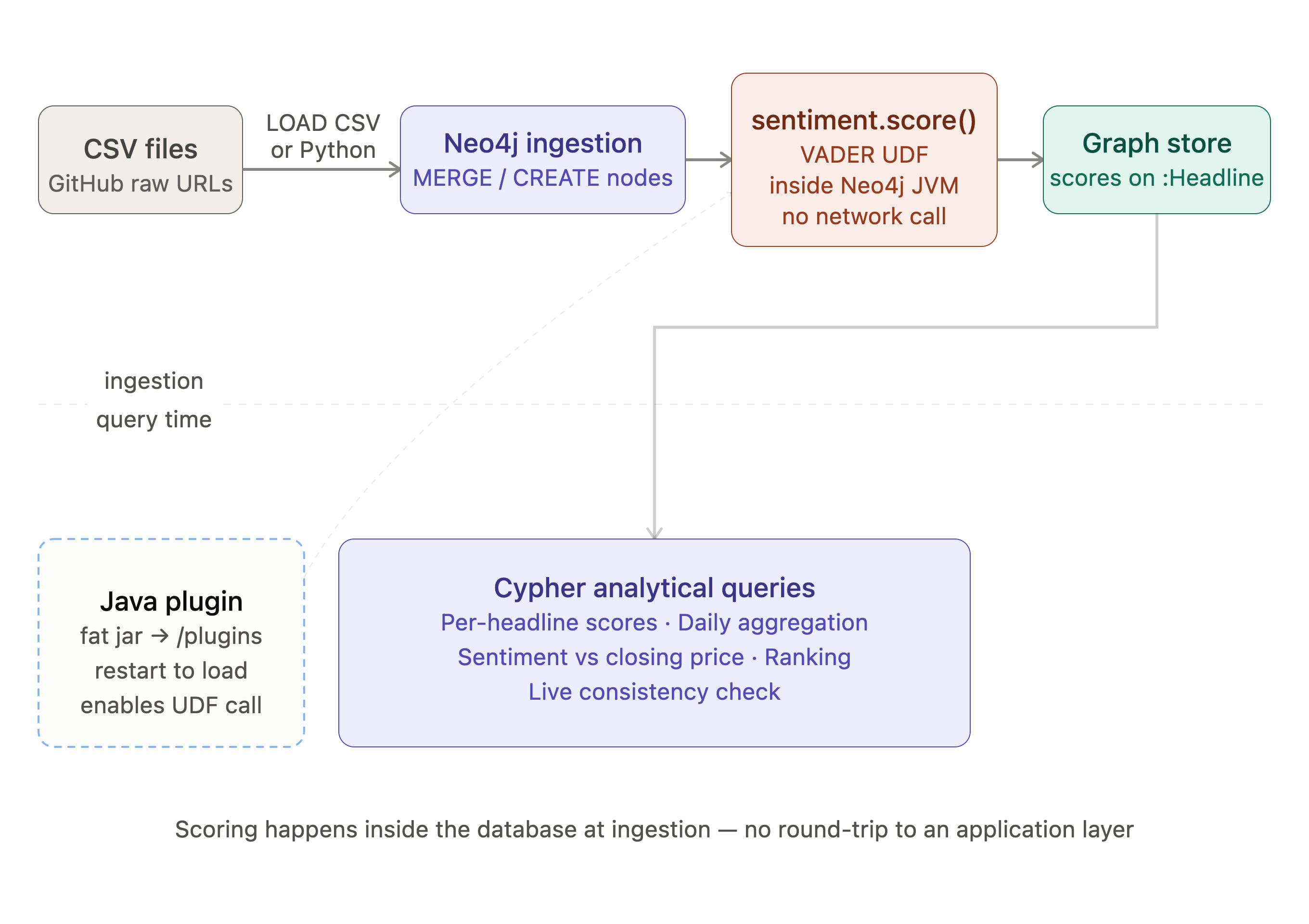
The pipeline mirrors the one in the SingleStore book chapter:
- A VADER-based sentiment function registered with the system and callable from queries
- A graph containing synthetic stock price ticks and news headlines
- A set of analytical queries: per-headline scoring, daily aggregation, sentiment-vs-price joins, most positive and most negative ranking, and a live consistency check
For the example in this article, we'll need a local install of Neo4j, a Docker container, or a server where we can place files and restart the process.
How Neo4j Extensibility Works
Neo4j lets us extend Cypher with custom Java code packaged as a .jar file. This is a fully documented and supported extensibility path. Neo4j publishes official guidance on setting up a plugin project and maintains a Neo4j Procedure Template on GitHub. Neo4j provides this extensibility model for building custom extensions. There are several extension types:
- User-defined functions (UDFs) – take inputs, return a single value, called inline in a query like a built-in function
- User-defined aggregation functions (UDAs) – group-level aggregation, analogous to
SUMorCOLLECT - Procedures – more flexible, can return multiple rows and perform side effects, called with
CALL
For our sentiment use case, a UDF is the right fit. We pass in a string and get back a map of polarity scores. In SingleStore, the equivalent was a Table-Valued Function (TVF) that returned a row set. A Neo4j UDF returning a Map<String, Double> is the closest structural equivalent.
One practical note on naming is that Neo4j maintains a list of reserved and deprecated procedure namespaces, such as db.*, dbms.*, graph.* and others. These are off-limits. The sentiment.* namespace is not reserved or deprecated, so it's a safe choice. Check User-defined procedures before choosing a namespace for any new plugin to confirm it doesn't conflict with a built-in namespace.
What to Know Before We Build
Because a Neo4j UDF runs inside the same JVM as the database engine, it's worth understanding a few practical considerations before diving in. These are the same considerations that apply to any extension of a running JVM process — Neo4j's own plugin authors deal with them too — and being aware of them upfront makes for a smoother build experience.
Memory. If a plugin allocates more memory than the JVM has available — for example, loading a very large model file or accumulating state across calls — it can trigger an OutOfMemoryError. The VADER UDF we build here loads a compact lexicon and holds no state, so this is not a concern in practice. For more complex plugins that allocate significant heap memory, Neo4j provides a preview ProcedureMemory API where we can register allocations against the configured transaction memory limits, which prevents uncapped growth from causing database restarts.
Uncaught exceptions. An unhandled RuntimeException in a UDF propagates up through the Neo4j query execution engine. Good error handling in the UDF code keeps this from becoming a problem.
Infinite loops and thread starvation. A UDF that hangs — waiting on a network call, deadlocked or stuck in a loop — ties up a JVM thread from Neo4j's shared pool. The VADER UDF makes no network calls, holds no state and performs a relatively small amount of computation per call, so this is not a concern here, but it matters for more complex plugins.
Dependency conflicts. Because the plugin jar shares the classpath with the database engine, any library bundled into the fat jar must not conflict with libraries Neo4j already ships. This problem was encountered during development and more on that in the build section below, including a straightforward fix.
Startup failures. A jar that fails to load prevents the system from starting. The solution is always to test in a development environment first, such as Neo4j Desktop or a local Docker container, before deploying anywhere more critical.
Security. A Java plugin has full access to the JVM, filesystem and network. This is the same trust model as Neo4j's own plugins and is appropriate for code we've written and reviewed. For third-party plugins from untrusted sources, the same caution applies as for any third-party code running inside a critical process.
AuraDB. AuraDB supports plugins provided and certified by Neo4j, such as APOC, GDS and GenAI, but not arbitrary third-party or custom jars. The Java UDF approach in this article requires self-managed Neo4j, such as Desktop, Docker or a server install. If AuraDB is the target, the Java UDF approach described here is not available; the GenAI plugin or an external service are the alternatives.
None of this should discourage us from building a Java UDF. The VADER UDF we build here is small, does one thing, makes no network calls, holds no state and uses a well-tested library. The sensible approach, which applies to any plugin development, is to build and test on a local development instance first, then deploy with confidence.
In Neo4j, the steps to deploy our UDF are:
- Build a fat jar
- Stop the server
- Copy the jar file to the server's
pluginsdirectory - Add an allowlist entry to
neo4j.conf - Restart the server
The deployment model differs from the Wasm approach — more on that in the build and deploy section below.
Setting Up the Project
Prerequisites
We'll need the following before starting:
- Java 21 – check with
java -version. Java 21 is the version used by the official Neo4j plugin template and by this article - Maven 3.8+ – check with
mvn -version - Neo4j 2026.06.0 – the version used for this article, running in one of the ways described below
Choosing a Neo4j Install
For this experiment, we'll use either Neo4j Desktop or Docker. Neo4j also supports server installs on Linux and Windows — the plugin mechanism is the same — but we did not test that path and don't provide instructions for it here.
Neo4j Desktop is the easiest starting point. Download it from Neo4j for Desktop, create a new project and start a local database server. Find the exact path to the plugins directory by clicking Open folder > plugins.
Docker is convenient for a clean, throwaway environment. The command below starts Neo4j 2026.06.0 with a plugins volume mounted to a local directory, which is where we'll drop the jar:
mkdir -p ~/neo4j/plugins ~/neo4j/data

docker run \
  --name neo4j-sentiment \
  -p 7474:7474 -p 7687:7687 \
  -v ~/neo4j/plugins:/plugins \
  -v ~/neo4j/data:/data \
  -e NEO4J_AUTH=neo4j/password \
  -e NEO4J_dbms_security_procedures_allowlist="sentiment.*" \
  neo4j:2026.06.0
With Docker we pass the allowlist as an environment variable rather than editing neo4j.conf directly. The jar goes into ~/neo4j/plugins/ on the host.
Creating the Project Structure
Create a new Maven project directory:
mkdir neo4j-sentiment-udf
cd neo4j-sentiment-udf
The full directory tree should look like this when finished:
neo4j-sentiment-udf/
├── pom.xml
└── src/
    ├── main/
    │   └── java/
    │       └── sentiment/
    │           └── Sentimentable.java
    └── test/
        └── java/
            └── sentiment/
                └── SentimentableTest.java
The sections below cover each part in turn.
Next, we'll create both source directories:
mkdir -p src/main/java/sentiment
mkdir -p src/test/java/sentiment
Maven Dependencies
We'll create a pom.xml file in the project root. The structure follows the official Neo4j procedure template at Neo4j Procedure Template, with three adjustments specific to this project that are explained below.
<?xml version="1.0" encoding="UTF-8"?>
<project xmlns="http://maven.apache.org/POM/4.0.0"
         xmlns:xsi="http://www.w3.org/2001/XMLSchema-instance"
         xsi:schemaLocation="http://maven.apache.org/POM/4.0.0
             http://maven.apache.org/xsd/maven-4.0.0.xsd">
    <modelVersion>4.0.0</modelVersion>
    <groupId>org.neo4j.example</groupId>
    <artifactId>sentimentable</artifactId>
    <version>1.0.0-SNAPSHOT</version>
    <packaging>jar</packaging>
    <name>Neo4j Sentiment UDF</name>
    <description>VADER sentiment analysis as a Neo4j user-defined function</description>

    <properties>
        <java.version>21</java.version>
        <maven.compiler.release>${java.version}</maven.compiler.release>
        <neo4j.version>2026.06.0</neo4j.version>
    </properties>

    <!-- ADJUSTMENT 1: JitPack required for VaderSentimentJava -->
    <repositories>
        <repository>
            <id>jitpack.io</id>
            <url>https://jitpack.io</url>
        </repository>
    </repositories>

    <dependencies>
        <dependency>
            <groupId>org.neo4j</groupId>
            <artifactId>neo4j</artifactId>
            <version>${neo4j.version}</version>
            <scope>provided</scope>
        </dependency>

        <!-- ADJUSTMENT 2: VaderSentimentJava runtime dependency -->
        <dependency>
            <groupId>com.github.apanimesh061</groupId>
            <artifactId>VaderSentimentJava</artifactId>
            <version>v1.1.1</version>
        </dependency>

        <!-- Test dependencies — let neo4j-harness manage JUnit version -->
        <dependency>
            <groupId>org.neo4j.test</groupId>
            <artifactId>neo4j-harness</artifactId>
            <version>${neo4j.version}</version>
            <scope>test</scope>
        </dependency>
        <dependency>
            <groupId>org.neo4j.driver</groupId>
            <artifactId>neo4j-java-driver</artifactId>
            <version>6.0.2</version>
            <scope>test</scope>
        </dependency>
    </dependencies>

    <build>
        <plugins>
            <plugin>
                <artifactId>maven-compiler-plugin</artifactId>
                <configuration>
                    <source>21</source>
                    <target>21</target>
                </configuration>
            </plugin>
            <plugin>
                <groupId>org.apache.maven.plugins</groupId>
                <artifactId>maven-surefire-plugin</artifactId>
                <version>3.5.4</version>
            </plugin>
            <plugin>
                <artifactId>maven-shade-plugin</artifactId>
                <version>3.5.1</version>
                <executions>
                    <execution>
                        <phase>package</phase>
                        <goals><goal>shade</goal></goals>
                        <configuration>
                            <!-- ADJUSTMENT 3: relocate commons-lang3 to avoid
                                 version conflict with Neo4j's internal copy -->
                            <relocations>
                                <relocation>
                                    <pattern>org.apache.commons.lang3</pattern>
                                    <shadedPattern>sentiment.shaded.org.apache.commons.lang3</shadedPattern>
                                </relocation>
                            </relocations>
                            <artifactSet>
                                <excludes>
                                    <exclude>org.neo4j:*</exclude>
                                </excludes>
                            </artifactSet>
                            <shadedArtifactAttached>false</shadedArtifactAttached>
                        </configuration>
                    </execution>
                </executions>
            </plugin>
        </plugins>
    </build>

</project>
The three adjustments from the official template are called out inline as comments. Everything else — groupId convention, provided scope for the Neo4j dependency, the shade plugin structure and the test dependency pattern — follows the official guidance.
Writing the UDF
We'll create the file src/main/java/sentiment/Sentimentable.java and paste in the following:
package sentiment;

import com.vader.sentiment.analyzer.SentimentAnalyzer;
import com.vader.sentiment.analyzer.SentimentPolarities;
import org.neo4j.procedure.Description;
import org.neo4j.procedure.Name;
import org.neo4j.procedure.UserFunction;

import java.util.Map;

public class Sentimentable {

    @UserFunction("sentiment.score")
    @Description("Score a string with VADER. Returns compound, positive, negative, neutral.")
    public Map<String, Double> score(@Name("text") String text) {

        if (text == null || text.isBlank()) {
            return Map.of("compound", 0.0, "positive", 0.0,
                          "negative", 0.0, "neutral",  1.0);
        }

        final SentimentPolarities polarities = SentimentAnalyzer.getScoresFor(text);

        return Map.of(
            "compound", (double) polarities.getCompoundPolarity(),
            "positive", (double) polarities.getPositivePolarity(),
            "negative", (double) polarities.getNegativePolarity(),
            "neutral",  (double) polarities.getNeutralPolarity()
        );
    }
}
The following implementation details are worth highlighting.
The v1.1.1 API uses a static method — SentimentAnalyzer.getScoresFor(text) — rather than a mutable instance. This means there is no shared state between calls, which is what we want in a Neo4j UDF where multiple Cypher queries may invoke the function concurrently. The VADER lexicon is loaded internally by the library on first call and cached for subsequent calls.
The @UserFunction("sentiment.score") annotation registers the method as callable from Cypher under that name. The @Name annotation on the parameter provides the argument name for Neo4j's function metadata and documentation — UDFs are always called with positional arguments in Cypher, as shown throughout this article: sentiment.score(row.headline).
The return type is Map<String, Double>. In Cypher, this surfaces as a map literal, so callers can destructure it with dot notation: sc.compound, sc.positive and so on. In the SingleStore version, the TVF returned a row set and was used in a FROM clause. Here the UDF is called inline in a WITH or RETURN clause instead.
Writing the Tests
Following the official Neo4j procedure template pattern, we'll use neo4j-harness to spin up a lightweight embedded Neo4j instance in JUnit, register our UDF with it and run Cypher queries against it — all without deploying to a running database. This is the recommended testing approach in Neo4j's own documentation.
We'll create the file src/test/java/sentiment/SentimentableTest.java and paste in the following:
package sentiment;

import org.junit.jupiter.api.AfterAll;
import org.junit.jupiter.api.BeforeAll;
import org.junit.jupiter.api.Test;
import org.junit.jupiter.api.TestInstance;
import org.neo4j.driver.Driver;
import org.neo4j.driver.GraphDatabase;
import org.neo4j.driver.Session;
import org.neo4j.harness.Neo4j;
import org.neo4j.harness.Neo4jBuilders;

import static org.junit.jupiter.api.Assertions.assertEquals;
import static org.junit.jupiter.api.Assertions.assertTrue;

@TestInstance(TestInstance.Lifecycle.PER_CLASS)
public class SentimentableTest {

    private Neo4j embeddedDatabaseServer;
    private Driver driver;

    @BeforeAll
    void initializeNeo4j() {
        this.embeddedDatabaseServer = Neo4jBuilders.newInProcessBuilder()
                .withDisabledServer()
                .withFunction(Sentimentable.class)
                .build();
        this.driver = GraphDatabase.driver(embeddedDatabaseServer.boltURI());
    }

    @AfterAll
    void closeNeo4j() {
        this.driver.close();
        this.embeddedDatabaseServer.close();
    }

    @Test
    void scorePositiveSentence() {
        try (Session session = driver.session()) {
            var scores = session.run(
                "RETURN sentiment.score('The movie was great') AS scores"
            ).single().get("scores").asMap();

            assertTrue((Double) scores.get("compound") > 0.5);
            assertTrue((Double) scores.get("positive") > 0.0);
            assertEquals(0.0, (Double) scores.get("negative"));
        }
    }

    @Test
    void capitalizationIncreasesScore() {
        try (Session session = driver.session()) {
            var normal = session.run(
                "RETURN sentiment.score('The movie was great') AS scores"
            ).single().get("scores").asMap();

            var caps = session.run(
                "RETURN sentiment.score('The movie was GREAT!') AS scores"
            ).single().get("scores").asMap();

            assertTrue((Double) caps.get("compound") > (Double) normal.get("compound"));
        }
    }

    @Test
    void emptyStringReturnsNeutral() {
        try (Session session = driver.session()) {
            var scores = session.run(
                "RETURN sentiment.score('') AS scores"
            ).single().get("scores").asMap();

            assertEquals(0.0, (Double) scores.get("compound"));
            assertEquals(1.0, (Double) scores.get("neutral"));
        }
    }

    @Test
    void nullStringReturnsNeutral() {
        try (Session session = driver.session()) {
            var scores = session.run(
                "RETURN sentiment.score(null) AS scores"
            ).single().get("scores").asMap();

            assertEquals(0.0, (Double) scores.get("compound"));
            assertEquals(1.0, (Double) scores.get("neutral"));
        }
    }
}
The four tests mirror the tests we'll run manually in Neo4j Browser, but now they run automatically as part of the build. Neo4jBuilders.newInProcessBuilder() starts a lightweight embedded instance with the Sentimentable function registered; .withDisabledServer() skips the HTTP server since we only need the Bolt connection. The structure follows the official JoinTest.java pattern.
Building and Deploying
Step 1: Install the Maven Wrapper and build
The official Neo4j procedure template uses the Maven Wrapper (mvnw), which means we only need Java installed, not a separate Maven installation. To add the wrapper to the project:
mvn wrapper:wrapperThen build and run the tests:
./mvnw clean packageOr to skip the tests during development:
./mvnw clean package -DskipTestsTo use a globally installed Maven directly, mvn clean package -DskipTests works equally well — the wrapper is a convenience, not a requirement.
Maven compiles the Java source, runs the Shade plugin and writes two jar files to target/. The one we want is sentimentable-1.0.0-SNAPSHOT.jar — the fat jar with VADER bundled inside. The original-sentimentable-1.0.0-SNAPSHOT.jar is the plain jar without dependencies, so we'll ignore it.
If the build fails with a package org.neo4j.procedure does not exist error, check that the pom.xml has <scope>provided</scope> on the Neo4j dependency and that the version matches the running Neo4j instance.
Step 2: Copy the Jar to the Plugins Directory
Neo4j Desktop:
- Stop the server
- Open folder > plugins and copy
sentimentable-1.0.0-SNAPSHOT.jarinto that folder - Open folder > conf > neo4j.conf, find
dbms.security.procedures.allowlist=and uncomment the line if it is commented out - Add
sentiment.*to the end of the line
Docker: Copy to the host directory mounted as /plugins:
cp target/sentimentable-1.0.0-SNAPSHOT.jar ~/neo4j/plugins/Step 3: Whitelist the Function Namespace
Neo4j's default dbms.security.procedures.allowlist is *, which loads all plugins. If an allowlist is configured with specific entries, any custom namespace must be included or the function will silently be unavailable — no error on startup, it simply won't exist. It's good practice to configure an explicit allowlist following the principle of least privilege.
Our UDF uses only the public Neo4j procedure API, which means it doesn't require the separate dbms.security.procedures.unrestricted setting — that's only needed for extensions that access internal APIs.
Step 4: Restart Neo4j
Neo4j Desktop: Restart the server using the button in the Desktop UI. If Desktop shows "stopped" immediately after starting, open http://localhost:7474 directly — the server may be running before the UI reflects it.
Docker: If this is the initial launch, no restart is needed — the docker run command in the Choosing a Neo4j Install section already starts Neo4j with the jar in place from the mounted plugins directory. If updating the jar after the container is already running, stop the container, replace the jar in ~/neo4j/plugins/ and then restart:
docker stop neo4j-sentiment
cp target/sentimentable-1.0.0-SNAPSHOT.jar ~/neo4j/plugins/
docker start neo4j-sentiment
The clearest confirmation that the plugin loaded correctly is to run the verification queries in step 5 below — if sentiment.score() is visible and returns results, the jar was picked up successfully.
Verifying the Function
We can interact with Neo4j by entering http://localhost:7474 in the browser.
Step 5: Confirm the Function Loaded
First, we'll check that Neo4j can see the function at all:
SHOW FUNCTIONS
YIELD name
WHERE name STARTS WITH 'sentiment'
RETURN name;
Expected output:
+-----------------+
| name            |
+-----------------+
| sentiment.score |
+-----------------+
If this returns zero rows, the jar is either not in the plugins directory, the allowlist entry is missing or misspelled or Neo4j was not fully restarted.
Step 6: Run the Tests
Run the following tests:
RETURN sentiment.score('The movie was great') AS scores;Expected output:
{
  neutral: 0.4230000078678131,
  negative: 0.0,
  positive: 0.5770000219345093,
  compound: 0.6248999834060669
}
Now we'll test that VADER's capitalization awareness is working:
RETURN sentiment.score('The movie was GREAT!') AS scores;Expected output:
{
  neutral: 0.36899998784065247,
  negative: 0.0,
  positive: 0.6309999823570251,
  compound: 0.7289999723434448
}
The compound score rises with the capitalized GREAT!, exactly as in the Wasm version. For the examples we tested, the Java port produces scores consistent with the Rust crate used in the book chapter.
Now, we'll test the null guard. Passing an empty string should return a neutral result rather than an exception:
RETURN sentiment.score('') AS scores;Expected output:
{
  neutral: 1.0,
  negative: 0.0,
  positive: 0.0,
  compound: 0.0
}
If all three return the expected values, the UDF is working and we're ready to build the graph schema and load data.
Designing the Graph Schema
The graph model for this pipeline has three node labels, as shown in Figure 2. A central Stock node connects to Tick nodes via HAS_TICK relationships and to Headline nodes via HAS_HEADLINE relationships. VADER polarity scores are stored directly on each Headline node at ingestion time, making them available to any Cypher query without recomputing.
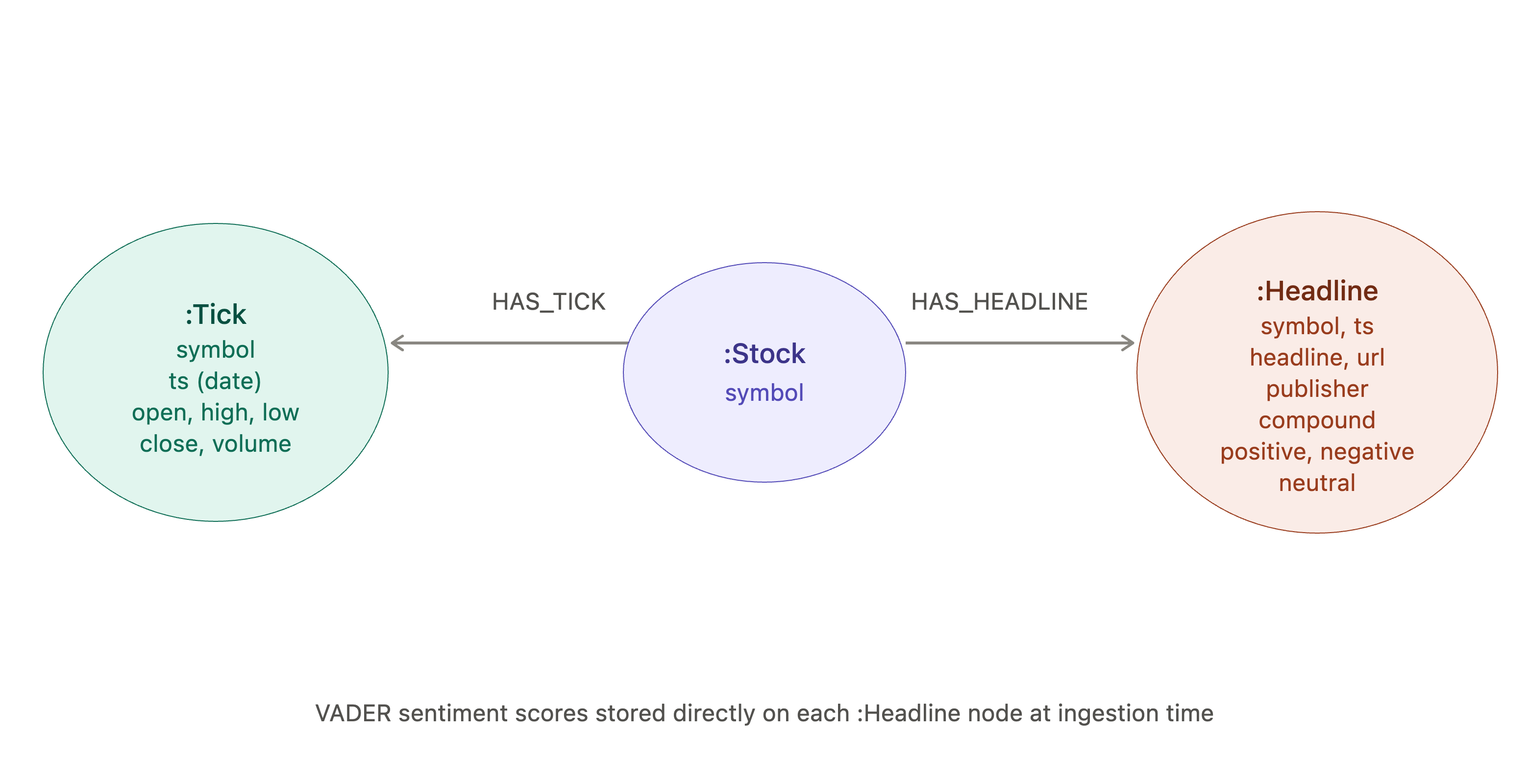
Figure 2. Graph data model
(:Stock {symbol})
    -[:HAS_TICK]->    (:Tick     {symbol, ts, open, high, low, close, volume})
    -[:HAS_HEADLINE]->(:Headline {id, symbol, ts, headline, url, publisher,
                                  compound, positive, negative, neutral})
The Stock node acts as the join key. In SingleStore the queries join tick and stock_sentiment on (symbol, DATE(ts)); in Neo4j that same co-reference is expressed by traversing from a shared Stock node to both Tick and Headline nodes with a date predicate. The relationship replaces the foreign key.
Let's now run these commands to create constraints and indexes:
CREATE CONSTRAINT tick_pk IF NOT EXISTS
    FOR (t:Tick) REQUIRE (t.symbol, t.ts) IS NODE KEY;

CREATE CONSTRAINT headline_id IF NOT EXISTS
    FOR (h:Headline) REQUIRE h.id IS UNIQUE;

CREATE CONSTRAINT stock_id IF NOT EXISTS
    FOR (s:Stock) REQUIRE s.symbol IS UNIQUE;

CREATE INDEX tick_symbol_ts IF NOT EXISTS
    FOR (t:Tick) ON (t.symbol, t.ts);

CREATE INDEX headline_symbol_ts IF NOT EXISTS
    FOR (h:Headline) ON (h.symbol, h.ts);
Loading Data and Scoring Headlines
Getting the Datasets
The datasets, notebook and SQL files for the original SingleStore book chapter are all publicly available in the book's GitHub repository.
The two CSV files we need are in the datasets subdirectory:
fictitious_stocks.csv– synthetic daily OHLCV stock prices (random-walk model, fictitious symbols)raw_fictitious_headlines.csv– programmatically generated news headlines (templates + ticker symbols + financial events)
We'll download both files into our local working directory.
Dataset Format
fictitious_stocks.csv has seven columns. The date and Name columns are renamed to ts and symbol, respectively, to match the graph schema:
date,open,high,low,close,volume,Name
2013-01-02,743.98,756.93,736.15,745.68,9142645,BBRQ-FX
2013-01-03,764.41,779.16,757.72,765.16,1208771,BBRQ-FX
...
raw_fictitious_headlines.csv has five columns that map directly to the Headline node properties:
headline,url,publisher,ts,symbol
BBRQ-FX stock record revenues after analyst update,http://www.hill.net/,The Stock Chronicle,2014-10-22,BBRQ-FX
...
No preprocessing is needed beyond what the loader already does, such as dropping nulls, filtering the one extreme volume outlier and sorting by date.
The Python Loader
The data_loader.py below reads the two CSV files and writes them into Neo4j via the Python driver. Install the dependencies first if not already done so:
pip install -r requirements.txtThen run the loader, substituting the actual paths to the downloaded CSV files. Also replace your_password_here with your actual password.
# data_loader.py
import pandas as pd

from neo4j import GraphDatabase
from tqdm import tqdm

URI      = "bolt://localhost:7687"
AUTH     = ("neo4j", "your_password_here")
TICK_CSV = "fictitious_stocks.csv"
RAW_CSV  = "raw_fictitious_headlines.csv"

driver = GraphDatabase.driver(URI, auth=AUTH)

def chunks(df, size):
    for i in range(0, len(df), size):
        yield df.iloc[i:i+size].to_dict("records")

# load tick data
tick_df = (pd.read_csv(TICK_CSV)
             .dropna()
             .query("volume <= 2_147_483_647")
             .rename(columns={"date": "ts", "Name": "symbol"})
             .sort_values(["ts", "symbol"]))

tick_batches = list(chunks(tick_df, 1000))
print(f"Loading {len(tick_df):,} tick rows in {len(tick_batches)} batches...")

with driver.session() as session:
    for batch in tqdm(tick_batches, desc="Ticks", unit="batch"):
        session.run("""
            UNWIND $rows AS row
            MERGE  (s:Stock {symbol: row.symbol})
            CREATE (t:Tick  {symbol: row.symbol, ts: date(row.ts),
                             open: row.open, high: row.high,
                             low:  row.low,  close: row.close,
                             volume: toInteger(row.volume)})
            CREATE (s)-[:HAS_TICK]->(t)
        """, rows=batch)

# load headlines and score at ingestion time
raw_df = pd.read_csv(RAW_CSV)
raw_batches = list(chunks(raw_df, 1000))
print(f"Loading {len(raw_df):,} headline rows in {len(raw_batches)} batches...")

with driver.session() as session:
    for batch in tqdm(raw_batches, desc="Headlines", unit="batch"):
        session.run("""
            UNWIND $rows AS row
            MATCH  (s:Stock {symbol: row.symbol})
            WITH   s, row, sentiment.score(row.headline) AS sc
            CREATE (h:Headline {
                id:        randomUUID(),
                symbol:    row.symbol,
                ts:        datetime(row.ts),
                headline:  row.headline,
                url:       row.url,
                publisher: row.publisher,
                compound:  sc.compound,
                positive:  sc.positive,
                negative:  sc.negative,
                neutral:   sc.neutral
            })
            CREATE (s)-[:HAS_HEADLINE]->(h)
        """, rows=batch)

print("Done.")
driver.close()
Run the Python program:
python data_loader.pyThe key line is sentiment.score(row.headline) AS sc inside the Cypher. This is doing what the sentimentable(i.headline) TVF call does in the SingleStore INSERT ... SELECT — computing scores at the database level in the same operation that writes the record, with no round-trip to the application layer.
One important note if we need to re-run the loader is that the script uses CREATE for Tick and Headline nodes, so running it a second time without clearing the database will create duplicates rather than overwriting. Clear the database first with the following Cypher, using the Query tab:
MATCH (n)
CALL { WITH n DETACH DELETE n } IN TRANSACTIONS OF 100 ROWS;
The batch size of 100 is deliberate — larger values can exceed the default transaction memory limit and fail. After clearing, re-run the schema constraints and indexes before running the loader again.
Alternative Loading Directly From GitHub With LOAD CSV
To stay entirely within Cypher and avoid Python, Neo4j's LOAD CSV command can fetch the files directly from GitHub over HTTPS. No file copying, no import directory, no Python dependencies. Run both queries using the Query tab in order — ticks first, then headlines, since the headlines query does a MATCH on Stock nodes created by the tick query.
LOAD CSV WITH HEADERS FROM 'https://...' AS row
CALL {
    WITH row
    MERGE (s:Stock {symbol: row.Name})
    CREATE (t:Tick {
        symbol: row.Name,
        ts:     date(row.date),
        open:   toFloat(row.open),
        high:   toFloat(row.high),
        low:    toFloat(row.low),
        close:  toFloat(row.close),
        volume: toInteger(row.volume)
    })
    CREATE (s)-[:HAS_TICK]->(t)
} IN TRANSACTIONS OF 1000 ROWS;

LOAD CSV WITH HEADERS FROM 'https://...' AS row
CALL {
    WITH row
    MATCH (s:Stock {symbol: row.symbol})
    WITH s, row, sentiment.score(row.headline) AS sc
    CREATE (h:Headline {
        id:        randomUUID(),
        symbol:    row.symbol,
        ts:        datetime(row.ts),
        headline:  row.headline,
        url:       row.url,
        publisher: row.publisher,
        compound:  sc.compound,
        positive:  sc.positive,
        negative:  sc.negative,
        neutral:   sc.neutral
    })
    CREATE (s)-[:HAS_HEADLINE]->(h)
} IN TRANSACTIONS OF 1000 ROWS;
LOAD CSV WITH HEADERS reads the first row as column names, so the original names (row.Name, row.date) are mapped directly to the graph property names inline — the same column renaming the Python loader does with rename(). The IN TRANSACTIONS OF 1000 ROWS batching is required for the tick file at ~600,000 rows to avoid the transaction memory limit. The same delete-before-reload rule applies here: re-running either query without clearing the database first will create duplicates.
The only requirement is that Neo4j has outbound HTTPS access to reach GitHub, which is the case for Desktop and local Docker. In a network-restricted server environment the Python loader with local files is the safer fallback.
Next, some example queries to test using the Query tab.
Headline-Level Sentiment
MATCH (h:Headline)
RETURN h.symbol             AS symbol,
       date(h.ts)           AS ts,
       left(h.headline, 30) AS headline,
       round(h.positive, 3) AS positive,
       round(h.negative, 3) AS negative,
       round(h.neutral,  3) AS neutral
ORDER BY h.symbol, h.ts
LIMIT 10;
Aggregate Sentiment by Stock and Day
MATCH (h:Headline)
WITH  h.symbol        AS symbol,
      date(h.ts)      AS ts,
      avg(h.positive) AS avg_positive,
      avg(h.negative) AS avg_negative,
      avg(h.neutral)  AS avg_neutral,
      count(h)        AS num_headlines
RETURN symbol,
       ts,
       round(avg_positive, 3) AS avg_positive,
       round(avg_negative, 3) AS avg_negative,
       round(avg_neutral,  3) AS avg_neutral,
       num_headlines
ORDER BY symbol, ts
LIMIT 10;
Join Sentiment With Closing Price
In Cypher, the shared Stock node makes the symbol join implicit and we only need a date predicate.
MATCH (t:Tick)<-[:HAS_TICK]-(s:Stock)-[:HAS_HEADLINE]->(h:Headline)
WHERE date(t.ts) = date(h.ts)
RETURN t.symbol             AS symbol,
       date(t.ts)           AS ts,
       round(t.close, 2)    AS close,
       round(h.positive, 3) AS positive,
       round(h.negative, 3) AS negative,
       round(h.neutral,  3) AS neutral
ORDER BY t.symbol, t.ts
LIMIT 10;
Most Positive Headlines
MATCH (h:Headline)
RETURN h.symbol,
       date(h.ts)           AS ts,
       left(h.headline, 30) AS headline,
       round(h.positive, 3) AS positive
ORDER BY h.positive DESC
LIMIT 10;
Most Negative Headlines
MATCH (h:Headline)
RETURN h.symbol,
       date(h.ts)           AS ts,
       left(h.headline, 30) AS headline,
       round(h.negative, 3) AS negative
ORDER BY h.negative DESC
LIMIT 10;
In the SingleStore book, CEO scandal headlines dominated the negative ranking across multiple stocks. We see the same pattern here because the underlying VADER lexicon is identical.
Validate Stored Scores Against Live UDF Calls
This mirrors the consistency check from the SingleStore book, where stored stock_sentiment values were compared against a fresh JOIN LATERAL sentimentable(...) call to confirm the ingestion pipeline was deterministic.
MATCH (h:Headline {symbol: 'BBRQ-FX'})
WITH  h, sentiment.score(h.headline) AS live
RETURN h.symbol             AS symbol,
       date(h.ts)           AS ts,
       left(h.headline, 30) AS headline,
       CASE
           WHEN round(h.positive, 3) = round(live.positive, 3)
            AND round(h.negative, 3) = round(live.negative, 3)
            AND round(h.neutral,  3) = round(live.neutral,  3)
           THEN 'match'
           ELSE 'not match'
       END AS comparison
LIMIT 10;
Daily Average Sentiment vs. Closing Price
The CTE-style aggregation from the book translates naturally to Cypher's WITH chaining.
MATCH (h:Headline)
WITH  h.symbol        AS symbol,
      date(h.ts)      AS ts,
      avg(h.positive) AS avg_positive,
      avg(h.negative) AS avg_negative,
      avg(h.neutral)  AS avg_neutral
MATCH (t:Tick {symbol: symbol})
WHERE date(t.ts) = ts
RETURN symbol,
       ts,
       round(t.close, 2)      AS daily_close,
       round(avg_positive, 3) AS avg_positive,
       round(avg_negative, 3) AS avg_negative,
       round(avg_neutral,  3) AS avg_neutral
ORDER BY symbol, ts
LIMIT 10;
What We Learned
The experiment was a clear success. VADER runs inside Neo4j, scores headlines at ingestion time via a simple Cypher call and all the analytical queries from the SingleStore book have direct equivalents in Cypher. For the examples we tested, the Java port produces scores consistent with the Rust crate used in the SingleStore book — although independent language ports may differ in edge cases due to differences in tokenization or floating-point handling. The graph model handles the stock-tick-plus-headlines domain naturally and in several respects the Cypher queries are more expressive than their SQL counterparts — the relationship traversal from a shared Stock node replaces a keyed SQL join in a way that reflects the actual structure of the domain rather than just being an implementation detail.
The graph model is a genuine advantage for the join queries. Replacing JOIN tick ON (symbol, DATE(ts)) with a graph traversal through a shared Stock node is not just syntactic preference — it reflects the actual structure of the domain. A stock symbol connects ticks and headlines naturally as a graph entity and Cypher expresses that more directly than a keyed SQL join.
In-database scoring works. Calling sentiment.score(row.headline) inside the Cypher CREATE statement means scoring and ingestion happen in the same operation, with no round-trip to an application layer. This is the same goal the SingleStore Wasm pipeline achieves and the Java UDF delivers it cleanly.
The dependency conflict is a one-time fix. We hit the commons-lang3 version conflict during development and it stopped the server from starting. The fix — relocating the bundled classes to a private namespace using the Maven Shade plugin — is straightforward once we know what to look for and the solution is baked into the pom.xml in this article.
There are also honest differences from the SingleStore Wasm approach.
Deployment requires a restart. SingleStore uses a tool that loads a function into a live database with no downtime. Neo4j requires a jar build, a file copy, a config edit and a restart. For an initial Docker launch, the jar is picked up automatically — but any subsequent update to the jar requires a container restart. The Maven Wrapper and the clear deployment steps in this article make the process repeatable.
No execution sandbox. SingleStore runs each Wasm function instance in its own isolated process with a hard memory boundary. The Neo4j UDF runs in the same JVM as the server. For a small, well-behaved plugin like the VADER UDF this makes no practical difference, but it's a meaningful architectural distinction for more complex or heavyweight plugins.
Language is JVM-based. The Wasm approach accepts any language that compiles to the Wasm core spec. Neo4j's extensibility model is JVM-only. For teams that want to bring existing Python or Rust models into the database, that is worth knowing about upfront.
Alternative Approaches
The Java UDF is the focus of this article, but it's not the only way to bring sentiment scoring close to Neo4j data. We considered several alternatives during the experiment. Some are compelling for specific use cases and others less so. Knowing the options helps us choose the right tool for our situation.
Pre-scoring outside the database. Score all headlines before loading. Add the polarity scores as columns in the CSV and load everything with LOAD CSV. Nothing custom runs inside Neo4j at all. For a batch pipeline like this one, where data are loaded once and queried many times, this is entirely practical and requires no Java knowledge. The only thing we give up is the ability to call sentiment.score() inline in Cypher at query time. For many teams this will be the right answer and it's the simplest path to a working pipeline.
External microservice. Deploy a small Python or Rust service that runs VADER and exposes an HTTP endpoint. An external microservice can expose VADER through an HTTP API, with the application layer calling the service before or during ingestion. This gives us complete process isolation — a crash in the sentiment service cannot touch the database — and works with AuraDB. The tradeoff is network latency on every call and the operational overhead of running a separate service. For lower-volume or interactive use cases it's a clean, flexible pattern.
Neo4j GenAI plugin. Neo4j's GenAI plugin supports calling embedding and LLM APIs — OpenAI, Azure OpenAI and compatible endpoints — directly from Cypher. It's fully managed by Neo4j, works on AuraDB and requires no Java. To use a cloud LLM for sentiment classification rather than VADER’s lexicon is a well-supported, low-friction path. The tradeoff is API cost and the opacity of a large language model compared to VADER's fully transparent, inspectable lexicon — which matters in regulated domains where we need to explain a score.
GraalVM native compilation. GraalVM can ahead-of-time compile Java UDFs to native binaries, reducing JVM startup overhead and memory footprint. This is a performance optimization rather than an architectural change — the code still runs inside the Neo4j process — and adds significant build complexity for modest gain in this use case. It is worth knowing about for larger, more heavyweight plugins, but not the right choice here.
Wasm runtime embedded inside a Java UDF. Theoretically, we could embed a Wasm runtime such as wasmtime inside a Java UDF and execute the VADER Wasm module from within Neo4j, getting Wasm's sandbox guarantees inside Neo4j's plugin model. It's technically feasible but no published working example appears to exist and the complexity cost is high relative to the alternatives. An interesting idea to watch, but not practical today.
The table below shows how these approaches compare on the dimensions that matter most.
| Approach | Compute location | AuraDB | Language choice | Operational complexity |
|---|---|---|---|---|
| Pre-score outside DB | Complete | Yes | Any | Low |
| External microservice | Complete | Yes (via APOC) | Any | Medium |
| APOC NLP (cloud API) | Remote service | No (APOC Extended required) | N/A | Low |
| GenAI plugin | Remote service | Yes | N/A | Low |
| Java UDF (this article) | Shared JVM | No | JVM-based | Medium |
| Wasm-in-Java (theoretical) | Wasm sandbox | No | Any (via Wasm) | Very high |
The Java UDF sits in the middle of this table — it's uniquely capable of calling sentiment.score() inline from any Cypher query without application-layer involvement and it runs entirely within the system without external API calls or network latency. Whether that inline, self-contained capability is what our use case needs is the key question. For development, experimentation and pipelines where the data and team are well understood, it's a compelling and practical approach. For other situations, the alternatives above offer different but equally valid tradeoffs.
A Second Path Is APOC NLP Procedures
The two approaches differ in where the computation happens, as shown in Figure 3. With the Java UDF, the VADER lexicon is bundled in the jar and scoring runs inside the Neo4j JVM — no network call, no external dependency, no per-call cost. With APOC NLP, Neo4j orchestrates calls to an external cloud API and receives scores back over the network. That single architectural difference drives most of the tradeoffs covered in this section.
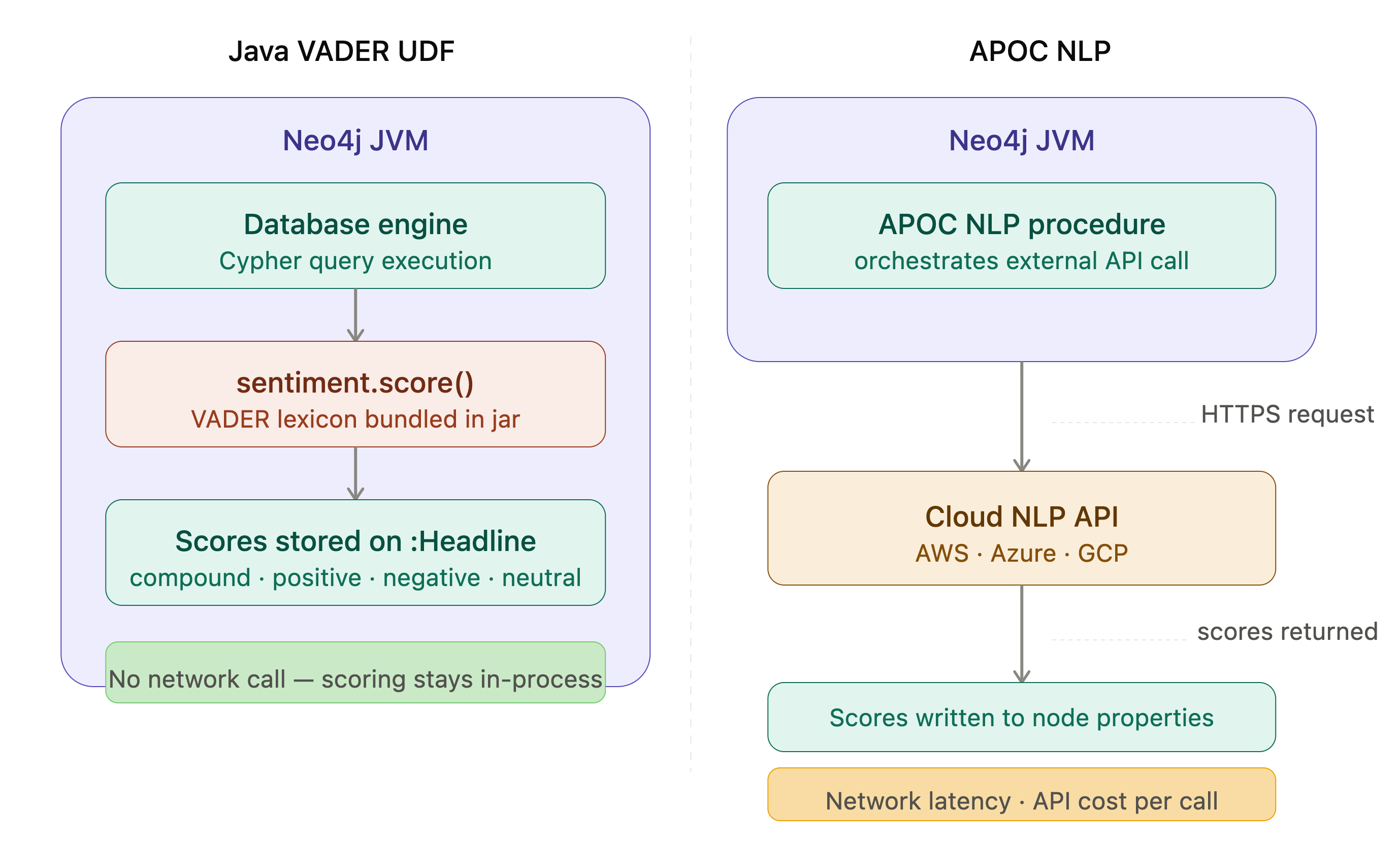
Figure 3. Java UDF vs. APOC NLP
Neo4j already has sentiment analysis capability — it just works quite differently and it lives not in GDS but in APOC Extended, a separate component from APOC Core.
APOC's NLP procedures act as wrappers around cloud-based Natural Language APIs. The supported providers are AWS Comprehend, Azure Cognitive Services and Google Cloud Natural Language. The calling pattern is straightforward. With AWS, for example:
MATCH (h:Headline {symbol: 'BBRQ-FX'})
CALL apoc.nlp.aws.sentiment.stream(h, {
    key:          $apiKey,
    secret:       $apiSecret,
    nodeProperty: 'headline'
})
YIELD value
RETURN h.headline, value.sentiment, value.sentimentScore;
And with Azure:
MATCH (h:Headline {symbol: 'BBRQ-FX'})
CALL apoc.nlp.azure.sentiment.stream(h, {
    key:          $apiKey,
    url:          $apiUrl,
    nodeProperty: 'headline'
})
YIELD value
RETURN h.headline, value.sentiment, value.sentimentScore;
The graph variant goes one step further and writes the sentiment result back as a node property automatically, with write: true in the config map.
Choosing Between the Two
| Java VADER UDF | APOC NLP (AWS / Azure / GCP) | |
|---|---|---|
| Where scoring runs | Inside Neo4j JVM | External cloud API |
| Network call per batch | No | Yes |
| Cost per call | No API charge | API pricing applies |
| Model quality | Lexicon-based (VADER) | Cloud NLP / ML models |
| AuraDB compatible | No | No (APOC Extended not available in AuraDB) |
| Java knowledge needed | Yes | No |
| Offline / air-gapped | Yes | No |
| Deterministic results | Yes | Provider-dependent |
| Domain tuning | Limited (lexicon) | Better (ML models handle context) |
The Java UDF is the stronger choice when scoring volume is high, API costs matter, the text is short social-media-style content that VADER was designed for, or an offline/air-gapped environment is required. The VADER lexicon is fully transparent — we can inspect why a string received a given score, which matters in regulated domains.
APOC NLP is the stronger choice when Java knowledge is limited, the text requires linguistic nuance beyond VADER’s lexicon (negation, sarcasm, domain-specific vocabulary), or cloud NLP APIs are already in use for other workloads.
One important constraint applies to both: APOC NLP is part of APOC Extended, not APOC Core. AuraDB includes APOC Core by default, but APOC Extended is not available in AuraDB — so neither the Java UDF nor APOC NLP works there. The GenAI plugin or an external microservice are the practical AuraDB paths.
GDS, Neo4j's Graph Data Science library, does not include text-level sentiment analysis — it's graph-algorithm-oriented. Text scoring in Neo4j is either in-database via a Java UDF or delegated to a cloud NLP service via APOC.
Summary
The experiment confirms that Neo4j's Java extensibility model is a capable platform for in-database compute. The VADER UDF works, the graph model is a natural fit for the stock-tick-plus-headlines domain and the analytical queries translate cleanly from SQL to Cypher — in some cases more expressively, because the relationship between prices and headlines is explicit in the graph schema rather than inferred at query time through a join predicate.
The more interesting engineering question is when to use a Java UDF versus the alternatives. The answer depends primarily on four factors:
- Deployment model (self-managed Neo4j only for UDFs)
- Latency and network requirements (the UDF has none; APOC NLP and external microservices introduce both)
- Model sophistication (VADER's lexicon is transparent and fast but limited; cloud NLP APIs offer better linguistic coverage)
- Operational constraints (Java knowledge, plugin management and the restart-on-update requirement all have a cost)
There is no universally correct choice — the table in the APOC NLP section lays out the tradeoffs and reasonable teams will land in different places depending on their priorities.
What the article does establish is that the approach works and is officially supported. Building a plugin is documented and templated. For development, experimentation and well-understood production pipelines, it's a practical and interesting path.
To go further, the official Neo4j Procedure Template is an excellent starting point, neo4j-harness makes unit testing UDFs straightforward without needing a running database instance and the full Neo4j Java Reference covers procedures, aggregation functions and the complete extensibility API in depth.
The full source code is available on GitHub.
Opinions expressed by DZone contributors are their own.
Comments