

OPC-UA and MQTT: A Guide to Protocols, Python Implementations
Explore two essential IoT protocols: OPC-UA for secure and structured industrial device communication and MQTT, a lightweight, real-time protocol for telemetry.
 ·
·
Join the DZone community and get the full member experience.
Join For FreeThe Internet of Things (IoT) is transforming industries by enabling seamless communication between a wide array of devices, from simple sensors to complex industrial machines. Two of the most prominent protocols driving IoT systems are OPC-UA (Open Platform Communications - Unified Architecture) and MQTT (Message Queuing Telemetry Transport).
Each protocol plays a vital role in facilitating data exchange, but their use cases and strengths vary significantly. This article delves into how these protocols work, their advantages, and how to implement them using Python for creating robust IoT solutions.
Why OPC-UA and MQTT?
OPC-UA: Built for Industrial Automation
OPC-UA is a platform-independent, service-oriented protocol tailored to industrial environments. It provides:
- Complex data models: Unlike simpler telemetry protocols, OPC-UA supports hierarchical data structures, making it suitable for detailed machine-to-machine (M2M) communication.
- Security: Features like encryption, authentication, and data integrity make OPC-UA a secure choice for industrial automation.
- Interoperability: It ensures seamless communication between devices from different manufacturers by adhering to a standardized information model.
- Rich functionality: Beyond simple data exchange, OPC-UA supports subscriptions, event monitoring, and remote method invocation, making it ideal for SCADA systems, MES (Manufacturing Execution Systems), and IIoT (Industrial Internet of Things) applications.
MQTT: Lightweight and Real-Time
MQTT is a lightweight, publish-subscribe protocol designed for devices with constrained resources. It offers:
- Minimal overhead: MQTT uses a lightweight messaging format, making it highly efficient for low-bandwidth networks.
- Real-time communication: The publish-subscribe model allows clients to receive updates as soon as they are published.
- Scalability: With an MQTT broker at the center, it can support thousands of devices in large-scale IoT deployments.
- Flexibility: It’s a go-to protocol for telemetry and event-driven applications, such as smart homes, health monitoring, and connected vehicles.
Architecture Overview
OPC-UA
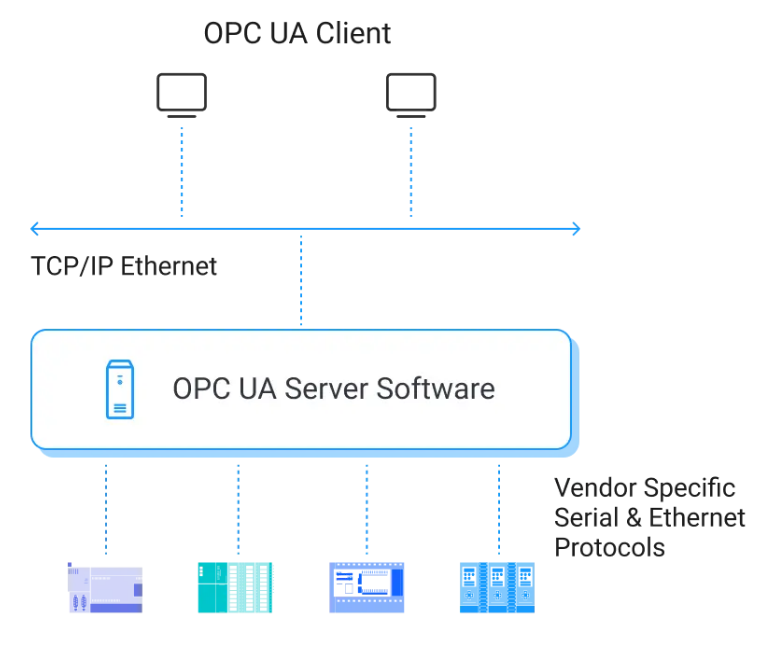
In an OPC-UA system:
- OPC-UA servers: Devices or systems (e.g., sensors, PLCs, or SCADA systems) host data and expose it to clients.
- OPC-UA clients: Applications or systems (e.g., MES or analytics software) connect to servers to retrieve or subscribe to data.
- Secure communication: Built-in encryption and access control ensure safe data exchange.
MQTT
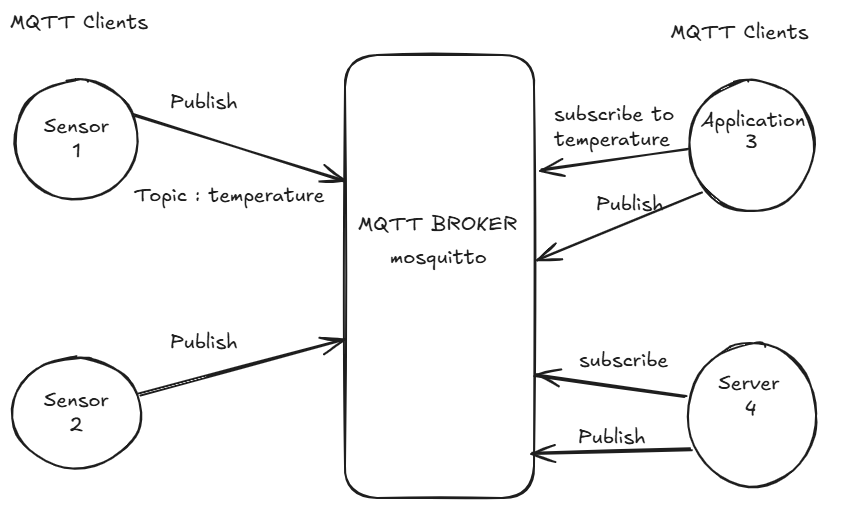
In an MQTT-based architecture:
- Publishers: Devices (e.g., sensors, microcontrollers) publish data to an MQTT broker.
- Subscribers: Applications or services subscribe to topics of interest to receive updates.
- MQTT bBroker: Acts as the central hub, managing message distribution and ensuring scalability.
Python Implementations
1. Setting Up an OPC-UA Server
Here’s how to create a simple OPC-UA server to expose a temperature sensor value:
from opcua import Server
from datetime import datetime

# Create an OPC-UA Server
server = Server()

# Set server endpoint
server.set_endpoint("opc.tcp://0.0.0.0:4840/freeopcua/server/")

# Add a namespace
namespace = server.register_namespace("IoT_Example")

# Create an object node
node = server.nodes.objects.add_object(namespace, "IoTDevice")

# Add a variable to the object
temperature = node.add_variable(namespace, "Temperature", 0)
temperature.set_writable()  # Allow variable to be writable

# Start the server
server.start()
print("OPC-UA Server is running at opc.tcp://0.0.0.0:4840/freeopcua/server/")

try:
    while True:
        # Update the temperature value
        temperature.set_value(35.5)  # Example value
        print(f"Temperature updated: {temperature.get_value()}")
except KeyboardInterrupt:
    print("Shutting down server...")
    server.stop()
2. Setting Up an OPC-UA Client
Here’s how to retrieve the temperature data from the OPC-UA server:
from opcua import Client

# Connect to the OPC-UA Server
client = Client("opc.tcp://127.0.0.1:4840/freeopcua/server/")  # Use the server's correct URL
client.connect()

print("Connected to the OPC-UA server.")

try:
    # Browse the root and objects node
    root = client.get_root_node()

    objects = root.get_child(["0:Objects"])

    # Get the IoTDevice node
    iot_device = client.get_node("ns=2;i=1")  # Replace with correct Node ID for IoTDevice


    # Fetch the Temperature variable
    temperature_node = client.get_node("ns=2;i=2")  # Use the correct Node ID found during browsing
    temperature_value = temperature_node.get_value()
    print(f"Current Temperature: {temperature_value}°C")

finally:
    # Disconnect from the server
    client.disconnect()
    print("Disconnected from the server.")
3. Setting Up an MQTT Publisher
Publish temperature sensor data to an MQTT broker using Python:
import paho.mqtt.client as mqtt

# MQTT Broker details
broker = "test.mosquitto.org"
port = 1883
topic = "iot/temperature"

# Create an MQTT client with explicit callbacks
def on_connect(client, userdata, flags, rc):
    if rc == 0:
        print("Connected to MQTT broker!")
    else:
        print(f"Connection failed with code {rc}")

# Create and configure client
client = mqtt.Client()
client.on_connect = on_connect  # Assign connect callback

# Connect to the broker
client.connect(broker, port)

# Publish a message
client.loop_start()  # Start the network loop
client.publish(topic, "Temperature: 15.5°C")
print(f"Message published to topic '{topic}'")
client.loop_stop()  # Stop the loop
4. Setting Up an MQTT Subscriber
Receive and display temperature data from the MQTT broker:
import paho.mqtt.client as mqtt

# MQTT Broker details
broker = "test.mosquitto.org"
port = 1883
topic = "iot/temperature"

# Define the callback functions explicitly
def on_connect(client, userdata, flags, rc):
    if rc == 0:
        print("Connected to MQTT broker and subscribed to topic.")
        client.subscribe(topic)
    else:
        print(f"Connection failed with code {rc}")

def on_message(client, userdata, msg):
    print(f"Received message: {msg.payload.decode()} from topic: {msg.topic}")

# Create an MQTT client and explicitly assign callbacks
client = mqtt.Client()
client.on_connect = on_connect
client.on_message = on_message

# Connect to the broker
client.connect(broker, port)

# Start the network loop to listen for messages
print("Listening for messages...")
client.loop_forever()
Conclusion
OPC-UA and MQTT complement each other in IoT systems. OPC-UA provides rich, secure, and structured communication for industrial devices, while MQTT ensures lightweight, scalable data distribution for telemetry and cloud integration. By leveraging Python, you can seamlessly implement and integrate these protocols to build versatile IoT solutions. These Python examples offer a starting point for practical implementation. As IoT ecosystems grow more complex, combining OPC-UA and MQTT will unlock new opportunities for efficiency and innovation.
Opinions expressed by DZone contributors are their own.
Comments