

Optimizing Airflow: A Case Study in Cloud Resource Efficiency
A case study troubleshooting the running of an orchestration tool for a limited amount of time per day, resulting in optimization and cost efficiency.
 ·
·
Join the DZone community and get the full member experience.
Join For FreeThroughout my career, I've worked with many companies that required an orchestration tool for a limited amount of time per day. For example, one of my first freelance clients needed to run an Airflow instance for only 2-3 hours per day, resulting in the instance being idle the rest of the time and wasting money.
Because it wasn't a large company, the client asked if I could intervene. The infrastructure was hosted on Google Cloud, which I was familiar with.
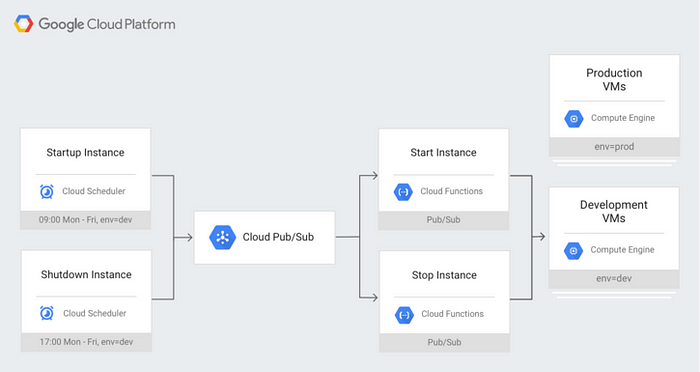
After a quick online search, I found the official manual that precisely addressed my needs. I estimated that the task would take about 20 hours. Here's the design diagram.
I have to stop here to explain why there were exactly 20 hours:
- I had to transfer the code from App Engine (I'm not sure why Airflow was initially deployed to App Engine).
- Currently, I use the official Airflow Docker Compose for such cases, but in the past, I installed raw Airflow in LocalExecutor mode, and the database was running in the same instance (I know it's bad, but you can't blame me if you've never done shitcode).
- The dags themselves must be slightly refactored to accommodate the new schedule, and as you might expect, there was a lot of low-quality code that I had carefully reviewed.
To cut a long story short, I squeezed in 18 hours, and the result was as follows:
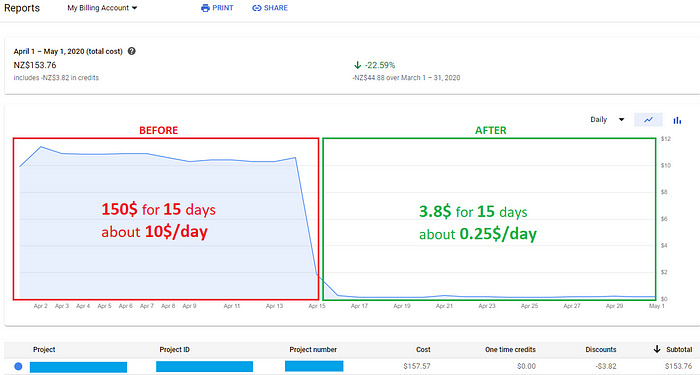 This is my “before and after.” I am really proud of it.
The main disadvantage of the solution was that the pipeline execution could take much longer than three hours, which I was not aware of at the time. There were occasions when pipelines should take 5 hours or even 12 hours, so what should we do?
Pretty simple: if we look closely at the design, we can see that there is a job in Cloud Scheduler that sends a message to the PubSub topic, which triggers the Cloud Function, which stops the Airflow instance. So why can't we just turn it off and send the message to the topic via Airflow? It's simple, just a few lines of code using the PubSubPublishMessageOperator:
check_that_still_latest >> PubSubPublishMessageOperator(

   task_id="send_pub_sub_message",

   project_id=conf.GCP_PROJECT_ID,

   topic=conf.TOPIC_TO_SHUTDOWN_AIRFLOW_INSTANCE,

   messages=[conf.AIRFLOW_SHUTDOWN_MESSAGE],

   gcp_conn_id=conf.GCP_CONN_ID,

   trigger_rule=TriggerRule.NONE_SKIPPED,

   execution_timeout=timedelta(minutes=5)

)
Have I mentioned setting the trigger_rule and the previous check_that_still_latest?
Yes, after a few issues with the pipeline, I realized two things:
- Because the pipeline can take more than 24 hours at times, we should consider whether we should skip the instance termination.
- Even if the previous tasks fail, we must still terminate the instance.
Because I am not supposed to check that on a regular basis, I used Google Cloud Monitoring for automated monitoring to avoid any unnecessary interactions. When an issue with the Airflow pipeline is detected, a message is sent to PubSub, allowing the GC Monitoring service to raise an alert and send my client and me an email with all relevant information. The client is aware that I will contribute hours to the timesheet and check the error, but I will not have to waste time manually monitoring the potential errors on a regular basis.
This solution has proven to be effective after more than a year of operation with no changes. During this time, I only had to restart one pipeline twice.
Published at DZone with permission of Aliaksandr Sheliutsin. See the original article here.
Opinions expressed by DZone contributors are their own.
Comments