

Payload Transformation: JSON to Java
Read on to view this tutorial in order to learn how to transform input data in the form of JSON to Java to increase efficiency and reduce execution time.
 ·
·
Join the DZone community and get the full member experience.
Join For FreeMule provides us the functionality of transforming one input data type to another that not only increases the system efficiency but also reduces the execution time. The request is passed in different formats, namely XML, JSON, etc.
Here, in the code, the input data is passed in the form of JSON and transformed output as Java LinkedHashMap, which reduces the time of defining the Java class and referencing to it every time the request is sent. The HTTP Listener configuration can be set as port availability.
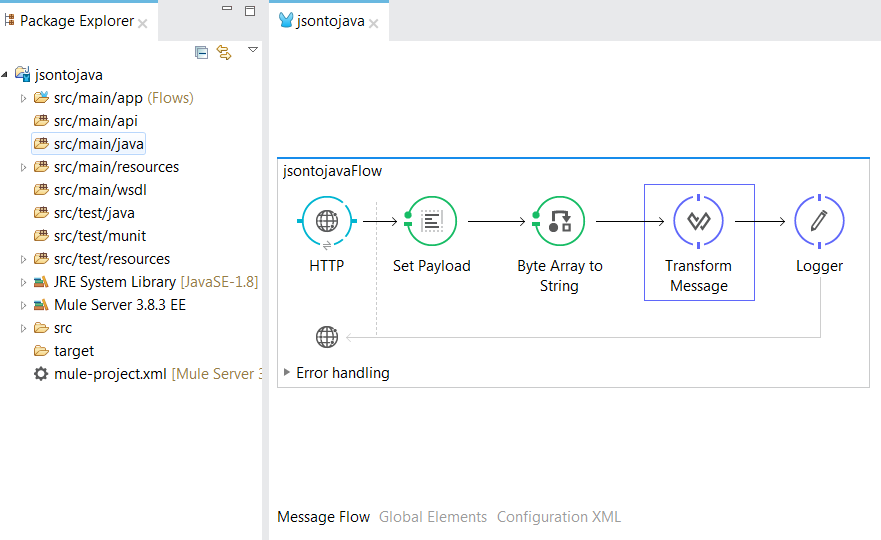
The request data sent is captured and set in the payload for Java transformation using Transform Message.
<?xml version="1.0" encoding="UTF-8"?>

<mule xmlns:dw="http://www.mulesoft.org/schema/mule/ee/dw" xmlns:http="http://www.mulesoft.org/schema/mule/http" xmlns="http://www.mulesoft.org/schema/mule/core" xmlns:doc="http://www.mulesoft.org/schema/mule/documentation"
xmlns:spring="http://www.springframework.org/schema/beans"
xmlns:xsi="http://www.w3.org/2001/XMLSchema-instance"
xsi:schemaLocation="http://www.springframework.org/schema/beans http://www.springframework.org/schema/beans/spring-beans-current.xsd
http://www.mulesoft.org/schema/mule/core http://www.mulesoft.org/schema/mule/core/current/mule.xsd
http://www.mulesoft.org/schema/mule/http http://www.mulesoft.org/schema/mule/http/current/mule-http.xsd
http://www.mulesoft.org/schema/mule/ee/dw http://www.mulesoft.org/schema/mule/ee/dw/current/dw.xsd">
    <http:listener-config name="HTTP_Listener_Configuration" host="localhost" port="8081" doc:name="HTTP Listener Configuration"/>
    <flow name="jsontojavaFlow">
        <http:listener config-ref="HTTP_Listener_Configuration" path="/test" doc:name="HTTP"/>
        <set-payload value="#[payload]" doc:name="Set Payload"/>
        <byte-array-to-string-transformer doc:name="Byte Array to String"/>
        <dw:transform-message doc:name="Transform Message">
            <dw:set-payload><![CDATA[%dw 1.0
%output application/java
---
{
Name: payload.Name,
Profile: payload.Profile,
Module_date: payload.Module_date
}]]></dw:set-payload>
        </dw:transform-message>
        <logger message="#[payload]" level="INFO" doc:name="Logger"/>
    </flow>
</mule>
The transformation from JSON to Java is done and the result is logged using Logger.
Request URI: http://localhost:8081/jsontojava
POST:
[
{
"Name" : "Varun",
"Profile" : "Developer",
"Module_date" : "04/12/2017"
},
{
"Name" : "Puja",
"Profile" : "Tester",
"Module_date" : "08/11/2017"
}
]
Response:
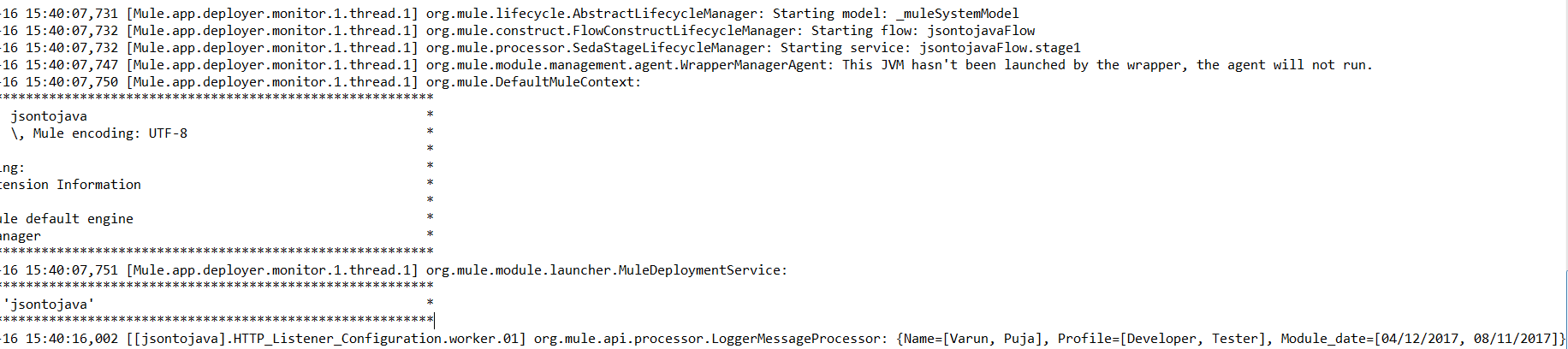
The response is coming as per expectation, which not only increases code efficiency but also performance.
Opinions expressed by DZone contributors are their own.
Comments