

Playing Around With AWS Vault for Fun and Profit
AWS Vault is an open-source tool by 99Designs that enables developers to store AWS credentials in their machine keystore securely.
 ·
·
Join the DZone community and get the full member experience.
Join For FreeAWS Vault is an open-source tool by 99Designs that enables developers to store AWS credentials in their machine keystore securely. After using it for a while at Jit, I decided to dig deeper into how it works and learned a lot along the way. In this article, I will summarize and simplify the information I learned to help others with their AWS Vault adoption and lower the barrier to usage.
I will start with a basic explanation of AWS access keys, the Session Token Service, and its helpful API calls. Then I will show how AWS Vault uses it to provide a secure way to access AWS resources, reducing the risk of exposing AWS credentials. In addition, I will represent a typical AWS account pattern, and again we'll see how AWS Vault works perfectly with it.
AWS Access Keys
AWS makes it possible to create a set of access keys for a specific user (those are called aws_access_key_id and aws_secret_access_key). Together with these keys, it's possible to authenticate to AWS and perform actions on behalf of the user.
When using Python, for example, it's possible to use the boto3 library, which is the AWS Software Development Kit for Python, to authenticate to AWS:
import boto3

session = boto3.Session(
    region_name='us-east-1',
    aws_access_key_id=AWS_ACCESS_KEY_ID,
    aws_secret_access_key=AWS_SECRET_ACCESS_KEY,
)
session.client('s3').list_buckets()
With the AWS CLI, a configuration file can be used to store the access keys, which can then be used in the future to authenticate to AWS as follows:
$ cat ~/.aws/config

[default]
region=us-east-1
aws_access_key_id=***
aws_secret_access_key=***

$ aws s3 ls
That is why developers and teams have moved on to more secure authentication practices, such as using session tokens.
Session Tokens
Sessions are a more secure approach, allowing the user to create valid temporary credentials for a specific period. Thus, if stolen, the keys might already be expired or will only limit the time the attacker can leverage them.
Below is a code example for how to generate temporary credentials using the AWS CLI:
$ aws sts get-session-token
{
    "Credentials": {
        "AccessKeyId": "***",
        "SecretAccessKey": "***",
        "SessionToken": "***",
        ...
        }
}
That is where AWS Vault comes in. But just before diving into AWS Vault, let's first look at popular STS API calls.
AWS STS
STS, which stands for AWS Security Token Service, is a web service that enables you to request temporary, limited-privilege credentials for AWS IAM users or IAM roles. All temporary credentials consist of an access key ID, a secret access key, and a session token. These three credentials are then used to sign requests to any AWS service.
GetSessionToken
GetSessionToken is an API call that fetches temporary credentials for an IAM user. The simplest example is when a user uses its long-lived credentials to request temporary credentials (for any reason), where a widespread use case for this API call is when a user wants to authenticate to AWS using MFA. If MFA is used, the received credentials can be used to access APIs requiring MFA authentication.
AssumeRole
Another method used to get temporary credentials, this time for an IAM role, is AssumeRole. Like GetSessionToken, it returns an access key, a secret access key, and a session token. It's possible to authenticate with an MFA device when assuming a role, and moreover, it's possible to protect an IAM role, requiring it to be assumed with MFA.
GetSessionToken and AssumeRole Comparison
| GetSessionToken | AssumeRole | |
|---|---|---|
| Used to receive credentials for | IAM User | IAM Role |
| Can be called with only long-lived credentials | YES | NO |
| Can be called with MFA | YES | YES |
The received credentials can be used to issue a call to GetSessionToken |
NO | NO |
The received credentials can be used to issue a call to AssumeRole |
YES | YES |
| Maximum session duration | 36 hours | 12 hours |
| Cross-account access | NO | YES |
AWS Vault
Now let's see where AWS Vault comes in to add a layer of security, preventing the storage of long-lived credentials in regular system files.
Copied from the project’s README:
AWS Vault stores IAM credentials in your operating system's secure keystore and then generates temporary credentials from those to expose to your shell and applications.
What this means for the end user is that instead of storing the credentials as clear text in a configuration file, they are stored in the OS's secure keystore. That is a safer approach, as the credentials are encrypted and can only be decrypted by the user who created them.
Not only does AWS Vault store the credentials in the OS's secure keystore, but it also generates temporary credentials from those to expose to the shell and applications. That means that even if the credentials are stolen from the environment or an application, they are only valid for a specific period.
How Does It Work?
First, AWS Vault stores the long-lived credentials in the OS's secure keystore. To do it, the `aws-vault add` command should be used:
# A configured profile can already exist or not. If not, aws-vault will create the profile in `~/.aws/config`.

$ aws-vault add some-developer
Enter Access Key Id: ***
Enter Secret Access Key: ***
Then, when requesting to use that profile, AWS Vault will generate temporary credentials from the long-lived credentials using GetSessionToken. These temporary credentials are then exposed to the shell and applications using environment variables.
$ aws-vault exec some-developer -- env | grep AWS
AWS_ACCESS_KEY_ID=***
AWS_SECRET_ACCESS_KEY=***
AWS_SESSION_TOKEN=***
Popular AWS Account Pattern
A typical user management pattern and recommended security practice is having a single AWS management account with only IAM users grouped into IAM groups (like developers and admins). Then, in addition to that account, there can be multiple AWS accounts (tagged dev, staging, and prod) with IAM roles that are assumed by the users in the developers and admins groups.
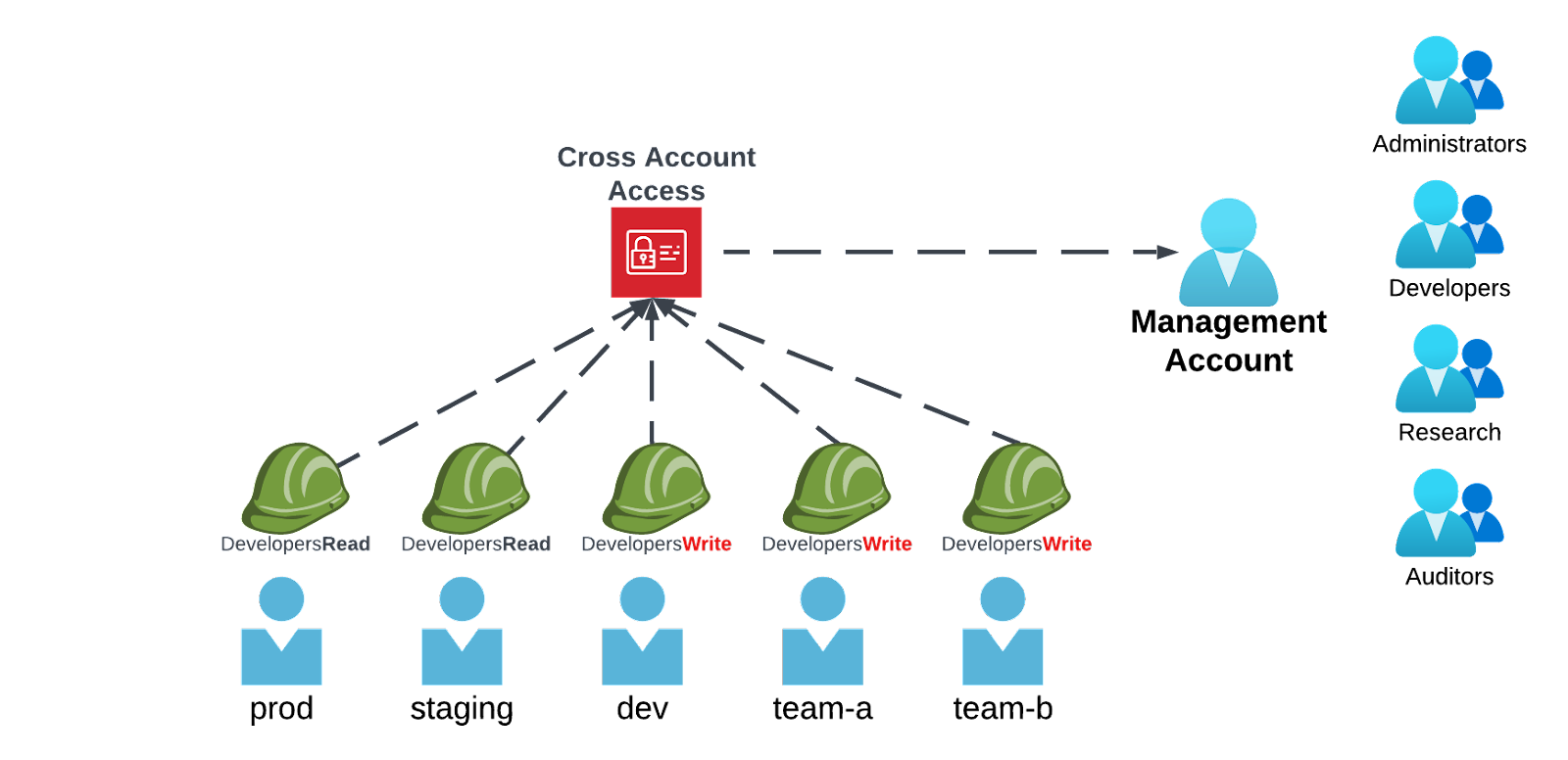
This pattern has many advantages, and the biggest of them all is resource isolation. Having each environment resource in a different AWS account makes it very unlikely that resources from a dev account will interact, interfere, or be included in the same list of resources in the production environment. In addition, in terms of security, this separation makes it harder to access prod resources or data (which are usually the most valuable) from a development or a staging account.
Not only that, but separating accounts also helps by viewing and monitoring cost and usage. With that, setting specific alerts and budgets for each environment is possible.
A developer in such an organization will probably have an AWS configuration file that looks like this:
$ cat ~/.aws/config

[default]
region = us-east-1
mfa_serial = arn:aws:iam::1000:mfa/some-developer

[profile some-developer]
Credential_process = aws-vault export --format=json some-developer

[profile dev]
role_arn = arn:aws:iam::2000:role/Admin
source_profile = some-developer

[profile staging]
role_arn = arn:aws:iam::3000:role/ReadOnly
source_profile = some-developer

[profile prod]
role_arn = arn:aws:iam::4000:role/ReadOnly
source_profile = some-developer
This is where the beauty of AWS Vault, together with this pattern, comes in. At first glance, it's possible to think that AWS Vault would ask for a session token for each environment (as it's in a different profile and AWS account). But, if you remember the previous section, GetSessionToken requests credentials for an IAM user, not for an IAM role. And in this case, the developer only has one user, which exists in the management account.
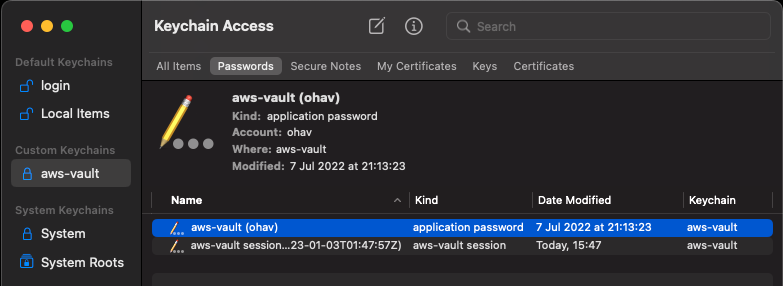
Thus, the developer will store only a single pair of long-lived keys of the management account in the OS’s secure keystore, as can be seen in the following output:
> aws-vault list

Profile                  Credentials              Sessions
=======                  ===========              ========
default                  -                        -
some-developer           some-developer           sts.GetSessionToken:8h29m31s
dev                      -                        -
staging                  -                        -
prod - - 
By leveraging the `source_profile` property in the `~/.aws/config` file, aws-vault will use the credentials from the `source_profile` to assume the role in the `role_arn` property. That allows AWS Vault to ask for MFA only once and then use the temporary credentials to assume the roles in the other accounts.
Usually, these roles will have a condition requiring MFA to be assumed. So, why isn't the MFA being asked for each time the developer switches between environments? That's thanks to the fact that a session token that was created using MFA can be used to assume a role that requires MFA, and AWS Vault is smart enough to know that both roles use the same MFA device.
With this pattern and configuration, developers can easily switch between different environments without a hassle:
$ aws-vault exec dev -- aws lambda invoke --function-name some-function --payload '{}'
$ aws-vault exec staging -- aws lambda list-functions
Wrap Up
AWS Vault is a powerful open-source security tool to help add a layer of much-needed essential security for AWS users and developers. It is also built on top of the classic AWS config file, helping to avoid extra configuration and pains of usage.
I hope the examples provided will help you ramp up AWS Vault more quickly and unleash the security capabilities this tool offers AWS users.
Published at DZone with permission of Ohav Almog. See the original article here.
Opinions expressed by DZone contributors are their own.
Comments