

Builder Pattern + Faker in API Test Automation Using Playwright With TypeScript
Learn how to use the Builder Pattern with the Faker library in API Test automation with Playwright and TypeScript to generate dynamic test data.
 CORE
·
CORE
·
Ever felt stuck writing Playwright tests because of messy or hardcoded test data? It usually starts simple, but as your tests grow, like testing an e-commerce or finance-related application, managing realistic data quickly becomes confusing and repetitive. More time is spent fixing test data than actually testing.
That’s where the Builder Pattern, combined with Faker, can really help. It lets us create clean, flexible, and realistic test data with ease.
In this article, we’ll learn how this approach can make the API tests with Playwright TypeScript easier to write, read, and maintain.
What Is the Builder Design Pattern?
The Builder Design Pattern is a creational design pattern that allows constructing complex objects step by step, allowing different representations of the same object.
It separates object-creation logic from structure, making the code more readable and maintainable. This pattern is especially useful for objects with many optional parameters, as it avoids messy constructors and improves test data creation.
What Is Faker?
Faker is a library that generates realistic-looking fake data such as names, emails, addresses, numbers, and more. It is commonly used in testing to avoid hardcoding values and to simulate real-world data scenarios.
By combining the Builder Pattern with Faker, we can generate realistic test data on the fly and perform testing without worrying about test data management, duplication, or maintenance.
Faker can be installed using npm by running the following command in the terminal:
npm install @faker-js/faker --save-devAfter installation, we can use the Faker library directly in the code by using the following import:
import {faker} from '@faker-js/faker';How to Use the Builder Pattern With Faker in Playwright With TypeScript
To use the Builder design pattern with Faker in Playwright TypeScript, the setup usually includes two main parts:
- Model
- Builder class
The Model defines how the data should look, while the Builder class handles creating and customizing that data using Faker.
Application Under Test
We’ll use the POST /addOrder API of the RESTful e-commerce demo application for the demonstration. The following is the request payload of the API:
[
  {
    "user_id": "string",
    "product_id": "string",
    "product_name": "string",
    "product_amount": 0,
    "qty": 0,
    "tax_amt": 0,
    "total_amt": 0
  }
]
Creating a Model for the Order
The following model interface should be created for the Order payload:
export interface Order {
    user_id: string,
    product_id: string,
    product_name: string,
    product_amount: number,
    qty: number,
    tax_amt: number,
    total_amt: number
}
Code Walkthrough
The Order interface represents the structure of an order object, where each field in the interface specifies the expected property and its data type:
user_id,product_id, andproduct_nameare strings.product_amount,qty,tax_amt, andtotal_amtare numbers.
This interface ensures that any order object created in the code follows this exact structure, helping catch errors early and making the code more predictable and easier to maintain.

Creating the Builder Class
The following builder class is created to generate a new order with realistic fake values using the Faker library.
import { Order } from "../models/order.model.js";
import {faker} from '@faker-js/faker';

export class OrderBuilder {

    private order:Order;

    constructor() {
        const product_amount = faker.number.int({ min: 1, max: 100 });
        const qty = faker.number.int({ min: 1, max: 5 });
        const tax_amt = faker.number.int({ min: 2, max: 10 });

        this.order = {
            user_id: this.generateUserId(),
            product_id: this.generateProductId(),
            product_name: faker.commerce.productName(),
            product_amount,
            qty,
            tax_amt,
            total_amt: (product_amount*qty)+tax_amt
        }
    }

    private generateUserId():string {
        return faker.number.int({min: 1, max: 50}).toString();
    }

    private generateProductId():string {
        return faker.number.int({ min: 1, max: 100 }).toString();
    }

    withUserID(user_id:string) {
        this.order.user_id = String(user_id);
        return this;
    }

    withProductId(product_id:string) {
        this.order.product_id=String(product_id);
        return this;
    }
    withProductName(product_name:string) {
        this.order.product_name = String(product_name);
        return this;

    }
    withProductAmount(product_amount:number) {
        this.order.product_amount= Number(product_amount);
        return this;
    }
    withQty(qty:number) {
        this.order.qty=Number(qty);
        return this;
    }

    withTaxAmt(tax_amt:number){
        this.order.tax_amt=Number(tax_amt);
        return this;
    }
    withTotalAmt(total_amt:number) {
        this.order.total_amt= Number(total_amt);
        return this;
    }

    build():Order{
        return this.order;
    }
}
Code Walkthrough
The OrderBuilder class implements the Builder Pattern to create an Order object using Faker. The following is a detailed explanation of the code:
- Constructor(): The
OrderBuilderclass internally holds anOrderobject, which is based on the Order interface. In the constructor, it generates default random data using the Faker library. - Private functions: The private functions, namely,
generateUserId()andgenerateProductId(), are helper methods that generate random user IDs and product IDs, respectively. - with() functions: The
withX()functions, such aswithUserId(),withProductId(), etc., allow overriding specific fields. Each method updates a value and “returns this,” enabling method chaining. - Build functions: The
build()function method finally returns the fully constructed Order object.
In short, this class generates realistic test data by default while allowing selective customization, resulting in cleaner and more reusable test code.
Writing the API Automation Test Using Playwright
The following Playwright test demonstrates how to send a POST request using an order request payload generated through the Builder Pattern with the Faker library.
import { test, expect } from "@playwright/test";
import { OrderBuilder } from "../builders/order.builder.js";
import { Order } from "../models/order.model.js";

test("Add Order details using Builder Design Pattern", async ({ request }) => {
  const orderDetails = new OrderBuilder().build();
  const orders: Order [] = [orderDetails];
  console.log(orders);

  const response = await request.post("http://localhost:3004/addOrder/", {
    data: orders,
    headers: {
      "Content-Type": "application/json",
    },
  });
  expect(response.status()).toBe(201);
});
Code Walkthrough
- The test imports
OrderBuilderto create test data, and theOrderinterface to ensure type safety. - Inside the test, new
OrderBuilder().build()generates a complete order object with realistic values using Faker. - The generated order is wrapped in an array, orders: Order[] = [orderDetails], as the API expects a list of orders. A console log statement is added to display the generated order in the console.
- A POST request is sent to the endpoint using Playwright’s
requestfixture, with the order payload passed in thedatafield and the appropriateContent-Typeheader. - The test validates that the response status is 201, confirming that the order was successfully created.
Test Execution
Before running the test, start the RESTful e-commerce application using Docker by running the following command from the terminal:
docker compose -f docker-compose-ecommerce.yml up -dThe test can be executed by running the following command from the terminal:
npx playwright test tests/post-api-builder-test.spec.tsThe following is the output of the test execution:
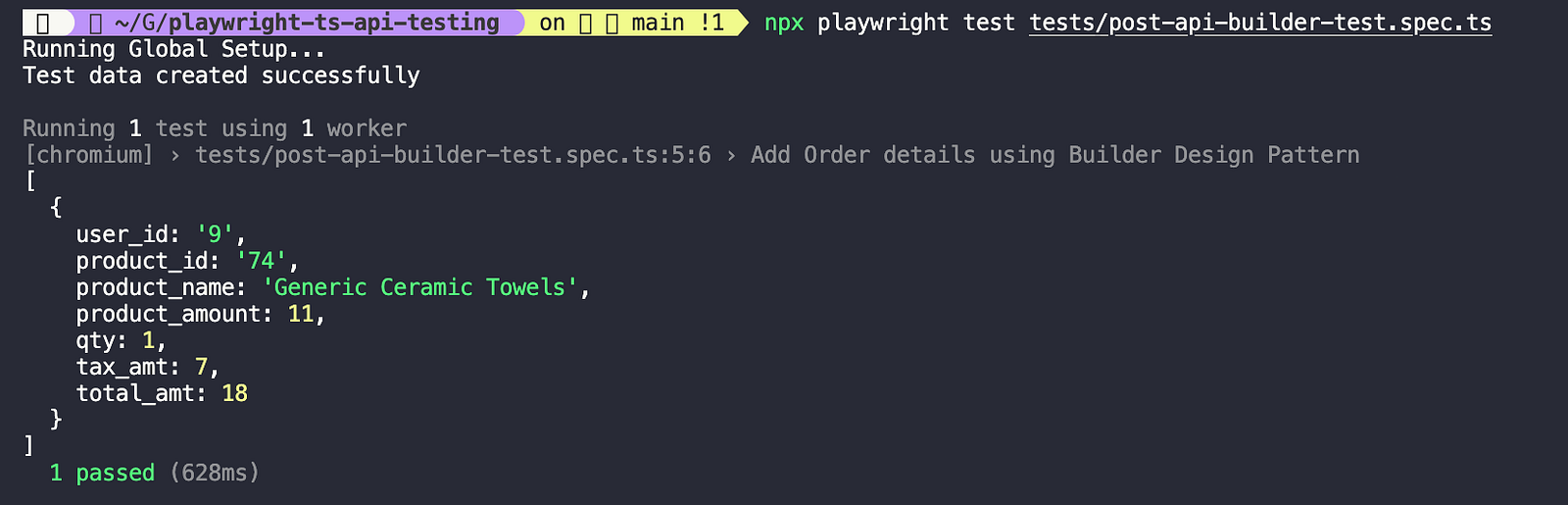
The order details generated using the Builder design pattern are printed on the console with fake data and are used as the request payload in the POST /addOrder test.
Writing automated tests by combining generated fake data with selectively updated static values.
In the previous test scenario, all order details were generated using the Faker library. However, in real testing scenarios, certain fields may require static values.
The Builder Pattern supports this by allowing specific fields to be overridden with static data, while the remaining fields continue to be generated dynamically using Faker.
test("Add Specific Order details using Builder Design Pattern", async ({ request }) => {

  const orderDetails = new OrderBuilder().withUserID("56").withProductName("Donuts").build();
  const orders: Order [] = [orderDetails];

  console.log(orderDetails);
  const response = await request.post("http://localhost:3004/addOrder/", {
    data: orders,
    headers: {
      "Content-Type": "application/json",
    },
  });
  expect(response.status()).toBe(201);
});
In this test, the user_id and product_name fields are explicitly set using the withUserID() and withProductName() functions. While the Builder generates the rest of the order details using the Faker library, these two fields are overridden with the static value provided in the test.
Let’s execute the test again and check the output:
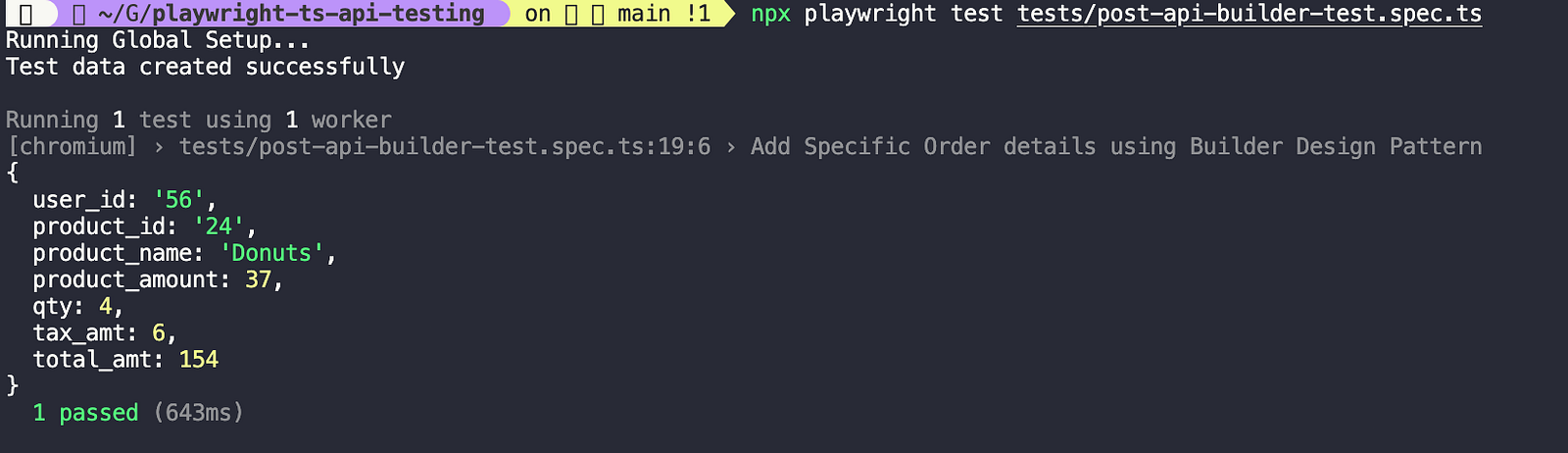
In the above screenshot, it can be seen that the order details are generated successfully using the Faker library; however, the value for user_id is set to "56" and product_name is set to "Donuts," as these were explicitly provided as static values for those fields.
Learn how to use the Builder Design Pattern in Java with a Datafaker library to generate test data for automated testing.
Summary
The Builder Design Pattern is really helpful for creating clean, flexible, and maintainable test data in API automation. When combined with Faker, it enables the generation of realistic data while still allowing specific fields to be customized as needed.
There are multiple ways to supply test data in API automation for POST API testing, such as using JSON files or directly generating data with the Faker library in the request payload without the Builder Pattern. However, the choice of approach depends on the application under test, the level of flexibility required, and how the test framework is designed.
Happy testing!
Published at DZone with permission of Faisal Khatri. See the original article here.
Opinions expressed by DZone contributors are their own.