

Playwright Fixtures vs POM: Which One Should You Choose?
Playwright fixtures streamline test automation by managing reusable objects like POMs, improving readability, reducing duplication, and enabling scalable test suites.
 CORE
·
CORE
·
Join the DZone community and get the full member experience.
Join For FreePlaywright fixtures and traditional Page Object Models (POM) are both used in test automation, but they serve different purposes and can be integrated for better results. Playwright fixtures help set up and manage test environments, while POM organizes page interactions.
In Playwright, you can use fixtures to handle POM instances, making tests cleaner and more maintainable.
Traditional POM Approach
Page Object Model (POM) is a design pattern where you create separate classes for each page and manually create objects in each test.
class LoginPage {
    constructor(page) {
        this.page = page;
        this.usernameInput = "#username";
        this.passwordInput = "#password";
        this.loginButton = "#login";
    }

    async goToLoginPage() {
        await this.page.goto("https://example.com/login");
    }

    async enterUsername(username) {
        await this.page.fill(this.usernameInput, username);
    }

    async enterPassword(password) {
        await this.page.fill(this.passwordInput, password);
    }

    async clickLoginButton() {
        await this.page.click(this.loginButton);
    }
}

export { LoginPage };import { test, expect } from "@playwright/test";
import { LoginPage } from "../pages/loginPage";
test("Login Test", async ({ page }) => {
const loginPage = new LoginPage(page);
await loginPage.goToLoginPage();
await loginPage.enterUsername("testuser");
await loginPage.enterPassword("password");
await loginPage.clickLoginButton();
expect(await page.url()).toBe("https://example.com/home");
});Problems in the Traditional POM Approach
- Code duplication. You have to create
new LoginPage(page)in every test. - Hard to maintain. If
LoginPagechanges, all test files using it must be updated. - Longer test setup. Every test has repeated setup code (
new LoginPage(page)).
Playwright Fixture Approach
Playwright fixtures are built-in mechanisms to manage reusable objects (like LoginPage). Instead of creating objects manually, fixtures inject them automatically.
Let's see the code below where we have loginPage class, we fixture class, and finally, the test class where we execute our test cases.
loginPage.js (Same Page Object)
class LoginPage {
    constructor(page) {
        this.page = page;
        this.usernameInput = "#username";
        this.passwordInput = "#password";
        this.loginButton = "#login";
    }

    async goToLoginPage() {
        await this.page.goto("https://example.com/login");
    }

    async enterUsername(username) {
        await this.page.fill(this.usernameInput, username);
    }

    async enterPassword(password) {
        await this.page.fill(this.passwordInput, password);
    }

    async clickLoginButton() {
        await this.page.click(this.loginButton);
    }
}

export { LoginPage };
fixture.js (Fixture Definition)
import { test as base } from "@playwright/test";
import { LoginPage } from "../pages/loginPage";

export const test = base.extend({
    loginPage: async ({ page }, use) => {
        const loginPage = new LoginPage(page);
        await use(loginPage);
    }
});

export { expect } from "@playwright/test";
Test Case Using Fixtures
In the below test case, you can see instead of creating an object, we are using the fixture loginPage.
import { test, expect } from "../utils/fixture";

test("Login Test", async ({ loginPage }) => {
    await loginPage.goToLoginPage();
    await loginPage.enterUsername("testuser");
    await loginPage.enterPassword("password");
    await loginPage.clickLoginButton();

    expect(await loginPage.page.url()).toBe("https://example.com/home");
});
Benefits of the Fixture-Based Approach
Using fixtures (like in your code) removes duplication and makes tests cleaner.
1. No Need to Create Objects in Every Test
Instead of const loginPage = new LoginPage(page); in every test, we automatically inject loginPage using Playwright fixtures.
2. Improved Readability and Maintainability
- If the
LoginPageconstructor changes, we only update it in one place (fixtures). - All tests automatically use the updated version.
3. Faster Test Execution (Fixture Reuse)
- Playwright reuses fixtures across tests when possible.
- If multiple tests use the same page (e.g
loginPageandinventoryPage), Playwright does not create a new object every time, which speeds up execution.
4. Shared Setup for Multiple Tests
- If all tests require a login, you can automate it in the fixture instead of repeating login in every test.
export const test = base.extend<SauceDemoFixtures>({
    loginPage: async ({ page }, use) => {
        const loginPage = new LoginPage(page);
        await loginPage.goToLoginPage();
        await loginPage.enterUsername("testuser");
        await loginPage.enterPassword("password");
        await loginPage.clickLoginButton();
        await use(loginPage);
    },
});
5. Cleaner and More Scalable Test Suite
- As the project grows, managing hundreds of test cases with traditional POM can be painful.
- With fixtures, the test structure stays organized even with many test cases.
When to Use Fixtures vs. POM?
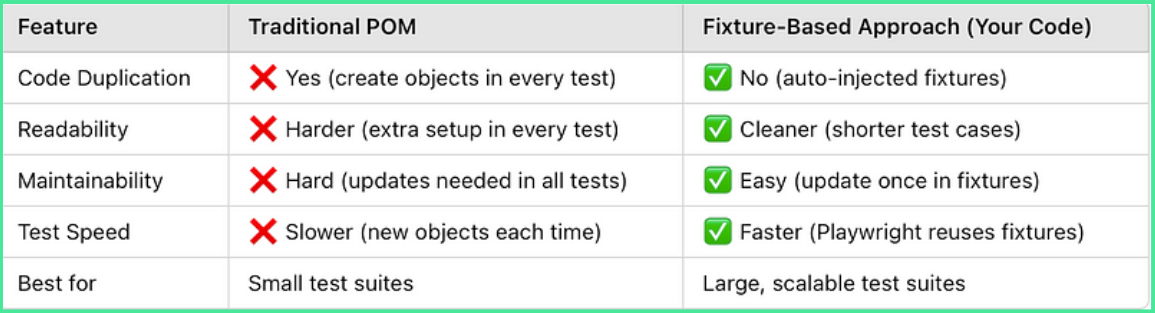
Final Recommendation
- If you have just a few tests, using the traditional POM might be okay.
- If you have many tests and want better maintainability, fixtures might be the best choice.
Opinions expressed by DZone contributors are their own.
Comments