

Page Object Model (POM) – With Playwright
Page Object Model (POM) is a Playwright-supported design pattern for test automation. Enhances test maintainability and readability.
 CORE
·
CORE
·
Join the DZone community and get the full member experience.
Join For FreeThe Page Object Model (POM) design pattern organizes and manages page components by creating a dedicated object repository, making it a favored approach in web automation. POM's effectiveness lies in its ability to establish a clear interface for tested pages. This reduces code complexity and redundancy significantly, enhancing code flexibility and simplifying test script maintenance.
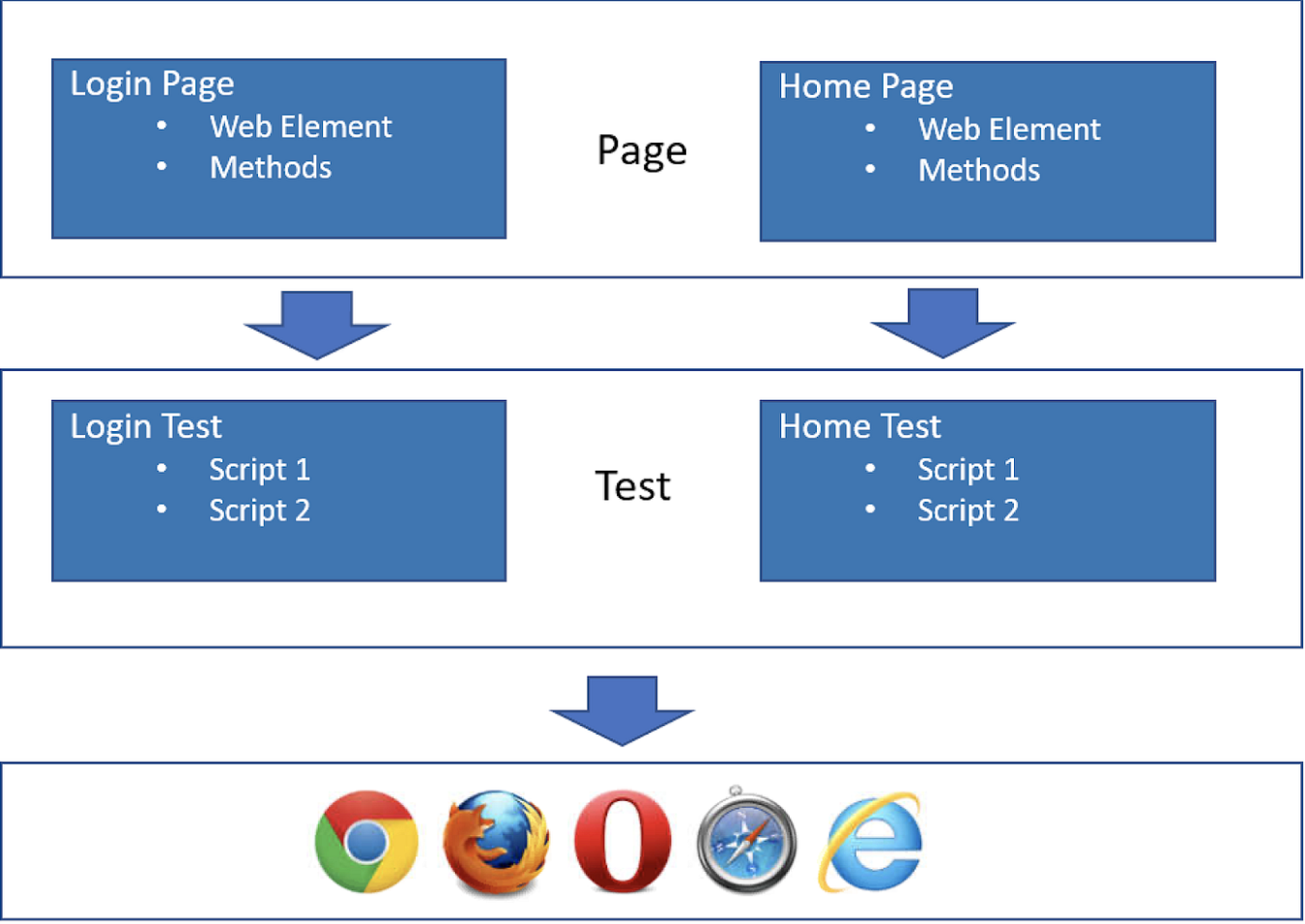
In POM, each web page is represented by its own class file containing all the relevant web components. Test scripts leverage these class files to execute various actions, ensuring efficient interaction with the page elements. This structured approach not only streamlines the automation process but also enhances the overall maintainability and adaptability of the automation framework.
To understand POM better, let's break the word “POM” into two parts (PO+ M).
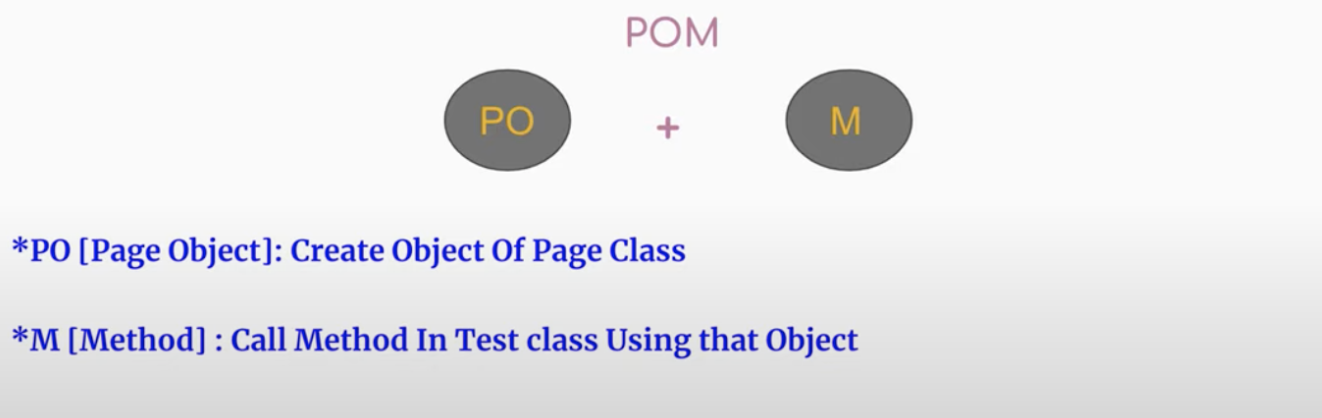
In POM, we create objects of page class, and by using this object, we are able to interact with web elements and also the method of page class. Page Object Model is commonly used to cut back duplication and improves test maintenance.
In a Page Object Model, each page in the web application contains a corresponding Page Class, which includes the Web Elements and the Methods that operate on those Web Elements.
Explanation With an Example (When We are NOT Using POM)
Let's take an example to explain the concept of POM without using the Page Object Model applied.
To understand this concept better, let’s look at the below line of code that we often use in playwright without the Page Object Model applied. In the below code, you can see there is no separation between actions and locators that we have used.
await this.page.locator("[data-id=email-field-login]").type("[email protected]");

await this.page.locator("[data-id=password-field-login]").type("qa@1234");
In the context of the Page Object Model (POM), the code is broken into two distinct segments.
The first section is the page class, serving as a repository for all methods and locators essential for interaction with the web elements. This separation enhances maintainability and readability by centralizing the elements' identification and related functions.
The second section, known as the test class, is where the actual test scenarios are formulated. Within this class, testers craft detailed test cases that verify various functionalities of the application. To access these test cases, objects of the page class are instantiated. These objects act as intermediaries, connecting the test class with the methods defined in the page class. Through these objects, testers can seamlessly access the methods encapsulated within the page class.
So, to create the above code in the POM design pattern, it is mandatory to establish a locator repository and instantiate objects of the page class. The locator repository serves as a centralized database for web element identifiers, promoting easy maintenance and updates. Concurrently, creating objects of the page class enables seamless interaction with these elements, enhancing the modularity and readability of the code.
The above line of code using the Page Object Model looks like the below, where we have created the object repository and method to login into the site.
this.username_field = page.getByTestId("email-field-login");

this.password_field = page.getByTestId("password-field-login");async login(username, password) {
await this.username_field.fill(username);
await this.password_field.fill(password);
await this.login_button.click();
}Consequences of Not Using POM
We will explain the consequences of not using POM using the below example:
await this.page.locator("[data-id=email-field-login]").type("[email protected]");
await this.page.locator("[data-id=password-field-login]").type("qa@1234");Here are the consequences of not using POM:
- In the above example, there is no separation between methods and locators; both are used under the same line of code. This absence of separation means that any alteration in the user interface's identifiers, layout, or the procedure for inputting and processing logins necessitates a corresponding modification in the test itself.
- When we require the usage of a specific web element in multiple instances, it necessitates re-locating the element each time. Essentially, this leads to the redundant development of identical code repeatedly. Consequently, the code lacks reusability, resulting in the creation of duplicate and convoluted sections within the program. This duplication not only hampers readability but also complicates the maintenance process.
- Using identical locators across multiple test scripts becomes problematic when those locators need modification. Updating these locators in numerous script files, especially within a large and intricate project, becomes a tedious task. In scenarios where multiple locators undergo changes, the situation exacerbates, resulting in a substantial waste of time and effort.
Benefits of Using Page Object Model
POM is a design pattern that is used to build an object repository for web UI elements in test automation. Testers may greatly increase the effectiveness and maintainability of their automated test suites by encapsulating web components and their interactions into Page Objects.
Using the Page Object Model (POM) has the following benefits:
- Enhanced Code Reusability: POM offers a basic benefit by greatly enhancing code reusability. POM centralizes UI element locators and interaction methods, which are dispersed across the codebase in typical automation scripts. Because of this centralization, testers may reuse certain Page Objects in different test scenarios.
- Improved Readability and Maintainability: POM helps make automation code easier to understand and comprehend. Even for individuals who did not develop the code initially, test scripts become increasingly clear and easy to read. Every component or web page has a corresponding Page Object that makes it obvious which interaction methods are available.
- Simplified Debugging and Refactoring: Without the right framework, debugging automated tests may be difficult. POM provides a clear division between page-specific code and test code, which facilitates issue identification. Moreover, testers just need to update the impacted Page Objects and don't need to alter the complete test suite when the application's user interface changes.
- Increased Test Coverage: POMs simplified the structure, and testers may focus on developing a greater range of test cases. Ensuring the overall stability of the program and detecting possible problems need extensive test coverage. Because of POM's advantages in reusability and maintainability, testers may devote more time to creating a variety of test cases, which leads to a more comprehensive testing approach.
- Enhanced Team Collaboration: In large-scale development projects, we have different teams that work together. POM allows testers to work together with developers and other stakeholders more efficiently. Since Page Objects offers a clear interface for interacting with the application, developers/QAs can easily understand the test cases and address issues that arise.
In the next section, you will see how we can implement POM in playwrights.
Create Project Structure for POM
Below is the simple example of POM; in the below screenshot, you can see we have created two folders under the ‘POM(Page Object Model)’ Folder.
Tests folder: In this folder, we will create the class with all test cases.
Pages folder: In this folder, we will create the class with all required locators and methods required for test cases.

Let's take an example of the site to implement POM.
Example:
|
To implement the POM, let's create Test and Pages Class.
Under the folder ‘Pages’ -> First, create the page class with name - >loginPage.spec.js.
const { chromium, expect } = require("@playwright/test");
exports.LoginPage = class LoginPage {
constructor(page, expect) {
this.page = page;
this.username_field = page.getByPlaceholder("Email");
this.password_field = page.getByPlaceholder("Password");
this.login_button = page.locator('[data-id="submit-login-btn"]');
this.drop_down = page.locator('[alt="DropDown Button"]');
this.log_out = page.locator('[data-id="nav-dropdown-logout"]');
}
async gotoLoginPage() {
await this.page.goto("https://talent500.co/auth/signin");
}
async login(username, password) {

await this.username_field.fill(username);

await this.password_field.fill(password);

await this.login_button.click();

}
async homePage(homeContent) {
const text = await this.page.locator('//div[@id="progress-bar"]').textContent();
expect(text).toContain(homeContent);
}
async logout() {
await this.drop_down.click();
await this.log_out.click();
}
};Code Walkthrough
Let's do the above code walkthrough
Here's a breakdown of the class methods:
- constructor(page, expect): The constructor initializes the class properties using the provided page object and the expect function from the Playwright test library.
- async gotoLoginPage(): Navigate the browser to the login page URL.
- async login(username, password): Fills in the username and password fields with the provided values and clicks the login button.
- async homePage(homeContent): Verifies the presence of specified content on the home page. It uses an XPath locator to find an element with the id "progress-bar" and checks if its text content contains the homeContent string.
- async logout(): Clicks on the dropdown button and then click on the logout button to log the user out.
Under the folder ‘Tests’ -> Create the test class with name - >loginTests.spec.js.
const { test } = require("@playwright/test");

const { LoginPage } = require("../Pages/loginPage.spec");

test("Login test", async ({ page }) => {

const Login = new LoginPage(page);

await Login.gotoLoginPage();

await Login.login("[email protected]", "Test@123");

await Login.homePage("PROFILE");

await Login.logout();

});
Code Walkthrough of the Above Code
Let's do the above code walkthrough.
Import Statements:
- You import the test function from the Playwright test library.
- You import the LoginPage class from the loginPage.spec file.
Test Case:
- The ‘test’ function takes a description ("Login test") and an asynchronous function as its argument.
- Inside the test function, you create a new instance of the ‘LoginPage’ class, passing the page object to it.
- You navigate to the login page using the ‘gotoLoginPage’ method.
- You log in with the specified username and password using the ‘login ‘method.
- You verify the content on the home page to ensure successful login using the ‘homePage’ method.
- Finally, you log out using the ‘logout’ method.
Execute the Test Cases
Now, let's execute the test cases; run the b to execute in UI mode.
npx playwright test --uiAs we run the above command, playwright runner is open from where you can execute the test case.
You can log into the site with a valid credential.

Verify that after logging in, the user can see the text “PROFILE.”

Finally, logout from the application.

Wrapping Up
Page Object Model (POM) with Playwright significantly enhances the efficiency, maintainability, and scalability of automated testing processes. By encapsulating web elements and their interactions within dedicated page classes, POM promotes a structured approach to test automation. This separation of concerns not only ensures code reusability and readability but also simplifies maintenance, allowing teams to adapt swiftly to changes in the application under test.
Combining the robustness of POM with the powerful capabilities of Playwright, testers can create comprehensive and reliable test suites. Playwright’s cross-browser compatibility and fast execution speed empower developers and QA teams to validate web applications across various platforms seamlessly.
Published at DZone with permission of Kailash Pathak. See the original article here.
Opinions expressed by DZone contributors are their own.
Comments