

Predictable Low Latencies for Apache HBase
By utilizing a multi-tiered storage architecture, HBase delivers a cost-effective solution that ensures predictable performance for latency-sensitive OLTP workloads.
 ·
·
Join the DZone community and get the full member experience.
Join For FreeApache HBase
Apache HBase is an open-source, strongly consistent distributed database designed to store record-oriented data across a scalable cluster of machines. HBase stores rows of data in tables that can be grouped into namespaces, and a table can belong to only one namespace at a time. Tables are split into groups of lexicographically adjacent rows called regions. By "lexicographically adjacent," we mean that all rows in the table that sort between the region’s start row key and end row key are stored in the same region.
Regions are distributed across the cluster, hosted, and made available to clients by RegionServer processes. Regions are the physical mechanism used to shard and distribute the write and query load across the fleet of RegionServers. Regions are also non-overlapping: A single row key belongs to exactly one region at any point in time. Together with the special META table, a table’s regions effectively form a B-tree for the purposes of locating a row within a table.
Apache HBase provides considerably lower p95/p99 write latencies at scale. However, the read p95/p99 read latencies can go a bit higher depending on where the data was read from. In the absence of any regions-in-transition (RIT), achieving predictable single-digit latencies for a single row read/write is desired for several latency-sensitive use cases at any scale (e.g., e-commerce applications).
Let's dive deeper into how HBase can leverage multi-tiered storage on the Apache Hadoop Distributed File System (HDFS).
HDFS Multi-Tiered Storage: Optimizing Data Placement and Cost
The HDFS has the ability to provide a tiered storage architecture to efficiently manage the data across a variety of storage media with different performance characteristics and costs. This architecture with flexible storage policies allows for optimized data placement based on how frequently it is accessed, ultimately leading to better resource utilization and reduced storage costs.
At its core, HDFS tiered storage recognizes that not all data is created and accessed equally. Some data can be categorized as "hot" (i.e., frequently accessed and requires high-performance storage), while other data can be categorized as "cold" or "warm," in other words, accessed less frequently and suitable for lower-cost, higher-capacity storage. To accommodate this, HDFS supports multiple storage types on DataNodes, creating a tiered storage hierarchy.
The primary storage types include the following:
| Storage Type | Description |
|---|---|
| RAM_DISK | The fastest tier, utilizing a portion of a DataNode's RAM as a block storage device. This is ideal for extremely hot data that requires minimal latency. |
| SSD (solid-state drive) | Offering high throughput and low latency, SSDs are well suited for hot and warm data that is frequently read and written. |
| DISK (hard disk drive) | The traditional and most common storage tier, providing a balance of performance and cost for warm data. |
| ARCHIVE | The slowest and most cost-effective tier, typically consisting of high-density, low-power servers. This tier is designed for cold data that is rarely accessed but must be retained for compliance or future analysis. |
| PROVIDED | Provided storage allows data stored outside HDFS to be mapped to and addressed from HDFS. |
| NVDIMM (non-volatile dual in-line memory module) | A persistent memory technology that offers performance close to RAM with the durability of traditional storage. |
How to configure different storage types in hdfs-site:
<property>
  <name>dfs.datanode.data.dir</name>
  <value>[DISK]/path/to/disk1,[SSD]/path/to/ssd1,[ARCHIVE]/path/to/archive1</value>
</property>
Without setting different storage types with the list of directories, DataNodes cannot select a particular storage policy while storing or accessing the data blocks. If the storage type is not specified, by default, DataNode uses the DISK storage type.
HFiles Backed by SSDs
An HFile is the underlying storage format for HBase, used to persist the data on disk in the hdfs. HBase table reads are served by RegionServers hosting the corresponding table regions. The RegionServers provide the fast read path by checking the memory-based caches before accessing slower disk storage:
- BlockCache – The RegionServer first looks for the data in the block cache. The block cache is a read cache that resides in the server heap memory (or off-heap). It stores frequently accessed data blocks that have already been read from HFiles on disk in the past. A hit in the block cache results in the fastest possible read as the data is served directly from memory. This results in single-digit ms p50 (or p90 on stable clusters) read latencies for single row reads.
- MemStore – The RegionServer also checks the MemStore, a write cache that stores all new data that has not yet been permanently written to disk as an HFile. Since all writes go to the MemStore first, checking it ensures that the read request has access to the most recent data.
- HFiles – If the requested data is not found in either the BlockCache or the MemStore, or if the old data versions also need to be accessed, the RegionServer then accesses the HFiles stored on the underlying HDFS filesystem. RegionServer reads the relevant data blocks from the HFiles into memory. As these blocks are read from disk, they are typically also loaded into the BlockCache to speed up subsequent requests for the same data. Depending on the latency of the disk access, by default (HDD hard drives), the p95 and p99 read latencies for the single row reads go beyond single-digit ms.
Unlike HDDs, SSDs store data on flash memory, which allows for near-real-time access to any data, regardless of its physical location on the drive. The result is much lower and more consistent, predictable latency for the read operations.
By backing HFiles with SSDs, the physical IO operations of reading data become significantly faster and more deterministic. When HBase needs to retrieve data from an HFile, the SSD can deliver that data with minimal delay, directly translating to lower and more predictable (p95/p99) read latencies for the end user or application requesting the data.
HDDs vs. SSDs Cost Comparison
For block storage, which is used for the primary disks, both AWS and GCP provide a range of SSD and HDD options. The cost differential is significant: SSD prices can be twice as high as HDDs for the raw storage capacity.
- https://aws.amazon.com/compare/the-difference-between-ssd-hard-drive/
- https://cloud.google.com/compute/disks-image-pricing
Moreover, not all NoSQL database use cases or applications require single-digit ms p99 latencies. Therefore, it is crucial for HBase clusters to host HFiles for only the latency-sensitive tables on SSDs, while the remaining table data is still hosted on HDDs.
Options to Host HFiles for Specific Tables on SSDs
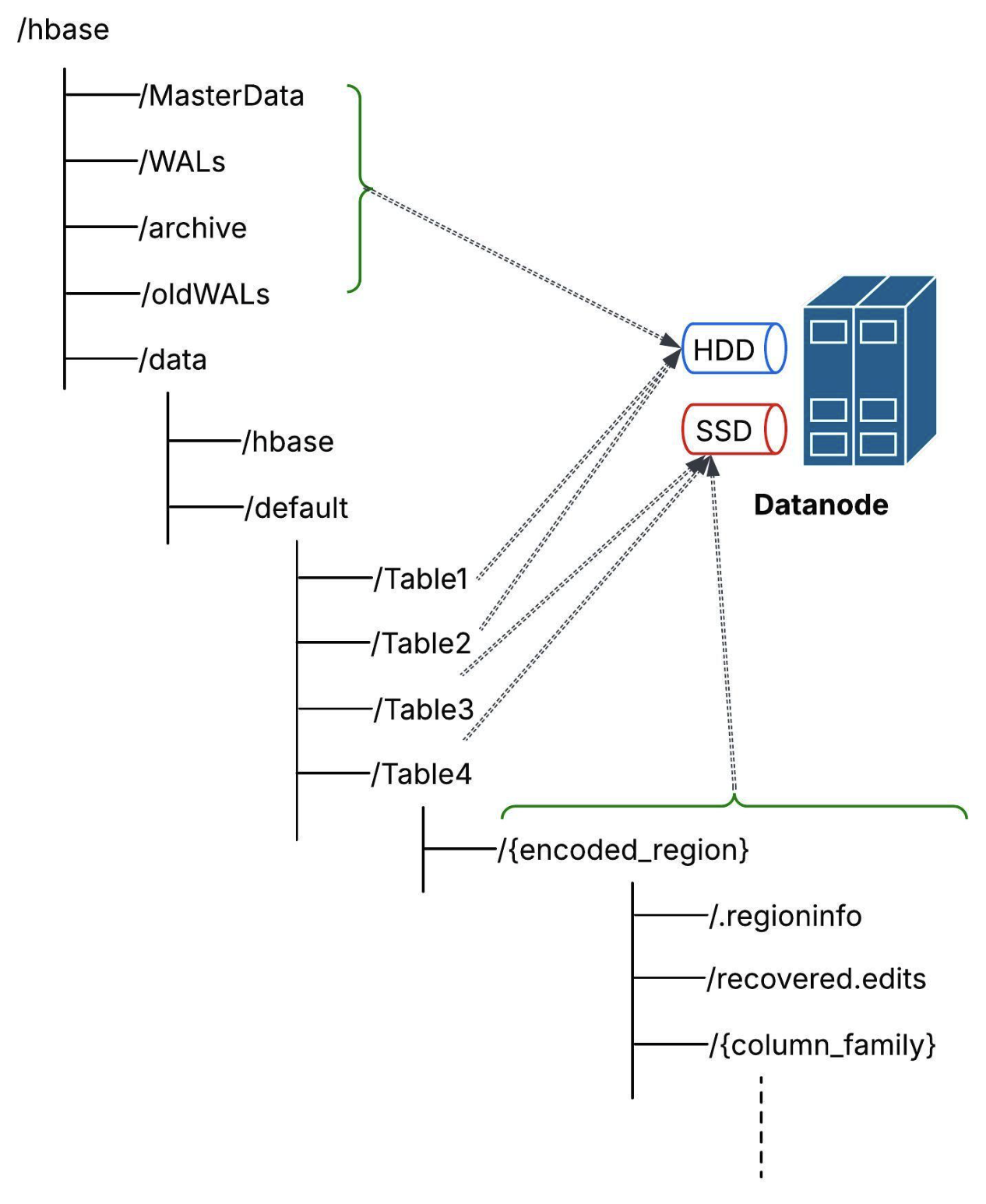
Option 1: Phoenix CREATE TABLE or ALTER TABLE DDLs
Provide Table table-level property "hbase.hstore.block.storage.policy"=ALL_SSD:
CREATE TABLE TEST_TABLE1 (ID VARCHAR PRIMARY KEY, COL1 INTEGER) "hbase.hstore.block.storage.policy"=ALL_SSD;CREATE INDEX IDX_TABLE1 ON TEST_TABLE1(COL1) INCLUDE (COL2) "hbase.hstore.block.storage.policy"=ALL_SSD;Option 2: HBase Admin DDL APIs createTable or modifyTable
Use ColumnFamilyDescriptor property STORAGE_POLICY with value ALL_SSD:
> create 'test_table1', {NAME => 'CF0', STORAGE_POLICY => 'ALL_SSD'}
The RegionServer logs should print something similar to:
DEBUG [StoreOpener-${thread}-1] util.CommonFSUtils(524): Set storagePolicy=ALL_SSD for path=hdfs://${prefix}/data/default/${tableName}/${regionName}/${columnFamilyName}

INFO [StoreOpener-${thread}-1] regionserver.HStore(321): Store=${regionName}/${columnFamilyName}, memstore type=DefaultMemStore, storagePolicy=ALL_SSD, verifyBulkLoads=${val}, parallelPutCountPrintThreshold=${val}, encoding=${val}, compression=${val}
Check the hdfs getStoragePolicy:
$ bin/hdfs storagepolicies -getStoragePolicy -path /hbase/data/default/${tableName}/${regionName}/${columnFamilyName}/
The storage policy of /hbase/data/default/${tableName}/${regionName}/${columnFamilyName}/:

BlockStoragePolicy{ALL_SSD:12, storageTypes=[SSD], creationFallbacks=[DISK], replicationFallbacks=[DISK]}
Option 3: Use hdfs setStoragePolicy Directly After Table Creation
After creating the table using Phoenix/HBase, use the hdfs command to set the storage policy directly on the table directory:
$ bin/hdfs storagepolicies -setStoragePolicy -path /hbase/data/default/test_table1 -policy ALL_SSD
To verify:
$ bin/hdfs storagepolicies -getStoragePolicy -path /hbase/data/default/${tableName}
The storage policy of /hbase/data/default/${tableName}/:

BlockStoragePolicy{ALL_SSD:12, storageTypes=[SSD], creationFallbacks=[DISK], replicationFallbacks=[DISK]}
Maintaining consistently low latency is a fundamental requirement for contemporary application environments. By implementing a multi-tiered storage architecture, HBase offers a cost-effective solution that ensures reliable and predictable low-latency response times, particularly for OLTP workloads with demanding latency constraints.
Opinions expressed by DZone contributors are their own.
Comments