

Cutting Data Pipeline Costs and Data Freshness Issues With Netflix Maestro and Apache Iceberg: A Practical Tutorial
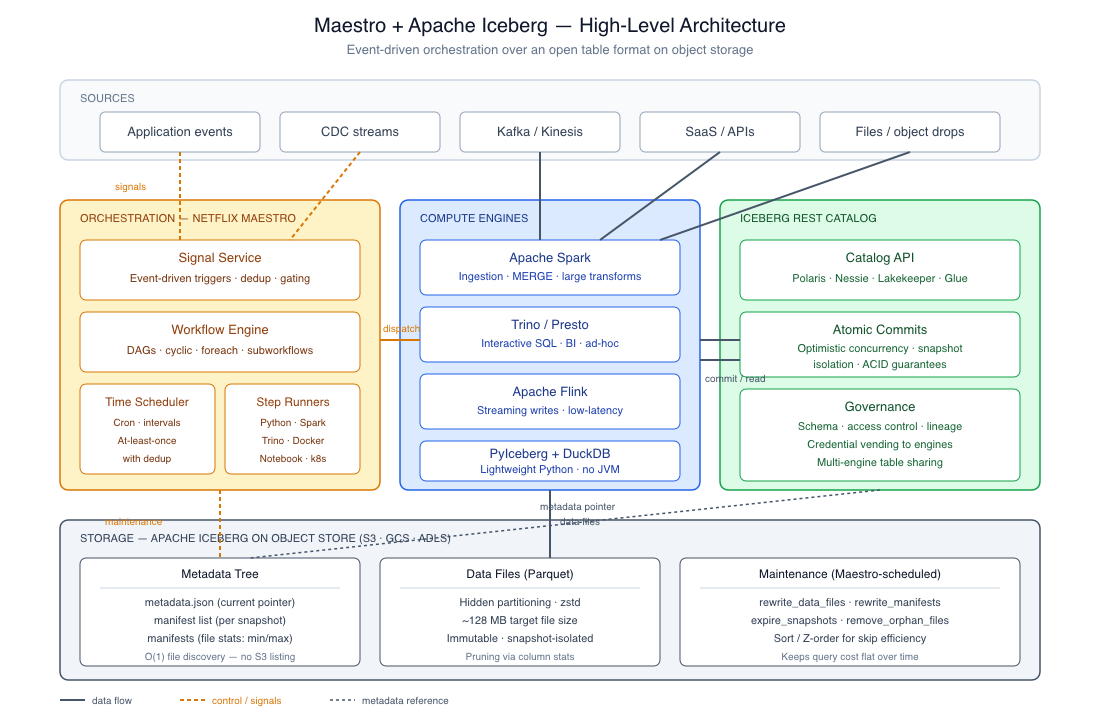
Iceberg replaces filesystem state with a metadata tree (cheap queries, ACID snapshots). Maestro replaces cron with event signals (fresh data).
Join the DZone community and get the full member experience.
Join For FreeAnalytics pipelines tend to scale in both cost and the age of their data sources: costs increase with data volume growth, while data freshness decreases due to longer batch jobs. The common approach, scaling out the cluster, addresses the symptom rather than the architectural issue.
In this tutorial, we will look at an alternative solution that addresses both problems at their root: using Netflix Maestro, a horizontally scalable workflow orchestrator open-sourced by Netflix in July 2024, along with Apache Iceberg, a standard table format for analytics on object storage. The former helps by shifting from time-based scheduling to event-driven, whereas the latter removes the overhead of listing files that slows down queries on large datasets and increases their costs.
We will cover all aspects of creating a full-fledged pipeline, including code examples, explanations of why each component reduces costs, and real metrics showing what results to expect.
What You'll Need
| Component | Purpose | Notes |
|---|---|---|
| Apache Iceberg + a catalog | Table format and metadata management | REST catalog (Polaris, Nessie, Lakekeeper, Unity Catalog) recommended for new deployments; Glue/Hive also fine |
| A compute engine | Reads and writes Iceberg tables | Spark 3.5+, Flink, Trino, or DuckDB via PyIceberg |
| Netflix Maestro | Workflow orchestration | Requires Java 21, Docker, and Postgres or CockroachDB for state |
| Cloud object storage | Data files and metadata | S3, GCS, ADLS, or S3-compatible (MinIO works for local dev) |
| Python 3.10+ | Lightweight tasks and ingestion | PyIceberg 0.11+, PyArrow |
Terminology note: there are several products named "Maestro" in the data space. This guide is about Netflix's Maestro and is different from Maestro by Conductor, AWS Maestro, etc. Netflix's Maestro executes hundreds of thousands of workflows and up to 2 million jobs per day inside Netflix, so the scalability claim is valid — although some practitioners consider Maestro overengineered for small teams, so keep that in mind.
The Problem Statement
The standard stack on Hive tables stored in S3 has three structural inefficiencies:
- File listing dominates query planning. Listing operations on S3 are slow and rate-limited. For a query on a partitioned Hive table, listing might take more time than reading data itself.
- Small-file proliferation. Continuous or micro-batch writing produces thousands of Parquet files. Each query suffers from open-file overhead, and each list operation brings in additional results.
- Time-based scheduling wastes compute. Jobs are triggered based on a fixed schedule, not data availability. If upstream data is late, the job processes stale inputs. If the data is early, the job idles until the next scheduled run.
Iceberg solves (1) and (2) in the storage tier. Maestro solves (3) in the orchestration tier. Let's see how.
Why Iceberg Shifts the Cost Model
Iceberg takes the table metadata out of the filesystem and puts it into a metadata tree. In response to the query "what files are part of this table?", the engine looks up a single metadata entry, follows the path to the manifest list, and gets back an exact list of data files, along with file-level statistics such as min/max values, null count, and row count. File discovery turns from an O(n) directory listing to O(1) metadata lookup.
As a result, we get a chain reaction:
- Hidden partitioning. Declare a table PARTITIONED BY days(event_time), and queries filter on event_time directly. Partition transform happens automatically. No more WHERE year=2026 AND month=05 AND day=18, and no risk of analysts forgetting.
- Partition evolution. You can change the partitioning of the table from monthly to daily without rewriting old data. The metadata keeps track of it, and the engine routes queries correctly.
- Time travel and rollback. Writes produce immutable snapshots. If a bad load happens, you don't need to restore from backups – just roll the catalog pointer back to the previous snapshot. It matters operationally – recovery time goes from hours to seconds.
- Snapshot isolation and ACID. Writers operate concurrently; readers always see the consistent state, never a partial commit.
The cost angle: manifest statistics can prune scans by an order of magnitude in time-filtered queries. With S3 list operations removed entirely, query costs on warehouse engines like Trino, Athena, or BigQuery (which charge per byte scanned) go down proportionally.
Why Maestro Helps With Freshness and Costs
The killer feature of Maestro in the context of our use case is the signal service — an event-driven trigger mechanism. Instead of scheduling "run this job at 02:00 every day", you tell Maestro to execute the job "when user_events_raw table receives a new snapshot".
The trigger may originate from another Maestro workflow, an S3 event, a database table modification, or even from any external system capable of sending a request to the signal API endpoint. The gap between data arrival and data availability closes from hours (the worst-case batch window) to seconds or minutes.
Other notable features of Maestro:
- Support for both DAGs and cyclic workflows. Unlike Airflow, Maestro allows loops and re-execution, which is useful for retry-with-backoff and convergence scenarios.
- ForEach loops and subworkflows as native concepts. Reduces the YAML sprawl common in large Airflow setups.
- At-least-once triggering with built-in deduplication leads to effective exactly-once execution.
- Mixed task types. A single workflow can combine Python, Spark, SQL (Trino/Presto), bash, notebook, Docker container, and Kubernetes jobs.
- 100x performance improvement of the engine announced in September 2025 brings a step transition time from seconds to milliseconds, which is important for workflows with hundreds of steps.
Step 1: Create the Iceberg Table With Sensible Defaults
Begin with a definition of the table such that partitioning is done correctly from the start. By far the most frequent problem when adopting Iceberg is to overlook partitioning.
CREATE TABLE analytics.user_events (
    user_id      BIGINT,
    event_type   STRING,
    event_time   TIMESTAMP,
    session_id   STRING,
    properties   MAP<STRING, STRING>
)
USING iceberg
PARTITIONED BY (days(event_time), bucket(16, user_id))
TBLPROPERTIES (
    'format-version' = '2',
    'write.target-file-size-bytes' = '134217728',          -- 128 MB target
    'write.parquet.compression-codec' = 'zstd',
    'write.metadata.delete-after-commit.enabled' = 'true',
    'write.metadata.previous-versions-max' = '20',
    'history.expire.max-snapshot-age-ms' = '604800000',    -- 7 days
    'history.expire.min-snapshots-to-keep' = '10'
)
LOCATION 's3://your-bucket/iceberg-tables/user_events';
Some interesting choices that should be explained:
- days(event_time) is a partitioning transform. Queries filtering by event_time will receive automatic partition pruning.
- bucket(16, user_id) is a bucket transform that evenly spreads writes among 16 buckets per day partition. It helps with hot spot prevention when one user produces disproportionately high amounts of traffic and provides better parallelism for joining on user_id.
- format-version = '2' allows for row-level deletions through delete files. V3 is a more recent version that adds many features, including deletion vectors, but make sure your engine supports it first.
- zstd provides better compression ratio by 10-20% compared to snappy with the same performance when reading.
- Expiring snapshot properties help avoid metadata explosion, which is one of the most frequent causes of costs silently accumulating in an Iceberg environment. Without this, each write would retain all previous snapshots indefinitely.
Step 2: Ingest Data
There are two reasonable options for ingesting data from Python into Iceberg: Spark (in case you already have a Spark cluster and need the scale provided by it) and PyIceberg (low overhead, no JVM required).
from pyspark.sql import SparkSession
from pyspark.sql.functions import to_timestamp, col

spark = (
    SparkSession.builder
    .appName("IcebergIngestion")
    .config("spark.sql.extensions",
            "org.apache.iceberg.spark.extensions.IcebergSparkSessionExtensions")
    .config("spark.sql.catalog.my_catalog",
            "org.apache.iceberg.spark.SparkCatalog")
    .config("spark.sql.catalog.my_catalog.type", "rest")
    .config("spark.sql.catalog.my_catalog.uri",
            "https://your-rest-catalog/api/v1")
    .config("spark.sql.catalog.my_catalog.warehouse",
            "s3://your-bucket/iceberg-tables/")
    .config("spark.sql.catalog.my_catalog.io-impl",
            "org.apache.iceberg.aws.s3.S3FileIO")
    .getOrCreate()
)

raw = spark.read.json("s3://your-bucket/raw/events/2026-05-18/")

events = (
    raw
    .withColumn("event_time", to_timestamp(col("event_time")))
    .select("user_id", "event_type", "event_time", "session_id", "properties")
)

# MERGE INTO supports idempotent ingestion — important for replay safety
events.createOrReplaceTempView("staging_events")
spark.sql("""
    MERGE INTO my_catalog.analytics.user_events t
    USING staging_events s
    ON t.user_id = s.user_id
       AND t.event_time = s.event_time
       AND t.event_type = s.event_type
    WHEN NOT MATCHED THEN INSERT *
""")
Two important aspects. First, the REST catalog should be used for any new deployment, as it allows accessing the same table via Spark, Trino, Flink, Snowflake, BigQuery, and PyIceberg without having to deal with catalog configurations drifting per engine. Second, using MERGE INTO instead of INSERT ensures that the ingestion becomes idempotent, especially when the step fails and Maestro tries to retry it.
PyIceberg Ingestion (Lightweight Path)
For lighter loads or ingestion processes executed as part of an orchestrator step, PyIceberg is quicker to initialize and has no dependency on the JVM. Currently, the library requires tables in PyArrow format, not pandas DataFrames:
import pyarrow as pa
from pyiceberg.catalog import load_catalog

catalog = load_catalog(
    "my_catalog",
    type="rest",
    uri="https://your-rest-catalog/api/v1",
    warehouse="s3://your-bucket/iceberg-tables/",
)

table = catalog.load_table("analytics.user_events")

new_rows = pa.table({
    "user_id":    [3, 4],
    "event_type": ["purchase", "click"],
    "event_time": pa.array(
        ["2026-05-18T12:10:00", "2026-05-18T12:15:00"],
        type=pa.timestamp("us"),
    ),
    "session_id": ["sess-001", "sess-002"],
    "properties": [{"sku": "A123"}, {"page": "/home"}],
})

table.append(new_rows)
By default, PyIceberg uses "fast append" optimization, which reduces per-commit metadata operations but creates more manifest files than other optimizations. This is good for frequent micro-batch processing as long as you perform regular compaction (see below).
Step 3: Define the Maestro workflow
Maestro workflows can be defined using either JSON or YAML format. The following example defines a workflow that loads raw events, applies transformation, performs data quality checks, and updates the aggregate. Steps are connected by signals to start processing as soon as their dependencies are available.
name: user-events-pipeline
description: Ingest, transform, validate, and aggregate user events
trigger:
  signal:
    name: raw_events_landed
    match:
      bucket: your-raw-bucket
      prefix: events/

nodes:
  - name: ingest-events
    task:
      type: python
      script: ingest.py
      params:
        partition_date: ${execution_date}
    retry:
      max_attempts: 3
      backoff_seconds: 60

  - name: validate-schema
    dependencies: [ingest-events]
    task:
      type: python
      script: validate.py

  - name: transform-events
    dependencies: [validate-schema]
    task:
      type: spark
      class: com.yourorg.transforms.SessionizeEvents
      params:
        input_table: analytics.user_events
        output_table: analytics.user_sessions
        partition_date: ${execution_date}

  - name: dq-checks
    dependencies: [transform-events]
    task:
      type: trino
      query_file: dq_checks.sql
      fail_on: any_row_returned

  - name: refresh-daily-aggregate
    dependencies: [dq-checks]
    task:
      type: trino
      query: |
        INSERT INTO analytics.daily_user_metrics
        SELECT
            CAST(event_time AS DATE)       AS event_date,
            event_type,
            COUNT(*)                       AS event_count,
            APPROX_DISTINCT(user_id)       AS unique_users
        FROM analytics.user_events
        WHERE event_time >= DATE '${execution_date}'
          AND event_time <  DATE '${execution_date}' + INTERVAL '1' DAY
        GROUP BY 1, 2

  - name: emit-completion-signal
    dependencies: [refresh-daily-aggregate]
    task:
      type: signal
      emit:
        name: daily_metrics_ready
        params:
          date: ${execution_date}
The last step, emitting a completion signal, makes pipelines composable. The downstream pipeline, such as the feature engineering task for ML, subscribes to the daily_metrics_ready topic and kicks off right away upon completion of this one without polling or any delay period.
Ingestion Script
# ingest.py
import os
import pyarrow as pa
import pyarrow.parquet as pq
from pyiceberg.catalog import load_catalog

PARTITION_DATE = os.environ["partition_date"]

catalog = load_catalog("my_catalog")
table = catalog.load_table("analytics.user_events")

raw_path = f"s3://your-raw-bucket/events/{PARTITION_DATE}/"
arrow_table = pq.read_table(raw_path)

# Schema enforcement before write — fail loudly on drift
expected = table.schema().as_arrow()
arrow_table = arrow_table.select(expected.names).cast(expected)

table.append(arrow_table)
print(f"Appended {arrow_table.num_rows} rows for {PARTITION_DATE}")
The cast is intentional. Schema drift — upstream system silently adds or modifies a column – is one of the most frequent pipeline failures. Early detection through an error at ingestion is far less expensive than debugging further down the line.
Step 4: Make Queries Cheap
There are three main optimizations that account for the majority of savings. Each one is worth comprehending rather than blindly copying.
Compaction: The Single Most Important Maintenance Activity
Real-time or micro-batch ingestions result in lots of small files. The smaller files lead to larger metadata, inefficient query planning, and unnecessary storage of Parquet footers and row-group overheads. Compaction periodically merges them into files of the desired size (128 MB for our table definition above).
With Spark:
-- Rewrite small files using bin-packing
CALL my_catalog.system.rewrite_data_files(
    table => 'analytics.user_events',
    options => map(
        'min-input-files', '5',
        'target-file-size-bytes', '134217728'
    )
);

-- Rewrite manifests so a query reads fewer manifest files
CALL my_catalog.system.rewrite_manifests('analytics.user_events');

-- Expire old snapshots beyond the retention configured in TBLPROPERTIES
CALL my_catalog.system.expire_snapshots(
    table => 'analytics.user_events',
    older_than => TIMESTAMP '2026-05-11 00:00:00',
    retain_last => 10
);

-- Remove orphan files (files in storage not referenced by any snapshot)
CALL my_catalog.system.remove_orphan_files(table => 'analytics.user_events');
Schedule as part of a Maestro workflow that runs either daily or weekly. The remove_orphan_files command is particularly crucial — without this, any failures in writing will result in untracked files in S3, which you continue to pay for storing.
Sorting Within Partitions for Skipping Efficiency
If you know that your analysts always filter by event_type and user_id, sort your files so that Iceberg’s file-by-file statistics can skip entire files:
CALL my_catalog.system.rewrite_data_files(
    table => 'analytics.user_events',
    strategy => 'sort',
    sort_order => 'event_type ASC, user_id ASC'
);
For higher-dimensional access patterns, use Z-order:
CALL my_catalog.system.rewrite_data_files(
    table => 'analytics.user_events',
    strategy => 'sort',
    sort_order => 'zorder(event_type, user_id, session_id)'
);
Let Hidden Partitioning Do Its Job
The query below requires no partition predicate — Iceberg derives the partition filter from event_time:
SELECT user_id, COUNT(*) AS event_count
FROM analytics.user_events
WHERE event_time >= TIMESTAMP '2026-05-17 00:00:00'
  AND event_time <  TIMESTAMP '2026-05-18 00:00:00'
  AND event_type =  'purchase'
GROUP BY user_id;
In Hive, we would have to do AND year=2026 AND month=5 AND day=17 to enable pruning. In Iceberg, the transformation days(event_time) happen automatically, and the extra predicate event_type enables more pruning based on min/max statistics at the file level; files that don’t cover 'purchase' in their event_type range will not be opened.
Step 5: Execute the Pipeline
Execute the pipeline from the Maestro command-line interface:
# Trigger a manual run with parameters
maestro start user-events-pipeline \
    --param partition_date=2026-05-18

# Check workflow status and last N runs
maestro status user-events-pipeline --last 10

# Inspect a specific run
maestro instance describe user-events-pipeline <run_id>

# Replay a failed run from a specific step
maestro instance restart user-events-pipeline <run_id> \
    --from-step transform-events
Maestro exports metrics on queue depth, step latency, and failure rates via /metrics. Use this together with engine metrics (Spark UI, Trino query stats) to correlate any delays in orchestration with query performance.
What Kind of Savings Should You Really Be Expecting?
There is the old story about 90 percent savings when making such migrations that needs to be taken with a grain of salt. The real truth is highly dependent on your source.
| Scenario | Realistic savings | Source of savings |
|---|---|---|
| Hive tables on S3 → Iceberg, same engine | 20–50% on query costs | Eliminated S3 listing, file pruning via stats, fewer small files |
| Cron-scheduled batch → Maestro signals | Variable on compute, large on freshness | Compute drops only if jobs were over-running their window; freshness improves from hours to minutes |
| Proprietary warehouse → Iceberg + open engines | 40–80% on storage and license | Storage decoupled from compute; engine competition on the same data |
| Streaming with no compaction → Iceberg + scheduled maintenance | 30–60% on query costs | Compaction collapses small-file overhead |
The 90% number is realistic if the starting point is truly pathological, say a highly partitioned Hive table on S3 with no file size management that is being queried by a byte-scanned engine. Most organizations should budget for 30%-60% improvements and view anything higher as upside.
Freshness improvements, by contrast, are reliably dramatic. Upgrading from a 4-hour cron job to an event-driven pipeline that fires within seconds of completion of its upstream is a structural win, not an incremental one.
Comparing Maestro to Other Options
Maestro is not the only option. The lay of the land as of 2026:
- Airflow has the broadest deployment and the most extensive provider ecosystem. Strengths: DAG construction; weaknesses: high-frequency triggering. Airflow's scheduler is traditionally been the bottleneck when operating at very high workflow volumes.
- Dagster has better data-aware abstractions (assets, partitions, software-defined assets) and integrates well with dbt and modern data tooling. The scale ceiling is lower than Maestro's.
- Prefect is native-Python and developer-friendly, offering good dynamic workflow capabilities. Still immature for very large scale.
- Temporal is the best general-purpose orchestrator for application workflows, less specialized for data pipelines.
- Maestro beats competitors on scale and on the signal/cyclic workflow paradigm. Cost factors: smaller community, steeper operational overhead, fewer out-of-the-box integrations.
If you are already using Airflow and have fewer than a few thousand workflows per day, the migration costs to Maestro probably don't justify themselves through orchestration improvements alone — Iceberg adoption can be decoupled. However, if you are hitting Airflow scheduler limitations or have highly interdependent workflows across teams, Maestro's signal paradigm deserves a serious look.
Common Mistakes
Some recurring pitfalls in production:
- Deferment of catalog selection. Setting up Iceberg with a Hadoop or filesystem catalog "as a temporary solution" creates a future migration burden. Choose a REST catalog (Polaris, Nessie, Lakekeeper, or vendor-managed) from the start.
- No snapshot expiration policy. Snapshots persist indefinitely by default. High-volume tables generate gigabytes of metadata each month. Set expiration policies in table properties and run expire_snapshots periodically.
- No orphan file removal. Failing writes leave behind Parquet files not referenced by any snapshot. Remove orphan files weekly.
- Over-partitioning. Partitioning by the hour on a low-volume table results in more partitions than rows. Partition by the resolution of your query filters and target file sizes, not finer.
- Using signals as a free pass on idempotency. Workflow execution triggered by signals can be replayed or backfilled. Make every step idempotent — use MERGE INTO for writes, de-dupe on natural keys, and never make assumptions about "this only runs once."
- Skipping compaction. Streaming pipelines without compaction gradually degrade query performance until someone notices that the queries are 10x slower than at launch time.
Conclusion
Iceberg and Maestro solve two aspects of the same problem. Iceberg makes the data layer cheap to query by converting filesystem state into metadata state. Maestro makes the orchestration layer responsive by substituting signals for clocks. Adopting either technology creates tangible value, while adoption of both yields a pipeline that is inherently cheaper to operate and inherently fresher than a cron-based/Hive setup.
If your current challenge is query cost or small file issues, start with Iceberg. If you are plagued with data staleness or unreliable scheduling, start with Maestro (or any other modern orchestrator). But eventually aim to adopt both if your goal is a data platform that scales without scaling your cloud bill.
Where to learn more:
- Netflix Maestro: github.com/Netflix/maestro
- Apache Iceberg: iceberg.apache.org
- PyIceberg: py.iceberg.apache.org
- Apache Polaris (Iceberg REST catalog): polaris.apache.org
Opinions expressed by DZone contributors are their own.
Comments