

MCP vs Skills vs Agents With Scripts: Which One Should You Pick?
Learn about when to use MCP, skills, and agents with scripts. How are they different from each other and what are they actually meant to be used for.
 CORE
·
CORE
·
I have been writing and building in the AI space for a while now. From writing about MCP when Anthropic first announced it in late 2024 to publishing a three-part series on AI infrastructure for agents and LLMs on DZone, one question keeps coming up in comments, DMs, and community calls: What is the right tool for the job when building with AI?
For a long time, the answer felt obvious. You pick an agent framework, write some Python, and ship it. But the ecosystem has moved fast. We now have MCP servers connecting AI to the real world, Skills encoding domain know-how as simple markdown files, and agent scripts that can orchestrate entire workflows end to end. The options are better than ever. The confusion around them is too.
I have seen teams spend weeks building a full agent setup for something a 50-line SKILL.md would have solved in an afternoon. I have also seen people reach for Skills when their agent actually needed live data from a real system. And I have watched MCP get used where a plain API call would have been simpler and faster.
The problem is not a lack of options. The problem is that most content out there treats MCP, Skills, and Agent scripts as competing choices. They are not. They are different layers of the same stack, and knowing when to use each one is what separates a good AI system from a messy one.
In this article, I want to give you a clear, practical breakdown of all three. Not theory. Not slides. Just the kind of thinking you need to make the right call on your next build.
Quick Definitions First
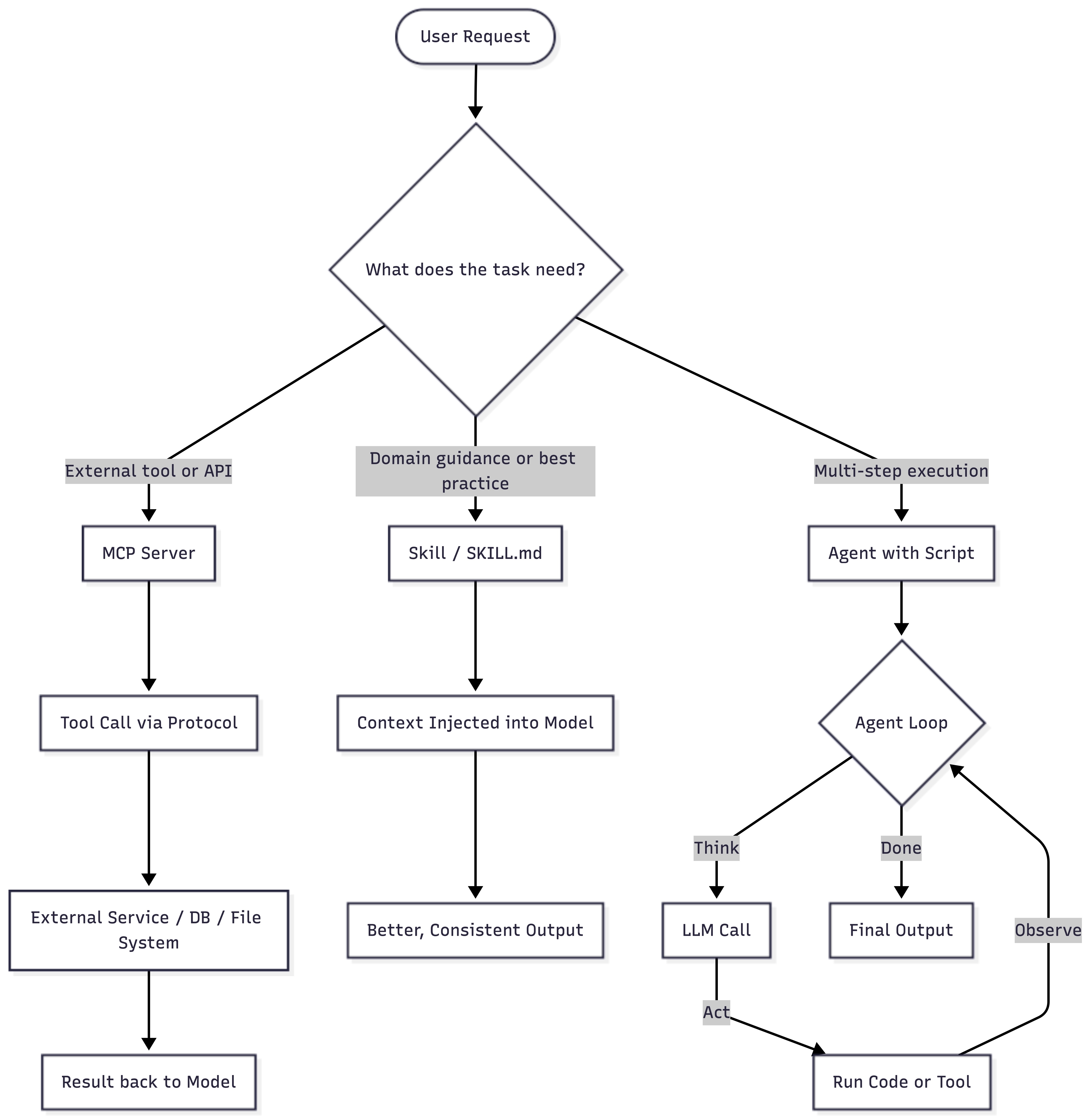
MCP (Model Context Protocol) is an open protocol that lets AI models connect to external tools, APIs, and data sources through a common interface. Think of it as USB-C for AI. Plug anything in, and the model knows how to use it.
Skills are reusable instruction files (usually markdown) that tell an AI agent how to handle a specific type of task. SKILL.md files, best practices, step-by-step guides. They are not code. They are context.
Agents with Scripts are programs (Python, Node.js, Bash) where the AI drives a loop: think, act, observe, repeat. The script owns the execution from start to finish.
The Big Comparison
| Dimension | MCP | Skills | Agents with Scripts |
|---|---|---|---|
| Primary purpose | Tool and API connectivity | Task-specific guidance | End-to-end task execution |
| Who defines the logic | Server builder | Prompt engineer | Developer + LLM |
| How it runs | Protocol-driven calls | Context injection | Agent loop |
| State management | Stateless | Stateless | Can hold state |
| Setup effort | Medium (needs a server) | Low (just a markdown file) | High (code + infra) |
| Reusability | High | High | Low to Medium |
| Debugging | Network and protocol level | Prompt inspection | Code + LLM traces |
| Best for | Live external data | Consistent output quality | Complex, multi-step work |
When to Use MCP
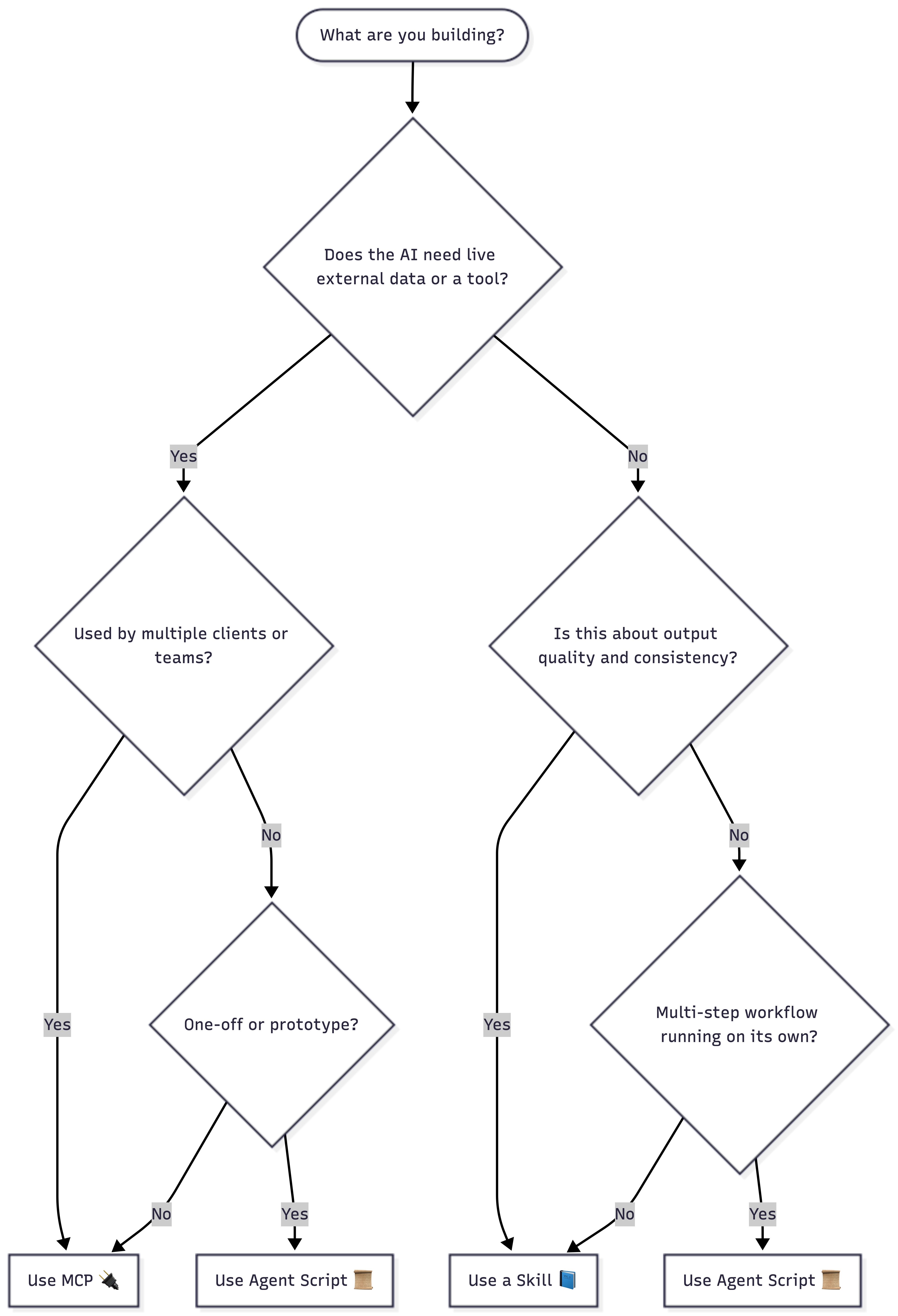
Use MCP when your AI needs to talk to something outside itself: a database, an API, a file system, a calendar, a CRM.
When Anthropic announced MCP in December 2024, the pitch was simple: instead of every team writing custom connectors for every data source, you build one server that speaks a common protocol, and any model can plug into it. That framing still holds.
Good fit when:
- You need live data that is not in the model's training or context
- Multiple AI clients need to hit the same tool in the same way
- You want access control at the protocol level
- You are building a platform where tools need to be easy to swap out
Real example: You are building a support agent that pulls order status from Shopify and creates tickets in Jira. Set both up as MCP servers. Your agent calls the tool and gets back what it needs. It does not need to know anything about the underlying APIs.
Pros:
- Common, vendor-neutral interface
- Keeps AI logic separate from API integration code
- Works across different models and clients
Cons:
- You need a running MCP server, which means infra to manage
- Adds a bit of latency on every tool call
- Too much for simple or one-off integrations
When to Use Skills
Use Skills when the problem is not about getting data. It is about getting good output. Skills carry the know-how. They are like a senior teammate sitting next to the model, saying: "For this task, here is how we do it."
Good fit when:
- You want repeatable, consistent results across many sessions
- The task has nuance that basic prompting does not catch
- Teams need outputs that all follow the same structure and tone
- You want to document a process without writing any code
Real example: Your team writes Word docs all the time: proposals, reports, SOWs. Without a Skill, every output looks different. Add a SKILL.md that defines the structure, tone, and formatting rules, and suddenly every doc comes out clean and consistent.
Pros:
- No infra needed, just a markdown file
- Easy to read, version, and update
- Works in the background without extra setup
Cons:
- Cannot actually do things, it only guides how they are done
- Only as useful as the instructions inside it
- No replacement for real tool access
When to Use Agents With Scripts
Use Agents with Scripts when the task has multiple steps and needs real decisions along the way. These are your power tools.
I have written before about AI agent architectures on DZone, and the recurring theme is the same: the think-act-observe loop is powerful, but it needs structure, or it gets expensive and hard to debug fast. Scripts give you that structure. You control the flow. The LLM handles the reasoning inside each step.
Good fit when:
- The workflow has if/else logic based on what happens at runtime
- You need to chain multiple tools in a specific order
- The job runs in the background without anyone watching
- You need retry logic, error handling, or a way to track progress
Real example: A nightly agent that pulls your GitHub PRs, runs a quick check, posts a summary to Slack, updates a Notion tracker, and sends an alert email for anything critical. That is not a single tool call. It is a full workflow. Skills guide it. MCP servers feed it data. The agent script ties it all together. If you have built process monitoring scripts before, this loop will feel familiar. The same principles from Linux process monitoring apply here: watch what is running, handle failures, and log everything.
Pros:
- Total flexibility
- Handles complex if/else logic well
- Can hold state, retry failed steps, and recover from errors
- Can use Skills and MCP together as building blocks
Cons:
- Most effort to set up and maintain
- LLM responses mid-loop can be unpredictable
- Harder to debug (you are tracking prompts, code, and external services at once)
- Token costs add up fast in long loops
They Work Together, Not Against Each Other
Here is the thing most people miss: MCP, Skills, and Agents are not competing options. They are layers in a stack.
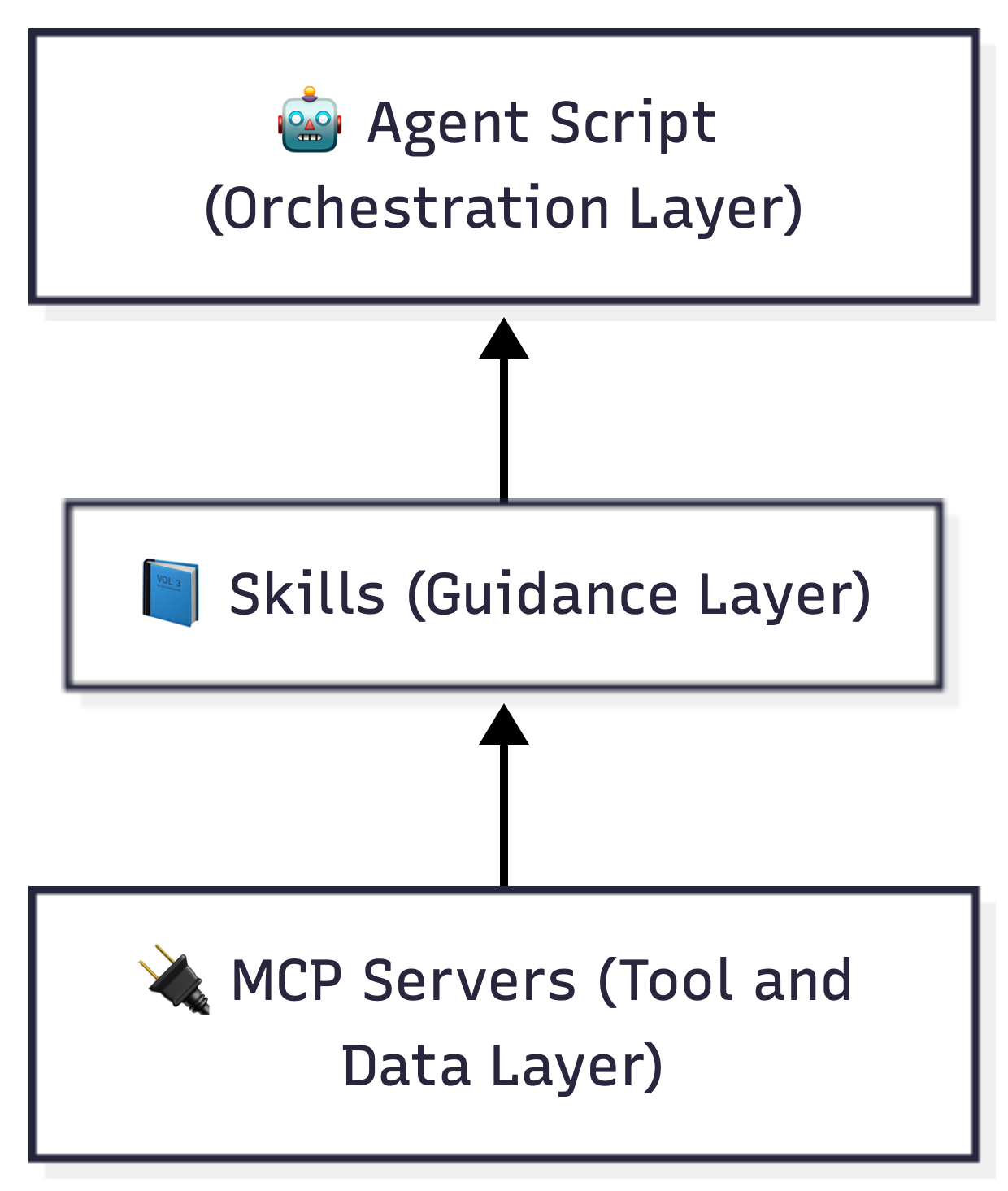
A solid AI system uses all three together:
- MCP connects to tools and data sources
- Skills tell the model how to use them well
- Agent scripts run the whole show
Simple way to think about it: MCP is the hands, Skills are the know-how, and the Agent script is what decides what to do next.
Effort vs. Power at a Glance
| Skills | MCP | Agents | |
|---|---|---|---|
| Setup effort | Low | Medium | High |
| Output control | Medium | Medium | High |
| Infra needed | None | Server | Full stack |
| Autonomy | Guided | Tool-driven | Fully autonomous |
| Learning curve | Easy | Moderate | Steep |
Conclusion
If there is one thing I have learned from years of building and writing about AI systems, it is that complexity is easy to add and hard to remove. Every team I talk to wants to jump straight to agents. That makes sense. Agents feel like the real thing. But many of the problems they are trying to solve do not require an agent. They need better guidance baked into the model, or a clean interface to a tool.
Start with Skills. They cost nothing, take an hour to write, and make your AI smarter right away. Then bring in MCP when your agent needs to reach outside itself and connect to real systems. Use Agent scripts when you have a genuine multi-step workflow that needs to run on its own and handle failures gracefully.
This is not a new idea either. Look at how automation has evolved in infrastructure work. In my recent piece on how IaC evolved to power AI workloads, the pattern is identical: you start simple, layer in tooling as complexity grows, and resist the urge to over-engineer from day one. The same thinking applies here.
If you want to go deeper on the tooling side, my complete guide to modern AI developer tools covers the broader ecosystem, and the AI infrastructure series on DZone goes into how all of these layers fit together at scale.
The AI tooling space is moving fast, but the principles are stable. Pick the right layer for the job. Keep your stack simple until it needs to grow. And build things you can actually maintain six months from now.
Opinions expressed by DZone contributors are their own.