

Prompt-Based ETL: Automating SQL Generation for Data Movement With LLMs
Prompt-based ETL uses LLMs to convert plain English into validated, schema-aware SQL, automating data transformation and enabling self-serve analytics.
Join the DZone community and get the full member experience.
Join For FreeEvery modern data team has experienced it: A product manager asks for a quick metric, “total signups in Asia over the last quarter, broken down by device type,” and suddenly the analytics backlog grows.
Somewhere deep in the data warehouse, an engineer is now tracing join paths across five tables, crafting a carefully optimized SQL query, validating edge cases, and packaging it into a pipeline that will likely break the next time the schema changes.
This isn’t a rare incident. It’s daily life for many.
For years, extract, transform, load (ETL) pipelines have been the backbone of data infrastructure. But they’ve also been a source of friction. The translation of business questions into SQL logic is manual, error-prone, and disconnected from the people who know the why but not the how.
What if you could just write:
“Get all orders above $1000 from the last 30 days, grouped by region.”… and have your ETL system do the rest?
Welcome to the world of prompt-based ETL, which introduces a new paradigm: using large language models (LLMs) to dynamically generate SQL from natural language prompts. Instead of writing SQL by hand, engineers and analysts can describe what they want, and LLMs generate the equivalent queries, aligned with the current schema and execution context.
Let’s unpack why it matters, how it works, and what to consider when implementing it.
Why Automate SQL Generation in ETL?
As organizations scale their data operations — serving more teams, updating faster, and aiming for self-service analytics, the cost of manual SQL development multiplies. It becomes more than slow; it becomes unsustainable.
A New Era: LLM-Powered SQL Generation
The breakthrough? Letting machines write SQL for you, with you.
With the rise of large language models (LLMs), teams are embracing a new approach: prompt-based or automated SQL generation. You don’t write queries line-by-line anymore. You describe what you want, and the system handles the syntax, structure, and logic translation.
Let’s look at why this shift matters.
Accelerates Development Cycles
In a dynamic data environment, even small changes can stall progress. A minor tweak in business logic? That’s another query rewrite. A new metric? Another custom join.
Automation flips this script. Whether via config files, natural language, or low-code UIs, transformation logic becomes declarative, not procedural.
Case in point: Rodrigo Pedro (2022). PromptQL research showed LLM-driven SQL generation reduced analytics prototyping time by up to 40%. Teams could iterate faster and respond to business needs without reworking SQL again and again.
Bridges the Gap Between Domain Experts and Engineers
The people who know what insights are needed, analysts, PMs, marketers, often can’t write the SQL to get there. This disconnect leads to bottlenecks, miscommunication, and endless back-and-forths.
With prompt-based ETL, that gap closes. Business users describe transformations in natural language. LLMs convert it into executable SQL. Everyone speaks the same language, and the system does the translation.
Tools like PromptQL connect directly to databases like PostgreSQL, BigQuery, and Zendesk, letting non-technical users explore product and support data without writing a single line of code.
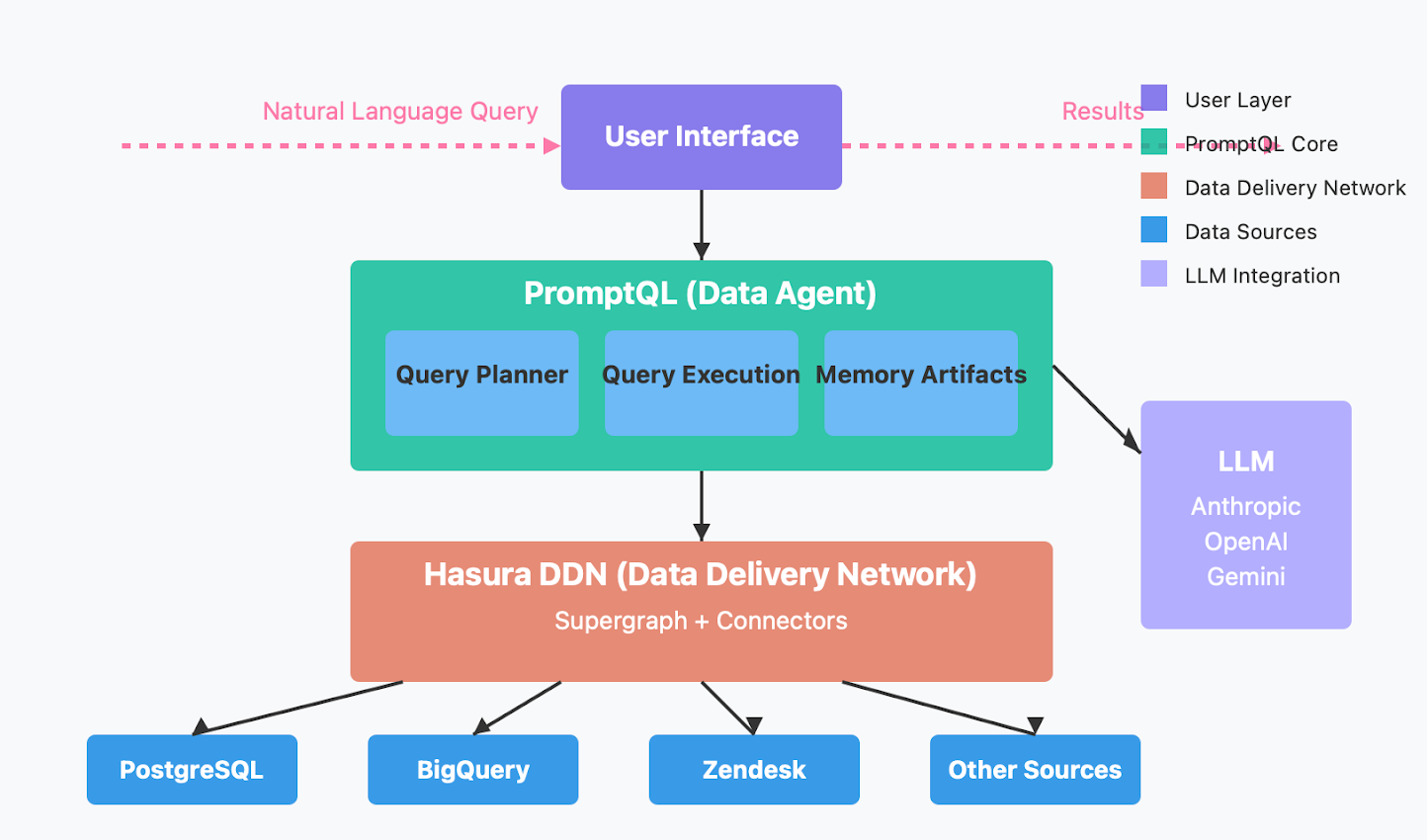
As Leixian Shen (2022) noted, this democratizes access to data, making insights more inclusive and less dependent on engineering bandwidth.
Reduces Human Error and Repetition
Copy-pasting SQL across pipelines seems harmless until filters get mismatched, joins break subtly, or logic drifts over time. These small inconsistencies quietly erode trust in your data.
Automated generation enforces consistency. Templates, transformation specs, and prompt-based logic make behavior predictable across environments, dev, staging, and production. Engineers stop worrying about missing a join condition and start trusting the system.
Enables Scalable Data Operations
As companies grow, so do their datasets and transformation needs. Writing every pipeline by hand doesn’t scale; it creates tech debt and team burnout.
With SQL automation, you define logic once, then apply it across domains. New datasets? Just adjust the config or prompt. The underlying system handles the variation. You scale pipelines without scaling team size.
Frees Engineers to Focus on Architecture, Not Syntax
Ultimately, engineers want to build reliable pipelines, ensure data quality, manage lineage, and enforce governance, not babysit JOINs and GROUP BYs. When SQL generation is automated, engineers can focus on more architecture, not syntax. This leads to better systems, happier teams, and faster innovation.
How Prompt-Based ETL Works
Prompt-based ETL reimagines SQL generation as a natural language task, making data transformation workflows more accessible, flexible, and faster to implement. This approach enables users to describe what they want in plain English while relying on an LLM to handle SQL generation, validation, and integration.
The workflow typically unfolds in five stages:
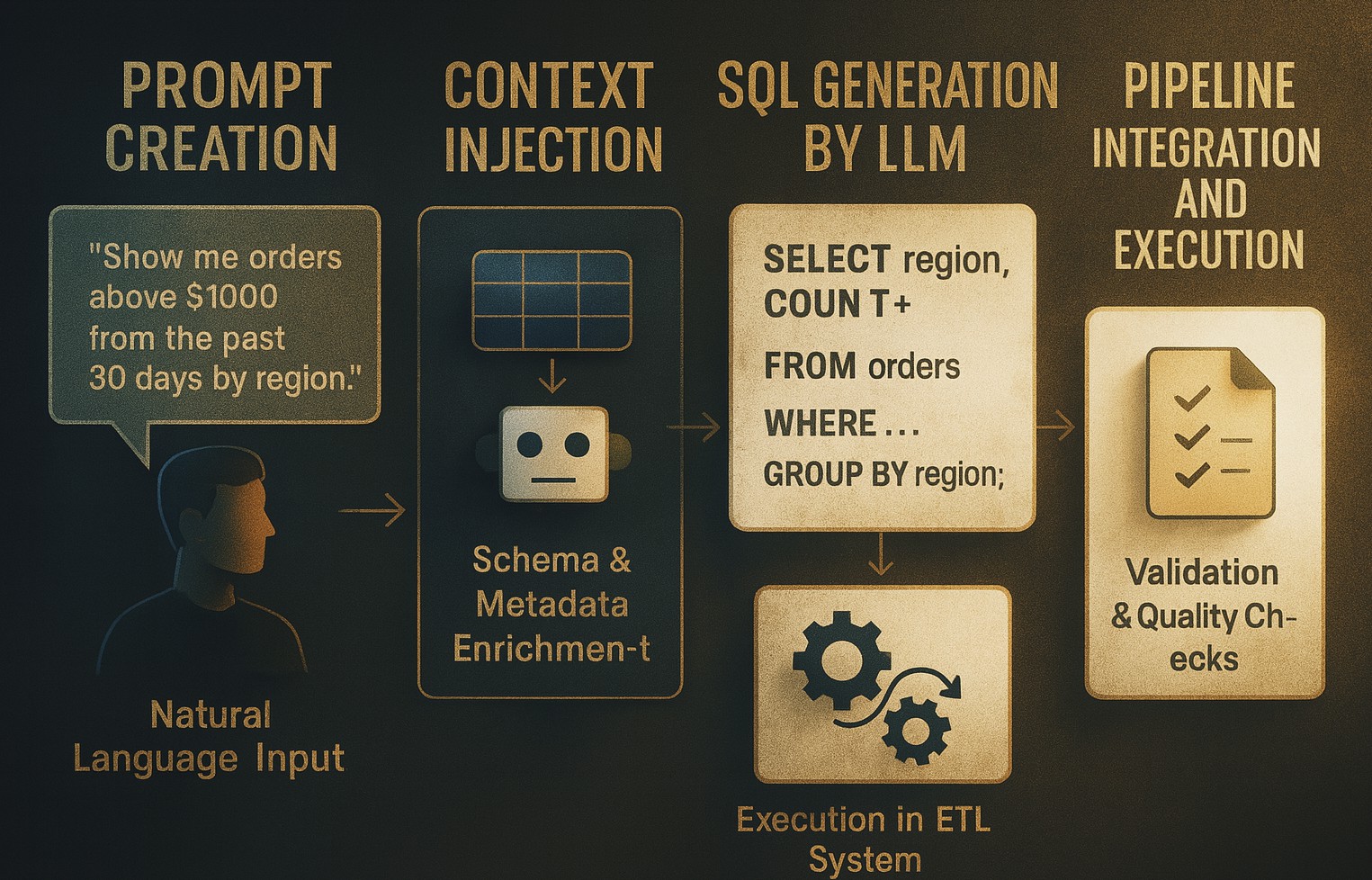
1. Prompt Creation
A user describes the transformation logic using a natural language instruction. For example:
“Extract all orders from the past 30 days where the total amount is above $1000, and group them by customer region.”This prompt acts as a declarative specification that replaces the need to hand-code SQL.
2. Context Injection
To ensure the generated SQL aligns with the actual data schema, the system enriches the prompt with schema metadata. This includes:
- Table names and their descriptions
- Column data types and constraints
- Foreign key relationships and join paths
- SQL dialect preferences (e.g., PostgreSQL, Snowflake, BigQuery)
tables:
- name: orders
columns:
- order_id: integer
- order_date: date
- total_amount: float
- customer_id: integer
- name: customers
columns:
- customer_id: integer
- region: text
relationships:
- orders.customer_id -> customers.customer_id
dialect: PostgreSQL
This helps the LLM map abstract intent to concrete query logic in the correct structural form.
3. SQL Generation by LLM
The prompt, now enriched with context, is passed to a large language model (like ChatGPT or PromptQL) for SQL generation.
LLM combines your English request with schema context to produce optimized SQL:
SELECT
    c.region,
    COUNT(o.order_id) AS total_orders,
    SUM(o.total_amount) AS total_amount
FROM
    orders o
JOIN
    customers c ON o.customer_id = c.customer_id
WHERE
    o.order_date >= CURRENT_DATE - INTERVAL '30 days'
    AND o.total_amount > 1000
GROUP BY
    c.region
ORDER BY
    total_amount DESC;
Behind the scenes, LLMs leverage tokenized pattern recognition, contextual memory, and pre-trained schema understanding to match natural language to SQL syntax.
In real-world deployments, such as with PromptQL and LangChain, this process enables both technical and non-technical users to interact with data using only natural language (Arpan Shaileshbhai Korat, 2024).
4. Validation and Testing
Once SQL is generated, it undergoes several checks to ensure correctness and performance:
You ask LLM:
“Can you optimize this query for large datasets and check it for Postgres syntax?”LLM may respond:
- Adds indexing recommendations on key fields.
- Ensures filters on indexed fields appear early.
- Prefers CURRENT_DATE - INTERVAL over NOW() for index friendliness.
Flags non-sargable filters that block index use.
- Indexing: Ensure you have indexes for optimal performance.
SQL
CREATE INDEX idx_orders_date_amount ON orders (order_date, total_amount);
CREATE INDEX idx_orders_customer_id ON orders (customer_id);
CREATE INDEX idx_customers_customer_id ON customers (customer_id);
These indexes help the planner avoid full table scans and improve filtering and join performance.
- Avoid count(o.order_Id).
SQL
count(*)This is faster and equally effective as long as the
JOINcondition ensures noNULLs (which is true in this case). - Use INTERVAL '30 days' with CURRENT_DATE.
SQL
count(*)Using
CURRENT_DATEavoids time zone-related issues that might arise withNOW(). - Data pruning early: Filter early in your query to reduce memory and I/O.
SQL
WHERE order_date > ... AND total_amount > ...
Place this before the JOIN to reduce the number of rows pulled into memory and processed downstream.
5. Pipeline Integration and Execution
Once validated, the SQL is ready for integration into the ETL pipeline. It can run in tools like dbt, Airflow, or Prefect, automatically extracting, transforming, and loading data into your system.
You ask LLM:
“Can you convert this query into a dbt model?”LLM generates:
SELECT
    c.region,
    COUNT(*) AS total_orders,
    SUM(o.total_amount) AS total_amount
FROM
    {{ ref('orders') }} o
JOIN
    {{ ref('customers') }} c ON c.customer_id = o.customer_id
WHERE
    o.order_date >= CURRENT_DATE - INTERVAL '30 days'
    AND o.total_amount > 1000
GROUP BY
    c.region
ORDER BY
    total_amount DESC
Plus schema.yml for dbt:
models:
  your_project_name:
    high_value_orders_by_region:
      materialized: table
You can include this schema.yml file alongside your dbt model to add descriptions, tests, and metadata for better documentation and quality checks.
Alternatively, you could say:
“Deploy this as an API endpoint using FastAPI and SQLAlchemy.”LLM can scaffold the Python code to dynamically run this SQL and expose the results via a REST API.
Once integrated, the ETL process becomes prompt-driven, extracting, transforming, and loading data automatically based on your natural language request.
Best Practices for Prompt-Based ETL Implementation
Drawing from recent case studies and tool deployments, the following best practices have emerged for successful prompt-based ETL:
|
Best Practice |
Revised description | improved example |
|---|---|---|
|
Be Specific |
Write prompts with precise table and column references. Avoid vague terms or generalities. |
“Join orders and products on product_id, filter for orders after Jan 1, 2025, and group by product_name.” |
|
Provide Schema Metadata |
Supply the LLM with schema details using prompt chaining or programmatic introspection. This improves SQL accuracy. |
“Include: orders(order_id, product_id, order_date), products(product_id, name).” |
|
Implement Guardrails |
Use automated checks (SQL linters, dry runs, EXPLAIN plans) before executing in production. Prevent malformed or dangerous queries. |
“Run in staging with EXPLAIN. Check for full table scans and disallow unsafe mutations.” |
|
Fine-Tune for Your Stack |
Customize the LLM with examples from your data stack — naming conventions, dialect preferences, or common query patterns. |
Train on: “SELECT user_id, AVG(session_time) FROM sessions GROUP BY user_id” (BigQuery style). |
|
Use Iterative Prompting |
Break complex logic into multiple simpler prompts. Chain them together for clarity and reduced error rates. |
Step 1: “Extract all orders.” → Step 2: “Join with products and group by category.” |
Conclusion
Prompt-based ETL isn’t just a technical enhancement. It’s a change in who gets to build with data. With the right architecture, schema awareness, validation, and human oversight, prompt-first workflows allow business users to be more hands-on, engineers to focus on higher-level design, and organizations to move faster without sacrificing trust.
LLMs aren’t perfect. But when properly implemented, they offer a new path forward: one where plain English becomes the interface for complex data operations.
In the end, it’s not just about faster SQL. It’s about empowering people to ask better questions and get better answers without barriers.
Opinions expressed by DZone contributors are their own.
Comments