

Google Cloud Pub/Sub vs. AWS SNS and SQS: One Java API for Both With MultiCloudJ
Google Cloud Pub/Sub does in one service what AWS splits across SNS and SQS. MultiCloudJ gives both a single Java interface.
Almost every distributed system ends up with an asynchronous messaging layer. One service publishes an event, several others consume it at their own pace, and the publisher doesn't wait for them. On Google Cloud, that layer is Pub/Sub. On AWS, it's usually two services wired together: SNS for fan-out and SQS for durable queues.
The building blocks are cut differently, and it shows in your code: how you publish, acknowledge, retry, and order messages. This article walks through Pub/Sub in Java, maps it onto SNS and SQS, and shows how MultiCloudJ, an open-source Java SDK from Salesforce, puts both behind one portable API.
Pub/Sub has two core resources:
- Topic. A named channel that publishers send messages to. Topics are global resources: a publisher in
us-east1and a subscriber ineurope-west1use the same topic without any cross-region plumbing. - Subscription. A named, durable stream of messages from one topic. Each subscription gets its own copy of every message published after it was created. Several subscribers on the same subscription share the work, and each message goes to one of them.
So fan-out means many subscriptions, and load-balancing means many subscribers on one subscription, with no extra wiring for either.
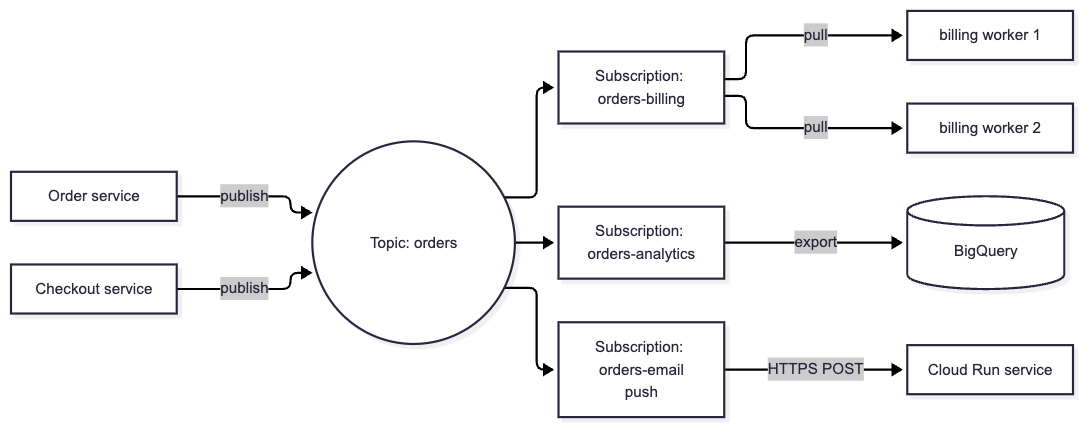
- Pull. The subscriber asks for messages. The Java client library uses StreamingPull, a long-lived bidirectional gRPC stream, so messages flow as soon as they arrive.
- Push. Pub/Sub sends each message as an HTTPS POST to an endpoint you own, such as a Cloud Run service. It can attach a Google-signed OIDC token so the endpoint can verify the caller. A success status (102, 200, 201, 202, or 204) is an ack.
- Export. BigQuery and Cloud Storage subscriptions write messages straight into a table or bucket, with no consumer code at all.
Delivery is at-least-once. A received message must be acked within the subscription's ack deadline (10 seconds by default, up to 600), or Pub/Sub redelivers it. ModifyAckDeadline extends the deadline, and setting it to 0 is a nack: the message becomes available for redelivery right away. The Java client extends leases in the background while your callback runs, for up to an hour by default.
A subscription retains unacked messages for 7 days by default, configurable from 10 minutes to 31 days. Topics can also retain messages for up to 31 days, so a new or rewound subscription can replay history with Seek.
The native publisher batches messages and returns a future per message. build() throws IOException:
import com.google.api.core.ApiFuture;
import com.google.cloud.pubsub.v1.Publisher;
import com.google.protobuf.ByteString;
import com.google.pubsub.v1.PubsubMessage;
import com.google.pubsub.v1.TopicName;

Publisher publisher = Publisher.newBuilder(TopicName.of("my-project", "orders"))
    .setEnableMessageOrdering(true)          // required if you set ordering keys
    .build();

PubsubMessage message = PubsubMessage.newBuilder()
    .setData(ByteString.copyFromUtf8("{\"orderId\":\"o-123\",\"total\":42.50}"))
    .putAttributes("type", "order.created")  // attributes are string key/value pairs
    .setOrderingKey("customer-42")           // ordered per key, not per topic
    .build();

ApiFuture<String> messageId = publisher.publish(message);
The subscriber registers a callback that acks or nacks each message:
import com.google.cloud.pubsub.v1.MessageReceiver;
import com.google.cloud.pubsub.v1.Subscriber;
import com.google.pubsub.v1.ProjectSubscriptionName;

MessageReceiver receiver = (msg, consumer) -> {
    try {
        process(msg.getData().toStringUtf8(), msg.getAttributesMap());
        consumer.ack();
    } catch (Exception e) {
        consumer.nack();                     // redeliver now
    }
};

Subscriber subscriber = Subscriber.newBuilder(
        ProjectSubscriptionName.of("my-project", "orders-billing"), receiver)
    .build();
subscriber.startAsync().awaitRunning();
Both use Application Default Credentials, so on GKE, Cloud Run, or GCE, no keys appear in code.
- Ordering keys. Messages that share an ordering key are delivered in publish order, as long as the subscription has message ordering enabled, and the messages are published in the same region. Messages with different keys can still be processed in parallel.
- Dead-letter topics. After a configurable number of delivery attempts (5 to 100), Pub/Sub forwards the message to a dead-letter topic instead of retrying forever.
- Filtering. A subscription can carry a filter on message attributes, such as
attributes.type = "order.created", so consumers only get what they care about. - Exactly-once delivery. Pull subscriptions can turn on exactly-once delivery. Pub/Sub then won't redeliver a message once its ack has succeeded, and the Java client's
AckReplyConsumerWithResponsetells you whether the ack went through. The guarantee holds when subscribers connect in the same region.
SNS is the topic: it pushes each message to its subscribers immediately, and consumers can't poll it. SQS is the durable queue: consumers poll it, and a message stays until someone deletes it. For Pub/Sub-style fan-out, you subscribe one SQS queue per consumer group to an SNS topic.
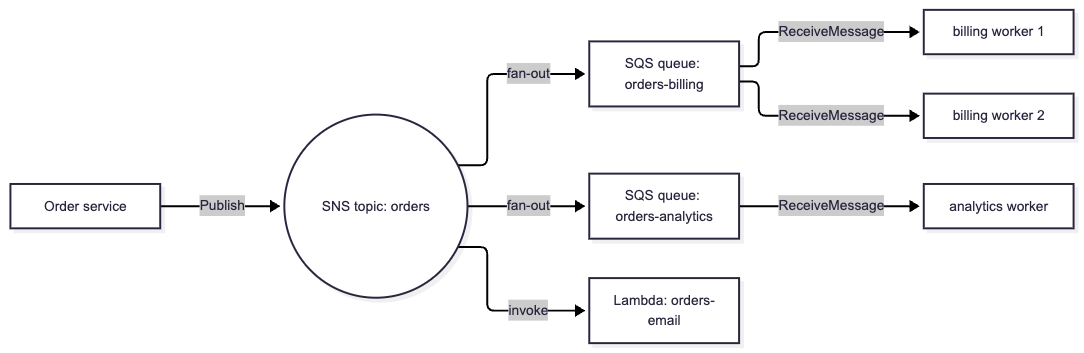
The same topology on AWS: an SNS topic fans out to one SQS queue per consumer group.
The concepts map closely; the table below lines them up. A few AWS details have no Pub/Sub equivalent:
- Each queue needs an access policy that lets the topic send to it.
- SQS has no ack call. You
DeleteMessagewith the receipt handle fromReceiveMessage. - There is no streaming pull.
ReceiveMessagelong-polls for up to 20 seconds. - FIFO adds a 5-minute deduplication window keyed by
MessageDeduplicationId. - Unless raw message delivery is on, each SQS body is an SNS JSON envelope with your payload in its
Messagefield.
| Concept | Google Cloud Pub/Sub | AWS SNS + SQS |
|---|---|---|
| Services involved | One | Two, wired together |
| Fan-out | Multiple subscriptions on a topic | SNS topic subscribed by multiple SQS queues |
| Durable consumer stream | Subscription | SQS queue |
| Consume | StreamingPull, push, or export to BigQuery/GCS | SQS polling (max 10 per call), or SNS push to Lambda/HTTPS |
| Ack | Acknowledge |
DeleteMessage |
| Ack window | Ack deadline: 10s default, 600s max | Visibility timeout: 30s default, 12h max |
| Nack | ModifyAckDeadline to 0 |
ChangeMessageVisibility to 0 |
| Ordering | Ordering keys on any topic | FIFO topics and queues with MessageGroupId |
| Dead letters | Dead-letter topic, 5–100 attempts | Redrive policy, maxReceiveCount |
| Max message size | 10 MB | 1 MiB (SQS), 256 KiB by default on SNS, configurable to 1 MiB |
| Retention | Subscription: 7 days by default, up to 31. Topic: up to 31 days | SQS: 4 days by default, up to 14. SNS FIFO archive: up to 365 days |
| Replay | Seek to a timestamp or snapshot, on any topic |
SNS FIFO archive and replay only. Standard topics and SQS can't replay |
- Pub/Sub has fewer moving parts. A new consumer group is one subscription. On AWS it's a queue, a subscription, and a queue policy.
- Ordering is cheaper to adopt on Pub/Sub. You add a key to a topic you already have. On AWS, you need FIFO resources from the start, because you can't convert a standard queue to FIFO.
- SQS gives you a longer ack window. Long-running jobs fit the 12-hour visibility timeout. On Pub/Sub, you rely on the client extending the lease.
- Replay is broader on Pub/Sub.
Seekworks on any subscription, which makes reprocessing after a bad deploy a routine operation. On AWS, only FIFO topics with archiving enabled can replay.
If your service runs on both clouds, these differences become if (cloud == GCP) branches through your messaging code. MultiCloudJ removes them. Its pubsub module has two portable clients, TopicClient and SubscriptionClient. They delegate to an abstract driver that owns batching, prefetching, ack batching, and error mapping, and a provider module per cloud makes the API calls. Providers are discovered with Java's ServiceLoader and selected by an ID string, so switching clouds is a configuration change.
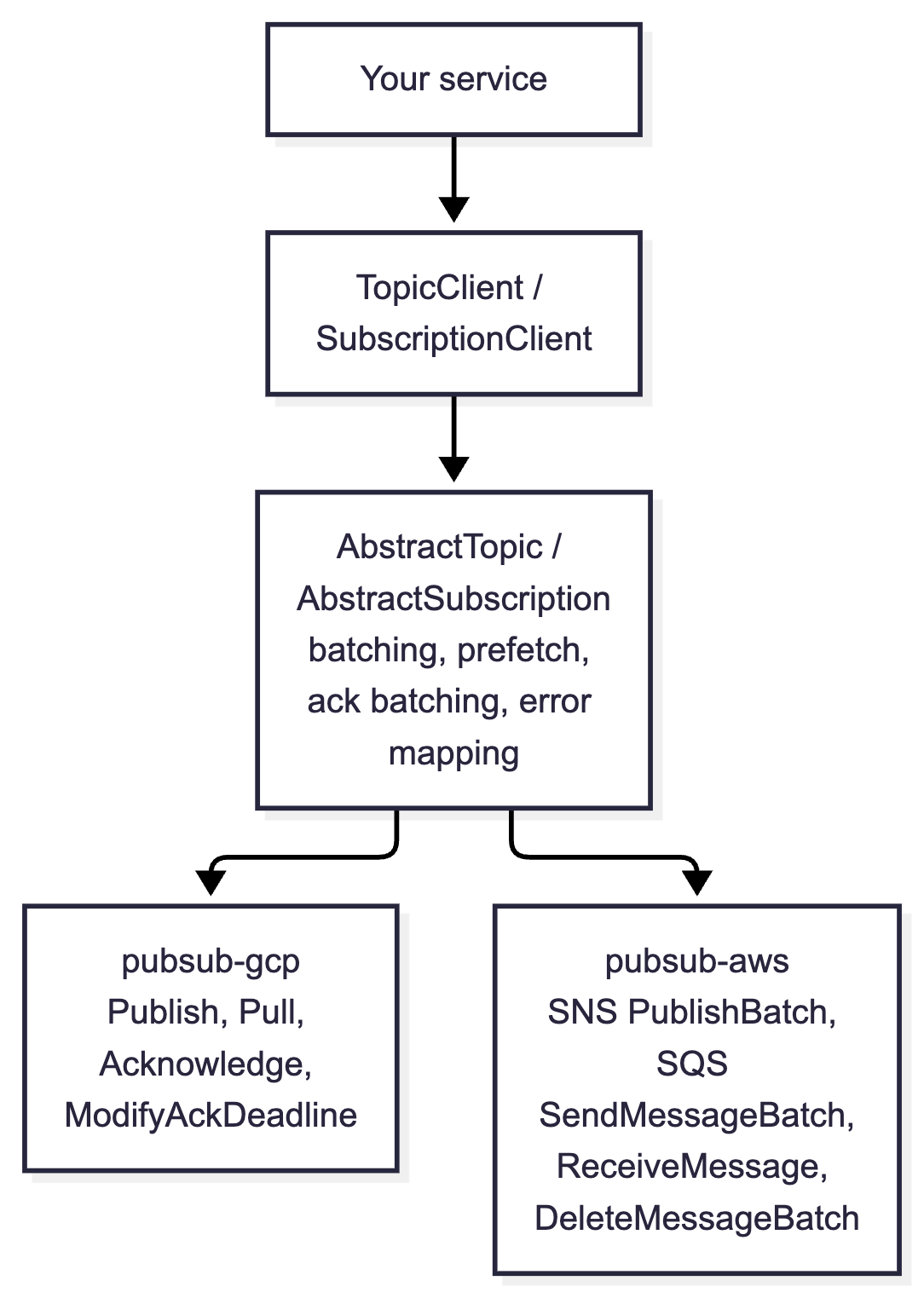
Add the client plus a provider module for each cloud. Your code never imports the provider modules:
<dependency>
    <groupId>com.salesforce.multicloudj</groupId>
    <artifactId>pubsub-client</artifactId>
    <version>0.4.11</version>
</dependency>
<!-- Google Cloud Pub/Sub -->
<dependency>
    <groupId>com.salesforce.multicloudj</groupId>
    <artifactId>pubsub-gcp</artifactId>
    <version>0.4.11</version>
</dependency>
<!-- AWS SNS and SQS -->
<dependency>
    <groupId>com.salesforce.multicloudj</groupId>
    <artifactId>pubsub-aws</artifactId>
    <version>0.4.11</version>
</dependency>
Only the provider ID and resource name change between clouds:
| Cloud | Topic provider ID | Topic name | Subscription provider ID | Subscription name |
|---|---|---|---|---|
| Google Cloud | gcp |
projects/my-project/topics/orders |
gcp |
projects/my-project/subscriptions/orders-billing |
| AWS (SNS) | awssns |
arn:aws:sns:us-east-1:123456789012:orders |
aws |
SQS queue name, e.g. orders-billing |
| AWS (SQS) | awssqs |
SQS queue name or queue URL | aws |
SQS queue name, e.g. orders-billing |
On AWS, a subscription is always an SQS queue, whether you publish to SNS or straight to SQS.
Send a Message With MultiCloudJ
import com.salesforce.multicloudj.pubsub.client.TopicClient;
import com.salesforce.multicloudj.pubsub.driver.Message;

public class PublishOrder {

    public static void main(String[] args) throws Exception {
        String provider = System.getenv("PUBSUB_TOPIC_PROVIDER");  // gcp, awssns, or awssqs
        String topicName = System.getenv("PUBSUB_TOPIC");

        TopicClient.TopicClientBuilder builder = TopicClient.builder(provider)
            .withTopicName(topicName);
        String region = System.getenv("REGION");                  // e.g. us-east-1 on AWS
        if (region != null) {
            builder.withRegion(region);
        }

        try (TopicClient topic = builder.build()) {
            Message message = Message.builder()
                .withBody("{\"orderId\":\"o-123\",\"total\":42.50}")
                .withMetadata("type", "order.created")
                .build();

            topic.send(message);             // blocks until accepted
        }                                    // close() flushes pending batches
    }
}
The driver batches concurrent sends: up to 1,000 per Publish on GCP, and 10 per PublishBatch or SendMessageBatch on AWS. Metadata becomes Pub/Sub attributes or SNS/SQS message attributes.
import com.salesforce.multicloudj.pubsub.client.SubscriptionClient;
import com.salesforce.multicloudj.pubsub.driver.Message;
import java.nio.charset.StandardCharsets;
import java.time.Duration;

public class ConsumeOrders {

    public static void main(String[] args) throws Exception {
        String provider = System.getenv("PUBSUB_SUBSCRIPTION_PROVIDER");  // gcp or aws
        String subscriptionName = System.getenv("PUBSUB_SUBSCRIPTION");

        SubscriptionClient.SubscriptionClientBuilder builder = SubscriptionClient.builder(provider)
            .withSubscriptionName(subscriptionName)
            .withNackVisibilityTimeout(Duration.ofSeconds(30));  // nack delay, default 0
        String region = System.getenv("REGION");
        if (region != null) {
            builder.withRegion(region);
        }

        try (SubscriptionClient subscription = builder.build()) {
            while (!Thread.currentThread().isInterrupted()) {
                Message msg = subscription.receive();             // blocks; the driver prefetches
                try {
                    String body = new String(msg.getBody(), StandardCharsets.UTF_8);
                    process(body, msg.getMetadata());
                    subscription.sendAck(msg.getAckID());         // batched in the background
                } catch (Exception e) {
                    subscription.sendNack(msg.getAckID());        // redelivered after 30s
                }
            }
        }
    }

    private static void process(String body, java.util.Map<String, String> metadata) {
        // your business logic
    }
}
This loop runs unchanged on both clouds. The driver translates each call:
| Portable call | GCP driver | AWS driver |
|---|---|---|
receive() |
Pull, up to 1,000 per call |
ReceiveMessage, up to 10 per call |
sendAck(id) |
Acknowledge |
DeleteMessageBatch |
sendNack(id) |
ModifyAckDeadline, capped at 600s |
ChangeMessageVisibilityBatch, capped at 12h |
getMetadata() |
Message attributes | SQS attributes, merged with SNS attributes |
getAttributes() |
GetSubscription (name, topic) |
GetQueueAttributes (queue ARN) |
The driver also absorbs differences you'd otherwise handle yourself:
- Adaptive prefetching.
receive()reads from a buffer the driver keeps about 2 seconds deep, based on your processing rate, so messages don't sit past their ack deadline. - Ack batching.
sendAckreturns immediately; acks flush in batches of up to 1,000 on GCP and 10 on AWS.sendAcksreturns aCompletableFutureif you need confirmation. - Nack backoff.
sendNack(id, Duration)overrides the subscription default per message. The GCP driver groups nacks by deadline, sinceModifyAckDeadlinetakes one deadline per request. - SNS envelope unwrapping. Without raw delivery, the AWS driver unwraps the SNS envelope, so you see the original body and metadata, as on GCP.
- FIFO through metadata. On AWS, the
MessageGroupIdandDeduplicationIdmetadata keys become the native FIFO fields. - Portable errors. Provider exceptions map to one
SubstrateSdkExceptionhierarchy.
- Resources are provisioned elsewhere. Topics, subscriptions, queues, SNS-to-SQS wiring, and dead-letter policies still come from Terraform or your platform tooling.
- Pub/Sub-only features stay native. Filters, exactly-once delivery, push and export subscriptions, and
Seekare configured on the resources or used through the native client. The GCP driver also doesn't set ordering keys. - The GCP driver uses unary
Pull, not StreamingPull. That keeps one batching model across clouds, but the nativeSubscriberwill deliver lower latency for very high-throughput subscriptions. - Ack windows still differ. The same nack timeout is capped at 10 minutes on GCP and 12 hours on AWS. Size your processing time to the smaller window.
Google Cloud Pub/Sub folds fan-out, durable queuing, and replay into one service. AWS gets there by combining SNS and SQS, with more resources to wire and different API verbs. On Google Cloud, subscriptions, ordering keys, and Seek give you more with less configuration.
If you run on both, keep the differences out of your business logic: put MultiCloudJ's TopicClient and SubscriptionClient at the boundary, pick the provider in configuration, and use the native client for the few features only one cloud offers.
Opinions expressed by DZone contributors are their own.