

Pulsar in Python on Pi for Sensors
Utilizing Apache Pulsar's Python Client on Raspberry Pi - FLiP-Py Stack
 CORE
·
CORE
·
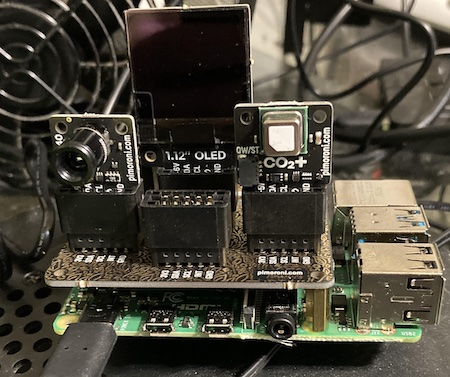
I have a new Raspberry Pi with a Breakout Garden with a thermal camera, 1.12" OLED screen, and a CO2+ sensor.
We first need to install the Pulsar Python Client, if you are running on certain architectures you will need to compile the Apache Pulsar C++ Client first.
pip3 install fastavro
pip3 install pytz
pip3 install pulsar-client[avro]
Our Python 3 App reads our sensor values and publishes the results as JSON Schema Records over Pulsar utilizing the Pulsar Client of Python.
root@thermal:/opt/demo# python3 thermal.py
2022-02-22 19:41:44.380 INFO  [3069204864] ClientConnection:182 | [<none> -> pulsar://pulsar1:6650] Create ClientConnection, timeout=10000
2022-02-22 19:41:44.380 INFO  [3069204864] ConnectionPool:96 | Created connection for pulsar://pulsar1:6650
2022-02-22 19:41:44.386 INFO  [3036730432] ClientConnection:368 | [192.168.1.204:34966 -> 192.168.1.230:6650] Connected to broker
2022-02-22 19:41:44.390 INFO  [3036730432] HandlerBase:64 | [persistent://public/default/pi-thermal, ] Getting connection from pool
2022-02-22 19:41:44.392 INFO  [3036730432] ClientConnection:182 | [<none> -> pulsar://pulsar1:6650] Create ClientConnection, timeout=10000
2022-02-22 19:41:44.392 INFO  [3036730432] ConnectionPool:96 | Created connection for pulsar://127.0.0.1:6650
2022-02-22 19:41:44.396 INFO  [3036730432] ClientConnection:370 | [192.168.1.204:34968 -> 192.168.1.230:6650] Connected to broker through proxy. Logical broker: pulsar://127.0.0.1:6650
2022-02-22 19:41:44.430 INFO  [3036730432] ProducerImpl:189 | [persistent://public/default/pi-thermal, ] Created producer on broker [192.168.1.204:34968 -> 192.168.1.230:6650]
SCD4X, Serial: d3efd3efd3ef
{'_required_default': False, '_default': None, '_required': False, 'uuid': 'wthr_uri_20220223004144', 'ipaddress': '192.168.1.204', 'cputempf': 108, 'runtime': 0, 'host': 'thermal', 'hostname': 'thermal', 'macaddress': 'e4:5f:01:7c:3f:34', 'endtime': '1645576904.9345362', 'te': '0.0006937980651855469', 'cpu': 6.5, 'diskusage': '106326.3 MB', 'memory': 8.7, 'rowid': '20220223004144_b9de27fa-fc0b-46a0-8d1f-04664360f3b0', 'systemtime': '02/22/2022 19:41:50', 'ts': 1645576910, 'starttime': '02/22/2022 19:41:44', 'datetimestamp': '2022-02-23 00:41:49.613734+00:00', 'temperature': 28.4543, 'humidity': 28.6, 'co2': 670.0}
{'_required_default': False, '_default': None, '_required': False, 'uuid': 'wthr_qle_20220223004150', 'ipaddress': '192.168.1.204', 'cputempf': 108, 'runtime': 0, 'host': 'thermal', 'hostname': 'thermal', 'macaddress': 'e4:5f:01:7c:3f:34', 'endtime': '1645576910.6230323', 'te': '0.0004811286926269531', 'cpu': 0.0, 'diskusage': '106326.3 MB', 'memory': 8.7, 'rowid': '20220223004150_040bc286-7778-4b87-8f20-abbe3028fe29', 'systemtime': '02/22/2022 19:41:55', 'ts': 1645576915, 'starttime': '02/22/2022 19:41:50', 'datetimestamp': '2022-02-23 00:41:54.384983+00:00', 'temperature': 27.9977, 'humidity': 29.2, 'co2': 683.0}
{'_required_default': False, '_default': None, '_required': False, 'uuid': 'wthr_sgh_20220223004155', 'ipaddress': '192.168.1.204', 'cputempf': 107, 'runtime': 0, 'host': 'thermal', 'hostname': 'thermal', 'macaddress': 'e4:5f:01:7c:3f:34', 'endtime': '1645576915.400389', 'te': '0.0007336139678955078', 'cpu': 0.0, 'diskusage': '106326.3 MB', 'memory': 8.7, 'rowid': '20220223004155_1a7c21b3-3e0b-48c9-8c3c-73e11b538602', 'systemtime': '02/22/2022 19:42:00', 'ts': 1645576920, 'starttime': '02/22/2022 19:41:55', 'datetimestamp': '2022-02-23 00:41:59.164362+00:00', 'temperature': 27.7413, 'humidity': 29.66, 'co2': 682.0}
^C2022-02-22 19:42:02.086 INFO  [3069204864] ClientImpl:495 | Closing Pulsar client with 1 producers and 0 consumers
2022-02-22 19:42:02.086 INFO  [3069204864] ProducerImpl:686 | [persistent://public/default/pi-thermal, standalone-1-2217] Closing producer for topic persistent://public/default/pi-thermal
2022-02-22 19:42:02.092 INFO  [3036730432] ProducerImpl:729 | [persistent://public/default/pi-thermal, standalone-1-2217] Closed producer
2022-02-22 19:42:02.092 INFO  [3036730432] ClientConnection:1548 | [192.168.1.204:34968 -> 192.168.1.230:6650] Connection closed
2022-02-22 19:42:02.092 INFO  [3036730432] ClientConnection:1548 | [192.168.1.204:34966 -> 192.168.1.230:6650] Connection closed
2022-02-22 19:42:02.121 INFO  [3069204864] ProducerImpl:655 | Producer - [persistent://public/default/pi-thermal, standalone-1-2217] , [batching  = off]
2022-02-22 19:42:02.122 INFO  [3069204864] ClientConnection:256 | [192.168.1.204:34966 -> 192.168.1.230:6650] Destroyed connection
2022-02-22 19:42:02.122 INFO  [3069204864] ClientConnection:256 | [192.168.1.204:34968 -> 192.168.1.230:6650] Destroyed connection
We can also use an Avro schema instead of a JSON schema if that is to your liking.
root@thermal:/opt/demo# python3 thermalavro.py
Schema info is: {
 "type": "record",
 "name": "thermal",
 "fields": [
  {
   "name": "uuid",
   "type": [
    "null",
    "string"
   ]
  },
  {
   "name": "ipaddress",
   "type": [
    "null",
    "string"
   ]
  },
  {
   "name": "cputempf",
   "type": [
    "null",
    "int"
   ]
  },
  {
   "name": "runtime",
   "type": [
    "null",
    "int"
   ]
  },
  {
   "name": "host",
   "type": [
    "null",
    "string"
   ]
  },
  {
   "name": "hostname",
   "type": [
    "null",
    "string"
   ]
  },
  {
   "name": "macaddress",
   "type": [
    "null",
    "string"
   ]
  },
  {
   "name": "endtime",
   "type": [
    "null",
    "string"
   ]
  },
  {
   "name": "te",
   "type": [
    "null",
    "string"
   ]
  },
  {
   "name": "cpu",
   "type": [
    "null",
    "float"
   ]
  },
  {
   "name": "diskusage",
   "type": [
    "null",
    "string"
   ]
  },
  {
   "name": "memory",
   "type": [
    "null",
    "float"
   ]
  },
  {
   "name": "rowid",
   "type": [
    "null",
    "string"
   ]
  },
  {
   "name": "systemtime",
   "type": [
    "null",
    "string"
   ]
  },
  {
   "name": "ts",
   "type": [
    "null",
    "int"
   ]
  },
  {
   "name": "starttime",
   "type": [
    "null",
    "string"
   ]
  },
  {
   "name": "datetimestamp",
   "type": [
    "null",
    "string"
   ]
  },
  {
   "name": "temperature",
   "type": [
    "null",
    "float"
   ]
  },
  {
   "name": "humidity",
   "type": [
    "null",
    "float"
   ]
  },
  {
   "name": "co2",
   "type": [
    "null",
    "float"
   ]
  }
 ]
}
2022-02-23 10:11:51.953 INFO  [3069213056] ClientConnection:182 | [<none> -> pulsar://pulsar1:6650] Create ClientConnection, timeout=10000
2022-02-23 10:11:51.953 INFO  [3069213056] ConnectionPool:96 | Created connection for pulsar://pulsar1:6650
2022-02-23 10:11:51.960 INFO  [3034862656] ClientConnection:368 | [192.168.1.204:34984 -> 192.168.1.230:6650] Connected to broker
2022-02-23 10:11:51.966 INFO  [3034862656] HandlerBase:64 | [persistent://public/default/pi-thermal-avro, ] Getting connection from pool
2022-02-23 10:11:51.970 INFO  [3034862656] ClientConnection:182 | [<none> -> pulsar://pulsar1:6650] Create ClientConnection, timeout=10000
2022-02-23 10:11:51.970 INFO  [3034862656] ConnectionPool:96 | Created connection for pulsar://127.0.0.1:6650
2022-02-23 10:11:51.974 INFO  [3034862656] ClientConnection:370 | [192.168.1.204:34986 -> 192.168.1.230:6650] Connected to broker through proxy. Logical broker: pulsar://127.0.0.1:6650
2022-02-23 10:11:52.008 INFO  [3034862656] ProducerImpl:189 | [persistent://public/default/pi-thermal-avro, ] Created producer on broker [192.168.1.204:34986 -> 192.168.1.230:6650]
SCD4X, Serial: d3efd3efd3ef
{'_required_default': False, '_default': None, '_required': False, 'uuid': 'thrm_xtq_20220223151152', 'ipaddress': '192.168.1.204', 'cputempf': 110, 'runtime': 0, 'host': 'thermal', 'hostname': 'thermal', 'macaddress': 'e4:5f:01:7c:3f:34', 'endtime': '1645629112.5121799', 'te': '0.0006127357482910156', 'cpu': 0.0, 'diskusage': '106314.1 MB', 'memory': 9.3, 'rowid': '20220223151152_46867a0c-dcf1-4919-b4e6-47bd8ca87dc3', 'systemtime': '02/23/2022 10:11:58', 'ts': 1645629118, 'starttime': '02/23/2022 10:11:52', 'datetimestamp': '2022-02-23 15:11:57.192564+00:00', 'temperature': 30.0725, 'humidity': 28.01, 'co2': 1082.0}
{'_required_default': False, '_default': None, '_required': False, 'uuid': 'thrm_kzt_20220223151158', 'ipaddress': '192.168.1.204', 'cputempf': 109, 'runtime': 0, 'host': 'thermal', 'hostname': 'thermal', 'macaddress': 'e4:5f:01:7c:3f:34', 'endtime': '1645629118.2040725', 'te': '0.0007352828979492188', 'cpu': 6.5, 'diskusage': '106314.1 MB', 'memory': 9.3, 'rowid': '20220223151158_fece78a9-4c51-4ad6-8ffa-87ae6bc970d6', 'systemtime': '02/23/2022 10:12:02', 'ts': 1645629122, 'starttime': '02/23/2022 10:11:58', 'datetimestamp': '2022-02-23 15:12:01.967448+00:00', 'temperature': 29.7414, 'humidity': 28.58, 'co2': 1076.0}
{'_required_default': False, '_default': None, '_required': False, 'uuid': 'thrm_udz_20220223151202', 'ipaddress': '192.168.1.204', 'cputempf': 109, 'runtime': 0, 'host': 'thermal', 'hostname': 'thermal', 'macaddress': 'e4:5f:01:7c:3f:34', 'endtime': '1645629122.9787736', 'te': '0.0005147457122802734', 'cpu': 0.0, 'diskusage': '106314.1 MB', 'memory': 9.3, 'rowid': '20220223151202_8fe911ba-5f02-47e4-a5bc-5535f3c789b9', 'systemtime': '02/23/2022 10:12:07', 'ts': 1645629127, 'starttime': '02/23/2022 10:12:02', 'datetimestamp': '2022-02-23 15:12:06.742775+00:00', 'temperature': 29.4877, 'humidity': 28.99, 'co2': 1071.0}
{'_required_default': False, '_default': None, '_required': False, 'uuid': 'thrm_kqr_20220223151207', 'ipaddress': '192.168.1.204', 'cputempf': 112, 'runtime': 0, 'host': 'thermal', 'hostname': 'thermal', 'macaddress': 'e4:5f:01:7c:3f:34', 'endtime': '1645629127.7585478', 'te': '0.0007393360137939453', 'cpu': 0.0, 'diskusage': '106314.1 MB', 'memory': 9.3, 'rowid': '20220223151207_c244eaa0-8b36-4040-8421-8bdafa0b46c0', 'systemtime': '02/23/2022 10:12:12', 'ts': 1645629132, 'starttime': '02/23/2022 10:12:07', 'datetimestamp': '2022-02-23 15:12:11.523104+00:00', 'temperature': 29.25, 'humidity': 29.35, 'co2': 1071.0}
{'_required_default': False, '_default': None, '_required': False, 'uuid': 'thrm_dfn_20220223151212', 'ipaddress': '192.168.1.204', 'cputempf': 110, 'runtime': 0, 'host': 'thermal', 'hostname': 'thermal', 'macaddress': 'e4:5f:01:7c:3f:34', 'endtime': '1645629132.5379777', 'te': '0.0008678436279296875', 'cpu': 0.0, 'diskusage': '106314.1 MB', 'memory': 9.3, 'rowid': '20220223151212_253d220a-34cd-4f1c-a435-1cb62834e3a2', 'systemtime': '02/23/2022 10:12:17', 'ts': 1645629137, 'starttime': '02/23/2022 10:12:12', 'datetimestamp': '2022-02-23 15:12:16.298915+00:00', 'temperature': 29.0097, 'humidity': 29.78, 'co2': 1064.0}
{'_required_default': False, '_default': None, '_required': False, 'uuid': 'thrm_flx_20220223151217', 'ipaddress': '192.168.1.204', 'cputempf': 111, 'runtime': 0, 'host': 'thermal', 'hostname': 'thermal', 'macaddress': 'e4:5f:01:7c:3f:34', 'endtime': '1645629137.3143985', 'te': '0.0007383823394775391', 'cpu': 0.0, 'diskusage': '106314.1 MB', 'memory': 9.3, 'rowid': '20220223151217_5d1cedb9-5fbb-4abe-bcf0-f836a6bec093', 'systemtime': '02/23/2022 10:12:22', 'ts': 1645629142, 'starttime': '02/23/2022 10:12:17', 'datetimestamp': '2022-02-23 15:12:21.179689+00:00', 'temperature': 28.8068, 'humidity': 30.11, 'co2': 1069.0}
{'_required_default': False, '_default': None, '_required': False, 'uuid': 'thrm_fjc_20220223151222', 'ipaddress': '192.168.1.204', 'cputempf': 109, 'runtime': 0, 'host': 'thermal', 'hostname': 'thermal', 'macaddress': 'e4:5f:01:7c:3f:34', 'endtime': '1645629142.1899443', 'te': '0.0007307529449462891', 'cpu': 5.1, 'diskusage': '106314.1 MB', 'memory': 9.3, 'rowid': '20220223151222_0f31c89a-96b5-4d8c-9f69-db3ff721d362', 'systemtime': '02/23/2022 10:12:26', 'ts': 1645629146, 'starttime': '02/23/2022 10:12:22', 'datetimestamp': '2022-02-23 15:12:25.953985+00:00', 'temperature': 28.5931, 'humidity': 30.52, 'co2': 1063.0}
{'_required_default': False, '_default': None, '_required': False, 'uuid': 'thrm_twe_20220223151226', 'ipaddress': '192.168.1.204', 'cputempf': 111, 'runtime': 0, 'host': 'thermal', 'hostname': 'thermal', 'macaddress': 'e4:5f:01:7c:3f:34', 'endtime': '1645629146.967186', 'te': '0.0004837512969970703', 'cpu': 0.0, 'diskusage': '106314.1 MB', 'memory': 9.3, 'rowid': '20220223151226_e85a8384-7f5b-4cc5-9bc7-ca5babd2fb54', 'systemtime': '02/23/2022 10:12:31', 'ts': 1645629151, 'starttime': '02/23/2022 10:12:26', 'datetimestamp': '2022-02-23 15:12:30.729362+00:00', 'temperature': 28.4009, 'humidity': 30.85, 'co2': 1061.0}
^C2022-02-23 10:12:31.743 INFO  [3069213056] ClientImpl:495 | Closing Pulsar client with 1 producers and 0 consumers
2022-02-23 10:12:31.744 INFO  [3069213056] ProducerImpl:686 | [persistent://public/default/pi-thermal-avro, standalone-1-2228] Closing producer for topic persistent://public/default/pi-thermal-avro
2022-02-23 10:12:31.746 INFO  [3034862656] ProducerImpl:729 | [persistent://public/default/pi-thermal-avro, standalone-1-2228] Closed producer
2022-02-23 10:12:31.746 INFO  [3034862656] ClientConnection:1548 | [192.168.1.204:34986 -> 192.168.1.230:6650] Connection closed
2022-02-23 10:12:31.747 INFO  [3034862656] ClientConnection:1548 | [192.168.1.204:34984 -> 192.168.1.230:6650] Connection closed
2022-02-23 10:12:31.782 INFO  [3069213056] ProducerImpl:655 | Producer - [persistent://public/default/pi-thermal-avro, standalone-1-2228] , [batching  = off]
2022-02-23 10:12:31.782 INFO  [3069213056] ClientConnection:256 | [192.168.1.204:34984 -> 192.168.1.230:6650] Destroyed connection
2022-02-23 10:12:31.783 INFO  [3069213056] ClientConnection:256 | [192.168.1.204:34986 -> 192.168.1.230:6650] Destroyed connection

bin/pulsar-client consume "persistent://public/default/pi-thermal-avro" -s "thermalpiavro" -n 0

----- got message -----
key:[thrm_twe_20220223151226], properties:[], content:�.thrm_twe_20220223151226�?192.168.1.204�����thermal�thermal�"e4:5f:01:7c:3f:34�"1645629146.967186�*0.0004837512969970703���106314.1 MB����A�f20220223151226_e85a8384-7f5b-4cc5-9bc7-ca5babd2fb54�&02/23/2022 10:12:31�����
                                                                                                            �&02/23/2022 10:12:26�@2022-02-23 15:12:30.729362+00:00�
              5�A����A���D
We can connect Apache Flink to Apache Pulsar and create a catalog of topics (tables) to query.
CREATE CATALOG pulsar WITH (
   'type' = 'pulsar',
   'service-url' = 'pulsar://pulsar1:6650',
   'admin-url' = 'http://pulsar1:8080',
   'format' = 'json'
);

USE CATALOG pulsar;

SHOW TABLES;

select * from `pi-thermal`;
We can query the table (topic) from Trino/PrestoSQL as well.

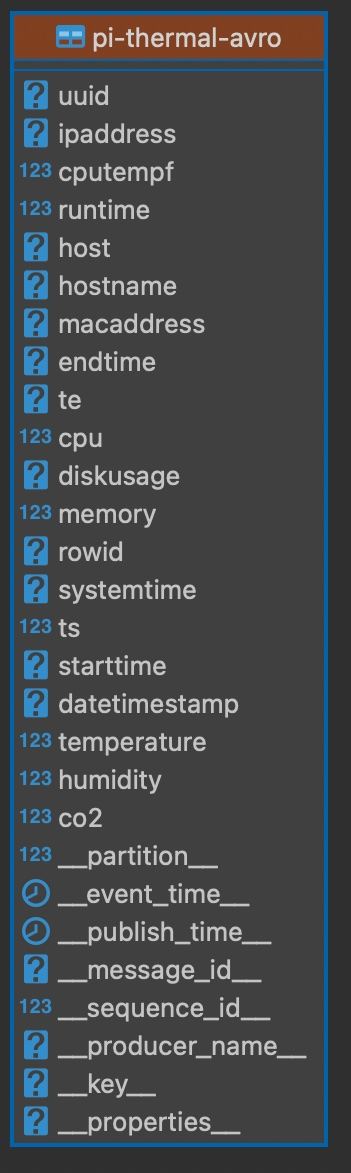
Schema object in Python:
### Schema Object
# https://pulsar.apache.org/docs/en/client-libraries-python/

class thermal(Record):
    uuid = String()
    ipaddress = String()
    cputempf = Integer()
    runtime = Integer()
    host = String()
    hostname = String()
    macaddress = String()
    endtime = String()
    te = String()
    cpu = Float()
    diskusage = String()
    memory = Float()
    rowid = String()
    systemtime = String()
    ts = Integer()
    starttime = String()
    datetimestamp = String()
    temperature = Float()
    humidity = Float()
    co2 =  Float()
Avro schema code:
client = pulsar.Client('pulsar://pulsar1:6650')

thermalschema = AvroSchema(thermal)
print("Schema info is: " + thermalschema.schema_info().schema())

producer = client.create_producer(topic='persistent://public/default/pi-thermal-avro' ,schema=thermalschema,properties={"producer-name": "thermal-pyavro-sensor","producer-id": "thermal-avro-sensor" })
JSON Schema code difference:
schema=JsonSchema(thermal)
Source:
https://github.com/tspannhw/FLiP-Pi-Thermal
References:
Opinions expressed by DZone contributors are their own.
Comments