

Understanding RabbitMQ Exchange Types in Spring Boot
This blog delves into various RabbitMQ exchange types used within a Spring Boot application, highlighting examples and configurations.
 CORE
·
CORE
·
Join the DZone community and get the full member experience.
Join For FreeIn this blog, you will take a closer look at the different exchange types that can be used in RabbitMQ. All are demonstrated by means of examples in a Spring Boot application. Enjoy!
Introduction
In the previous blog, you learned the basic concepts of RabbitMQ and how to use it in a Spring Boot application. However, you only scratched the surface of it, so now it is time to dig a bit deeper into the different exchange types.
If you are not yet familiar with the basic concepts, it is advised to read the previous blog.
The official RabbitMQ documentation also provides detailed information that is worth reading.
Sources used in this blog can be found on GitHub.
Prerequisites
Prerequisites for reading this blog are:
- Basic knowledge of Java;
- Basic knowledge of Spring Boot;
- Basic knowledge of Docker Compose;
- Basic knowledge of RabbitMQ.
Topics
The code can be found in the topics module.
In the previous blog, you created two consumers A and B. Consumer A was bound to Queue A with routing key event.general.*. Consumer B was bound to Queue B with routing keys event.general.* and event.specific.*.
The asterisk (*) wildcard was used and is a substitute for exactly one word. In the examples, the routing keys event.general.message and event.specific.message were used.
You can also use the hash (#) wildcard, and this is a substitute for zero or more words. This is visualized in the figure below.
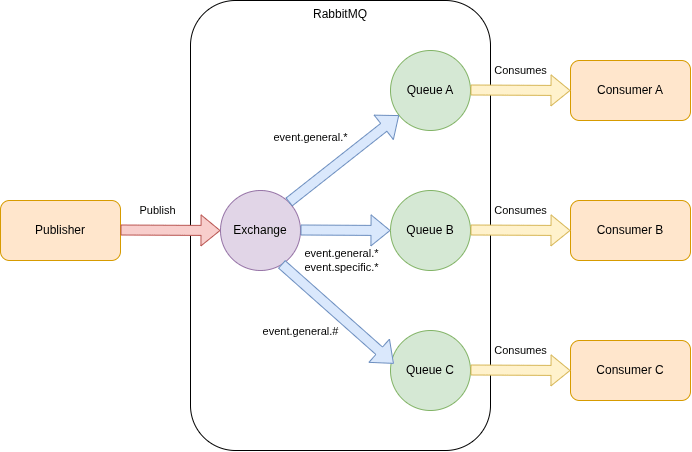
In the RabbitMqConfig, you declare queue C and bind it to the TopicExchange with routing key event.general.#.
public static final String QUEUE_CONSUMER_C = "consumer-c.queue";
public static final String ROUTING_KEY_NESTED_GENERAL_MESSAGE = "event.general.#";

@Bean
Binding bindingConsumerBSpecific(Queue queueConsumerB, TopicExchange exchange) {
    return BindingBuilder.bind(queueConsumerB).to(exchange).with(ROUTING_KEY_SPECIFIC_MESSAGE);
}

@Bean
public Queue queueConsumerC() {
    return new Queue(QUEUE_CONSUMER_C, false);
}

@Bean
Binding bindingConsumerCNestedGeneral(Queue queueConsumerC, TopicExchange exchange) {
    return BindingBuilder.bind(queueConsumerC).to(exchange).with(ROUTING_KEY_NESTED_GENERAL_MESSAGE);
}
In the MessageController, you create an endpoint for sending a message with routing key event.general.message.nested. This routing key will not match the bindings of consumers A and B.
@RequestMapping(
        method = RequestMethod.POST,
        value = "send-nested-general"
)
public ResponseEntity<Void> sendNestedGeneralMessage(@RequestBody String message) {
    messageService.sendMessage("event.general.message.nested", message);
    return new ResponseEntity<>(HttpStatus.CREATED);
}
The ReceiverC listens to messages received in queue C and prints a message.
@Component
public class ReceiverC {

    @RabbitListener(queues = RabbitMqConfig.QUEUE_CONSUMER_C)
    public void receiveMessage(String message) {
        System.out.println("Queue Consumer C received <" + message + ">");
    }

}
Start the application from within the topics module.
mvn spring-boot:runFirst, post a general message; this should be received by all consumers.
curl -X POST http://localhost:8080/send-general \
  -H "Content-Type: text/plain" \
  -d "This is a general message"
In the application console log, you notice that all consumers receive the message.
Queue Consumer B received <This is a general message>
Queue Consumer A received <This is a general message>
Queue Consumer C received <This is a general message>
Now, post a nested general message, which should be received only by consumer C.
curl -X POST http://localhost:8080/send-nested-general \
  -H "Content-Type: text/plain" \
  -d "This is a nested general message"
In the application console log, you notice that the message is only received by consumer C.
Queue Consumer C received <This is a nested general message>
Work Queues
The code can be found in the work module.
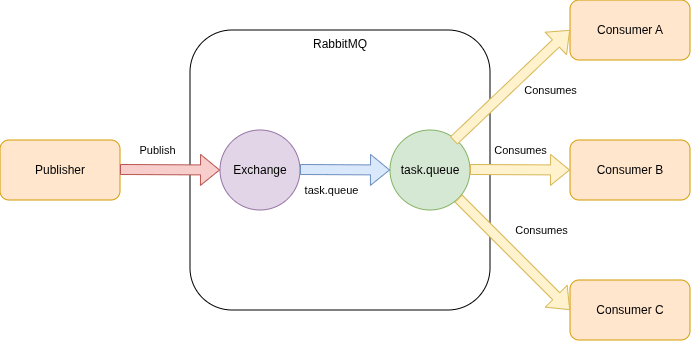
With work queues, you can publish a message and dispatch it to a pool of consumers. One of the consumers will pick up the message and start processing it. This is especially useful for dispatching long-running tasks.
You use the default direct exchange in this case, and the queue name is used as the routing key. No need to use a custom exchange.
This is visualized in the figure below.
The RabbitMqConfig is quite small; you only define the queue.
@Configuration
public class RabbitMqConfig {

    public static final String QUEUE_TASK = "task.queue";
    @Bean
    public Queue queueTask() {
        return new Queue(QUEUE_TASK, false);
    }

}
When sending a message via an endpoint, you use the queue name as the routing key.
@RequestMapping(
        method = RequestMethod.POST,
        value = "send-work"
)
public ResponseEntity<Void> sendWorkMessage(@RequestBody String message) {
    messageService.sendMessage(RabbitMqConfig.QUEUE_TASK, message);
    return new ResponseEntity<>(HttpStatus.CREATED);
}
Every consumer listens to the queue.
@Component
public class ReceiverA {

    @RabbitListener(queues = RabbitMqConfig.QUEUE_TASK)
    public void receiveMessage(String message) {
        System.out.println("Task picked up by Consumer A <" + message + ">");
    }

}

@Component
public class ReceiverB {

    @RabbitListener(queues = RabbitMqConfig.QUEUE_TASK)
    public void receiveMessage(String message) {
        System.out.println("Task picked up by Consumer B <" + message + ">");
    }

}

@Component
public class ReceiverC {

    @RabbitListener(queues = RabbitMqConfig.QUEUE_TASK)
    public void receiveMessage(String message) {
        System.out.println("Task picked up by Consumer C <" + message + ">");
    }

}
Start the application from within the work module.
mvn spring-boot:runSend a message to the queue.
curl -X POST http://localhost:8080/send-work \
  -H "Content-Type: text/plain" \
  -d "This is a work message"
The message is processed by one consumer.
Task picked up by Consumer A <This is a work message>
Fanout
The code can be found in the fanout module.
With fanout, you want to broadcast messages to all queues. You send messages to the exchange, but there is no need to specify a routing key. You can also ensure that temporary queues are used. When temporary queues are used, the queue name will be generated.
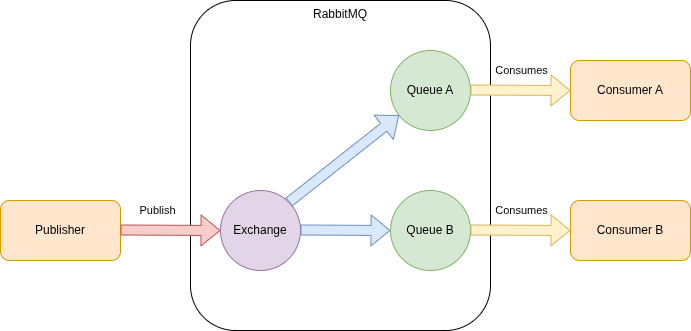
In the RabbitMqConfig, you define a FanoutExchange. The queues are defined as an AnonymousQueue. This creates a non-durable, exclusive, auto-delete queue with a generated name. You bind the queues to the exchange.
@Configuration
public class RabbitMqConfig {

    public static final String FANOUT_EXCHANGE_NAME = "fanout.exchange";

    @Bean
    FanoutExchange fanoutExchange() {
        return new FanoutExchange(FANOUT_EXCHANGE_NAME);
    }

    @Bean
    public Queue queueConsumerA() {
        return new AnonymousQueue();
    }

    @Bean
    Binding bindingConsumerA(Queue queueConsumerA, FanoutExchange exchange) {
        return BindingBuilder.bind(queueConsumerA).to(exchange);
    }

    @Bean
    public Queue queueConsumerB() {
        return new AnonymousQueue();
    }

    @Bean
    Binding bindingConsumerBGeneral(Queue queueConsumerB, FanoutExchange exchange) {
        return BindingBuilder.bind(queueConsumerB).to(exchange);
    }

    @Bean
    Binding bindingConsumerBSpecific(Queue queueConsumerB, FanoutExchange exchange) {
        return BindingBuilder.bind(queueConsumerB).to(exchange);
    }

}
In order to send messages, you only need to send them to the exchange. This can be seen in the MessageService.
public void sendMessage(String message) {
    rabbitTemplate.convertAndSend(RabbitMqConfig.FANOUT_EXCHANGE_NAME, "", message);
}
On the receiving side, you listen to the generated queue name (thus not a specific one in this case).
@Component
public class ReceiverA {

    @RabbitListener(queues = "#{queueConsumerA.name}")
    public void receiveMessage(String message) {
        System.out.println("Queue Consumer A received <" + message + ">");
    }

}

@Component
public class ReceiverB {

    @RabbitListener(queues = "#{queueConsumerB.name}")
    public void receiveMessage(String message) {
        System.out.println("Queue Consumer B received <" + message + ">");
    }

}
Start the application from within the fanout module.
mvn spring-boot:runSend a message to the queue.
curl -X POST http://localhost:8080/send-to-all \
  -H "Content-Type: text/plain" \
  -d "This is a fanout message"
In the application console log, you notice that the message is consumed by all queues.
Queue Consumer B received <This is a fanout message>
Queue Consumer A received <This is a fanout message>
RPC
The code can be found in the RPC module.
Remote Procedure Call (RPC) can be used when you need to execute a function on a remote application and wait for the result.
The event is sent to the queue and is processed by Consumer A. The result is sent to a queue in the replyTo field of the request. The publisher waits for data to be returned on this callback queue. When the message appears, it checks the correlationId. If it matches the value of the request, the response is returned to the publisher. All of this is done automatically by the RabbitTemplate.
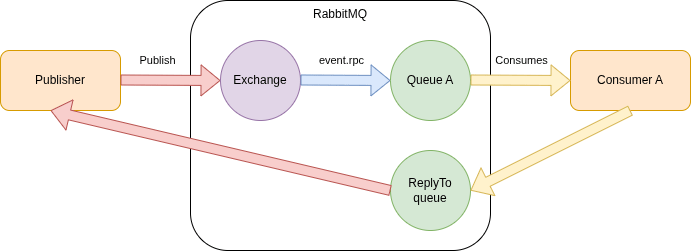
In the RabbitMqConfig, a DirectExchange is used. With a DirectExchange, you match exactly on events; you cannot use wildcards here, just like a TopicExchange.
@Configuration
public class RabbitMqConfig {

    public static final String QUEUE_CONSUMER_A = "consumer-a.queue";
    public static final String DIRECT_EXCHANGE_NAME = "events.exchange";
    public static final String ROUTING_KEY_RPC_MESSAGE = "event.rpc";

    @Bean
    DirectExchange eventsExchange() {
        return new DirectExchange(DIRECT_EXCHANGE_NAME);
    }

    @Bean
    public Queue queueConsumerA() {
        return new Queue(QUEUE_CONSUMER_A, false);
    }

    @Bean
    Binding bindingConsumerA(Queue queueConsumerA, DirectExchange exchange) {
        return BindingBuilder.bind(queueConsumerA).to(exchange).with(ROUTING_KEY_RPC_MESSAGE);
    }

}
The MessageController contains an endpoint for sending the event.
@RequestMapping(
        method = RequestMethod.POST,
        value = "send-rpc"
)
public ResponseEntity<Void> sendRpcMessage(@RequestBody String message) {
    messageService.sendMessage(message);
    return new ResponseEntity<>(HttpStatus.CREATED);
}
In the MessageService, you use convertSendAndReceive and process the response.
public void sendMessage(String message) {
    Object response = rabbitTemplate.convertSendAndReceive(RabbitMqConfig.DIRECT_EXCHANGE_NAME, ROUTING_KEY_RPC_MESSAGE, message);
    if (response != null) {
        System.out.println("Sender received response: " + response);
    } else {
        System.out.println("No response received");
    }
}
In the receiver, you receive the message and send a response. Do note that some additional processing is added in order to trigger a timeout. More on that in a moment.
@Component
public class ReceiverA {

    @RabbitListener(queues = RabbitMqConfig.QUEUE_CONSUMER_A)
    public String receiveMessage(String message) {
        System.out.println("Queue Consumer A received <" + message + ">");

        if (message.equals("This is an rpc message")) {
            return "success";
        } else if (message.equals("This is a timeout message")) {
            try {
                Thread.sleep(10000);
            } catch (InterruptedException e) {
                throw new RuntimeException(e);
            }
            return "success";
        } else {
            return "failure";
        }
    }

}
Start the application from within the rpc module.
mvn spring-boot:runSend a message to the queue.
curl -X POST http://localhost:8080/send-rpc \
  -H "Content-Type: text/plain" \
  -d "This is an rpc message"
In the application console log, you notice that the message is consumed by consumer A, and that a successful response is received by the publisher.
Queue Consumer A received <This is an rpc message>
Sender received response: success
But what if it takes too long to process the message? In real life, the remote application can be unreachable for one reason or another.
Send a timeout message.
curl -X POST http://localhost:8080/send-rpc \
  -H "Content-Type: text/plain" \
  -d "This is a timeout message"
In the MessageService, the response will return null, and a timeout exception is raised.
Queue Consumer A received <This is a timeout message>
No response received
2026-04-25T14:50:16.785+02:00  WARN 482297 --- [MySpringRabbitMqPlanet] [pool-2-thread-8] o.s.amqp.rabbit.core.RabbitTemplate      : Reply received after timeout for 2
2026-04-25T14:50:16.785+02:00  WARN 482297 --- [MySpringRabbitMqPlanet] [pool-2-thread-8] s.a.r.l.ConditionalRejectingErrorHandler : Execution of Rabbit message listener failed.

org.springframework.amqp.rabbit.support.ListenerExecutionFailedException: Listener threw exception
        at org.springframework.amqp.rabbit.listener.AbstractMessageListenerContainer.wrapToListenerExecutionFailedExceptionIfNeeded(AbstractMessageListenerContainer.java:1795) ~[spring-rabbit-4.0.2.jar:4.0.2]
        at org.springframework.amqp.rabbit.listener.AbstractMessageListenerContainer.doInvokeListener(AbstractMessageListenerContainer.java:1687) ~[spring-rabbit-4.0.2.jar:4.0.2]
        at org.springframework.amqp.rabbit.listener.AbstractMessageListenerContainer.actualInvokeListener(AbstractMessageListenerContainer.java:1612) ~[spring-rabbit-4.0.2.jar:4.0.2]
        at org.springframework.amqp.rabbit.listener.AbstractMessageListenerContainer.invokeListener(AbstractMessageListenerContainer.java:1599) ~[spring-rabbit-4.0.2.jar:4.0.2]
        at org.springframework.amqp.rabbit.listener.AbstractMessageListenerContainer.doExecuteListener(AbstractMessageListenerContainer.java:1590) ~[spring-rabbit-4.0.2.jar:4.0.2]
        at org.springframework.amqp.rabbit.listener.AbstractMessageListenerContainer.executeListenerAndHandleException(AbstractMessageListenerContainer.java:1539) ~[spring-rabbit-4.0.2.jar:4.0.2]
        at org.springframework.amqp.rabbit.listener.AbstractMessageListenerContainer.executeListener(AbstractMessageListenerContainer.java:1520) ~[spring-rabbit-4.0.2.jar:4.0.2]
        at org.springframework.amqp.rabbit.listener.DirectMessageListenerContainer$SimpleConsumer.callExecuteListener(DirectMessageListenerContainer.java:1206) ~[spring-rabbit-4.0.2.jar:4.0.2]
        at org.springframework.amqp.rabbit.listener.DirectMessageListenerContainer$SimpleConsumer.handleDelivery(DirectMessageListenerContainer.java:1163) ~[spring-rabbit-4.0.2.jar:4.0.2]
        at com.rabbitmq.client.impl.ConsumerDispatcher$5.run(ConsumerDispatcher.java:149) ~[amqp-client-5.27.1.jar:5.27.1]
        at com.rabbitmq.client.impl.ConsumerWorkService$WorkPoolRunnable.run(ConsumerWorkService.java:111) ~[amqp-client-5.27.1.jar:5.27.1]
        at java.base/java.util.concurrent.ThreadPoolExecutor.runWorker(ThreadPoolExecutor.java:1090) ~[na:na]
        at java.base/java.util.concurrent.ThreadPoolExecutor$Worker.run(ThreadPoolExecutor.java:614) ~[na:na]
        at java.base/java.lang.Thread.run(Thread.java:1474) ~[na:na]
Caused by: org.springframework.amqp.AmqpRejectAndDontRequeueException: Reply received after timeout
        at org.springframework.amqp.rabbit.core.RabbitTemplate.onMessage(RabbitTemplate.java:2721) ~[spring-rabbit-4.0.2.jar:4.0.2]
        at org.springframework.amqp.rabbit.listener.DirectReplyToMessageListenerContainer.lambda$setMessageListener$0(DirectReplyToMessageListenerContainer.java:93) ~[spring-rabbit-4.0.2.jar:4.0.2]
        at org.springframework.amqp.rabbit.listener.AbstractMessageListenerContainer.doInvokeListener(AbstractMessageListenerContainer.java:1683) ~[spring-rabbit-4.0.2.jar:4.0.2]
        ... 12 common frames omitted

2026-04-25T14:50:16.790+02:00 ERROR 482297 --- [MySpringRabbitMqPlanet] [pool-2-thread-8] .l.DirectReplyToMessageListenerContainer : Failed to invoke listener

org.springframework.amqp.rabbit.support.ListenerExecutionFailedException: Listener threw exception
        at org.springframework.amqp.rabbit.listener.AbstractMessageListenerContainer.wrapToListenerExecutionFailedExceptionIfNeeded(AbstractMessageListenerContainer.java:1795) ~[spring-rabbit-4.0.2.jar:4.0.2]
        at org.springframework.amqp.rabbit.listener.AbstractMessageListenerContainer.doInvokeListener(AbstractMessageListenerContainer.java:1687) ~[spring-rabbit-4.0.2.jar:4.0.2]
        at org.springframework.amqp.rabbit.listener.AbstractMessageListenerContainer.actualInvokeListener(AbstractMessageListenerContainer.java:1612) ~[spring-rabbit-4.0.2.jar:4.0.2]
        at org.springframework.amqp.rabbit.listener.AbstractMessageListenerContainer.invokeListener(AbstractMessageListenerContainer.java:1599) ~[spring-rabbit-4.0.2.jar:4.0.2]
        at org.springframework.amqp.rabbit.listener.AbstractMessageListenerContainer.doExecuteListener(AbstractMessageListenerContainer.java:1590) ~[spring-rabbit-4.0.2.jar:4.0.2]
        at org.springframework.amqp.rabbit.listener.AbstractMessageListenerContainer.executeListenerAndHandleException(AbstractMessageListenerContainer.java:1539) ~[spring-rabbit-4.0.2.jar:4.0.2]
        at org.springframework.amqp.rabbit.listener.AbstractMessageListenerContainer.executeListener(AbstractMessageListenerContainer.java:1520) ~[spring-rabbit-4.0.2.jar:4.0.2]
        at org.springframework.amqp.rabbit.listener.DirectMessageListenerContainer$SimpleConsumer.callExecuteListener(DirectMessageListenerContainer.java:1206) ~[spring-rabbit-4.0.2.jar:4.0.2]
        at org.springframework.amqp.rabbit.listener.DirectMessageListenerContainer$SimpleConsumer.handleDelivery(DirectMessageListenerContainer.java:1163) ~[spring-rabbit-4.0.2.jar:4.0.2]
        at com.rabbitmq.client.impl.ConsumerDispatcher$5.run(ConsumerDispatcher.java:149) ~[amqp-client-5.27.1.jar:5.27.1]
        at com.rabbitmq.client.impl.ConsumerWorkService$WorkPoolRunnable.run(ConsumerWorkService.java:111) ~[amqp-client-5.27.1.jar:5.27.1]
        at java.base/java.util.concurrent.ThreadPoolExecutor.runWorker(ThreadPoolExecutor.java:1090) ~[na:na]
        at java.base/java.util.concurrent.ThreadPoolExecutor$Worker.run(ThreadPoolExecutor.java:614) ~[na:na]
        at java.base/java.lang.Thread.run(Thread.java:1474) ~[na:na]
Caused by: org.springframework.amqp.AmqpRejectAndDontRequeueException: Reply received after timeout
        at org.springframework.amqp.rabbit.core.RabbitTemplate.onMessage(RabbitTemplate.java:2721) ~[spring-rabbit-4.0.2.jar:4.0.2]
        at org.springframework.amqp.rabbit.listener.DirectReplyToMessageListenerContainer.lambda$setMessageListener$0(DirectReplyToMessageListenerContainer.java:93) ~[spring-rabbit-4.0.2.jar:4.0.2]
        at org.springframework.amqp.rabbit.listener.AbstractMessageListenerContainer.doInvokeListener(AbstractMessageListenerContainer.java:1683) ~[spring-rabbit-4.0.2.jar:4.0.2]
        ... 12 common frames omitted
How to solve this? In this case, you are better off using the AsyncRabbitTemplate. This template is not automatically autowired, so you have to define it as a bean. Let's do so in the RabbitMqConfig.
@Bean
public AsyncRabbitTemplate asyncRabbitTemplate(RabbitTemplate rabbitTemplate) {
    return new AsyncRabbitTemplate(rabbitTemplate);
}
In the MessageController, you define an endpoint to trigger the async template.
@RequestMapping(
        method = RequestMethod.POST,
        value = "send-async"
)
public ResponseEntity<Void> sendAsyncMessage(@RequestBody String message) {
    messageService.sendAsyncMessage(message);
    return new ResponseEntity<>(HttpStatus.CREATED);
}
In the MessageService, you autowire the AsyncRabbitTemplate. And because it is an async call, you catch the response by means of a CompletableFuture.
public void sendAsyncMessage(String message) {
    CompletableFuture<Object> future = asyncRabbitTemplate.convertSendAndReceive(RabbitMqConfig.DIRECT_EXCHANGE_NAME, ROUTING_KEY_RPC_MESSAGE, message);

    future.thenAccept(response -> {
        if (response != null) {
            System.out.println("Sender received response: " + response);
        } else {
            System.out.println("No response received");
        }
    });

}
Start the application from within the rpc module.
mvn spring-boot:runSend a message to the queue.
curl -X POST http://localhost:8080/send-async \
  -H "Content-Type: text/plain" \
  -d "This is a timeout message"
In the application log, you see the same result: the response is null, but no timeout exception anymore.
Conclusion
In this post, you learned different exchange types. Each serves its own use case. It is up to you to choose the right pattern for your use case.
Published at DZone with permission of Gunter Rotsaert. See the original article here.
Opinions expressed by DZone contributors are their own.
Comments