

When Million Requests Arrive in a Minute: Why Reactive Auto Scaling Fails and the Predictive Fix
Learn how to handle flash crowds with predictive, schedule-aware autoscaling, readiness checks, and tier-based capacity to prevent downtime and lag.
Reactive autoscaling is a critical safety net. Demand rises, metrics spike, policies trigger, and capacity increases. But flash-crowd events, product drops, major campaigns, and limited-inventory moments do not ramp. They cliff. Users arrive at once, and reactive scaling is structurally late because “scale triggered” is only the start of the journey to usable capacity.
If your demand spike arrives faster than your system can warm up, reactive scaling will lag no matter how well you tune it. The fix is planning and verification, scaling before the event, and proving the system is ready before customers arrive.
This article outlines a practitioner approach: schedule-aware, tier-based predictive scaling using capacity targets and an executor that verifies readiness.
Why Reactive Scaling Loses Against Flash Crowds
Reactive scaling assumes:
- Demand ramps gradually enough to be detected early.
- Signals (CPU, request rate, latency) change soon enough to trigger action.
- Provisioning time is short relative to demand growth.
- Workloads are ready to serve traffic as soon as they are “up.”
Flash crowds violate all four. Time is consumed by provisioning compute, registering capacity and passing health checks, application warm-up (caches and connection pools), and dependency readiness (datastores, rate limits, downstream saturation). The result is predictable. Traffic arrives instantly, usable capacity arrives minutes later, after customers have already experienced errors and latency.
The Pivot: Treat Peak Traffic Events as Planned Operational Events
Peak traffic is unpredictable in volume but often predictable in timing. Drops, campaigns, and major announcements have scheduled start times. That enables a different operating model:
- Scale ahead of time instead of waiting for metrics to turn red.
- Define what “ready” means beyond desired capacity.
- Continuously verify readiness as the event approaches.
The questions shift from “What is the load right now?” to. What event is coming (and when), how risky is it (tier), what capacity do critical services need, and when must scaling begin so the system is ready by start time?
A Practitioner Architecture: Control Plane, Policy Engine, Executor
A robust predictive scaling solution typically looks like three components:
1. Control Plane (Operations Hub)
The control plane orchestrates the workflow and maintains operational state: schedule and window (pre-, during-, and post-), tier, services in scope, controls (manual overrides/safety locks), and an audit trail. It triggers actions as events enter the pre-scale window and coordinates readiness checks through the peak period.
2. Policy Engine (Config-Driven Capacity Targets)
The policy engine maps tier + service identity → capacity target. The key design choice: capacity is configuration, not code. Define tiers such as BASELINE (normal day), ELEVATED (higher demand), and PEAK (launch posture). Store tier targets in version-controlled config so service owners can adjust safely with review without deploying code to change capacity.
3. Scaling Executor (Actuation With Verification)
The executor applies targets to your scaling mechanism (autoscaling groups, container orchestrators, platform scaling APIs) and verifies that reality matches intent. Teams often treat “set desired = X” as success. It is not.
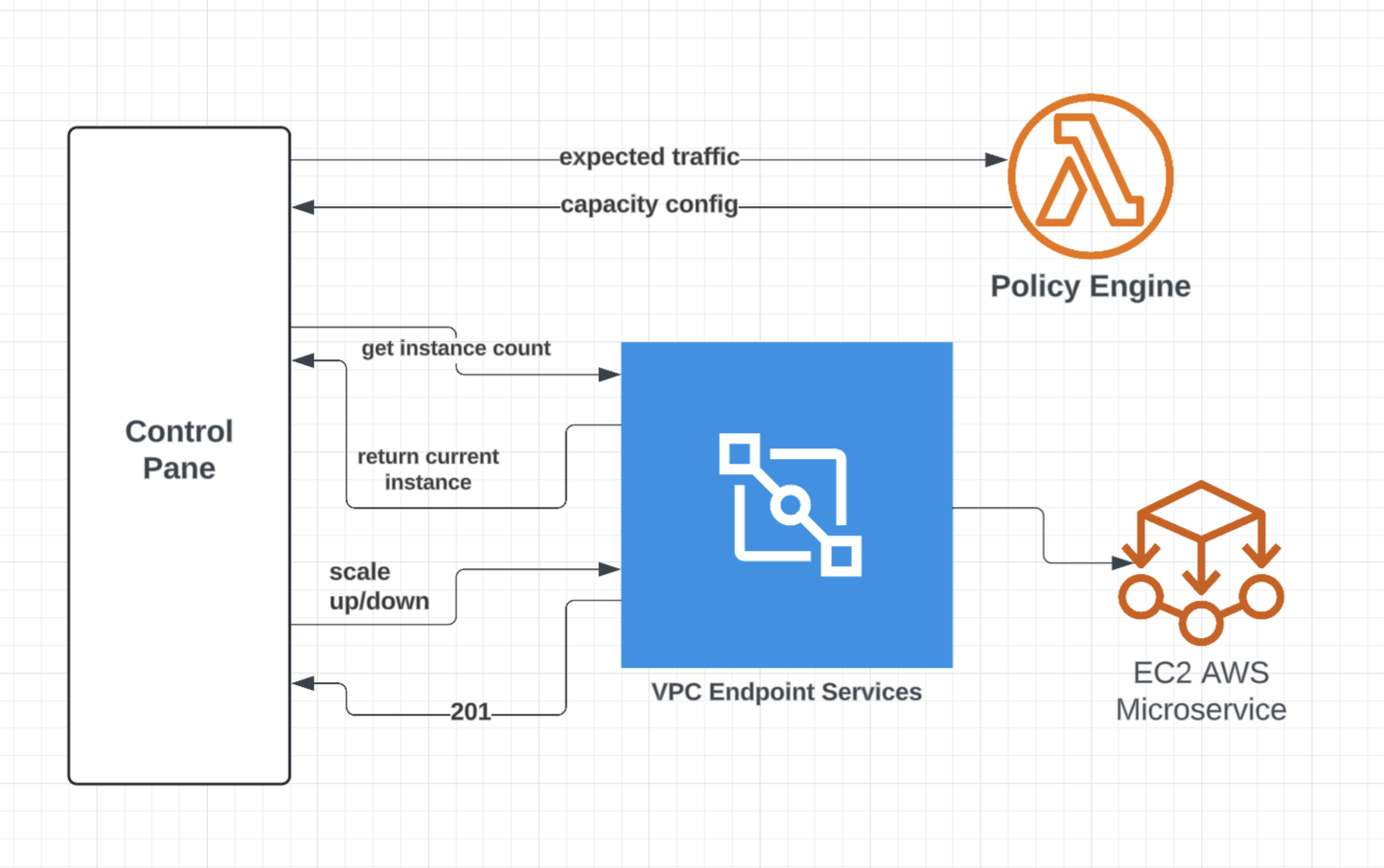
Healthy, routed, warmed capacity equals the target before T-0.
At a minimum, the executor should provide overlap protection, drift detection (non-convergence), bounded scaling, and break-glass override.
The Peak Traffic Scaling Playbook: What to Do and When
Predictive scaling works when it is operationalized into a repeatable timeline:
T-90 to T-60 Minutes: Start Pre-Scale
- Apply tier targets to critical path services.
- Start warm-up actions where appropriate (cache priming, connection pre-establishment).
T-30 Minutes: Convergence Verification Gate
- Confirm capacity is provisioned, healthy, and routable.
- Confirm key SLO signals are stable under synthetic traffic.
T-0 Through Tail: Maintain Peak Posture
- Hold capacity through the predicted peak and tail.
- Monitor error budget burn and dependency saturation.
- Allow controlled overrides if reality exceeds forecasts.
Tail End: Controlled Scale-Down
- Step down gradually and confirm stability at each step.
- Capture metrics for tuning tiers next time.
Readiness Verification: Beyond “Desired Count”
A readiness checklist should reflect user impact, not just fleet size:
Fleet and Routing
- Healthy targets meet threshold (e.g., ≥ 95% of target)
- Capacity is registered and receiving traffic
- No abnormal imbalance (hot nodes/shards)
Application Warm-Up
- Cache behavior stable (hit rate or warm complete)
- Connection pools within limits
- Startup behavior normal (no repeated crashes/restarts)
Dependencies
- Downstream error rate stable
- Rate limits not near exhaustion
- Datastore/queue/cache metrics within safe bands
A simple drift rule can be highly effective: if time-to-peak traffic is within 30 minutes and healthy capacity is below threshold, escalate early. The goal is to discover “not ready” before customers do.
When Reactive Scaling Is Enough
Reactive scaling is often sufficient when demand ramps over minutes (not seconds), warm-up time is short, workloads are stateless and immediately ready, or strict budget caps forbid pre-scaling. But for high-heat events where demand arrives faster than readiness can be achieved, predictive scaling is a structural advantage.
Bottom Line
If your peak arrives faster than your platform can warm up, reactive scaling will always lag. A schedule-aware, tier-based predictive framework paired with readiness verification and strong guardrails shifts peak events from reactive firefighting to planned operations. In flash-crowd systems, readiness beats reactivity.
Opinions expressed by DZone contributors are their own.