

Real-Time Recommendation AI Architecture: Streaming Events and On-Device Ranking
This Android recommendation architecture streams events to the backend and uses on-device ranking to deliver fast, resilient, privacy-aware recommendations.
You log in, browse, maybe buy something, and the app keeps showing basically the same items. Personalization is driven by a nightly batch job in the backend, and recommendation calls are slow trips to a cloud service.
Modern apps need recommendations that react to behavior in seconds, not days — and still feel snappy and private on flaky mobile networks.
This article walks through a real-time recommendation AI architecture on Android that does exactly that, by combining streaming events from the app, on-device ranking with a lightweight model, and a feedback loop that continuously improves what users see.
Architecture at a Glance
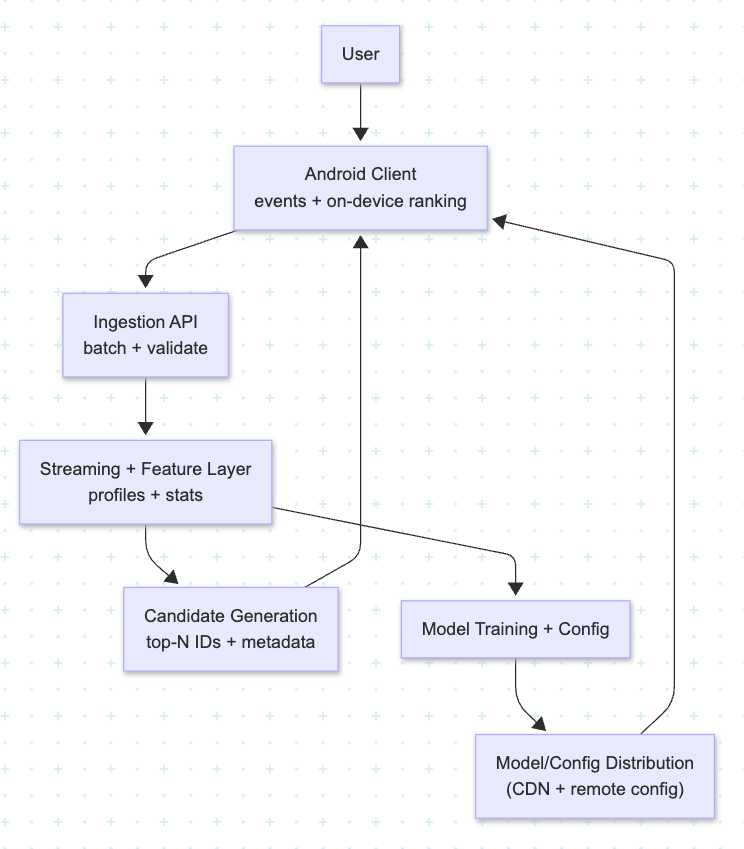
At a high level, the system has five layers:
- Android client – event capture and on-device ranking
- Ingestion API – validating and streaming events
- Streaming and feature layer – turning events into features
- Candidate generation – deciding what we could show
- Model training and configuration – shipping models back to Android
Think of it as a loop:
1. Android Client: Events In, Ranking Out
On the client, you do two things:
- Capture user actions as structured events.
- Apply on-device ranking to candidates from the backend.
Events should be small and consistent, for example:
view_item(item ID, position, screen, timestamp)click_item(item ID, position, list ID, timestamp)add_to_cart,purchase,dismiss_recommendation
Your ViewModels or use cases call a telemetry interface that batches and uploads these events on a timer or when the app goes to the background, instead of firing a network call on every scroll. That keeps network usage efficient and avoids UI jank.
For ranking, the Android app receives:
- A candidate set of items (IDs + minimal metadata)
- A ranking configuration (model version, feature weights, or a tiny TFLite model)
Ranking runs on-device:
- Build features (e.g., similarity to user profile, recency, popularity)
- Score each candidate
- Sort and render in Compose or views
If the model isn’t available or the device is too weak, you fall back to a simple heuristic or server-provided order. That way, the feature still works even on low-end hardware.
2. Ingestion API: Getting Events Into the Stream
On the server side, you expose a single ingestion endpoint that:
- Receives batched events from Android
- Authenticates the app and user
- Performs light validation and enrichment (server timestamp, region, app version)
- Publishes events into your streaming platform
You don’t want much business logic here; the point is to get events reliably into the stream with minimal coupling to downstream systems. All the interesting behavior happens later in the pipeline.
3. Streaming and Feature Layer
Once events are in a stream, processors can start turning raw actions into useful signals:
- Maintain per-user profiles (recent actions, preferred categories)
- Track item statistics (views, clicks, conversions)
- Compute simple co-occurrence patterns (users who viewed X also viewed Y)
These aggregates are written into a feature store or low-latency key–value store.
Now, when Android asks for recommendations, your backend can quickly:
- Look up the user’s profile
- Look up candidate item features
- Generate a candidate list to send back to the device
The heavy lifting on real-time behavior and popularity happens here, in your streaming + feature layer, not in the app.
4. Candidate Generation
Candidate generation answers a simple question:
“What items could we sensibly recommend right now?”
Typical sources include:
- Recently popular items
- Items similar to what the user recently viewed
- Items related to their long-term preferences
- Rule-based inclusions (promoted or seasonal content)
The backend returns a set of candidates plus minimal metadata to Android:
- Item IDs
- A few attributes (title, image URL, price, category)
This list is deliberately larger than what you actually display. The final ordering is left to the on-device ranker, which has access to fresh context (latest interactions, local state, even device signals if you choose).
5. Model Training and Configuration
All those events and recommendation outcomes feed back into training:
- Join what you recommended with what the user did
- Train models that predict click, add-to-cart, or purchase probability
- Export small models or feature-weight configs that can run on-device
Then you:
- Publish new models to a CDN or model registry
- Use remote config/flags to control which model version each cohort of Android users runs
- Log model version and config with every recommendation impression
This gives you safe rollout and A/B testing, plus the ability to roll back quickly if a new model misbehaves in production.
Why On-Device Ranking?
On-device ranking brings three big advantages to Android:
- Speed: Scoring a few dozen candidates locally is much faster than another full network round-trip.
- Resilience: If the network is flaky, you can reuse cached candidates and still deliver “good enough” recommendations.
- Privacy: More of the user’s behavior and profile can stay on-device, especially if you only send high-level or aggregated features to the server.
The backend becomes a candidate provider and feature engine, while the phone is the final decision maker for what the user actually sees.
Closing Thoughts
Real-time recommendation AI on Android isn’t just another model plugged into an API. It’s a full loop from events to features to on-device ranking, built to be fast, resilient, and privacy-aware.
If you design the event schema carefully, invest in a streaming and feature layer, and keep ranking close to the user on their device, you’ll ship recommendations that feel alive — reacting in seconds to what people do instead of days after a nightly batch job finishes.
Opinions expressed by DZone contributors are their own.