

Reduce Frontend Complexity in ASP.NET Razor Pages Using HTMX
Modern web development often defaults to heavy client-side frameworks for applications, a good alternative is HTMX with Asp.Net Razor Pages.
Join the DZone community and get the full member experience.
Join For FreeModern web development often defaults to heavy client-side frameworks (React/Angular) for CRUD applications, introducing significant architectural overhead and “dependency hell.” By integrating HTMX with ASP.NET Razor Pages, we shifted DOM rendering back to the server, utilizing HTML fragments instead of JSON APIs. This approach eliminated complex client-side state management, reduced custom JavaScript by approximately 85%, and maintained a seamless, single-page application (SPA) feel with minimal infrastructure costs.
The “Failure” of the Modern SPA Forest
Engineers often find themselves trapped in a “forest” of NPM packages, Webpack configurations, and Vite build scripts just to render a simple list or validate a form field. In our initial architectural attempts, using a heavy SPA framework for a standard CRUD application manifested in:
- Excessive Latency: p95 latency spikes during hydration and client-side rendering.
- Maintenance Debt: Frequent breakage in the
node_modulestree and complex JSON-to-HTML mapping logic. - Log Bloat: Metrics showed that 40% of client-side errors originated from state synchronization issues between the API and the frontend.
We realized that for most data-driven applications, the complexity of a virtual DOM was a liability, not an asset.
Structured Decision: Server-Driven Interactivity
To solve the complexity crisis, we evaluated shifting back to a server-centric model while retaining modern UX.
- Problem: Implementing “live” features (loaders, infinite scroll, real-time validation) without full page reloads.
- Constraints: High SEO requirements, limited frontend team bandwidth, and a strict .NET backend ecosystem.
- Decision: Adopt HTMX to extend HTML with declarative AJAX attributes.
- Trade-offs: We sacrificed the ability to perform complex offline-first state manipulation for a significantly simplified deployment pipeline and faster “Time to Interactive.”
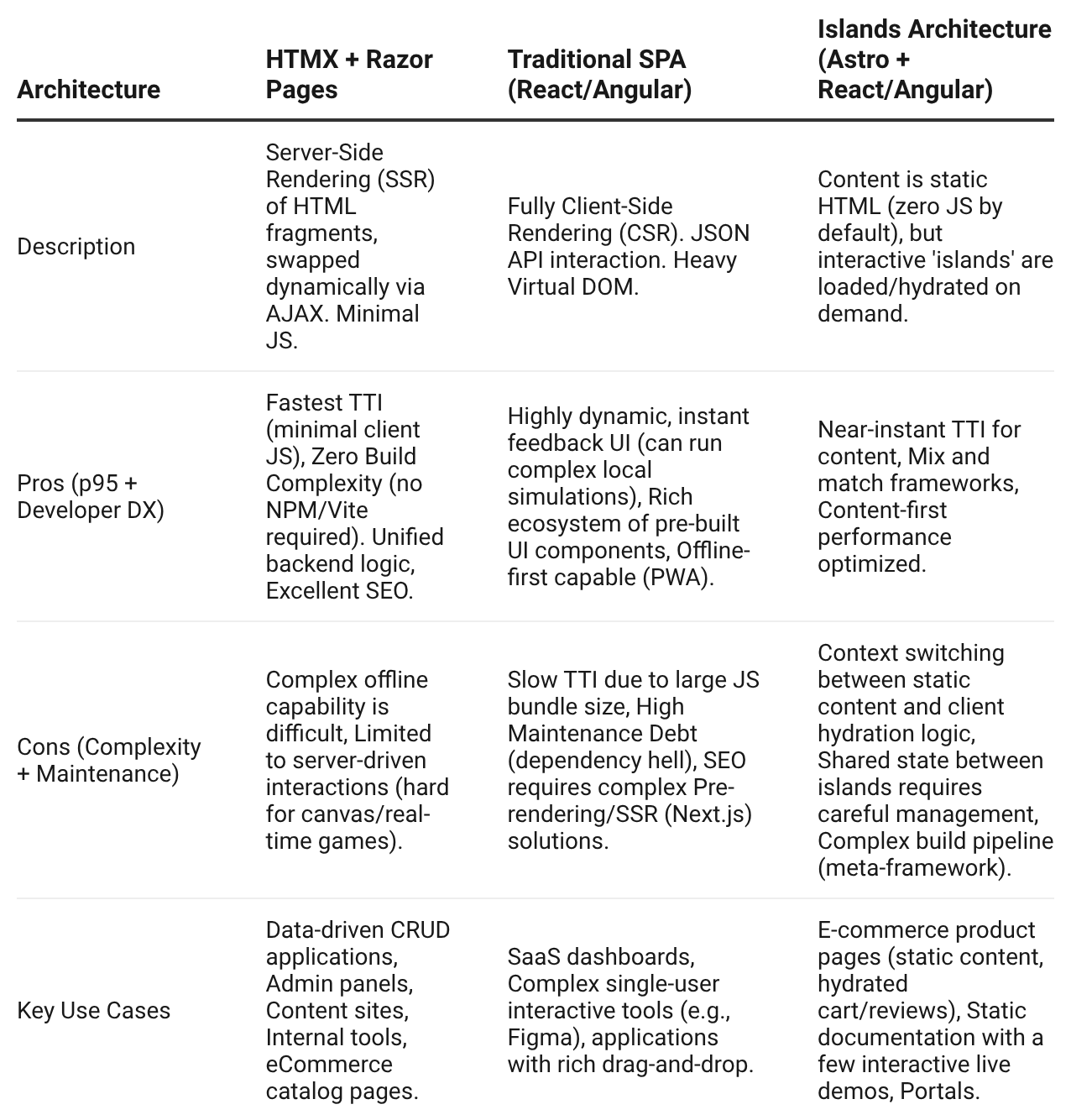
Beyond the Hype: Tabular Comparison of Modern Frontend Architectures
Choosing the right frontend strategy depends heavily on team composition, SEO requirements, and the nature of interactivity. Below is a structured comparison of the core approach discussed (HTMX + Razor) against traditional and modern alternatives.
Implementing HTMX in the Razor Pages Lifecycle
How Do We Achieve SPA Behavior with hx-boost?
The hx-boost attribute is the "low-hanging fruit" of HTMX. By adding hx-boost="true" to a navigation container, HTMX intercepts all anchor tags. Instead of a full postback, it fetches the page via AJAX and swaps the <body> content. This preserves the browser history while eliminating the "white flash" of a reload.
How Do We Handle Real-Time Server-Side Validation?
Instead of duplicating validation logic in JavaScript and C#, we use the blur trigger to hit a Razor Page handler:
<input type="text"
       name="slug"
       hx-get="/Profile/Create?handler=CheckSlug"
       hx-trigger="blur changed"
       hx-target="#slug-validation" />
<span id="slug-validation"></span>
Insight Block: The Power of Partial Rendering
By returning
PartialVieworPartialfrom a Razor Page handler, the server sends only the necessary HTML fragment. This reduces the payload size from a full ~50KB page to a ~200B fragment, drastically improving p95 response times for interactive elements.
Technical Deep Dive: Out-of-Band (OOB) Swaps
A common engineering challenge is updating multiple disconnected DOM elements simultaneously (e.g., adding an item to a list and updating a counter in the header). HTMX solves this with Out-of-Band Swaps.
When the server responds with a primary fragment, it can include additional fragments marked with hx-swap-oob="true". HTMX will automatically find the targets by ID and update them, regardless of where they are in the DOM hierarchy. This allows for complex UI synchronization without a centralized client-side state store like Redux.
Technical FAQs
1. Why not just use Blazor for server-side interactivity?
While Blazor is powerful, it requires a persistent SignalR connection (WebSockets), which can be resource-intensive for high-traffic sites. HTMX uses standard stateless HTTP requests, making it more resilient to flaky connections and easier to scale horizontally.
2. How do you handle security and Anti-forgery tokens?
ASP.NET Razor Pages requires an __RequestVerificationToken for POST requests. We handle this by adding a global HTMX configuration that includes the token in the X-XSRF-TOKEN header for every request initiated by HTMX.
3. Is HTMX compatible with existing CSS frameworks like Bulma or Bootstrap?
Yes. Since HTMX works by swapping standard HTML, it is completely agnostic of your styling. We successfully implemented loaders and modals using Bulma classes and HTMX’s hx-indicator attribute.
Internal Alternatives Considered
- Full React Rewrite: Rejected due to integration risk and the need for a separate API layer.
- ASP.NET Update Panels (Legacy): Rejected due to the heavy
ViewStatepayload and lack of modern browser support. - Plain Vanilla JS (Fetch API): Rejected as it would require writing significant “glue code” for DOM manipulation and event handling.
Actionable Conclusion: Reusable Takeaways
- Start with
hx-boost: Immediately improve the "feel" of existing Razor Pages applications by eliminating full-page refreshes. - Leverage Handlers: Use
OnGet[HandlerName]in yourPageModelto return partials for specific UI components. - Quantify Your JavaScript: Before reaching for a framework, ask if the interaction can be described as a “Server-Side DOM Swap.” If yes, HTMX is the more efficient tool.
References
Opinions expressed by DZone contributors are their own.
Comments