

Reducing Daily PM Overhead With a Chat-Based AI Agent
An experiment in reducing project management overhead by removing small but costly routines around Jira updates, status clarifications, and daily reporting.
 ·
·
Join the DZone community and get the full member experience.
Join For FreeAs a project manager, I have often encountered time losses caused by daily operational routines. Depending on how many departments are involved in development, these delays can range from two extra days per task to one or even two weeks for a relatively small feature.
These delays usually occur in processes not directly related to development itself: clarifying requirements, working in task trackers, searching for information, duplicating work, and constantly switching between tasks. This is also supported by research: around 90% of professionals say they regularly lose time because of inefficient processes and tools, and about half of them lose more than 10 hours every week because of this.
Against this background, task management tools like Jira play a mixed role. On the one hand, they are an industry standard. On the other hand, developers frequently mention its complexity, heavy configuration, and process overhead. As a result, Jira often appears at the top of “most disliked but still widely used” tool lists.
With this in mind, I decided to run an experiment to see whether I could build an AI agent myself that could eliminate these issues — or at least part of them. Before this experiment, I had no prior experience working with AI agents.
Task
Build an agent that can be integrated into a work messenger and configured so that task creation and monitoring happen entirely inside the messenger, without switching to external tools.
Must:
- Allow developers to update the status of their tasks directly in the chat, without opening Jira.
- Allow the PM to generate an automatic report showing the current project status.
Should:
-
Allow developers to create tasks for themselves by selecting from a predefined project task database.
The Agent
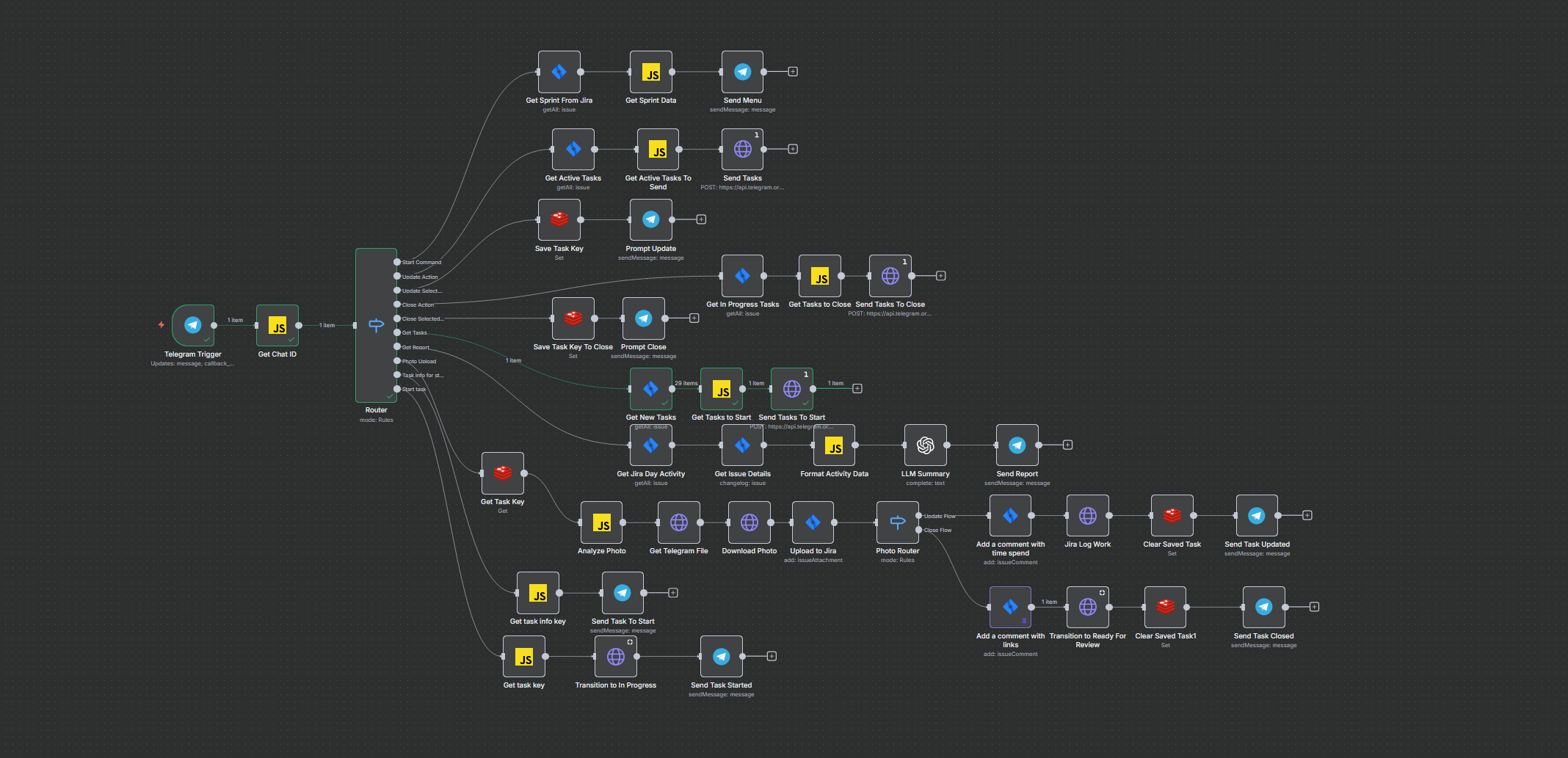
Agent workflow
Architecture and Components
Interaction Channel
-
Telegram Bot API – serves as both the inbound channel (messages, buttons, photos) and the outbound channel (menus, task lists, confirmations), and may be replaced with Slack or Microsoft Teams as alternative messaging interfaces.
Task Tracker
-
Jira Cloud REST API/Agile API – used for retrieving active sprints, searching issues via JQL, fetching issue details and changelogs, logging work time, attaching files, adding comments, and performing workflow transitions.
State Storage
-
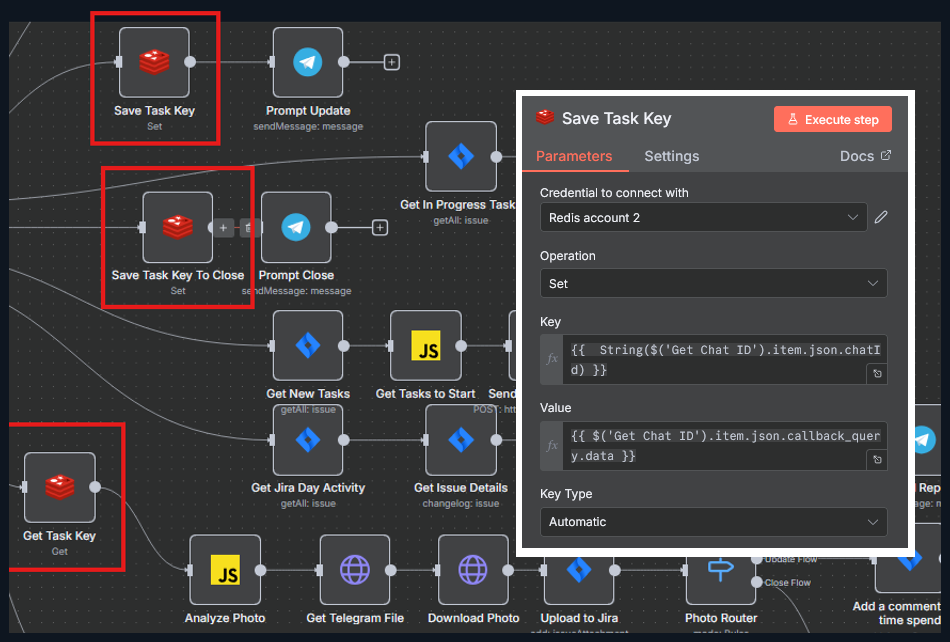
Redis – used to store conversational context, including the selected task and the expected user action (e.g., update or close).
Summarization module
-
LLM (openai) – generates a concise daily report based on Jira activity and issue changelogs.
Inputs, Outputs, and Interfaces
Inputs
- Telegram
message:- Text commands (
/start) - Photo messages with a
caption(time spent, optional link)
- Text commands (
- Telegram
callback_query:- Inline button interactions such as
update_task, task_<KEY>, close_task_<KEY>, get_tasks, get_report, start_task_<KEY>
- Inline button interactions such as
Outputs
- Telegram messages:
- Menus
- Task lists
- Prompts requesting a photo and time spent
- Confirmation messages
- Daily summary report
- Jira operations:
- Attachments (screenshots)
- Comments (structured)
- Worklog entries (time tracking)
- Workflow transitions (in progress/ready for review)
- Reading active sprint data and issue changelogs
Core Logic: Router → Action Scenarios
Entry point: The Telegram Trigger listens for both message and callback_query events (button clicks). Next, the Get Chat ID node normalizes the context (chatId, userId, username), allowing the same workflow to handle both messages and callback buttons consistently.
All events are then routed through a Router (Switch) node, which branches logic based on the event type:
/startupdate_task / task_...(update selected task)close_task / close_task_...(close or transition a task)get_tasks(retrieve active tasks)get_report(daily report)photo upload(incoming photo)info_... / start_task_...(start a task from To Do)
Core Use Cases
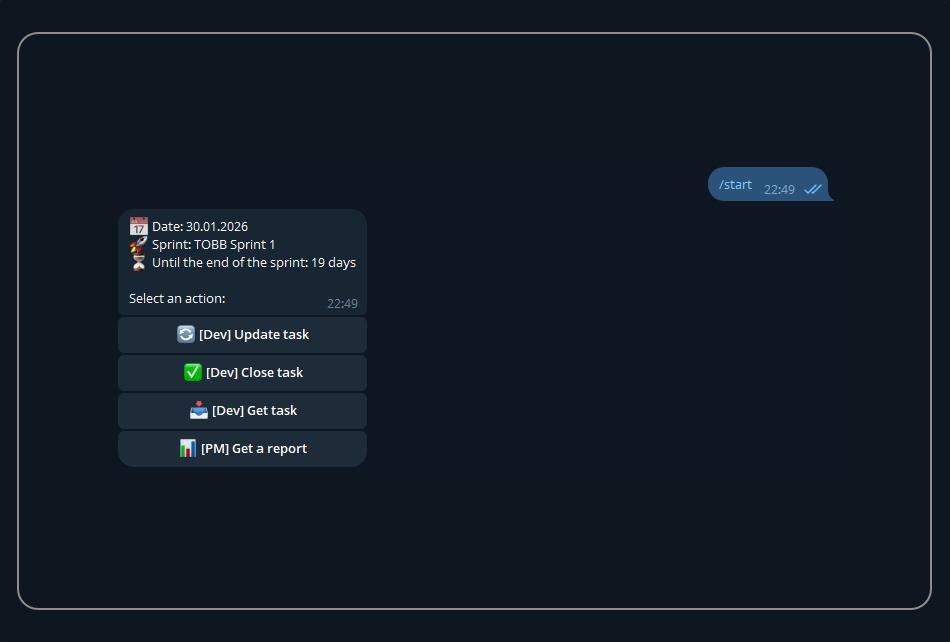
Use Case 1. /start: Show Menu and Active Sprint Information
Purpose: It serves as the entry point for all actions and provides a lightweight sprint “dashboard.”
- The bot sends an HTTP request to the Jira Agile API to retrieve the active sprint for a specific board (in this example:
board/34, state=active). - Node Get Sprint Data extracts: sprint name, sprint goal, and calculates
days_leftuntil the sprintendDate. - Node Send Menu sends a message with interactive buttons:
- Update task
- Close task
- Get task
- Get a report
The developer sees this as a bot within the interface of a messenger they are already familiar with:
Use case 1
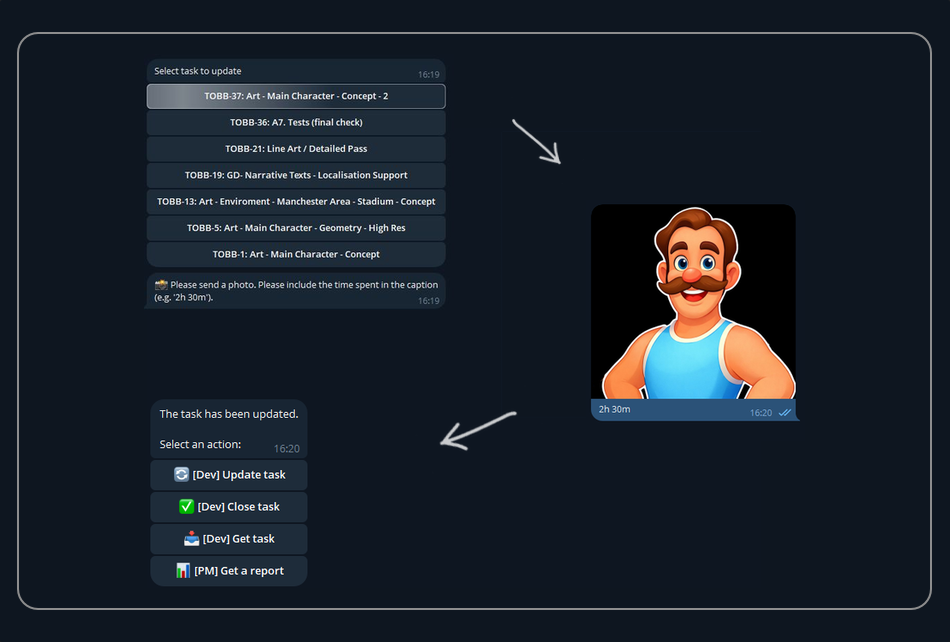
Use Case 2. Update Task: Select a Task → Send a Screenshot With Time → Bot Updates Jira Automatically
This flow is implemented as a mini-dialog, with conversational state stored in Redis.
2.1. Selecting a Task to Update
- When the user clicks
update_task, the bot retrieves a list of active tasks via JQL (statuses such as In Progress, In Review, Ready For Review). - The Get Active Tasks To Send node builds an inline keyboard with buttons in the format
task_<KEY>. - The Send Tasks node sends this list to the user as clickable buttons.
2.2. Persisting the Selected Task (State)
When the user selects a specific task (e.g., task_TOBB-37), the workflow stores state in Redis:
- key:
TOBB-<chatId> - value:
{ "action": "update", "task": "<callback_data>" }
The Prompt Update node then asks the user to: “Send a screenshot and include the time spent in the caption (e.g., 2h 30m).”
Use case 2
2.3. Photo Received: Validate → Upload to Jira → Log Time
When a photo is received, the Analyze Photo node performs three checks:
- Whether a task is selected in Redis (otherwise: “no task selected to update”)
- Whether a photo is present
- Whether the caption contains a valid time format (regex such as
2h 30m)
If all checks pass, the following pipeline is executed:
- Retrieve the file from Telegram (
getFile) and download the image - Upload to Jira: Attach the image as an issue attachment
- Add a comment with time spent: Structured comment containing “time spent + screenshot reference”
- Jira Log Work: Create a worklog entry:
- (
/rest/api/3/issue/<key>/worklog),
- (
- Clear Saved Task: Remove state from Redis,
- Send Task Updated: Send confirmation and return to the main menu.
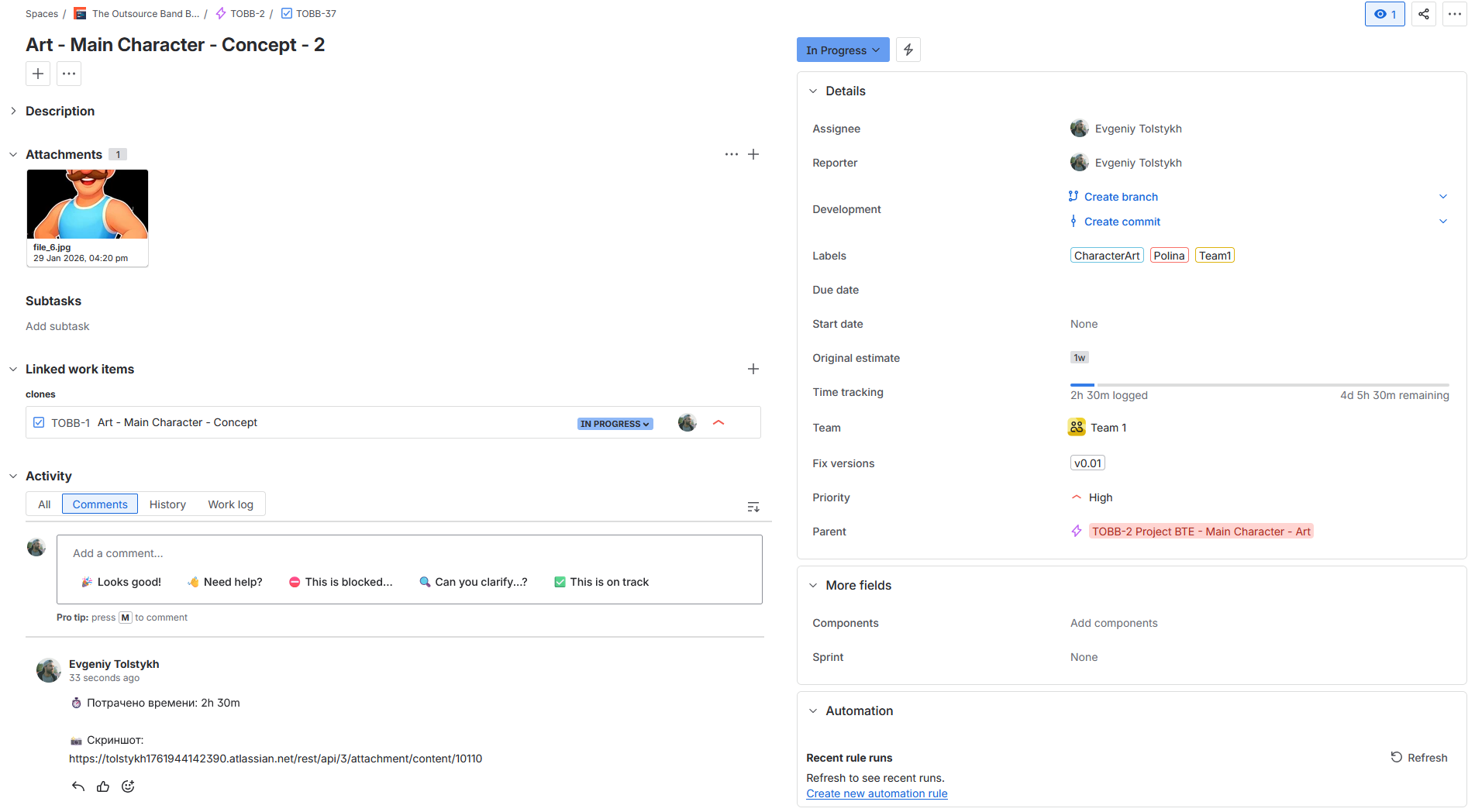
Use case 2.3
Key effect for reducing “noise”:
The bot enforces a minimal Definition of Done for task updates with a screenshot and time spent. This significantly reduces empty updates and fragmented chat messages.
Use Case 3. Close Task: Similar Flow With an Additional Status Transition
The close flow mirrors Update Task, but additionally requires a link to file in the caption.
- The user selects a task from In Progress (
close_task_<KEY>). - State is saved in Redis as
{ "action": "close", "task": ... }. - When a photo is received, the bot extracts: time spent and link (URL from the caption).
The bot then:
- Attaches the screenshot
- Adds a comment containing the link
- Logs work time
- Performs a Jira workflow transition to Ready For Review (transition id
"2"in the JSON) - Clears Redis state
- Sends confirmation and returns the menu
Practical outcome:
Task closure becomes formalized and reproducible:
proof of work (screenshot), time accounting (worklog), and a deterministic next workflow state.
Use Case 4. Start Task: move from To Do to In Progress
- In the “new tasks” branch, the bot runs a JQL query:
status IN ("To Do")and displays tasks as buttonsinfo_<KEY>. - When
info_<KEY>is clicked, the bot sends: a link to the task and a Start task button. - On
start_task_<KEY>, the bot performs a Jira transition to In Progress (transition id"21") - Sends “task started”, and returns the menu.
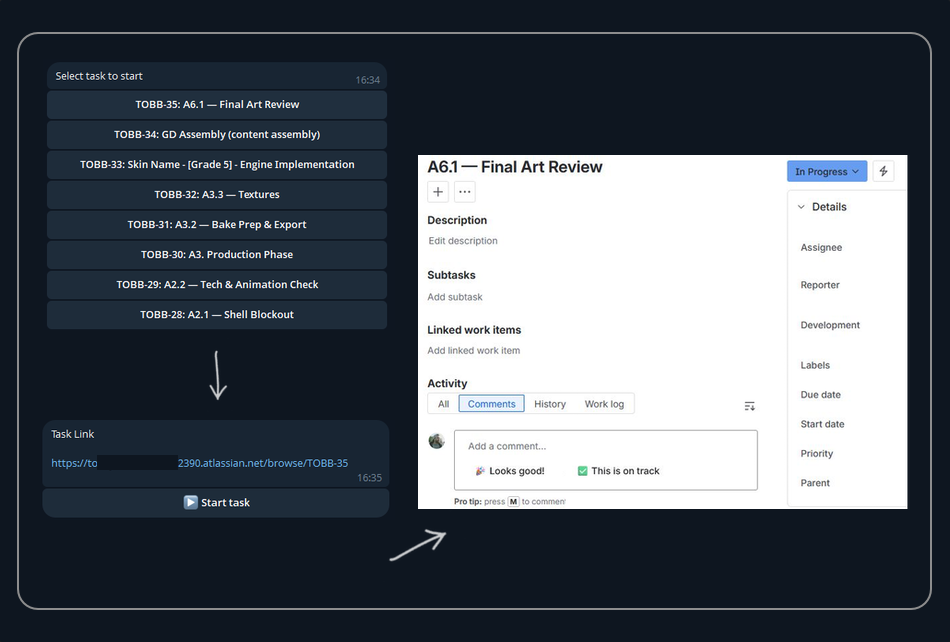
Use Case 5. PM Report: Daily Summary via LLM
This is the only place where the LLM is used as an actual “reasoning component.”
- Get Jira Day Activity: Retrieves issues updated in the last 24 hours
- (
updated >= -1d ORDER BY updated DESC). - For each issue, the changelog is fetched (Get Issue Details).
- Format Activity Data computes:
- Number of status changes,
- Number of unique issues affected,
- How many moved to Done / In Progress / In Review,
- Authors of changes,
- A list of changes (key, summary, from → to, date).
- LLM summary: converts this data into a concise 5–7 sentence English report.
- Send report: delivers the report to Telegram.
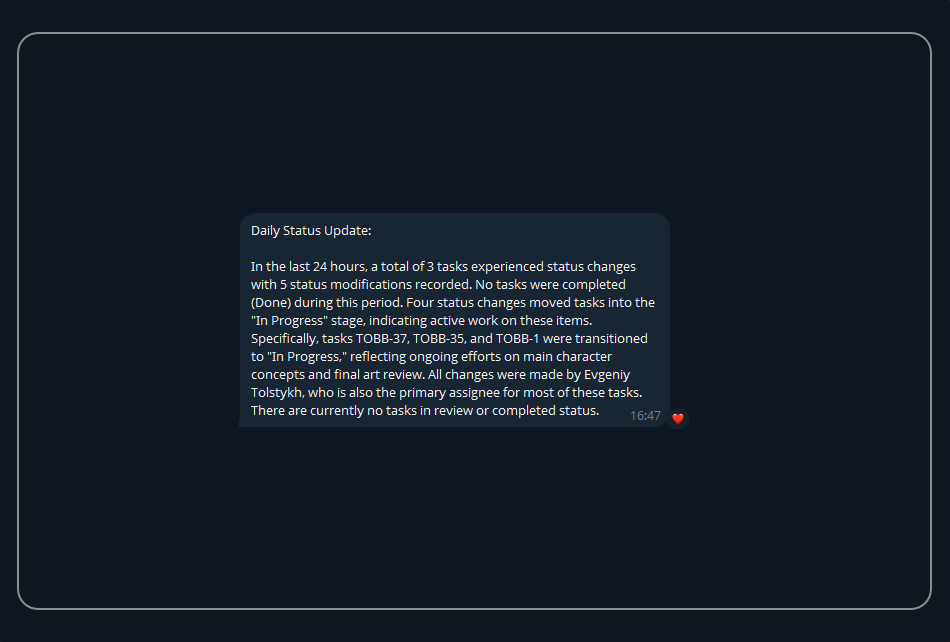
Outcome: The PM receives a human-readable daily summary without manually navigating Jira or Slack.
Conclusion
As a result of this experiment, we ended up with an agent that does more than simply “pass data through.” It performs three critical functions:
- Enforces rules (data hygiene): task updates and closures require explicit proof of work (a screenshot) along with time spent (and, in some cases, a link).
- Maintains conversational context: using Redis, the agent remembers which task the user selected and what action is currently expected (update vs. close).
- Executes Jira actions automatically: handling attachments, comments, worklog entries, workflow transitions, and generating a daily LLM-based summary report.
Building an agent like this required a subscription and 3–4 weeks of work by someone with no prior preparation or technical background. An experienced person could assemble a similar agent in about four working days, plus one additional day for bugfix. This is especially beneficial during the pre-production stage, when a manager can not only design the product plan but also build an agent to simplify the delivery process. As a result, during production, there is no need to be distracted by routine tasks, repetitive actions, or constant switching to the Jira interface.
In addition, an agent like this — and the tools that allow it to be built — provides several advantages:
- It saves the time of technical specialists, who no longer need to be distracted by such improvements, as they can be implemented by management independently.
- It gives managers autonomy from technical specialists — once they understand how their agent works, they can adapt and refine it to suit development needs.
- An agent integrated as a bot into an existing and familiar messenger helps developers stay focused on their tasks within an interface they already know. This reduces stress within the team.
Potential
I arrived at this idea only during the experiment itself, but perhaps agents could become the first step toward changing outdated team structures and reshaping daily routines.
According to classic agile principles, one PM effectively manages a team of 5–10 people. This is believed to make daily stand-ups more efficient.
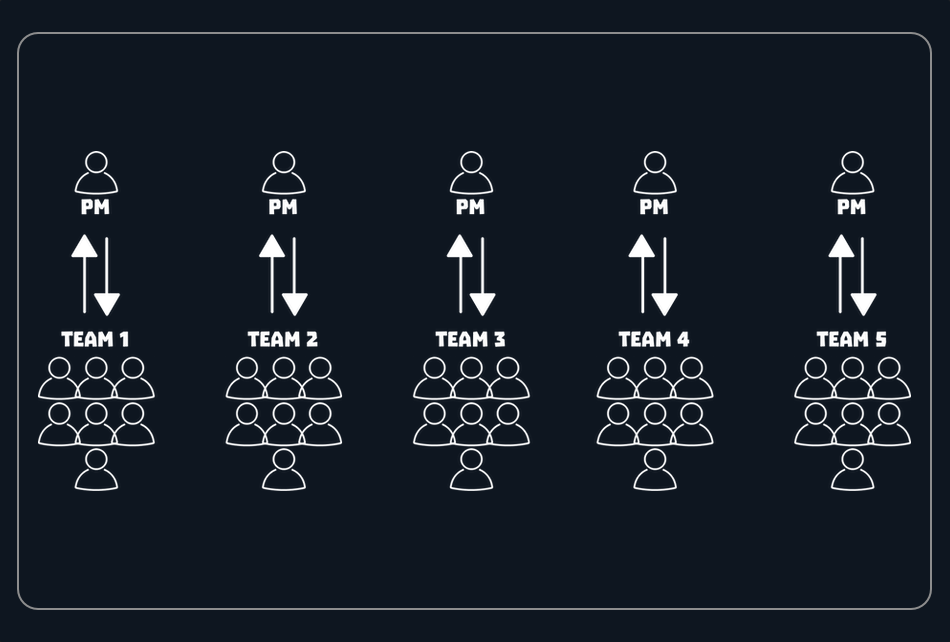
However, what if production were organised so that an agent acted as the link between team members and the PM? In this setup, the PM would monitor not seven people directly, but a single agent connected to 5–7 teams.
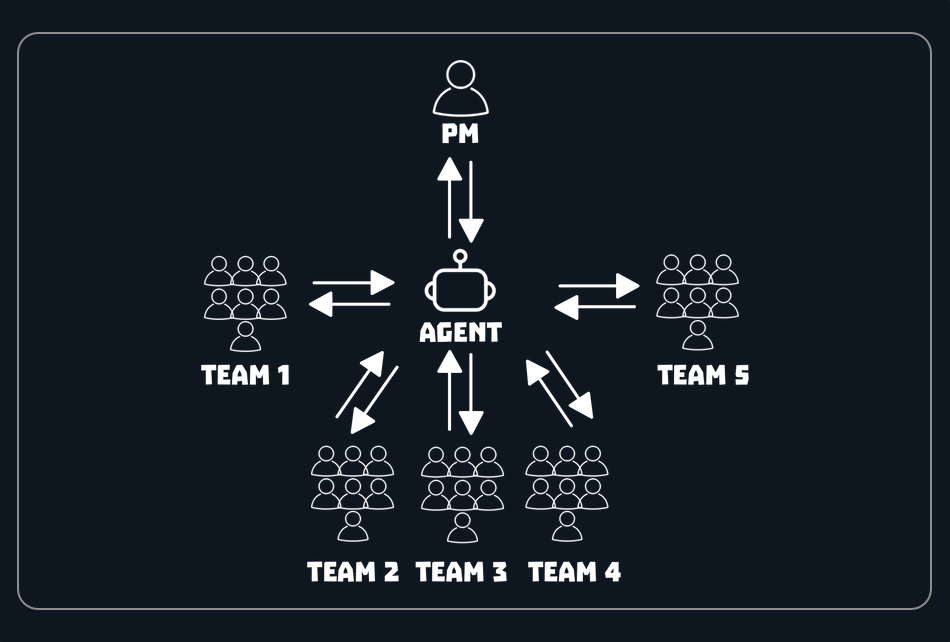
The agent could handle the initial technical checks and generate daily reports accessible at any time, allowing the PM to step into the production process only when something goes off plan.
Thank you.
Opinions expressed by DZone contributors are their own.
Comments