

DZone
Thanks for visiting DZone today,
Edit Profile
  • Manage Email Subscriptions
  • How to Post to DZone
  • Article Submission Guidelines
Sign Out View Profile
  • Post an Article
  • Manage My Drafts
Over 2 million developers have joined DZone.
Log In / Join
Refcards Trend Reports
Events Video Library
Refcards
Trend Reports

Events

View Events Video Library

Related

  • Debug Like a Pro in 2025: 10 New Eclipse Java Debugger Features to Enhance Your Productivity (With Spring Boot Examples)
  • Introducing Graph Concepts in Java With Eclipse JNoSQL, Part 3: Understanding Janus
  • Introducing Graph Concepts in Java With Eclipse JNoSQL, Part 2: Understanding Neo4j
  • Introducing Graph Concepts in Java With Eclipse JNoSQL

Trending

  • When One MVP Is Really Four Systems: A Better Way to Plan Multi-Role Apps
  • Build a GitHub Slack Bot With AWS Bedrock and MCP, Part 1
  • Chaos Engineering Has a Blind Spot. Agentic AI Lives in It.
  • Securing the AI Host: Spring AI MCP Server Communication With API Keys
  1. DZone
  2. Coding
  3. Frameworks
  4. Remotely Debugging an Eclipse Plugin

Remotely Debugging an Eclipse Plugin

This tutorial will show you how to debug an Eclipse plugin remotely for bug resolution after it has been installed in the IDE.

By 
Anupam Gogoi user avatar
Anupam Gogoi
·
May. 21, 18 · Tutorial
Likes (2)
Comment
Save
Tweet
Share
6.6K Views

Join the DZone community and get the full member experience.

Join For Free

Introduction 

The Eclipse plugin can be debugged from inside the IDE while in the development phase, but once the plugin is installed in the IDE, we need to debug it remotely for bug resolution. In this quick tutorial, I'm going to explain how to debug an Eclipse plugin remotely. 

Plugin Project

Let's suppose we have developed our simple Hello World plugin and installed it in our IDE. Now, to debug the plugin remotely, please follow the steps below.

Step 1

Open the first instance of Eclipse IDE pointing to the workspace where your Hello World plugin project is located.

Step 2

Navigate to the eclipse.ini file of your IDE. Here is a screenshot of the location of the file in MacOS.
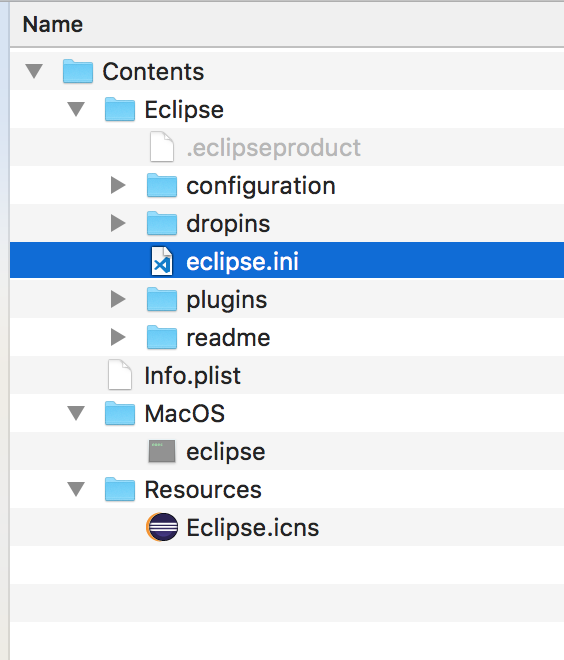
Image title

Now add the following JVM arguments to the file:

-vmargs
-Xdebug
-Xrunjdwp:transport=dt_socket,server=y,suspend=n,address=1044

Step 3

Now, open another instance of the Eclipse IDE (on MacOS, use the command open -a -n Eclipse in the terminal).This instance will point to a workspace different from the one which contains the Hello World plugin project.

Step 4

Now, in the workspace containing the Hello World plugin project, make the following remote debug configurations/; Navigate Run -> Debug Configurations -> Remote Java Application.
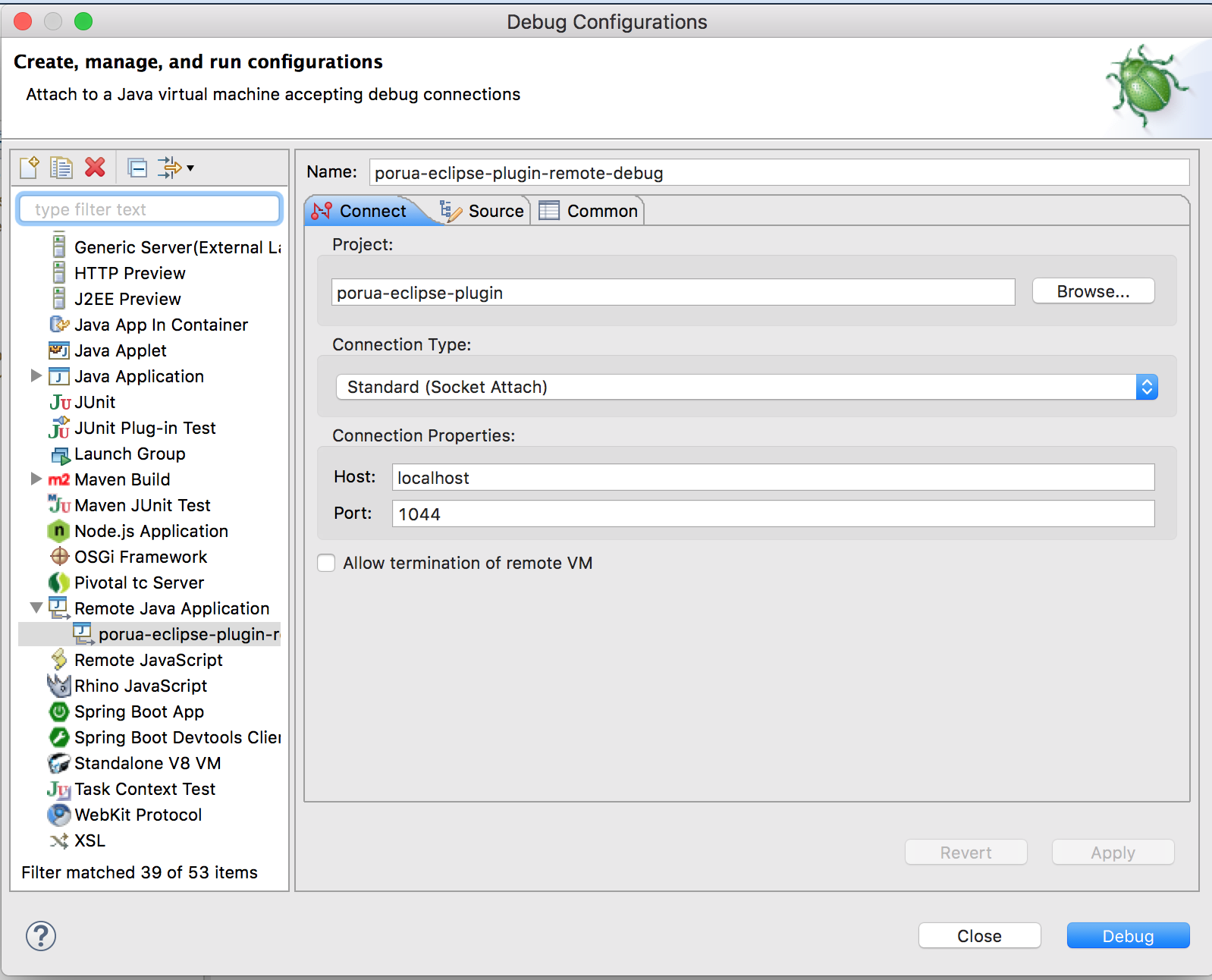
Image title

Then hit the debug button. Also, do not forget to put break-points in the codes of the Hello World plugin to be debugged.

Step 5

In the other workspace (which does not contain the Hello World plugin) try to use the Hello World plugin and it will be remotely debugged in the other instance of Eclipse.

Conclusion 

In this brief tutorial, I have shown how to debug an Eclipse plugin remotely. 

Eclipse

Opinions expressed by DZone contributors are their own.

Related

  • Debug Like a Pro in 2025: 10 New Eclipse Java Debugger Features to Enhance Your Productivity (With Spring Boot Examples)
  • Introducing Graph Concepts in Java With Eclipse JNoSQL, Part 3: Understanding Janus
  • Introducing Graph Concepts in Java With Eclipse JNoSQL, Part 2: Understanding Neo4j
  • Introducing Graph Concepts in Java With Eclipse JNoSQL

Partner Resources

×

Comments

The likes didn't load as expected. Please refresh the page and try again.

  • RSS
  • X
  • Facebook

ABOUT US

  • About DZone
  • Support and feedback
  • Community research

ADVERTISE

  • Advertise with DZone

CONTRIBUTE ON DZONE

  • Article Submission Guidelines
  • Become a Contributor
  • Core Program
  • Visit the Writers' Zone

LEGAL

  • Terms of Service
  • Privacy Policy

CONTACT US

  • 3343 Perimeter Hill Drive
  • Suite 215
  • Nashville, TN 37211
  • [email protected]

Let's be friends:

  • RSS
  • X
  • Facebook