

[Resolved] CROSSSLOT Keys Error in Redis Cluster-Mode Enabled
In this article, we are going to learn why the "CROSSSLOT Keys in request don't hash to the same slot" error happens in a Redis cluster and how to solve it.
Join the DZone community and get the full member experience.
Join For FreeMy company recently decided to move our cache system from a single Redis server to an AWS-managed Redis cluster.
Amazon ElastiCache is a fully managed caching service that can be configured in cluster mode with a simple click so it can be easily scaled in and out.
Running a Redis cluster isn’t an easy task. Orchestrating multiple Redis nodes with the same efficiency as a managed service requires a lot of vertical skills. A managed service helps us to stay focused on application development instead of dealing with infrastructure management issues.
But moving from a single server instance to a cluster enabled configuration caused a new error to appear:
CROSSSLOT Keys in request don't hash to the same slotWhere Does This New Error Come From?
When Redis operates in cluster mode, it handles data storage differently than when it operates as a single instance. This is because it should be ready to distribute data across multiple nodes enabling horizontal scalability.
A Redis cluster, if you are comparing it to the standalone Redis which is the non-distributed setup, use the “HASH SLOT” concept for key management, which implies some restrictions on key operations, necessary to ensure data consistency in a distributed environment.
If you take a look at the error description, it says “Keys in request don’t hash to the same slot“, it means that we are running some commands not compatible with the “HASH SLOT” restrictions mentioned above.
What Is a Hash Slot in Redis?
Redis cluster determines what instance the particular key shall be assigned to using a specific algorithm.
To make it simple, when you create a new key, Redis will assign an integer to it that is called hash-slot. Keys with the same hash-slot will reside on the same Redis node inside the cluster.
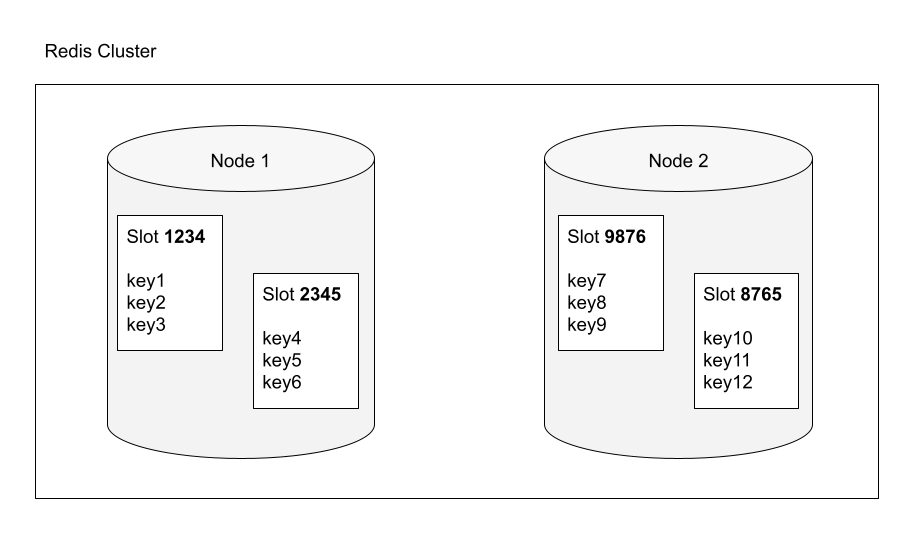
You can verify it by yourself with a quick example.
Connect to your Redis cluster:
redis-cli -h [CLUSTER_ADDRESS] -p 6379
Create two new keys and checkout their assigned hash slot:
redis> SET mykey1 "Hello"
"OK"
redis> SET mykey2 "Hello 2"
"OK"

redis> CLUSTER KEYSLOT mykey1
(integer) 650
redis> CLUSTER KEYSLOT mykey2
(integer) 8734
As you can see the cluster has assigned two different hash-slots to the keys, so they are probably stored on different nodes within the cluster.
This is exactly what happens when your application creates or changes keys in Redis.
Why Does the CROSSSLOT Error Occur?
This error occurs because the application is trying to run a command on multiple keys, but the keys involved in the operation aren’t in the same hash slot.
This results in a “CROSS-SLOT” operation which is not allowed in a cluster. Hash slots control how data is distributed within the cluster, so this constraint is necessary to avoid information corruption in a distributed environment.
In the example above we have verified that the two keys (mykey1, mykey2) have obtained two different hashes slots.
Trying to run a command that involves both keys we will get the error:
redis> SUNION mykey1 mykey2 (error) CROSSSLOT Keys in request don't hash to the same slot
How To Solve CROSSSLOT Error at the Application Level
When creating keys that could be used by multi-key operations, use hashtags ({…}) to force the keys into the same hash slot. When the key contains a “{…}” pattern, only the substring between the braces, “{” and “}”, is considered to calculate the hash slot.
For example, the keys {user1}:mykey1 and {user1}:mykey2 are hashed to the same hash-slot because only the string inside the braces “{” and “}”, that is, “user1”, is used to compute the hash-slot.
redis> CLUSTER KEYSLOT {user1}:mykey1
(integer) 8006
redis> CLUSTER KEYSLOT {user1}:mykey2
(integer) 8006

redis> SUNION {user1}:mykey1 {user1}:mykey2
1) "Hello"
2) "Hello 2"
Now multi-key operations can be performed since both keys are placed in the same hash slot.
Almost all Redis clients support the “tag” feature, so you should explore the documentation of your framework/library to understand how to use it.
Published at DZone with permission of Valerio Barbera. See the original article here.
Opinions expressed by DZone contributors are their own.
Comments