

How to Test POST Requests With REST Assured Java for API Testing: Part II
In this second part, learn how to use JSON Files, the Builder design pattern with the Datafaker library in Java, to test a POST API Request with REST Assured.
 CORE
·
CORE
·
Join the DZone community and get the full member experience.
Join For FreeIn the previous article, we learnt the basics, setup, and configuration of the REST Assured framework for API test automation. We also learnt to test a POST request with REST Assured by sending the request body as:
- String
- JSON Array/ JSON Object
- Using Java Collections
- Using POJO
In this tutorial article, we will learn the following:
- How to use JSON files as a request body for API testing.
- Implement the Builder Design Pattern in Java to create request data dynamically.
- Integrate the Datafaker library to generate realistic test data at runtime.
- Perform assertions with the dynamic request data generated using the Builder design pattern and the Datafaker library.
Writing a POST API Test With a Request Body as a JSON File
The JSON files can be used as a request body to test the POST API requests. This approach comes in handy in the following scenarios:
- Multiple test scenarios with different payloads, and you need to maintain test data separately from test code.
- Large or complex payloads that need to be reused across multiple tests.
- Frequently changing request payloads that are easier to update in the JSON files rather than using other approaches, like dynamically updating the request body using JSON Objects/Arrays or POJOs.
Apart from the above, JSON files can also be used when non-technical team members need to modify the test data before running the tests, without modifying the automation code.
With the pros, this approach has some drawbacks as well. The JSON files must be updated with unique data before each test run to avoid duplicate data errors. If you prefer not to modify the JSON files before every execution, you’ll need to implement data cleanup procedures, which adds additional maintenance overhead.
We will be using the POST /addOrder API from the RESTful e-commerce demo application to write the POST API requests test.
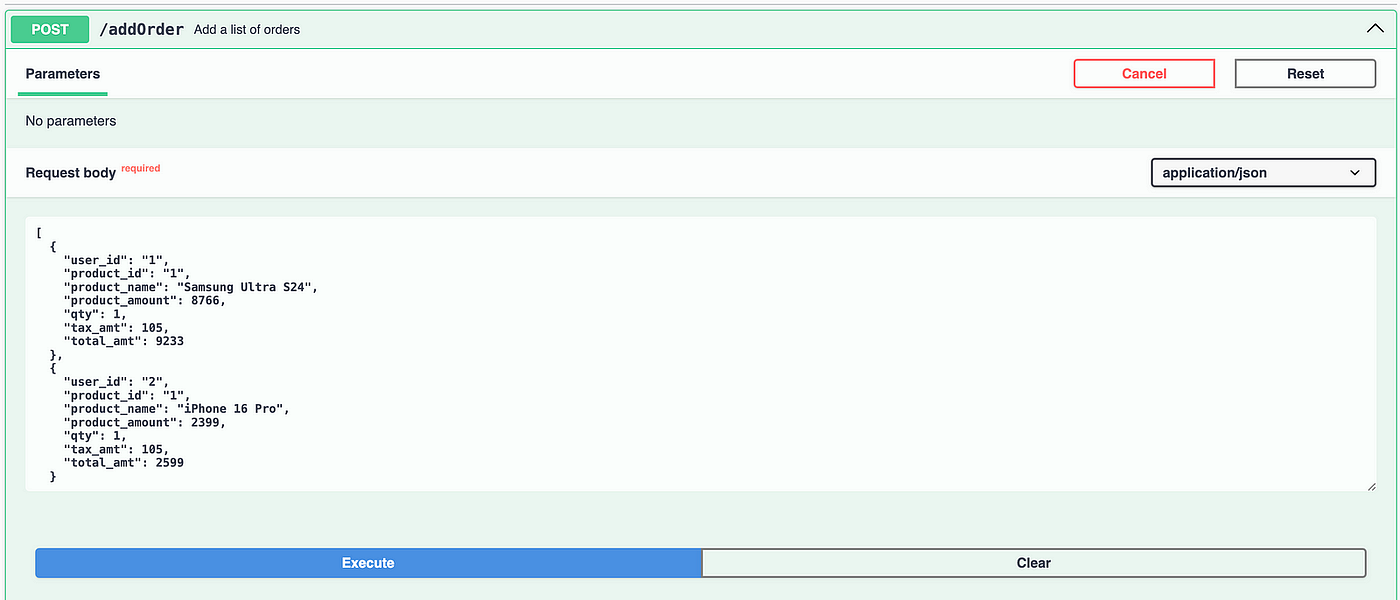
Let’s add a new Java class, TestPostRequestWithJsonFile, and add a new method, getOrdersFromJson(), to it.
public class TestPostRequestWithJsonFile {

    public List<Orders> getOrdersFromJson (String fileName) {
        InputStream inputStream = this.getClass ()
            .getClassLoader ()
            .getResourceAsStream (fileName);
        if (inputStream == null) {
            throw new IllegalArgumentException ("File not found!!");
        }
        Gson gson = new Gson ();
        try (BufferedReader reader = new BufferedReader (new InputStreamReader (inputStream))) {
            Type listType = new TypeToken<List<Orders>> () {
            }.getType ();
            return gson.fromJson (reader, listType);
        } catch (IOException e) {
            throw new RuntimeException ("Error Reading the JSON file" + fileName, e);
        }
    }
//...
}
Code Walkthrough
The getOrdersFromJson() method accepts the JSON file as a parameter and returns a list of orders. This method functions as explained below:
- Locates the JSON file: The JSON file is placed in the
src/test/resourcesfolder, it searches for the JSON file in the classpath using thegetResourcesAsStream()method. In case the file is not found, it will throw anIllegalArgumentException. - Deserialise the JSON to Java objects: The
BufferedReaderis used for efficiently reading the file. Google’s Gson library uses theTypeTokento specify the target type (List<Orders>) for proper generic type handling, and converts JSON array into a typed list of order objects. - The try-with-resources autocloses the resources to prevent memory leaks.

The following test method, testCreateOrder(), tests the POST /addOrder API request:
@Test
public void testCreateOrders () {

    List<Orders> orders = getOrdersFromJson ("new_orders.json");

    given ().contentType (ContentType.JSON)
        .when ()
        .log ()
        .all ()
        .body (orders)
        .post ("http://localhost:3004/addOrder")
        .then ()
        .log ()
        .all ()
        .statusCode (201)
        .and ()
        .assertThat ()
        .body ("message", equalTo ("Orders added successfully!"));
}
The following line of code will read the file new_orders.json and use its content as the request body to create new orders.
List<Orders> orders = getOrdersFromJson("new_orders.json")The rest of the test method remains the same as explained in the previous tutorial, which sets the content type to JSON and sends the post request. It will verify that the status code is 201 and also assert the message field in the response body.
Writing a POST API Test With a Request Body Using the Builder Pattern and Datafaker
The recommended approach for real-time projects is to use the Builder Pattern with the Datafaker library, as it generates dynamic data at runtime, allowing random and fresh test data generation every time the tests are executed.
The key advantages of using this approach are as follows:
- It provides a faster test setup as there are no I/O operations involved in searching, locating, and reading JSON files.
- It can easily handle parallel test execution as there is no conflict of test data between concurrent tests.
- It helps in easy maintenance as there is no need for manual updating of the test data.
The Builder Pattern with Datafaker can be implemented using the following steps:
Step 1: Generate a POJO for the Request Body
The following is the schema of the request body of the POST /addOrder API:
[
  {
    "user_id": "string",
    "product_id": "string",
    "product_name": "string",
    "product_amount": 0,
    "qty": 0,
    "tax_amt": 0,
    "total_amt": 0
  }
]
Let’s create a new Java class for POJO and name it OrderData. We will use Lombok in this POJO as it helps in reducing boilerplate code, such as getters, setters, and builders. By using annotations like @Builder, @Getter and @Setter, the class can be made concise, readable, and easier to maintain.
@Getter
@Setter
@Builder
@JsonPropertyOrder ({ "user_id", "product_id", "product_name", "product_amount", "qty", "tax_amt", "total_amt" })
public class OrderData {
    @JsonProperty ("user_id")
    private String userId;
    @JsonProperty ("product_id")
    private String productId;
    @JsonProperty ("product_name")
    private String productName;
    @JsonProperty ("product_amount")
    private int    productAmount;
    private int    qty;
    @JsonProperty ("tax_amt")
    private int    taxAmt;
    @JsonProperty ("total_amt")
    private int    totalAmt;
}
The field name of the JSON request body has a “_” in between them, and as per Java standard conventions, we follow the camelCase pattern. So, to mitigate this issue, we can make use of the @JsonProperty annotation by the Jackson DataBind library and provide the actual field name in the annotation over the respective Java variable names.
The order of the JSON fields can be preserved by using the @JsonProperOrder annotation and passing the field names as per the required order.
Step 2: Create a Builder Class for Generating Data at Runtime With Datafaker
In this step, we will create a new Java class, OrderDataBuilder, for generating test data at runtime using the Datafaker library.
public class OrderDataBuilder {

    public static OrderData getOrderData () {

        Faker faker = new Faker ();
        int productAmount = (faker.number ()
            .numberBetween (1, 1999));
        int qty = faker.number ()
            .numberBetween (1, 10);
        int grossAmt = qty * productAmount;
        int taxAmt = (int) (grossAmt * 0.10);
        int totalAmt = grossAmt + taxAmt;

        return OrderData.builder ()
            .userId (String.valueOf (faker.number ()
                .numberBetween (301, 499)))
            .productId (String.valueOf (faker.number ()
                .numberBetween (201, 533)))
            .productName (faker.commerce ()
                .productName ())
            .productAmount (productAmount)
            .qty (qty)
            .taxAmt (taxAmt)
            .totalAmt (totalAmt)
            .build ();
    }
}
A static method getOrderData() has been created inside the class that implements the Datakaker library and builds the OrderData for generating the request body in JSON format at runtime.
The Faker class from the Datafaker library is instantiated first, which will be further used for creating fake data at runtime. It provides various methods to generate the required data, such as names, numbers, company names, product names, addresses, etc., at runtime.
Using the OrderData POJO, we can populate the required fields through Java’s Builder design pattern. Since we have already applied the @Builder annotation from Lombok, it automatically enables an easy and clean way to construct OrderData objects.
Step 3: Write the POST API Request Test
Let’s create a new Java class, TestPostRequestWithBuilderPattern, for implementing the test.
public class TestPostRequestWithBuilderPattern {

    @Test
    public void testCreateOrders () {
        List<OrderData> orderDataList = new ArrayList<> ();
        for (int i = 0; i < 4; i++) {
            orderDataList.add (getOrderData ());
        }

        given ().contentType (ContentType.JSON)
            .when ()
            .log ()
            .all ()
            .body (orderDataList)
            .post ("http://localhost:3004/addOrder")
            .then ()
            .statusCode (201)
            .and ()
            .assertThat ()
            .body ("message", equalTo ("Orders added successfully!"));
    }
}
The request body requires the data to be sent in a JSON Array with multiple JSON objects. The OrderDataBuilder class will generate the JSON objects; however, the JSON Array can be handled in the test.
List<OrderData> orderDataList = new ArrayList<> ();
       for (int i = 0; i < 4; i++) {
            orderDataList.add (getOrderData ());
        }
This code generates four unique order records using the getOrderData() method and adds them to a list named orderDataList.
Once the loop completes, the list holds four unique OrderData objects, each representing a new order ready to be included in the test request.
The POST test request is finally sent to the server, where it is executed, and the code checks for a status code of 201 and asserts the response body with the text “Orders added successfully!”
Performing Assertions With the Builder Pattern
When the request body and its data are generated dynamically, a common question arises: “Can we perform assertions on this dynamically created data?”
The answer is “Yes.” In fact, it is much easier and quicker to perform the assertions with the request data generated using the Builder pattern and the Datafaker library.
The following is the response body generated after successful order creation using the POST /addOrder API:
{
  "message": "Orders fetched successfully!",
  "orders": [
    {
      "id": 1,
      "user_id": "412",
      "product_id": "506",
      "product_name": "Enormous Wooden Watch",
      "product_amount": 323,
      "qty": 7,
      "tax_amt": 226,
      "total_amt": 2487
    },
    {
      "id": 2,
      "user_id": "422",
      "product_id": "447",
      "product_name": "Ergonomic Marble Shoes",
      "product_amount": 673,
      "qty": 2,
      "tax_amt": 134,
      "total_amt": 1480
    },
    {
      "id": 3,
      "user_id": "393",
      "product_id": "347",
      "product_name": "Fantastic Bronze Plate",
      "product_amount": 135,
      "qty": 9,
      "tax_amt": 121,
      "total_amt": 1336
    },
    {
      "id": 4,
      "user_id": "398",
      "product_id": "526",
      "product_name": "Incredible Leather Bottle",
      "product_amount": 1799,
      "qty": 4,
      "tax_amt": 719,
      "total_amt": 7915
    }
  ]
}
Let’s say we need to perform the assertion for the user_id field in the second order and the total_amt field of the fourth order in the response. We can write the assertions with REST Assured as follows:
given ().contentType (ContentType.JSON)
            .when ()
            .log ()
            .all ()
            .body (orderDataList)
            .post ("http://localhost:3004/addOrder")
            .then ()
            .statusCode (201)
            .and ()
            .assertThat ()
            .body ("message", equalTo ("Orders added successfully!"))
            .and ()
            .assertThat ()
            .body ("orders[1].user_id", equalTo (orderDataList.get (1)
                .getUserId ()), "orders[3].total_amt", equalTo (orderDataList.get (3)
                .getTotalAmt ()));
The order array in the response holds all the data related to the orders. Using the JSONPath “orders[1].user_id”, the user_id of the second order will be retrieved. Similarly, the total amount of the fourth order can be fetched using the JSONPath orders[3].total_amt.
The Builder design pattern comes in handy for comparing the expected values, where we can use the code orderDataList.get(1).getUserId and orderDataList.get(3).getTotalAmt to get the dynamic value of user_id (second order) and total_amount (fourth order) generated and used in the request body for creating orders at runtime.
Summary
The REST Assured framework provides flexibility to post the request body in the POST API requests. The request body can be posted using a String, JSON Object, or JSON Array, Java Collections such as List and Map, JSON files, and POJOs. The Builder design pattern in Java can be combined with the Datafaker library to generate a dynamic request body at runtime.
Based on my experience, using the Builder Pattern in Java provides several advantages over other approaches for creating request bodies. It allows dynamic values to be easily generated and asserted, making test verification and validation more efficient and reliable.
Published at DZone with permission of Faisal Khatri. See the original article here.
Opinions expressed by DZone contributors are their own.
Comments