

DZone
Thanks for visiting DZone today,
Edit Profile
  • Manage Email Subscriptions
  • How to Post to DZone
  • Article Submission Guidelines
Sign Out View Profile
  • Post an Article
  • Manage My Drafts
Newsletter
Log In / Join
Refcards Trend Reports
Events Video Library
Refcards
Trend Reports

Events

View Events Video Library

Related

  • How To Validate HTTP Post Request Body - Restful Web Services With Spring Framework | Spring Boot
  • RESTful Web Services With Spring Boot: Reading HTTP POST Request Body
  • Spring Boot - How To Use Native SQL Queries | Restful Web Services
  • RESTful Web Services: How To Create a Context Path for Spring Boot Application or Web Service

Trending

  • Java 8 Optional - Avoid Null and NullPointerException Altogether - and Keep It Pretty
  • Who Should Grade Your AI? Rules vs LLM Judges vs Humans
  • Putting Guardrails Around What Your AI Agent Is Allowed to Touch
  • Beyond @Transactional: Solving the Dual-Write Problem in Distributed Microservices

Draft This article hasn't been published, so readers can't see it.

In moderation This article is waiting for review, so readers can't see it yet.

Deleted This article has been deleted, so readers can't see it.

  1. DZone
  2. Coding
  3. Frameworks
  4. Build a REST Service That Consumes Any Type of Request Format

Build a REST Service That Consumes Any Type of Request Format

By 
Santosh Devkate
·
Feb. 27, 20 · Tutorial
Post on X (opens in a new tab) Share on LinkedIn (opens in a new tab)
34.2K Views

Join the DZone community Save articles, join the discussion, and download Refcards and Trend Reports with a free account.

Join for free Already a member? Log in

Sometimes, we have demands from clients that require a REST service that consumes JSON/XML or any other format dynamically. In this tutorial, we're going to show you how to do exactly that with Spring Boot. 

Here is the class that I am taking as a request body in my API. Here, I am using @XmlRootElement annotation to mark an Employee class as a root. For more details about this annotation, please click here.

Java


xxxxxxxxxx
1
15
 
1
@XmlRootElement
2
 
          
3
public class Employee {
4
 
          
5
private int id;
6
 
          
7
private String firstName;
8
 
          
9
private String lastName;
10
 
          
11
private String department;
12
 
          
13
//setters & getters 
14
 
          
15
//toString()


You may also like: Spring Boot: The Most Notable Features You Should Know.

Here is my REST service, EmployeeController.Java.

Java


x
15
 
1
@RestController
2
public class EmployeeController {
3
 
          
4
    @PostMapping(path = "/get-diff-data/", consumes = MediaType.ALL_VALUE)
5
    public ResponseEntity<?> getDetails(@RequestBody Employee emp) {
6
        ResponseEntity<?> response = null;
7
        try {
8
            response = ResponseEntity.status(HttpStatus.OK).body(emp);
9
        } catch (Exception e) {
10
            response = ResponseEntity.status(HttpStatus.INTERNAL_SERVER_ERROR).body(e.getMessage());
11
        }
12
        return response;
13
    }
14
 
          
15
}


After this, let's make sure that the service API is working properly. Here, I'll be using Postman. First, we will check with XML:

XML


xxxxxxxxxx
1
 
1
<?xml version="1.0" encoding="UTF-8"?>
2
<employee>
3
   <department>IT</department>
4
   <firstName>Santosh</firstName>
5
   <id>123</id>
6
   <lastName>Devkate</lastName>
7
</employee>


For the above input, this is the response we get in JSON:

JSON


xxxxxxxxxx
1
 
1
{
2
    "id": 123,
3
    "firstName": "Santosh",
4
    "lastName": "Devkate",
5
    "department": "IT"
6
}


Here is a snapshot of the entire service call:
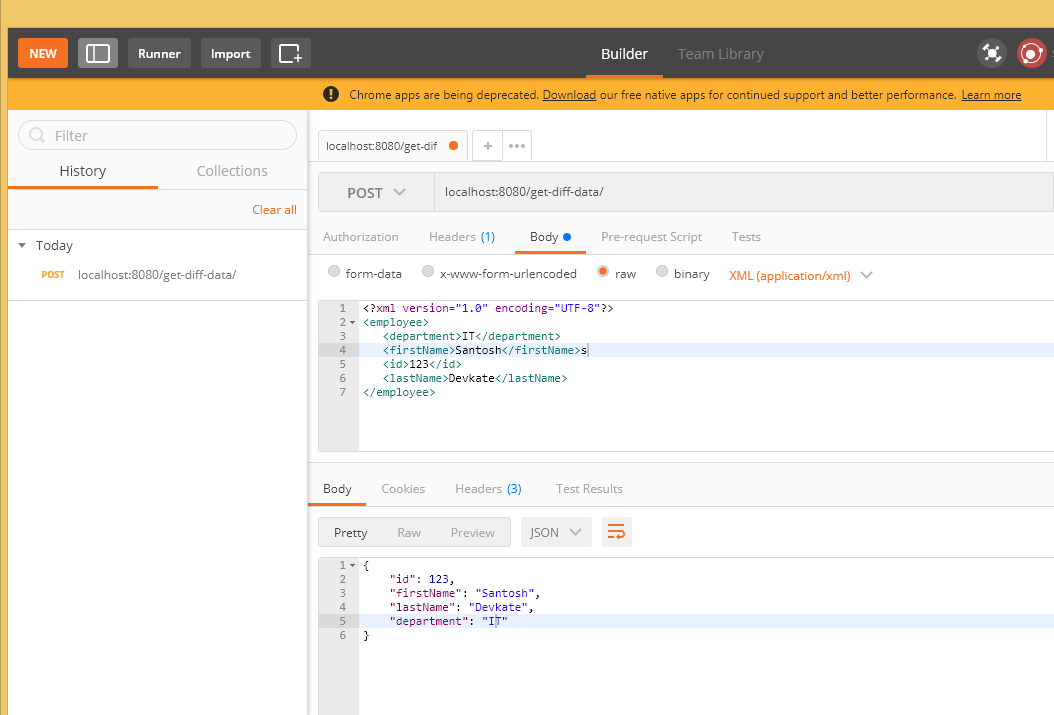
XML service call

XML service call

Next, we will test it based on JSON input:

JSON


xxxxxxxxxx
1


1
{
2
    "id": 123,
3
    "firstName": "Santosh",
4
    "lastName": "Devkate",
5
    "department": "IT"
6
}


The expected response will be the same JSON:

JSON


x


1
{
2
    "id": 123,
3
    "firstName": "Santosh",
4
    "lastName": "Devkate",
5
    "department": "IT"
6
}


Thanks for reading this blog. Please feel free to post any comments on this if you have any questions!


Further Reading

  • Step-By-Step Spring Boot RESTful Web Service Complete Example.
  • XML Parsing Using Java org.w3c.dom.
  • All About Spring Boot [Tutorials and Articles].
REST Web Protocols Web Service Spring Framework Requests Build (game engine)

Opinions expressed by DZone contributors are their own.

Related

  • How To Validate HTTP Post Request Body - Restful Web Services With Spring Framework | Spring Boot
  • RESTful Web Services With Spring Boot: Reading HTTP POST Request Body
  • Spring Boot - How To Use Native SQL Queries | Restful Web Services
  • RESTful Web Services: How To Create a Context Path for Spring Boot Application or Web Service

Partner Resources

×

Comments

Loading comments

The comments didn't load

Please try again in a moment.

Likes

Loading

The next likes didn't load. Please try again.

The likes didn't load

Please try again in a moment.

See who liked this

Log in or join DZone for free to see who liked this article.

Log in Join for free
  • RSS
  • X
  • Facebook

ABOUT US

  • About DZone
  • Support and feedback
  • Community research

ADVERTISE

  • Advertise with DZone

CONTRIBUTE ON DZONE

  • Article Submission Guidelines
  • Become a Contributor
  • Core Program
  • Visit the Writers' Zone

LEGAL

  • Terms of Service
  • Privacy Policy

CONTACT US

  • 3343 Perimeter Hill Drive
  • Suite 215
  • Nashville, TN 37211
  • [email protected]

Let's be friends:

  • RSS
  • X
  • Facebook