

No VIP? No Problem: Pacemaker-Based SAP HANA High Availability Using a Load Balancer Health Check
Many cloud platforms do not support floating virtual IPs, which breaks the standard RHEL Pacemaker setup for SAP HANA HA. Use a network load balancer.
 CORE
·
CORE
·
 ·
·
Join the DZone community and get the full member experience.
Join For FreeHigh availability is a non-negotiable requirement for mission-critical SAP HANA deployments. When a primary database node goes down without an automated failover in place, the business impact is immediate. RHEL Pacemaker has long been the standard cluster manager for SAP HANA High Availability(HA) on Linux; it detects failures, fences misbehaving nodes, promotes secondaries, and orchestrates the full recovery sequence without manual intervention.
The standard Pacemaker playbook for SAP HANA HA, as documented in the official documentation, relies on a virtual IP address (VIP) as the single stable network endpoint for all database traffic. Pacemaker keeps that VIP tied to whichever node is currently the active primary. When a failover happens, the VIP moves. Applications reconnect to the same address and reach the new primary without configuration changes.
The problem is that this approach breaks down on many cloud platforms. Hyperscalers and private cloud environments frequently do not support traditional floating VIPs in the way bare-metal or on-premises networking does. The official RHEL Pacemaker documentation covers the VIP setup in detail and stops there. When VIPs are not available, practitioners are left to work out an alternative on their own.
This article defines a production-ready alternative for exactly this scenario. The approach replaces the floating VIP with a network load balancer (NLB) and uses a Pacemaker-managed health check listener to tell the load balancer which node is the active primary at any given time. This article explains the problem, positions it against existing cloud provider approaches, and walks through the implementation step by step.
How Cloud Providers Address This
The challenge of replacing a floating VIP with a load balancer while still routing traffic exclusively to the active HANA primary is not new. There is published guidance on how to approach, and the core pattern is consistent across all of them.
One such approach is to use an internal passthrough Network Load Balancer alongside a socat-based health check listener managed as a Pacemaker resource. The listener opens on a dedicated port in the private range (49152–65535), and the NLB probes that port to determine which backend is the primary. The approach uses the Open Cluster Framework(OCF) 'anything' resource agent to manage the socat process inside Pacemaker.
The second approach is to use an Internal Load Balancer with a health probe on port 625XX (where XX is the HANA instance number). A listener on each HANA node responds to the probe, but only the primary has the listener active. In some configurations, HAProxy is used rather than socat as the listener.
The implementation discussed in this article adds to this landscape a clean approach using a native systemd service registered directly as a Pacemaker resource instead of the OCF 'anything' agent or HAProxy, and it targets RHEL specifically. The systemd approach keeps the setup self-contained, auditable, and consistent with how most RHEL administrators already manage services. It works on any cloud provider or private cloud environment that supports network load balancers.
Architecture Overview
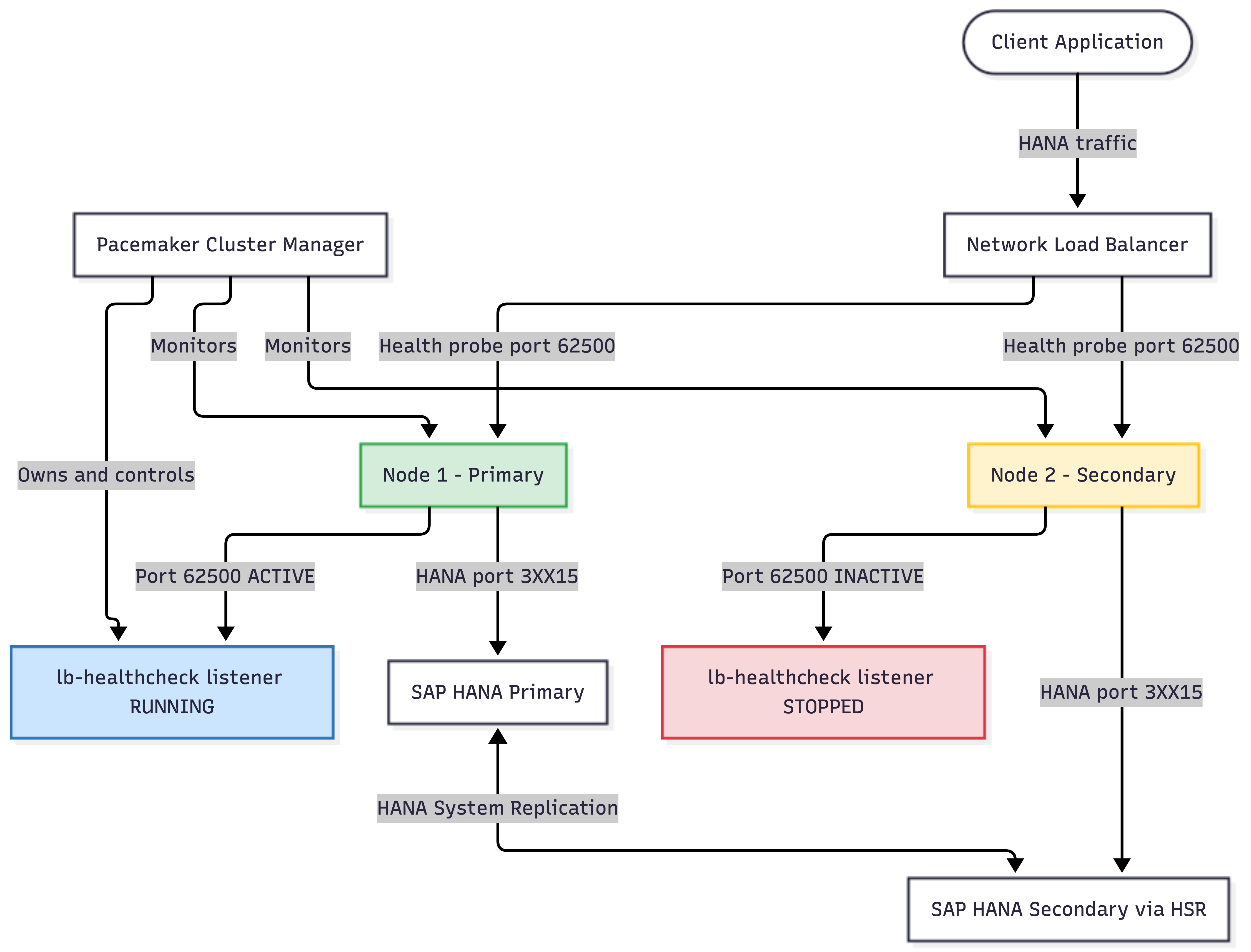
The diagram below shows the two-node SAP HANA cluster, the network load balancer, and how the health check listener connects them. The NLB's backend pool includes both HANA nodes on the standard HANA port (3XX15), but the health probe targets a separate port, 62500, that only the active primary exposes.
Failover Sequence
The diagram below shows the sequence of events from the moment the primary node fails to the moment applications reconnect through the load balancer.
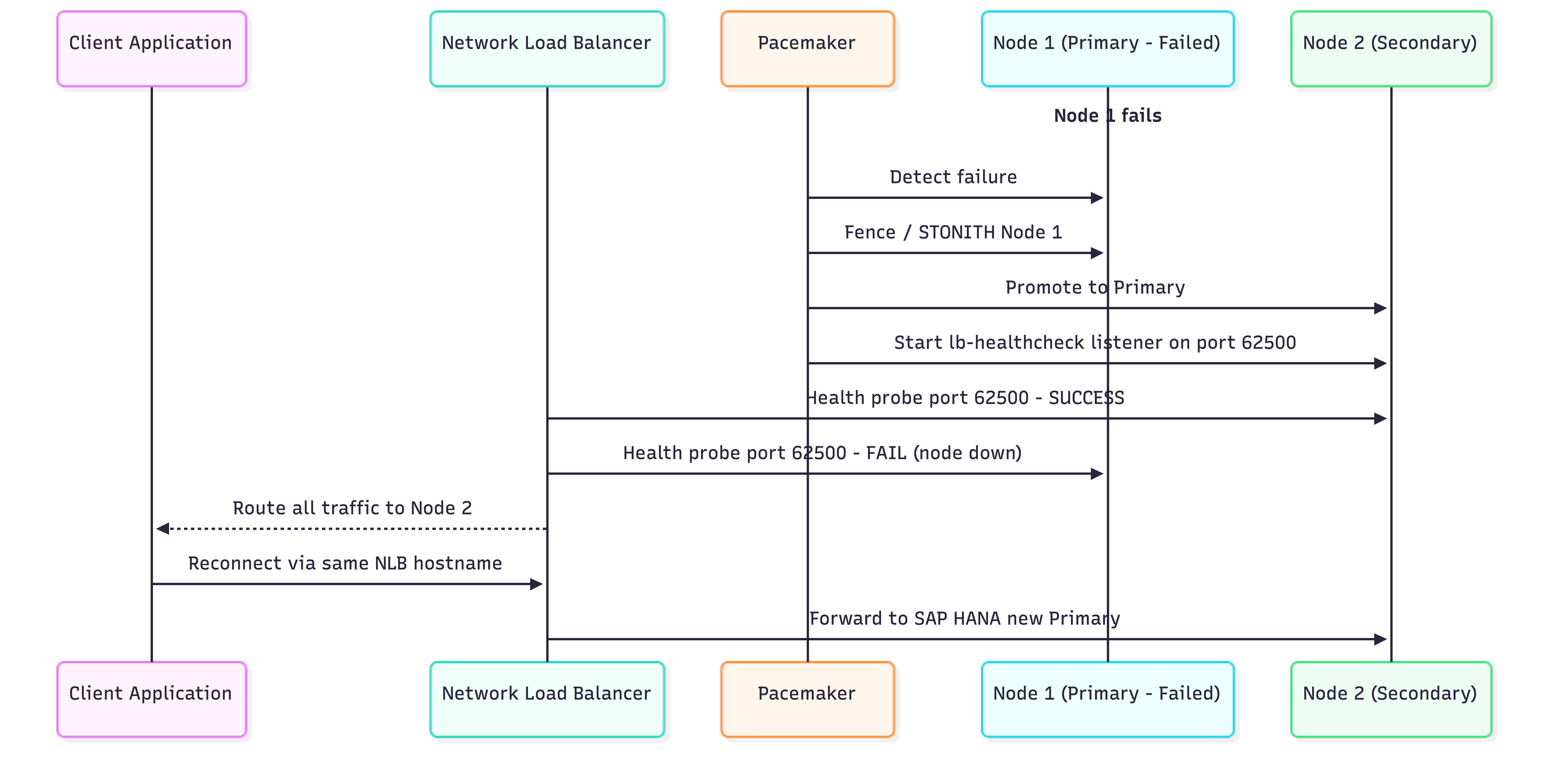
Two timing factors govern the total recovery window. The first is Pacemaker's fencing and promotion sequence, typically 30 to 90 seconds, depending on the STONITH method and HANA replication state. The second is the NLB health check interval, which determines how quickly the load balancer detects the new primary after Pacemaker completes its promotion. For production environments, tuning both values together is worth the effort
Pacemaker Resource Model
The diagram below maps the Pacemaker resource hierarchy and constraints used in this setup. Understanding the resource model helps clarify why both the colocation and ordering constraints are necessary.

The colocation constraint (score=INFINITY) tells Pacemaker that lb_healthcheck must always run on the same node as the promoted HANA primary. If the promoted primary moves, the health check listener moves with it. The ordering constraint ensures the listener does not start until HANA has fully completed its promotion, preventing the load balancer from routing traffic to a node that is still finishing its takeover sequence.
Prerequisites
The following must be in place before starting the implementation:
- Two RHEL virtual servers with access to the Red Hat High Availability Add-On repository
- SAP HANA installed on both servers with HANA System Replication configured
- Pacemaker installed and configured through section 5.7 of the official Red Hat SAP HANA HA guide, sections 5.8 and 5.9 (virtual IP configuration) are intentionally skipped
- A network load balancer provisioned with both HANA nodes in the backend pool, backend port set to 3XX15 (where XX is the HANA instance number)
- socat installed on both HANA nodes
- Firewall rules permitting TCP traffic on port 62500 from the NLB health check source addresses
socat is available in standard RHEL repositories. Install it with: sudo dnf install socat -y
Step-by-Step Implementation
Step 1: Create the Systemd Health Check Service
Run the following command on both HANA nodes. It creates a systemd unit file that uses socat to open a TCP listener on port 62500. The listener accepts any connection and returns success immediately; that response is all the load balancer needs.
cat <<EOF > /etc/systemd/system/lb-healthcheck.service
[Unit]
Description=LB healthcheck listener for active SAP HANA primary
After=network-online.target
Wants=network-online.target

[Service]
Type=simple
ExecStart=/usr/bin/socat TCP4-LISTEN:62500,reuseaddr,fork EXEC:/bin/true
Restart=always
RestartSec=2

[Install]
WantedBy=multi-user.target
EOF
Do not enable this service manually. Pacemaker will control its lifecycle entirely.
Step 2: Reload Systemd
After writing the unit file, reload systemd on both nodes so it registers the new service:
systemctl daemon-reloadStep 3: Prevent the Service From Starting Automatically
Explicitly disable and stop the service. If both nodes have the listener running simultaneously, the load balancer will consider both healthy and will route traffic to either node, which defeats the entire purpose of the setup.
systemctl disable lb-healthcheck
systemctl stop lb-healthcheck
Step 4: Create the Pacemaker Resource
Register the systemd service as a Pacemaker-managed resource. From this point forward, Pacemaker owns the start, stop, and monitoring of the listener.
pcs resource create lb_healthcheck \
  systemd:lb-healthcheck \
  op monitor interval=10s timeout=20s
Pacemaker will now monitor the listener every 10 seconds and automatically relocate it during failover events.
Step 5: Add the Colocation Constraint
This is the constraint that enforces the listener always runs on the same node as the promoted SAP HANA primary. Without it, Pacemaker might place the resource on either node.
pcs constraint colocation add lb_healthcheck \
  with Promoted cln_SAPHanaCon_P01_HDB01 \
  score=INFINITY
Replace P01_HDB01 with the actual SID and instance number for the environment. For example: if SID is PRD and instance number is 00, use PRD_HDB00
Step 6: Add the Ordering Constraint
The ordering constraint prevents the health check listener from starting until after the HANA promotion is fully complete. Without this, a race condition could cause the load balancer to route traffic to a node that is still mid-promotion.
pcs constraint order promote cln_SAPHanaCon_P01_HDB01 \
  then start lb_healthcheck
Step 7: Validate the Pacemaker Configuration
Verify that both constraints are correctly registered in the cluster:
pcs constraint configThe output should contain both of the following entries:
Colocation Constraints:
  Started resource 'lb_healthcheck' with Promoted resource
  'cln_SAPHanaCon_P01_HDB01'
  score=INFINITY

Order Constraints:
  promote resource 'cln_SAPHanaCon_P01_HDB01' then start resource 'lb_healthcheck'
Step 8: Verify Listener Placement
Confirm that only the active primary node is listening on port 62500. Run this command on each node:
ss -lntp | grep 62500On the primary node, the output should show a LISTEN entry on 0.0.0.0:62500. On the secondary node, the command should return nothing.
# Expected on PRIMARY node:
LISTEN  0  5  0.0.0.0:62500  0.0.0.0:*

# Expected on SECONDARY node:
# (no output)
If both nodes show the listener, the colocation constraint is either missing or incorrect. If neither node shows it, check that the HANA clone resource is in the Promoted state with: pcs status
Comparison: VIP Approach vs. NLB Health Check Approach
The diagram below summarizes the trade-offs between the traditional VIP approach and the NLB health check approach described in this article.

The VIP approach cuts over faster because there is no dependency on an external health check interval. The IP simply moves to the new primary node. It requires the underlying network to support IP address mobility, which cloud environments typically do not.
The NLB approach works across any cloud or private cloud environment that supports network load balancers. The trade-off is that traffic cutover depends on the NLB's health check interval in addition to Pacemaker's promotion time.
The cloud documentation on major cloud providers acknowledges this trade-off explicitly: using an NLB with a health check listener is their recommended approach for all SAP HANA HA deployments, and they provide the same socat-based pattern using the OCF 'anything' resource agent. The approach documented here achieves the same outcome using a systemd service, which many operators find more familiar and easier to audit.
Operational Notes and Tuning
A few things are worth keeping in mind when running this setup in production.
NLB health check interval: The faster the health check interval, the shorter the window between Pacemaker completing its promotion and the NLB redirecting traffic. A 5-second interval is common in Cloud SAP HA documentation. Setting this too low can cause false positives during normal HANA replication lag.
STONITH configuration: This solution assumes STONITH (fencing) is configured as part of the base Pacemaker setup. Without STONITH, Pacemaker will not promote the secondary during a primary failure. STONITH ensures the failed node is definitively powered off before promotion proceeds, preventing split-brain.
Port 62500 vs. 625XX convention: Cloud providers use the convention 625XX (where XX is the instance number) for their SAP HANA health check ports. Cloud's documentation recommends using any port in the private range 49152 to 65535. Port 62500 used in this setup falls within that range and does not conflict with standard HANA ports. Teams following other cloud provider conventions can substitute 625XX if they prefer consistency across environments.
Testing failover: After setup, the full failover sequence should be tested by killing the primary HANA process (not the OS) and verifying the NLB redirects traffic to the new primary within the expected time window. The pcs status command is the primary tool for watching the Pacemaker side of the transition.
Conclusion
The standard RHEL Pacemaker documentation for SAP HANA HA assumes a virtual IP is available. Not all hyperscalers provide VIP. The solution fills that gap cleanly: replace the VIP with a network load balancer hostname, and use a Pacemaker-managed socat listener to tell the load balancer which node is the primary at any given time.
The core pattern NLB health probe targeting a Pacemaker-owned listener is the same pattern major cloud providers use in their own SAP HA documentation. What this implementation adds is a clean systemd service approach for RHEL, without needing the OCF 'anything' resource agent or additional proxy software.
The setup comes down to eight steps: write a systemd service, disable it from auto-starting, register it as a Pacemaker resource, and add two constraints. The constraints — one for colocation, one for ordering — are what tie the listener's lifecycle to the HANA primary promotion sequence and make the whole thing work reliably across failovers.
For teams running SAP HANA on RHEL in environments where VIPs are not an option, this is a production-ready path forward that relies entirely on standard RHEL tooling.
Opinions expressed by DZone contributors are their own.
Comments