

Scripting Language Execution in Mulesoft Using Scripting Module(2.0)
Scripting Module is useful to execute scripting languages to perform all or part of a complex task or to reuse modules that you have already written.
Join the DZone community and get the full member experience.
Join For FreeAbout Scripting Module(2.0)
The scripting module provides facilities for using scripting languages in Mule. The Scripting Module executes custom logic written in a scripting language (such as Groovy, Javascript, Python, and Ruby). In some cases, you might need to create custom code to perform all or part of a complex task or to reuse modules that you have already written.
Similarly, any scripting languages that support JSR-223 can be used inside Mule. Scripts can be used as implementations of components or transformers. Also, scripts can be used for expression evaluations, meaning message routing can be controlled using script evaluations on the current message. You can even configure Mule instances from scripts. Since version 2.0 you must provide a compliant JSR-223 scripting language engine.
What Is JSR-223?
JSR223 is a standard scripting API for Java Virtual Machine (JVM) languages. The JVM languages provide varying levels of support for the JSR223 API and interoperability with the Java runtime.
How to Use the Scripting Module(2.0)?
In Anypoint Studio create a new Mule project, Search for the “Scripting” module in the Mule palette or simply add the following dependency in your pom.xml of the created project.
<!-- Scripting Module Mule-4 -->
<dependency>
<groupId>org.mule.modules</groupId>
<artifactId>mule-scripting-module</artifactId>
<version>2.0.0</version>
<classifier>mule-plugin</classifier>
</dependency>
This Scripting module does not provide execution engines directly, you have to provide an execution engine yourself(Only Oracle Nashorn engine for Javascript is inbuilt.). Refer to the following dependency.
Groovy:
xxxxxxxxxx
<dependency>
<groupId>org.codehaus.groovy</groupId>
<artifactId>groovy-all</artifactId>
<version>2.4.16</version>
<classifier>indy</classifier>
</dependency>
JRuby (Ruby):
<dependency>
<groupId>org.jruby</groupId>
<artifactId>jruby-core</artifactId>
<version>9.2.11.1</version>
</dependency>
Jython (Python):
xxxxxxxxxx
<dependency>
<groupId>org.python</groupId>
<artifactId>jython-standalone</artifactId>
<version>2.7.2</version>
</dependency>
Let's get started with a simple use case.
Use Case:
How to stop and start the flow in Mule 4 programmatically?
Prerequisites:
- Anypoint Studio 7.x.x
- Postman
Step 1
Create a Mule project in Anypoint Studio and create a Global Element for Scripting module. We can configure the respective engine by clicking “Configure”.
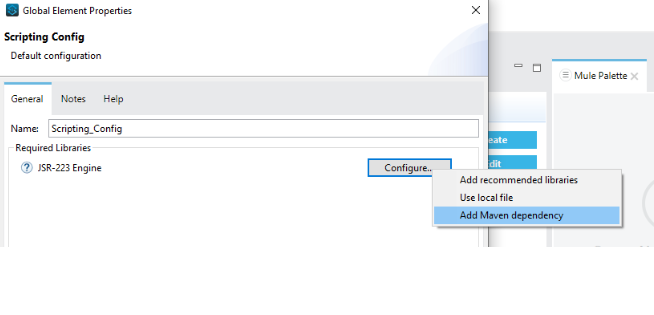
(Note: First you have to create a global element for the Scripting module. Otherwise, respective engines won't be shown in properties.)
Step 2
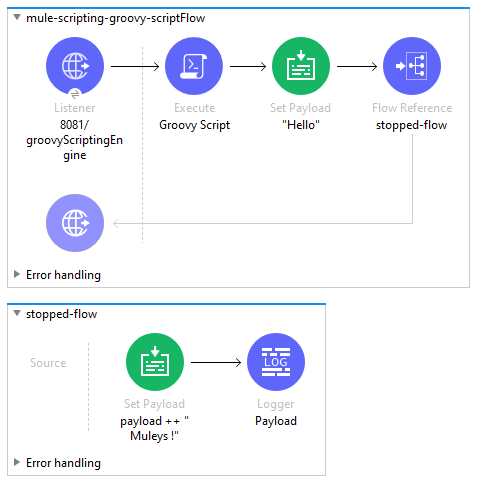
Create mule flows as shown below. The initial state of the “stopped-flow” is stopped.
Step 3
The following image represents the configuration of the "Execute" connector of the Scripting module.
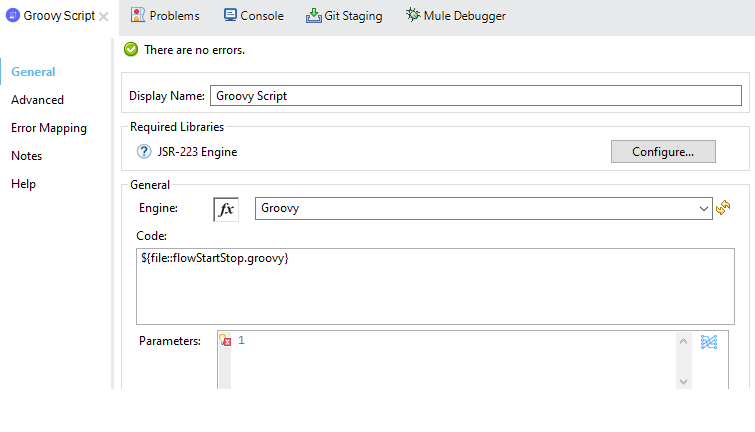
- Engine: Select the Scripting Engine.
- Code: Write the code here directly or we can also load code from an external file. (Here we have added
flowStartStop.groovyfile tosrc/main/resources). - Parameters: Define input values for the script to use through DataWeave.
flowStartStop.groovy
xxxxxxxxxx
flow = registry.lookupByName("stopped-flow").get();
if (flow.isStarted())
flow.stop()
else
flow.start()
Step 4
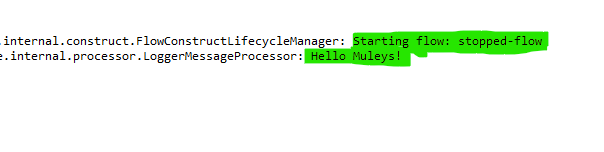
Deploy the application and navigate to the URL of your application from Postman, you will get the following logs showing the stopped-flow has started.
To summarize, using the Scripting module we can perform all or part of a complex task by writing the custom logic in scripting languages.
For more examples, you can login to Anypoint platform account and open the examples from an exchange in Anypoint Studio.
Username: guestuser1
Password: Muleuser@1
References
1) https://docs.mulesoft.com/scripting-module/2.0/
2) https://help.mulesoft.com/s/article/How-To-Stop-Or-Start-Flows-In-Mule-4-x-Programmatically
Opinions expressed by DZone contributors are their own.
Comments