

Secrets Management With Infisical and External Secrets Operator
No secrets in Git, but GitOps needs secrets. Learn how to use Infisical with the External Secrets Operator to bridge the gap in Kubernetes.
 ·
·
Join the DZone community and get the full member experience.
Join For FreeGitOps has a fundamental tension: everything should be in Git, but secrets shouldn't be in Git. You need database passwords, API keys, and tokens to deploy applications, but committing them to a repository is a security incident waiting to happen.
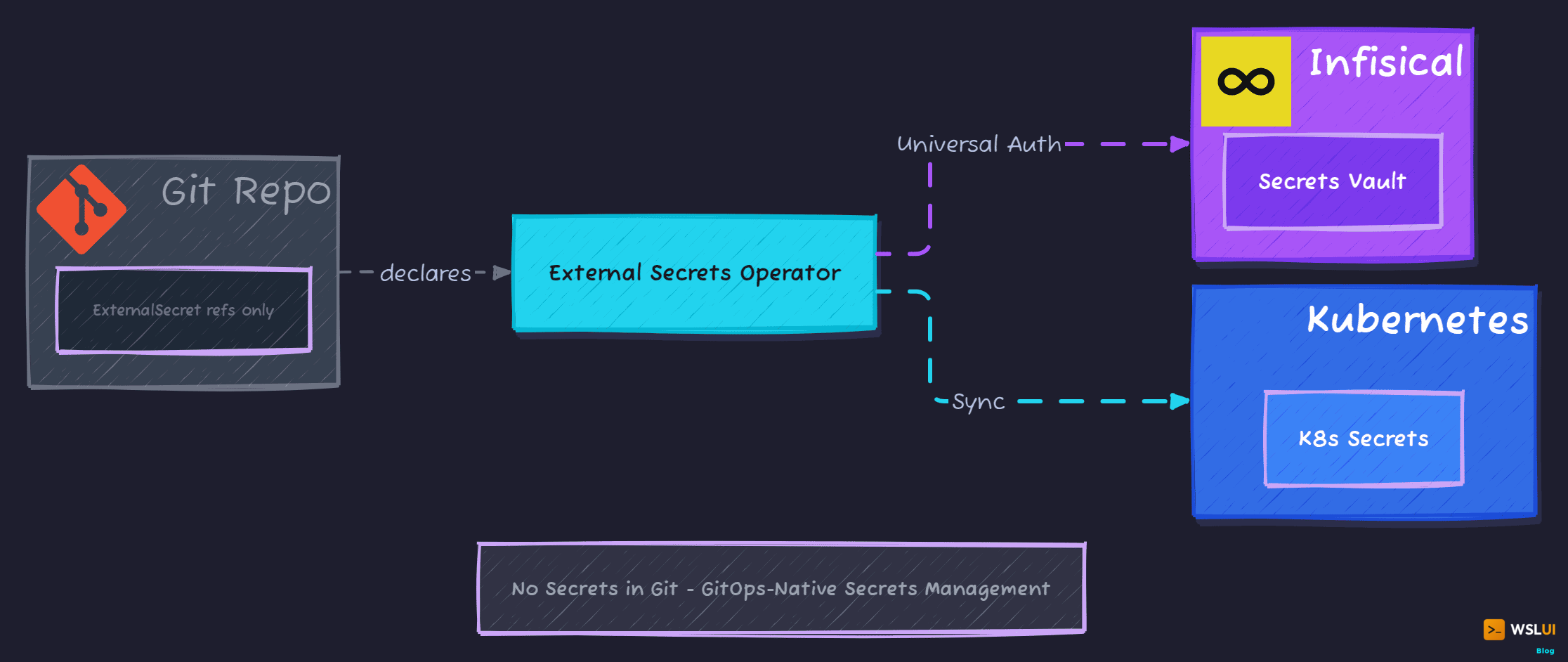
This post covers how to solve this with Infisical and External Secrets Operator (ESO) - a combination that keeps secrets out of Git while letting Kubernetes applications access them seamlessly. The same architectural pattern works with any ESO-supported backend (HashiCorp Vault, AWS Secrets Manager, Azure Key Vault, GCP Secret Manager), so the concepts apply regardless of which secrets manager you choose.
The Problem: Secret Zero
Every secrets management system has a bootstrapping problem. You need a secret to access your secrets manager. Where does that initial secret come from?
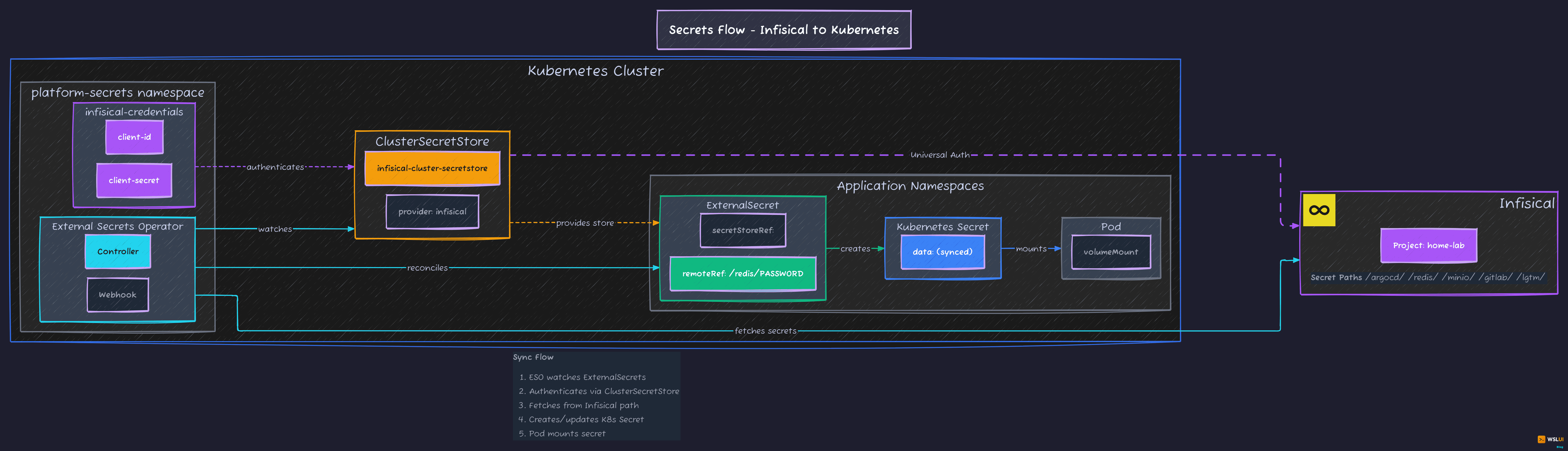
The options aren't great:
- Environment variables on the host: Someone has to set them
- Cloud IAM: Requires cloud infrastructure and vendor lock-in
- Mounted files: Still need to get the file there somehow
The pragmatic approach: machine identity credentials stored locally, passed to scripts as environment variables. Not perfect, but contained to one location and never committed to Git.
Choosing a Secrets Backend
I evaluated several options for this setup: HashiCorp Vault, AWS Secrets Manager, Azure Key Vault, and Infisical. For a homelab or small team context, I went with Infisical because it had lower operational overhead than Vault (no unsealing, no HA configuration), a native ESO provider, and machine identity authentication designed for Kubernetes workloads. It also offers EU hosting for data residency requirements.
That said, ESO supports over 20 secret store providers. If your organisation already runs Vault or uses a cloud-native secrets manager, the ExternalSecret patterns in this article work the same way - only the ClusterSecretStore configuration changes.
The general setup is: store secrets in your secrets manager, create a service account or machine identity for the cluster, and let ESO sync secrets into Kubernetes.
Choosing Your Infisical Region
Infisical offers two hosted regions. Choose based on your data residency requirements:
| Region | API URL | Use Case |
|---|---|---|
| US (default) | https://app.infisical.com |
Most users, no specific data residency needs |
| EU | https://eu.infisical.com |
GDPR compliance, European data residency |
Throughout this post, examples use the US region (app.infisical.com) as the default. If you need EU hosting, replace the domain in all configuration.
Setting Up Machine Identity
Machine identities in Infisical use Universal Auth — a client ID and secret pair specifically for automated systems. No user login, no MFA prompts, just machine-to-machine authentication.
In Infisical's web UI:
- Within a project, go to Access Control > Machine Identities
- Click Add Machine Identity to Project
- Generate a client ID and client secret
- Save these somewhere secure (you'll need them for bootstrap and ongoing management)
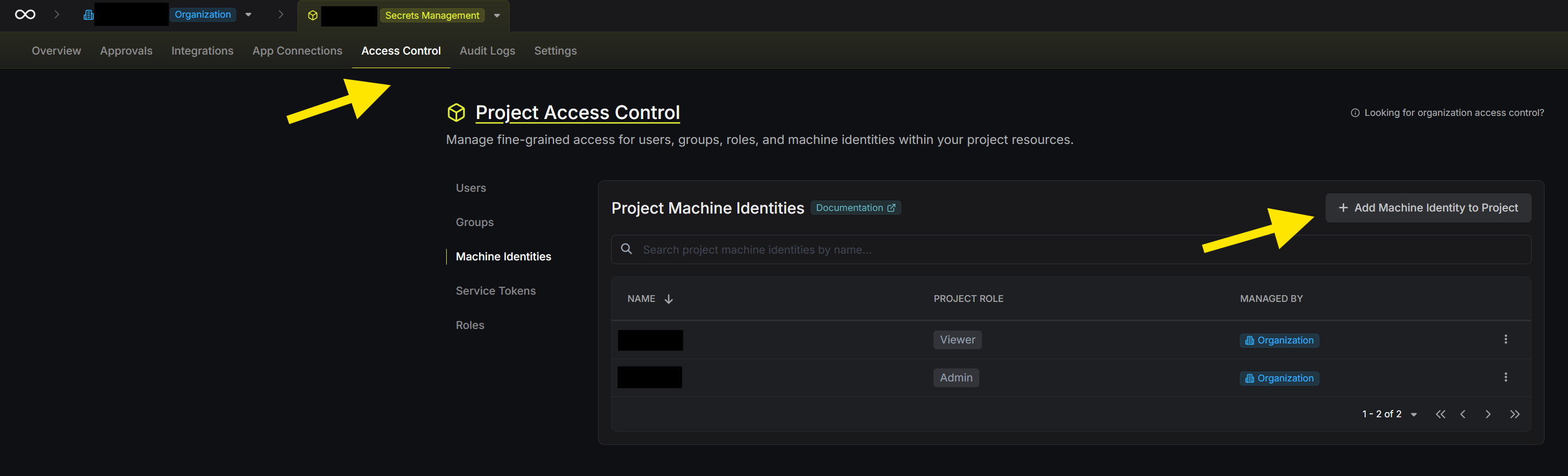
The identity needs access to read secrets from your project. Scope it to the appropriate environment with read-only access - it doesn't need to modify secrets, just fetch them.
Storing Configuration
Before diving into implementation, establish where configuration lives. I use a config.env file for non-secret values that both scripts and infrastructure-as-code tools can read:
# Infisical Configuration
INFISICAL_API_URL="https://app.infisical.com"    # or https://eu.infisical.com for EU
INFISICAL_PROJECT_SLUG="my-project-slug"
INFISICAL_PROJECT_ID="your-project-uuid"
INFISICAL_ENVIRONMENT="dev"
# Credentials come from environment variables, never stored in files
The actual credentials (INFISICAL_CLIENT_ID and INFISICAL_CLIENT_SECRET) stay in environment variables, set before running any scripts:
export INFISICAL_CLIENT_ID="your-client-id"
export INFISICAL_CLIENT_SECRET="your-client-secret"
This separation keeps configuration in version control while credentials stay out.
Bootstrap: Fetching Initial Secrets
During cluster bootstrap, ESO isn't installed yet. Use the Infisical CLI directly to fetch any secrets needed for initial setup (like an ArgoCD admin password).
Install the CLI:
curl -1sLf 'https://dl.cloudsmith.io/public/infisical/infisical-cli/setup.deb.sh' | sudo -E bash
sudo apt-get install -y infisical
Authenticate and fetch a secret:
# Authenticate with machine identity
INFISICAL_TOKEN=$(infisical login \
  --method="universal-auth" \
  --client-id="$INFISICAL_CLIENT_ID" \
  --client-secret="$INFISICAL_CLIENT_SECRET" \
  --domain="https://app.infisical.com" \
  --silent \
  --plain)

# Fetch a specific secret
ARGOCD_PASSWORD=$(infisical secrets get ARGOCD_ADMIN_PASSWORD \
  --path="/argocd" \
  --env="dev" \
  --projectId="$INFISICAL_PROJECT_ID" \
  --domain="https://app.infisical.com" \
  --token="$INFISICAL_TOKEN" \
  --silent \
  --plain)

# Clear token from memory when done
unset INFISICAL_TOKEN
The --plain flag returns just the value, no JSON wrapping. The --silent flag suppresses progress output.
Validate credentials early in your bootstrap script:
validate_environment() {
    if [ -z "$INFISICAL_CLIENT_ID" ] || [ -z "$INFISICAL_CLIENT_SECRET" ]; then
        echo "Missing Infisical credentials"
        echo "Please set: export INFISICAL_CLIENT_ID='...' INFISICAL_CLIENT_SECRET='...'"
        exit 1
    fi
}
Installing External Secrets Operator
With the cluster running, install ESO via Helm:
helm repo add external-secrets https://charts.external-secrets.io
helm repo update

helm upgrade --install external-secrets external-secrets/external-secrets \
  --namespace external-secrets \
  --create-namespace \
  --set installCRDs=true \
  --wait
Once installed, ESO watches for ExternalSecret resources and syncs them into Kubernetes Secrets.
Creating the Credentials Secret
ESO needs credentials to authenticate with Infisical. Create a Kubernetes Secret containing the machine identity:
kubectl create namespace platform-secrets

kubectl create secret generic infisical-credentials \
  --namespace platform-secrets \
  --from-literal=client-id="$INFISICAL_CLIENT_ID" \
  --from-literal=client-secret="$INFISICAL_CLIENT_SECRET"
Or declaratively with Terraform/OpenTofu:
resource "kubernetes_secret" "infisical_credentials" {
  metadata {
    name      = "infisical-credentials"
    namespace = "platform-secrets"
  }

  data = {
    "client-id"     = var.infisical_client_id
    "client-secret" = var.infisical_client_secret
  }
}
Configuring the ClusterSecretStore
A ClusterSecretStore tells ESO how to reach Infisical. This is cluster-wide, so any namespace can reference it:
apiVersion: external-secrets.io/v1
kind: ClusterSecretStore
metadata:
  name: infisical-cluster-secretstore
spec:
  provider:
    infisical:
      hostAPI: https://app.infisical.com  # or https://eu.infisical.com for EU

      auth:
        universalAuthCredentials:
          clientId:
            name: infisical-credentials
            key: client-id
            namespace: platform-secrets
          clientSecret:
            name: infisical-credentials
            key: client-secret
            namespace: platform-secrets

      secretsScope:
        projectSlug: my-project-slug
        environmentSlug: dev
        secretsPath: "/"
Apply it:
kubectl apply -f cluster-secret-store.yamlUsing the Terraform Provider
If you manage infrastructure with Terraform/OpenTofu, you can read secrets directly from Infisical. This is useful for configuring other providers (like ArgoCD) that need credentials.
terraform {
  required_providers {
    infisical = {
      source  = "Infisical/infisical"
      version = "~> 0.15"
    }
  }
}

provider "infisical" {
  host = "https://app.infisical.com"  # or https://eu.infisical.com for EU
  auth = {
    universal = {
      client_id     = var.infisical_client_id
      client_secret = var.infisical_client_secret
    }
  }
}
Fetch secrets as data sources:
data "infisical_secrets" "argocd" {
  env_slug     = "dev"
  workspace_id = var.infisical_project_id
  folder_path  = "/argocd"
}

# Use in other provider configurations
provider "argocd" {
  password = data.infisical_secrets.argocd.secrets["ARGOCD_ADMIN_PASSWORD"].value
}
This lets you bootstrap providers that need secrets without hardcoding values or using separate secret files.
Important: State file security
When Terraform/OpenTofu reads secrets, those values end up in the state file. This is a security consideration:
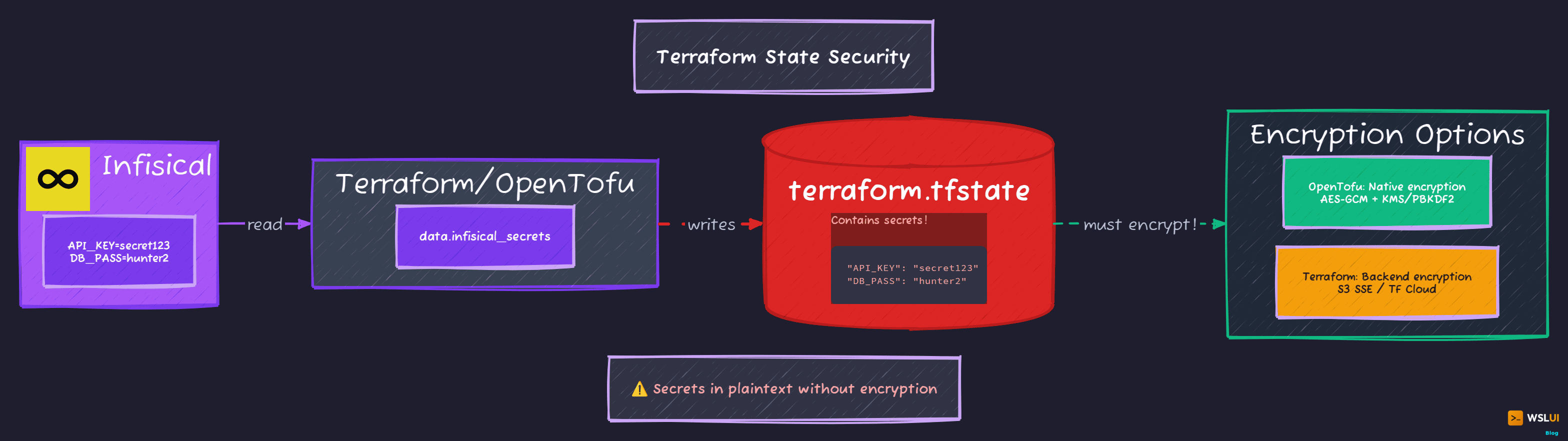
- OpenTofu supports native client-side state encryption (since 1.7) using AES-GCM with keys from PBKDF2, AWS KMS, GCP KMS, or OpenBao
- Terraform does not have native state encryption - you must rely on encrypted backends (S3 with SSE, Terraform Cloud, etc.)
If you're storing secrets in state, OpenTofu's encryption feature is worth considering. Otherwise, ensure your state backend is properly secured and access-controlled.
ExternalSecret Patterns
With the ClusterSecretStore configured, applications request secrets via ExternalSecret resources. These live in Git - they contain references to secrets, not the values themselves.
Basic pattern — single secret:
apiVersion: external-secrets.io/v1
kind: ExternalSecret
metadata:
  name: redis-credentials
  namespace: redis
spec:
  refreshInterval: 15m
  secretStoreRef:
    name: infisical-cluster-secretstore
    kind: ClusterSecretStore
  target:
    name: redis-credentials
    creationPolicy: Owner
  data:
    - secretKey: password
      remoteRef:
        key: "/redis/REDIS_PASSWORD"
Multiple secrets in one resource:
apiVersion: external-secrets.io/v1
kind: ExternalSecret
metadata:
  name: minio-credentials
  namespace: minio
spec:
  refreshInterval: 15m
  secretStoreRef:
    name: infisical-cluster-secretstore
    kind: ClusterSecretStore
  target:
    name: minio-credentials
  data:
    - secretKey: rootUser
      remoteRef:
        key: "/minio/MINIO_ROOT_USER"
    - secretKey: rootPassword
      remoteRef:
        key: "/minio/MINIO_ROOT_PASSWORD"
Templated secrets with labels:
apiVersion: external-secrets.io/v1
kind: ExternalSecret
metadata:
  name: gitlab-repo-credentials
  namespace: argocd
spec:
  refreshInterval: 15m
  secretStoreRef:
    name: infisical-cluster-secretstore
    kind: ClusterSecretStore
  target:
    name: gitlab-repo
    creationPolicy: Owner
    template:
      metadata:
        labels:
          argocd.argoproj.io/secret-type: repository
      data:
        type: git
        url: https://gitlab.com/your-org/your-repo.git
        username: "{{ .username }}"
        password: "{{ .password }}"
  data:
    - secretKey: username
      remoteRef:
        key: "/gitlab/DEPLOY_TOKEN_USERNAME"
    - secretKey: password
      remoteRef:
        key: "/gitlab/DEPLOY_TOKEN_PASSWORD"
The template feature lets you construct complex secrets combining static values with fetched values.
The template feature is particularly useful for GitLab or GitHub runner authentication, where the target secret needs specific labels and a mix of static and dynamic values.
Organizing Secrets in Infisical
Organize secrets by path for clarity:
| Path | Purpose |
|---|---|
/argocd/ |
ArgoCD admin credentials |
/gitlab/ |
GitLab deploy tokens, runner tokens |
/redis/ |
Redis authentication |
/minio/ |
Object storage credentials |
/grafana/ |
Monitoring credentials |
/cert-manager/ |
DNS challenge credentials |
The pattern: /<application>/<SECRET_NAME>. Clear, searchable, and easy to scope access.
Types of secrets to store:
- Service credentials: Database passwords, cache auth, object storage keys
- Platform tokens: Deploy tokens, runner registration tokens
- Cloud credentials: IAM keys for cert-manager DNS validation
- Application secrets: API keys, admin passwords
The Refresh Cycle
ESO polls on an interval, not continuously. Use refreshInterval: 15m for most secrets:
- Secret rotation takes up to 15 minutes to propagate
- Reduces API calls to Infisical
- Acceptable latency for most use cases
Lower the interval for critical secrets requiring faster rotation. Increase it for static secrets that rarely change.
Security Considerations
What's protected:
- No secrets in Git - ExternalSecrets reference paths, not values
- Machine identity credentials never committed
- Infisical handles encryption at rest and in transit
What's not protected:
- Kubernetes Secrets are base64 encoded, not encrypted (unless you enable encryption at rest)
- Anyone with cluster access can read synced secrets
- The secret zero problem is pushed to the operator, not eliminated
Recommendations:
- Enable Kubernetes encryption at rest for Secrets
- Use RBAC to restrict secret access by namespace
- Consider Sealed Secrets or SOPS for secrets that must be in Git
- Audit Infisical access logs periodically
The Complete Flow
Putting it all together:
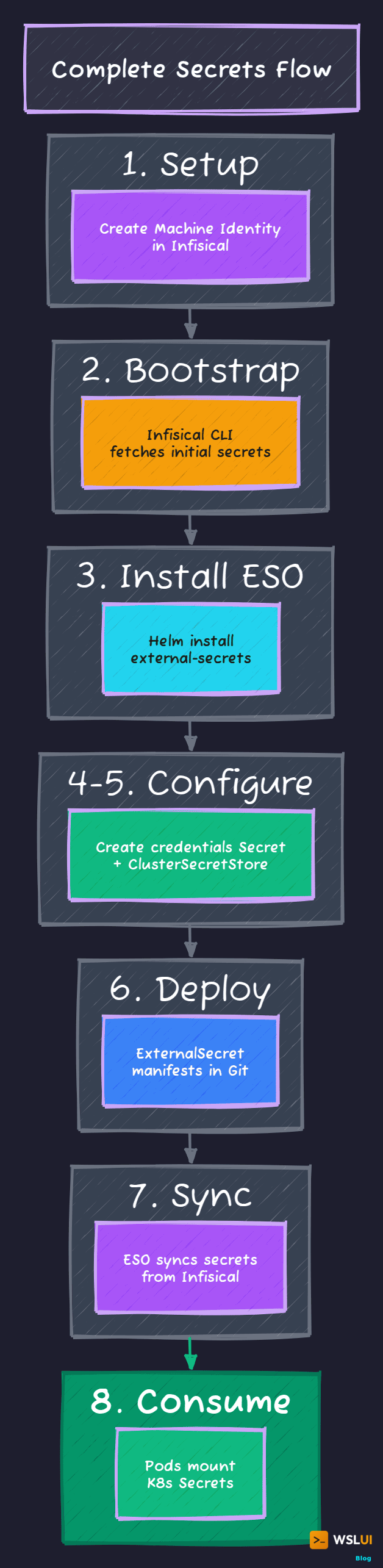
- Setup (one-time): Create machine identity in Infisical, store client ID/secret locally
- Bootstrap: Script authenticates via CLI, fetches initial secrets, installs cluster components
- ESO Install: External Secrets Operator deployed to cluster
- Credentials: Create the infisical-credentials Kubernetes Secret
- ClusterSecretStore: Configure ESO to connect to Infisical
- ExternalSecrets: Deploy manifests that reference secrets by path
- Sync: ESO watches ExternalSecrets, creates Kubernetes Secrets
- Consumption: Pods mount secrets normally - they don't know the source
Applications see standard Kubernetes Secrets. ESO is the bridge.
What I'd Change
Secret versioning: Infisical supports secret versions. Pinning to specific versions would add safety during rotations.
Backup strategy: If Infisical is unavailable, ESO can't refresh secrets. Existing secrets persist, but new deployments might fail. A backup secret store would help.
Audit integration: Infisical has audit logs. Shipping these to your logging system would add visibility.
Workload identity: On cloud providers, workload identity (GKE, EKS IAM roles) eliminates the secret zero problem entirely.
Originally published at https://wsl-ui.octasoft.co.uk/blog/secrets-management-infisical-external-secrets
Published at DZone with permission of Ian Packard. See the original article here.
Opinions expressed by DZone contributors are their own.
Comments