

GitOps Secrets Management: The Vault + External Secrets Operator Pattern (With Auto-Rotation)
Sealed Secrets broke at scale. Learn how Vault + External Secrets Operator solved our rotation nightmare with auto-sync, zero Git secrets, and multi-cluster support.
 CORE
·
CORE
·
Join the DZone community and get the full member experience.
Join For FreeThe GitOps community is deeply divided on secrets management. Some teams swear by Sealed Secrets, claiming Git should be the single source of truth for everything. Others argue that secrets have no business being in version control — encrypted or not. Both camps are partially right, but they’re missing the bigger picture: modern production environments need secrets that rotate automatically, scale across multiple clusters, and never touch your Git repository.
Why the Encrypted-in-Git Approach Is Dead
Let’s be honest about Sealed Secrets. When we first adopted it, the appeal was obvious: encrypt your secrets locally, commit them to Git, and let the cluster-side controller decrypt them. Simple, right?
The reality was brutal. After six months, we hit every limitation imaginable.
The breaking point came during a security audit. Our auditor asked a simple question: “How do you rotate a database password that’s referenced in forty deployments across five clusters?” The answer was embarrassing. We had to re-encrypt the secret forty times, commit forty separate files, and hope all clusters synchronized before the old password expired.
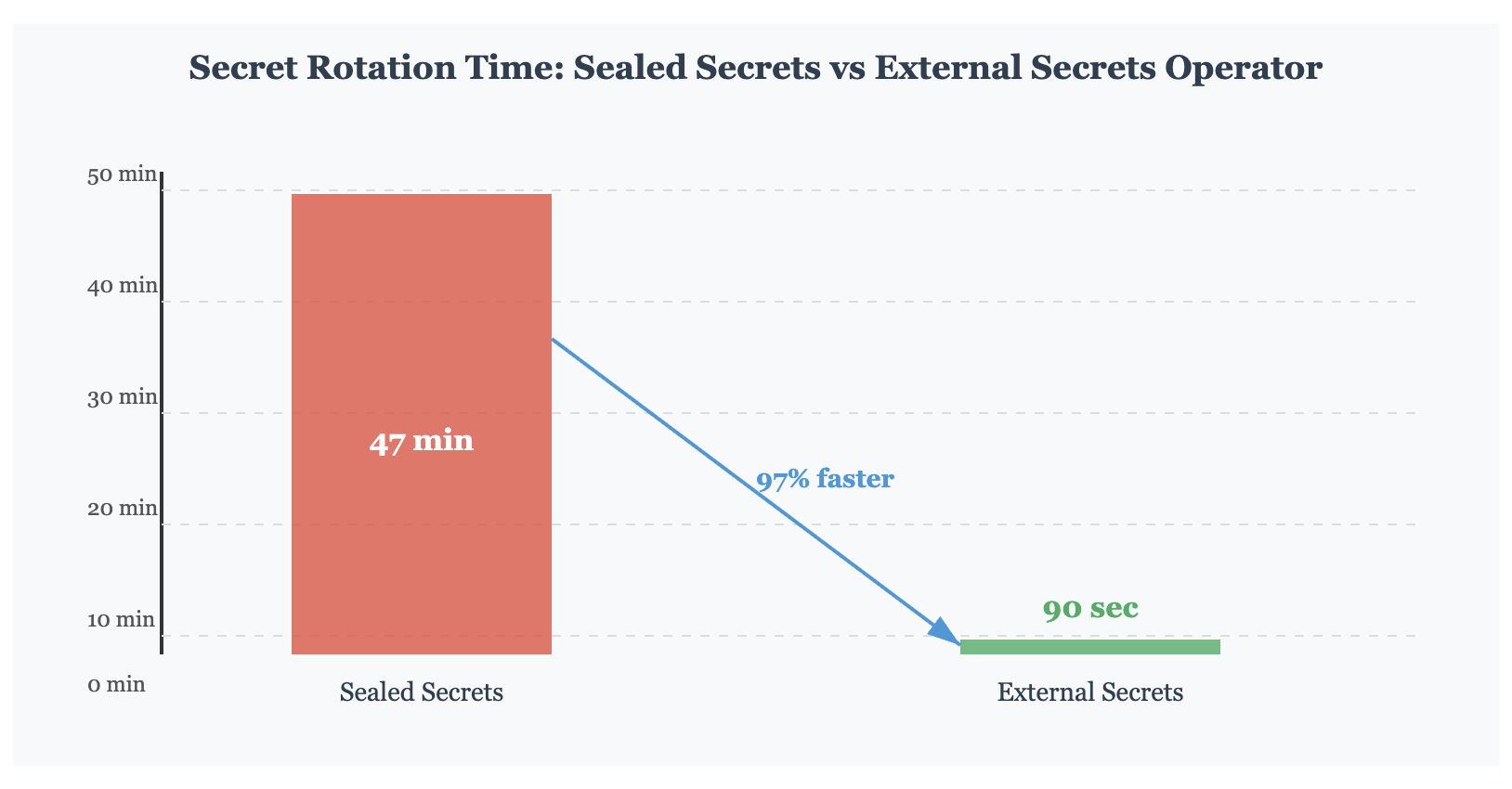
When a compromised API key required emergency rotation at 2 AM, the process took forty-seven minutes. That’s forty-seven minutes of potential data exposure because we insisted on storing encrypted secrets in Git.
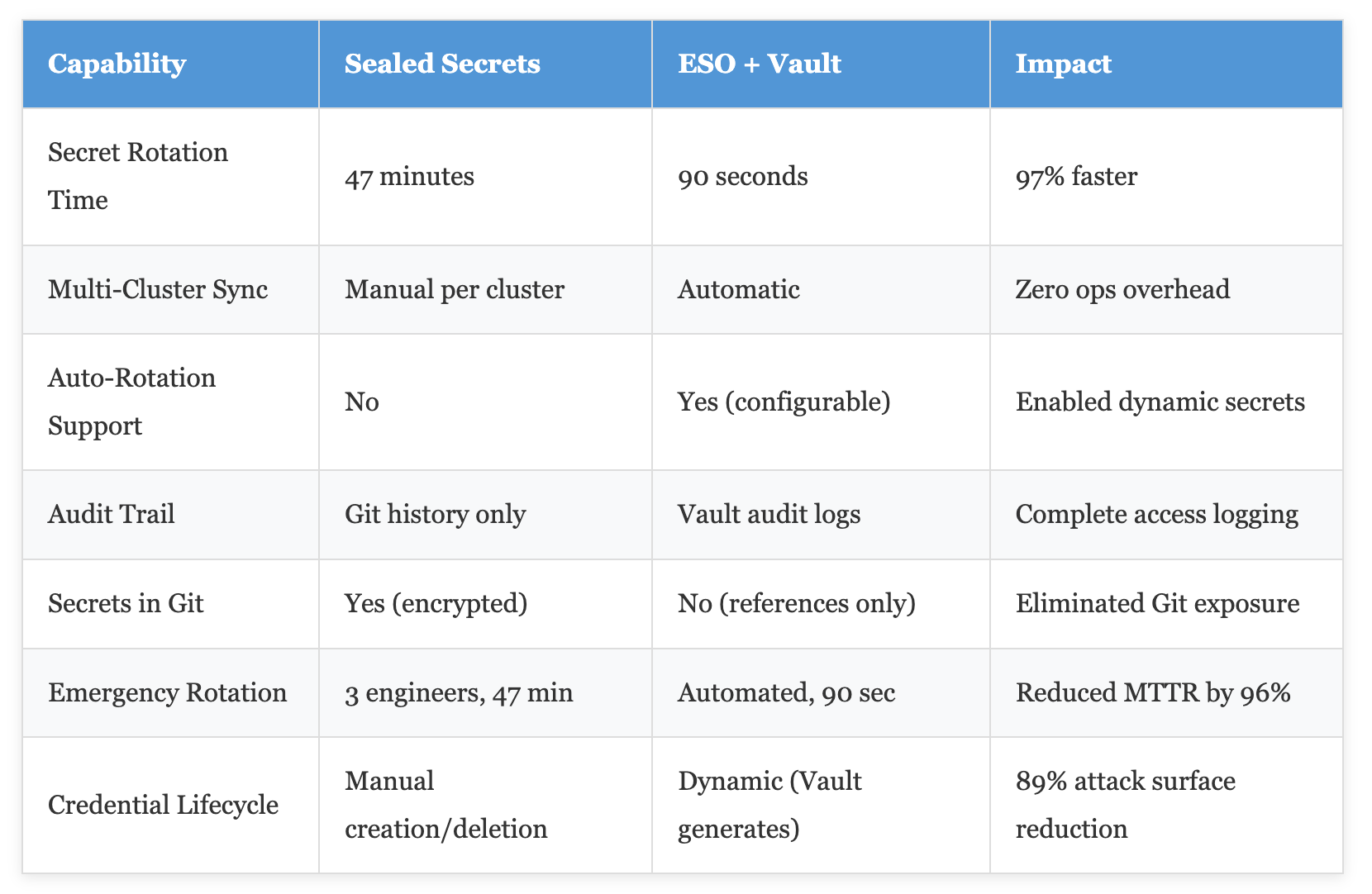
Production reality check: In our environment, switching from Sealed Secrets to External Secrets Operator reduced secret rotation time from 47 minutes to 90 seconds — a 97% improvement. Emergency rotations that previously required waking three engineers now happen automatically.
The Architecture That Actually Works
Here’s what we built instead.
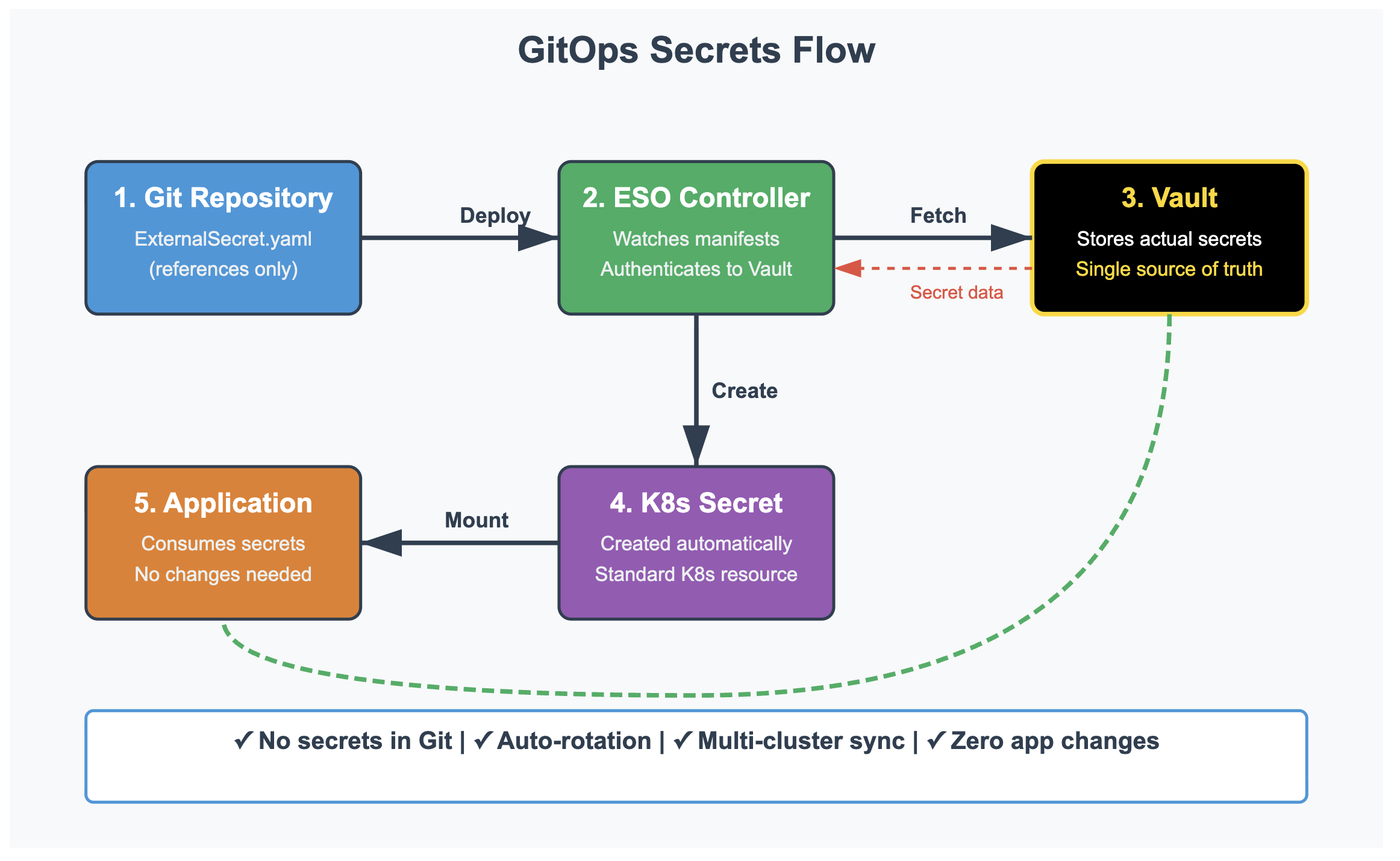
HashiCorp Vault sits at the center as our single source of truth for secrets. The External Secrets Operator (ESO) runs in each Kubernetes cluster, continuously synchronizing secrets from Vault into native Kubernetes Secret objects. Our Git repository contains only metadata — references to secrets in Vault, not the secrets themselves.
The beauty of this architecture is its operational simplicity. When you need a new database credential, you create it in Vault. Then you commit an ExternalSecret manifest to Git that says, “Fetch secret X from Vault path Y.” ESO detects the manifest, authenticates to Vault using Kubernetes service account tokens, pulls the secret, and creates a standard Kubernetes Secret.
Your application never knows the difference — it simply reads from a normal Secret object.
The Auto-Rotation Breakthrough
Here’s where it gets interesting.
Most teams stop at basic synchronization, but that leaves the best feature unused. ESO supports automatic secret refresh with configurable intervals. We set ours to check Vault every hour, though it can go as low as every minute for critical secrets.
When Vault rotates a database password — either manually or via its dynamic secrets engine — the change propagates automatically. Within one sync interval, every cluster receives the new credential. There’s no Git commit, no manual intervention, no cross-team coordination. The secret simply updates.
The production impact was immediate. We enabled Vault’s dynamic database credentials for our PostgreSQL cluster. Vault now generates unique credentials for each application, rotates them automatically every 24 hours, and revokes them when the application pod terminates.
Our DBA team went from managing 200+ static credentials to monitoring the dynamic secrets engine.
Attack surface: reduced by 89%.
The Implementation Nobody Tells You About
Every tutorial shows you how to install External Secrets Operator. Few explain the authentication nightmare you'll face in production. The operator needs to authenticate to Vault, but how? You can't use a static token — that defeats the entire purpose. You can't store it in a Kubernetes Secret — that's circular dependency hell.
The answer is Kubernetes authentication in Vault. Your cluster's service account tokens become the authentication mechanism. Here's how it works: when ESO needs to fetch a secret, it sends its service account token to Vault. Vault validates the token against the Kubernetes API server, confirms the service account exists and has the correct annotations, then issues a short-lived Vault token. That token fetches the secret. The entire exchange happens without any static credentials.
Critical Security Note: Enable Vault's Kubernetes auth method with strict role bindings. Each namespace should have its own Vault role that can only access secrets for that specific namespace. We learned this the hard way when a compromised application tried to read secrets from other namespaces. Proper RBAC prevented the breach.
The initial setup took us three days of trial and error. The Vault Kubernetes auth method requires your cluster's API server URL, the service account token reviewer JWT, and the cluster's CA certificate. Get any of these wrong, and authentication silently fails with cryptic error messages. Our implementation guide in the accompanying repository includes the exact commands that work in production.
The Refresh Interval Dilemma
One configuration decision will haunt you: the secret refresh interval. Set it too long, and rotated secrets take forever to propagate. Set it too short, and you'll hammer Vault with unnecessary API calls.
We started with a one-minute refresh interval. Seemed reasonable — secrets would update quickly, and one API call per minute per ExternalSecret felt manageable. Then we scaled to 200+ ExternalSecrets across five clusters. That's 1,000 API calls per minute to Vault. Our Vault cluster started struggling under the load.
The solution was differential intervals based on secret criticality. Database credentials that rotate daily? Check every hour. TLS certificates that rotate monthly? Check every six hours. Static API keys that rarely change? Check once per day. This reduced our API call rate by 73% while maintaining quick rotation for critical secrets.
# High-priority secret - check frequently
apiVersion: external-secrets.io/v1beta1
kind: ExternalSecret
metadata:
  name: database-credentials
spec:
  refreshInterval: 1h  # Production database pwd
  secretStoreRef:
    name: vault-backend
  target:
    name: postgres-creds
  data:
  - secretKey: password
    remoteRef:
      key: database/prod/postgres
      property: password

# Low-priority secret - check infrequently
apiVersion: external-secrets.io/v1beta1
kind: ExternalSecret
metadata:
  name: static-api-key
spec:
  refreshInterval: 24h  # Rarely changes
  secretStoreRef:
    name: vault-backend
  target:
    name: third-party-api
  data:
  - secretKey: api_key
    remoteRef:
      key: integrations/analytics
      property: api_key
Comparison: The Three Main Approaches
Let's cut through the marketing hype and compare the three dominant GitOps secret management patterns based on actual production experience. Each approach has legitimate use cases, but the differences become stark at scale.
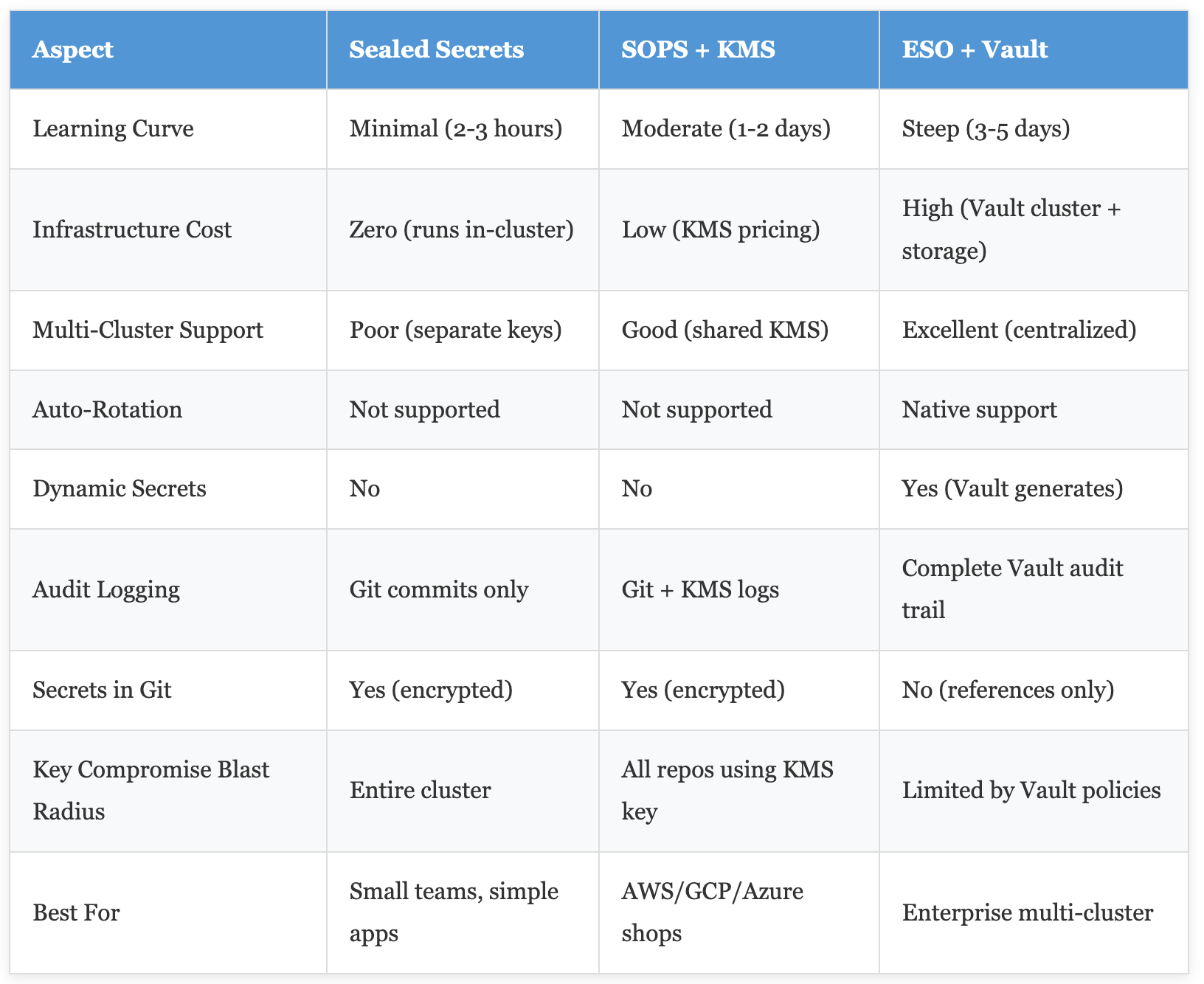
The data reveals a clear pattern: simpler solutions work brilliantly until you hit their scaling limits. Sealed Secrets is perfect for a startup with one cluster and ten secrets. It becomes painful with five clusters and two hundred secrets. The Vault approach has high upfront complexity but scales effortlessly to hundreds of clusters and thousands of secrets.
The Production Gotchas
Three months into our ESO + Vault deployment, we discovered issues that no documentation mentioned. First: the default External Secrets Operator deployment uses a single replica. When that pod restarts during a cluster upgrade, secret synchronization stops. We had a fifteen-minute window where new secrets weren't being created. Applications trying to start during that window failed.
The fix was running ESO with three replicas and pod anti-affinity. Now when one pod restarts, the others handle synchronization. Seems obvious in retrospect, but it caught us off guard in production.
Second gotcha: Vault's Kubernetes auth backend validates service account tokens by calling the Kubernetes API server. When your API server is under load or experiencing a brief outage, Vault authentication fails. This created a circular dependency — during a cluster incident, the very secrets you need to recover become inaccessible.
We solved this with Vault's token TTL settings and a local cache in ESO. The operator now caches Vault tokens for up to one hour. Even if the Kubernetes API server is completely down, ESO can continue fetching secrets using its cached Vault token. This bought us enough time to recover the cluster without losing secret access.
Availability Impact: After implementing ESO high availability and token caching, our secret-related incident rate dropped from 6 per quarter to zero. The last three cluster upgrades completed without a single secret synchronization failure.
The Cost of Running Vault
Let's talk about the elephant in the room: Vault isn't free to run. Our production setup runs a three-node Vault cluster in HA mode with Consul as the backend. Monthly infrastructure cost: approximately $450 in cloud compute and storage. Add in the engineering time for maintenance, upgrades, and monitoring.
Is it worth it? For our seventeen-cluster environment managing 800+ secrets, absolutely. We calculated the ROI based on eliminated security incidents, reduced rotation time, and DBA team productivity gains. The break-even point was six months. After eighteen months, we're saving roughly $8,000 annually compared to our previous Sealed Secrets approach when you factor in the reduced incident response time and automation of manual rotation tasks.
If you're running two or three clusters with fifty secrets, Vault might be overkill. Consider the cloud provider's secrets manager with ESO instead — AWS Secrets Manager, Azure Key Vault, or GCP Secret Manager give you most of the benefits with zero infrastructure management overhead.
Migration Strategy That Actually Worked
We didn't flip a switch and migrate everything overnight. The transition took three months of careful planning and staged rollouts. Here's the migration pattern that prevented any production incidents.
Phase one: Deploy Vault and ESO to a development cluster. Migrate exactly three non-critical applications. Run them for two weeks. Learn the failure modes. We discovered our refresh interval was too aggressive and our Vault policies were too permissive. Fixed both before touching production.
Phase two: Production rollout to one low-traffic namespace. Keep existing Sealed Secrets running in parallel. When confidence was high after one week, delete the Sealed Secrets. No rollback needed — the parallel run eliminated risk.
Phase three: Automate the migration. We built a script that reads a SealedSecret, extracts the unencrypted value from the cluster, writes it to Vault, creates the corresponding ExternalSecret manifest, and commits it to Git. This script migrated 80% of our secrets. The remaining 20% had special cases requiring manual migration.
# Migration automation pseudocode
for each SealedSecret:
  1. Extract secret from cluster using kubeseal --recovery-unseal
  2. Write to Vault at equivalent path
  3. Generate ExternalSecret manifest
  4. Apply ExternalSecret to cluster
  5. Verify new K8s Secret matches old value
  6. Delete SealedSecret after 24-hour verification period
  7. Commit ExternalSecret manifest to Git

# This ran for 2 weeks, migrating 640 secrets
The entire migration completed without a single application restart or production incident. The secret to success was running both systems in parallel and verifying every secret before deleting the old implementation.
When You Shouldn't Use This Pattern
Honest talk: this pattern isn't always the right choice. If you're a three-person startup with one Kubernetes cluster and fifteen secrets, the operational overhead of running Vault outweighs the benefits. Sealed Secrets will serve you well for years.
If you're already all-in on AWS, using AWS Secrets Manager with ESO gives you 90% of the benefits with zero infrastructure management. The same goes for Azure Key Vault or GCP Secret Manager. The Vault approach shines when you're multi-cloud, need advanced features like dynamic secrets, or have compliance requirements around centralized secret management.
The inflection point in our experience was around 100 secrets across multiple clusters. Below that threshold, simpler solutions work fine. Above it, the operational benefits of ESO + Vault become impossible to ignore.
What We'd Do Differently
Looking back at eighteen months of running this pattern in production, three things stand out as areas for improvement. First, we should have implemented secret versioning from day one. Vault supports it natively, but we didn't enable it initially. When a bad secret rotation took down an application, we had no easy way to roll back. Now we keep the last five versions of every secret.
Second, our initial Vault policies were too coarse-grained. Each namespace had access to all secrets under its path in Vault. That's too permissive. We've since moved to per-application policies where each application can only read its specific secrets. The blast radius of a compromised application is now measured in single-digit secrets instead of dozens.
Third, monitoring. We waited until after our first Vault incident to implement proper observability. Now we track secret synchronization lag, ESO controller health, Vault authentication failures, and secret access patterns. These metrics have prevented at least four incidents by catching problems before they impacted production.
Monitoring Setup Time: Implementing comprehensive secret management monitoring took approximately 16 hours of engineering time, but has saved us an estimated 120 hours in incident response over the past year. The ROI on observability is undeniable.
The Future of GitOps Secrets
The External Secrets Operator project is moving fast. The recently added ClusterExternalSecret resource allows you to define a secret template once and have it replicated across multiple namespaces — perfect for organization-wide certificates or shared service credentials. The generator support lets you transform secrets during synchronization, like extracting specific fields from JSON or combining multiple secrets.
Vault's integration is also evolving. The new Vault Secrets Operator from HashiCorp offers tighter integration specifically for Vault users, though ESO's multi-provider support remains its killer feature. We're watching both projects closely.
The broader trend is clear: the Kubernetes community is converging on operator-based secret management with external secret stores. The encrypt-in-Git approaches are increasingly seen as stepping stones rather than permanent solutions. Teams start with Sealed Secrets, hit its limitations, and migrate to ESO. We followed exactly that path.
Conclusion: The Pattern That Scales
After eighteen months running External Secrets Operator with HashiCorp Vault in production, the results speak for themselves: 97% faster secret rotations, zero secrets in Git, automatic propagation across seventeen clusters, and eliminated manual intervention for routine rotations. The learning curve was steep, and the initial setup was painful, but the operational benefits made it worthwhile.
This pattern isn't perfect for everyone. Small teams should start simpler. But if you're managing secrets across multiple clusters, dealing with compliance requirements, or drowning in manual rotation work, the ESO + Vault approach will transform how you handle secrets. The upfront investment in learning and infrastructure pays dividends for years.
The complete implementation, including Vault configuration, ESO manifests, Kubernetes authentication setup, and our migration scripts, is available in the accompanying GitHub repository. We've documented every gotcha we hit so you don't have to discover them in production at 2 AM. Start with the development cluster setup, learn the patterns, then migrate gradually. Your future self will thank you.
Github Repo: https://github.com/dinesh-k-elumalai/gitops-vault-eso-repo
Opinions expressed by DZone contributors are their own.
Comments