

Securing Federal Systems
Follow this tour of how to get an Authority to Operation (ATO) for a Federal IT system including additional DoD Requirements.
Join the DZone community and get the full member experience.
Join For FreeComputer systems in the federal government must demonstrate that they are secure. The process is known as accreditation and the goal is to receive an Authority to Operate (ATO). The ATO allows the system to be put into production for use by the federal workforce. While the process is specific to federal systems, state and local governments usually have similar requirements and most commercial companies have similar security reviews before releasing new systems.
The foundation of the process is governed by the Risk Management Framework described in the National Institute of Standards and Technology (NIST) Special Publication (SP) 800-37. The Risk Management Framework has a seven-step process authorizing a system:
- Prepare
- Categorize System
- Select Controls
- Implement Controls
- Assess Controls
- Authorize System
- Monitor Controls
1. Prepare
"Prepare" relates to some basic tasks that must be updated throughout the process. These include:
- Understand the focus of the system.
- Determine stakeholders.
- Understand requirements.
- Understand enterprise architecture.
- Determine authorization boundary: What is in the system and what is outside the system? Where does the system fit in the enterprise?
2. Categorize
"Categorize" is the determination of how secure the system needs to be. For example, a system with banking data needs to be extremely secure while a system that just provides marketing materials does not need to be nearly so secure. To categorize a system, the Federal Information Processing Standards (FIPS) Publication (PUB) 199 looks at three factors:
- Confidentiality – Only permitting access to those who are authorized to have access
- Integrity– Preventing unauthorized modification and ensuring non-repudiation and authenticity
- Non-repudiation means a user cannot deny (repudiate) having performed a transaction. It combines authentication and integrity: nonrepudiation authenticates the identity of a user who performs a transaction and ensures the authenticity of that transaction.
- Availability – Preventing disruption of access to information.
Confidentiality, integrity, and availability are then evaluated in terms of potential impacts: low, moderate, or high.
- Low – Limited adverse effect; for example, as a minor functional loss
- Moderate – Serious adverse effect; for example, a significant degradation in the ability of the organization to perform primary functions or incur a significant financial loss
- High – Severe or catastrophic adverse effect; for example, a major financial loss or significant injuries to individuals
A system is assigned an overall risk equal to the highest risk for any risk for confidentiality, integrity, and availability. So if any one of those is Moderate, then the whole system has to be at least Moderate.
3. Select Controls
There are various standards you can use to assess your compliance. For example:
- SOC2 – Accounting standard used for doing due diligence; Widely used in the commercial world
- HIPAA - For healthcare records
- ISO 27001 – International security standard
- OWASP SAMM - Software Assurance Maturity Model
For federal systems, compliance with NIST 800-53 is required. The current version (revision 5) is 465 pages long and has the following 20 control families:
| ID | Control Family | ID | Control Family |
|---|---|---|---|
|
AC |
Access Control |
PE |
Physical and Environmental Protection |
|
AT |
Awareness and Training |
PL |
Planning |
|
AU |
Audit and Accountability |
PM |
Program Management |
|
CA |
Assessment, Authorization, and Monitoring |
PS |
Personnel Security |
|
CM |
Configuration Management |
PT |
Personally Identifiable Information (PII) Processing and Transparency |
|
CP |
Contingency Planning |
RA |
Risk Assessment |
|
IA |
Identification and Authentication |
SA |
System and Services Acquisition |
|
IR |
Incident Response |
SC |
System and Communications Protection |
|
MA |
Maintenance |
SI |
System and Information Integrity |
|
MP |
Media Protection |
SR |
Supply Chain Risk Management |
Each control family has between 6 and 51 controls. Each control can also have a number of control enhancements.
NIST 800-53B provides guidance on which of the over 1,000 controls must be used for Low, Moderate, and High security baselines. You can then tailor the controls (select more or less) to the exact needs of your system.
4. Implement
"Implement" controls means building and delivering the actual system implementing the selected controls. You develop and apply a System Development Life Cycle (SDLC) to ensure that the solution is built using a methodology that will produce secure code. The DoD has adopted a DevSecOps software lifecycle.
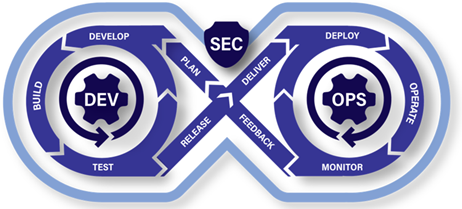
Image Source: Cloud.mil
Here is the DoD documentation on running DevSecOps:
- DoD Enterprise DevSecOps Strategy Guide
- DoD Enterprise DevSecOps Fundamentals
- DevSecOps Fundamentals Guidebook: Activities & Tools
- DevSecOps Playbook
Additional guidance on secure development can also be found in NIST SP 800-218 Secure Software Development Framework (SSDF).
A critical part of the implementation phase is documentation. Ideally, the documentation will cross-reference the controls supported by various design elements because the next phase — "assess" — requires proof that the design implements the controls.
For example, the DevSecOps Fundamentals Guidebook: DevSecOps Activities & Tools states that it requires a System Design Document (SDD) as a part of the Plan phase. The SDD should include:
- System architecture
- Functional design
- Data flow diagrams
- Acceptance Criteria
- Infrastructure configuration plan
- Tool selections
- Ecosystem Tools
- Development tool
- Test Tool
- Deployment platform
5. Assess
In the "assess" phase, an independent assessor determines if the selected security controls are implemented and operating as intended. Conveniently, NIST 800-53A provides guidance on how to assess each of the controls.
The assessment consists of:
- Selecting an assessor
- Creating an assessment plan
- Doing the assessment
- Writing a report with findings and recommendations
- Remediation of security issues found
- Creating a Plan of Actions and Milestones (POAM) for any security issues not remediated in the previous step
The POAM is a living document that will be updated throughout the system’s lifetime. It is basically a to-do list of security actions to be fixed along with a due date.
In addition to the assessment, a penetration test is also performed.
6. Authorize
Once the assessment is complete, materials are compiled into an authorization package. The authorization package will include the system security plan, the assessment report, the POAM, and various other documentation. This is reviewed by an authorizing official who then issues the authorization for the system to go live.
7. Monitor
Once the system goes live, its security status must be monitored. Typically, an automated security monitoring tool will be used to issue real-time alerts for possible intrusions. Additionally, system security logs must be periodically reviewed for issues. Changes to the system and the system’s environment must also be monitored for any security implications.
For more:
- Continuous Monitoring (CM): NIST SP 800-137
- CM Assessment: NIST SP 800-137A
DoD Specifics
- The DoD has additional guidance and procedures, some of which can be very useful for securing any system. The DoD guidance is provided at the DoD Cyber Exchange.
- The DoD provides detailed audit guidelines in the form of Control Correlation Identifiers (CCI). There are presently 10,202 CCIs which can be found here.
STIGs and Stones May Break My Bones
Security Technical Implementation Guides (STIG) provide detailed implementation guidance for applying CCIs to particular technologies. There are currently 191 STIGs. They can be downloaded as a zip file from: the SRG/STIG Library Compilations site. A STIG viewer is available on the SRG/STIG Tools site. Start the STIG viewer and select the downloaded STIG zip file and you will be able to browse the STIGs and export them as either HTML or CSV.
The STIGs provide detailed guidance on how to harden various software products. Products with STIGs include Microsoft Windows, Red Hat Enterprise Linux, Mozilla Firefox, Google Chrome, Google Android, etc.
Some more general STIGs are available. The Application Security and Development STIG relates to the process of developing applications and must be generally applied to all software development efforts. The Web Server Security Requirements Guide describes how to secure web servers if no more detailed guide is available (for example, Microsoft IIS).
In addition, the DoD maps each of the NIST 800-53 controls to its associated CCIs. If you know the controls applied to a system, then you will know what CCIs are applied to the system.
The following graphic shows these relationships:

Information about systems undergoing the DoD ATO process is stored in the Enterprise Mission Assurance Support Service (eMASS). eMASS conveniently tracks applicable controls, STIGs, and CCIs and allows audit evidence to be attached. It will also track the POAMs for a system.
Controls can also be inherited from other systems and eMASS tracks that. For example, security controls related to physical access may be inherited from a cloud provider such as AWS.
The following graphic shows the normal order of creation and purpose of various documents to support the ATO assessment process.
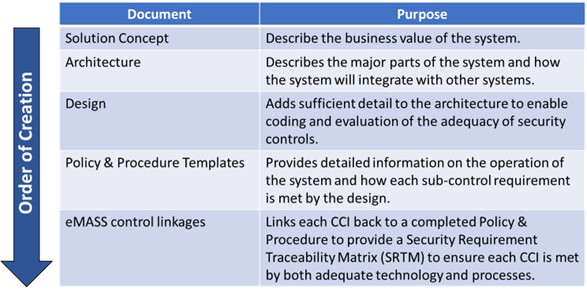
Previously, the accreditation would last for 3 years and then a reaccreditation process would kick in. That presented two problems. First, it was a major hassle to rework the documentation every three years. Secondly, security threats evolve quickly, and three years is a long time to wait for updates. The DoD has recently moved to a Continuous ATO (cATO) process based on a more active and continuous security posture.
For more information see:
- Memorandum for Senior Pentagon Leadership Defense Agency and DOD Field Activity Directors
- Continuous Authorization to Operate (cATO) Evaluation Criteria
Conclusion
That concludes this whirlwind description of the Federal ATO process. Even if you don’t work on securing federal systems, this should provide guidance on how to secure your systems. In particular, STIGs provide very detailed guidance on secure configurations.
Safe computing!
Opinions expressed by DZone contributors are their own.
Comments