

Building a Self-Healing Observability System with AWS Bedrock AgentCore
This article explains how to build a self-healing observability system with AWS Bedrock AgentCore using AI agents to analyze and remediate infrastructure issues.
Join the DZone community and get the full member experience.
Join For FreeIn today’s fast-paced cloud environments, keeping systems running smoothly isn’t just about monitoring them — it’s about making them smart enough to fix themselves. Enter the world of self-healing observability systems, where AI agents detect issues, analyze root causes, and take corrective actions without human intervention. With AWS Bedrock AgentCore, a powerful platform for building and deploying AI agents at scale, you can create a system that is reliable, secure, and efficient.
In this article, we’ll dive deep into how to build such a system from scratch, complete with code examples, practical diagrams, and real-world insights. By the end, you’ll have a blueprint to implement your own self-healing setup.
What Is Self-Healing Observability?
Before we jump into the technical details, let’s clarify the concepts. Observability refers to the ability to understand a system’s internal state through external outputs such as logs, metrics, and traces. Tools like Amazon CloudWatch or Prometheus help collect this data, but traditional monitoring often stops at alerting — you receive a notification, and then it’s up to a human to resolve the issue.
Self-healing takes this a step further by using automation and intelligence to remediate issues automatically. For example, if a web application begins experiencing high latency due to overloaded servers, a self-healing system could detect the anomaly, scale up resources, or restart faulty instances — all on its own.
AWS Bedrock AgentCore fits naturally into this model. Launched as part of Amazon’s push into agentic AI, AgentCore provides a framework-agnostic platform for building, deploying, and operating AI agents. It handles much of the heavy lifting around scaling, security, and monitoring, allowing you to focus on agent logic. Key features such as Intelligent Memory for context retention, Gateway for tool integration, and built-in observability make it well suited for agents that can both observe infrastructure and heal it proactively.
Why AgentCore over plain Bedrock Agents? AgentCore is designed for production-scale deployments, offering capabilities such as real-time policy enforcement, evaluations for continuous improvement, and seamless integration with AWS services. It is model-agnostic, allowing you to swap in Claude, Llama, or other models as needed.
Why Build This with AgentCore?
Traditional self-healing approaches often rely on rule-based scripts or basic machine learning models, which struggle in complex, dynamic environments. AI agents powered by large language models (LLMs) can reason over unstructured data, correlate signals, and execute multi-step actions. For example, an agent might analyze logs for patterns indicating a memory leak, cross-reference metrics, and then invoke a Lambda function to apply a fix.
AgentCore stands out because of the following strengths:
- Scalability: A serverless runtime handles thousands of sessions with low latency.
- Security: Identity management and policy enforcement prevent unauthorized actions.
- Learning: The Memory service allows agents to improve over time, turning one-off fixes into preventive measures.
- Built-in observability: You can monitor the agent itself using CloudWatch dashboards, ensuring the healer does not need healing.
High-Level Architecture
Let’s visualize the architecture to understand how the components interact. Imagine an EC2-based application monitored by CloudWatch. The AgentCore agent pulls metrics and logs, analyzes them using an LLM, and triggers remediation tools.
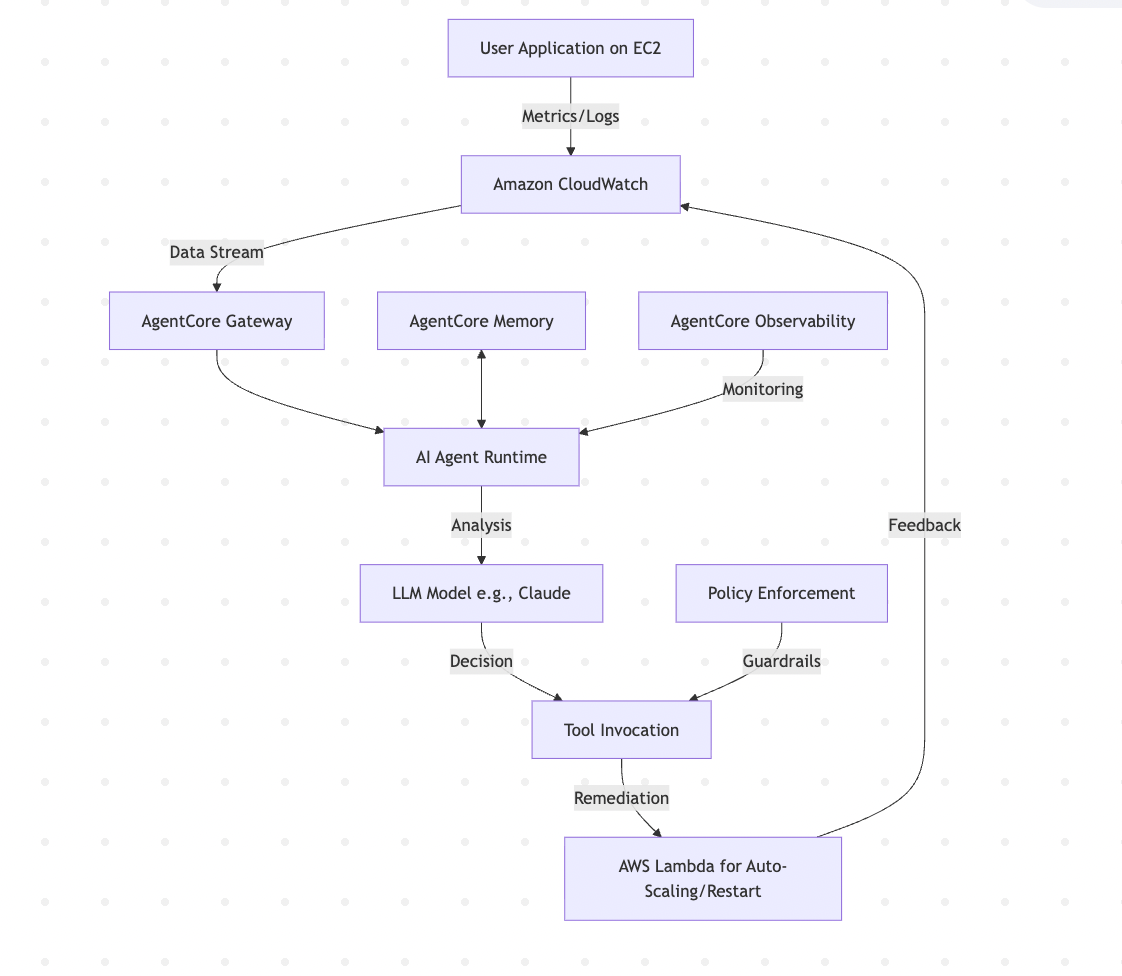
This flow illustrates how data from CloudWatch feeds into the agent via Gateway. The agent, running in Runtime, consults the LLM for reasoning, uses Memory for context, applies policies, and invokes tools. Observability monitors the entire process, closing the feedback loop.
Setting Up Your Environment
To get started, you’ll need an AWS account with Bedrock access enabled in your region (for example, us-east-1). Install the required Python packages using pip:
pip install bedrock-agentcore strands-agents boto3AgentCore uses the AWS SDK (boto3) for interactions. First, configure your AWS credentials:
import boto3
session = boto3.Session(profile_name='default')

bedrock_client = session.client('bedrock-agent')
Enable model access in the Bedrock console for a model such as Anthropic’s Claude 3.5 Sonnet, which is well suited for reasoning tasks.
Building the Agent
Now let’s create the core agent. We’ll use the Strands framework, which integrates seamlessly with AgentCore. The agent will include tools to query CloudWatch, analyze data, and remediate issues.
Define the agent in a Python file, for example self_healing_agent.py:
from bedrock_agentcore import BedrockAgentCoreApp

from strands import Agent, Tool

import boto3

from datetime import datetime, timedelta


# Initialize clients

cw_client = boto3.client('cloudwatch')

as_client = boto3.client('autoscaling')

ec2_client = boto3.client('ec2')


# Tool to get metrics from CloudWatch

@Tool(name="get_metrics", description="Fetch CPU utilization metrics for an EC2 instance")

def get_metrics(instance_id: str) -> dict:

    end_time = datetime.utcnow()

    start_time = end_time - timedelta(minutes=5)

    response = cw_client.get_metric_statistics(

        Namespace='AWS/EC2',

        MetricName='CPUUtilization',

        Dimensions=[{'Name': 'InstanceId', 'Value': instance_id}],

        StartTime=start_time,

        EndTime=end_time,

        Period=300,

        Statistics=['Average']

    )

    return {'metrics': response['Datapoints']}


# Tool to analyze metrics with reasoning

@Tool(name="analyze_issue", description="Analyze metrics and suggest remediation")

def analyze_issue(metrics: dict) -> str:

    # Simple logic; in reality, use LLM for deeper analysis

    avg_cpu = sum(dp['Average'] for dp in metrics['metrics']) / len(metrics['metrics']) if metrics['metrics'] else 0

    if avg_cpu > 80:

        return "High CPU detected. Recommend scaling up."

    return "No issues found."


# Tool for remediation

@Tool(name="remediate", description="Perform auto-scaling or restart")

def remediate(action: str, resource: str):

    if action == "scale_up":

        as_client.update_auto_scaling_group(

            AutoScalingGroupName=resource,

            MinSize=2,  # Example scaling

            DesiredCapacity=2

        )

        return "Scaled up Auto Scaling Group."

    elif action == "restart_instance":

        ec2_client.reboot_instances(InstanceIds=[resource])

        return "Restarted instance."


# Create the agent

app = BedrockAgentCoreApp()

agent = Agent(tools=[get_metrics, analyze_issue, remediate])


@app.entrypoint

def invoke(payload):

    instance_id = payload.get("instance_id", "i-1234567890abcdef0")

    # Step 1: Get metrics

    metrics = get_metrics(instance_id)

    # Step 2: Analyze

    issue = analyze_issue(metrics)

    # Step 3: Remediate if needed

    if "High CPU" in issue:

        result = remediate("scale_up", "my-asg-group")

    else:

        result = "System healthy."

    return {"result": result, "issue": issue}


if __name__ == "__main__":

    app.run()
This code sets up an agent with three tools: fetching metrics, analyzing them, and performing remediation. The @Tool decorator exposes functions to the agent through Gateway. In a production setup, the analysis step would invoke the LLM for deeper reasoning, such as identifying memory leaks or configuration drift.
To deploy locally for testing:
python self_healing_agent.pyThen invoke with cURL:
curl -X POST http://localhost:8080/invocations -H "Content-Type: application/json" -d '{"instance_id": "your-instance-id"}'For production, use AgentCore's CLI to deploy to AWS:
agentcore configure -e self_healing_agent.py

agentcore launch
This pushes your agent to the Runtime, where it scales automatically.
Integrating Observability and Self-Healing Logic
AgentCore’s built-in Observability is a game changer. It provides CloudWatch dashboards for metrics such as latency, error rates, and token usage. To enable it, add OpenTelemetry instrumentation.
In your agent code, import and configure the following:
from opentelemetry import trace

from opentelemetry.sdk.trace import TracerProvider

from opentelemetry.sdk.trace.export import BatchSpanProcessor

from opentelemetry.exporter.otlp.proto.grpc.trace_exporter import OTLPSpanExporter


trace.set_tracer_provider(TracerProvider())

trace.get_tracer_provider().add_span_processor(BatchSpanProcessor(OTLPSpanExporter(endpoint="your-otlp-endpoint")))

tracer = trace.get_tracer(__name__)


# Wrap your invoke function

@app.entrypoint

def invoke(payload):

    with tracer.start_as_current_span("agent_invoke"):

        # Your logic here
This traces every step, allowing you to debug why a remediation failed. For self-healing, the agent can also monitor its own metrics — if it begins consuming too many tokens, it could throttle itself.
The Self-Healing Loop
Now let’s look at the self-healing loop and the decision process.
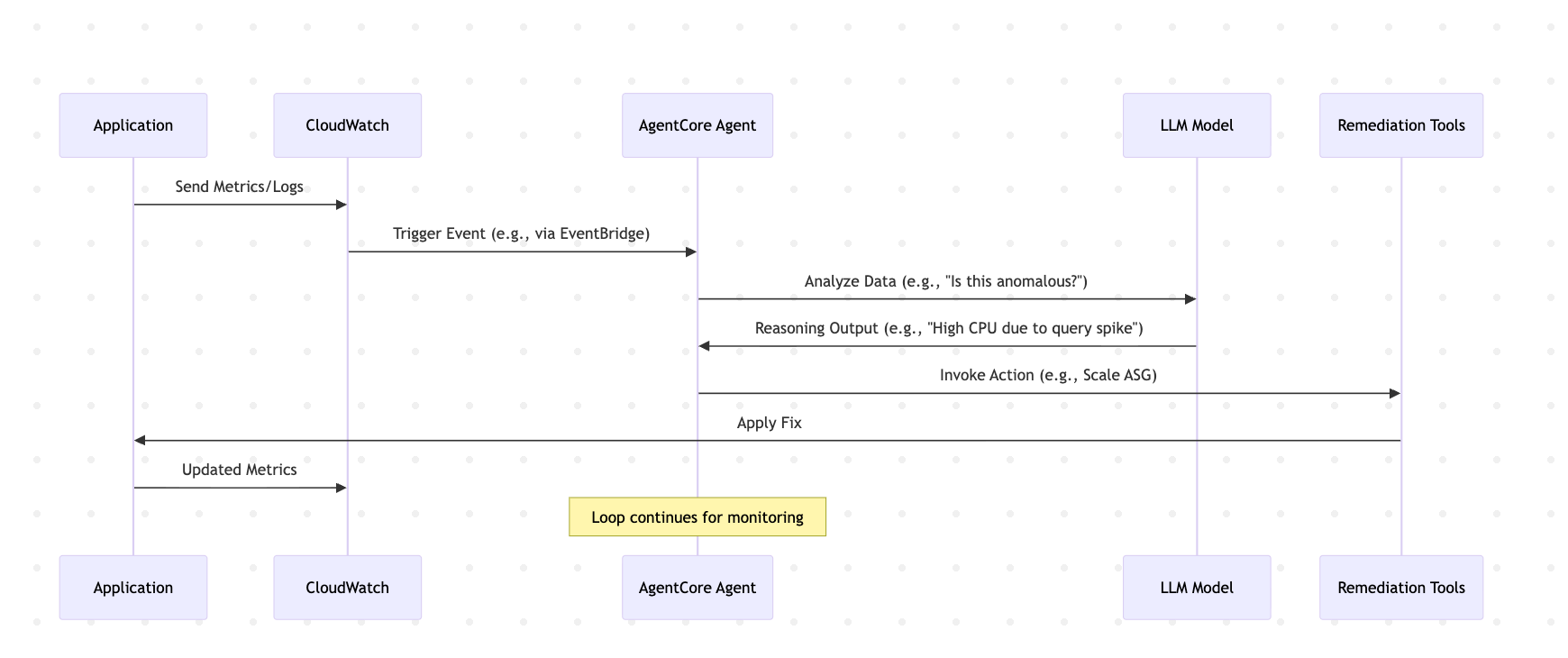
Send Metrics/Logs → Trigger Event (e.g., via EventBridge) → Analyze Data (e.g., “Is this anomalous?”) → Reasoning Output (e.g., “High CPU due to query spike”) → Invoke Action (e.g., scale ASG) → Apply Fix → Updated Metrics → Loop continues for monitoring
This sequence illustrates the continuous feedback loop. In practice, you could trigger the agent using AWS EventBridge in response to CloudWatch alarms.
Advanced Features: Memory and Evaluations
To make the system truly self-healing, leverage Memory. It stores session context so that if an issue recurs, the agent can recall previous diagnoses and fixes.
Add the following to your agent:
from bedrock_agentcore.memory import Memory


memory = Memory()


# In invoke

def invoke(payload):

    session_id = payload.get("session_id")

    history = memory.get(session_id)

    # Use history in analysis

    # ...

    memory.put(session_id, {"issue": issue, "fix": result})
Evaluations (currently in preview) can score interactions — for example, “Did the fix reduce CPU usage by 20%?” — and feed those results back into the system for continuous improvement.
Best Practices and Challenges
- Security: Use the Policy service to define rules such as “The agent can only scale groups in development environments.” Policies can be written in natural language and are converted to Cedar by AgentCore.
- Testing: Start with synthetic data. Use tools such as Code Interpreter to simulate metrics.
- Cost management: Monitor usage through Observability to prevent runaway token consumption.
- Challenges: LLMs can hallucinate fixes — mitigate this by combining LLM reasoning with rule-based guardrails. Ensure actions are idempotent to prevent over-remediation.
In production, you can also integrate the Browser tool to allow agents to consult external documentation or APIs dynamically.
Conclusion
Building a self-healing observability system with AWS Bedrock AgentCore transforms reactive monitoring into proactive intelligence. This article covered the architecture, setup, code, and diagrams needed to get started. With features such as Runtime for scaling and Memory for learning, systems can evolve to handle operational complexity autonomously. As AI capabilities advance, expect even more sophisticated agents — potentially predicting and preventing issues before they occur.
Opinions expressed by DZone contributors are their own.
Comments