

Send CloudWatch Alarms to Slack With AWS Lambda
Want to get your AWS account notifications on Slack? Here's how to set up a CloudWatch alarm that contains all the data you need with AWS Lambda.
Join the DZone community and get the full member experience.
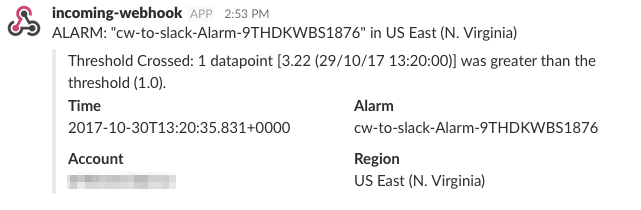
Join For FreeAs we all know, things go wrong. That’s why monitoring and alerting are essential topics. Wouldn’t it be nice if problems in your AWS account would show up in Slack? So you could react quickly while using your favorite messaging tool? In this blog post, you will learn how you can turn CloudWatch Alarms into Slack messages like this:
How it Works
On AWS, everything sends monitoring data (CPU utilization, estimated monthly charges, …) to CloudWatch. In CloudWatch, you define alarms to send a message to an SNS topic if the monitoring data gets out of normal bounds. Finally, you connect a Lambda function to the SNS topic to trigger a function execution. The Lambda function calls the Slack API to send a message. The following figure shows the data flow:
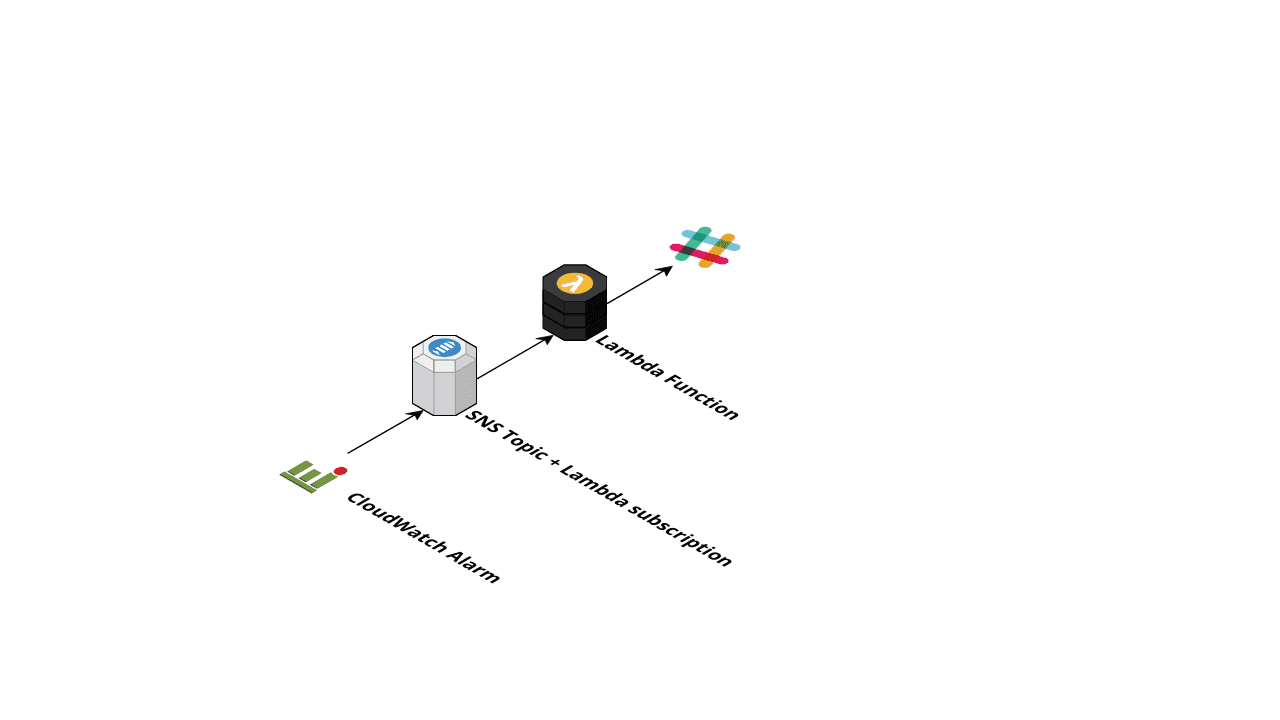
To deploy the components in the figure, you will use the Serverless Application Model (SAM). If you are not interested in implementing this on your own, give our Slack chatbot a try. Never miss an alert from your AWS infrastructure with marbot!
Implementing the Lambda Function
You will use Node.js to implement the Lambda function. To send a request to the Slack API, you have to make an HTTPS request. The request module is easy to use, but I wanted a variant of the module that returns promises to avoid callback hell. That’s why I used request-promise-native. The Slack webhook URL is passed in as an environment variable that you define later in the CloudFormation template.
const request = require('request-promise-native');
const sendMessage = (message) => {
    return request({
        method: 'POST',
        url: process.env.WEBHOOK_URL,
        body: message,
        json: true,
    })
    .then((body) => {
        if (body === 'ok') {
            return {};
        } else {
            throw new Error(body);
        }
    });
};
Messages delivered from SNS to the Lambda function will look like this:
{
    "Records": [{
        "EventSource": "aws:sns",
        "EventVersion": "1.0",
        "EventSubscriptionArn": "arn:aws:sns:us-east-1:XXX:cw-to-slack-Topic-1B8S548158492:a0e76b10-796e-471d-82d3-0510fc89ad93",
        "Sns": {
            "Type": "Notification",
            "MessageId": "[...]",
            "TopicArn": "arn:aws:sns:us-east-1:XXX:cw-to-slack-Topic-1B8S548158492",
            "Subject": "ALARM: \"cw-to-slack-Alarm-9THDKWBS1876\" in US East (N. Virginia)",
            "Message": "{\"AlarmName\":\"cw-to-slack-Alarm-9THDKWBS1876\",\"AlarmDescription\":null,\"AWSAccountId\":\"XXX\",\"NewStateValue\":\"ALARM\",\"NewStateReason\":\"Threshold Crossed: 1 datapoint [3.22 (29/10/17 13:20:00)] was greater than the threshold (1.0).\",\"StateChangeTime\":\"2017-10-30T13:20:35.831+0000\",\"Region\":\"US East (N. Virginia)\",\"OldStateValue\":\"INSUFFICIENT_DATA\",\"Trigger\":{\"MetricName\":\"EstimatedCharges\",\"Namespace\":\"AWS/Billing\",\"StatisticType\":\"Statistic\",\"Statistic\":\"MAXIMUM\",\"Unit\":null,\"Dimensions\":[{\"name\":\"Currency\",\"value\":\"USD\"}],\"Period\":86400,\"EvaluationPeriods\":1,\"ComparisonOperator\":\"GreaterThanThreshold\",\"Threshold\":1.0,\"TreatMissingData\":\"\",\"EvaluateLowSampleCountPercentile\":\"\"}}",
            "Timestamp": "2017-10-30T13:20:35.855Z",
            "SignatureVersion": "1",
            "Signature": "[...]",
            "SigningCertUrl": "[...]",
            "UnsubscribeUrl": "[...]",
            "MessageAttributes": {}
        }
    }]
}
You need to convert the format into the Slack message format.
const processRecord = (record) => {
    const subject = record.Sns.Subject;
    const message = JSON.parse(record.Sns.Message);
    return sendMessage({
        text: subject,
        attachments: [{
            text: message.NewStateReason,
            fields: [{
                title: 'Time',
                value: message.StateChangeTime,
                short: true,
            }, {
                title: 'Alarm',
                value: message.AlarmName,
                short: true,
            }, {
                title: 'Account',
                value: message.AWSAccountId,
                short: true,
            }, {
                title: 'Region',
                value: message.Region,
                short: true,
            }],
        }],
    });
};
Finally, each Lambda function needs a handler function. The handler function takes three parameters:
- event
- context
- callback function
exports.event = (event, context, cb) => {
    console.log(`event received: ${JSON.stringify(event)}`);
    Promise.all(event.Records.map(processRecord))
        .then(() => cb(null))
        .catch((err) => cb(err));
};
Now, you will use SAM and CloudFormation to define the AWS resources.
Defining the CloudFormation Template Using SAM
First, you need some boilerplate to enable SAM and configure CloudFormation. Additionally, you will add two parameters to the template:
---
AWSTemplateFormatVersion: '2010-09-09'
Transform: 'AWS::Serverless-2016-10-31'
Description: 'CloudWatch Alarm to Slack'
Parameters:
  Threshold:
    Description: 'Alarm, if your monthly estimated charges are higher'
    Default: 1
    Type: Number
  WebhookURL:
    Description: 'Slack incoming webhook URL'
    Type: String
You need three resources in your template:
- SNS Topic
- Lambda Function
- CloudWatch Alarm
SAM handles the SNS subscription and also takes care of IAM roles and Lambda permissions.
Resources:
  Topic:
    Type: 'AWS::SNS::Topic'
  LambdaFunction:
    Type: 'AWS::Serverless::Function'
    Properties:
      Handler: 'handler.event'
      Runtime: 'nodejs6.10'
      MemorySize: 512
      Timeout: 30
      Environment:
        Variables:
          WEBHOOK_URL: !Ref WebhookURL
      Events:
        SNS:
          Type: SNS
          Properties:
            Topic: !Ref Topic
  Alarm:
    Type: 'AWS::CloudWatch::Alarm'
    Properties:
      AlarmActions:
        - !Ref Topic
      ComparisonOperator: GreaterThanThreshold
      Dimensions:
        - Name: Currency
          Value: USD
      EvaluationPeriods: 1
      MetricName: EstimatedCharges
      Namespace: 'AWS/Billing'
      Period: 86400
      Statistic: Maximum
      Threshold: !Ref Threshold
That’s it. You can find the full source code on GitHub. Now you can deploy the solution.
Deploying the Solution
Slack Setup
- Start by setting up an incoming webhook integration in your Slack workspace: https://my.slack.com/services/new/incoming-webhook/
- Select a channel or create a new one
- Click on Add Incoming WebHooks integration
- You are redirected to a new page where you can see your Webhook URL. Copy the value; you will need it soon.
AWS Setup
- Clone or download the sample repository
- Create an S3 bucket for SAM (replace
$UniqueSuffixwith e.g. your username):aws --region us-east-1 s3 mb s3://cw-to-slack-$UniqueSuffix - Install Node.js dependencies:
npm install - Package the Lambda function code (replace
$UniqueSuffixwith e.g. your username): - Deploy the CloudFormation stack (replace
$WebhookURLwith your URL from Slack):
aws --region us-east-1 cloudformation package --s3-bucket cw-to-slack-$UniqueSuffix --template-file template.yml --output-template-file template.sam.ymlaws --region us-east-1 cloudformation deploy --parameter-overrides "WebhookURL=$WebhookURL" --template-file template.sam.yml --stack-name cw-to-slack --capabilities CAPABILITY_IAMPublished at DZone with permission of Michael Wittig. See the original article here.
Opinions expressed by DZone contributors are their own.
Comments