

Should an AI Agent Have Write Access to Your AWS Account?
AI agents can have AWS write access, but only with least privilege, specialized roles, and human approval for high-risk actions.
The thought of granting AI agent permissions to work on your AWS setup might seem scary and dangerous to some and very alluring to others. Traditionally, scripts or predefined sets of actions were used in specific scenarios. Now AI has “reasoning”; whether good or bad, its scope of action might go way beyond scripted limits. It is called AI blast: the number of decisions the agent can make before someone stops it.
What Can Go Wrong?
There are several things that can go wrong. Let's take a look at some of the critical things that can go wrong.
Misdiagnosing the Problem
The agent sees CPU utilization at 95% and decides to increase the instance size. But the real problem is a memory leak. The change may temporarily reduce the symptoms while increasing cost and leaving the underlying failure untouched.
Cascading Changes
One seemingly harmless change can trigger a chain reaction. An agent modifies a security group, which affects connectivity, which causes a deployment to fail, which then triggers another automated remediation. Each action may look reasonable, but the combined result is anything but.
Wrong Cleanup of Volumes
The agent identifies old EBS volumes, snapshots, or other resources as unused and deletes them. It cannot easily know that a volume may be intentionally detached, required for disaster recovery, or part of an undocumented operational procedure.
Security Regression
An agent trying to restore availability might weaken a security control to make a service work, for example, opening a port, broadening an IAM policy, or changing a network rule. The immediate incident gets resolved, but the environment is left in a less secure state.
Prompt Injection
One of the biggest threats for agentic systems. It’s the attack where malicious content in the agent’s environment, a document the agent is asked to process, a webpage it visits, or a tool result it receives, contains text designed to override the agent’s instructions and cause it to take unauthorized actions. In the context of identity and access management, the most dangerous variant targets credentials: a malicious prompt instructs the agent to exfiltrate credentials available in its execution environment.
Let's consider a scenario where an agent notices an EC2 instance running at 95% CPU. It decides to scale the instance, modifies an Auto Scaling policy, changes a security group, and deletes an “unused” EBS volume. Some of these actions are reasonable except one. Deleting an EBS volume that is considered “unused” might cause an outage if the volume is actually attached or required by the instance or other services. Sometimes volumes appear unused but are critical for data or system operation.
Now, a reasonable question: why would an agent that only needs to scale EC2 need permission to drop EBS? So, based on this, one might conclude that granting agents least-privilege access is the correct choice. What does least-privilege access mean for agents?
Impersonation vs. Delegation
First, let's distinguish between two ways agents can work in your setup. First is impersonation; in this case, the agent performs tasks on the user's behalf, presenting itself as the user. Well, this is also an option, but not the right choice. Maintaining clear attribution and continuously monitoring activity is particularly important in environments subject to frameworks such as SOC 2. Auditing will fail; logs won’t allow us to figure out which actions were performed by the user and which by the agent. In this case, it would be impossible to tailor permissions at the agent level. The other option is delegation, and it is best practice because, in this case, we can give agents a scope of permissions beyond which they won’t act.
Now, how do we decide on the right scope of permissions for agents? All permissions need to be carefully classified. Having one agent in your setup with a full assistant role won’t be the right choice. It would require giving all permissions at once, which contradicts the least-privilege principle. At this stage, agents need to be subdivided into sub-agents.
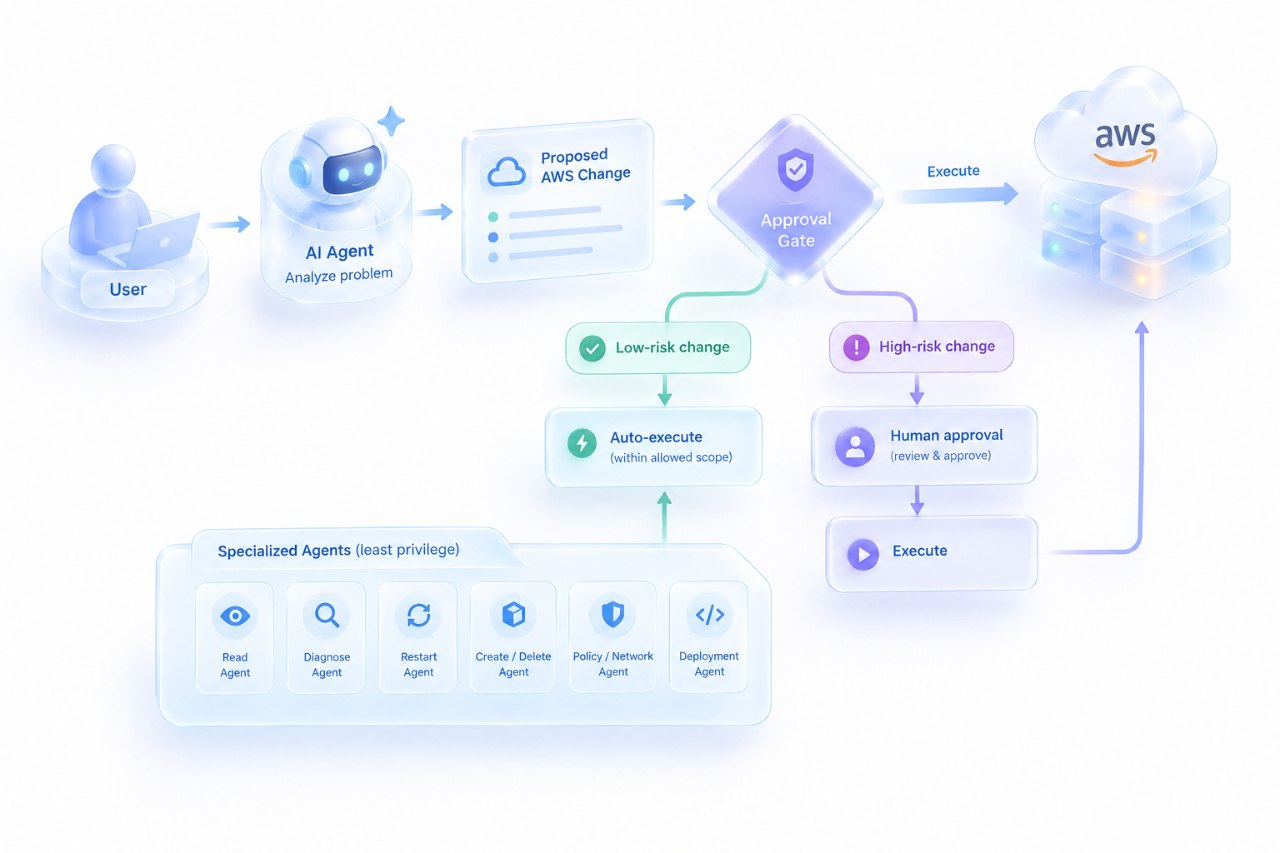
Some agents need to read only; others diagnose and recommend. Other agents need to restart instances; some create or delete resources; some change policies or modify networking; some can execute (and here we need to be careful; there is a difference between prod and dev environments); and, most importantly, choose which agents can delete resources and modify policies. Each permission is tailored to perform the exact task the agent must complete.
On top of these small, specialized agents sits the orchestration agent, which controls the workflow for the user. It will not have permissions exceeding the user's permissions and additional limitations based on its role and workflows.
The orchestrator role needs permission to run Lambda functions, start Step Functions, manage workflow data in DynamoDB, and send approval messages through SNS. It does not need permissions for EKS, ECR, or AWS CloudFormation; those are for the deployment agent’s role. The deployment agent needs permissions for EKS and ECR but doesn’t need the wide Lambda permissions that the orchestrator requires.
On top of this will be users who will act as the base and initiators of all the models. In a mature system, users will also be involved in the agentic system workflow, not step aside and leave all the work for agents. When agent changes are low risk, they might auto-execute. When risks are higher, you might need to add user approval before execution.
Final Thoughts
Overall, the answer is not to deny agents from taking actions, but to ensure every action is within the right scope of permissions. The ultimate question is how many permissions should be granted to agentic systems and under what conditions. Delegation, least privilege, task-specific permissions, and human approval gates are the right way to achieve systems that will not damage your AWS environment. The more tasks we delegate to AI agents, the more carefully we should design the boundaries within which they need to operate.
Opinions expressed by DZone contributors are their own.