

Shrink a Bloated Git Repository and Optimize Pack Files
This article walks you through why Git repos grow, how to find and remove hidden large files, and how to optimize pack files to get your repo back into shape.
Executive Summary
Large Git repositories slow down developers, CI/CD, and release processes. The main culprits are big binary blobs, long-lived histories of rarely used files, and repeated commits of generated artifacts. This guide provides a comprehensive, step-by-step approach to:
- Measure where the bloat is and surgically remove it by rewriting history with safe, modern tools,
- Aggressively repack objects for performance, and put guardrails in place — such as Git LFS, CI size policies, and partial clone — to keep your repo lean over time.
By the end, you will know how to identify the largest objects hidden in your commit DAG, remove historical binaries without breaking your trunk, safely coordinate a force-push for the team, reduce pack files by orders of magnitude, and adopt practices that prevent bloat from coming back.
What This Article Is For
- Repository maintainers and leads are responsible for performance and health
- DevOps/Platform engineers running CI/CD and build farms
- Engineering managers planning monorepos or long-lived codebases
- Security and compliance specialists who need to remove secrets or sensitive binaries from history
What This Article Covers
- Why repositories grow and how Git stores data (objects, packs, delta-compression, reachability)
- Multiple techniques to find hidden giants: by size, by path, by time range, by author
- History rewriting with git-filter-repo and BFG, including safety, backups, and rollback
- Aggressive packing and garbage collection for space and speed
- Migration strategies to Git LFS and practical caveats
- Clone/checkout optimizations (shallow, sparse, partial clone with blob filtering)
- CI/CD acceleration with caching, partial clone, and artifact policies
- Governance: prevent future bloat with hooks, policies, and education
Symptoms That One Notices (Quick Checks)
- Clones or fetches take minutes instead of seconds
.git/objects/packcontains one or more pack files of several gigabytes- CI checkout steps dominate pipeline time and bandwidth
- Developer machines or build agents run out of disk space
- Local operations like
git statusorgit logfeel sluggish after years of growth
Quick sanity checks show compressed and loose object counts, packfiles in .git/objects/pack, and the repo's size.
git count-objects -v
ls -lh .git/objects/pack
du -sh .git
How Git Stores Data (Objects, Packs, and Reachability)
Git stores content as objects, blobs (file contents), trees (directories), commits (history), and tags. Initially, objects are loose files. Over time, git gc consolidates them into pack files, which apply delta compression and zlib compression. This is excellent for text, but not for many binary formats where deltas are ineffective.
- Loose objects: Individual files in
.git/objects/??/ - Pack files: Consolidated storage in
.git/objects/pack/pack-*.packwith an index.idx - Delta compression: Efficient for text, often poor for already-compressed binaries (ZIP, JPEG, MP4)
- Reachability: Objects reachable from refs (branches, tags) are retained; unreachable ones become candidates for pruning after grace periods
- Reflogs: Record movements of refs; as long as reflogs reference old commits, their objects remain protected from pruning
Understanding reachability and reflogs is crucial, even if you delete a file or force-push; Git may retain old objects until reflogs expire or you explicitly prune. That is why size improvements often materialize only after aggressive garbage collection and pruning windows are passed.
Diagnose Bloat to Find Large Objects and Hotspots
Start with a ranked list of the largest objects across the entire history:
git rev-list --objects --all | git cat-file --batch-check='%(objecttype) %(objectname) %(objectsize) %(rest)' | sort -k3 -n | tail -50Interpretation: The output lists object type (typically blob), SHA, size (bytes), and optionally the path. Many of these blobs may no longer be in your working tree; they persist in history.
Additional focused analyses:
By path patterns (e.g., archives, media, models): Adjust the grep to match your patterns
git rev-list --objects --all | grep -Ei '\.(zip|tar|tgz|gz|7z|mp4|mov|avi|mkv|png|jpg|jpeg|psd|mp3|wav|pdf|bin|jar|war|exe)$' | git cat-file --batch-check='%(objecttype) %(objectname) %(objectsize) %(rest)' | sort -k3 -n | tail -50By time range (recent growth vs. historical):
# Example: last 12 months
git rev-list --objects --since="12 months ago" --all | git cat-file --batch-check='%(objecttype) %(objectname) %(objectsize) %(rest)' | sort -k3 -n | tail -30
By author (to coach teams or adjust workflows):
# Large blobs introduced by specific author (heuristic)
git rev-list --all --author="First Last" | xargs -I {} git ls-tree -r --long {} | awk '{print $4, $5, $6}' | sort -k2 -n | tail -20
By directory (which areas contribute most):
# Summarize sizes by path (approximation via latest tree; history-wide requires custom scripts)
git ls-tree -r --long HEAD | awk '{print $4, $5}' | awk -F'/' '{sizes[$1]+=$2} END {for (k in sizes) print sizes[k], k}' | sort -n | tail -20
For a birds-eye view, consider using git-sizer to highlight pathological patterns such as large commits, huge trees, and excessive history fan-out.
Install and run git-sizer (if available)
- macOS: brew install git-sizer
- Linux: download binary from releases
git sizer --verboseBackups, Mirrors, and Recovery Plans: Safety First
History rewriting is powerful and disruptive. Before you modify anything, create a mirror backup of your repository and verify it. A mirror captures all refs, including remote-tracking branches and notes.
From a clean clone of the repository you want to fix:
cd /Users/Shivi/Code/bloated-repo-test
echo "Creating a mirror backup..."
cd ..
git clone --mirror repo/ repo-backup.git
Optionally pack backup aggressively to save space:
cd repo-backup.git
git gc --aggressive --prune=now

# Save refs list
cd /path/to/repo
git for-each-ref --format='%(refname) %(objectname)' > ../refs-pre-cleanup.txt
In addition, export a list of current branches and tags so you can compare pre/post cleanup and restore if necessary.
Rewrite History With git-filter-repo
git-filter-repo is the modern, fast, and well-tested replacement for git filter-branch. It operates locally and is scriptable for precise policies. Begin with a dry run mindset by crafting specific rules and testing on a clone.
Common Scenarios and Recipes
1. Remove all blobs bigger than a threshold across all history:
# Remove any blob > 10 MB across history
# Requires: pip install git-filter-repo (or package for your OS)

git filter-repo --strip-blobs-bigger-than 10M
2. Remove specific paths (past and present), e.g., build outputs or vendor archives:
# Remove paths wherever they occur in history
# Patterns use Python regex by default

git filter-repo --path-glob 'build/**' --path-glob 'dist/**' --invert-paths

# Or remove a specific file introduced long ago
# (Keeps everything else intact)

git filter-repo --path 'datasets/huge_model.bin' --invert-paths
3. Replace sensitive content (e.g., secrets) with placeholders while keeping file structure:
# Replace matching content with redactions
# (Requires a replace map file)

echo 'PASSWORD=***' > replacements.txt

git filter-repo --replace-text replacements.txt
4. Rewrite author info (useful while you’re cleaning anyway):
# Map old emails to new canonical identities
cat > authors.txt <<'EOF'
Shivi Kashyap <[email protected]>==>Kashyap Shivi <[email protected]>
EOF

git filter-repo --mailmap authors.txt
After running filter-repo, your local history has changed. Verify repository health: run tests, build, and compare key branches. Then you’ll coordinate a force-push.
Coordinating a Safe Cutover (Force Push, Re-Clone, and Communication)
- Agree on a freeze window (e.g., 30–60 minutes) where no merges occur.
- Communicate the plan, the reason (space/performance), and precise steps collaborators must take.
- Protect or temporarily disable branch protections as required to allow force-push (admin-only).
- Force-push all updated branches and tags to the remote.
- Ask collaborators to archive/abandon old clones and perform a fresh clone, or hard reset to the new root if permitted.
# Force push examples (use cautiously)
# Push the primary branch
git push --force-with-lease origin main

# Push all branches and tags after filter-repo
# (Ensure you understand which refs changed)
for ref in $(git for-each-ref --format='%(refname:short)' refs/heads/); do
git push --force-with-lease origin "$ref"
done

git push --force --tags
Encourage developers to run a fresh clone for the cleanest state. If they must keep their working copy, they can rebase or hard reset to the new history — though this is more error-prone.
# In an existing clone (risky for unpushed work)
# Save local changes, then:

git fetch origin

git checkout main
# Option A: hard reset to new history
git reset --hard origin/main
# Option B: rebase your topic branch onto new main
# git rebase --rebase-merges --rebase-to origin/main <your-branch>
Alternative: BFG Repo-Cleaner
BFG provides a high-level, fast interface for common cleanup tasks like removing big files or secrets. It rewrites only the Git database, leaving your working tree unchanged.
# Remove blobs larger than 50 MB
java -jar bfg.jar --strip-blobs-bigger-than 50M your-repo.git

# Remove a directory everywhere in history
java -jar bfg.jar --delete-folders build --delete-files build.log --no-blob-protection your-repo.git

# After BFG, always run
git reflog expire --expire=now --all && git gc --prune=now --aggressive
Repack and Garbage-Collect for Maximum Space Savings
- Expire reflogs so unreachable objects can be pruned immediately.
- Run aggressive garbage collection to consolidate and compress anew.
- Repack with deeper windows for better delta chains across similar content.
# Expire reflogs and prune aggressively (use with care)
git reflog expire --expire-unreachable=now --expire=now --all
git gc --prune=now --aggressive

# Optional: explicit repack knobs
git repack -a -d -f --depth=250 --window=250
These steps create fresh pack files, collapse historical objects, and remove unreachable blobs. Results vary, but reductions from multi‑GB to sub‑GB are common when binaries are purged.
Example Size Improvement
| Metric | Before | After |
|---|---|---|
|
.git/objects/pack size |
3.2 GB |
350–450 MB |
|
Cold clone time (LAN) |
45–90 s |
6–12 s |
|
CI checkout (no cache) |
Slow/bandwidth heavy |
Fast/lightweight |
Move Big Binaries to Git LFS
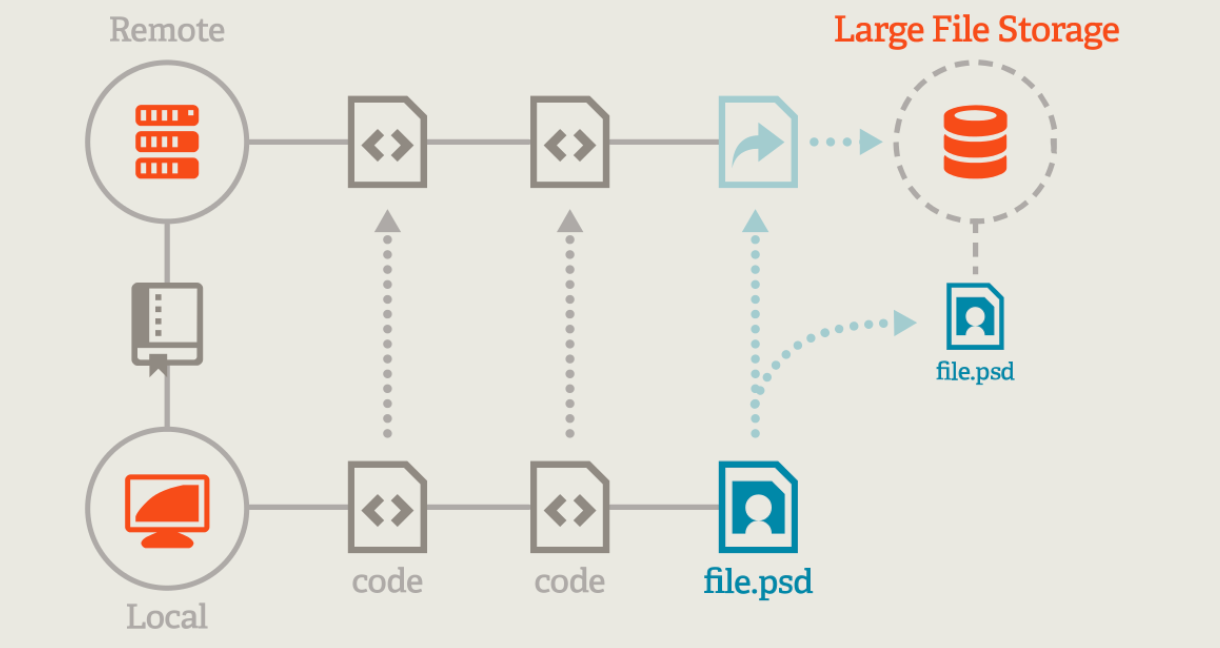
Git Large File Storage (LFS) keeps pointers in Git and stores large content on a separate LFS server (or the hosting provider’s storage). This keeps your Git history text-friendly, while still versioning binaries.
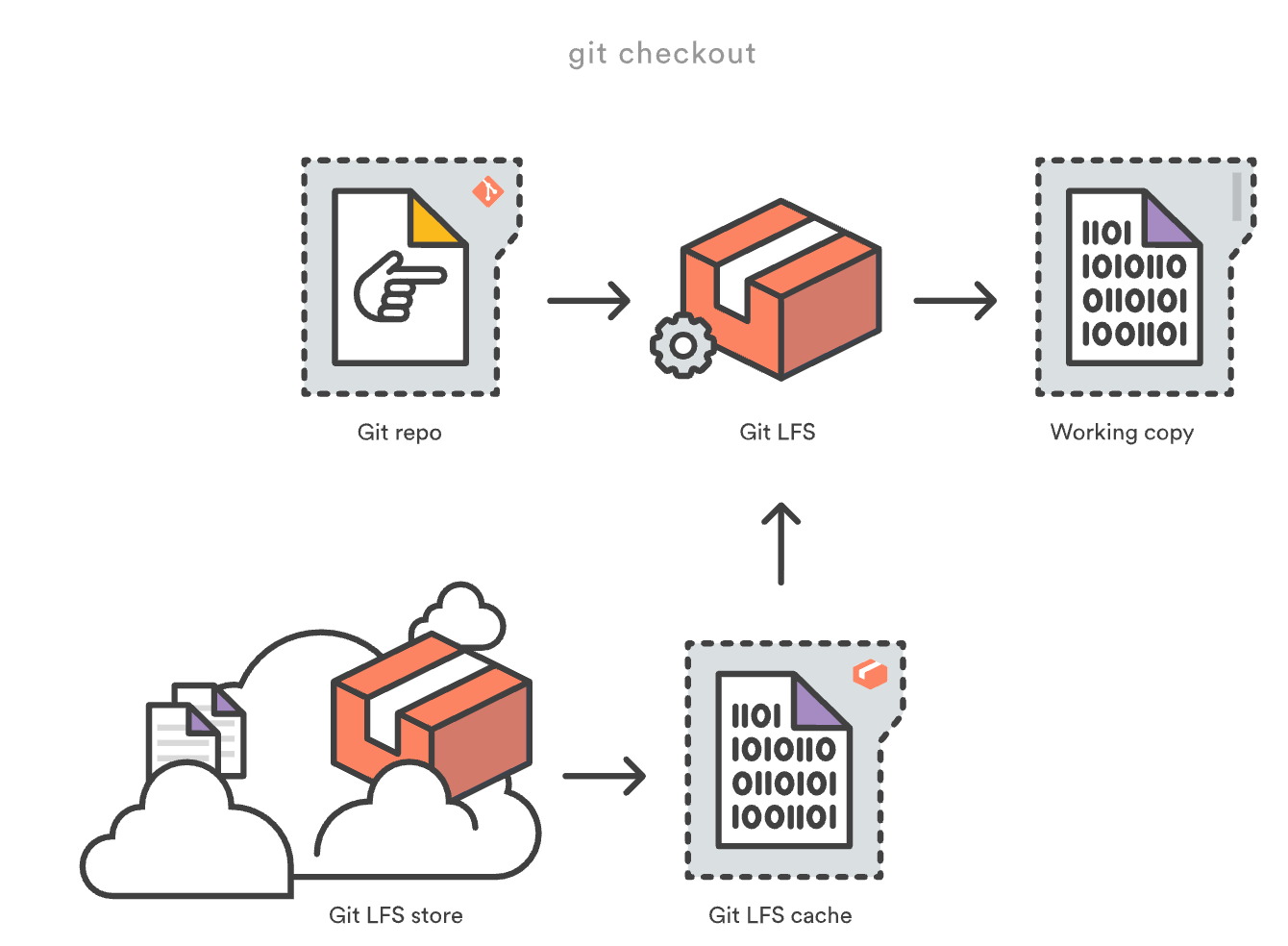
- Install and initialize LFS.
- Track patterns for large or frequently changing binaries.
- Migrate historical blobs to LFS if necessary.
- Enforce via CI or pre-receive hooks to prevent regressions.
1. Install and initialize.
git lfs install
2. Track patterns.
git lfs track "*.zip"
git lfs track "*.mp4"
git lfs track "*.psd"

echo "*.zip filter=lfs diff=lfs merge=lfs -text" >> .gitattributes
echo "*.mp4 filter=lfs diff=lfs merge=lfs -text" >> .gitattributes
echo "*.psd filter=lfs diff=lfs merge=lfs -text" >> .gitattributes
3. Commit the attributes file.
git add .gitattributes
git commit -m "chore: track large binaries via Git LFS"
Migrating history to LFS (optional; can be time‑consuming):
# Migrate existing big binaries to LFS across history
# Use with caution and test on a clone

git lfs migrate import --include="*.zip,*.mp4,*.psd" --include-ref=refs/heads/main

git push origin --all
git lfs push origin --all
Before enabling LFS, confirm your remote hosting (GitHub, GitLab, Azure Repos, Bitbucket) supports LFS and that your organisation has appropriate quotas and retention policies.
Clone, Fetch, and Checkout Optimizations
- Shallow clones cut history depth for CI or ephemeral jobs
- Sparse checkout limits the working tree to a subset of paths
- Partial clone with
--filter=blob:nonefetches trees/commits first and lazily fetches blobs on demand
# Shallow clone for CI
git clone --depth=1 https://github.ibm.com/Shivi-Kashyap/test-repo.git

# Sparse checkout: only a subset of the tree
git clone https://github.ibm.com/Shivi-Kashyap/test-repo.git
cd repo

git sparse-checkout init --cone
# Pull only certain directories
git sparse-checkout set src/ tools/

git clone --filter=blob:none --no-checkout https://github.ibm.com/Shivi-Kashyap/test-repo.git repo
cd repo
git checkout main
Combine these strategies in CI to cut network, disk, and time dramatically — especially when caches are cold.
Governance: Prevent Bloat From Coming Back
- Policy: Define what should never be committed — archives, media, large datasets, build outputs.
- gitignore: Keep it current and central. Add generated artifacts and local files.
- Hooks: Use pre-receive or push-protection to reject large files above size thresholds.
- Education: Teach contributors how Git LFS works and when to use it.
- Monitoring: Track repo size, pack size, and clone times periodically.
# Example server-side pre-receive snippet (pseudo)
size_limit=$((20*1024*1024)) # 20 MB
while read oldrev newrev refname; do
for obj in $(git rev-list --objects $oldrev..$newrev | awk '{print $1}'); do
size=$(git cat-file -s $obj)
if [ "$size" -gt "$size_limit" ]; then
echo "Rejected: object $obj is larger than 20MB" >&2
exit 1
fi
done
done
exit 0
Special Topics and Edge Cases
Monorepos and Partial Ownership
In monorepos, growth can be rapid because many teams contribute artifacts. Consider enforcing LFS for all non-text binaries, and encourage sparse/partial clones for teams that only need a subset. Break out exceptionally large, rarely changing assets into separate repositories managed as submodules or package artifacts in your artifact repository.
Submodules vs. Subtrees vs. Vendoring
Embedding third-party code or assets can balloon history. Submodules keep history separate but add coordination overhead. Subtrees copy history into your repo, increasing size. Vendoring prebuilt binaries or archives is especially costly. Prefer package managers and artifact repositories where possible.
Binary Formats and Delta-Compression
Already-compressed formats (ZIP, JPEG, MP4, tar.gz) are poor delta candidates; Git often stores each version almost independently. For assets that change frequently, LFS plus a content-addressable artifact store can be a better fit than versioning inside Git.
Secrets and Compliance Cleanups
When removing secrets, replace text with redactions across history and rotate credentials immediately. Combine git-filter-repo --replace-text with organization-wide secret scanning (e.g., pre-receive hooks or provider tools) to prevent recurrence. Document the incident and the fix for audit trails.
Windows, macOS, and Filesystem Pitfalls
Case sensitivity differences, long path limits, and antivirus scans can impact performance. On Windows, enable long paths, keep antivirus exceptions for your repo cache on build agents, and ensure line-ending normalization is configured consistently via .gitattributes.
Reusable Cleanup Scripts (Linux/macOS)
#!/usr/bin/env bash
set -euo pipefail

# Usage: ./shrink-repo.sh /path/to/repo 10M
REPO_DIR=${1:-.}
SIZE_LIMIT=${2:-10M}

pushd "$REPO_DIR" >/dev/null

# 1) Backup (mirror)
echo "==> Backing up as mirror..."
BACKUP_DIR="../$(basename "$REPO_DIR")-backup.git"
if [ ! -d "$BACKUP_DIR" ]; then
git clone --mirror . "$BACKUP_DIR"
fi

# 2) Show top offenders
echo "==> Top 30 largest blobs (pre-cleanup):"
git rev-list --objects --all | git cat-file --batch-check='%(objecttype) %(objectname) %(objectsize) %(rest)' | sort -k3 -n | tail -30 | tee ../largest-pre.txt

# 3) Rewrite history (size-based)
echo "==> Rewriting history: stripping blobs bigger than $SIZE_LIMIT"
if command -v git-filter-repo >/dev/null; then
git filter-repo --strip-blobs-bigger-than "$SIZE_LIMIT"
else
echo "ERROR: git-filter-repo not found. Install it first." >&2
exit 1
fi

# 4) Expire reflogs and GC
echo "==> Expiring reflogs and running aggressive GC"
git reflog expire --expire=now --expire-unreachable=now --all
git gc --prune=now --aggressive

# 5) Report
echo "==> Top 30 largest blobs (post-cleanup):"
git rev-list --objects --all | git cat-file --batch-check='%(objecttype) %(objectname) %(objectsize) %(rest)' | sort -k3 -n | tail -30 | tee ../largest-post.txt

# 6) Reminder
echo "==> IMPORTANT: Coordinate a force-push and ask all collaborators to re-clone."

popd >/dev/null
Appendix B: Pre- and Post-Cleanup Checklists
Pre-Cleanup
- Announce maintenance window and re-clone requirement
- Create mirror backup and verify it is restorable
- Snapshot list of refs (branches/tags)
- Draft filter rules and test on a scratch clone
- Confirm branch protection and permissions for force-push
Post-Cleanup
- Expire reflogs and run GC with prune
- Compare refs list before/after; investigate discrepancies
- Validate builds/tests on mainline and critical branches
- Re-enable protections and update CI to use shallow/partial clone
- Monitor repo size and performance for a week
Appendix: Command Reference (Quick Copy/Paste)
# Largest objects
git rev-list --objects --all | git cat-file --batch-check='%(objecttype) %(objectname) %(objectsize) %(rest)' | sort -k3 -n | tail -50

# Remove blobs > 10MB
git filter-repo --strip-blobs-bigger-than 10M

# Remove paths across history
git filter-repo --path-glob 'build/**' --path-glob 'dist/**' --invert-paths

# Replace sensitive content
git filter-repo --replace-text replacements.txt

# Post-rewrite GC
git reflog expire --expire=now --expire-unreachable=now --all && git gc --prune=now --aggressive

# Repack knobs
git repack -a -d -f --depth=250 --window=250

# Partial clone
git clone --filter=blob:none <url>
Final Thoughts
Git is astonishingly capable for source and text-based workflows, but it needs a little help when repositories accumulate large binaries and deep histories. With a structured cleanup using git-filter-repo, a disciplined repack, and permanent guardrails like Git LFS and partial clone, you can transform a sluggish multi-gigabyte repository into a nimble, developer-friendly asset. Make cleanup a periodic ritual, quarterly for fast-moving monorepos, and pair it with education and policies so your gains persist.
Opinions expressed by DZone contributors are their own.