

Simulating and Troubleshooting Thread Leak in Scala
In this series of simulating and troubleshooting performance problems in Scala, let’s discuss how to simulate thread leaks.
 CORE
·
CORE
·
Join the DZone community and get the full member experience.
Join For FreeIn this series of simulating and troubleshooting performance problems in Scala, let’s discuss how to simulate thread leaks. java.lang.OutOfMemoryError: unable to create new native thread will be thrown when more threads are created than the memory capacity of the device. When this error is thrown, it will disrupt the application’s availability.
Video: To see the visual walk-through of this post, click below:
Scala Sample Thread Leak Program
Here is a sample Scala program, which will generate java.lang.OutOfMemoryError: unable to create new native thread
package com.yc
import java.lang.Thread.sleep
class ThreadLeakApp {
}
object ThreadLeakApp {
      def main(args: Array[String]): Unit = {
      System.out.println("ThreadApp started")
         while (true) {
           new ForeverThread().start()
        }
     }
  class ForeverThread extends Thread {
    override def run(): Unit = {
      while (true) {
        sleep(100)
      }
    }
  }
}
You can notice that the sample program contains the ThreadLeakApp class. This class has a start() method. In this method, ForeverThread is created an infinite number of times because of the while (true) loop.
In the ForeverThread class there is the run() method. In this method, thread is put to continuous sleep, i.e., thread is repeatedly sleeping for 100 milliseconds again and again. This will keep the ForeverThread alive always without doing any activity. A thread will die only if it exits the run() method. In this sample program run() method will never exit because of the never-ending sleep.
Since the ThreadLeakApp class keeps creating ForeverThread infinitely and it never terminates, very soon several thousands of ‘ForeverThread’ will be created. It will saturate memory capacity, ultimately resulting in java.lang.OutOfMemoryError: unable to create new native thread problem.
How To Diagnose java.lang.OutOfMemoryError: unable to create new native thread?
You can diagnose the OutOfMemoryError: unable to create new native thread problem either through a manual or automated approach.
Manual Approach
In the manual approach, you need to capture thread dumps as the first step. A thread dump shows all the threads that are in memory and their code execution path. You can capture a thread dump using one of the 8 options mentioned here. But an important criterion is: You need to capture thread dump right when the problem is happening (which might be tricky to do). Once the thread dump is captured, you need to manually import the thread dump from your production servers to your local machine and analyze it using thread dump analysis tools like fastThread, and samurai.
Automated Approach
On the other hand, you can also use yCrash open source script, which would capture 360-degree data (GC log, 3 snapshots of thread dump, heap dump, netstat, iostat, vmstat, top, top -H,…) right when the problem surfaces in the application stack and analyze them instantly to generate root cause analysis report.
We used the automated approach. Below is the root cause analysis report generated by the yCrash tool highlighting the source of the problem.
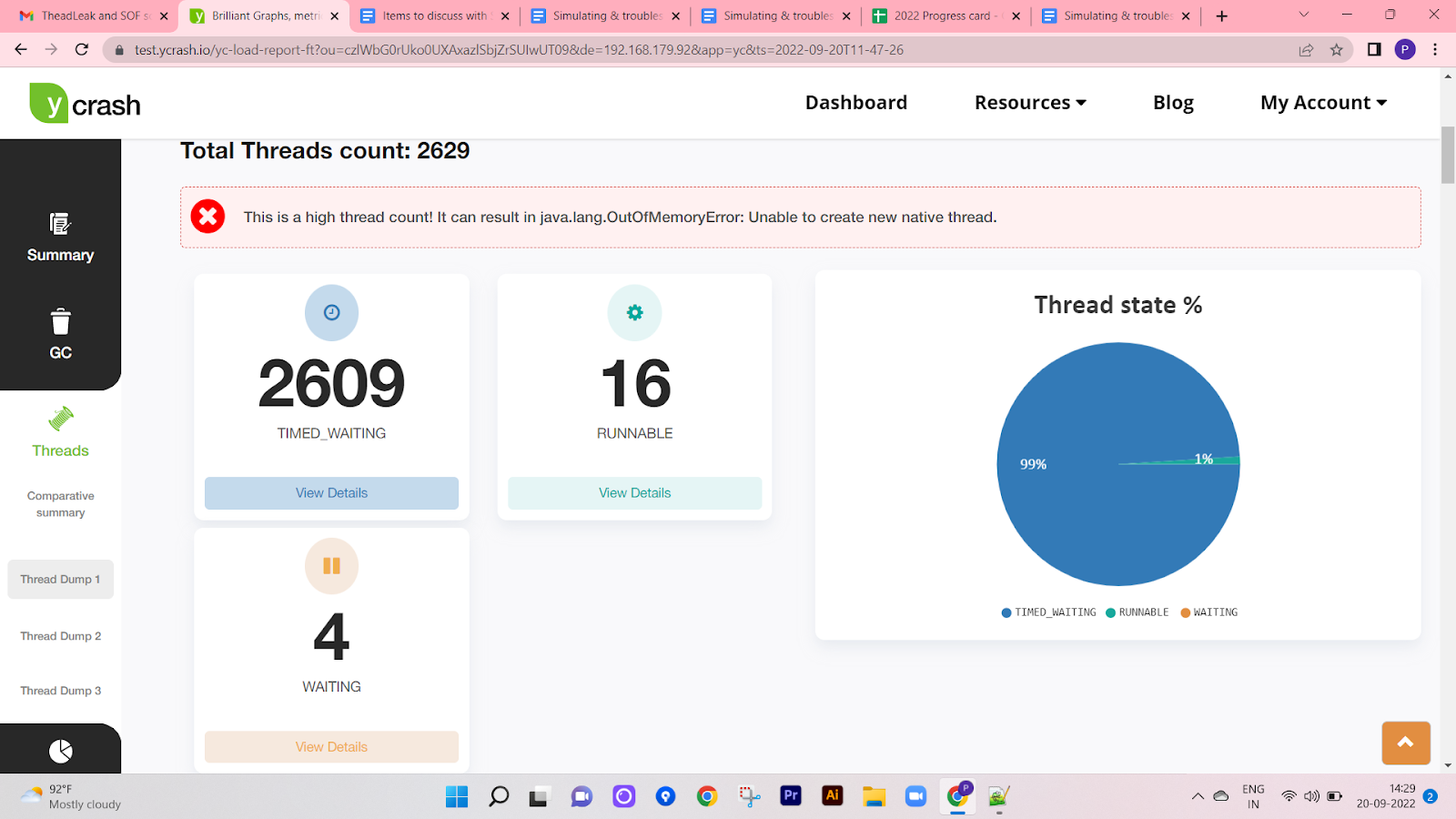
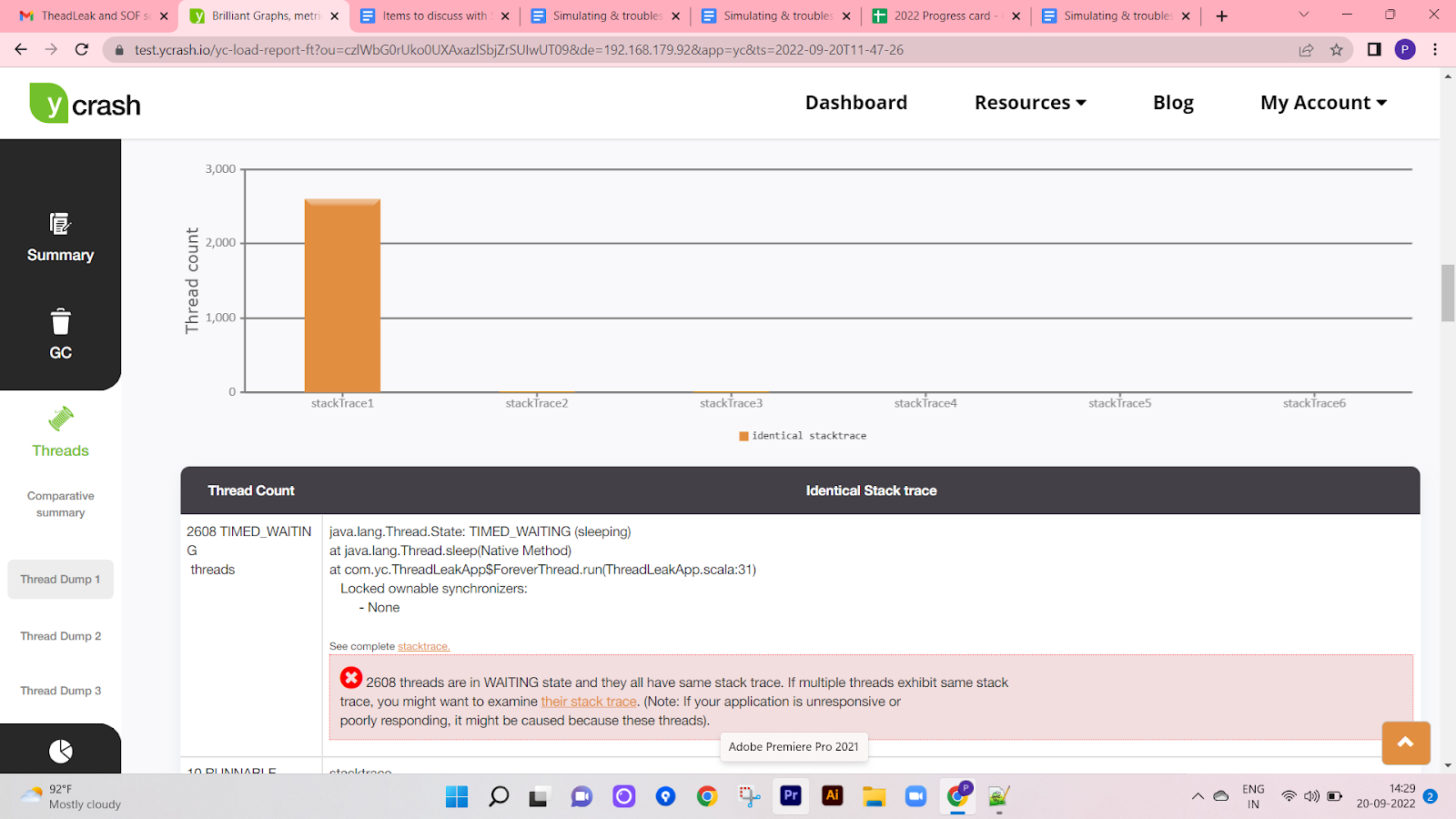
From the report, you can notice that yCrash points out that 2608 threads are in TIMED_WAITING state, and they have the potential to cause OutOfMemoryError: unable to create new native thread problem. Besides the thread count, the tool is also reporting the line of code, i.e., com.yc.ThreadLeakApp$ForeverThread.run(ThreadLeakApp.scala:31) in which all the 2608 threads are stuck. Equipped with this information, one can quickly go ahead and fix the java.lang.OutOfMemoryError: unable to create new native thread problem.
Published at DZone with permission of Ram Lakshmanan. See the original article here.
Opinions expressed by DZone contributors are their own.
Comments