

Small Language Models as Control Planes to Steer Complex Systems
Small language models don't just answer questions; they can act as the "control brain" that routes work across services, tools, and larger models.
Join the DZone community and get the full member experience.
Join For FreeMost teams meet AI with the same strategy: integrate a large language model (LLM) into an application, connect a few tools/products/etc., and then gradually watch complexity grow as new use cases and features are added.
That's exactly what happened to me. What started as "just a chatbot" turned into:
- Multiple models (e.g., the original LLM used for chat, an embedding model for retrieval, a vision model, etc.)
- A zoo of tools and APIs that all somehow needed to be orchestrated.
- Different layers of retrieval logic, feature stores, vector databases, etc.
- Multiple guardrails, audit logs to track the actions taken by the system, and/or human approval steps to approve the actions taken by the system before they can be completed.
Glue logic starts leaking into every service. Prompts are scattered across the codebase. Debugging a bad decision means chasing logs through three different systems.
At some point, I realized I was no longer "building an AI system"; I was fighting the architecture.
That's what pushed me toward a different pattern: utilizing a small language model (SLM) as a control plane, a dedicated "brain" that determines what happens next, and allowing the rest of the stack to focus on executing the actual task.
This article walks through how I think about SLMs as control planes, why this pattern has worked well for me in practice, and how you can implement it in your own systems.
What I Mean by "Small Language Model" and "Control Plane"
When I say small language model (SLM), I mean a model with far fewer parameters than today's flagship LLMs (typically in the sub-5B parameter range), designed to be:
- Cheap to run (often on a single GPU or even CPU)
- Fast enough that calling it on every request doesn't feel painful (low-latency inference)
- Easy to fine-tune to your specific use case using your own domain data
- Deployable on-prem or at the edge for privacy and control over your data
In my experiments and prototypes, this has typically meant models from families like Phi-3, LLaMA 3 8B, Mistral-7B, and other compact models you can run locally via tools like Ollama or on lightweight servers.
Control Plane vs. Data Plane (The Analogy I Keep Coming Back To)
In the context of networking, Kubernetes, and service meshes, there are often discussions about:
- Control plane – establishes and enforces policy: routing rules, security policies, and configuration. It is the "brain."
- Data plane – performs the actual execution of these policies: forwarding packets, terminating TLS, routing requests, etc. It is the "hands."
The control plane does not touch every packet; instead, it determines what action should occur and configures the data plane accordingly, and monitors its performance.
I realized I could use the same pattern for AI systems:
- SLM control plane – determines the objectives, selects the tools/models, orchestrates the sequence of steps, and enforces the constraints.
- Data plane – includes microservices, vector stores, larger LLMs, CV models, and transactional systems, which perform the actual work.
The architecture of my AI systems became much cleaner once I started thinking, "This SLM is my control plane."
Why SLMs Make Great Control Planes (From Experience)
Yes, you could use a giant LLM for all aspects of your application (request interpretation; invocation of specialized services/tools; generation of response). I tried that, and it quickly became painful in production.
Here's why I shifted to SLMs as the control plane.
1. Cost and Latency You Can Live With
Routing and orchestration happen on every request. Using a 400B-parameter model just to decide which downstream service to call is overkill. Switching to an SLM for planning and routing gave me:
- Reduced per-request costs – beneficial as you invoke multiple tools/services per user request.
- Lower latency – essential as your control loop is a significant portion of the user experience.
2. On-Premise and Air-Gapped Deployments
One major reason why developers prefer SLMs is their capability to deploy them:
- On developer workstations for local development
- On-premises or in private VPCs for Regulated Domains (Finance, Healthcare, Energy)
This makes SLMs a natural control plane for environments where sensitive data cannot exit your network.
3. Fine-Tuning and Predictability
Because SLMs are smaller, I feel much less guilty about fine-tuning them for tightly scoped behaviors like:
- "Determine which microservice to call for this request."
- "Transform this API payload into a structured event."
- "Determine the classification of this incident and select the correct workflow template."
With proper prompt design and schema design, I've been able to achieve consistent and structured outputs (e.g., JSON with a fixed schema) and ultimately more deterministic behavior that's easier to test and reason.
4. Separation of Concerns
The biggest win I've seen is the separation of concerns:
- The SLM control plane handles orchestration logic in one place
- Data-plane services remain "dumb but reliable" and focused on doing their one job well
When I need to swap a tool or a model, I can usually do it without ripping up the whole system. This feels very similar to the way service meshes and API gateways separate policy from execution.
The "SLM as Control Plane" Pattern
Here's how I define the pattern practically, based on what's worked for me.
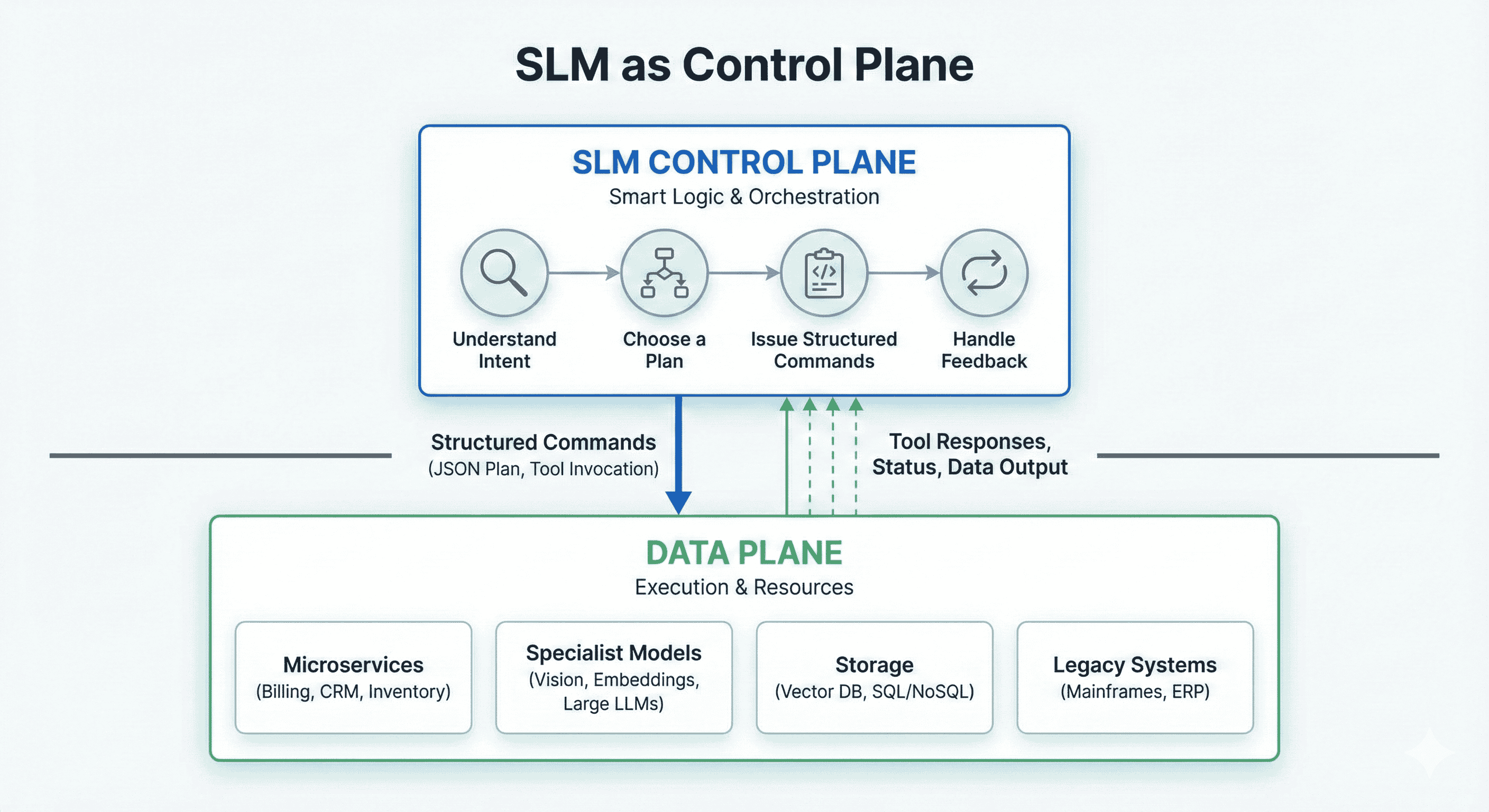
Responsibilities of the SLM Control Plane
The SLM is your planner and router, not your business logic:
- Understanding intent: Parse user/system input; Identify the goal, constraints, and safety rules.
- Choosing a plan: Decide which tools/services/models should be invoked; Possibly decompose a task into multiple steps.
- Issuing structured commands: Produce a machine-readable plan (e.g., JSON); Specify tool names, parameters, and ordering.
- Handling feedback: Inspect tool responses; Decide whether to retry, escalate, or call a different tool; Summarize results for downstream consumers (UI, APIs, logs).
The SLM never directly manipulates your core business data. It tells other components what to do, then inspects what happened.
Responsibilities of the Data Pplane
The data plane is where actual work happens:
- Microservices: billing, inventory, CRM, ticketing, etc.
- Specialist models: embedding models, vision models, and bigger LLMs for heavy reasoning.
- Storage: vector DBs, SQL/NoSQL stores, log pipelines.
- Legacy systems: mainframes, ERP, custom line-of-business apps.
Each data-plane service provides a narrow, well-defined API: the SLM cares nothing about the internal workings of the tool/service, simply that it invokes the tool/service and reads its output.
Example Architecture: SLM Steering an Incident Response Platform
To make this less abstract, imagine an incident-response assistant.
The Old Way
You wire a big LLM directly to:
- Log search APIs
- Metrics APIs
- Runbook documentation
- PagerDuty / ticketing integration
Prompts grow increasingly complicated, and soon you're debugging prompts instead of incidents:
"Given these logs, metrics, past incidents, and runbooks, explain what's happening and decide if we should page the on-call…"
The SLM Control-Plane Way
Instead, you build:
- A small control SLM that:
- Takes an incident description (alert payload, logs snippet, context)
- Decides which tools to call in which order
- Aggregates results and returns a concise decision
- A data plane of tools/services:
search_logs(query, time_range)get_metric(service, window)find_similar_incident(payload)lookup_runbook(service, symptom)create_ticket(summary, severity)- Optionally, a larger LLM for deep root-cause analysis
High-level flow:
- Alert comes in.
- Control SLM decides: "Call
search_logsandget_metricsfirst." - Tools run, return structured data.
- SLM looks at the results, says:
- matches incident X → call
lookup_runbookandcreate_ticketwith severity HIGH. - Or "Unclear → escalate to human with summarized context."
- matches incident X → call
All the heavy lifting: log scanning, metric aggregation, ticket creation, lives in code you can test in typical ways. The SLM orchestrates the dance.
Implementation Sketch: A Simple SLM Router in Python
Here's a minimal example that shows the pattern (framework-agnostic).
1. Define your tools (data-plane functions).
import requests

def search_logs(query, time_range):
    resp = requests.get(
        "https://logs.internal/api/search",
        params={"q": query, "range": time_range},
        timeout=5,
    )
    resp.raise_for_status()
    return resp.json()

def get_metrics(service, window):
    resp = requests.get(
        "https://metrics.internal/api/stats",
        params={"service": service, "window": window},
        timeout=5,
    )
    resp.raise_for_status()
    return resp.json()

def create_ticket(summary, severity):
    resp = requests.post(
        "https://tickets.internal/api/tickets",
        json={"summary": summary, "severity": severity},
        timeout=5,
    )
    resp.raise_for_status()
    return resp.json()
2. Define a planning schema for the SLM.
{
  "steps": [
    {
      "tool": "search_logs",
      "args": { "query": "...", "time_range": "15m" }
    },
    {
      "tool": "get_metrics",
      "args": { "service": "checkout", "window": "30m" }
    },
    {
      "tool": "create_ticket",
      "args": { "summary": "...", "severity": "HIGH" }
    }
  ]
}
3. Call your SLM to produce that plan.
This pseudo-code assumes you're hitting a local SLM endpoint (e.g., Phi-3 hosted via Ollama).
import json
import requests

SLM_URL = "http://localhost:8000/v1/chat/completions"

PLAN_PROMPT = """
You are an incident-response planner. Given an alert, decide which tools to call
and in what order. Return ONLY valid JSON matching this schema:

{
  "steps": [
    { "tool": "<tool_name>", "args": { ... } }
  ]
}

Available tools:
- search_logs(query: string, time_range: string)
- get_metrics(service: string, window: string)
- create_ticket(summary: string, severity: "LOW"|"MEDIUM"|"HIGH")
"""

def ask_slm_for_plan(alert_text: str) -> dict:
    payload = {
        "model": "phi-3-mini",
        "messages": [
            {"role": "system", "content": PLAN_PROMPT},
            {"role": "user", "content": f"Alert: {alert_text}"}
        ],
        "temperature": 0.1
    }
    resp = requests.post(SLM_URL, json=payload, timeout=10)
    resp.raise_for_status()
    content = resp.json()["choices"][0]["message"]["content"]
    return json.loads(content)
In production, you'd add:
- JSON schema validation
- Retry logic
- Guardrails or a JSON-only decoder to avoid malformed outputs
… but this captures the core idea.
4. Execute the plan in your orchestrator.
TOOL_REGISTRY = {
    "search_logs": search_logs,
    "get_metrics": get_metrics,
    "create_ticket": create_ticket,
}

def execute_plan(plan: dict, context: dict | None = None):
    context = context or {}
    results = []

    for step in plan.get("steps", []):
        tool_name = step["tool"]
        args = step.get("args", {})

        if tool_name not in TOOL_REGISTRY:
            raise ValueError(f"Unknown tool: {tool_name}")

        tool_fn = TOOL_REGISTRY[tool_name]
        result = tool_fn(**args)
        results.append({"tool": tool_name, "result": result})

        # Optionally update context, feed back to SLM in another loop, etc.
        context[tool_name] = result

    return results
Now your high-level handler looks like:
def handle_alert(alert_text: str):
    plan = ask_slm_for_plan(alert_text)
    results = execute_plan(plan)
    return {"plan": plan, "results": results}
You've just built:
- An SLM control plane (planning + routing)
- A conventional code data plane (tools/services)
You can test search_logs, get_metrics, create_ticket, and even execute_plan without the model, then separately evaluate SLM behavior with recorded test alerts.
Design Lessons I've Learned
- Keep the SLM's job small and well-defined
- Use SLMs to gate access and enforce policy
- Log everything
- Tune for determinism
- Decide when you actually need a big LLM
When This Pattern Has Worked Well for Me (and When It Hasn't)
Good fits:
- Systems with many tools and services (APIs, multiple models, external SaaS)
- Agentic workflows that need step-by-step plans and tools use
- Regulated or high-stakes environments where you want a narrow, auditable "brain."
- Cost-sensitive scenarios where calling a massive LLM on every request isn't feasible.
Probably overkill:
On the other hand, I don't reach for this pattern when:
- The task is a simple one-shot Q&A or summarization.
- There's only a single tool and no branching logic.
- Latency budgets are so tight that even an SLM call is too much.
You don't need an SLM control plane for everything. Use it where orchestration complexity justifies a dedicated "AI router."
Closing Thoughts
Once my AI systems stopped being "a single model behind a chat box" and started looking more like distributed, agentic platforms, it became obvious that architecture mattered as much as model choice.
Treating an SLM as the control plane has given me:
- A centralized place for planning and policy.
- Simple, testable data-plane services.
- Freedom to mix and match bigger models, tools, and systems underneath.
- Clear levers to tune cost, latency, and safety.
You don't have to rip out all your LLM usage to adopt this pattern. In my experience, the win comes from giving an SLM the job it's best at:
Not doing everything — just steering the rest of your stack.
Learned something new? Tap that like button and pass it on!
Opinions expressed by DZone contributors are their own.
Comments