

Taming Parameter Sniffing in SQL Server 2022 With PSP Optimization
SQL Server 2022 PSP Optimization addresses parameter sniffing by maintaining multiple execution plans for queries with different data distributions.
Join the DZone community and get the full member experience.
Join For FreeTraditionally, developers use different query optimization techniques, such as complex conditional looping and procedure branching, and query hints like OPTION (RECOMPILE). The query hint option sometimes leads to high CPU utilization. SQL Server 2022 (Compatibility Level 160) introduced a new feature called Parameter Sensitive Plan (PSP) Optimization as part of the core capabilities of the Intelligent Query Processing (IQP) feature family.
PSP optimization addresses parameter sniffing at the engine level by allowing a single parameterized query to generate and maintain multiple active execution plans in the plan cache simultaneously, tailored to different data volume boundaries.
How It Works: Mechanics, Dispatchers, and Variants
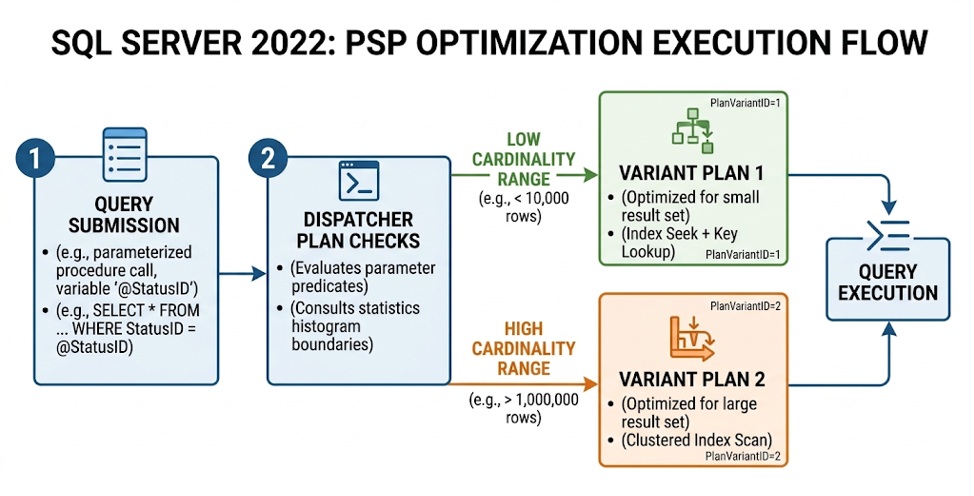
Instead of forcing a single execution plan into cache for all parameter invocations, the SQL Server 2022 Query Optimizer uses data distribution statistics to recognize parameter sensitivity automatically during initial compilation.
How to Detect Parameter Sensitivity
During compilation, the optimizer evaluates predicates referencing parameter variables. It checks the associated column statistics histogram. If the statistics indicate significant data skew across histogram steps, the query is flagged as PSP-eligible.
When a query qualifies, the engine creates a Dispatcher Plan. The dispatcher plan contains the logic needed to evaluate incoming runtime parameter values against pre-calculated boundary ranges. It acts as an internal router rather than a direct execution plan.
The optimizer divides the parameter data distribution spectrum into distinct boundary buckets (typically low, medium, and high cardinality ranges) based on the histogram:
- Boundary calculation: The engine calculates threshold values using histogram step densities
- Variant generation: As different parameter values are executed, the dispatcher maps the runtime value to its corresponding boundary range and compiles or reuses a specific Variant Plan associated with that range.
When reviewing execution plans in SQL Server Management Studio (SSMS), PSP-optimized queries display distinct Query Plan XML attributes under the Dispatcher and Statement Plan nodes, referencing variant identifiers (e.g., PlanVariantID="1" vs. PlanVariantID="2")
Demonstrating PSP Optimization in Action
The following example uses customers from the WideWorldImporters database. In the sample data, CustomerID = 90 has 150 orders, while CustomerID = 1060 has only 4. To make the execution-plan difference easier to observe, we create a small demonstration table that preserves this skew at a larger scale.
USE WideWorldImporters;
GO
DROP TABLE IF EXISTS dbo.PSP_OrderDemo;
GO
CREATE TABLE dbo.PSP_OrderDemo
(
    OrderID      BIGINT IDENTITY PRIMARY KEY,
     CustomerID   INT NOT NULL,
     OrderDate    DATE NOT NULL,
     OrderAmount  MONEY NOT NULL,
    Padding      CHAR(200) NOT NULL
);

GO
CREATE INDEX IX_PSP_OrderDemo_CustomerID ON dbo.PSP_OrderDemo(CustomerID);
GO
Populate one customer with approximately 500,000 rows and the rare customer with only a few rows:
-- Common customer
INSERT dbo.PSP_OrderDemo (CustomerID, OrderDate, OrderAmount, Padding)
SELECT TOP (500000)
       90,
       DATEADD(DAY, -(ROW_NUMBER() OVER
           (ORDER BY (SELECT NULL)) % 365), GETDATE()),
       100.00,
       REPLICATE('X',200)
FROM sys.all_objects a
CROSS JOIN sys.all_objects b;
GO

-- Rare customer
INSERT dbo.PSP_OrderDemo (CustomerID, OrderDate, OrderAmount, Padding)
SELECT TOP (4) 1060, GETDATE(), 100.00, REPLICATE('X',200)
FROM sys.all_objects;
GO
UPDATE STATISTICS dbo.PSP_OrderDemo WITH FULLSCAN;
GO

Create a parameterized stored procedure:
CREATE OR ALTER PROCEDURE dbo.GetOrdersByCustomer
    @CustomerID INT
AS
BEGIN
    SELECT OrderID, CustomerID, OrderDate, OrderAmount, Padding
    FROM dbo.PSP_OrderDemo
    WHERE CustomerID = @CustomerID;
END;
GO
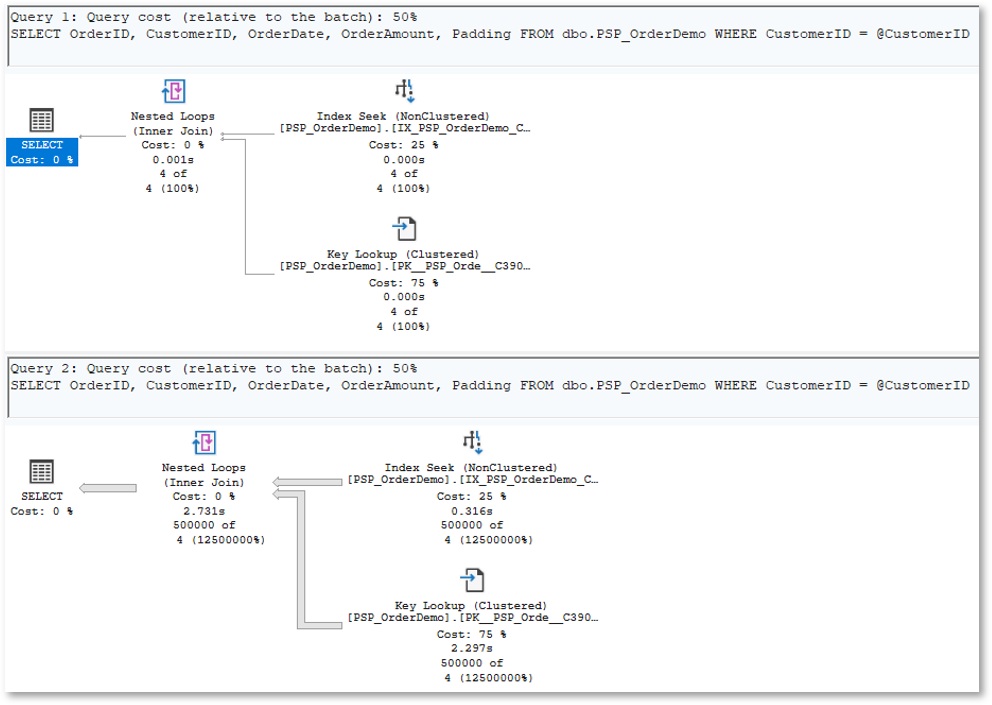
Enable Actual Execution Plan in SSMS with Ctrl+M, then first test with PSP disabled. Because the rare value is compiled first, SQL Server may cache a plan optimized for four rows and reuse it when the same procedure returns approximately 500,000 rows. This illustrates the traditional parameter-sniffing problem.
ALTER DATABASE WideWorldImporters SET COMPATIBILITY_LEVEL = 160;
GO
ALTER DATABASE SCOPED CONFIGURATION SET PARAMETER_SENSITIVE_PLAN_OPTIMIZATION = OFF;
GO
ALTER DATABASE SCOPED CONFIGURATION CLEAR PROCEDURE_CACHE;
GO
SET STATISTICS IO, TIME ON;
EXEC dbo.GetOrdersByCustomer @CustomerID = 1060; -- Rare
EXEC dbo.GetOrdersByCustomer @CustomerID = 90;   -- Common
GO
Because the rare value is compiled first, SQL Server may cache a plan optimized for four rows and reuse it when the same procedure returns approximately 500,000 rows. This illustrates the traditional parameter-sniffing problem.
Now enable PSP and repeat the workload:
ALTER DATABASE SCOPED CONFIGURATION SET PARAMETER_SENSITIVE_PLAN_OPTIMIZATION = ON;
GO
ALTER DATABASE SCOPED CONFIGURATION CLEAR PROCEDURE_CACHE;
GO
EXEC dbo.GetOrdersByCustomer @CustomerID = 1060;
EXEC dbo.GetOrdersByCustomer @CustomerID = 90;
GO
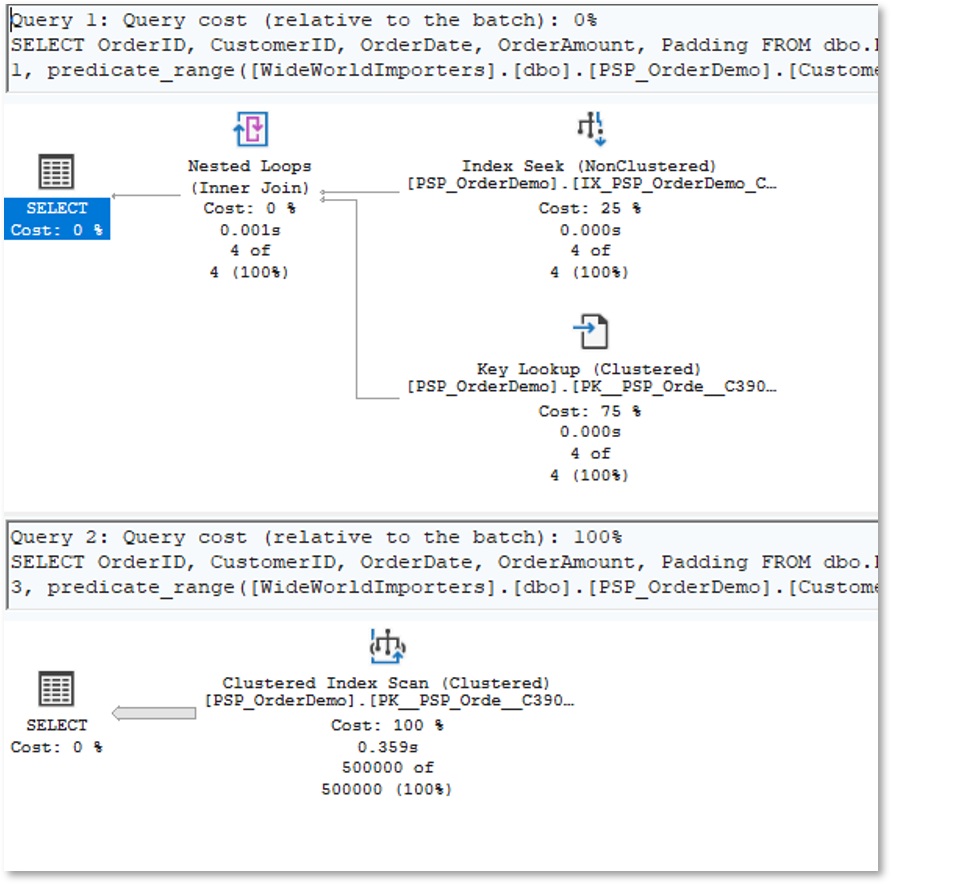
In the PSP-enabled plans, opening the execution plan XML should also reveal QueryVariantID and PLAN PER VALUE, confirming that SQL Server is maintaining separate plans for different cardinality ranges.
The Parameter Sniffing Decision Tree
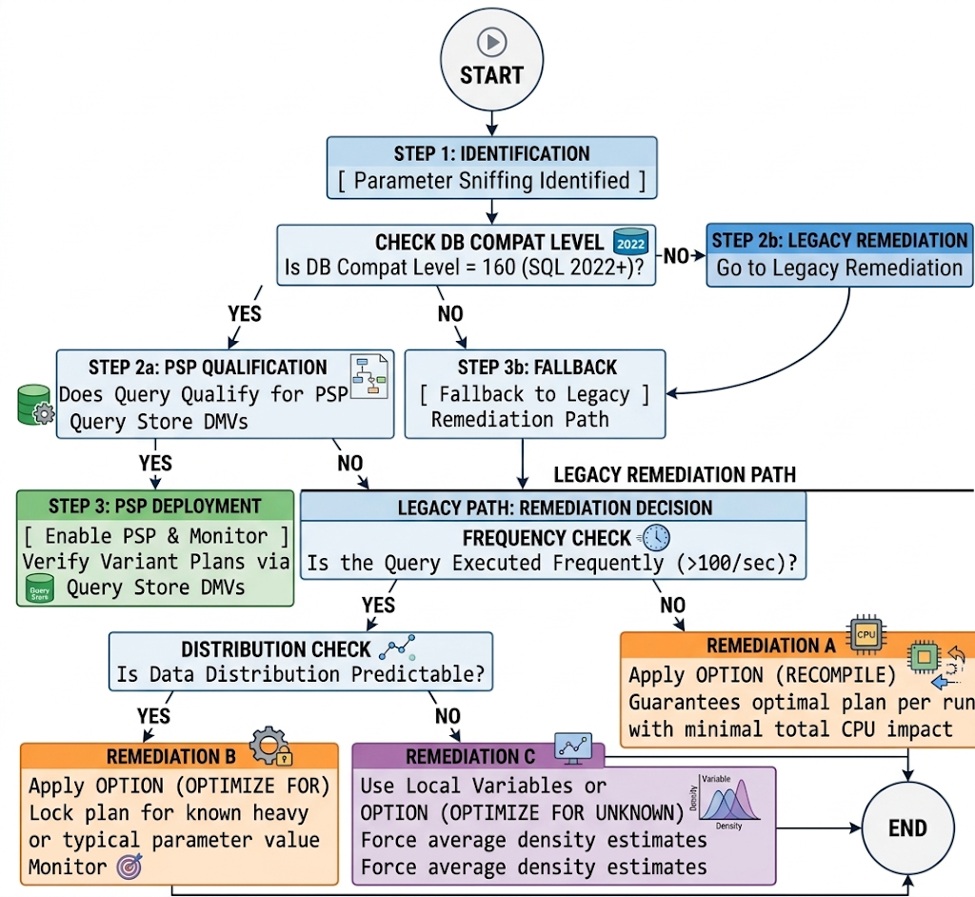
When diagnosing and resolving parameter sniffing issues in production, follow this step-by-step decision framework:
Summary of Best Practices
- Avoid blanket global fixes: Resist the urge to disable parameter sniffing database-wide via ALTER DATABASE SCOPED CONFIGURATION SET PARAMETER_SNIFFING = OFF. Disabling it globally starves steady-state OLTP queries of optimal compilation behavior.
- Prioritize targeted query hints: Apply OPTION (RECOMPILE) for complex reporting queries run infrequently, and OPTION (OPTIMIZE FOR ...) for high-throughput transactional procedures with well-understood parameters.
- Establish baseline guardrails in Query Store: Leverage Query Store runtime statistics to track standard deviation spikes in avg_cpu_time and avg_logical_io_reads. Use plan forcing as an immediate temporary fix during active site incidents.
- Upgrade to compatibility level 160 where feasible: Capitalize on IQP features in SQL Server 2022 to handle non-uniform data distributions natively without littering codebases with query hints.
Conclusion
Parameter sniffing is not an engine defect. SQL Server’s default mechanism for maximizing plan reuse and minimizing compilation overhead. While skewed data distributions meet volatile execution requirements, captured plans can severely compromise application performance.
To conclude, SQL Server 2022’s Parameter Sensitive Plan (PSP) optimization introduces welcome automation; enterprise database systems, at the same time, still require a deliberate, structured approach to query tuning.
Opinions expressed by DZone contributors are their own.
Comments