

SSL Testing Tool
SSL is a building block of server security. Check out this quick article to see how one dev built an SSL/TLS connection testing tool.

Join the DZone community and get the full member experience.
Join For FreeIf you have a large number of servers, which are configured with SSL/TLS and you are out of track on their certificate validity, now all of sudden you are worried if some of the certificates are expired.
Or if I think in some other scenario where you are required to understand underlying SSL/TLS configuration of your servers e.g. CipherSuits, Protocols, etc.
Yes, in the traditional way, you can get all the information of your SSL/TLS configuration by logging into an individual server and checking the certificates, but it is very difficult if your environment size is very large.
To overcome this problem, I have to build a tool, which will give you get all the required details.
Source Code:
import java.io.FileInputStream;
import java.math.BigInteger;
import java.security.KeyStore;
import javax.net.ssl.KeyManager;
import javax.net.ssl.KeyManagerFactory;
import javax.net.ssl.SSLContext;
import javax.net.ssl.SSLSession;
import javax.net.ssl.SSLSocket;
import javax.net.ssl.SSLSocketFactory;
import javax.net.ssl.TrustManager;
import javax.net.ssl.TrustManagerFactory;
import javax.security.cert.X509Certificate;

/**
*
* @author sidd
**/

public class SSLFactory_Client {
    public static void main(String[] args){
       String hostname;
       Integer port;
       if(args.length!=2){
           hostname = "google.com";
           port = 443;
       }else{
           hostname = args[0];
           port = Integer.valueOf( args[1]);
       }

       SSLFactory_Client sclient = new SSLFactory_Client();
       SSLContext sslContext = sclient.createSSLContext();
       try {
           SSLSocketFactory sslSocketFactory = sslContext.getSocketFactory();
           SSLSocket sslSocket = (SSLSocket) sslSocketFactory.createSocket(hostname, port);
           sslSocket.startHandshake();
           SSLSession sslSession = (SSLSession) sslSocket.getSession();

           System.out.println("SSLSession :");
           System.out.println("\tSessionID: "+  new BigInteger(sslSession.getId()));
           System.out.println("\tProtocol : "+sslSession.getProtocol());
           System.out.println("\tCipher suite : "+sslSession.getCipherSuite());
           System.out.println("\tServer: "+sslSession.getPeerHost());
           System.out.println("\tSSL Port: "+sslSession.getPeerPort());

           System.out.println("\nSupported Protocol :");
           for(int i=0;i<sslSocket.getEnabledProtocols().length;i++){
               System.out.println("\t"+sslSocket.getEnabledProtocols()[i]);
           }

           System.out.println("\nSupported CipherSuites: ");
           for(int j=0;j<sslSocket.getEnabledCipherSuites().length;j++){
               System.out.println("\t"+sslSocket.getEnabledCipherSuites()[j]);
           }

           X509Certificate[] certs = (X509Certificate[]) sslSession.getPeerCertificateChain();
           System.out.println("\nCertificate Chain Info :");
           for (int i =0;i<certs.length;i++){
               System.out.println("\tSubject DN :"+((X509Certificate) certs[i]).getSubjectDN());
               System.out.println("\tIssuer DN  : "+((X509Certificate) certs[i]).getIssuerDN());
               System.out.println("\tSerial No. : "+((X509Certificate) certs[i]).getSerialNumber());
               System.out.println("\tExpires On : "+((X509Certificate) certs[i]).getNotAfter()+"\n");
          }
       } catch (Exception ex) {
           ex.printStackTrace();
       }
    }

    private SSLContext createSSLContext(){
       try{
           KeyStore keyStore = KeyStore.getInstance("JKS");
           keyStore.load(new FileInputStream("/opt/jdk1.8.0_102/jre/lib/security/cacerts"),"changeit".toCharArray());

           // Create key manager
           KeyManagerFactory keyManagerFactory = KeyManagerFactory.getInstance("SunX509");
           keyManagerFactory.init(keyStore, "changeit".toCharArray());
           KeyManager[] km = keyManagerFactory.getKeyManagers();

           // Create trust manager
           TrustManagerFactory trustManagerFactory = TrustManagerFactory.getInstance("SunX509");
           trustManagerFactory.init(keyStore);
           TrustManager[] tm = trustManagerFactory.getTrustManagers();

           // Initialize SSLContext
           SSLContext sslContext = SSLContext.getInstance("TLSv1.2");
           sslContext.init(km,  tm, null);
           return sslContext;
       } catch (Exception ex){
           ex.printStackTrace();
           return null;
       }
    }
}
Compile the code using javac (e.g. javac SSLFactory_Client .java).
Now, you can execute the program. You need to pass the hostname and port during the execution (e.g java SSLFactory_Client "google.com" 443) and you will get the output, which should look something like the screenshot below.
Output: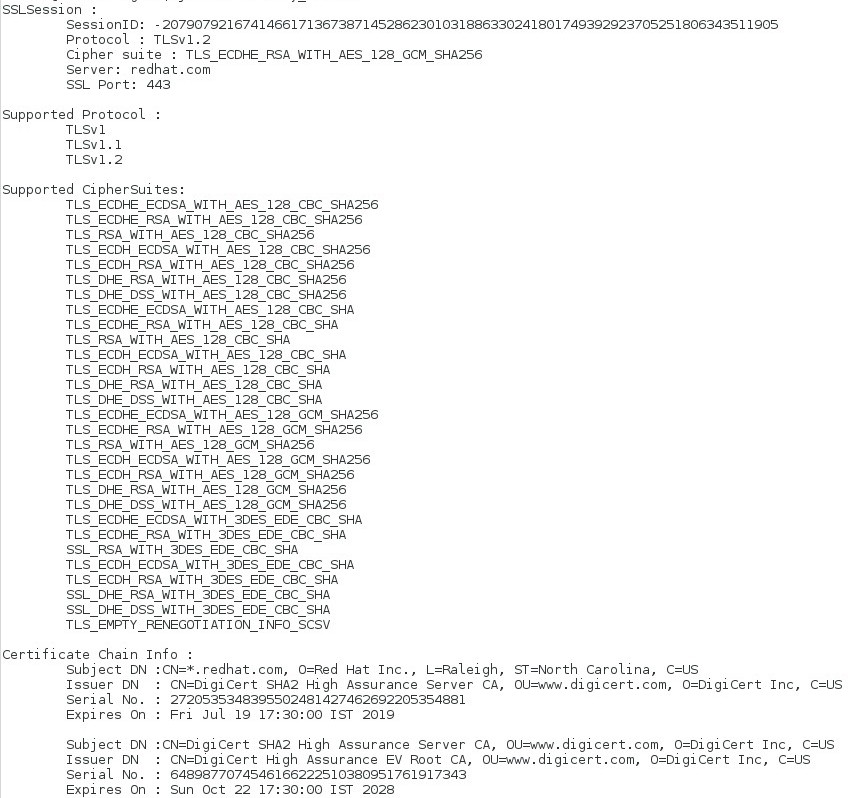
Note: This program can also be used for testing two-way SSL/TLS connections.
Published at DZone with permission of Siddhartha De. See the original article here.
Opinions expressed by DZone contributors are their own.
Comments