

Tracing Stratoshark’s Roots: From Packet Capture to System Call Analysis
Stratoshark builds on the foundations of Sysdig and Falco to extend packet capture concepts into cloud-native environments using system call analysis.
The journey that led to the creation of open-source Sysdig and Falco traces its roots to packet capture—a domain where many of the original developers had honed their expertise over the years. This deep connection to network traffic analysis, combined with inspiration from technologies like BPF, libpcap, tcpdump, and Snort, laid the groundwork for innovations that extended packet capture principles into the evolving worlds of containers and cloud security.
Wireshark is a well-known network analysis tool that uses libpcap, a user-level library for capturing and filtering packets. At its core, Wireshark relies on libpcap—a versatile library that manages live packet capture, filtering, and file handling. Libpcap became a foundation for countless tools, providing a generic interface that could be extended to fit various needs. Snort, for instance, built a rule engine for network intrusion detection directly on top of libpcap, leveraging its packet capture capabilities to detect and prevent suspicious network activity.
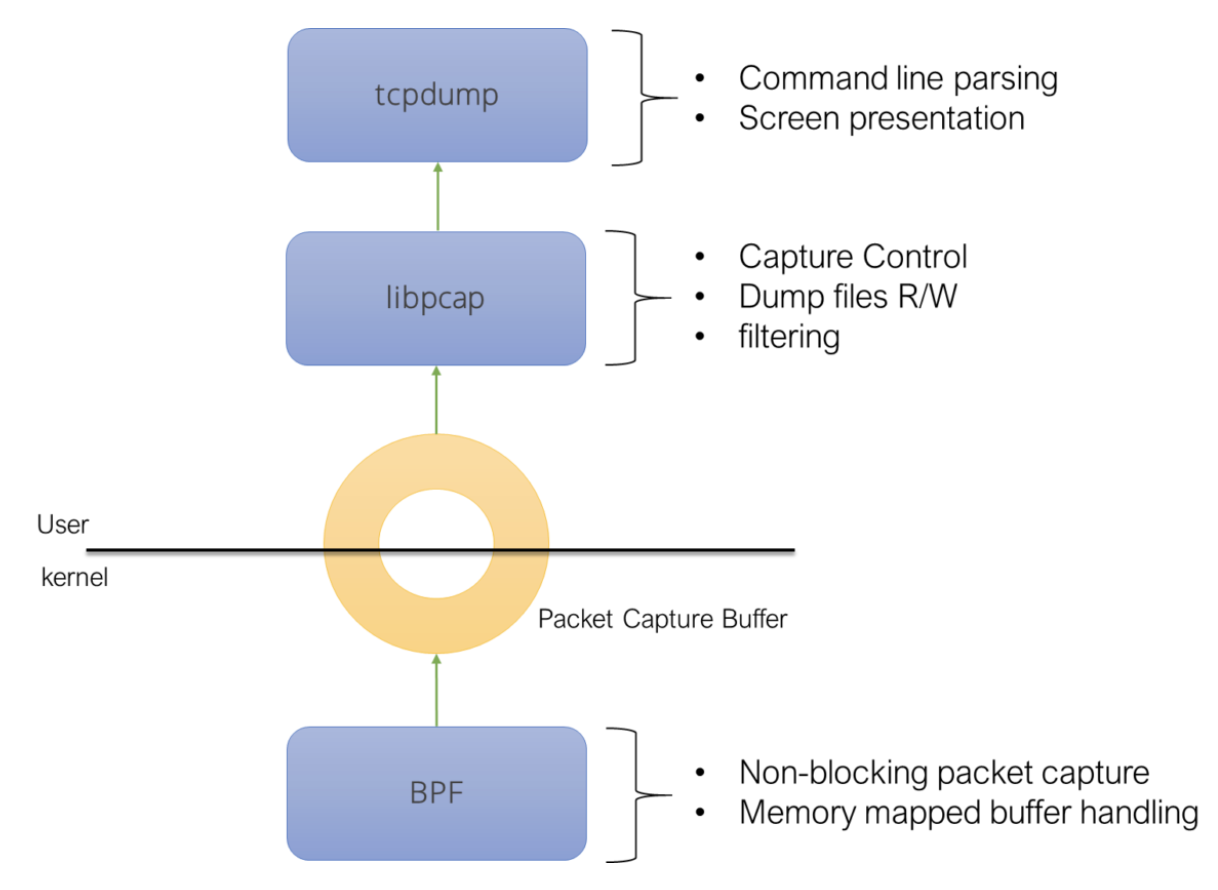
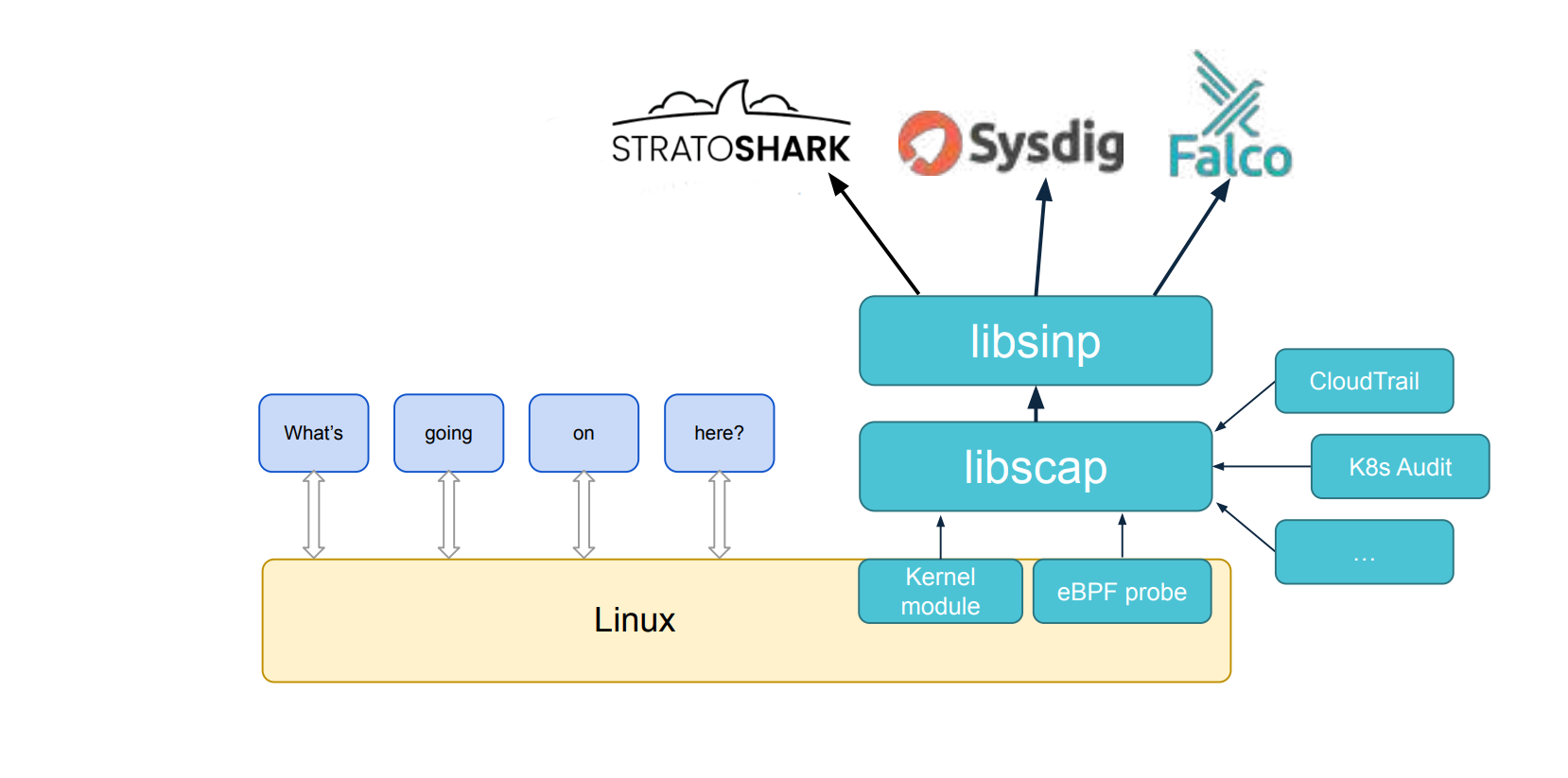
Drawing from this model, Falco emerged as a runtime security tool that monitors Linux, containers, and Kubernetes environments. Instead of packets, Falco focuses on system calls to detect anomalies, applying principles similar to those used in network monitoring. At the heart of Falco's architecture are two essential libraries: libscap and libsinsp. These libraries mirror the role of libpcap in the packet world, but for system calls and system state capture. libscap handles low-level capture tasks, managing live data collection and recording, while libsinsp abstracts system information, offering higher-level insights and filtering capabilities.
Sysdig was the first project to link these libraries into a user-facing tool, much like tcpdump provides an interface for libpcap. Sysdig combined libscap and libsinsp to offer deep visibility into system behaviour, allowing users to trace activity across containers and hosts with ease. Although Falco and Sysdig share components, Falco does not directly depend on Sysdig; instead, it leverages sysdig-probe, libscap, and libsinsp through clean, modular interfaces. This separation reflects a deliberate design choice to keep the core capture libraries versatile, fostering the development of multiple tools from a common base.
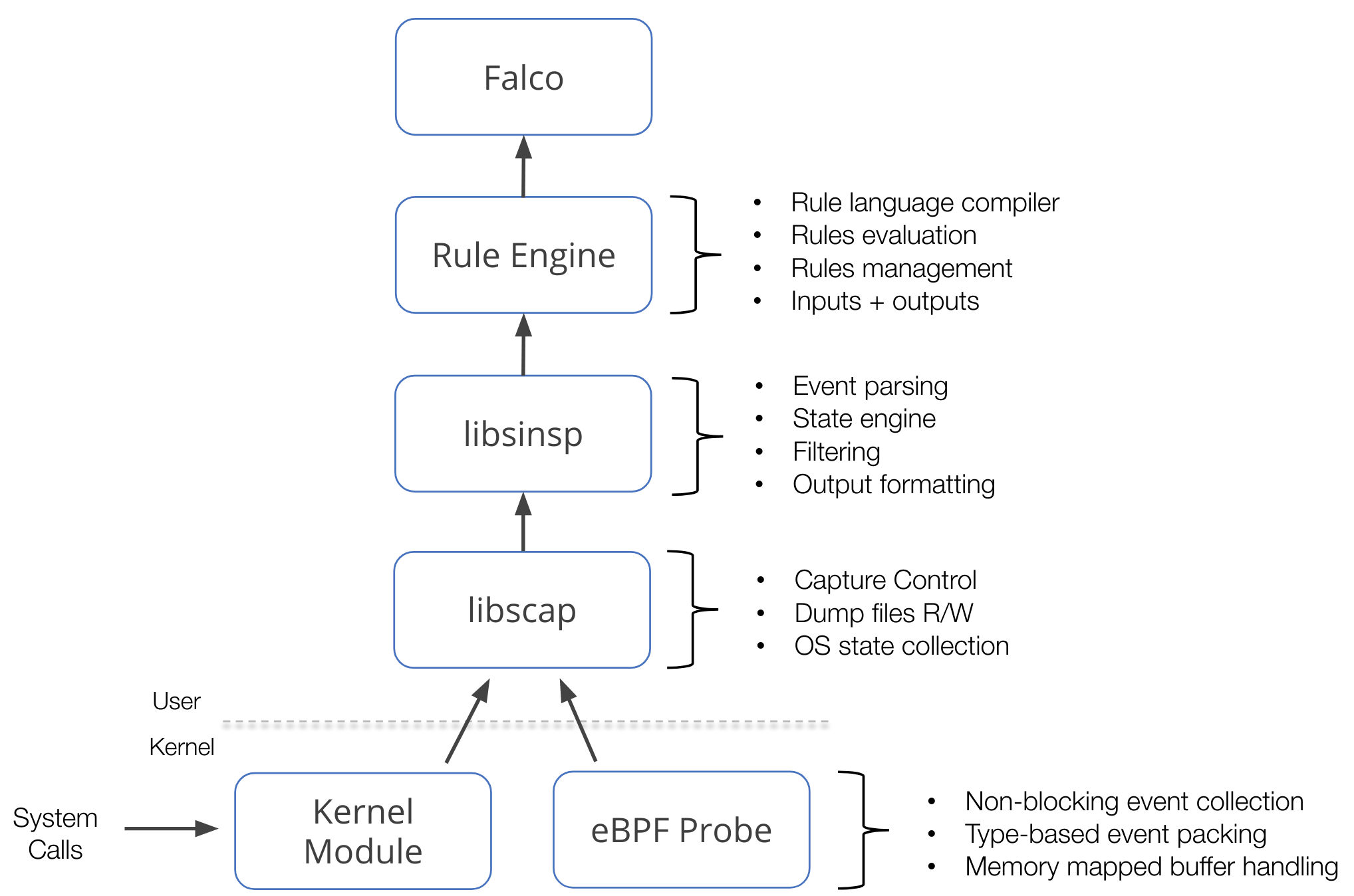
The parallels between Snort and Falco extend beyond their reliance on capture libraries. Just as Snort employs libpcap to analyze packet data, Falco uses libscap and libsinsp to analyze system calls. Falco's rule engine, inspired by Snort's design, applies pattern-matching principles to runtime data, focusing on cloud workloads and container environments rather than traditional network packets.
Today, this lineage continues with Stratoshark—a project that bridges the gap between network packet analysis and modern cloud-native security. Stratoshark relies on libscap and libsinsp, sourced from the falcosecurity/libs repository, alongside plugins from falcosecurity/plugins. In doing so, Stratoshark extends the evolutionary arc from Wireshark to Sysdig, to Falco, and now into the cloud and container landscape. By integrating familiar packet inspection techniques with contemporary runtime monitoring, Stratoshark represents the next step in unifying traditional network security with the demands of cloud-native environments.
Monitoring Cloud Audit Logs in Stratoshark
falcodump is an extcap tool that allows one to capture log messages from cloud providers. The extcap interface is a versatile plugin system that lets external binaries act as capture interfaces directly in Wireshark. In Stratoshark, each plugin is listed as a separate interface—e.g., the AWS CloudTrail plugin appears as "cloudtrail". All instances of the Stratoshark UI include the Falco CloudTrail plugin, which pulls logs from S3 or SQS/SNS.
While Stratoshark can be installed on Windows and MacOS, native system call captures aren't yet supported on those platforms. This can only be done on Linux systems, similar to Falco, which you need to build from scratch with the appropriate Falco libs and plugins. If you are interested in installing on other systems, you can get the early development packages for Windows and OSX.
Collecting an SCAP file
The easiest way to to collect a Syscall CAPture (SCAP) file is via Sysdig OSS. The Sysdig OSS Github repository provides a single-line command to install Sysdig OSS on just about any Linux distribution, or you can run Sysdig as a Docker container:
curl -s https://s3.amazonaws.com/download.draios.com/stable/install-sysdig | sudo bash
You can run the below 5 second timeout command to get a short capture from your Linux environment into a file called generic-capture.scap:
timeout 5 sysdig -w generic-capture.scapReading the SCAP in Stratoshark
If you are not interested in capturing your own .scap file right now, you can download one of the examples provided below:
502 Errorcapture for troubleshootingHAProxy 502– Download404 Errorcapture of a 404 error from a leaky file – Downloadcurl-wsdl-win64.scapcapture ofcurlactivity – DownloadActive Malwarecapture fromKubernetes– Download
When you open the Stratoshark user interface (on Mac), you’ll notice the ability to either open an existing SCAP capture file from Sysdig OSS or connect to AWS using the Falco Cloudtrail Plugin. The final option is to connect to an SSH remote syscall server via sshdig.
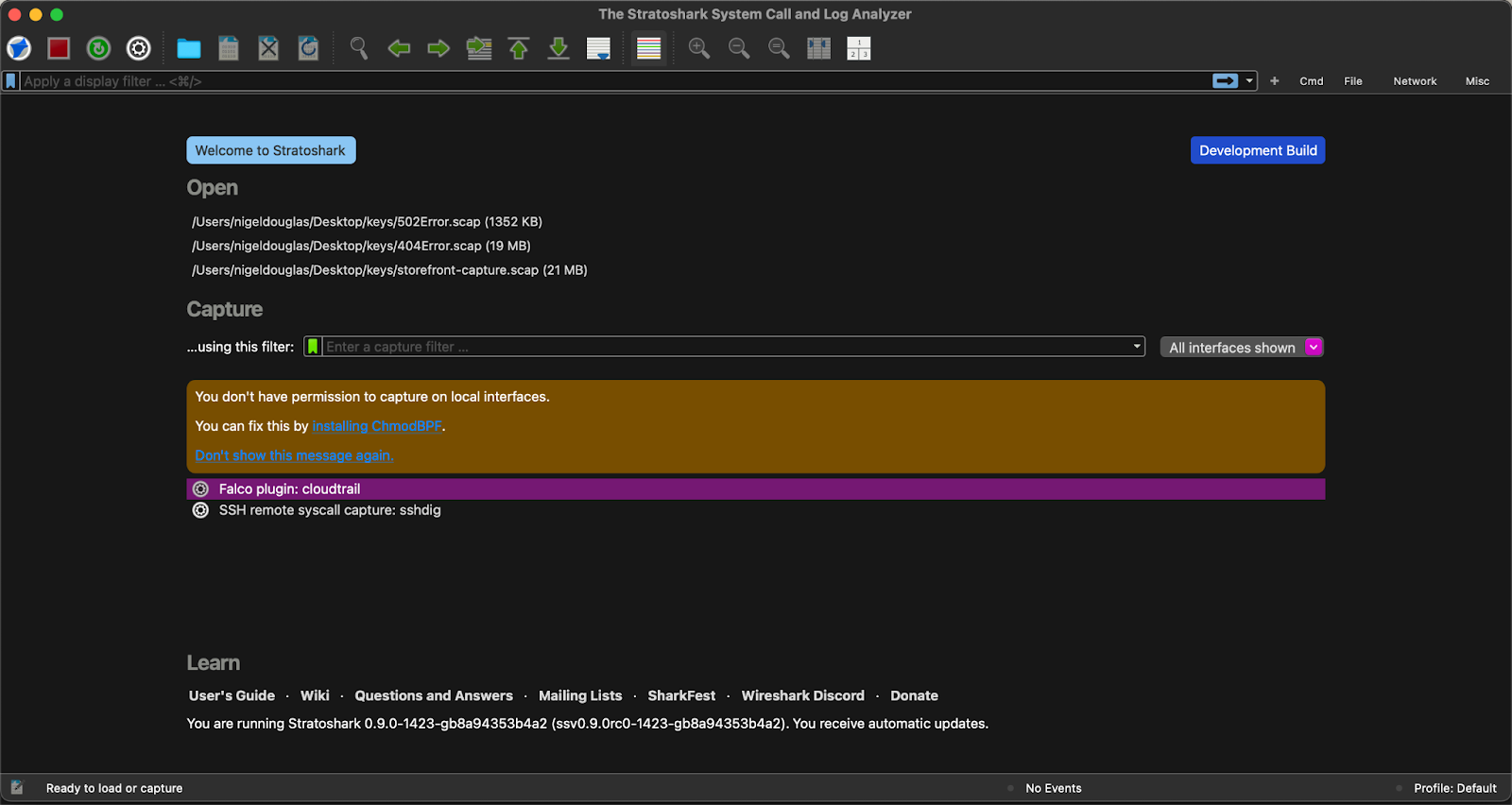
As of the version Stratoshark 0.9.0rc0-974 and later packages provided here, Stratoshark includes a new capture source named sshdig. It lets you capture syscalls from a remote host using sysdig over SSH. You’ll need to know your SSH server address, username, and password credentials in order to connect.
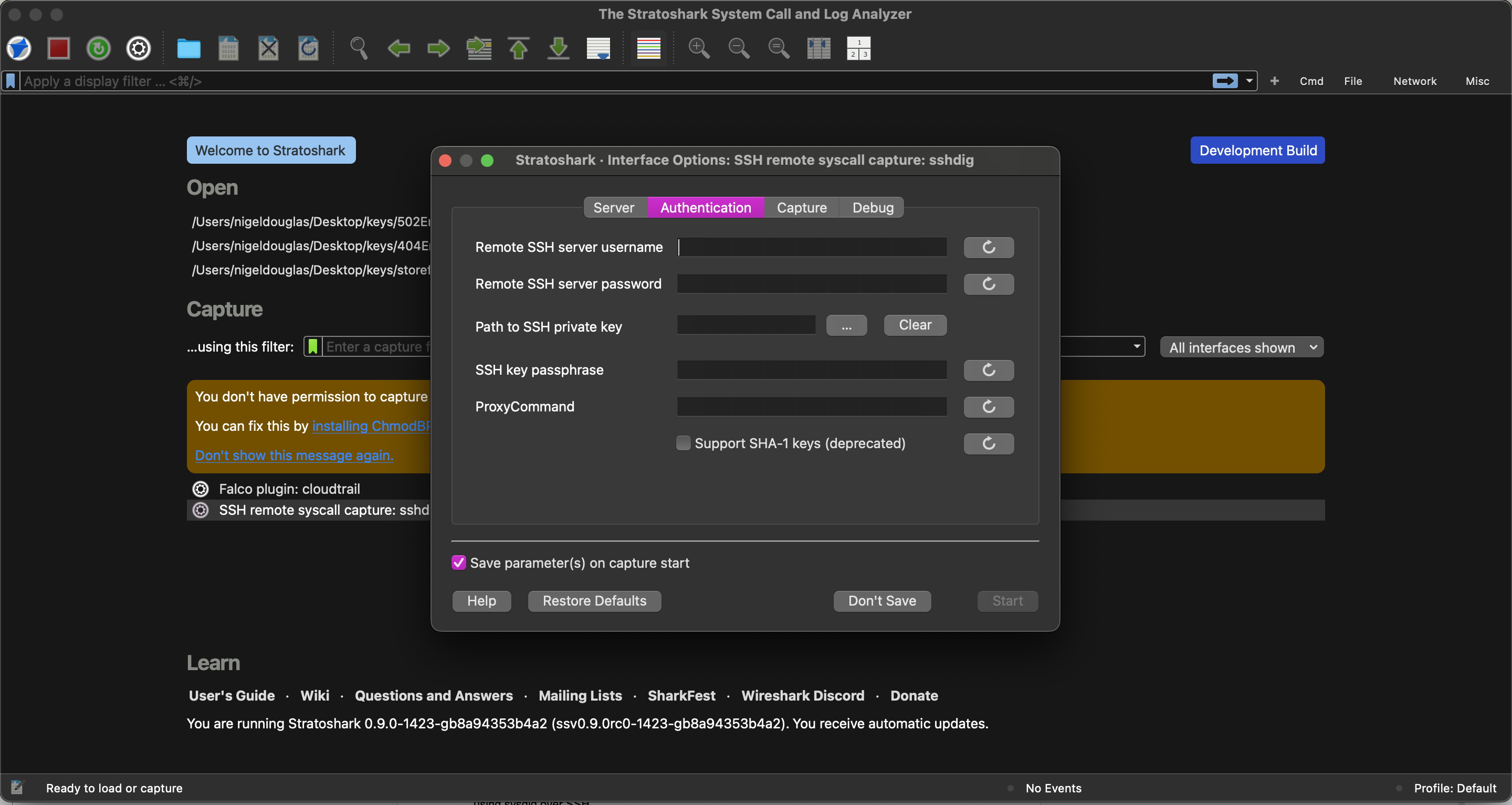
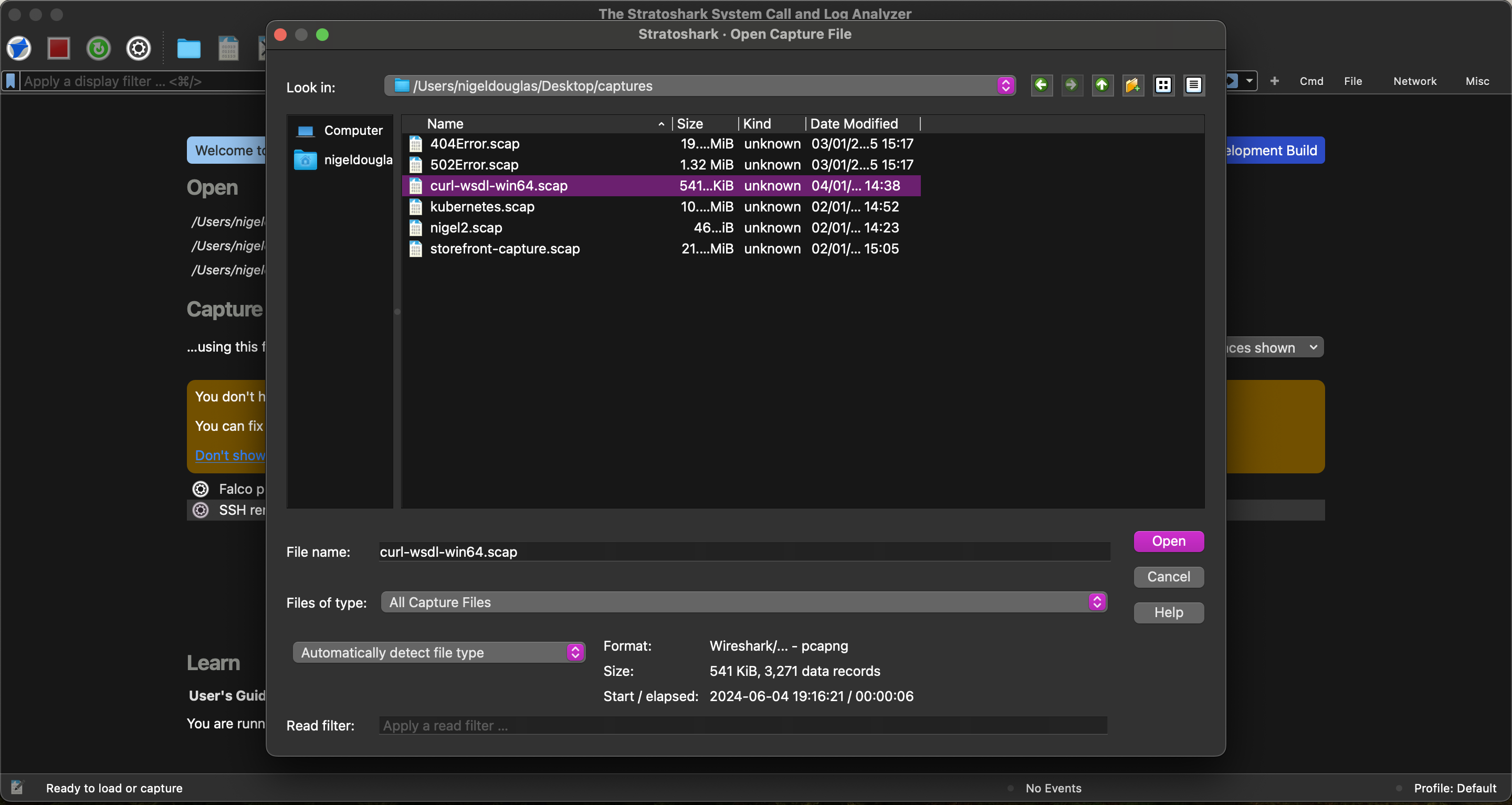
For the purpose of this tutorial, we will use Stratoshark with the curl-wsdl-win64.scap capture file provided by the Wireshark team on Discord. Click on the blue folder icon in the upper tool bar and open the .scap capture—similar to how you’d open a file in Wireshark.
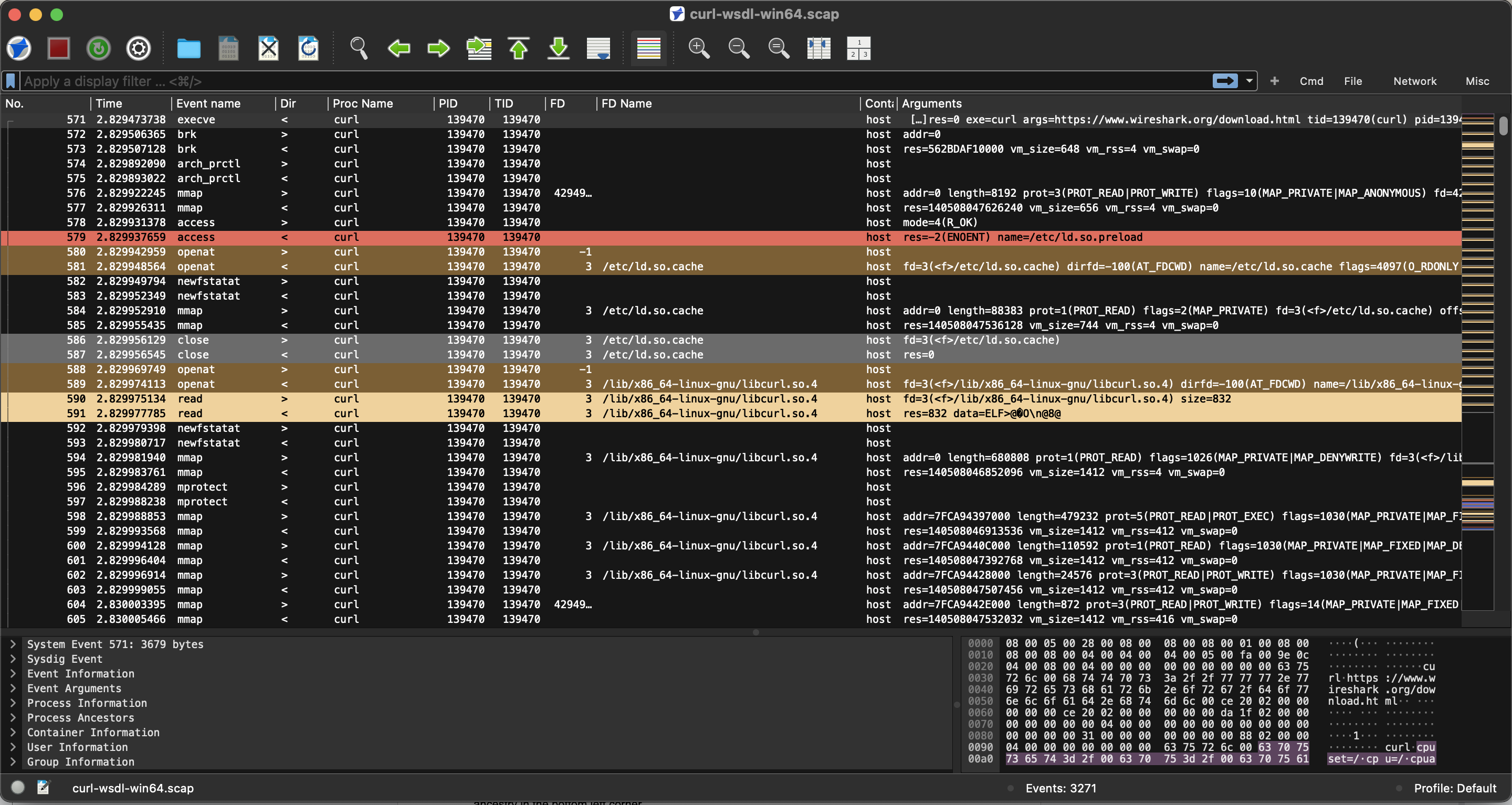
Opening the file, you can see that the experience is almost identical to the user interface of Wireshark. Unlike packet inspection, you’ll notice new fields like events, user, and process ancestry in the bottom left corner.
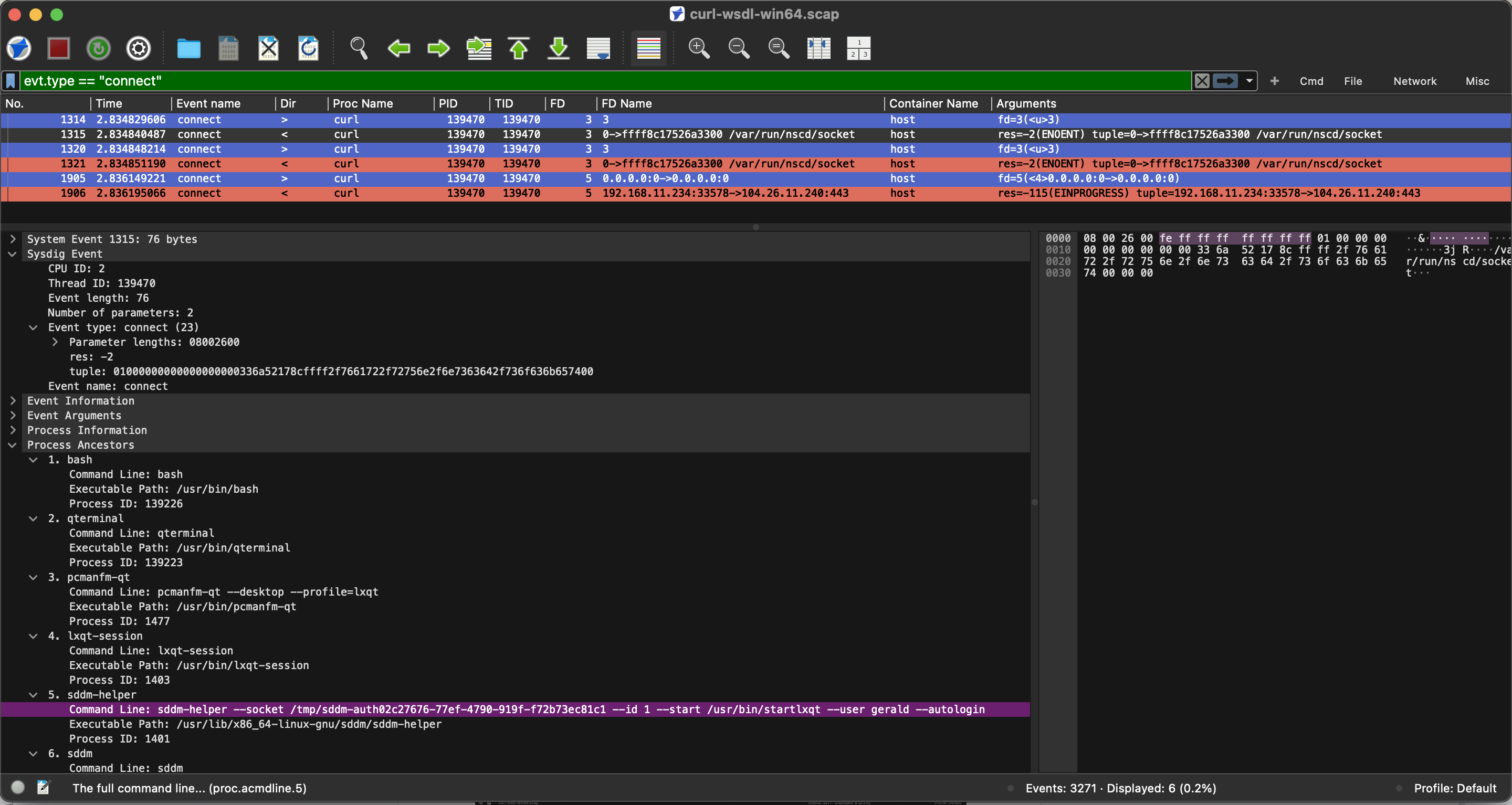
Looking for all outbound connection requests related to cURL? You can use the event filter to search for events of type "connect":
evt.type == "connect"Under process ancestry, we can see the exact command line argument related to that outbound network connection, providing all of the surrounding context.
From a troubleshooting perspective, there are legitimate cases where system calls will fail. Being able to troubleshoot why a component or protocol, such as the Falco Bridge in this case, is failing, allows operations and security teams to better investigate the causes of system failures or instability. The below Stratoshark filtered search will highlight all activity in red:
(evt.failed == True) && !(evt.res == "EAGAIN") && !(evt.res == "EALREADY")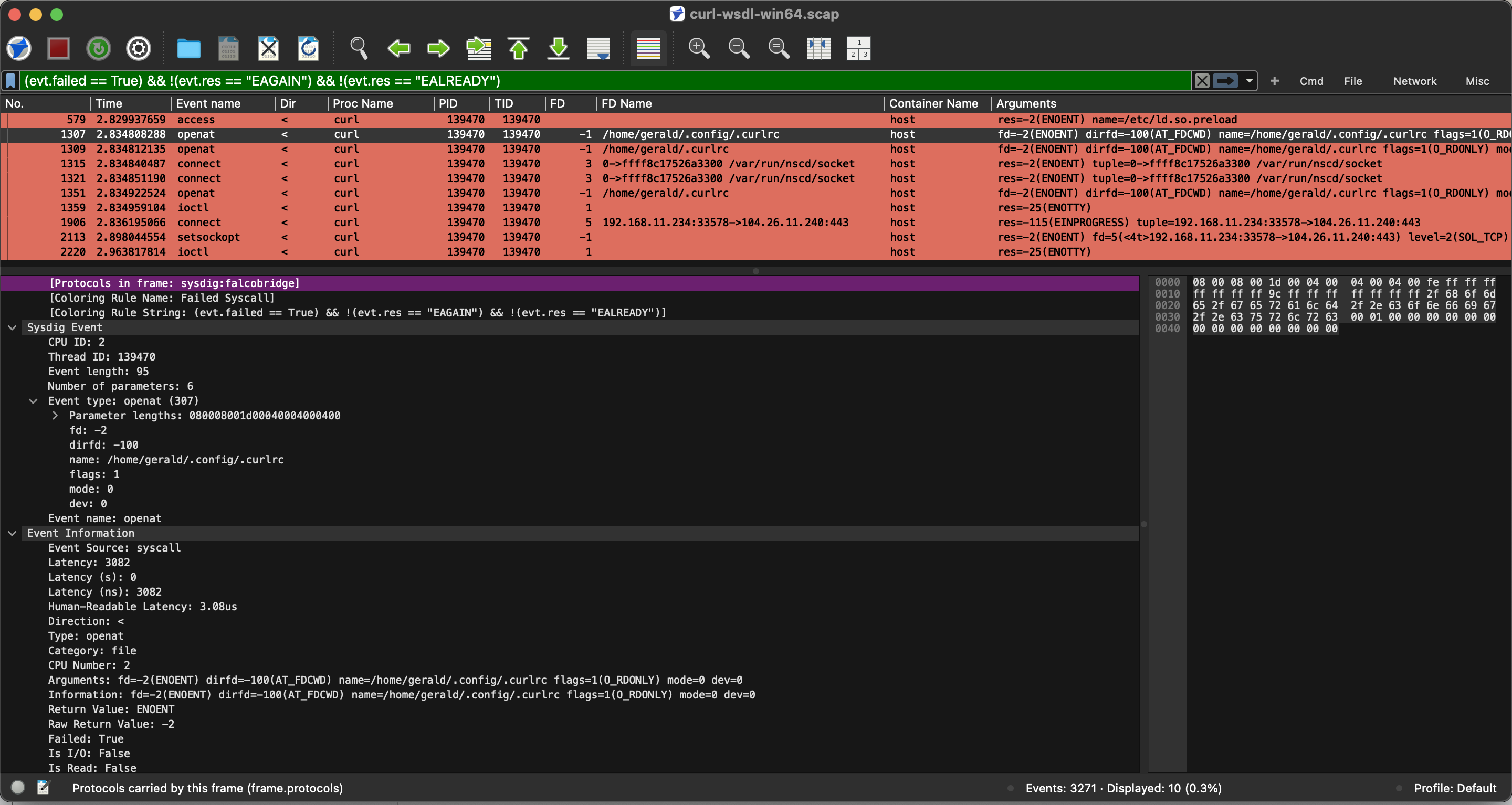
Conclusion
This post outlines Stratoshark’s origins, grounded in earlier open-source efforts like Sysdig and Falco. It also includes a walkthrough for getting started and references for those interested in learning more about the tool’s development and use—such as technical talks and related documentation.
Published at DZone with permission of Nigel Douglas. See the original article here.
Opinions expressed by DZone contributors are their own.
Comments