

Streaming Real-Time Data From Kafka 3.7.0 to Flink 1.18.1 for Processing
Flink seamlessly integrates with Kafka and offers robust support for exactly-once semantics, ensuring each event is processed precisely once. Learn more here.
 CORE
·
CORE
·
Join the DZone community and get the full member experience.
Join For FreeOver the past few years, Apache Kafka has emerged as the leading standard for streaming data. Fast-forward to the present day: Kafka has achieved ubiquity, being adopted by at least 80% of the Fortune 100. This widespread adoption is attributed to Kafka's architecture, which goes far beyond basic messaging. Kafka's architecture versatility makes it exceptionally suitable for streaming data at a vast "internet" scale, ensuring fault tolerance and data consistency crucial for supporting mission-critical applications.
Flink is a high-throughput, unified batch and stream processing engine, renowned for its capability to handle continuous data streams at scale. It seamlessly integrates with Kafka and offers robust support for exactly-once semantics, ensuring each event is processed precisely once, even amidst system failures. Flink emerges as a natural choice as a stream processor for Kafka. While Apache Flink enjoys significant success and popularity as a tool for real-time data processing, accessing sufficient resources and current examples for learning Flink can be challenging.
In this article, I will guide you through the step-by-step process of integrating Kafka 2.13-3.7.0 with Flink 1.18.1 to consume data from a topic and process it within Flink on the single-node cluster. Ubuntu-22.04 LTS has been used as an OS in the cluster.
Assumptions
- The system has a minimum of 8 GB RAM and 250 GB SSD along with Ubuntu-22.04.2 amd64 as the operating system.
- OpenJDK 11 is installed with
JAVA_HOMEenvironment variable configuration. - Python 3 or Python 2 along with Perl 5 is available on the system.
- Single-node Apache Kafka-3.7.0 cluster has been up and running with Apache Zookeeper -3.5.6. (Please read here how to set up a Kafka cluster.).
Install and Start Flink 1.18.1
- The binary distribution of Flink-1.18.1 can be downloaded here.
- Extract the archive flink-1.18.1-bin-scala_2.12.tgz on the terminal using
$ tar -xzf flink-1.18.1-bin-scala_2.12.tgz. After successful extraction, directory flink-1.18.1 will be created. Please make sure that inside itbin/,conf/, andexamples/directories are available. - Navigate to the
bindirectory through the terminal, and execute$ ./bin/start-cluster.shto start the single-node Flink cluster.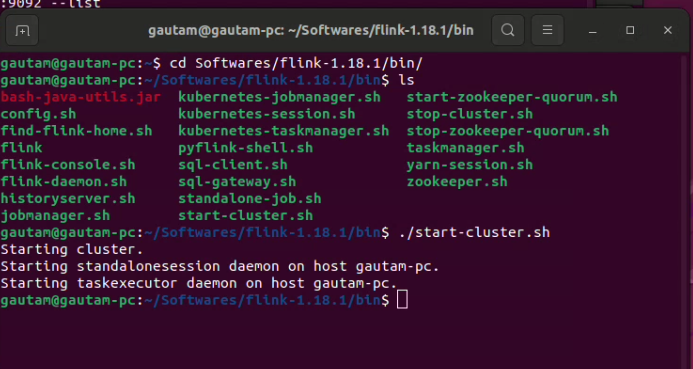
- Moreover, we can utilize Flink's web UI to monitor the status of the cluster and running jobs by accessing the browser at port 8081.

- The Flink cluster can be stopped by executing
$ ./bin/stop-cluster.sh.
List of Dependent JARs
The following .jars should be included in the classpath/build file:

I've created a basic Java program using Eclipse IDE 23-12 to continuously consume messages within Flink from a Kafka topic. Dummy string messages are being published to the topic using Kafka's built-in kafka-console-publisher script. Upon arrival in the Flink engine, no data transformation occurs for each message. Instead, an additional string is simply appended to each message and printed for verification, ensuring that messages are continuously streamed to Flink.
package com.dataview.flink;
import org.apache.flink.api.common.eventtime.WatermarkStrategy;
import org.apache.flink.api.common.functions.MapFunction;
import org.apache.flink.api.common.serialization.SimpleStringSchema;
import org.apache.flink.connector.kafka.source.KafkaSource;
import org.apache.flink.connector.kafka.source.enumerator.initializer.OffsetsInitializer;
import org.apache.flink.streaming.api.datastream.DataStream;
import org.apache.flink.streaming.api.environment.StreamExecutionEnvironment;

import com.dataview.flink.util.IKafkaConstants;


public class readFromKafkaTopic {
	public static void main(String[] args) throws Exception {
		StreamExecutionEnvironment see = StreamExecutionEnvironment.getExecutionEnvironment();
		KafkaSource<String> source = KafkaSource.<String>builder()
			    .setBootstrapServers(IKafkaConstants.KAFKA_BROKERS)
			    .setTopics(IKafkaConstants.FIRST_TOPIC_NAME)
			    .setGroupId(IKafkaConstants.GROUP_ID_CONFIG)
			    .setStartingOffsets(OffsetsInitializer.earliest())
			    .setValueOnlyDeserializer(new SimpleStringSchema())
			    .build();
		DataStream<String> messageStream = see.fromSource(source, WatermarkStrategy.noWatermarks(), "Kafka Source");
		messageStream.rebalance().map(new MapFunction<String, String>() {
			private static final long serialVersionUID = -6867736771747690202L;

			@Override
			public String map(String value) throws Exception {
				return "Kafka and Flink says: " + value;
			}
		}).print();

		see.execute();
	}

}
The entire execution has been screen-recorded. If interested, you can watch it below:<
I hope you enjoyed reading this. Please stay tuned for another upcoming article where I will explain how to stream messages/data from Flink to a Kafka topic.
Published at DZone with permission of Gautam Goswami. See the original article here.
Opinions expressed by DZone contributors are their own.
Comments