

Supercharging Your Chatbot With Context-Aware AI on AWS
Tired of chatbots that feel like scripts? Learn how to build a context-aware, AI-powered chatbot that remembers, responds, and scales as per need.
Join the DZone community and get the full member experience.
Join For FreeToday’s online users expect instant, personalized support—whether they’re comparing day to day online products, troubleshooting a technical issue, or just looking for a quick answer. Basic keyword-based chatbots can only take you so far. To truly connect with customers, your bot needs "context". It needs to remember past interactions, anticipate needs, and respond with more than just predefined scripts.
In this article, we’ll walk through a scalable, serverless architecture built on AWS, combining Lambda for event logging and real-time logic processing, DynamoDB for session memory, and SageMaker for AI-driven insights. We’ll also cover how to gracefully escalate to human agents via SNS for those critical moments when a bot just isn’t enough or while the bot get additional learning power from more human interaction.
"Basic keyword-based chatbots often fall short, turning conversations into repetitive, impersonal exchanges that can leave people feeling unheard and frustrated."
Why Context Matters Even More Than Ever
Traditional chatbots treat every message in isolation. A user might click through several pages before asking a question, but a stateless bot simply responds to the text in front of it. Context-aware chatbots, by contrast, remember where the user has been, what actions they’ve taken, and adapt and build their replies accordingly. The result is a more natural, human-like interaction:
- Relevance: Imagine you’ve been browsing three different running shoes on a shopping platform, comparing features and prices. Instead of a generic, “How can I help you today?” How about the bot steps in with, “I see you’ve been checking out the Pegasus, ZoomX, and React Infinity. Want a quick comparison of their cushioning and the latest deals?” It’s like chatting with a knowledgeable store associate, not a robotic script.
- Efficiency: No more repeating yourself. If you placed an order yesterday, the bot can jump straight to the point: “Your shoes are already on the way and should arrive by tomorrow afternoon!” You get instant, relevant updates without the frustrating back-and-forth of providing order numbers and context every time.
- Satisfaction: When conversations pick up right where they left off, it feels less like talking to a machine and more like a genuine, attentive assistant. You don’t have to repeat yourself, and the bot’s responses feel personalized and thoughtful, making the whole experience smoother and more satisfying.
"Because conversations deserve context."
High-Level Architecture
Below is the core flow of our solution, rendered in Mermaid Live for easy sharing and modifications.
(Comment or reach out to me, if you need the architecture as code for your own startup ideas)
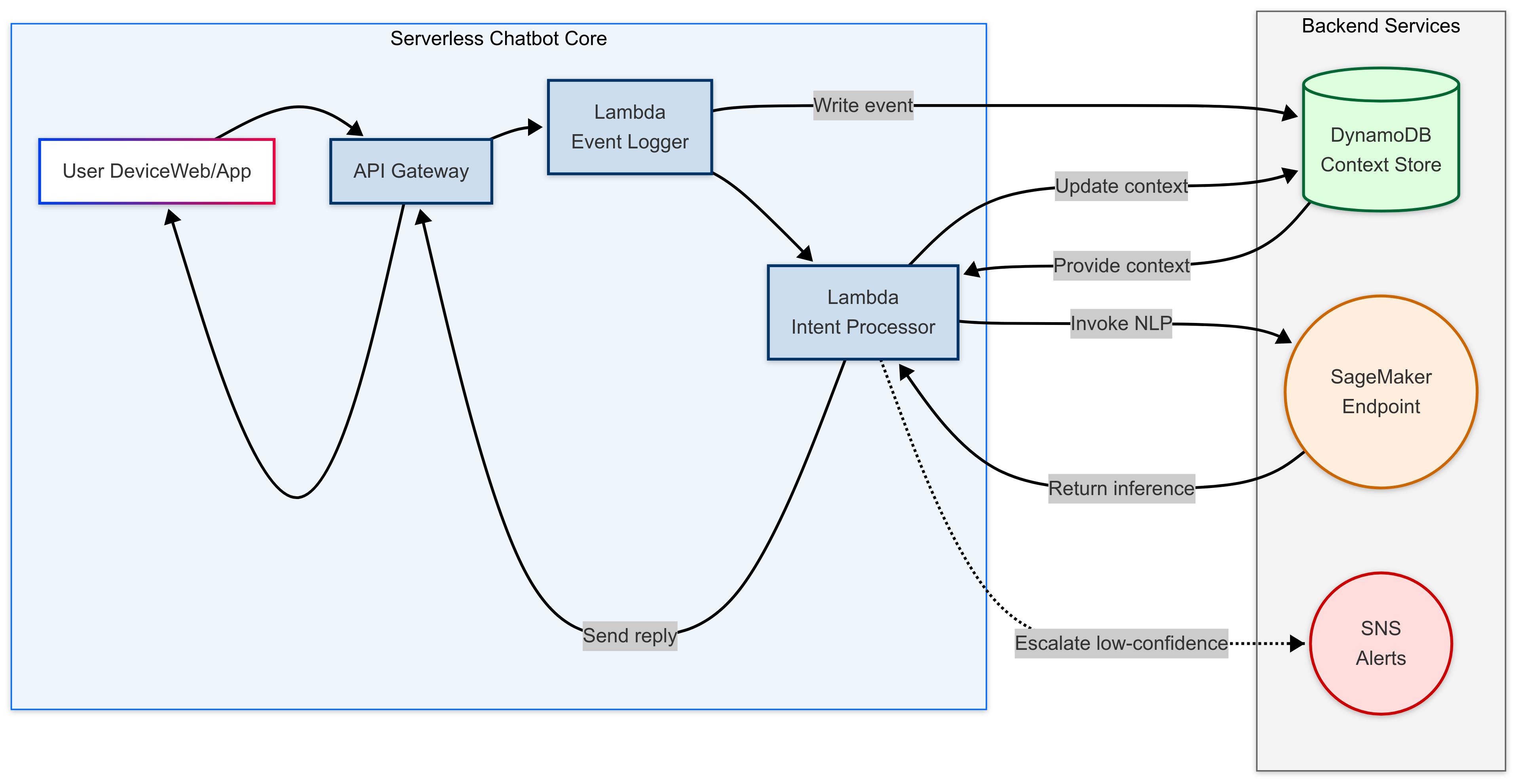
Flowchart depicting the High level architecture of the ChatBot and its interaction with the Backend.
At a glance, you can see:
1. Core
- User Device: Web or mobile app.
- API Gateway(The Distributor): Central entry point for all chatbot interactions, handling authentication, throttling, and routing.
- Lambda Functions:
- Event Logger: Captures every user interaction—clicks, page views, and form submissions—writes them to DynamoDB for session context, and forwards those event details to the Intent Processor so your chatbot can react in real time.
- Intent Processor(The Processing unit of ChatBot) : Orchestrates context retrieval, NLP inference, response generation, and optional escalation to the actual human agent( which is beyond the purpose of the article)
2. Backends
- DynamoDB (Context Store): A fast, durable key-value store that holds recent user actions and bot replies—your session “memory.”Choice of DynamoDB, because it's serverless, auto-scaling architecture delivers single-digit millisecond reads/writes under any load, with pay-per-request billing and seamless AWS Lambda integration—making it perfect for storing and retrieving session state in real time which is a must for maintaining the ChatBot.
- SageMaker Endpoint: Powers real-time predictions by hosting fine-tuned NLP models that can understand user intent, detect sentiment, and extract key information from messages, all while scaling seamlessly as demand fluctuates.
- SNS Alerts: Optional notification channel for low-confidence or sensitive queries, enabling a human support handoff.(the after part, which is not covered in this article)
Detailed Flow
1. Ingestion and Event Logging
When the user performs any action—navigating to a page, clicking a button, or typing a message—the front-end sends a request to API Gateway. We route all events to the Event Logger Lambda, which timestamps and writes them to DynamoDB under the user’s session key. This builds a timeline of user behavior that we can leverage for building the context.
Sample Code to How to Record User Actions in to DB
import boto3
import json
import os

dynamodb = boto3.resource('dynamodb')
table_name = os.environ.get('DYNAMODB_TABLE', 'UserContext')
table = dynamodb.Table(table_name)

def lambda_handler(event, context):
    user_id = event.get('user_id')
    action = event.get('action')

    # Store the user action in DynamoDB
    table.put_item(
        Item={
            'UserID': user_id,
            'Timestamp': int(time.time()),
            'Action': action
        }
    )

    return {'statusCode': 200, 'body': 'Event logged successfully'}
2. Chat Message Processing
Separately, when the user submits a chat message, API Gateway invokes the Intent Processor Lambda. This separation of logging vs. intent logic keeps each function focused and easier to scale.
Sample Code on How to Pull Context From Db and Invoke a Sagemaker Endpoint for Real-Time Responses
import boto3
import json
import os

sagemaker_client = boto3.client('sagemaker-runtime')
dynamodb = boto3.resource('dynamodb')
table_name = os.environ.get('DYNAMODB_TABLE', 'UserContext')
table = dynamodb.Table(table_name)

def lambda_handler(event, context):
    user_id = event.get('user_id')
    message = event.get('message')

    # Fetch recent context
    response = table.query(
        KeyConditionExpression=boto3.dynamodb.conditions.Key('UserID').eq(user_id),
        Limit=5,
        ScanIndexForward=False
    )
    context_items = response.get('Items', [])

    # Prepare NLP payload
    payload = json.dumps({'context': context_items, 'message': message})

    # Invoke SageMaker endpoint
    nlp_response = sagemaker_client.invoke_endpoint(
        EndpointName=os.environ.get('SAGEMAKER_ENDPOINT', 'chatbot-nlp-endpoint'),
        ContentType='application/json',
        Body=payload
    )
    nlp_result = json.loads(nlp_response['Body'].read().decode())

    return {'statusCode': 200, 'body': nlp_result.get('reply', 'I didn’t quite get that.')}
3. Context Delivery
Before running NLP inference, the Intent Processor reads the recent session data from DynamoDB—“Provide context”—so the model understands what the user did just before asking a question.
4. AI Inference
The Lambda packages the raw message plus context history into a JSON payload and invokes the SageMaker endpoint. The model returns an intent label, confidence score, and any extracted entities.
5. Response Generation
Using the inference results, the Intent Processor constructs a reply. It immediately updates DynamoDB—“Update context”—by appending the bot’s response. This ensures future turns will incorporate the entire conversation.
6. Delivery and Feedback
The reply is sent back through API Gateway to the user. If the model’s confidence falls below your threshold, the Lambda publishes a dashed-line alert to SNS, which can fan out to a helpdesk dashboard, email, or SMS.
Implementation Tips
- Cold Start Mitigation: Use Provisioned Concurrency or Lambda SnapStart to eliminate cold starts and deliver predictable, low-latency responses. Consider warming critical functions during peak hours to ensure snappy performance.
- DynamoDB Design: Store each session as a “time-series” with a composite key—UserID partition key and Timestamp sort key—so you can efficiently query recent events.
- Model Optimization: For sub-second inference, use distilled or quantized models (e.g., DistilBERT, ONNX). Keep your endpoint instance size balanced for cost vs. latency.Use SageMaker Multi-Model Endpoints to reduce costs by serving multiple models from a single instance.
- Security: Lock down your SageMaker endpoint inside a VPC and use IAM roles for least-privilege access. and enable encryption at rest (KMS) and in transit (TLS) for data protection.
- Observability: Enable X-Ray tracing on your Lambdas and API Gateway to pinpoint latency hotspots. Use CloudWatch Alarms for real-time error detection and to monitor function cold starts, timeout rates, and invocation errors.
Why This Chatbot Model Delivers a Better Experience
- Serverless Scalability: No servers to manage—your chatbot grows automatically from zero to thousands of concurrent sessions.
- Cost Efficiency: You pay only for execution time and inference calls; idle bots cost almost zero.
- Contextual Intelligence: By marrying event logging with real-time NLP, you deliver personalized, proactive assistance that static bots simply can’t match.
- Extensibility: Need image recognition or custom business logic? Swap in another SageMaker model or add more Lambdas.
- Proactive Cost Management:
- Use Auto-Scaling for SageMaker endpoints to handle traffic spikes without over-provisioning.
- Optimize DynamoDB read/write capacity based on peak and off-peak usage patterns.
- Implement caching layers (e.g., API Gateway Response Caching) to reduce backend load.
- Human Handoff :For critical escalations, use SNS to alert support teams in real time. Include session context in the alert payload for a seamless human takeover.
Sample Code Showing How the Escalation Path Works in Conjuction With NLP
import boto3
import json
import os

sns_client = boto3.client('sns')
sns_topic_arn = os.environ.get('SNS_TOPIC_ARN', 'arn:aws:sns:us-east-1:123456789012:chatbot-escalations')

def lambda_handler(event, context):
    user_id = event.get('user_id')
    message = event.get('message')
    confidence = event.get('confidence', 0.0)

    if confidence < 0.5:
        sns_client.publish(
            TopicArn=sns_topic_arn,
            Message=json.dumps({
                'user_id': user_id,
                'message': message,
                'confidence': confidence,
                'action': 'Escalation required'
            })
        )
        return {'statusCode': 200, 'body': 'Escalation triggered'}

return {'statusCode': 200, 'body': 'No escalation needed'}- Resilient Data Flow:Ensure your Lambda functions handle retries gracefully. Use SQS or SNS DLQs to capture failed events for later processing, preventing data loss during outages.
- Scalability and Flexibility:Architect your chatbot for scale with modular functions, event-driven triggers, and serverless data stores. Consider EventBridge for loosely-coupled, scalable event processing.
Conclusion
Crafting a context-aware chatbot on AWS is about creating seamless, intelligent conversations that feel like human interactions. By combining Lambda for serverless compute, DynamoDB for real-time context, and SageMaker for deep language understanding—and mixing and matching tools based on each project’s goals—you can deliver personalized, impactful user experiences at scale. This architecture provides a flexible blueprint for building smarter, more responsive digital assistants, complete with two-way context handling, real-time AI inference, and graceful human escalation. Whether you’re building a customer support bot, a digital shopping assistant, or a voice-based concierge, this approach lays the foundation for meaningful, frictionless interactions.
“In the world of digital support, context is king. With these enhanced architectures, you’re not just catching up to user expectations—you’re setting the bar.”
Opinions expressed by DZone contributors are their own.
Comments