

AWS Agentic AI for App Portfolio Modernization
AWS Agentic AI automates and enriches portfolio assessments, fusing business context with technical signals to deliver faster, more consistent modernization decisions.
 ·
·
Join the DZone community and get the full member experience.
Join For FreeRethinking Application Modernization in the GenAI Era
Enterprises are accelerating their modernization journeys, driven by cloud mandates and growing demand for digital agility. Yet when faced with large application portfolios, transformation leaders often struggle to make decisions that are objective, scalable, and consistent.
In the era of Generative AI, a new paradigm is emerging: Agentic AI systems that not only reason over user input but also collaborate as autonomous agents to deliver reliable, explainable, and business-aligned outcomes.
This blog explores how AWS’s GenAI ecosystem, powered by Amazon Bedrock and Model Context Protocol (MCP), can redefine IT portfolio decision-making through agentic intelligence.
The Challenge: Modernization Decisioning at Scale
For most organizations, determining whether to Retain, Rehost, Replatform, Refactor, or Retire is:
- Time-consuming and manually intensive
- Highly subjective and dependent on individual reviewers
- Slow to adapt to changing business priorities or risks
The result? Delayed transformations, inconsistent recommendations, and missed opportunities.
Vision: Agentic AI for Intelligent Portfolio Advisory
Imagine a modernization engine where:
- A business or IT user simply asks, “What’s the best modernization path for this app?”
- A GenAI system interprets the intent, analyzes the application, and produces clear, defensible recommendations.
- Autonomous agents collaborate to assess risks, estimate effort, validate compliance, and identify transformation patterns.
That's the promise of Agentic AI + AWS Bedrock + MCP working together.
End-to-End Use Case: From Natural Language to Actionable Strategy
How It Works:
1. User Prompt
A business or IT stakeholder enters a request such as:“Assess this app and recommend a modernization strategy.”
2. The Foundation Model (FM) in Bedrock interprets the intent and routes tasks to specialized Action Groups, such as:
getAppDisposition– Determine the disposition (retain, rehost, refactor, retire)getRiskScore– Evaluate technical and business risks (tech debt, security, dependencies)estimateEffort– Provide T-shirt sizing or story-point-based estimatessuggestPattern– Recommend migration or modernization patterns
3. Each Action Group calls its corresponding MCP Client, which connects through an MCP Gateway to an MCP Server.
4. The MCP Server triggers AWS Lambda functions that fetch real-time data from:
- Configuration Management Database (CMDB)
- APM tools
- Code repositories
- Compliance systems
5. The FM consolidates the responses and returns a clear, explainable modernization advisory.
System Design: Agentic Architecture With AWS and MCP
The solution architecture has five core layers:
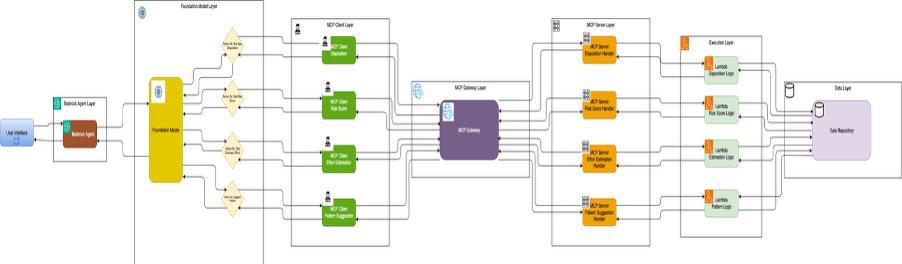
- Bedrock Agent Layer – Orchestrates user prompts and agent flows
- Foundation Model + Action Groups – Break down the user request into API calls
- MCP Client → Gateway → Server – Provides standardized, secure access to contextual data and tools
- Lambda Functions – Perform stateless business logic and fetch or compute insights
- Data Layer – Persistent stores such as RDS, DynamoDB, and S3 that hold inventories, risk rules, effort models, and policies
This design ensures traceability, modularity, and extensibility, making it adaptable to any enterprise environment.
Beyond a Single Agent: Multi-Agent Collaboration in Action
To support real-world complexity, the platform can be extended to enable multi-agent orchestration. Here are key agents and the unique problems they solve:
|
Agent |
Purpose |
Value Delivered |
|
Data Quality Agent |
Cleans and validates portfolio data |
Prevents garbage-in-garbage-out scenarios |
|
Compliance Agent |
Ensures policy and regulatory alignment |
Enables “governance by design” |
|
Financial Estimator |
Converts effort into budget-level cost approximations |
Supports early-stage investment planning |
|
Human Feedback Agent |
Ingests SME feedback to refine GenAI output |
Builds trust, transparency, and oversight |
Multi-Agent Coordination: Orchestration Approaches
Agents can be orchestrated using different patterns:
- Parallel execution – For independent tasks such as risk scoring and compliance validation
- Sequential chains – Where one agent’s output feeds the next agent's input (for example: disposition → effort → cost)
Recommended orchestration tools:
- LangChain – For prompt routing, tool management, and agent memory
- AWS Step Functions – For low-code, serverless orchestration of agent workflows
Building a PoC: Low-Code Demonstration on AWS
Validating this approach is easier than it sounds. You can build a functional proof of concept (PoC) using:
- Amazon Bedrock + Lambda to simulate the full prompt-to-action loop
- AWS API Gateway with mocked MCP clients to represent backend flows
- Streamlit or Amazon Q Business for a simple UI interface
This PoC requires no custom model training — just prompt engineering, configuration, and standard AWS services.
Detailed Steps
Build a Bedrock agentic POC that accepts a natural-language request such as:“Assess this app and recommend a modernization strategy.” The system should respond with:
- A disposition (retain, rehost, refactor, retire)
- A risk score
- An effort estimate
- A recommended transformation pattern
These outputs are generated through Action Groups (or MCP tools), backed by Lambda functions and a small data store. Refer to AWS Documentation for implementation details.
Prerequisites
- An AWS account with access to Amazon Bedrock, Lambda, Identity and Access Management (IAM), API Gateway, S3, and DynamoDB (or RDS)
- AWS Command Line Interface (CLI) or Console access with appropriate IAM permissions
- Python installed locally for writing Lambda functions or a simple Streamlit UI
- (Optional but recommended) Access to Bedrock models and AgentCore preview if you plan to use AgentCore features
POC Scope and Acceptance Criteria
1. Define a minimal success checklist:
- The user provides a natural-language prompt, and the agent returns:
disposition,riskScore,effortEstimate, andsuggestedPattern - Each result includes explainability — a short rationale and the data used
- All action traces and logs appear in CloudWatch for auditability
- A Streamlit UI demonstrates the end-to-end flow
2. Map these outputs to your Action Groups: getAppDisposition, getRiskScore, estimateEffort, suggestPattern.
Prepare a Sample Data Layer
Create a minimal sample dataset so your Lambdas or MCP servers have something to query:
Option A: DynamoDB Table
- Table:
AppInventory(PK:appId) - Example Record:
{

  "appId": "cust-billing-01",

  "name": "Customer Billing",

  "language": "Java 8",

  "ageYears": 12,

  "businessCriticality": "High",

  "lastDeployDaysAgo": 420,

  "techDebtScore": 8,

  "dependencies": ["legacy-db", "paygateway-v1"]

}
Option B: S3 JSON Files
If you want to avoid database setup, store a few structured JSON files in S3 instead. This approach still provides deterministic, explainable data for your PoC, allowing Lambdas to return predictable responses rather than relying purely on LLM output.
Build Back-End Functions (Lambdas)
For a low-code POC, build each Action Group as a small Python Lambda.
Example: getAppDisposition Lambda
# lambda_get_disposition.py

import json

import boto3


dynamodb = boto3.resource('dynamodb')

table = dynamodb.Table('AppInventory')


def lambda_handler(event, context):

    appId = event.get('appId') or event['body'].get('appId')

    resp = table.get_item(Key={'appId': appId})

    item = resp.get('Item')

    if not item:

        return {"statusCode":404, "body":{"error":"app not found"}}

    # simple heuristic

    if item['businessCriticality']=='High' and item['techDebtScore'] < 4:

        disposition = 'retain'

    elif item['techDebtScore'] >= 7 and item['ageYears']>8:

        disposition = 'refactor'

    else:

        disposition = 'rehost'

    rationale = f"age={item['ageYears']}, techDebt={item['techDebtScore']}, criticality={item['businessCriticality']}"

    return {"statusCode":200, "body":{"appId":appId, "disposition":disposition, "rationale":rationale}}
Create similar Lambdas for getRiskScore, estimateEffort, and suggestPattern. Each should return numeric scores and short rationales (for example: T-shirt sizes or story-point effort estimates).
Deploy the Lambdas and record their ARNs. For quick iteration, the AWS Console's inline editor works fine.
Two Integration Paths: Direct Lambda Calls or MCP
You can integrate the backend functions with your Bedrock agent using either a direct Lambda-based approach or a more modular MCP-based design.
Option A: Use Bedrock Action Groups to Call Lambdas Directly
Define Action Groups that map directly to your Lambda functions using either function schemas or simple “function” actions.
AWS Bedrock Console Workflow:
- Open Amazon Bedrock → Agents → select or create an agent.
- Set the instruction text, for example:
- “You are an App Modernization Advisor. When the user asks to assess an app, collect the
appIdand call thegetAppDisposition,getRiskScore,estimateEffort, andsuggestPatternactions.”
- “You are an App Modernization Advisor. When the user asks to assess an app, collect the
- Add an Action Group → choose Function schema or create an OpenAPI schema.
- Link the action to a Lambda ARN using the guided console flow.
This is the fastest and simplest integration method.
Option B: Use MCP to Wrap Your Data and APIs
To demonstrate the MCP, wrap your data sources and backend APIs behind MCP servers. These servers expose your CMDB, APM, and code metadata as MCP tools, enabling fully modular and vendor-agnostic integrations.
Why Use MCP?
MCP provides a standardized way for agents to discover and call external tools and APIs with:
- explicit schemas
- secure authentication
- Works across AWS, Anthropic, and other MCP-compatible ecosystems
Both AWS and Anthropic offer documentation, examples, and reference MCP server implementations.
High-Level Steps for the MCP Path
- Create an OpenAPI spec exposing endpoints such as:
/apps/{appId}/apm-metrics/{appId}- You can edit the spec in the Bedrock console or host an
openapi.yamlfile in S3. (See AWS Documentation for reference.)
- Deploy an MCP server that implements your OpenAPI spec:
- AWS’s open-source MCP server
- Lightweight frameworks such as FastMCP (from AWS blog examples). You can host the MCP server on ECS, EKS, or even a Lambda-backed API. (See AWS MCP Server Guidance for examples.)
- Secure the MCP server using API keys, a custom authorizer, or AgentCore identity (if using Bedrock AgentCore).
- Register the MCP tool with your Bedrock Agent by defining an Action Group with your OpenAPI schema. When invoked, the agent calls the MCP tool and receives structured responses.
AWS Documentation provides sample flows showing how Bedrock Agents call Open API endpoints and MCP tools interchangeably.
Example OpenAPI snippet:
openapi: "3.0.1"

info:

  title: AppInventoryTools

paths:

  /apps/{appId}:

    get:

      summary: Get app metadata

      parameters:

        - name: appId

          in: path

          required: true

          schema:

            type: string

      responses:

        '200':

          description: app object
Create openapi.yaml and upload this to S3 (Bedrock console can use S3-hosted schema). Upload this and reference it when creating the Action Group in Bedrock.
Configure the Bedrock Agent: Instructions, Action Groups, Sequencing, and Aliasing
Agent Instructions
Define clear instructions for the agent, for example:
"When user asks to assess an application, collect appId, call getAppDisposition, then in parallel call getRiskScore and estimateEffort, and finally suggestPattern. Provide a consolidated answer with rationale and trace IDs."
Action Groups
Add four Action Groups — each mapped to its Lambda or OpenAPI tool. Use the console to validate parameter schemas. (See Bedrock Action Group Documentation for reference.)
Versioning and Aliasing
Create a version and alias (for example, dev) so you can iterate without breaking integrations.
Test Interactively in Bedrock Console
- Open the Agent Test window and try prompts such as:
- "Assess app cust-billing-01 and recommend a modernization strategy."
- Verify that:
- The agent invokes the Action Groups
- Lambda or MCP server logs show invocation
- The agent returns disposition, riskScore, effortEstimate, suggestedPattern and short rationales
- Bedrock provides traces and chunked responses (you can enable streaming to for lower latency)
Simple UI Integration (Streamlit)
Example Streamlit UI:
# app_ui.py (Streamlit)

import streamlit as st

import boto3, json


client = boto3.client('bedrock-agent-runtime')  # bedrock agent runtime client


agentId='AGENT_ID'

aliasId='dev'


prompt = st.text_input("Ask the Agent", "Assess app cust-billing-01")

if st.button("Run"):

    resp = client.invoke_agent(agentId=agentId, aliasId=aliasId, input={'text': prompt})

    st.write(resp['chunk'])  # or resp['output'] depending on return format
Please note that SDK names and method signatures can vary. Use the bedrock-agent-runtime SDK methods shown in the AWS code examples.
Observability: Logs, Traces and Explainability
- CloudWatch logs: Enable logging for all Lambdas and the MCP servers.
- Bedrock traces: The
invoke_agentresponse includes trace attributes that you can store in S3 for auditing or human review. Use these traces to show which Action Group produced each output. - Rationale fields: Make sure each Action Group returns a concise rationale describing the data it used (
techDebtScore: 8,ageYears: 12).
Extend to Multi-Agent Orchestration
Once the PoC is working, you can evolve the architecture:
- Replace simple Lambdas with specialized agents (Risk Agent, Compliance Agent, etc.)
- Orchestrate agents either:
- Within Bedrock using instruction-level sequencing or parallelization, or
- Using AWS Step Functions, which provide predictable and low-code orchestration for complex workflows.
- Consider using AgentCore if you need production-grade features such as memory, identity, observability, or secure credential management.
Business Value: Why Agentic AI for Modernization?
Organizations gain multiple advantages:
- Speed: Instant GenAI-driven advisory instead of multi-week manual analysis
- Consistency: Reduces bias through rule-driven and model-driven decision logic
- Scalability: Capable of evaluating hundreds or thousands of applications
- Explainability: Full traceability across Action Groups, Lambda, and logs
- Extensibility: Plug-and-play agents and domain-specific rules enable customization.
Opinions expressed by DZone contributors are their own.
Comments