

Synchronized Method: BoyFriend Threads and GirlFriend Object [Video]
How does the synchronized method work in Java? Find out in this tutorial while taking a closer look at BoyFriend threads and GirlFriend objects.
 CORE
·
CORE
·
Join the DZone community and get the full member experience.
Join For FreeWhen a method is synchronized, only one thread can enter that object’s method at a given point in time. If any other thread tries to enter the synchronized method, it will NOT be allowed to enter. It will be put into the BLOCKED state.
In this post, let’s learn a little more details about the synchronized method.

Java Synchronized Method Example
It’s always easy to learn with an example. Here is an interesting program that I have put together which facilitates us to understand the synchronized method behavior better:
01: public class SynchronizationDemo {
02:
03:    private static class BoyFriendThread extends Thread {
04:
05:       @Override
06:       public void run() {
07:
08:          girlFriend.meet();
09:       }
10:    }
11:
12:    private static GirlFriend girlFriend = new GirlFriend();
13:
14:    public static void main(String[] args) {
15:
16:       for (int counter = 0; counter < 10; ++counter) {
17:
18:          BoyFriendThread fThread = new BoyFriendThread();
19:          fThread.setName("BoyFriend-" + counter);
20:          fThread.start();
21:       }
22:    }
23: }
01: public class GirlFriend {
02:
03: public void meet() {
04:
05: String threadName = Thread.currentThread().getName();
06: System.out.println(threadName + " meeting started!");
07: System.out.println(threadName + " meeting ended!!");
08: }
09: }In this program, there are two classes:
1. SynchronizationDemo
In this class, you can notice that we are starting 10 BoyFriendThread from lines #18-20. Each BoyFriendThread is invoking meet() method on the GirlFriend object in line #8.
2. GirlFriend
In this class, there is only one meet() method. This method prints the name of the Boyfriend thread name and meeting started! and meeting stopped!!.
When the SynchronizationDemo program is executed, it prints the following as the output:
01: BoyFriend-0 meeting started!
02: BoyFriend-8 meeting started!
03: BoyFriend-1 meeting started!
04: BoyFriend-0 meeting ended!!
05: BoyFriend-4 meeting started!
06: BoyFriend-3 meeting started!
07: BoyFriend-3 meeting ended!!
08: BoyFriend-2 meeting started!
09: BoyFriend-8 meeting ended!!
10: BoyFriend-2 meeting ended!!
11: BoyFriend-5 meeting started!
12: BoyFriend-6 meeting started!
13: BoyFriend-6 meeting ended!!
14: BoyFriend-7 meeting started!
15: BoyFriend-7 meeting ended!!
16: BoyFriend-9 meeting started!
17: BoyFriend-1 meeting ended!!
18: BoyFriend-4 meeting ended!!
19: BoyFriend-9 meeting ended!!
20: BoyFriend-5 meeting ended!!
You can notice that the meeting started! and meeting stopped!! statements of each thread are not printed consecutively. For example, on line #1, a meeting with BoyFriend-0 started, and while that meeting was in progress, meetings with BoyFriend-8 (line #2) and BoyFriend-1 (line #3) also started. It is only after that that the meeting with BoyFriend-0 ends. These kinds of mixed meetings continue throughout the program. If this happens in the real world, then our GirlFriend object will be in trouble. We should save her from this trouble. Only after her meeting with one boyfriend completes, the next meeting should resume.
This is where synchronization comes to help.
Let’s change the meet() method in the GirlFriend object to be synchronized, and execute the program once again.
01: public class GirlFriend {
02:
03:   public synchronized void meet() {
04:
05:      String threadName = Thread.currentThread().getName();
06:      System.out.println(threadName + " meeting started!");
07:      System.out.println(threadName + " meeting ended!!");
08:   }
09: }
Notice that in line #3, the synchronized keyword is introduced in the meet() method. When we executed the same program once again, below is the result we got:
01: BoyFriend-2 meeting started!
02: BoyFriend-2 meeting ended!!
03: BoyFriend-0 meeting started!
04: BoyFriend-0 meeting ended!!
05: BoyFriend-5 meeting started!
06: BoyFriend-5 meeting ended!!
07: BoyFriend-8 meeting started!
08: BoyFriend-8 meeting ended!!
09: BoyFriend-9 meeting started!
10: BoyFriend-9 meeting ended!!
11: BoyFriend-6 meeting started!
12: BoyFriend-6 meeting ended!!
13: BoyFriend-7 meeting started!
14: BoyFriend-7 meeting ended!!
15: BoyFriend-4 meeting started!
16: BoyFriend-4 meeting ended!!
17: BoyFriend-3 meeting started!
18: BoyFriend-3 meeting ended!!
19: BoyFriend-1 meeting started!
20: BoyFriend-1 meeting ended!!
Bingo!! Now you can see each meeting with a boyfriend started and ended sequentially. Only after completing a meeting with BoyFriend-0 does a meeting with BoyFriend-5 start. This should make the GirlFriend object quite happy, as she can focus on one Boyfriend at a time.
Note: Some of you might wonder why BoyFriend threads are not meeting the GirlFriend object in sequential order. The answer to this question will be coming soon in an upcoming post.
How Does the Synchronized Method Work in Java?
When you make a method synchronized, only one thread will be allowed to execute that method at a given point in time. When a thread enters a synchronized method, it acquires the lock of the object. Only after this thread releases the lock, other threads will be allowed to enter the synchronized method.
Say the BoyFriend-0 thread is executing the meet() method; only after this thread exits the method, other threads will be allowed to enter the meet() method, until then all other threads which are trying to invoke the meet() method will be put to the BLOCKED thread state.
Threads Behavior When a Method Is Synchronized
To confirm this theory, we executed the above program and captured the thread dump using the open-source script yCrash. We analyzed the thread dump using the fastThread tool. Here is the generated thread dump analysis report of this simple program. Below is the excerpt from the thread dump analysis report:
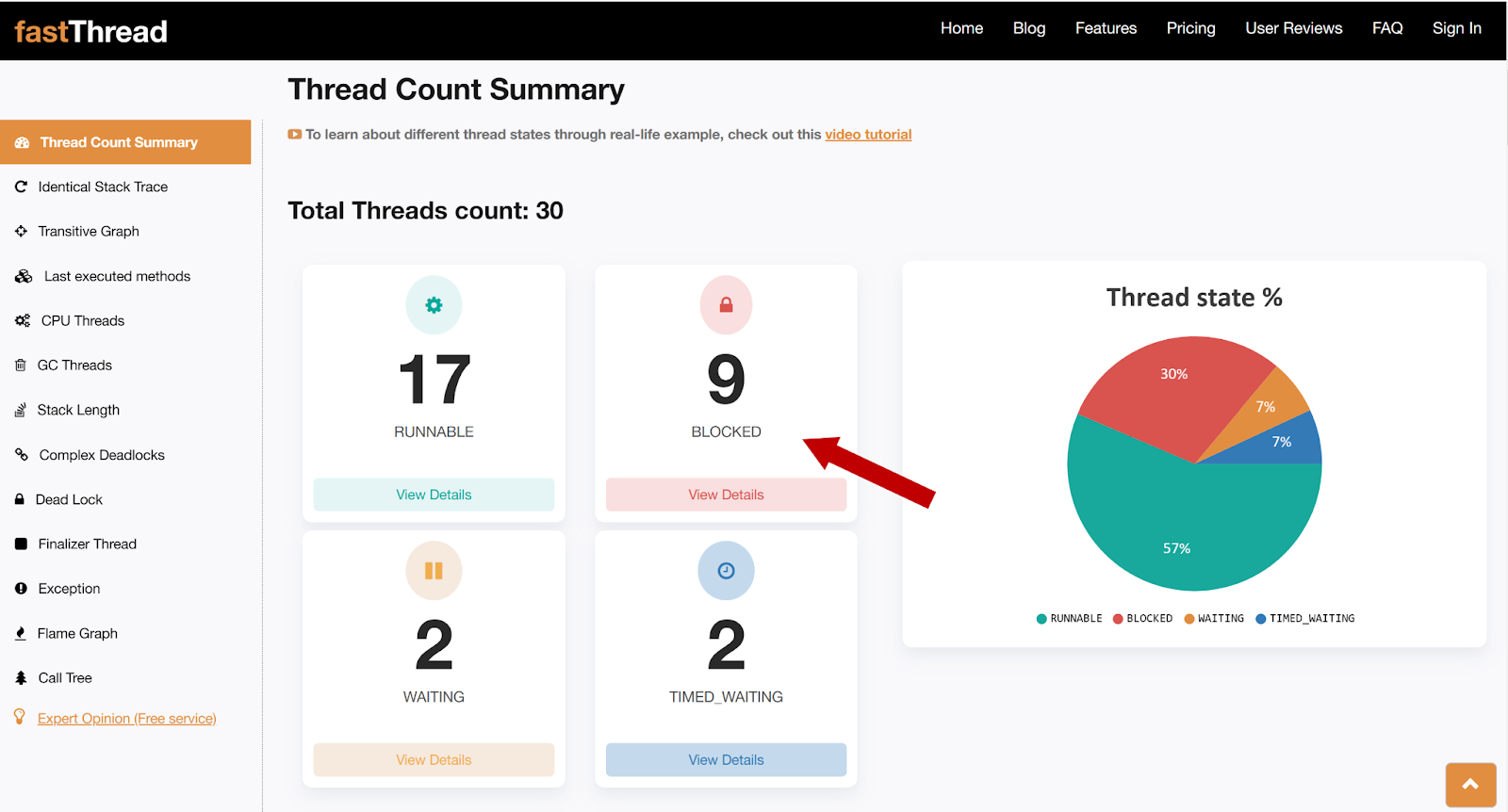
Fig 1: fastThread tool reporting 9 threads are in BLOCKED state
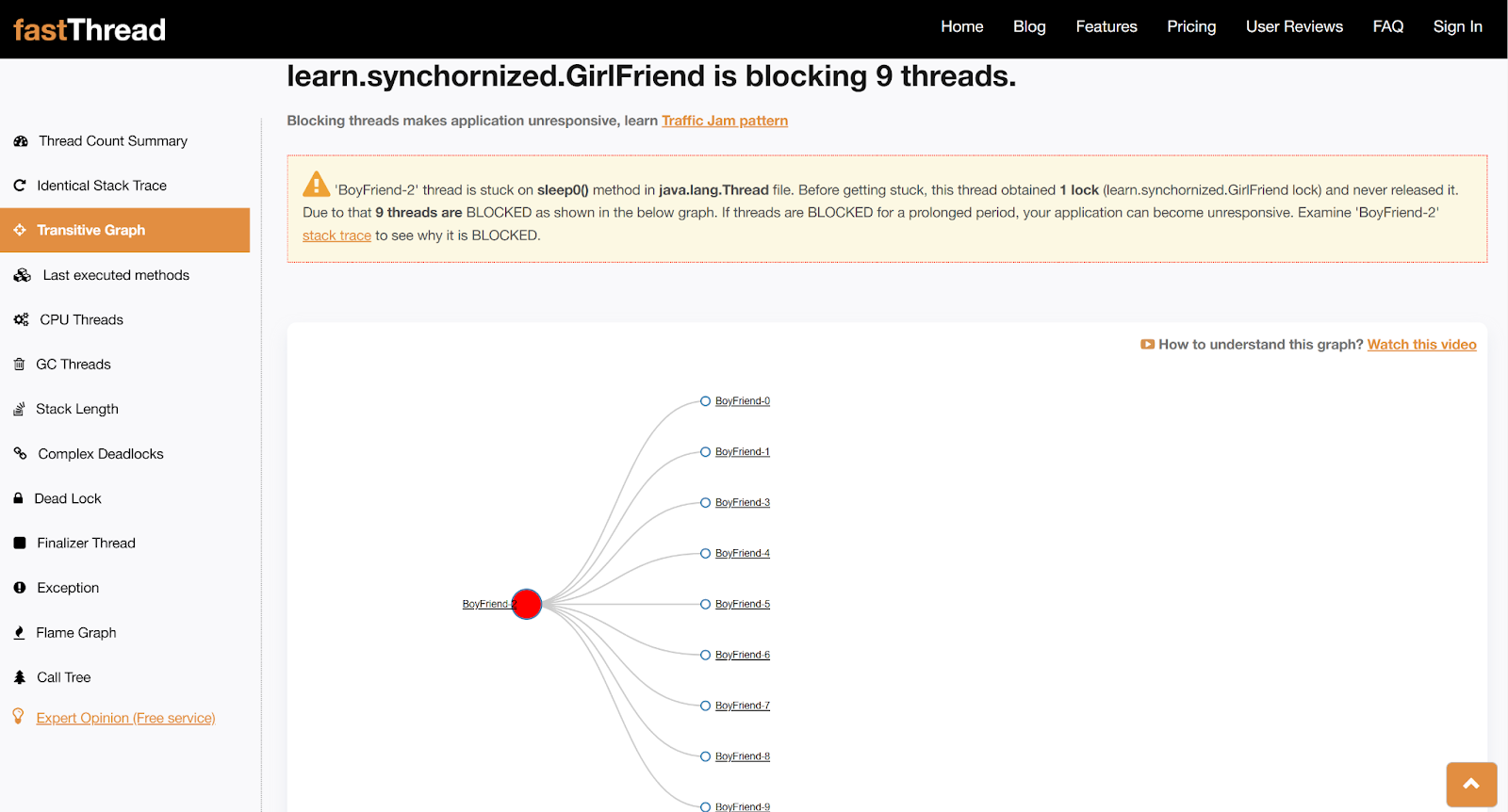
Fig 2: fastThread tool reporting 9 threads to be in BLOCKED state when accessing GirlFriend Object
fastThread tool reports the total number of blocked threads and a transitive graph to indicate where they are BLOCKED. In this example (Fig 1), the tool reported that 9 threads are in a BLOCKED state. From the transitive graph (Fig 2), you can notice that BoyFriend2 is blocking the remaining 9 BoyFriend threads. When clicking on the thread names, you can see its complete stack trace.
Below is the stack trace of one of the BoyFriend threads which is BLOCKED:
01: java.lang.Thread.State: BLOCKED (on object monitor)
02: at learn.synchornized.GirlFriend.meet(GirlFriend.java:7)
03: - waiting to lock <0x0000000714173850> (a learn.synchornized.GirlFriend)
04: at learn.synchornized.SynchronizationDemo$BoyFriendThread.run(SynchronizationDemo.java:10)
05: Locked ownable synchronizers:
06: - None
You can see that this BoyFriend thread is put into a BLOCKED state when it’s trying to execute the meet() method (as reported in line #2).
Video
To see the visual walk-through of this post, click below:
Conclusion
In this post, we learned about the basics of the synchronized method. If you want to learn more details about the synchronized method, stay tuned.
Published at DZone with permission of Ram Lakshmanan. See the original article here.
Opinions expressed by DZone contributors are their own.
Comments