

Understanding System Logger
I recently learned that instead of using SFL4J's API and the wanted implementation, you'd use System.Logger which is available since Java 9. Let's see how.
December was not a good time for Java developers and even less for Ops. The former had to repackage their apps with a fixed Log4J's version, and the latter had to redeploy them - several times. Yet, every cloud has a silver lining. In my case, I learned about System.Logger.
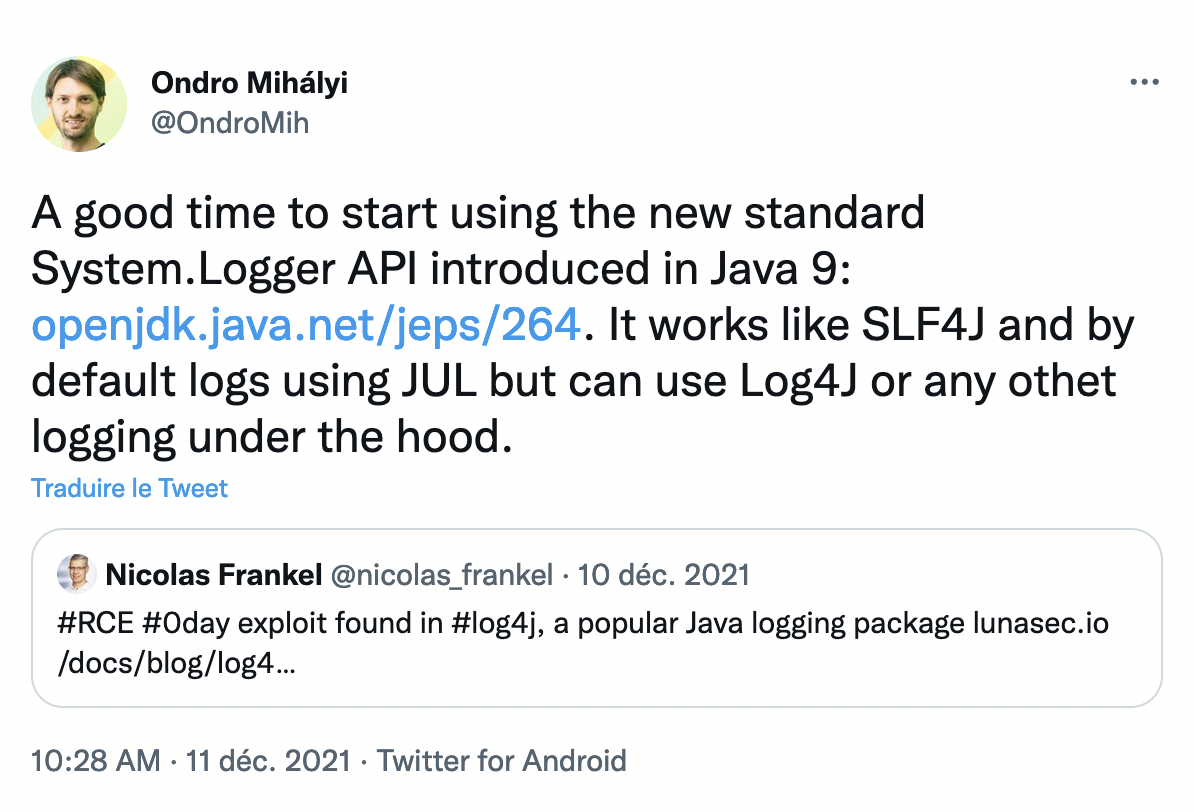
In short, System.Logger is a façade over your logging engine. Instead of using, say, SFL4J's API and the wanted implementation, you'd use System.Logger instead of SLF4J. It's available since Java 9, and it's a bummer that I learned about it only recently.
System.Logger API
The API is a bit different than other logging APIs: it avoids different logging methods such as debug(), info() in favor of a single log() one where you pass a logging Level parameter.
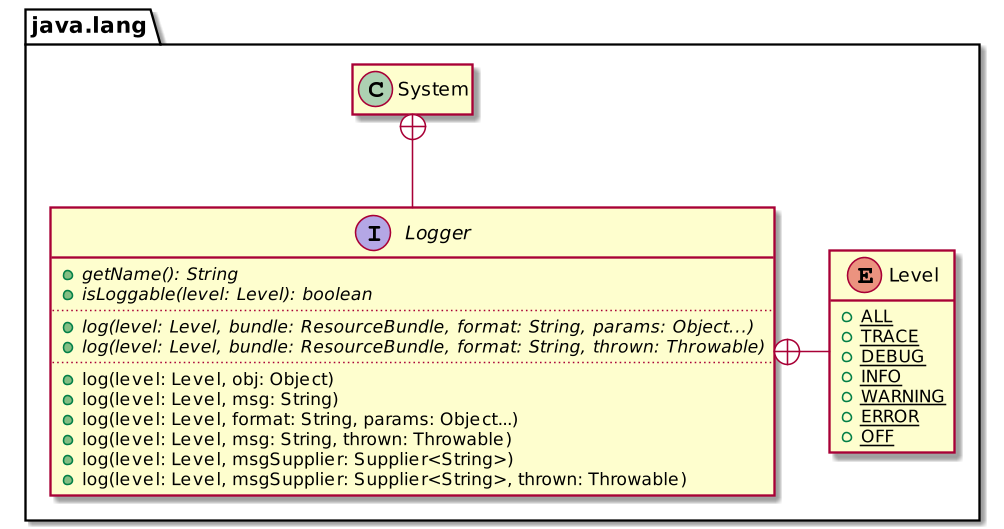
If you don't provide any corresponding implementation on the classpath, System.Logger defaults to JUL.
public class LoggerExample {

  private static final System.Logger LOGGER = System.getLogger("c.f.b.DefaultLogger"); // 1

  public static void main(String[] args) {
      LOGGER.log(DEBUG, "A debug message");
      LOGGER.log(INFO, "Hello world!");
  }
}- Get the logger.
Running the above snippet outputs the following:
Dec 24, 2021 10:38:15 AM c.f.b.DefaultLogger main
INFO: Hello world!
Compatible Implementations
Most applications currently use Log4J2 or SLF4J. Both provide a compatible System.Logger implementation.
For Log4J, we need to add two dependencies:
<dependencies>
    <dependency>
        <groupId>org.apache.logging.log4j</groupId>
        <artifactId>log4j-core</artifactId>            <!-- 1 -->
        <version>2.17.0</version>
    </dependency>
    <dependency>
        <groupId>org.apache.logging.log4j</groupId>    <!-- 2 -->
        <artifactId>log4j-jpl</artifactId>
        <version>2.17.0</version>
    </dependency>
</dependencies>- Log4J implementation.
- Bridge from
System.Loggerto Log4J.
The same logging snippet as above now outputs the following:
11:00:07.373 [main] INFO c.f.b.DefaultLogger - Hello world!To use SLF4J instead, use the following dependencies:
<dependencies>
    <dependency>
        <groupId>org.slf4j</groupId>
        <artifactId>slf4j-simple</artifactId>               <!-- 1 -->
        <version>2.0.0-alpha5</version>
    </dependency>
    <dependency>
        <groupId>org.slf4j</groupId>
        <artifactId>slf4j-jdk-platform-logging</artifactId> <!-- 2 -->
        <version>2.0.0-alpha5</version>
    </dependency>
</dependencies>- Basic SLF4J implementation. Any other implementation will do, e.g. Logback.
- Bridge from
System.Loggerto Log4J.
The snippet outputs:
[main] INFO c.f.b.DefaultLogger - Hello world!Your Own System.Logger Implementation
System.Logger relies on Java's ServiceLoader mechanism. Both log4j-jpl and slf4j-jdk-platform-logging contain a META-INF/services/java.lang.System$LoggerFinder file that points to a LoggerFinder implementation.
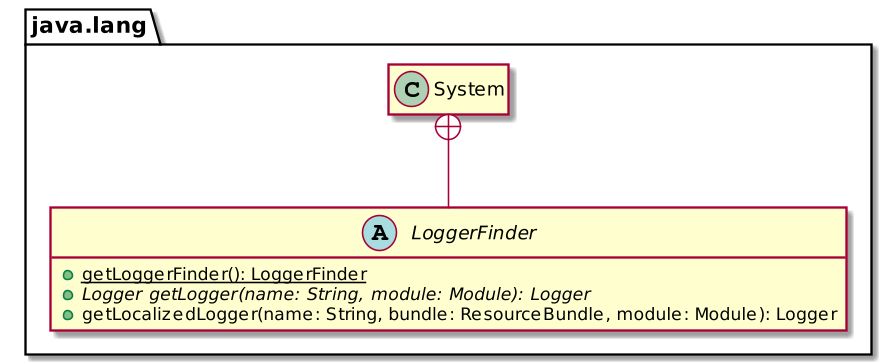
We can create our own based on System.out for educational purposes.
The first step is to implement the logger itself.
public class ConsoleLogger implements System.Logger {

    private final String name;

    public ConsoleLogger(String name) {
        this.name = name;
    }

    @Override
    public String getName() {
        return name;
    }

    @Override
    public boolean isLoggable(Level level) {
        return level.getSeverity() >= Level.INFO.getSeverity();
    }

    @Override
    public void log(Level level, ResourceBundle bundle, String msg, Throwable thrown) {
        if (isLoggable(level)) {
            System.out.println(msg);
            thrown.printStackTrace();
        }
    }

    @Override
    public void log(Level level, ResourceBundle bundle, String format, Object... params) {
        if (isLoggable(level)) {
            System.out.println(MessageFormat.format(format, params));
        }
    }
}
Then, we need to code the System.LoggerFinder:
public class ConsoleLoggerFinder extends System.LoggerFinder {

    private static final Map<String, ConsoleLogger> LOGGERS = new HashMap<>(); // 1

    @Override
    public System.Logger getLogger(String name, Module module) {
        return LOGGERS.computeIfAbsent(name, ConsoleLogger::new);              // 2
    }
}
Keep a map of all existing loggers:
- Create a logger if it doesn't already exist and store it.
Finally, we create a service file:
ch.frankel.blog.ConsoleLoggerFinderAnd now, running the same code snippet outputs:
Hello world!Conclusion
While the API is more limited than other more established logging APIs, System.Logger is a great idea. It offers a façade that's part of the JDK. Thus, it avoids using a third-party façade that needs to wire calls to another unrelated implementation, e.g. SLF4J to Log4J2.
For this reason, I think I'll be trying System.Logger if only to get some hands-on experience.
The complete source code for this post can be found in Maven format there.
Published at DZone with permission of Nicolas Fränkel. See the original article here.
Opinions expressed by DZone contributors are their own.