

Testing Jedis API Using Junit Test Case in Eclipse IDE
In this article, we will learn how to set up a Junit testing environment for testing Jedis API, which will interact with the Redis database.
 ·
·
Join the DZone community and get the full member experience.
Join For FreePrerequisites
- Eclipse (any version) with Maven capabilities
- Java 8+
- Junit
- Redis and Jedis
Installing Redis Server on Windows
- Click on the link: https://github.com/dmajkic/redis/downloads
- Download redis-2.4.5-win32-win64.zip file
- Unzip the file and go to the 64bit folder. There you can find redis-server.exe
- To start the Redis server, execute the redis-server.exe file.
Installing Eclipse-IDE on Windows
1.Click on the link: https://www.eclipse.org/downloads/download.php?file=/oomph/epp/2020-09/R/eclipse-inst-jre-win64.exe
2. Download eclipse-inst-jre-win64.exe file and run the eclipse installer.
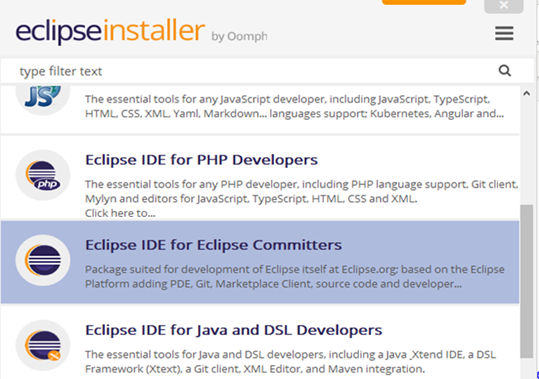
3.Select Eclipse IDE for Eclipse committers and install
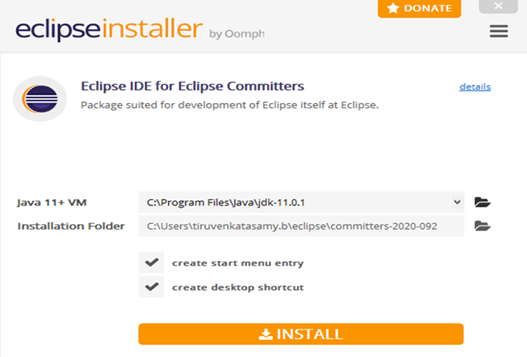
Creating Maven Project in Eclipse IDE
1.Open the Eclipse IDE
2.Go to File > New > Project 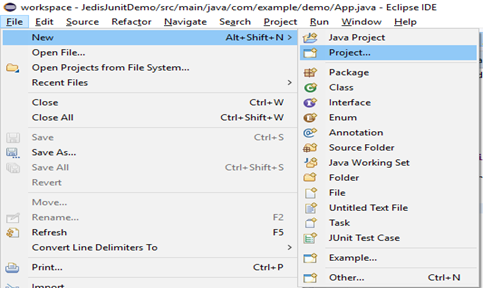
3.Go to Maven -> Maven Project and click Next. 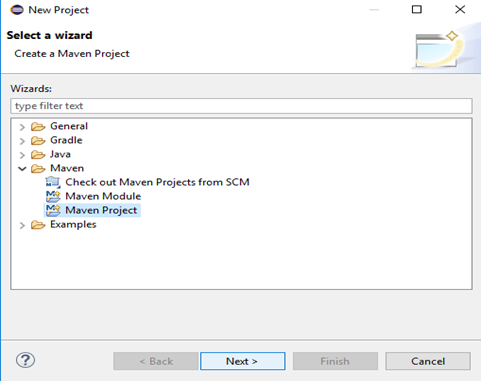
4.Select your workspace location and click Next
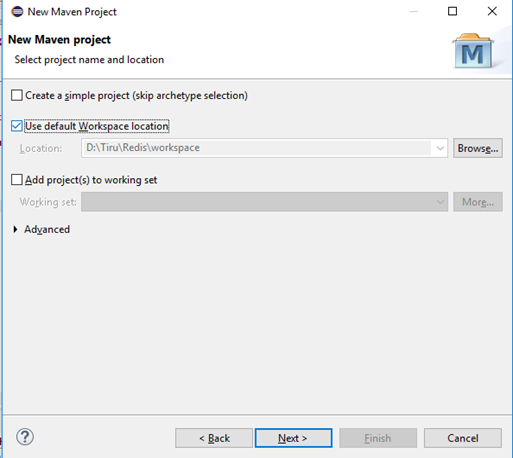
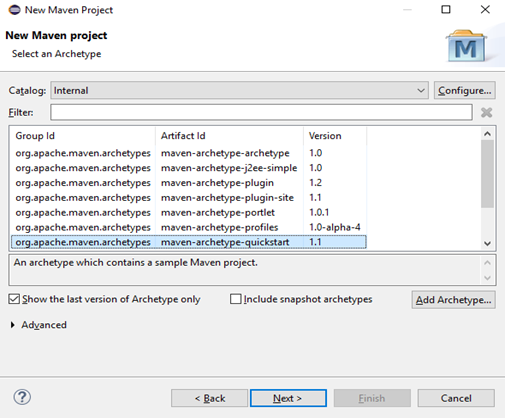
5.Select quick start maven archetype and click Next.
6.Enter Group Id, Artifact Id, and package name.
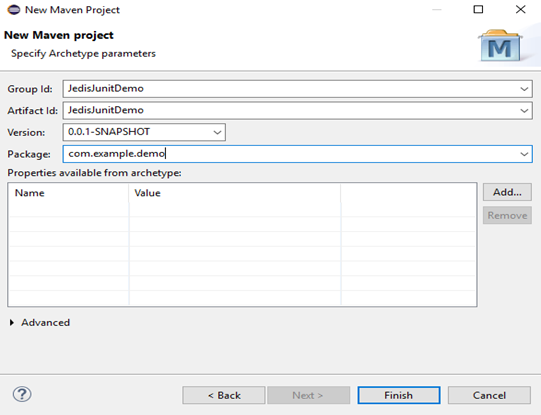
- Group Id: Fill a groupId for the project of your choice.
- Artifact Id: Fill artifactId for the project of your choice.
- Package: java package structure of your choice
7.The above process will create a project structure like below.
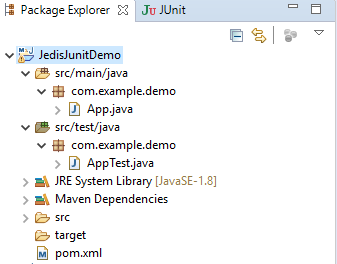
8.Place the HostPort.java file in com.example.demo package.
package com.example.demo;
public class HostPort {
final private static String defaultHost = "localhost";
final private static Integer defaultPort = 6379;
final private static String defaultPassword = "";
public static String getRedisHost() {
return defaultHost;
}
public static Integer getRedisPort() {
return defaultPort;
}
public static String getRedisPassword() {
return defaultPassword;
}
}
9.Add the WelcomeTest.java file in com.example.demo package.
xxxxxxxxxx
package com.example.demo;
import org.junit.Test;
import com.example.demo.HostPort;
import redis.clients.jedis.Jedis;
import redis.clients.jedis.JedisPool;
import redis.clients.jedis.JedisPoolConfig;
import static org.hamcrest.MatcherAssert.assertThat;
import static org.hamcrest.Matchers.is;
public class WelcomeTest {
public void sayWelcomeBasic() {
Jedis jedis = new Jedis(HostPort.getRedisHost(), HostPort.getRedisPort());
System.out.print("Host"+HostPort.getRedisHost());
if (HostPort.getRedisPassword().length() > 0) {
jedis.auth(HostPort.getRedisPassword());
}
jedis.set("welcome", "world");
String value = jedis.get("welcome");
assertThat(value, is("world"));
}
public void sayWelcome() {
Jedis jedis = new Jedis(HostPort.getRedisHost(), HostPort.getRedisPort());
if (HostPort.getRedisPassword().length() > 0) {
jedis.auth(HostPort.getRedisPassword());
}
String result = jedis.set("welcome", "world");
assertThat(result, is("OK"));
String value = jedis.get("welcome");
assertThat(value, is("world"));
jedis.close();
}
public void sayWelcomeThreadSafe() {
JedisPool jedisPool;
String password = HostPort.getRedisPassword();
if (password.length() > 0) {
jedisPool = new JedisPool(new JedisPoolConfig(),
HostPort.getRedisHost(), HostPort.getRedisPort(), 2000, password);
} else {
jedisPool = new JedisPool(new JedisPoolConfig(),
HostPort.getRedisHost(), HostPort.getRedisPort());
}
try (Jedis jedis = jedisPool.getResource()) {
String result = jedis.set("welcome", "world");
assertThat(result, is("OK"));
String value = jedis.get("welcome");
assertThat(value, is("world"));
}
jedisPool.close();
}
}
10. Replace the pom.xml with the below content.
xxxxxxxxxx
<project
xmlns="http://maven.apache.org/POM/4.0.0"
xmlns:xsi="http://www.w3.org/2001/XMLSchema-instance"
xsi:schemaLocation="http://maven.apache.org/POM/4.0.0 http://maven.apache.org/maven-v4_0_0.xsd">
<modelVersion>4.0.0</modelVersion>
<prerequisites>
<maven>3.0.0</maven>
</prerequisites>
<groupId>JedisJunitDemo</groupId>
<artifactId>JedisJunitDemo</artifactId>
<version>1.0</version>
<packaging>jar</packaging>
<name>JedisJunitDemo</name>
<properties>
<redis.host>localhost</redis.host>
<redis.port>6379</redis.port>
<project.build.sourceEncoding>UTF-8</project.build.sourceEncoding>
<project.reporting.outputEncoding>UTF-8</project.reporting.outputEncoding>
<dropwizard.version>1.3.8</dropwizard.version>
<mainClass>com.example.demo.RediSolarApplication</mainClass>
</properties>
<dependencyManagement>
<dependencies>
<dependency>
<groupId>io.dropwizard</groupId>
<artifactId>dropwizard-bom</artifactId>
<version>${dropwizard.version}</version>
<type>pom</type>
<scope>import</scope>
</dependency>
</dependencies>
</dependencyManagement>
<dependencies>
<dependency>
<groupId>com.google.inject</groupId>
<artifactId>guice</artifactId>
<version>4.2.2</version>
</dependency>
<dependency>
<groupId>io.dropwizard</groupId>
<artifactId>dropwizard-core</artifactId>
</dependency>
<dependency>
<groupId>io.dropwizard</groupId>
<artifactId>dropwizard-assets</artifactId>
</dependency>
<dependency>
<groupId>io.dropwizard</groupId>
<artifactId>dropwizard-testing</artifactId>
</dependency>
<dependency>
<groupId>redis.clients</groupId>
<artifactId>jedis</artifactId>
<version>3.1.0-m3</version>
</dependency>
<dependency>
<groupId>com.redislabs</groupId>
<artifactId>jredistimeseries</artifactId>
<version>0.9.0</version>
</dependency>
<dependency>
<groupId>javax.xml.bind</groupId>
<artifactId>jaxb-api</artifactId>
<version>2.2.11</version>
</dependency>
<dependency>
<groupId>com.sun.xml.bind</groupId>
<artifactId>jaxb-core</artifactId>
<version>2.2.11</version>
</dependency>
<dependency>
<groupId>com.sun.xml.bind</groupId>
<artifactId>jaxb-impl</artifactId>
<version>2.2.11</version>
</dependency>
<dependency>
<groupId>javax.activation</groupId>
<artifactId>activation</artifactId>
<version>1.1.1</version>
</dependency>
<dependency>
<groupId>junit</groupId>
<artifactId>junit</artifactId>
<version>4.12</version>
<scope>test</scope>
</dependency>
<dependency>
<groupId>org.hamcrest</groupId>
<artifactId>hamcrest-all</artifactId>
<version>1.3</version>
<scope>test</scope>
</dependency>
<dependency>
<groupId>org.mockito</groupId>
<artifactId>mockito-all</artifactId>
<version>1.9.5</version>
<scope>test</scope>
</dependency>
</dependencies>
<build>
<plugins>
<plugin>
<groupId>org.codehaus.mojo</groupId>
<artifactId>properties-maven-plugin</artifactId>
<version>1.0.0</version>
<executions>
<execution>
<phase>initialize</phase>
<goals>
<goal>read-project-properties</goal>
</goals>
<configuration>
<files>
<file>pom.xml</file>
</files>
</configuration>
</execution>
</executions>
</plugin>
<plugin>
<artifactId>maven-shade-plugin</artifactId>
<version>2.4.1</version>
<configuration>
<createDependencyReducedPom>false</createDependencyReducedPom>
<transformers>
<transformer implementation="org.apache.maven.plugins.shade.resource.ServicesResourceTransformer"/>
<transformer implementation="org.apache.maven.plugins.shade.resource.ManifestResourceTransformer">
<mainClass>${mainClass}</mainClass>
</transformer>
</transformers>
<!-- exclude signed Manifests -->
<filters>
<filter>
<artifact>*:*</artifact>
<excludes>
<exclude>META-INF/*.SF</exclude>
<exclude>META-INF/*.DSA</exclude>
<exclude>META-INF/*.RSA</exclude>
</excludes>
</filter>
</filters>
</configuration>
<executions>
<execution>
<phase>package</phase>
<goals>
<goal>shade</goal>
</goals>
</execution>
</executions>
</plugin>
<plugin>
<artifactId>maven-jar-plugin</artifactId>
<version>3.0.2</version>
<configuration>
<archive>
<manifest>
<addClasspath>true</addClasspath>
<mainClass>${mainClass}</mainClass>
</manifest>
</archive>
</configuration>
</plugin>
<plugin>
<artifactId>maven-compiler-plugin</artifactId>
<version>3.6.1</version>
<configuration>
<source>1.8</source>
<target>1.8</target>
</configuration>
</plugin>
<plugin>
<artifactId>maven-source-plugin</artifactId>
<version>3.0.1</version>
<executions>
<execution>
<id>attach-sources</id>
<goals>
<goal>jar</goal>
</goals>
</execution>
</executions>
</plugin>
</plugins>
</build>
<reporting>
<plugins>
<plugin>
<artifactId>maven-project-info-reports-plugin</artifactId>
<version>2.8.1</version>
<configuration>
<dependencyLocationsEnabled>false</dependencyLocationsEnabled>
<dependencyDetailsEnabled>false</dependencyDetailsEnabled>
</configuration>
</plugin>
<plugin>
<artifactId>maven-javadoc-plugin</artifactId>
<version>2.10.3</version>
</plugin>
</plugins>
</reporting>
</project>
Running the Junit Test Case
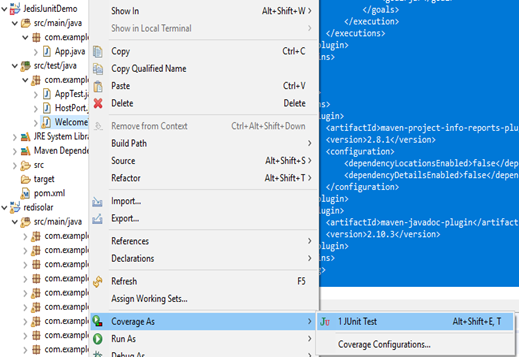
- Build the Maven project and run the test case as shown below.
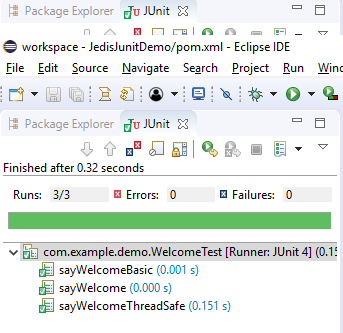
2.Check the test result.
Cross Verifying the Result From Redis Client
- To start the Redis client, execute the redis-cli.exe file
- Type get welcome on the console, I will give world
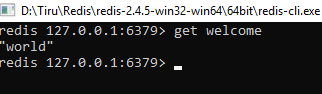
So, we are able to test the Jedis API using Junit.
Further, this test case can be customized according to your needs.
Feel free to ask questions.
Opinions expressed by DZone contributors are their own.
Comments