

Theia Deep Dive, Part 1: From Zero to Your Own IDE
Part 1 of building your own custom IDE with Theia. From setup and plugins to a working browser-based IDE with a custom UI and splash screen.
Join the DZone community and get the full member experience.
Join For FreeIntro: Why Build Your Own IDE?
There are countless reasons to create your own IDE. Perhaps you are creating a sandbox similar to CodeSandbox, but adapted to your own framework. Or an Arduino-style environment where a strictly controlled user interface is required for flashing firmware and interacting with hardware. Maybe your SaaS product needs a built-in cloud editor. Maybe you're creating an educational platform where users should only see part of the code. Or you're releasing your own language or framework, and want the developer tools not to look like an add-on plugin. Or maybe you've decided to create your own Cursor with an AI assistant.
Whatever your goal, creating your own IDE is more than possible. In this guide, I'll show you how to do it with Eclipse Theia: a fully modular, open-source platform designed to adapt to your needs.
Our Goals
I will proceed from the idea that we want to create an online IDE, similar to CodeSandbox. It's great to have a full-fledged IDE with support for dozens of languages, a full-fledged file system, a terminal, and no need to write everything from scratch. At the same time, we don't need all the functionality that any IDE usually offers; for example, functionality such as Debug may be unnecessary.
So here's what I'll do:
- Remove any distracting elements, buttons, and panels, leaving only the essentials
- Remove unnecessary menus, buttons, and actions
- Add our own menus and actions
- Configure the default layout
- Connect the necessary themes and widgets
- Make unique looks and feel with Islands UI
So, let's dive in!
Meet Theia: The Framework Behind the Magic
To bring our idea to life, we will use Eclipse Theia. This is an open-source modular framework for creating IDEs. It looks and works like VS Code and partially uses VS Code components (like Monaco Editor). But it is not a fork of VS Code.
It supports VS Code extensions, but is not tied to VS Code either architecturally or visually. Theia was conceived as a universal framework for custom IDEs.
It gives you a foundation and a set of separate modules: from a code editor to a terminal, from toolbars to tabs. Everything can be disabled, replaced, or rewritten. And you can make your own modules with their internal widget system, which allows you to write your own components in React (or whatever framework you want, actually).
You can build a specialized IDE, such as Arduino IDE or SAP App Studio. Or a minimalistic editor with an AI agent inside, like Cursor. Or something completely non-standard, such as an editor where you can't write code, but you can build diagrams. It all depends on your requirements.
It works both in a browser and as a desktop application (via Electron), but I will focus on the web version. The Electron version works similarly in the aspects that will be discussed in this article.
Why Not Use VS Code Web?
Although VS Code is open source, it is not a modular framework. It is a monolithic product with a plugin system, rather than a set of components and modules that can be assembled into the specific tool you need. You can add extensions, but you cannot remove basic parts such as panels, commands, tabs, and Shell behavior without hacks and serious code rewriting, which can make it difficult to update the VS Code core in the future.
And even though VS Code is an open-source product, Microsoft is not interested in you using it to create competitors. So forget about documentation or official support.
Also, according to my tests, VS Code consumes about 1.5 times more memory, which can be critical if you run it inside virtual machine instances somewhere in the cloud. You can even run a "browser-only" version of Theia with some kind of virtual file system; in that case, you do not need backend resources at all.
Installing Theia and Preparing to Make Changes
The first step is to deploy the IDE code itself. We have two options:
- Clone the full repository. The repository contains a complete build with all plugins. This is the same version you can download and install on your PC from the main page: https://theia-ide.org/, but it's heavy and contains a lot of unnecessary components. My goal is to create a lightweight Cloud IDE build, so this method won't work for me, as it would require more effort to remove unnecessary parts.
- Use the extension generator. The idea of this generator is to provide a CLI for creating and debugging custom Theia plugins, but when this CLI creates a plugin, it deploys a minimal Theia build that contains nothing except a file tree and code editor. Let's start with this one.
To install, run:
npm install -g yo generator-theia-extension
This will install the necessary utilities for generation.
To create a sample Theia project (optionally with custom Theia extensions), including a browser and electron app, run:
mkdir ~/theia && cd ~/theia
yo theia-extension
Select “Hello World” and specify the name of your extension, for example custom-ui.
This will create a minimal possible IDE configuration for browser and electron, an example plugin, and will immediately install the dependencies.
Prepare for Customization
Before we start customizing our IDE, we'll make a few changes to the build and launch process.
First, we'll replace the outdated lerna with turborepo and remove scripts related to the electron version since we won't need it:
npm remove lerna
npm install turbo -D
Turborepo is necessary in this project because it contains multiple packages and custom plugins that we'll be writing, each of which needs to be built separately. With turborepo, we can build all our dependencies with a single command.
I'll also delete the electron-app folder since I don't need it and remove all electron version-related scripts so they don't get in the way, and I'll change the port to :4000 to avoid conflicts with other applications.
Open /package.json and replace lerna with turborepo and remove unnecessary scripts:
~/theia/package.json
{
    "private": true,
    "engines": {
        "node": ">=20",
        "npm": ">=10"
    },
    "scripts": {
        "build": "turbo run build",
        "start": "turbo start",
        "watch": "turbo run watch",
        "postinstall": "theia check:theia-version",
        "clean": "turbo run clean && rimraf node_modules",
        "download:plugins": "theia download:plugins --rate-limit=15 --parallel=false",
    },
    "workspaces": [
        "custom-ui",
        "browser-app"
    ],
    "devDependencies": {
        "turbo": "^2.5.4",
        "typescript": "^5.8.3",
        "rimraf": "^6.0.1"
    },
    "packageManager": "[email protected]",
    "theiaPluginsDir": "plugins",
    "theiaPlugins": {}
}
~/theia/browser-app/package.json
{
    "private": true,
    "name": "browser-app",
    "version": "0.0.0",
    "dependencies": {
        "@theia/core": "1.62.2",
        "@theia/editor": "1.62.2",
        "@theia/filesystem": "1.62.2",
        "@theia/markers": "1.62.2",
        "@theia/messages": "1.62.2",
        "@theia/monaco": "1.62.2",
        "@theia/navigator": "1.62.2",
        "@theia/preferences": "1.62.2",
        "@theia/process": "1.62.2",
        "@theia/terminal": "1.62.2",
        "@theia/workspace": "1.62.2",
        "custom-ui": "0.0.0"
    },
    "devDependencies": {
        "@theia/cli": "1.62.2"
    },
    "scripts": {
        "build": "npm run rebuild && theia build --mode production",
        "rebuild": "theia rebuild:browser --cacheRoot ..",
        "start": "theia start -p 4000 --plugins=local-dir:../plugins",
        "watch": "npm run rebuild && theia build --watch --mode development",
        "clean": "theia clean && rimraf node_modules"
    },
    "theia": {
        "target": "browser"
    },
    "packageManager": "[email protected]"
}
Now, create a file turbo.json.
~/theia/turbo.json
{
    "$schema": "<https://turbo.build/schema.json>",
    "tasks": {
        "clean": {
            "outputs": [],
            "dependsOn": ["^clean"]
        },
        "build": {
            "dependsOn": ["^build"],
            "outputs": ["lib/**"]
        },
        "start": {
            "dependsOn": ["^build"],
            "outputs": []
        },
        "watch": {
            "cache": false,
            "dependsOn": [],
            "outputs": ["lib/**"]
        }
    }
}
I also recommend using vite as the bundler for our custom-ui plugin, as this will solve several problems down the line and allow us to easily add necessary plugins to our plugin, such as Tailwind or preprocessor support if needed.
First, let's specify paths in tsconfig and update target and lib to more modern versions:
~/theia/custom-ui/tsconfig.json
{
    "compilerOptions": {
        "skipLibCheck": true,
        "declaration": true,
        "declarationMap": true,
        "noImplicitAny": true,
        "noEmitOnError": false,
        "noImplicitThis": true,
        "noUnusedLocals": true,
        "strictNullChecks": true,
        "experimentalDecorators": true,
        "emitDecoratorMetadata": true,
        "resolveJsonModule": true,
        "module": "commonjs",
        "moduleResolution": "node",
        "target": "ES2022",
        "jsx": "react",
        "lib": ["ES2022", "dom"],
        "sourceMap": true,
        "rootDir": ".",
        "outDir": "lib",
        "paths": {
            "@/*": ["./src/*"]
        }
    },
    "include": ["src"],
    "exclude": ["node_modules", "lib"]
}
Create vite.config.mjs:
~/theia/custom-ui/vite.config.mjs
import react from '@vitejs/plugin-react';
import { resolve } from 'path';
import { defineConfig } from 'vite';
import { libInjectCss } from 'vite-plugin-lib-inject-css';

export default defineConfig({
    clearScreen: false,
    plugins: [
        react(),
        libInjectCss(),
    ],
    build: {
        lib: {
            entry: [
                resolve(__dirname, 'src/frontend/index.ts'),
            ],
            formats: ['cjs'],
            fileName: (format, entryName) => `${ entryName }.js`,
        },
        outDir: 'lib',
        emptyOutDir: true,
        cssCodeSplit: true,
        sourcemap: true,
        target: 'ES2022',
        rollupOptions: {
            external: (id) => {
                // Aliases is not external
                if (id.startsWith('@/')) {
                    return false;
                }

                return !id.startsWith('.') && !id.startsWith('/') && !id.includes('\\0');
            },
            output: {
                preserveModules: true,
                preserveModulesRoot: 'src',
                entryFileNames: '[name].js',
                chunkFileNames: '[name].js',
                format: 'cjs',
                exports: 'named',
            },
        },
    },
    resolve: {
        alias: [{
            find: /^@\\/(.*)/,
            replacement: `${ resolve(__dirname, 'src') }/$1`,
        }],
        // preserveSymlinks: true,
    },
});
Let's specify the scripts and entry points in package.json.
~/theia/custom-ui/package.json
{
    ...
  "scripts": {
    "clean": "rm -rf lib node_modules",
    "build": "vite build && npm run dts",
    "watch": "vite build --watch --clearScreen false",
    "dev": "npm run watch",
    "dts": "tsc --emitDeclarationOnly --declaration --outDir lib"
  },
  "theiaExtensions": [{
    "frontend": "lib/frontend/index.js"
  }]
}
Let's create the main file for our plugin, for now, without any logic.
~/theia/custom-ui/src/frontend/index.ts
import { ContainerModule } from '@theia/core/shared/inversify';

export default new ContainerModule((bind, unbind, isBound, rebind) => {
    // TODO Implement any logic here
});
Install Vite:
cd ~/**theia/custom-ui
npm i -D vite @vitejs/plugin-react vite-plugin-lib-inject-css
Check that everything runs smoothly:
cd ~/theia
npm run build
npm run start
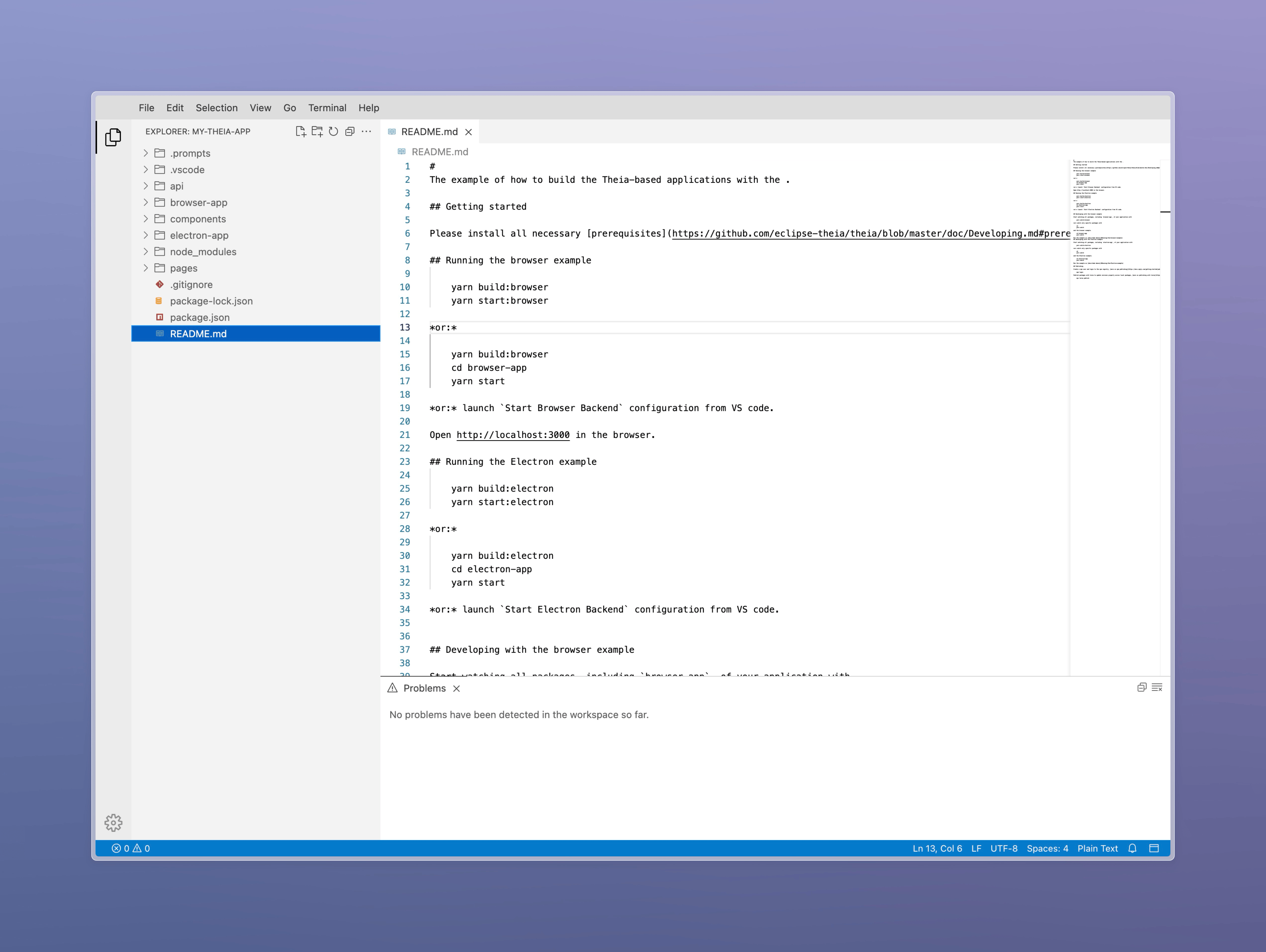
Open http://127.0.0.1:4000 and check your working IDE:
Adding Functionality
Currently, our IDE has literally nothing except a file tree and an editor without syntax highlighting support, so let's add the missing plugins.
VS Code Plugins
VS Code plugins (pre-installed by you or installed by users from the marketplace). These are all the plugins from the VS Code application store, as well as some internal plugins, such as syntax highlighting support for different languages. To install such a plugin, you can use the Extensions section or declare it in package.json → theiaPlugins
Let's start by installing basic VS Code plugins for syntax highlighting, as well as the material icons theme:
./package.json
"theiaPlugins": {
  "eclipse-theia.builtin-extension-pack": "<https://open-vsx.org/api/eclipse-theia/builtin-extension-pack/1.95.3/file/eclipse-theia.builtin-extension-pack-1.95.3.vsix>",
  "zhuangtongfa.material-theme": "<https://open-vsx.org/api/zhuangtongfa/material-theme/3.19.0/file/zhuangtongfa.material-theme-3.19.0.vsix>",
  "PKief.material-icon-theme": "<https://open-vsx.org/api/PKief/material-icon-theme/5.23.0/file/PKief.material-icon-theme-5.23.0.vsix>"
}
eclipse-theia.builtin-extension-pack includes all plugins contained in the standard VS Code build, but you can install only the ones you need:
    "theiaPlugins": {
        "vscode.javascript": "<https://open-vsx.org/api/vscode/javascript/1.95.3/file/vscode.javascript-1.95.3.vsix>",
        "vscode.typescript": "<https://open-vsx.org/api/vscode/typescript/1.95.3/file/vscode.typescript-1.95.3.vsix>",
        "vscode.typescript-language-features": "<https://open-vsx.org/api/vscode/typescript-language-features/1.95.3/file/vscode.typescript-language-features-1.95.3.vsix>",
        "vscode.json": "<https://open-vsx.org/api/vscode/json/1.95.3/file/vscode.json-1.95.3.vsix>",
        "vscode.css": "<https://open-vsx.org/api/vscode/css/1.95.3/file/vscode.css-1.95.3.vsix>",
        "vscode.html": "<https://open-vsx.org/api/vscode/html/1.95.3/file/vscode.html-1.95.3.vsix>",
        "vscode.markdown": "<https://open-vsx.org/api/vscode/markdown/1.95.3/file/vscode.markdown-1.95.3.vsix>",
        "zhuangtongfa.material-theme": "<https://open-vsx.org/api/zhuangtongfa/material-theme/3.19.0/file/zhuangtongfa.material-theme-3.19.0.vsix>",
        "PKief.material-icon-theme": "<https://open-vsx.org/api/PKief/material-icon-theme/5.23.0/file/PKief.material-icon-theme-5.23.0.vsix>"
    }
zhuangtongfa.material-theme— one dark theme, one of the most popular themes for VS CodePKief.material-icon-theme— material style icons in the file tree and tabs
Then execute:
npm run download:plugins
This will download all these plugins to the /plugins folder.
Core Plugins
These are plugins that extend Theia's functionality. These plugins add core IDE functionality and can completely change behavior. To install such a plugin, simply run npm install for the desired package.
The list of packages can be found in the Theia repository.
I will install the most essential ones for me, which are project search and VS Code plugin support:
cd **~/**theia/browser-app
npm i @theia/plugin @theia/plugin-ext @theia/plugin-ext-vscode @theia/search-in-workspace
Please note that some plugins may depend on others, so when you install @theia/plugin-ext-vscode, almost all the main modules will be included in your build, even if you don't need them.
Then run npm run build && npm run start to check that everything is working.
Rewiring Theia: UI and Behavior Customization
To understand how to customize Theia, we need to understand how its code works internally.
Any customizations are done through system plugins, whose code can replace any system object or class. This is possible thanks to InversifyJS, which Theia uses under the hood. It is a simple but incredibly powerful Dependency Injection container that allows you to easily replace some dependencies with others.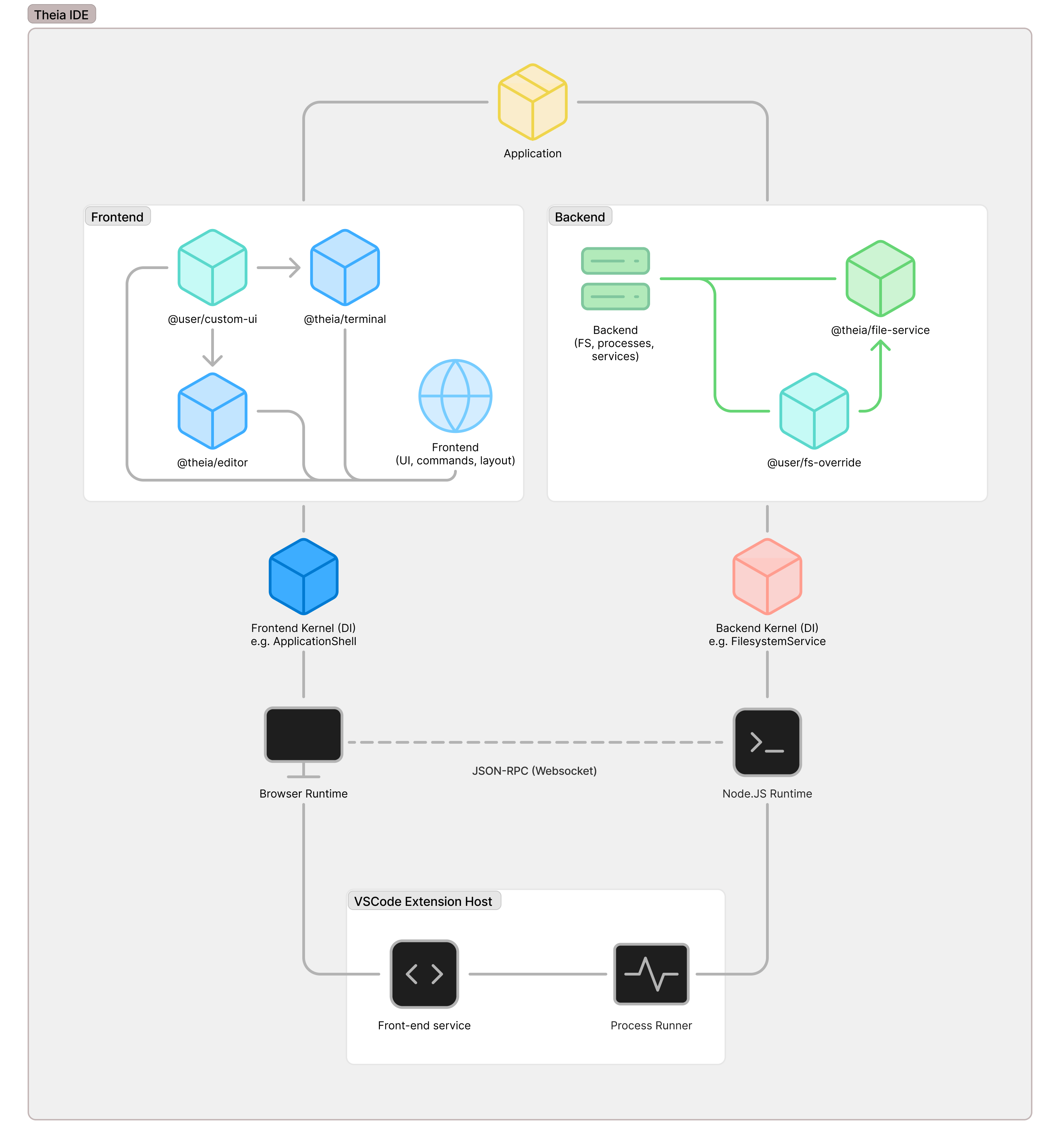
This way, as a developer of the custom-ui plugin, you can easily override the logic of system modules, such as @theia/terminal on the front end or @theia/file-service on the back end.
Now we are ready to start customizing our build. My plan includes:
- Specify default user settings
- Create a splash screen
- Remove unnecessary interface elements, functionality, actions, and menus
- Add custom commands and menu items
- Change the appearance of some interface elements
- Change some behavior logic (for example, prohibit DnD elements on panels)
Default IDE Settings
Theia uses the same configuration format as VS Code and is configured via the settings.json file. To set the default settings, we first need to collect them.
To do this, open your IDE, configure it in any convenient way (via the interface or directly via the JSON config), then press cmd + shift + p to open the Command Palette and enter “Open Settings JSON.”
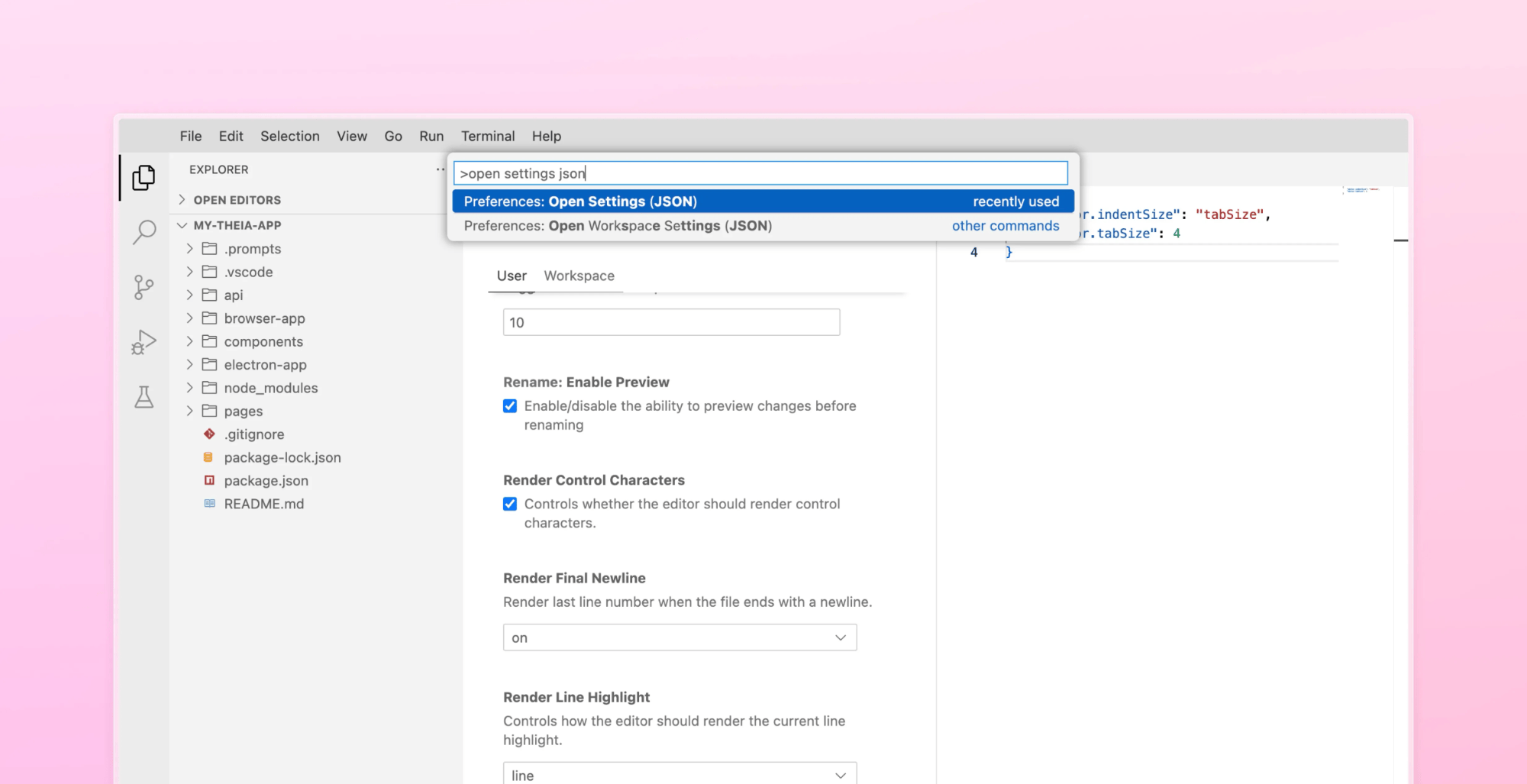
Copy the contents of this file and paste them into browser-app/package.json in the theia section:
./browser-app/package.json
"theia": {
    "target": "browser",
    "frontend": {
    "config": {
        "applicationName": "Flexbe IDE",
        "reloadOnReconnect": false,
        "preferences": {
        "editor.indentSize": "tabSize",
        "editor.tabSize": 4,
        "workbench.tree.indent": 13,
                "workbench.colorTheme": "One Dark Pro Night Flat",
        "workbench.iconTheme": "material-icon-theme"
        }
        }
    },
}
Creating a Splash Screen
This screen will be displayed during the loading process of Theia instead of the standard loader.
To create it, specify the template in the settings of Theia → generator.
./browser-app/package.json
"theia": {
    ...
    "generator": {
      "config": {
      "preloadTemplate": "./resources/preload.html"
      }
    }
}
After that, we will correct the webpack configuration so that static files are copied to the frontend assets folder during compilation, and so that we can see the compilation progress:
./browser-app/webpack.config.js
const CopyWebpackPlugin = require('copy-webpack-plugin');
const path = require('path');
const webpack = require('webpack');

const configs = require('./gen-webpack.config.js');
const nodeConfig = require('./gen-webpack.node.config.js');

// Add copy plugin and progress plugin to the first config
configs[0].plugins.push(
    new CopyWebpackPlugin({
        patterns: [
            {
                from: path.resolve(__dirname, './resources'),
                to: path.resolve(__dirname, './lib/frontend/resources'),
            },
        ],
    }),
    new webpack.ProgressPlugin((percentage, message, ...args) => {
        const cleanMessage = `${ (percentage * 100).toFixed(1) }% ${ message } ${ args.join(' ') }`.trim();

        console.warn(cleanMessage);
    })
);

module.exports = [
    ...configs,
    nodeConfig.config,
];
Create a resources folder with a preload.html file:
./browser-app/resources/preload.html
<style>
    html,
    body {
        background-color: #23272e;
    }

    .theia-preload {
        position: absolute;
        top: 0;
        left: 0;
        right: 0;
        bottom: 0;
        background-image: none;
    }

    .theia-preload::after {
        /* remove default loading animation */
        content: none;
    }

    .spinner-container {
        display: flex;
        flex-direction: center;
        align-self: center;
        justify-content: center;
        height: 100vh;
        width: 100vw;
        background-color: #23272e;
    }

    .custom-spinner {
        display: flex;
        flex-direction: center;
        align-self: center;
        justify-content: center;
        animation: fadeInOut 1.65s ease-in-out infinite;
    }

    @keyframes fadeInOut {
        0% {
            opacity: 0.4;
        }
        50% {
            opacity: 1;
        }
        100% {
            opacity: 0.4;
        }
    }
</style>

<div class="spinner-container">
    <div class="custom-spinner">
        <svg width="150" height="30" viewBox="0 0 368 74" fill="none" xmlns="<http://www.w3.org/2000/svg>">
            <path d="M27.0691 12.8665C22.672 12.8665 19.1076 16.4384 19.1076 20.8445V28.8226H31.846V38.3964H19.1076H9.55379H0V28.8226H9.55379V20.8445C9.55379 11.1509 17.3957 3.29272 27.0691 3.29272H31.846V12.8665H27.0691ZM19.1076 38.3964V73.5H9.55379V47.9699L19.1076 38.3964ZM171.968 3.29272H162.414V73.5H171.968V65.8373C176.014 70.5661 181.653 73.5 187.891 73.5C200.203 73.5 210.183 62.0699 210.183 47.9699C210.183 33.8703 200.203 22.4402 187.891 22.4402C181.653 22.4402 176.014 25.3742 171.968 30.1029V3.29272ZM186.299 63.9265C177.933 63.9265 171.968 56.3535 171.968 47.9699C171.968 39.5868 177.933 32.0139 186.299 32.0139C194.665 32.0139 200.629 39.5868 200.629 47.9699C200.629 56.3535 194.665 63.9265 186.299 63.9265ZM155.874 22.4402H144.728L131.99 40.2003L126.416 47.9699L108.105 73.5H119.251L131.99 55.7399L144.728 73.5H155.874L137.563 47.9699L155.874 22.4402ZM119.251 22.4402L129.232 36.3559L123.63 44.0851L108.105 22.4402H119.251ZM38.2151 3.29272V62.3308C38.2151 68.4993 43.2052 73.5 49.3611 73.5H54.1383V63.9265H49.3611C48.4817 63.9265 47.7689 63.2119 47.7689 62.3308V3.29272H38.2151ZM69.862 26.3473C73.2072 23.9098 77.494 22.4402 82.7996 22.4402C88.1048 22.4402 92.3916 23.9099 95.7364 26.3477C99.0298 28.7483 101.13 31.8807 102.468 34.8075C103.802 37.7257 104.444 40.5806 104.761 42.6619C104.921 43.7142 105.002 44.6007 105.044 45.2412C105.065 45.5622 105.076 45.8235 105.082 46.0154C105.085 46.1114 105.086 46.1906 105.087 46.251L105.088 46.3278L105.088 46.3559V46.3672V46.3723C105.088 46.3723 105.088 46.3766 100.311 46.375C100.311 51.1616 100.311 51.1616 100.311 51.1616H100.305H100.299H100.294H100.289H100.283H100.277H100.27H100.262H100.254H100.244H100.234H100.224H100.213H100.201H100.189H100.176H100.162H100.148H100.133H100.117H100.101H100.084H100.067H100.049H100.03H100.011H99.991H99.9702H99.9491H99.9272H99.9049H99.8819H99.8581H99.8339H99.8093H99.7836H99.7579H99.7314H99.7041H99.6761H99.648H99.6188H99.5897H99.5593H99.5286H99.4975H99.4656H99.4334H99.4003H99.3669H99.3331H99.2982H99.2632H99.2275H99.1914H99.1546H99.1173H99.0793H99.0409H99.0021H98.9626H98.9226H98.8819H98.8408H98.7993H98.7571H98.7145H98.6715H98.6277H98.5835H98.539H98.4937H98.448H98.4019H98.355H98.3082H98.2602H98.2122H98.1634H98.1143H98.0647H98.0148H97.9641H97.913H97.8616H97.8097H97.7571H97.7041H97.6507H97.597H97.5428H97.4879H97.4326H97.3769H97.3209H97.2644H97.2072H97.15H97.092H97.0336H96.9749H96.9157H96.8562H96.7959H96.7356H96.6746H96.6135H96.5517H96.4895H96.4269H96.3643H96.3009H96.2372H96.1727H96.1081H96.0432H95.978H95.9123H95.8462H95.7794H95.7126H95.6454H95.5778H95.5098H95.4415H95.3724H95.3032H95.2337H95.1638H95.0939H95.0233H94.9522H94.8808H94.8094H94.7372H94.665H94.592H94.5191H94.4457H94.372H94.2979H94.2238H94.1489H94.074H93.9987H93.9231H93.847H93.7706H93.6938H93.617H93.5398H93.4622H93.3843H93.3063H93.2276H93.1489H93.0702H92.9907H92.9112H92.8313H92.7511H92.6704H92.5898H92.5087H92.4273H92.3459H92.2641H92.1819H92.0994H92.0168H91.9339H91.8509H91.7672H91.6839H91.5998H91.5157H91.4312H91.3467H91.2618H91.1766H91.0913H91.0057H90.92H90.834H90.7476H90.6612H90.5744H90.4876H90.4005H90.3129H90.2254H90.1378H90.0499H89.9615H89.8732H89.7845H89.6958H89.6071H89.518H89.4285H89.339H89.2492H89.1593H89.0695H88.9792H88.889H88.7983H88.7073H88.6167H88.5257H88.4343H88.3429H88.2515H88.1597H88.0679H87.9762H87.884H87.7914H87.6993H87.6067H87.5142H87.4212H87.3283H87.2354H87.1421H87.0487H86.9554H86.8617H86.768H86.6743H86.5806H86.4865H86.3925H86.2984H86.2039H86.1094H86.015H85.9205H85.8256H85.7312H85.6363H85.5415H85.4462H85.3514H85.2561H85.1609H85.0657H84.9704H84.8748H84.7792H84.684H84.5883H84.4927H84.3967H84.3011H84.2055H84.1095H84.0135H83.9174H83.8218H83.7258H83.6294H83.5334H83.4374H83.3414H83.245H83.149H83.053H82.9566H82.8606H82.7642H82.6682H82.5718H82.4755H82.3795H82.2831H82.1871H82.0907H81.9947H81.8983H81.8023H81.7059H81.6099H81.5139H81.4175H81.3215H81.2255H81.1295H81.0335H80.9378H80.8418H80.7458H80.6502H80.5542H80.4586H80.363H80.2673H80.1717H80.0765H79.9809H79.8856H79.7904H79.6952H79.5999H79.5051H79.4098H79.315H79.2201H79.1257H79.0308H78.9363H78.8419H78.7474H78.6533H78.5588H78.4648H78.3711H78.277H78.1833H78.0896H77.9963H77.9026H77.8092H77.7163H77.6234H77.5304H77.4375H77.345H77.2524H77.1599H77.0677H76.9755H76.8838H76.792H76.7002H76.6088H76.5174H76.426H76.335H76.244H76.1534H76.0627H75.9725H75.8822H75.7924H75.7025H75.6126H75.5232H75.4341H75.345H75.2559H75.1672H75.0785H74.9902H74.9022H74.8143H74.7263H74.6388H74.5516H74.4644H74.3776H74.2909H74.2044H74.118H74.032H73.9464H73.8608H73.7755H73.6902H73.6054H73.5209H73.4364H73.3523H73.2686H73.1849H73.1015H73.0182H72.9357H72.8527H72.7705H72.6883H72.6065H72.5251H72.4437H72.3627H72.2821H72.2014H72.1215H72.0416H71.9618H71.8827H71.8036H71.7248H71.6465H71.5682H71.4906H71.413H71.3358H71.2586H71.1822H71.1058H71.0301H70.9545H70.8788H70.804H70.7295H70.655H70.5808H70.5071H70.4338H70.3608H70.2882H70.216H70.1961C71.0079 55.8698 73.8892 59.4964 77.7689 61.4404C82.7535 63.9378 90.0107 63.9198 97.5014 58.4601L103.121 66.2024C93.0986 73.5074 82.0461 74.2871 73.4963 70.0033C65.016 65.7542 59.614 56.7802 60.5072 46.1274L60.5103 46.0135C60.5161 45.8216 60.5272 45.5602 60.548 45.2392C60.5898 44.5988 60.6716 43.7126 60.8321 42.6599C61.1497 40.5786 61.7933 37.7241 63.1282 34.8062C64.4669 31.8796 66.5678 28.7476 69.862 26.3473ZM100.311 46.375L105.088 46.3766L105.086 51.1616H100.311L100.311 46.375ZM70.8097 41.5881H70.8788H70.9545H71.0301H71.1058H71.1822H71.2586H71.3358H71.413H71.4906H71.5682H71.6465H71.7248H71.8036H71.8827H71.9618H72.0416H72.1215H72.2014H72.2821H72.3627H72.4437H72.5251H72.6065H72.6883H72.7705H72.8527H72.9357H73.0182H73.1015H73.1849H73.2686H73.3523H73.4364H73.5209H73.6054H73.6902H73.7755H73.8608H73.9464H74.032H74.118H74.2044H74.2909H74.3776H74.4644H74.5516H74.6388H74.7263H74.8143H74.9022H74.9902H75.0785H75.1672H75.2559H75.345H75.4341H75.5232H75.6126H75.7025H75.7924H75.8822H75.9725H76.0627H76.1534H76.244H76.335H76.426H76.5174H76.6088H76.7002H76.792H76.8838H76.9755H77.0677H77.1599H77.2524H77.345H77.4375H77.5304H77.6234H77.7163H77.8092H77.9026H77.9963H78.0896H78.1833H78.277H78.3711H78.4648H78.5588H78.6533H78.7474H78.8419H78.9363H79.0308H79.1257H79.2201H79.315H79.4098H79.5051H79.5999H79.6952H79.7904H79.8856H79.9809H80.0765H80.1717H80.2673H80.363H80.4586H80.5542H80.6502H80.7458H80.8418H80.9378H81.0335H81.1295H81.2255H81.3215H81.4175H81.5139H81.6099H81.7059H81.8023H81.8983H81.9947H82.0907H82.1871H82.2831H82.3795H82.4755H82.5718H82.6682H82.7642H82.8606H82.9566H83.053H83.149H83.245H83.3414H83.4374H83.5334H83.6294H83.7258H83.8218H83.9174H84.0135H84.1095H84.2055H84.3011H84.3967H84.4927H84.5883H84.684H84.7792H84.8748H84.9704H85.0657H85.1609H85.2561H85.3514H85.4462H85.5415H85.6363H85.7312H85.8256H85.9205H86.015H86.1094H86.2039H86.2984H86.3925H86.4865H86.5806H86.6743H86.768H86.8617H86.9554H87.0487H87.1421H87.2354H87.3283H87.4212H87.5142H87.6067H87.6993H87.7914H87.884H87.9762H88.0679H88.1597H88.2515H88.3429H88.4343H88.5257H88.6167H88.7073H88.7983H88.889H88.9792H89.0695H89.1593H89.2492H89.339H89.4285H89.518H89.6071H89.6958H89.7845H89.8732H89.9615H90.0499H90.1378H90.2254H90.3129H90.4005H90.4876H90.5744H90.6612H90.7476H90.834H90.92H91.0057H91.0913H91.1766H91.2618H91.3467H91.4312H91.5157H91.5998H91.6839H91.7672H91.8509H91.9339H92.0168H92.0994H92.1819H92.2641H92.3459H92.4273H92.5087H92.5898H92.6704H92.7511H92.8313H92.9112H92.9907H93.0702H93.1489H93.2276H93.3063H93.3843H93.4622H93.5398H93.617H93.6938H93.7706H93.847H93.9231H93.9987H94.074H94.1489H94.2238H94.2979H94.372H94.4457H94.5191H94.592H94.665H94.7372H94.7844C94.536 40.6816 94.2096 39.7299 93.7818 38.7942C92.9315 36.9342 91.7488 35.2797 90.1167 34.0901C88.5357 32.9377 86.2534 32.0139 82.7996 32.0139C79.3453 32.0139 77.0627 32.9377 75.4805 34.0904C73.8477 35.2804 72.6638 36.9354 71.8128 38.7958C71.385 39.7311 71.0582 40.682 70.8097 41.5881ZM238.845 22.4402C233.539 22.4402 229.252 23.9098 225.907 26.3473C222.613 28.7476 220.512 31.8796 219.173 34.8062C217.838 37.7241 217.195 40.5786 216.877 42.6599C216.717 43.7126 216.635 44.5988 216.593 45.2392C216.572 45.5602 216.561 45.8216 216.555 46.0135L216.552 46.1274C215.659 56.7802 221.062 65.7542 229.541 70.0033C238.091 74.2871 249.144 73.5074 259.166 66.2024L253.546 58.4601C246.056 63.9198 238.799 63.9378 233.814 61.4404C229.934 59.4964 227.053 55.8698 226.241 51.1616H226.261H226.333H226.406H226.479H226.552H226.626H226.7H226.775H226.849H226.924H227H227.075H227.151H227.227H227.304H227.381H227.458H227.536H227.613H227.692H227.77H227.849H227.928H228.007H228.087H228.167H228.247H228.327H228.408H228.489H228.57H228.652H228.733H228.816H228.898H228.981H229.063H229.147H229.23H229.314H229.397H229.482H229.566H229.65H229.735H229.821H229.906H229.992H230.077H230.163H230.25H230.336H230.423H230.51H230.597H230.684H230.771H230.859H230.947H231.035H231.124H231.212H231.301H231.39H231.479H231.568H231.658H231.748H231.837H231.927H232.018H232.108H232.198H232.289H232.38H232.471H232.563H232.654H232.745H232.837H232.929H233.021H233.113H233.205H233.298H233.39H233.483H233.576H233.668H233.761H233.855H233.948H234.041H234.135H234.228H234.322H234.416H234.51H234.604H234.698H234.793H234.887H234.981H235.076H235.171H235.265H235.36H235.455H235.55H235.645H235.74H235.836H235.931H236.026H236.122H236.217H236.312H236.408H236.504H236.6H236.695H236.791H236.887H236.983H237.079H237.175H237.271H237.367H237.463H237.559H237.655H237.751H237.847H237.943H238.04H238.136H238.232H238.328H238.425H238.521H238.617H238.713H238.809H238.906H239.002H239.098H239.194H239.291H239.387H239.483H239.579H239.675H239.771H239.867H239.963H240.059H240.155H240.251H240.346H240.442H240.538H240.633H240.729H240.825H240.92H241.016H241.111H241.206H241.301H241.396H241.491H241.587H241.681H241.776H241.871H241.966H242.06H242.155H242.249H242.343H242.438H242.532H242.626H242.719H242.813H242.907H243.001H243.094H243.187H243.281H243.373H243.466H243.559H243.652H243.744H243.837H243.929H244.021H244.113H244.205H244.297H244.388H244.479H244.571H244.662H244.753H244.843H244.934H245.024H245.115H245.204H245.294H245.384H245.474H245.563H245.652H245.741H245.83H245.918H246.007H246.095H246.183H246.27H246.358H246.446H246.533H246.62H246.706H246.793H246.879H246.965H247.051H247.136H247.222H247.307H247.392H247.476H247.561H247.645H247.729H247.813H247.896H247.979H248.062H248.144H248.227H248.309H248.391H248.472H248.554H248.635H248.716H248.796H248.876H248.956H249.036H249.115H249.194H249.273H249.351H249.429H249.507H249.585H249.662H249.739H249.816H249.892H249.968H250.044H250.119H250.194H250.269H250.343H250.417H250.491H250.564H250.638H250.71H250.782H250.855H250.926H250.997H251.068H251.139H251.209H251.279H251.348H251.418H251.487H251.555H251.623H251.691H251.758H251.825H251.891H251.957H252.023H252.088H252.153H252.218H252.282H252.346H252.409H252.472H252.535H252.597H252.659H252.72H252.781H252.841H252.901H252.961H253.02H253.079H253.137H253.195H253.252H253.31H253.366H253.422H253.478H253.533H253.588H253.642H253.696H253.749H253.802H253.855H253.907H253.958H254.009H254.06H254.11H254.16H254.209H254.257H254.306H254.353H254.4H254.447H254.493H254.539H254.584H254.629H254.673H254.717H254.76H254.802H254.844H254.886H254.927H254.968H255.008H255.047H255.086H255.124H255.162H255.2H255.237H255.273H255.308H255.344H255.378H255.412H255.445H255.478H255.511H255.543H255.574H255.604H255.635H255.664H255.693H255.722H255.749H255.777H255.803H255.829H255.854H255.879H255.903H255.927H255.95H255.972H255.994H256.015H256.036H256.056H256.075H256.094H256.112H256.129H256.146H256.163H256.178H256.193H256.207H256.221H256.234H256.247H256.258H256.269H256.28H256.29H256.299H256.307H256.315H256.322H256.329H256.334H256.339H256.344H256.353C256.353 51.1616 256.356 51.1616 256.356 46.375L256.353 51.1616H261.131L261.133 46.3766L256.356 46.375C261.133 46.3766 261.133 46.3723 261.133 46.3723V46.3672V46.3559L261.133 46.3278L261.132 46.251C261.131 46.1906 261.13 46.1114 261.127 46.0154C261.121 45.8235 261.11 45.5622 261.089 45.2412C261.048 44.6007 260.966 43.7142 260.806 42.6619C260.49 40.5806 259.847 37.7257 258.513 34.8075C257.175 31.8807 255.075 28.7483 251.782 26.3477C248.437 23.9099 244.15 22.4402 238.845 22.4402ZM226.924 41.5881H226.855C227.103 40.682 227.43 39.7311 227.858 38.7958C228.709 36.9354 229.893 35.2804 231.526 34.0904C233.108 32.9377 235.391 32.0139 238.845 32.0139C242.299 32.0139 244.581 32.9377 246.162 34.0901C247.794 35.2797 248.977 36.9342 249.827 38.7942C250.255 39.7299 250.581 40.6816 250.83 41.5881H250.782H250.71H250.638H250.564H250.491H250.417H250.343H250.269H250.194H250.119H250.044H249.968H249.892H249.816H249.739H249.662H249.585H249.507H249.429H249.351H249.273H249.194H249.115H249.036H248.956H248.876H248.796H248.716H248.635H248.554H248.472H248.391H248.309H248.227H248.144H248.062H247.979H247.896H247.813H247.729H247.645H247.561H247.476H247.392H247.307H247.222H247.136H247.051H246.965H246.879H246.793H246.706H246.62H246.533H246.446H246.358H246.27H246.183H246.095H246.007H245.918H245.83H245.741H245.652H245.563H245.474H245.384H245.294H245.204H245.115H245.024H244.934H244.843H244.753H244.662H244.571H244.479H244.388H244.297H244.205H244.113H244.021H243.929H243.837H243.744H243.652H243.559H243.466H243.373H243.281H243.187H243.094H243.001H242.907H242.813H242.719H242.626H242.532H242.438H242.343H242.249H242.155H242.06H241.966H241.871H241.776H241.681H241.587H241.491H241.396H241.301H241.206H241.111H241.016H240.92H240.825H240.729H240.633H240.538H240.442H240.346H240.251H240.155H240.059H239.963H239.867H239.771H239.675H239.579H239.483H239.387H239.291H239.194H239.098H239.002H238.906H238.809H238.713H238.617H238.521H238.425H238.328H238.232H238.136H238.04H237.943H237.847H237.751H237.655H237.559H237.463H237.367H237.271H237.175H237.079H236.983H236.887H236.791H236.695H236.6H236.504H236.408H236.312H236.217H236.122H236.026H235.931H235.836H235.74H235.645H235.55H235.455H235.36H235.265H235.171H235.076H234.981H234.887H234.793H234.698H234.604H234.51H234.416H234.322H234.228H234.135H234.041H233.948H233.855H233.761H233.668H233.576H233.483H233.39H233.298H233.205H233.113H233.021H232.929H232.837H232.745H232.654H232.563H232.471H232.38H232.289H232.198H232.108H232.018H231.927H231.837H231.748H231.658H231.568H231.479H231.39H231.301H231.212H231.124H231.035H230.947H230.859H230.771H230.684H230.597H230.51H230.423H230.336H230.25H230.163H230.077H229.992H229.906H229.821H229.735H229.65H229.566H229.482H229.397H229.314H229.23H229.147H229.063H228.981H228.898H228.816H228.733H228.652H228.57H228.489H228.408H228.327H228.247H228.167H228.087H228.007H227.928H227.849H227.77H227.692H227.613H227.536H227.458H227.381H227.304H227.227H227.151H227.075H227H226.924Z" fill="white"/>
            <path d="M276.832 70.2393C275.542 68.8663 274.896 67.2125 274.896 65.2779C274.896 63.3433 275.542 61.7208 276.832 60.4102C278.184 59.0373 279.812 58.3508 281.717 58.3508C283.621 58.3508 285.25 59.0373 286.601 60.4102C287.953 61.7208 288.629 63.3433 288.629 65.2779C288.629 67.2125 287.953 68.8663 286.601 70.2393C285.25 71.6122 283.621 72.2987 281.717 72.2987C279.812 72.2987 278.184 71.6122 276.832 70.2393ZM341.833 71.5498H332.433V64.9035C328.377 69.8336 322.94 72.2987 316.119 72.2987C311.02 72.2987 306.78 70.8321 303.401 67.899C300.083 64.9659 298.424 61.0655 298.424 56.1978C298.424 51.2677 300.206 47.5857 303.769 45.1518C307.333 42.718 312.156 41.5011 318.239 41.5011H331.603V39.6289C331.603 33.0138 327.978 29.7062 320.728 29.7062C316.181 29.7062 311.45 31.3912 306.534 34.7612L301.926 28.2085C307.886 23.4032 314.645 21.0005 322.202 21.0005C327.978 21.0005 332.678 22.4983 336.303 25.4938C339.99 28.4269 341.833 33.0762 341.833 39.4417V71.5498ZM331.511 53.0151V48.8026H319.898C312.464 48.8026 308.746 51.1741 308.746 55.917C308.746 58.3508 309.668 60.223 311.511 61.5336C313.354 62.7817 315.904 63.4057 319.161 63.4057C322.479 63.4057 325.367 62.4697 327.824 60.5975C330.282 58.7253 331.511 56.1978 331.511 53.0151ZM366.525 71.5498H356.203V21.7494H366.525V71.5498ZM356.848 11.8268C355.558 10.5162 354.913 8.95609 354.913 7.1463C354.913 5.33651 355.558 3.77635 356.848 2.46581C358.138 1.15527 359.675 0.5 361.456 0.5C363.238 0.5 364.774 1.15527 366.065 2.46581C367.355 3.77635 368 5.33651 368 7.1463C368 8.95609 367.355 10.5162 366.065 11.8268C364.774 13.1373 363.238 13.7926 361.456 13.7926C359.675 13.7926 358.138 13.1373 356.848 11.8268Z" fill="#7666F6"/>
        </svg>
    </div>
</div>

<script>
    if (document.head) {
        let link = document.createElement('link');
        link.rel = 'icon';
        link.href = '/favicon.ico';
        document.head.appendChild(link);
    }
</script>
Let's set up dependencies and check that everything works:
npm i copy-webpack-plugin -D
npm run build
npm run start
NOTE: I recommend running npm run start in a separate terminal. Instead of
npm run build, you can usenpm run watchto speed up rebuilds during making changes.
Conclusion
In this part, we’ve built the foundation of a custom IDE with Theia: added VS Code extensions for syntax and themes, pulled in core Theia plugins, wired up a custom Vite-based UI, and even introduced our own splash screen. At this stage, you already have a functional browser-based IDE that can be launched and used for real work.
But this is just the groundwork. The real transformation begins when we start stripping away the unnecessary parts, reshaping the interface, and building a UX tailored to our product.
In the next part, I’ll show how to go deeper — rewiring tabs, sidebars, and layouts to turn Theia into something uniquely yours.
Opinions expressed by DZone contributors are their own.
Comments