

Theia Deep Dive, Part 2: Mastering Customization
Part 2 of building your own custom IDE with Theia. Learn how to strip down the UI, rewire contributions, and craft a UX tailored to your product.
Join the DZone community and get the full member experience.
Join For FreeIn the first part, we set up the basics: Theia runs in the browser, plugins work, themes and icons load, and we even added a splash screen. That gives us a functional IDE, but it’s still pretty close to stock.
This part is about shaping it into our own product. We’ll start by stripping out what we don’t need, then adjust the UI and wire up contributions so the editor feels focused and intentional.
Let’s start by cutting away the functionality we’re not going to use.
Removing Default Contributions
Time to clean house: we’ll start by removing the functionality we don’t use.
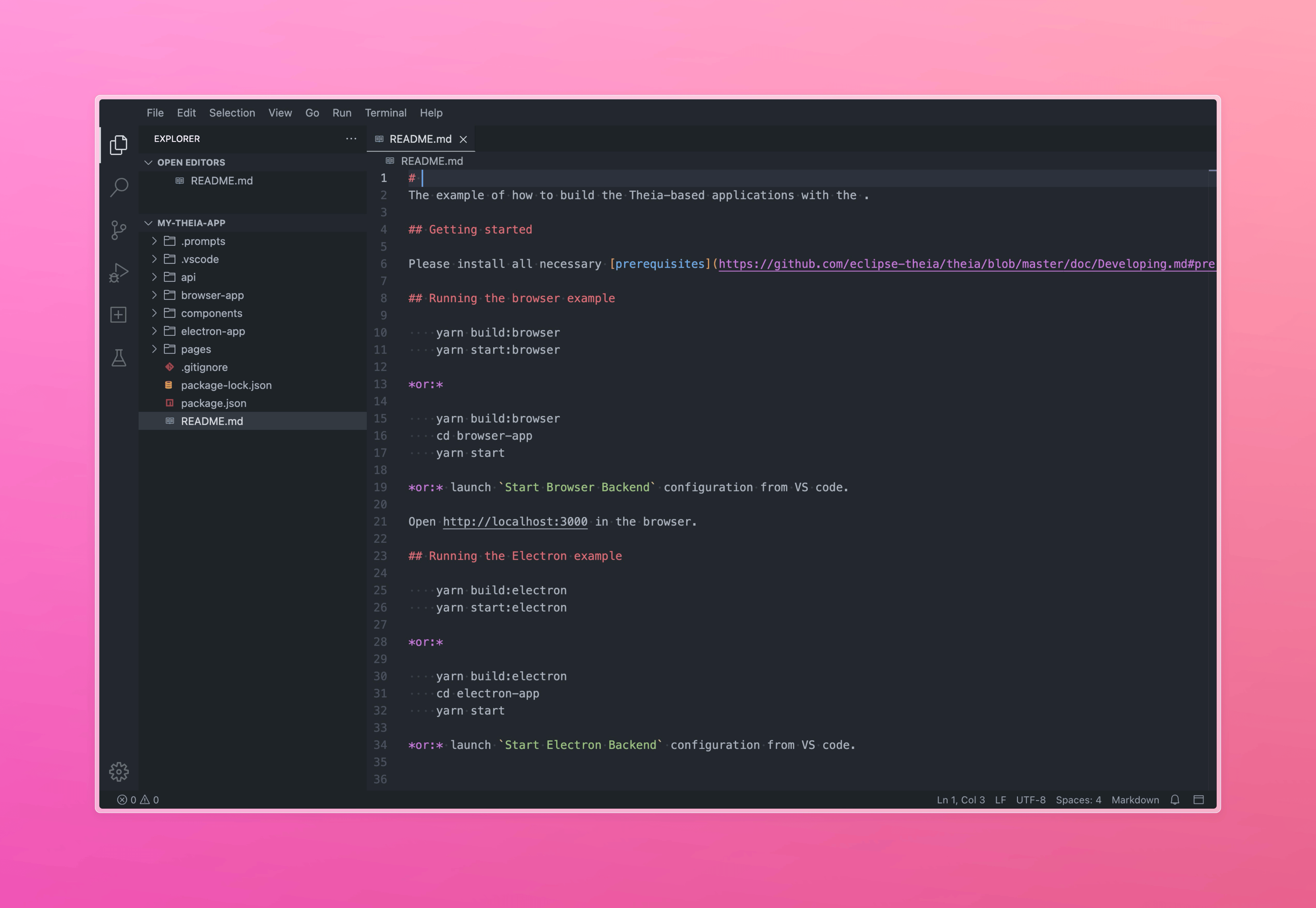
All plugins create so-called contributions — special classes that extend the behavior of the IDE. There are different types of contributions, the most popular of which are:
FrontendApplicationContribution– Adding logic at startup, after loading the UI, lifecycle hooksCommandContribution– Adding new commands (which can then be linked to buttons, shortcuts, etc.)MenuContribution– Adding items to the menu (File, Edit, etc.)KeybindingContribution– Linking commands to hotkeys
I don't need any views except files, search, terminal, and output. Fortunately, Theia has a built-in mechanism for filtering Contributions, which we will use to disable those we don't need.
We will make all changes through our custom-ui plugin, which was created when deploying the IDE at the beginning of the article.
Create a contribution-filters file:
~/theia/custom-ui/src/frontend/contribution-filters.ts
import { ContributionFilterRegistry, FilterContribution } from '@theia/core/lib/common';
import { injectable, interfaces } from '@theia/core/shared/inversify';

// Run Test Contribution
import { TestOutputViewContribution } from '@theia/test/lib/browser/view/test-output-view-contribution';
import { TestResultViewContribution } from '@theia/test/lib/browser/view/test-result-view-contribution';
import { TestRunViewContribution } from '@theia/test/lib/browser/view/test-run-view-contribution';
import { TestViewContribution } from '@theia/test/lib/browser/view/test-view-contribution';

const filtered = [
    TestViewContribution,
    TestRunViewContribution,
    TestResultViewContribution,
    TestOutputViewContribution,
];

@injectable()
export class RemoveFromUIFilterContribution implements FilterContribution {
    registerContributionFilters(registry: ContributionFilterRegistry): void {
        registry.addFilters('*', [
            (contrib) => {
                return !filtered.some(c => contrib instanceof c);
            },
        ]);
    }
}

export function registerFilters({ bind, rebind }: { bind: interfaces.Bind; rebind: interfaces.Rebind }): void {
    bind(FilterContribution).to(RemoveFromUIFilterContribution).inSingletonScope();
}
And call registerFilters in index.ts.
~/theia/custom-ui/src/frontend/index.ts
import { ContainerModule } from '@theia/core/shared/inversify';

import { registerFilters } from './contribution-filters';

export default new ContainerModule((bind, unbind, isBound, rebind) => {
    // Filter out modules we don't want to see in the editor
    registerFilters({ bind, rebind });
});
In this code, we:
- Register our RemoveFromUIFilterContribution class in the filter list
bind(FilterContribution).to(RemoveFromUIFilterContribution).inSingletonScope() - Inside the class, in the registerContributionFilters method, we add filters for all Contributions declared in the filtered list
- We added all Contributions related to testing functionality to the filtered
By analogy, we filter out all other functionality that you don't need. Unfortunately, there is no complete list of all possible Contributions, so you have to search for the names and paths to the files in the theia-ide repository.
For myself, I filtered the following list of contributions:
- debug
- test
- scm
- outline
- hierarchy
- problems
- plugins
- tasks
- notebook
- window
After you create the filter, be sure to run the Reset Workbench Layout command, because without resetting, the contributions will continue to apply.

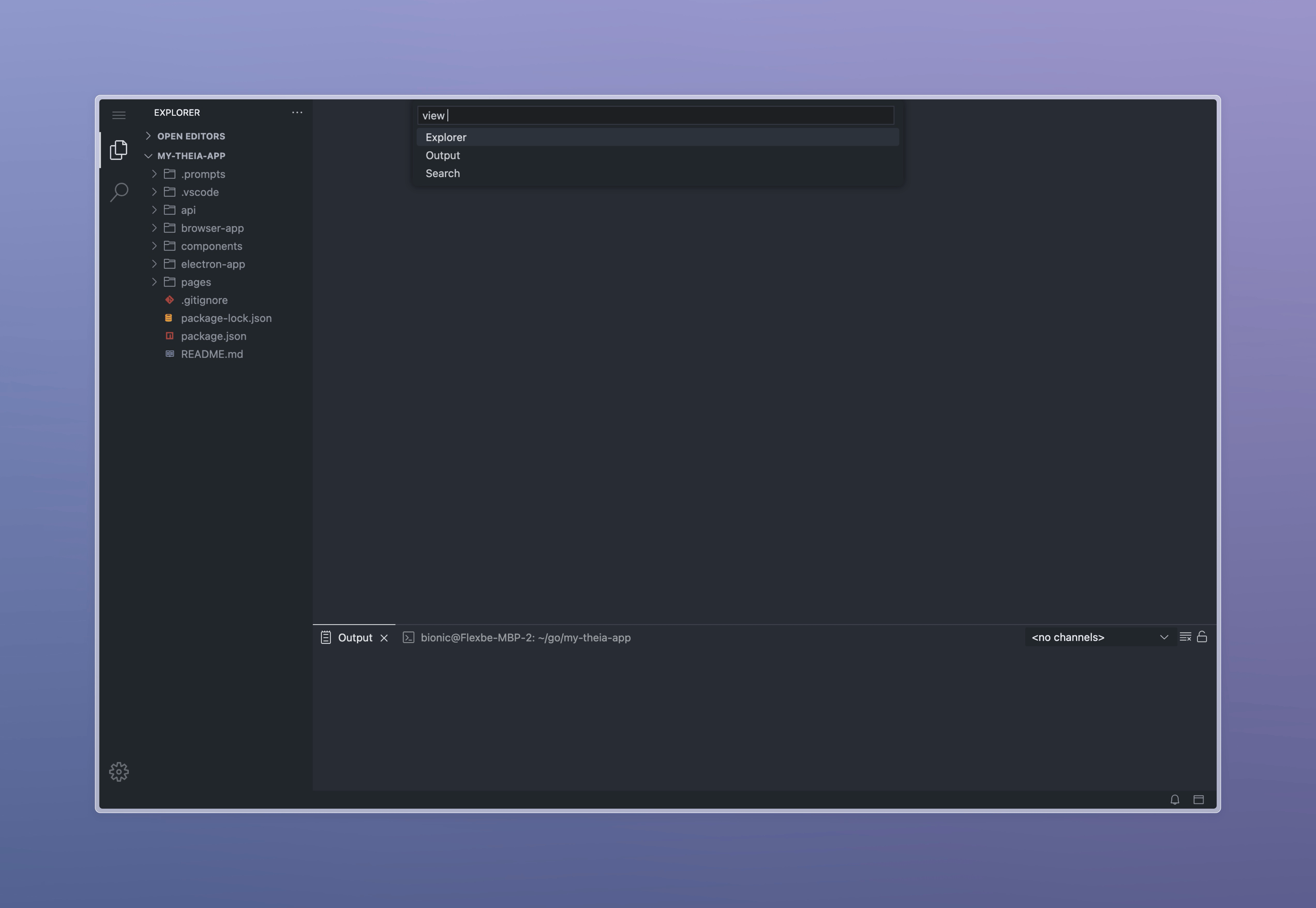
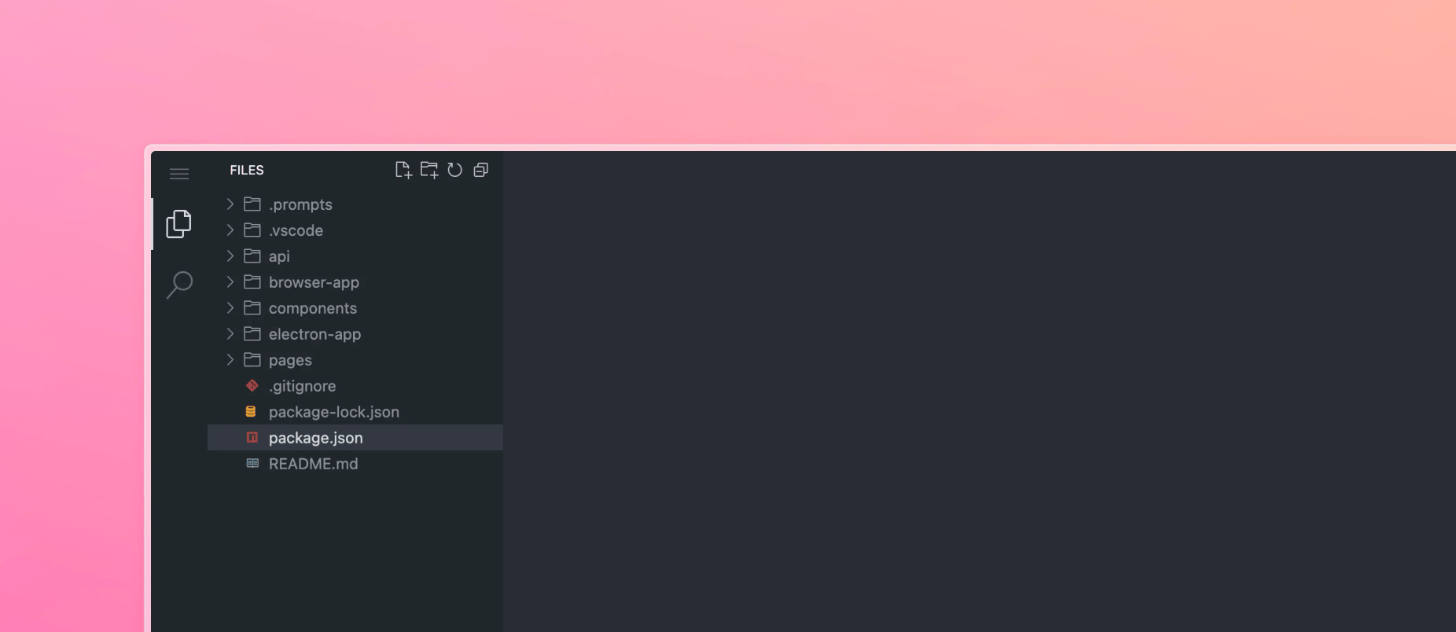
In my case, without all the modules I don't need, the editor looks much simpler and contains only four views (Explorer, Search, Output, Terminal):
Adding and Removing Commands and Menus
We have removed some functionality, but the menus and commands still contain dozens of actions that I want to hide from the user of my IDE.
To do this, we will create our own CommandContribution and MenuContribution.
~/theia/custom-ui/src/frontend/commands-contribution.ts
import { CommonCommands, CommonMenus } from '@theia/core/lib/browser';
import { Command, CommandContribution, CommandRegistry, MenuContribution, MenuModelRegistry, nls } from '@theia/core/lib/common';
import { inject, type interfaces } from '@theia/core/shared/inversify';
import { FileNavigatorContribution } from '@theia/navigator/lib/browser/navigator-contribution';
import { SearchInWorkspaceFrontendContribution } from '@theia/search-in-workspace/lib/browser/search-in-workspace-frontend-contribution';
import { TerminalCommands, TerminalMenus } from '@theia/terminal/lib/browser/terminal-frontend-contribution';
import { WorkspaceCommands } from '@theia/workspace/lib/browser';

import { TOGGLE_OUTPUT_COMMAND } from './register-command-contribution';

export const SHOW_EXPLORER_COMMAND = Command.toLocalizedCommand({
    id: 'fileNavigator:activate',
    label: 'Files',
});

export const SHOW_SEARCH_COMMAND = Command.toLocalizedCommand({
    id: 'searchInWorkspace:activate',
    label: 'Search',
});

class MyCommandsContribution implements CommandContribution, MenuContribution {
    @inject(FileNavigatorContribution)
    protected readonly fileNavigatorContribution!: FileNavigatorContribution;

    @inject(SearchInWorkspaceFrontendContribution)
    protected readonly searchInWorkspaceFrontendContribution!: SearchInWorkspaceFrontendContribution;

    registerCommands(registry: CommandRegistry): void {
        // Register spy to log any commands
        this._spyCommands(registry);

        // Remove about comand + menu
        registry.unregisterCommand(CommonCommands.ABOUT_COMMAND);

        // Remove workspace commands
        registry.unregisterCommand(WorkspaceCommands.OPEN_WORKSPACE);
        registry.unregisterCommand(WorkspaceCommands.OPEN_WORKSPACE_FILE);
        registry.unregisterCommand(WorkspaceCommands.OPEN_RECENT_WORKSPACE);
        registry.unregisterCommand(WorkspaceCommands.SAVE_WORKSPACE_AS);

        // Register Open Explorer and Search commands
        registry.registerCommand(SHOW_EXPLORER_COMMAND, {
            execute: async() => this.fileNavigatorContribution.openView({ activate: true, reveal: true }),
        });

        registry.registerCommand(SHOW_SEARCH_COMMAND, {
            execute: async() => this.searchInWorkspaceFrontendContribution.openView({ activate: true, reveal: true }),
        });

        // No-op for NEW_UNTITLED_TEXT_FILE to prevent empty file creation on double click
        registry.registerCommand(CommonCommands.NEW_UNTITLED_TEXT_FILE, {
            execute: () => null,
        });
    }

    registerMenus(menus: MenuModelRegistry): void {
        // Remove Menu -> Help
        menus.unregisterMenuAction(CommonMenus.HELP.at(-1) as string, CommonMenus.HELP.slice(0, -1));

        // Remove Menu -> Terminal
        menus.unregisterMenuAction(TerminalMenus.TERMINAL.at(-1) as string, TerminalMenus.TERMINAL.slice(0, -1));

        // Remove Menu -> View (will be recreated)
        menus.unregisterMenuAction(CommonMenus.VIEW.at(-1) as string, CommonMenus.VIEW.slice(0, -1));

        // Recreate: Menu -> View
        menus.registerSubmenu(CommonMenus.VIEW, nls.localizeByDefault('View'));

        // Create Menu -> View -> Explorer
        menus.registerMenuAction(CommonMenus.VIEW_VIEWS, {
            commandId: SHOW_EXPLORER_COMMAND.id,
            label: SHOW_EXPLORER_COMMAND.label,
            order: 'a',
        });

        // Create Menu -> View -> Search
        menus.registerMenuAction(CommonMenus.VIEW_VIEWS, {
            commandId: SHOW_SEARCH_COMMAND.id,
            label: SHOW_SEARCH_COMMAND.label,
            order: 'b',
        });

        // Create Menu -> View -> Output
        menus.registerMenuAction(CommonMenus.VIEW_VIEWS, {
            commandId: TOGGLE_OUTPUT_COMMAND.id,
            label: TOGGLE_OUTPUT_COMMAND.label,
            order: 'c',
        });

        // Create Menu -> View -> Terminal
        menus.registerMenuAction(CommonMenus.VIEW_VIEWS, {
            commandId: TerminalCommands.TOGGLE_TERMINAL.id,
            label: TerminalCommands.TOGGLE_TERMINAL.label,
            order: 'd',
        });
    }

    private _spyCommands(registry: CommandRegistry): void {
        const original = registry.executeCommand.bind(registry);

        registry.executeCommand = async(name: string, ...args: any[]) => {
            console.log(
                '[FLEXBE-UI] Command executed: %c%s%c with args:',
                'color: #1976d2; font-weight: bold;',
                name,
                '',
                args
            );

            return original(name, ...args);
        };
    }
}

export function initCommands({ bind, rebind }: { bind: interfaces.Bind; rebind: interfaces.Rebind }): void {
    bind(CommandContribution).to(MyCommandsContribution).inSingletonScope();
}
Add initCommands to index.ts.
~/theia/custom-ui/src/frontend/index.ts
import { ContainerModule } from '@theia/core/shared/inversify';

import { registerFilters } from './contribution-filters';
import { initCommands } from './commands-contribution';

export default new ContainerModule((bind, unbind, isBound, rebind) => {
    // Filter out modules we don't want to see in the editor
    registerFilters({ bind, rebind });

    // Register or unregister commands and menus
    initCommands({ bind, rebind });
});
Please note how we access fileNavigatorContribution using InversifyJS.
This code:
- Installs a spy that will log every command in the dev console, which will help you find the commands you want to delete
- Deletes some of the commands related to working with the workspace
- Deletes the About item from the commands
- Deletes the Help menu
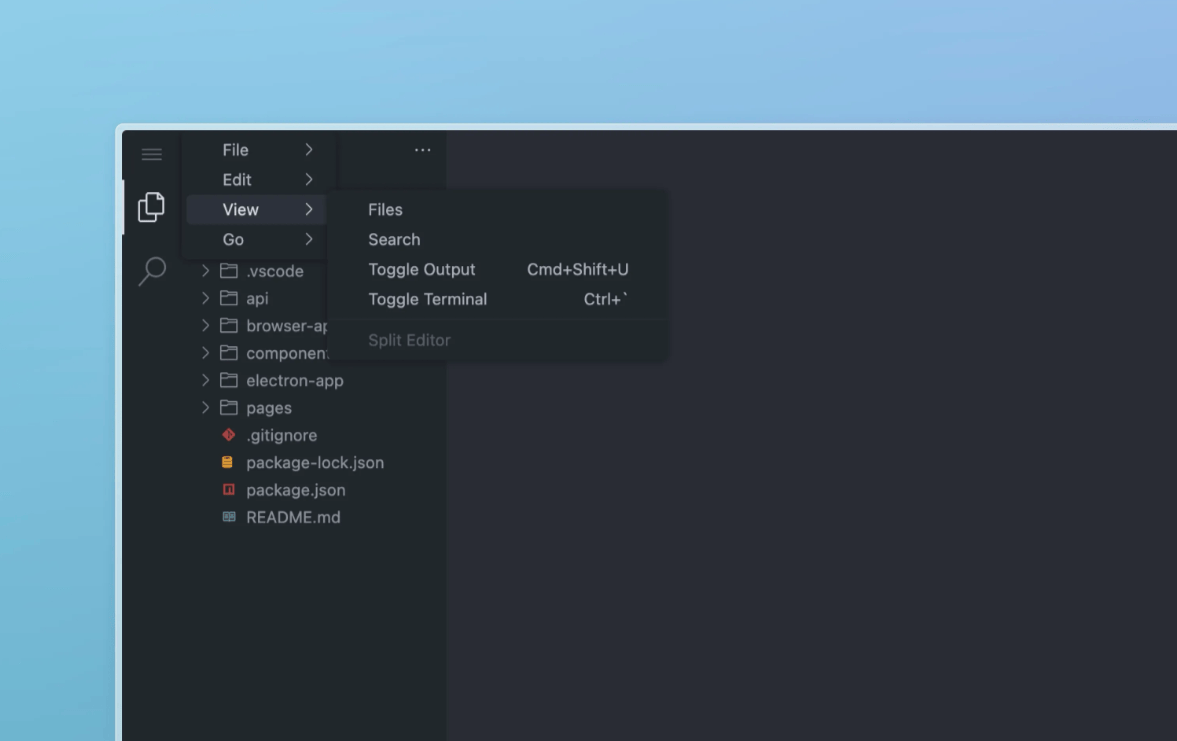
- Removes the View menu and recreates it with custom commands (Files, Search, Terminal)
Same way, you can clean up everything you don't need and rearrange the actions and menu items to your liking:
Disabling the Open Editors Widget
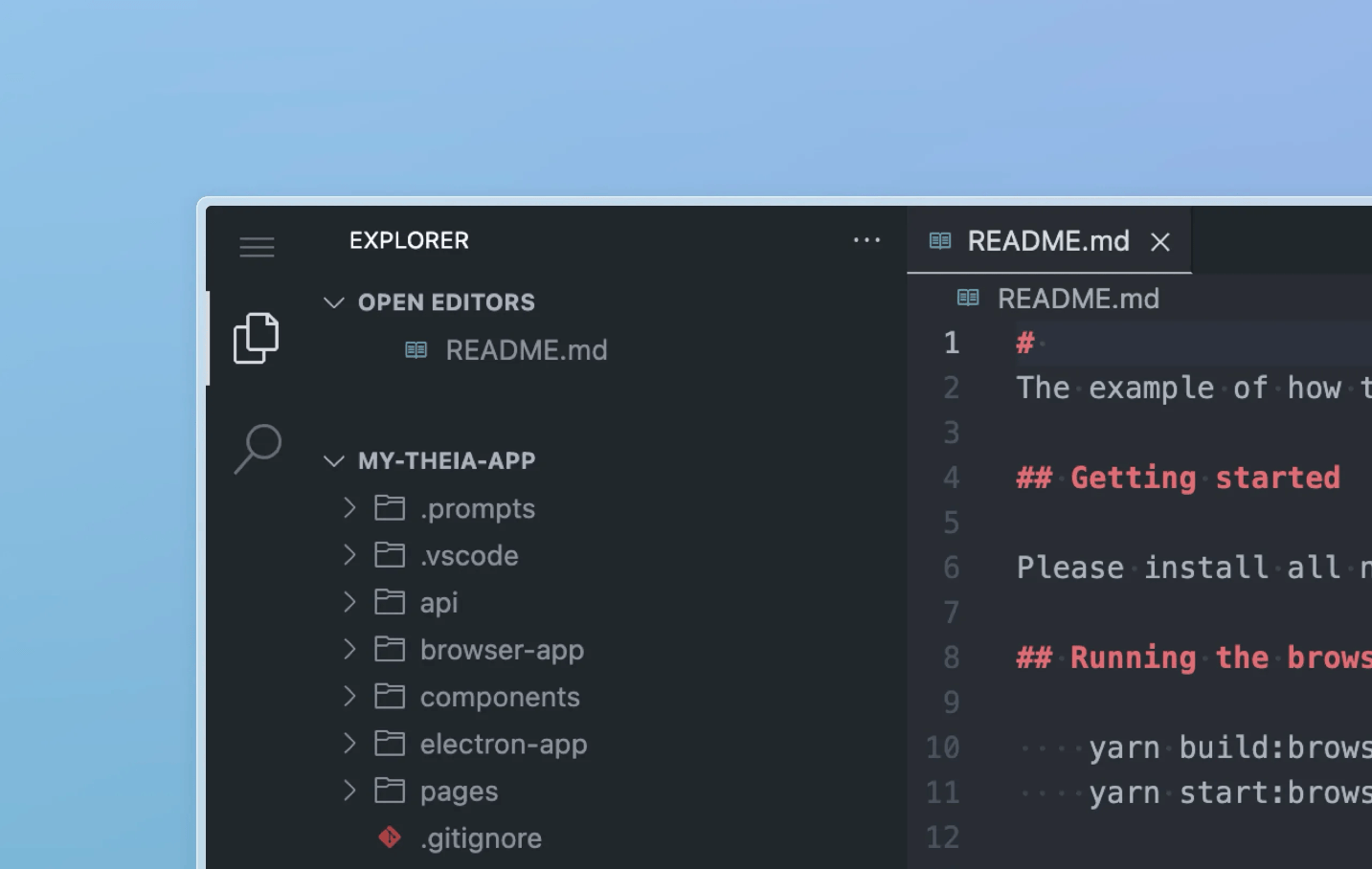
By default, the Explorer tab contains not only the file tree but also the Open Editors widget, which can be temporarily hidden but cannot be permanently deleted. We will remove it by patching the Explorer code itself, and at the same time, we will look at the process of replacing widgets. Also, I will prevent Explorer from being deleted from the panel.
Create the navigator-widget-factory.ts file:
~/theia/custom-ui/src/frontend/navigator-widget-factory.ts
import { injectable, type interfaces } from '@theia/core/shared/inversify';
import { EXPLORER_VIEW_CONTAINER_ID, EXPLORER_VIEW_CONTAINER_TITLE_OPTIONS, FILE_NAVIGATOR_ID, NavigatorWidgetFactory as TheiaNavigatorWidgetFactory } from '@theia/navigator/lib/browser';

import type { ViewContainer } from '@theia/core/lib/browser';

export function initFileNavigator({ bind, rebind }: { bind: interfaces.Bind; rebind: interfaces.Rebind }): void {
    rebind(TheiaNavigatorWidgetFactory).to(NavigatorWidgetFactory).inSingletonScope();
}

@injectable()
export class NavigatorWidgetFactory extends TheiaNavigatorWidgetFactory {
    protected override fileNavigatorWidgetOptions: ViewContainer.Factory.WidgetOptions = {
        order: 0,
        // NOTE: Disable hiding from container
        canHide: false,
        initiallyCollapsed: false,
        weight: 120,
        disableDraggingToOtherContainers: true,
    };

    override async createWidget(): Promise<ViewContainer> {
        const viewContainer = this.viewContainerFactory({
            id: EXPLORER_VIEW_CONTAINER_ID,
            progressLocationId: 'explorer',
        });

        viewContainer.setTitleOptions({
            ...EXPLORER_VIEW_CONTAINER_TITLE_OPTIONS,
            label: '',
            // NOTE: Don't allow remove explorer from action bar
            closeable: false,
        });

        const navigatorWidget = await this.widgetManager.getOrCreateWidget(FILE_NAVIGATOR_ID);

        viewContainer.addWidget(navigatorWidget, this.fileNavigatorWidgetOptions);

        // NOTE: Removed open editors widget
        // const openEditorsWidget = await this.widgetManager.getOrCreateWidget(OpenEditorsWidget.ID);
        // viewContainer.addWidget(openEditorsWidget, this.openEditorsWidgetOptions);

        return viewContainer;
    }
}
Add initFileNavigator to index.ts.
~/theia/custom-ui/src/frontend/index.ts
import { ContainerModule } from '@theia/core/shared/inversify';

import { registerFilters } from './contribution-filters';
import { initCommands } from './commands-contribution';
import { initFileNavigator } from './navigator-widget-factory';

export default new ContainerModule((bind, unbind, isBound, rebind) => {
    // Filter out modules we don't want to see in the editor
    registerFilters({ bind, rebind });

    // Register or unregister commands and menus
    initCommands({ bind, rebind });

    // EXPLORER: Rebind Navigation factory to remove open editors widget
    initFileNavigator({ bind, rebind });
});
In this case, the NavigatorWidgetFactory factory in the createWidget method creates a container for widgets consisting of two widgets: Explorer and Open Editors. We simply comment out the code that creates Open Editors and leave only Explorer. However, we can also create any widget and insert it into the container we need.
Using InversifyJS, we replace the NavigatorWidgetFactory built into Theia with our copy of the class, in which we simply override the widget parameters and the createWidget function that creates the widget itself:
rebind(TheiaNavigatorWidgetFactory).to(NavigatorWidgetFactory).inSingletonScope();
In fact, we are saying to Dependency Injection System — “Take the class registered in the container by the key TheiaNavigatorWidgetFactory (the class itself is specified as the key, but it can be a symbol or a string) and replace it with our version of NavigatorWidgetFactory (also make it a singleton i.e create it only once)”
This way, we can replace almost any classes built into Theia and patch any functionality in it.
But I'll go a little further. I'm making a cloud IDE, and the user will work with a fixed temporary folder on the server. The folder name will be the project ID, and I don't want the user to see that name. Instead, I want to write simply “Files,” so I'll replace the method in the widget that sets this title:
@injectable()
export class FileNavigatorWidget extends TheiaFileNavigatorWidget {
    protected override doUpdateRows(): void {
        super.doUpdateRows();

        this.title.label = nls.localizeByDefault('Files');
    }
}
Because of how FileNavigator works, overriding FileNavigatorWidget is a bit trickier, and just rebind isn't enough:
...
import { createFileTreeContainer } from '@theia/filesystem/lib/browser';
import { EXPLORER_VIEW_CONTAINER_ID, EXPLORER_VIEW_CONTAINER_TITLE_OPTIONS, FILE_NAVIGATOR_ID, FileNavigatorModel, FileNavigatorWidget as TheiaFileNavigatorWidget, NavigatorDecoratorService, NavigatorWidgetFactory as TheiaNavigatorWidgetFactory } from '@theia/navigator/lib/browser';

import { FILE_NAVIGATOR_PROPS } from '@theia/navigator/lib/browser/navigator-container';
import { FileNavigatorTree } from '@theia/navigator/lib/browser/navigator-tree';
...

export function initFileNavigator({ bind, rebind }: { bind: interfaces.Bind; rebind: interfaces.Rebind }): void {
    // EXPLORER: Rebind Navigation factory to remove open editors widget
    rebind(TheiaNavigatorWidgetFactory).to(NavigatorWidgetFactory).inSingletonScope();

    // EXPLORER: Patched files widget
    bind(WidgetFactory).toDynamicValue(({ container }) => ({
        id: FILE_NAVIGATOR_ID,
        createWidget: () => {
            return createFileTreeContainer(container, {
                // NOTE: This is our overrided widget
                widget: FileNavigatorWidget,
                // NOTE: This is standard Theia classes
                tree: FileNavigatorTree,
                model: FileNavigatorModel,
                decoratorService: NavigatorDecoratorService,
                props: FILE_NAVIGATOR_PROPS,
            }).get(FileNavigatorWidget);
        },
    })).inSingletonScope();
}
In this code, we register a function for WidgetFactory to create a widget with ID = FILE_NAVIGATOR_ID. In the widget creation code, we call createFileTreeContainer in the same way as in the Theia code itself, but pass our patched FileNavigatorWidget as the widget.
The best way to understand how to override widget code is to find how it is originally created and binded in the plugin's source code.
We do the same with the Search by Project widget so that it cannot be removed from the panel.
Great, now it's much cleaner:
Removing Unnecessary Actions From Output
The bottom panel with output mode will be mandatory in my application, so I will need to disable the removal of Output from the panel. I also don't need the clear and scroll lock icons on the right side:
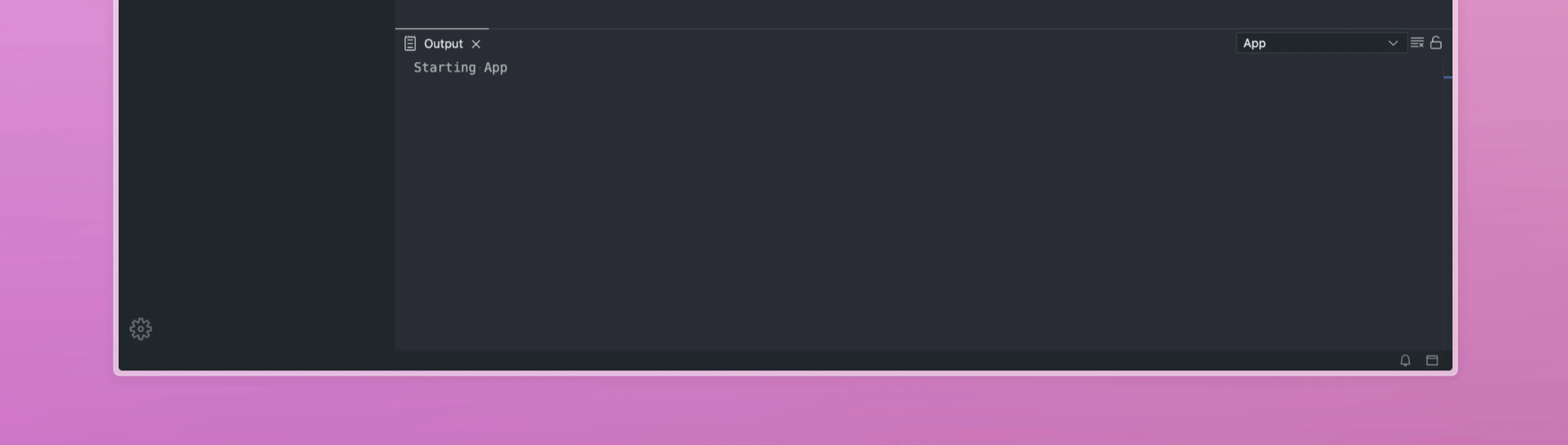
To fix this, let's create a file output-toolbar-contribution.ts.
~/theia/custom-ui/src/frontend/output-toolbar-contribution.ts
import { injectable, type interfaces } from "@theia/core/shared/inversify";
import { OutputToolbarContribution as TheiaOutputToolbarContribution } from "@theia/output/lib/browser/output-toolbar-contribution";
import { OutputWidget as TheiaOutputWidget } from '@theia/output/lib/browser/output-widget';
import { OutputCommands } from '@theia/output/lib/browser/output-commands';

import type { TabBarToolbarRegistry } from "@theia/core/lib/browser/shell/tab-bar-toolbar";

export function initOutputContribution({ bind, rebind }: { bind: interfaces.Bind; rebind: interfaces.Rebind }): void {
    bind(OutputToolbarContribution).toSelf().inSingletonScope();
    rebind(TheiaOutputToolbarContribution).toService(OutputToolbarContribution);
    rebind(TheiaOutputWidget).to(OutputWidget).inSingletonScope();
}

@injectable()
export class OutputWidget extends TheiaOutputWidget {
    // NOTE: Locked by default
    protected _state: TheiaOutputWidget.State = { locked: true };

    constructor() {
        super();
        // NOTE: Don't show close
        this.title.closable = false;
    }
}

// Area in the right side of the output widget
@injectable()
export class OutputToolbarContribution extends TheiaOutputToolbarContribution {
    override registerToolbarItems(toolbarRegistry: TabBarToolbarRegistry): void {
        super.registerToolbarItems(toolbarRegistry);

        // NOTE: Hide clear, lock, unlock buttons
        toolbarRegistry.unregisterItem(OutputCommands.CLEAR__WIDGET.id);
        toolbarRegistry.unregisterItem(OutputCommands.LOCK__WIDGET.id);
        toolbarRegistry.unregisterItem(OutputCommands.UNLOCK__WIDGET.id);
    }
}
And as usual, add initOutputContribution to index.ts.
~/theia/custom-ui/src/frontend/index.ts
import { ContainerModule } from '@theia/core/shared/inversify';

import { registerFilters } from './contribution-filters';
import { initCommands } from './commands-contribution';
import { initFileNavigator } from './navigator-widget-factory';
import { initOutputContribution } from './output/output-toolbar-contribution';

export default new ContainerModule((bind, unbind, isBound, rebind) => {
    // Filter out modules we don't want to see in the editor
    registerFilters({ bind, rebind });

    // Register or unregister commands and menus
    initCommands({ bind, rebind });

    // EXPLORER: Rebind Navigation factory to remove open editors widget
    initFileNavigator({ bind, rebind });

    // OUTPUT: Rebind Output widget to disable closing
    initOutputContribution({ bind, rebind });
});
In this code, we simply extend the functionality of OutputToolbarContribution → registerToolbarItems, removing unnecessary icons (or, conversely, adding your own in this method), and also override the closable flag of the widget header.
Most often, the Theia module code is so flexible that you can solve any task in such a simple way. The most difficult part here is finding the right place in the source code.
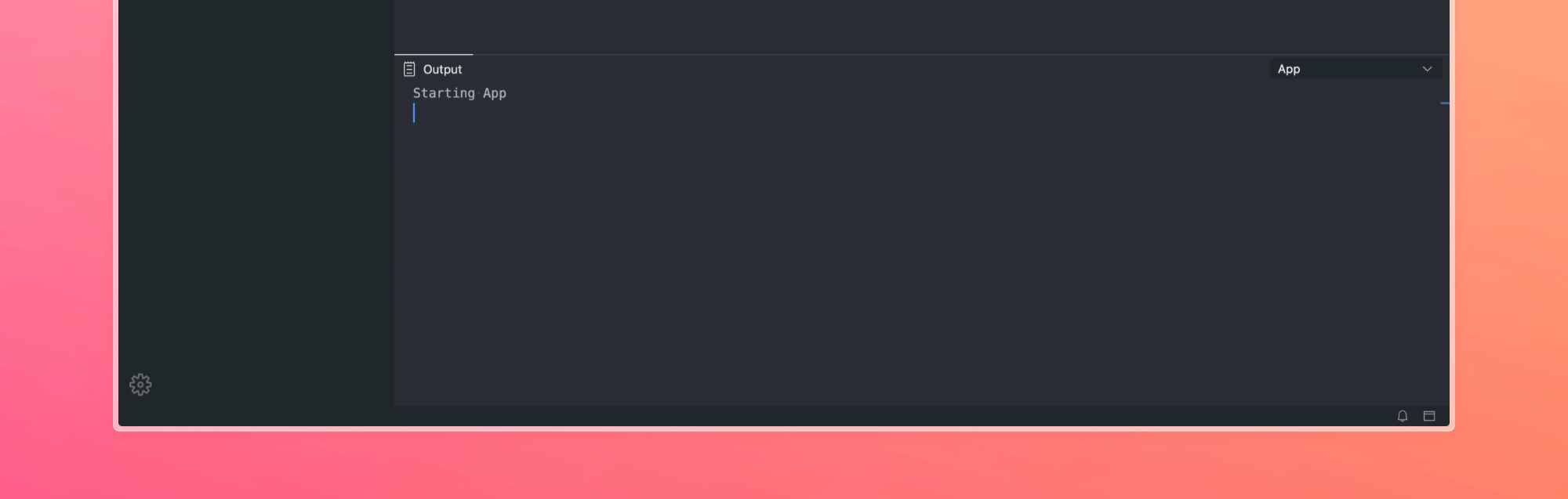
The result is that the tab cannot be closed, and the icons in the right panel have disappeared:
Customize the Interface
After cleaning up the main unnecessary fields in the IDE, you can start styling everything else. This is the most difficult and interesting process.
What Are My Goals?
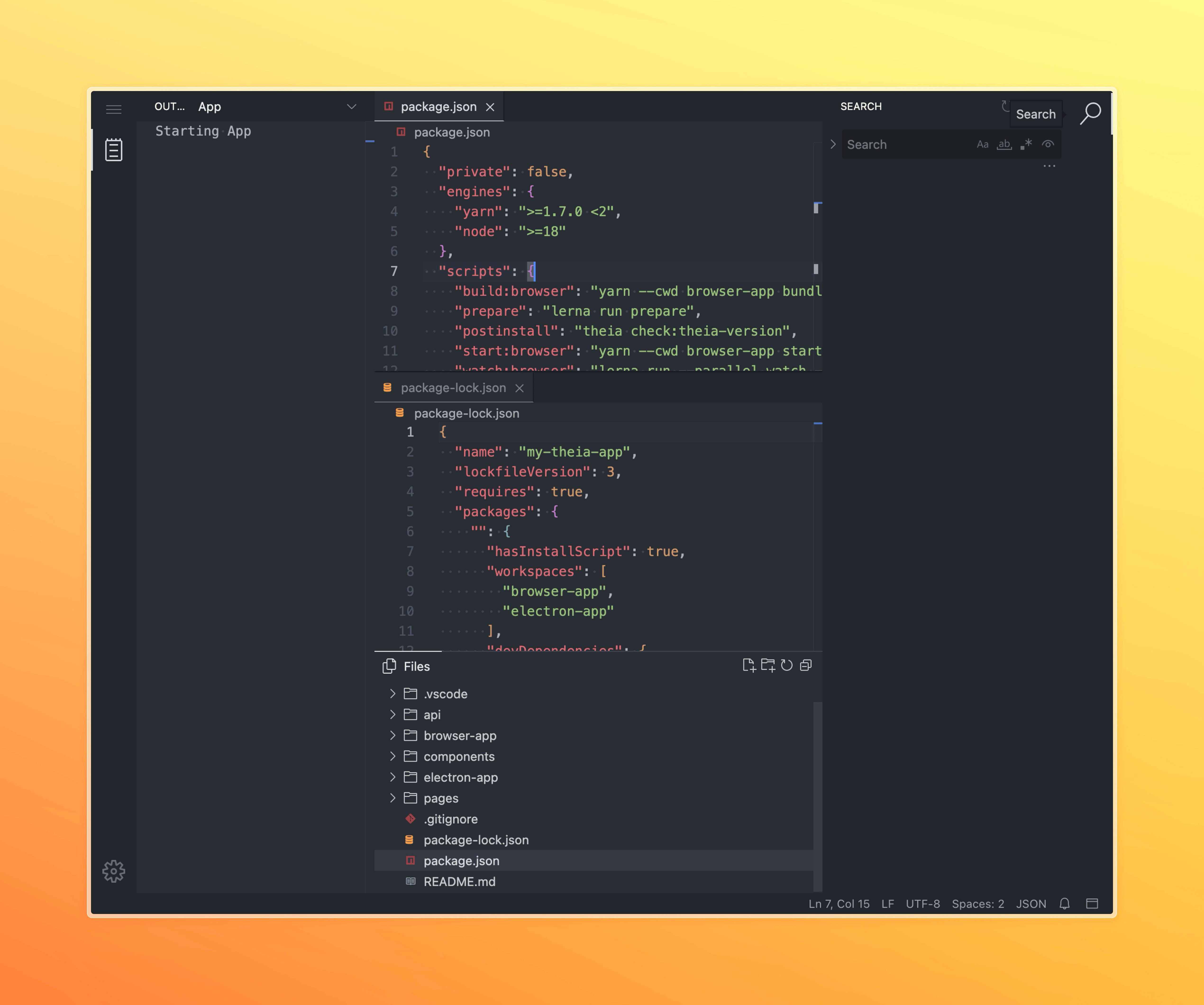
- Prevent widgets from being moved between panels. Currently, I can move the file widget down to the terminal and place the terminal in the left/right panel. I intend to prevent this behavior.
- Prevent the creation of the right panel altogether. I want all widgets (such as files and search) to always be in the left panel. Widgets such as the terminal and output should remain in the bottom panel.
- Prohibit split-screen in any direction except horizontal, because I don't really understand why anyone would want to split the editor vertically.
- Remove the side VSCode style panel and replace it with tabs like in the cursor, but with labels.
- Implement something similar to the new IntelliJ IDEA design — “many island style.”
An example of madness that is currently possible and that I will try to prohibit users from doing:
To achieve this, I will patch:
ApplicationShell– The main widget that collects everything in the IDE. By changing this class and the createLayout method, you can completely change the appearance of the basic IDE layout. For example, you can draw a custom toolbar or any widget.SidePanelHandler– A class that manages a dock panel and a related sidebar.FrontendApplicationContribution– We will create our own contribution to open the panels we need when opening the editor.
Disallowing Panel Movement
Let's create the application-shell.ts file:
~/theia/custom-ui/src/frontend/application-shell.ts
import {
    ApplicationShell as TheiaApplicationShell,
    FrontendApplication as TheiaFrontendApplication,
    FrontendApplicationContribution,
    Widget
} from '@theia/core/lib/browser';

import { TheiaDockPanel } from '@theia/core/lib/browser/shell/theia-dock-panel';
import { ElementExt } from '@theia/core/shared/@lumino/domutils';
import { injectable, postConstruct, type interfaces } from '@theia/core/shared/inversify';

export function initApplicationShell({ bind, rebind }: { bind: interfaces.Bind; rebind: interfaces.Rebind }): void {
    rebind(TheiaApplicationShell).to(ApplicationShell).inSingletonScope();
}

@injectable()
export class ApplicationShell extends TheiaApplicationShell {
    @postConstruct()
    protected init(): void {
        // Disable right / bottom panels (for dragging)
        this.options = {
            leftPanel: {
                ...this.options.leftPanel,
                initialSizeRatio: 0.25, // 25% of window width
            },
            bottomPanel: {
                ...this.options.bottomPanel,
                emptySize: 0,
                expandDuration: 0,
                initialSizeRatio: 0.2, // 20% of window height
            },
            rightPanel: {
                ...this.options.rightPanel,
                emptySize: 0,
                expandThreshold: 0,
                initialSizeRatio: 0,
            },
        };

        super.init();
        this.restrictDragging();
    }

    // NOTE: Right now is left :D
    getInsertionOptions(options?: TheiaApplicationShell.WidgetOptions) {
        if (options?.area === 'right') {
            options.area = 'left';
        }

        return super.getInsertionOptions(options);
    }

    // NOOP, dragging has been disabled
    override handleEvent(event: Event): void {
        switch (event.type) {
            case 'lm-dragenter':
            case 'lm-dragleave':
            case 'lm-dragover':
            case 'lm-drop':
                return;
        }

        return super.handleEvent(event);
    }

    /**
     * Restrict dragging from/to bottom panel
     */
    protected restrictDragging(): void {
        const proto = TheiaDockPanel.prototype as any;

        if (proto._patchedDropBlocker) {
            return;
        }

        const originalHandleEvent = proto.handleEvent;
        const originalShowOverlay = proto._showOverlay;
        const originalAddWidget = proto.addWidget;

        proto.handleEvent = function(event: Event & { source?: TheiaDockPanel }): any {
            const el = this.node;
            const toSidePanel = !!el.closest('.theia-side-panel');
            const toBottomPanel = !!el.closest('[id="theia-bottom-content-panel"]');

            // @ts-ignore
            const isNotFromDockPanel = !event.source;

            // @ts-ignore
            const fromBottomPanel = !!(event.source?.id === 'theia-bottom-content-panel');

            // Don't allow to drag from outside of the dock panel (allow only dragging between dock panels)
            if (isNotFromDockPanel) {
                return;
            }

            // Any kind of dragging has been disabled for bottom panel
            if (fromBottomPanel || toBottomPanel) {
                return;
            }

            // Cant drop to side panels
            if (toSidePanel && ['lm-dragenter', 'lm-dragleave', 'lm-dragover', 'lm-drop'].includes(event.type)) {
                return;
            }

            return originalHandleEvent.call(this, event);
        };

        // Don't allow to show overlay on top/bottom of the dock panel
        proto._showOverlay = function(this: DockPanel, clientX: number, clientY: number): string {
            const zone = originalShowOverlay.call(this, clientX, clientY) as string;
            const overlay = this.overlay;

            if (['widget-top', 'widget-bottom', 'root-top', 'root-bottom', 'widget-tab'].includes(zone)) {
                const box = ElementExt.boxSizing(this.node);

                overlay.show({
                    top: box.paddingTop,
                    left: box.paddingLeft,
                    right: box.paddingRight,
                    bottom: box.paddingBottom,
                });

                return 'widget-all';
            }

            return zone;
        };

        proto.addWidget = function(
            widget: Widget,
            options?: DockPanel.IAddOptions
        ): void {
            if (options?.mode === 'split-top' || options?.mode === 'split-bottom') {
                options.mode = 'tab-after';
            }

            return originalAddWidget.call(this, widget, options);
        };

        proto._patchedDropBlocker = true;
    }
}
And as always, we will write the initApplicationShell call to our container:
~/theia/custom-ui/src/frontend/index.ts
import { ContainerModule } from '@theia/core/shared/inversify';

import { initCommands } from './commands';
import { registerFilters } from './contribution-filters';
import { initApplicationShell } from './layout/application-shell';
import { initFileNavigator } from './navigator/navigator-widget-factory';
import { initOutputContribution } from './output/output-toolbar-contribution';
import { initSearchWidget } from './search/search-in-workspace-factory';

export default new ContainerModule((bind, unbind, isBound, rebind) => {
    // Filter out modules we don't want to see in the editor
    registerFilters({ bind, rebind });

    // Register or unregister commands and menus
    initCommands({ bind, rebind });

    // SEARCH: Rebind Search in workspace to disable dragging to other containers
    initSearchWidget({ rebind });

    // EXPLORER: Rebind Navigation factory to remove open editors widget
    initFileNavigator({ bind, rebind });

    // OUTPUT: Rebind Output widget to disable closing
    initOutputContribution({ bind, rebind });

    // Shell: Disable collapsing panels and dnd
    initApplicationShell({ bind, rebind });
});
What I'm doing here:
In the init method, I reset the emptySize and expandTreshold parameters for the right and bottom panels. This is necessary so that when the panels are closed, nothing can be dragged and dropped into them.
I also set initialSizeRatio to the desired percentage of the screen width/height so that when the layout is reset, the panel immediately occupies the width we need.
The getInsertionOptions method is called by widgets that attempt to open or be added to our layout. Instead of patching all possible widgets that are added to the right panel, we simply change this method and redefine right to left. Of course, you can implement any other logic or add more complex checks.
In the handleEvent method, I intercept and prevent drag-and-drop events between side panels. However, this is not enough to completely prevent the dragging of widgets, as you can still drag the Explorer/Terminal widget and drop it into the main area as a file, or drag any file tab to the bottom panel.
Finally, in the restrictDragging method, I prevent dragging from and to the bottom panel. The fact is that in Theia, the bottom panel, which usually contains Terminal/Output, is no different from the main panel where files are opened. Thus, any file can be dragged to the bottom panel, and the terminal can be dragged into files. ApplicationShell → handleEvent in turn, only blocked dragging to the side panels.
Here we are forced to apply a slightly dirtier patch and patch the DockPanel prototype directly. This is because DockPanel is not an injectable class and is not managed by the DI container.
Also, in the _showOverlay method, I prohibit the display of the overlay when moving files to the bottom of the window (Split Vertical). But to completely disable the Split functionality, except for vertical, we also need to return to the commands-contribution.ts file and disable the commands (this will remove them from the command palette and from the menu):
import { EditorCommands } from '@theia/editor/lib/browser';
import { TerminalCommands } from '@theia/terminal/lib/browser/terminal-frontend-contribution';

...

commands.unregisterCommand(TerminalCommands.SPLIT);
commands.unregisterCommand(EditorCommands.SPLIT_EDITOR_LEFT);
commands.unregisterCommand(EditorCommands.SPLIT_EDITOR_RIGHT);
commands.unregisterCommand(EditorCommands.SPLIT_EDITOR_DOWN);
commands.unregisterCommand(EditorCommands.SPLIT_EDITOR_UP);
commands.unregisterCommand(EditorCommands.SPLIT_EDITOR_VERTICAL);
// This is allowed
// commands.unregisterCommand(EditorCommands.SPLIT_EDITOR_HORIZONTAL);
...
Setting Default Shell Parameters
I want the editor to look a certain way when it is opened for the first time. Explorer, Search, and Output should be immediately available. Explorer and Output should be open right away.
To do this, we create the ShellInitContribution class:
import {
    DefaultFrontendApplicationContribution,
    DockPanel,
    Widget
} from '@theia/core/lib/browser';
import { FrontendApplicationStateService } from '@theia/core/lib/browser/frontend-application-state';
import { ElementExt } from '@theia/core/shared/@lumino/domutils';
import { inject, injectable } from '@theia/core/shared/inversify';
import { FileNavigatorContribution } from '@theia/navigator/lib/browser/navigator-contribution';
import { OutputContribution } from '@theia/output/lib/browser/output-contribution';
import { SearchInWorkspaceFrontendContribution } from '@theia/search-in-workspace/lib/browser/search-in-workspace-frontend-contribution';

@injectable()
export class ShellInitContribution extends DefaultFrontendApplicationContribution {
    @inject(FileNavigatorContribution)
    protected readonly navigatorContribution: FileNavigatorContribution;

    @inject(SearchInWorkspaceFrontendContribution)
    protected readonly searchContribution: SearchInWorkspaceFrontendContribution;

    @inject(OutputContribution)
    protected readonly outputContribution: OutputContribution;

    @inject(FrontendApplicationStateService)
    protected readonly appStateService: FrontendApplicationStateService;

    async onDidInitializeLayout(): Promise<void> {
        await this.openDefaultLayout();
    }

    async onStart(): Promise<void> {
        this.appStateService.onStateChanged((state) => {
            if (state === 'ready') {
                document.body.classList.add('theia-app-ready');
            }
        });
    }

    /**
     * Open default layout on theia load
     */
    protected async openDefaultLayout(): Promise<void> {
        // Force activate files + search + output (bottom)
        await this.navigatorContribution.openView({
            area: 'left',
            reveal: true,
            rank: 100,
        });

        await this.searchContribution.openView({
            area: 'left',
            reveal: false,
            rank: 200,
        });

        // Reveal output widget
        void this.outputContribution.openView({
            area: 'bottom',
            reveal: true,
        });
    }
}
And add it to our initApplicationShell:
export function initApplicationShell({ bind, rebind }: { bind: interfaces.Bind; rebind: interfaces.Rebind }): void {
    // Rebind application shell
    rebind(TheiaApplicationShell).to(ApplicationShell).inSingletonScope();

    // Shell init contribution
    bind(ShellInitContribution).toSelf().inSingletonScope();
    bind(FrontendApplicationContribution).toService(ShellInitContribution);
}
What happens in this code:
First, we call the openDefaultLayout method, in which we forcefully create and place explorer / search / output in the right places. Without this code, the user may not have the Search widget added to the panel, and the functionality will be unavailable until the user manually calls it via Menu → View → Show Search. The same applies to other views. I also specify reveal: true for explorer and output, which means that they must be forcibly displayed even if they were collapsed before.
The method is called from the onDidInitializeLayout method, which is called only when the editor is first loaded or after the “Reset Workbench Layout” command. If you move the call to the onStart method, the layout will be reset each time the editor is opened.
Second, in the onStart method, we wait for the editor to fully load and add the theia-app-ready class to the body. I found this useful for further work with CSS, especially when it comes to managing transitions/animations and preventing flickering and animations until the editor is fully loaded.
Be sure to execute the “Reset Workbench Layout” command after all changes to make sure everything works:

Removing the Left Side Panel
Now my task is to remove the left panel that takes up space and replace it with a more minimalistic panel at the top, similar to how it looks in Cursor. I'm also going to remove the Preferences icon located in the lower right corner. And I will place the burger menu somewhere based on the residual principle.
To do this, we need to patch SidePanelHandler — the class responsible for creating the sidebar:
import '@/frontend/style/side-panel.less';

import { BoxLayout, BoxPanel, Panel, SidePanelHandler as TheiaSidePanelHandler, type SideTabBar } from '@theia/core/lib/browser';
import { injectable } from '@theia/core/shared/inversify';

/**
 * Move side panel to top
 */
@injectable()
export class SidePanelHandler extends TheiaSidePanelHandler {
    protected override createSideBar(): SideTabBar {
        const sideBar = super.createSideBar();

        // Dont allow to move icons
        sideBar.tabsMovable = false;

        sideBar.removeClass('theia-app-left');
        sideBar.removeClass('theia-app-right');
        sideBar.addClass('theia-app-top');

        return sideBar;
    }

    protected override createContainer(): Panel {
        this.tabBar.orientation = 'horizontal';

        const side = this.side;

        // flexbox column layout
        const sidePanelLayout = new BoxLayout({ direction: 'top-to-bottom', spacing: 0 });
        // widget:container > layout:sidePanelLayout > [widget:headerPanel, widget:toolBar, widget:dockPanel]
        const container = new BoxPanel({ layout: sidePanelLayout });
        // Panel with burger, tabs, settings icons
        const headerPanel = new Panel();

        BoxPanel.setStretch(headerPanel, 0); // Fixed width for burger icon
        sidePanelLayout.addWidget(headerPanel);

        // Widget title with buttons (like Files [new] [collapse])
        BoxPanel.setStretch(this.toolBar, 0);
        sidePanelLayout.addWidget(this.toolBar);

        // Widget container (like Navigator, Search, ...)
        BoxPanel.setStretch(this.dockPanel, 1); // Stretch dock panel
        sidePanelLayout.addWidget(this.dockPanel);

        // Navigator, Search, ...
        BoxPanel.setStretch(this.tabBar, 1); // Stretch tabs
        headerPanel.addWidget(this.tabBar);

        // Menu burger icon
        BoxPanel.setStretch(this.topMenu, 0); // Fixed width for burger icon
        headerPanel.addWidget(this.topMenu);

        headerPanel.addClass('theia-header-panel');
        container.id = `theia-${ side }-content-panel`;

        return container;
    }

    // Disable collapse
    override async collapse(): Promise<void> {}
}
And as usual, we register our class in the initApplicationShell method:
export function initApplicationShell({ bind, rebind }: { bind: interfaces.Bind; rebind: interfaces.Rebind }): void {
    ...
    // Side panel handler
    bind(SidePanelHandler).toSelf();
    rebind(SidePanelHandlerFactory).toAutoFactory(SidePanelHandler);
}
The changes here are extremely simple:
- Redefine createSideBar to remove theia-app-left/theia-app-right classes and add our theia-app-top class instead
- Set tabsMovable = false to prevent sorting and dragging tabs on this panel
- We override the collapse method to empty to prevent the panel from closing when the active tab is clicked again
- We override createContainer to place the toolbar at the top instead of on the side.
Let's take a closer look at the last one. Theia uses the Lumino framework to render basic interface elements, panels, tabs, and more.
Lumino is a framework for building window interfaces in a browser with tabs, layouts, panels, drag-and-drop, events, and signals. It's similar to old IDE toolkits like Qt, but written in TypeScript. All elements are absolutely positioned, and the framework itself decides how to arrange the elements relative to each other.
Essentially, Lumino provides two entities:
Layout is a system that controls the placement of child widgets within another widget. Lumino supports different types of layouts (e.g., PanelLayout, BoxLayout, DockLayout) for vertical/horizontal placement with resizing, tabs, and complex interfaces, as in an IDE.
Widget is the basic building block of the UI. It manages its DOM element and lifecycle: mounting, showing, hiding, deleting, and resizing. Everything you see on the screen is a widget. The framework provides a number of widgets for building interfaces, such as BoxPanel, SplitPanel, DockPanel, TabBar, etc., but most of them are just widgets with a pre-set layout. A widget only needs a layout to draw its child widgets.
So, if you need something like FlexBox, you use Widget + BoxLayout (or just the BoxPanel widget).
Also, you can create your own widget with any logic inside, including rendering any content using your favorite framework. For example, a widget that allows you to render a SolidJS component would look something like this:
import { Widget } from '@lumino/widgets'
import { render } from 'solid-js/web'
import { createSignal } from 'solid-js'
import type { Component } from 'solid-js'
import type { Message } from '@lumino/messaging'

type Merge<A, B> = Omit<A, keyof B> & B

export class SolidWidget<P = {}> extends Widget {
    private disposeSolid?: () => void
    private Component: Component<Merge<P, { updateSignal: () => number }>>
    private props: P
    private update: () => void
    private updateSignal: () => number

    constructor(Component: Component<any>, props: P) {
        super()
        this.Component = Component
        this.props = props
        this.addClass('solid-widget')
        this.setFlag(Widget.Flag.DisallowLayout)

        const [updateSignal, setUpdate] = createSignal(0)
        this.updateSignal = updateSignal
        this.update = () => setUpdate(x => x + 1)
    }

    protected onAfterAttach(msg: Message): void {
        this.disposeSolid = render(() => (
            <this.Component {...this.props as any} updateSignal={this.updateSignal} />
        ), this.node)
    }

    protected onBeforeDetach(msg: Message): void {
        this.disposeSolid?.()
    }

    protected onUpdateRequest(msg: Message): void {
        this.update()
    }

    protected onCloseRequest(msg: Message): void {
        this.dispose()
    }
}
By the way, Theia already has a built-in ReactWidget, and some of the built-in plugins (such as AI integration) already use it. You can look at their implementation to understand how to write your own widgets in React.
In the createContainer() code, we create a container widget to which we attach sidePanelLayout containing three other widgets: headerPanel (Files / Search + Burger menu tabs), toolBar (a narrow strip with the name of the selected widget and action buttons), dockPanel (a container in which the widgets themselves are drawn).
In headerPanel, we add tabBar (tabs) and topMenu (container with burger menu).
We also set tabBar.orientation = ‘horizontal’ because the tabs will be arranged horizontally.
Similarly, you can override the createLayout / createMainPanel methods of the application shell itself or any other widget and completely redesign the entire IDE interface.
Also, pay attention to the import of the less file, create it, and describe custom styles:
~/theia/custom-ui/src/frontend/style/side-panel.less
:root {
    // Same color for activity bar as sidebar
    --theia-activityBar-background: var(--theia-sideBar-background) !important;

    --theia-tab-activeBackground: var(--theia-tab-hoverBackground) !important;
    // Button size and icon size
    --theia-private-sidebar-tab-width: 30px;
    --theia-private-sidebar-tab-height: 30px;
    --theia-private-sidebar-tabicon-width: 30px;

    --theia-private-sidebar-icon-size: 16px;

    // Gap between tabs
    --theia-private-sidebar-tab-gap: 5px;
    --theia-private-horizontal-tab-height: 36px;
}

// Set height of header panel
.theia-header-panel {
    display: flex;
    align-items: center;
    justify-content: space-between;
    min-height: var(--theia-horizontal-toolbar-height);
    background-color: var(--theia-activityBar-background);
    padding-inline: var(--theia-private-sidebar-tab-gap);
}

.lm-TabBar.theia-app-sides {
    /* Top tabs */
    display: flex;
    flex-direction: row;
    align-items: center;
    max-width: 100%;
    background: unset;

    /* Tabs container */
    .lm-TabBar-content {
        display: flex;
        gap: var(--theia-private-sidebar-tab-gap);
        cursor: default;
    }

    /* Tab */
    .lm-TabBar-tab {
        padding: 0;
        min-width: 0;
        min-height: 0 !important;
        max-height: var(--theia-private-sidebar-tab-height);
        border-radius: 7px;
        cursor: pointer;
        background-color: transparent;
        transition: all 0.18s ease;
    }

    /* Tab:hover */
    .lm-TabBar-tab:hover {
        background-color: var(--theia-tab-hoverBackground);
    }

    /* Tab:active */
    .lm-TabBar-tab.lm-mod-current {
        background-color: var(--theia-tab-activeBackground);
    }

    /* Button with icon and label */
    .lm-TabBar-tab .theia-tab-icon-label {
        display: flex;
        align-items: center;
        justify-content: center;
        padding: 0 12px;
    }

    .lm-TabBar-tabIcon {
        width: var(--theia-private-sidebar-icon-size);
        height: var(--theia-private-sidebar-icon-size);
    }

    /* Label */
    .lm-TabBar-tabLabel {
        display: inline-flex;
        white-space: nowrap;
        margin-left: 8px;
    }
}
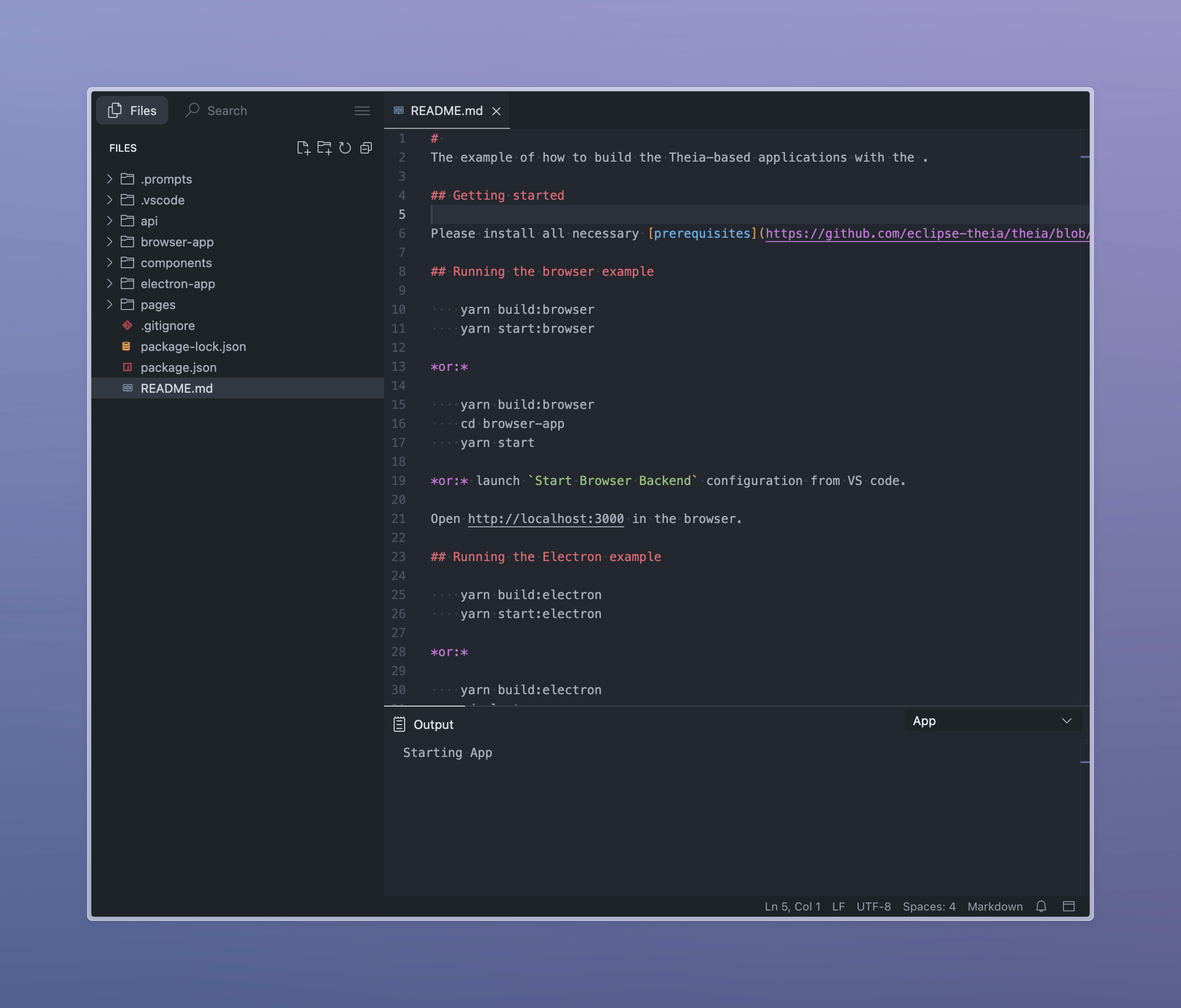
The result is that instead of taking up space horizontally, we now have neat tabs above the area:
Many Island Style
I really liked the new beta UI in IntelliJ IDEA, so I'll try to implement something similar.
In theory, it should be simple — just add a gap or margin between the main panels, round them, and set the background on the body that will show through the resulting gaps. However, since Theia uses the Lumino framework, which positions panels absolutely, we cannot set margins or gaps — they simply won't apply!
To achieve this, we will have to patch the createLayout method of the ApplicationShell class, which we already modified earlier. Let's add the following method to it:
import '@/frontend/style/application-shell.less';

...

export class ApplicationShell extends TheiaApplicationShell {
    ...
    /**
     * Create a custom layout for the application shell
     */
    protected createLayout(): Layout {
        const SPACING = 6;

        const bottomSplitLayout = this.createSplitLayout(
            [this.mainPanel, this.bottomPanel],
            [1, 0],
            { orientation: 'vertical', spacing: SPACING }
        );
        const panelForBottomArea = new TheiaSplitPanel({ layout: bottomSplitLayout });

        panelForBottomArea.id = 'theia-bottom-split-panel';

        const leftRightSplitLayout = this.createSplitLayout(
            [this.leftPanelHandler.container, panelForBottomArea, this.rightPanelHandler.container],
            [0, 1, 0],
            { orientation: 'horizontal', spacing: SPACING }
        );
        const mainIDEPanel = new TheiaSplitPanel({ layout: leftRightSplitLayout });

        mainIDEPanel.id = 'theia-main-ide-panel';

        return this.createBoxLayout(
            [this.topPanel, mainIDEPanel, this.statusBar],
            [0, 1, 0],
            { direction: 'top-to-bottom', spacing: 0 }
        );
    }
}
This method is a complete copy of the original method. All we have changed here is the spacing, which we pass to the createSplitLayout method. Spacing here works similarly to the CSS gap property. This is how we create the necessary indents between the left, center, and bottom panels. To create indents at the edges of the screen, we simply add a transparent border using CSS.
Next, we need to create and import a CSS file in which we will set the global background, frame the editor itself, and style the tabs:
~/theia/custom-ui/src/frontend/style/application-shell.less
body {
    // Tab height
    --theia-island-outer: 6px;
    --theia-island-spacing: 5px;
    --theia-island-border-radius: 10px;
    --theia-island-border-radius-xs: 5px;
    --theia-island-border-radius-sm: 7px;
    --theia-island-background: linear-gradient(135deg, #000000, #1c2526, #1a1313, #1a1313, #000000);

    // Menu bar (File, Edit, ...) and status bar must be transparent
    --theia-titleBar-activeBackground: transparent;
    --theia-titleBar-inactiveBackground: transparent;
    --theia-statusBar-background: transparent;
    --theia-statusBar-noFolderBackground: transparent;
    // Transparent background for tabs in the editor group header
    --theia-editorGroupHeader-tabsBackground: transparent;
    --theia-activityBar-background: transparent;

    // Button size and icon size
    --theia-private-sidebar-tab-width: 30px;
    --theia-private-sidebar-tab-height: 30px;
    --theia-private-sidebar-tabicon-width: 30px;
    --theia-private-sidebar-tab-gap: var(--theia-island-spacing);
    --theia-private-sidebar-icon-size: 16px;
    --theia-close-button-size: 20px;
    --theia-private-sidebar-tab-padding-top-and-bottom: 7px;
    --theia-private-sidebar-tab-padding-left-and-right: 7px;

    // Gap between tabs
    --theia-private-horizontal-tab-scrollbar-rail-height: 0px;
    --theia-private-horizontal-tab-height: 30px;

    --theia-horizontal-toolbar-height: calc(
        var(--theia-private-horizontal-tab-height) + var(--theia-island-spacing) * 2
    );

    // Override toolbar height
    --theia-override-toolbar-height: 30px;

    --theia-tab-activeBackground: fade(#fff, 10%);
    --theia-tab-hoverBackground: fade(#fff, 7%);
    --theia-list-inactiveSelectionBackground: fade(#fff, 10%);
    --theia-list-activeSelectionBackground: fade(#fff, 10%);
    --theia-list-hoverBackground: fade(#fff, 7%);
    --theia-tab-inactiveBackground: transparent;
}

body,
.monaco-editor,
.monaco-diff-editor,
.monaco-component {
    --vscode-editor-background: transparent !important;
    --vscode-editorGutter-background: transparent !important;
}

// Background color for the whole application shell
#theia-app-shell {
    background: var(--theia-island-background);
}

// Spacing around the main IDE panel
#theia-main-ide-panel {
    border: var(--theia-island-outer) solid transparent;
    // Remove top spacing due to spacing around tabs
    border-top: none;
}

// Remove bottom spacing if status bar is visible
#theia-main-ide-panel:has(+ #theia-statusBar:not(.lm-mod-hidden)) {
    border-bottom: none;
}

#theia-top-panel {
    .lm-Widget.lm-MenuBar {
        padding-inline: var(--theia-island-outer);
    }
}

#theia-statusBar {
    border: 0 !important;
}

// Rounded corners for the panels
#theia-left-content-panel,
#theia-main-content-panel,
#theia-bottom-content-panel {
    border-radius: var(--theia-island-border-radius);
    overflow: hidden;

    @supports (overflow: clip) {
        overflow: clip;
    }
}

/* File tree */
// Add inline padding to the tree container
.theia-TreeContainer {
    padding-inline: var(--theia-island-spacing);

    [data-item-index] {
        margin-bottom: 1px;
    }

    .theia-TreeNode {
        height: 28px;
        line-height: 28px;
        border-radius: var(--theia-island-border-radius-sm);
    }
}

/* Main tabs */
:is(#theia-main-content-panel, #theia-bottom-content-panel) {
    .lm-Widget.lm-TabBar {
        border: 0 !important;
    }

    .theia-tabBar-tab-row {
        display: flex;
        align-items: center;
    }

    .lm-TabBar-content {
        padding: var(--theia-island-spacing);
        gap: var(--theia-island-spacing);
    }

    .lm-TabBar-tab {
        border: 0 !important;
        box-shadow: none !important;
        height: var(--theia-private-horizontal-tab-height);
        border-radius: var(--theia-island-border-radius-sm);

        &.lm-mod-current {
            background: var(--theia-tab-activeBackground);
        }
    }

    .lm-TabBar-tab.lm-mod-closable > .lm-TabBar-tabCloseIcon,
    .lm-TabBar-tab.theia-mod-pinned > .lm-TabBar-tabCloseIcon {
        display: flex;
        align-items: center;
        justify-content: center;
        margin: 0 0 0 var(--theia-island-spacing);
        padding: 0;
        width: var(--theia-close-button-size);
        height: var(--theia-close-button-size);
        box-sizing: border-box;
    }

    .lm-TabBar-tab:not(.lm-mod-closable) > .lm-TabBar-tabCloseIcon {
        display: none;
    }
}

/* Main content panel */
#theia-main-content-panel {
    background: transparent;

    .lm-TabBar-content {
        padding-inline: 0;
    }

    .lm-Widget.lm-TabBar .lm-TabBar-tab:hover {
        background: var(--theia-tab-hoverBackground);
    }

    .lm-TabBar .lm-TabBar-tab.lm-mod-current {
        background: var(--theia-tab-activeBackground) !important;
    }

    .lm-Widget.lm-DockPanel-widget {
        border-radius: var(--theia-island-border-radius) var(--theia-island-border-radius) 0 0;
        overflow: hidden;
    }
}

/* Bottom tabs */
#theia-bottom-content-panel {
    .lm-Widget.lm-TabBar .lm-TabBar-tab {
        font-size: 12px;
        font-weight: 500;

        // Hide icons
        .lm-TabBar-tabIcon {
            display: none;
        }
    }
}

/* Other fixes */
.monaco-editor,
.monaco-diff-editor {
    padding-block: var(--theia-island-spacing);
    outline: 0 !important;
}

.lm-TabBar-toolbar {
    margin: 0;
    padding: 0 var(--theia-island-spacing);
}

.theia-select-component {
    min-height: 24px;
    border-radius: var(--theia-island-border-radius-sm);
}

.action-label {
    min-width: 18px;
    min-height: 18px;
    line-height: 18px;
    padding: 2px;
    box-sizing: content-box;
}

// Fix search input paddings
.t-siw-search-container {
    .searchHeader {
        padding: 0 9px;

        .search-field-container {
            border-radius: var(--theia-island-border-radius-sm);
        }
    }

    .theia-input {
        border-radius: var(--theia-island-border-radius-sm);
        padding: 3px 9px;
    }
}

.xterm .xterm-viewport {
    background: transparent !important;
}

// Hide logo in the top left corner
.theia-icon {
    display: none !important;
}
As a result:
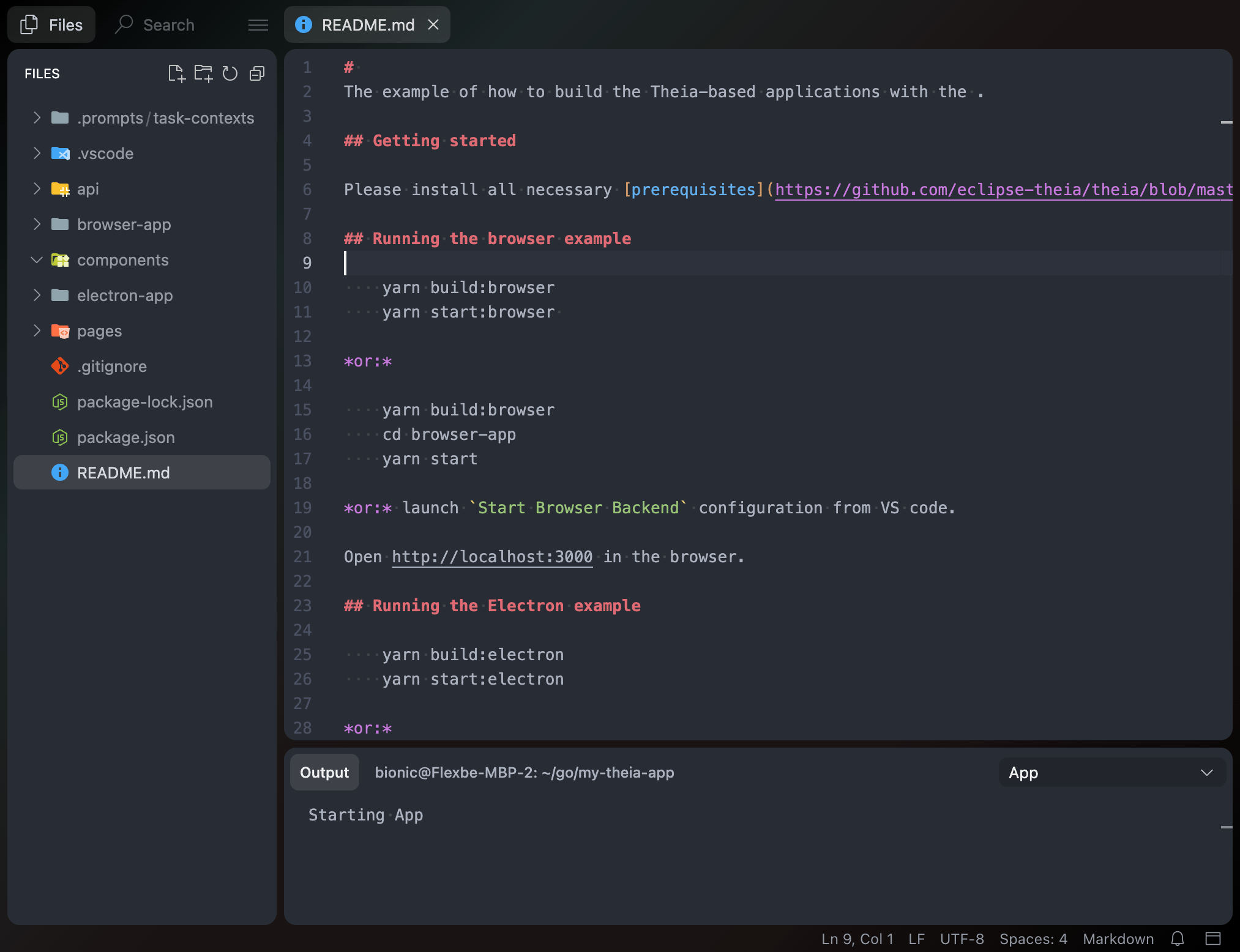
Now we have a clean, minimalistic, and modern UI for our Cloud IDE.
You can check out a live example and the full source code in this CodeSandbox demo.
Conclusion
We have examined some of the customization techniques for Theia IDE, and as can be seen from the work done, this platform offers many customization options, and the techniques described in this article are only a small part of its capabilities.
The most challenging part of the customization process is finding the location responsible for a particular feature. However, due to the modular architecture, finding the right place is usually quite obvious.
If you decide to create your own IDE and have questions, I recommend going to the Discussions section of the Theia GitHub repository. In my experience searching for answers to my questions, I realized that most of them had already been asked by other people and answered by Theia developers. If you haven't found the answer to your question, feel free to ask. In my experience, developers respond quickly and in detail to such questions.
Opinions expressed by DZone contributors are their own.
Comments