

Unified Intelligence: Mastering the Azure Databricks and Azure Machine Learning Integration
Bridge the gap between Big Data and production ML. Learn to integrate Azure Databricks with Azure Machine Learning for a seamless, scalable end-to-end MLOps workflow.
 CORE
·
CORE
·
Join the DZone community and get the full member experience.
Join For FreeIn the modern enterprise, the divide between data engineering and data science is often a primary bottleneck for innovation. Data engineers live in the world of distributed clusters, Spark, and ETL pipelines, while data scientists thrive in experimental environments, model tracking, and hyperparameter tuning.
Azure provides two powerhouse platforms to address these needs: Azure Databricks and Azure Machine Learning (Azure ML). While they share some overlapping features, their true potential is unlocked when integrated into a single, cohesive ecosystem. This article provides a deep-dive into why and how you should combine these technologies to build a production-grade Big Data ML pipeline.
The Architecture of Integration
To understand why we integrate these platforms, we must first look at the logical flow of a machine learning project. Data starts as raw, unstructured telemetry or transactional logs. It must be cleansed, transformed, and aggregated before a model can ever see it.
Azure Databricks is the industry-leading environment for this "Big Data" heavy lifting. Once the features are ready, Azure ML steps in as the governance and deployment layer, providing robust model versioning, endpoint management, and drift monitoring.
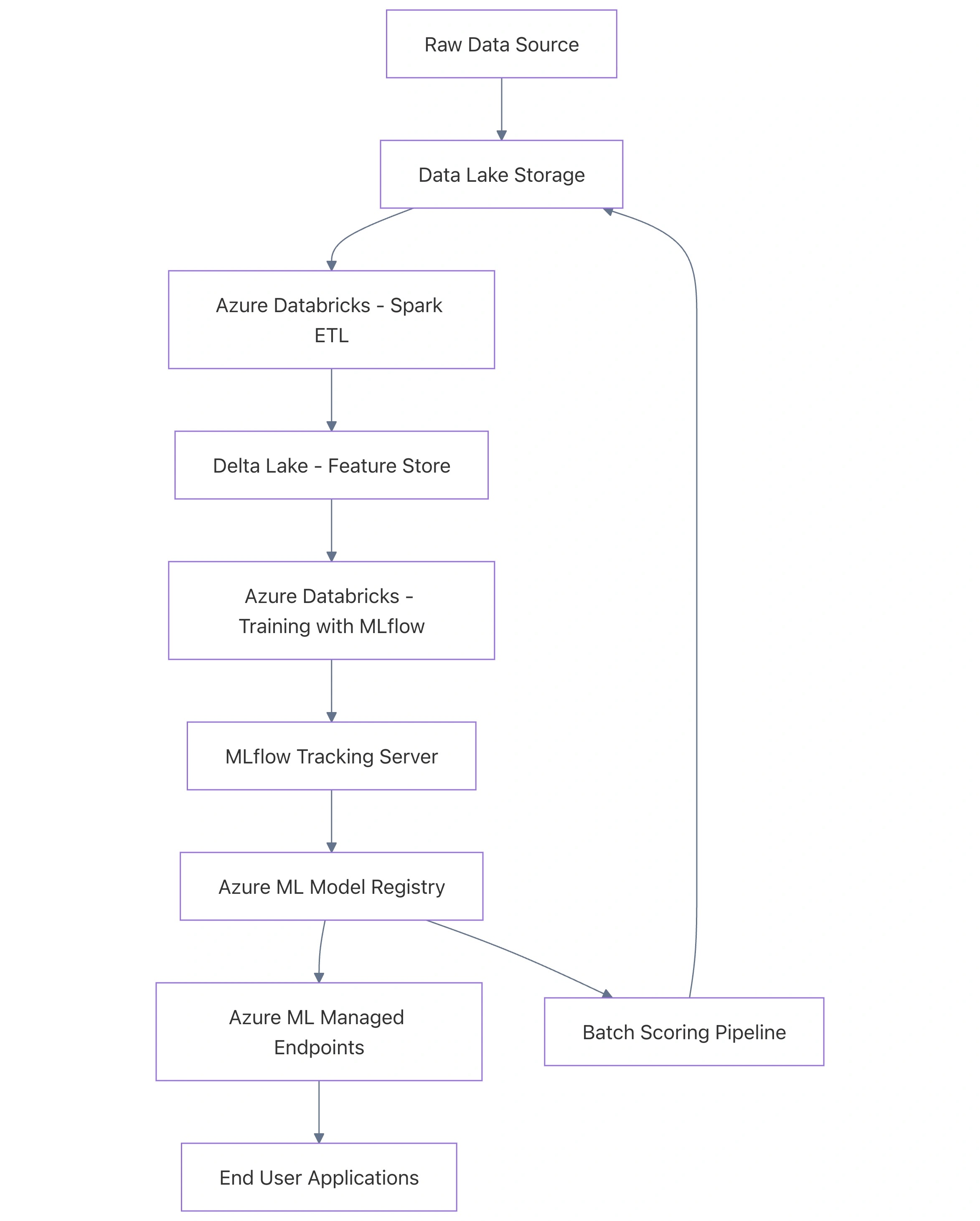
System Architecture Overview
Below is a conceptual architecture showing how data flows from storage through the two platforms to final consumption.
Why Integrate? Choosing the Right Tool for the Job
It is a common misconception that you must choose between Databricks and Azure ML. In reality, they are complementary. Azure Databricks excels at the "Data" part of Data Science, while Azure ML excels at the "Operations" (MLOps) part.
Comparison: Databricks vs. Azure ML
| Feature | Azure Databricks | Azure Machine Learning |
|---|---|---|
| Core Strength | Large-scale data processing & Spark | Model lifecycle, tracking, & deployment |
| Compute Engine | Apache Spark (Tungsten/Catalyst) | CPUs, GPUs, and Managed Clusters |
| Primary Language | PySpark, SQL, Scala, R | Python, R, CLI v2, YAML |
| Storage Integration | Native Delta Lake Support | Datastores and Data Assets |
| Model Management | Basic MLflow Registry | Advanced Registry with Governance |
| Deployment | Spark UDFs, Real-time (Preview) | Managed Online/Batch Endpoints |
Deep-Dive: The Integration Workflow
1. Data Preparation with Spark and Delta Lake
Before training, we need to process millions (or billions) of rows. Azure Databricks provides the collaborative workspace and optimized Spark runtime to do this efficiently. By using Delta Lake, we ensure ACID compliance and time-travel capabilities for our datasets.
Here is a practical example of preparing a feature set using PySpark in a Databricks notebook:
# Import necessary libraries
from pyspark.sql.functions import col, avg, window

# Load raw telemetry data from Azure Data Lake
raw_data = spark.read.format("parquet").load("abfss://[email protected]/telemetry/")

# Perform complex aggregations for feature engineering
# Example: Calculating rolling average of sensor data
feature_df = raw_data.groupBy(
    window(col("timestamp"), "1 hour"),
    col("device_id")
).agg(
    avg("temperature").alias("avg_temp"),
    avg("pressure").alias("avg_pressure")
)

# Save as a Delta Table for high-performance retrieval
feature_df.write.format("delta").mode("overwrite").saveAsTable("gold_telemetry_features")
This prepared Delta table acts as the source of truth for our training process.
2. Experiment Tracking with MLflow and Azure ML
One of the strongest points of integration is the MLflow Tracking URI. Databricks has a built-in MLflow tracking server, but we can configure it to log directly to our Azure ML Workspace. This allows data scientists to use the powerful interactive notebooks of Databricks while centralizing all experimental results in Azure ML for the DevOps teams to see.
Workflow Diagram: Tracking Logic

To link them, you must install the azureml-mlflow package on your Databricks cluster and set the tracking URI to your Azure ML workspace.
import mlflow
import azureml.core
from azureml.core import Workspace

# Connect to the Azure ML Workspace
ws = Workspace.get(
    name="aml-workspace-name",
    subscription_id="your-subscription-id",
    resource_group="your-resource-group"
)

# Get the MLflow tracking URI for the Azure ML Workspace
mlflow_tracking_uri = ws.get_mlflow_tracking_uri()
mlflow.set_tracking_uri(mlflow_tracking_uri)

# Start an experiment
mlflow.set_experiment("device_failure_prediction")

with mlflow.start_run():
    # Log parameters
    mlflow.log_param("n_estimators", 100)

    # Model training logic here...
    # model = RandomForestClassifier(...).fit(X_train, y_train)

    # Log metrics
    mlflow.log_metric("accuracy", 0.95)

    # Log the model specifically for Azure ML
    mlflow.sklearn.log_model(sk_model=model, artifact_path="model_artifacts")
3. Registering and Transitioning Models
Once a model is logged in Azure ML, it enters the official Model Registry. This is where the "Big Data" world hands the baton to the "Operations" world. In the registry, you can apply tags, version the model, and trigger CI/CD pipelines.
4. Deployment: Managed Endpoints
While Databricks can host models for real-time inference, Azure ML Managed Online Endpoints are often preferred for production. They offer built-in support for blue/green deployments, auto-scaling, and deep integration with Azure Monitor.
However, for Batch Scoring at the scale of petabytes, the best approach is to bring the model back into Databricks. You can load a model from the Azure ML Registry and apply it as a Spark User Defined Function (UDF).
# Loading a model from Azure ML Registry for Batch Inference in Databricks
import mlflow.pyfunc

model_name = "failure_prediction_model"
model_version = 1
model_uri = f"models:/{model_name}/{model_version}"

# Load as a Spark UDF
batch_udf = mlflow.pyfunc.spark_udf(spark, model_uri=model_uri)

# Apply to a massive Spark DataFrame
new_data = spark.table("silver_telemetry_latest")
predictions = new_data.withColumn("prediction", batch_udf(col("feature_1"), col("feature_2")))

# Write results back to the Data Lake
predictions.write.format("delta").save("/mnt/predictions/results")
Advanced MLOps: The CI/CD Bridge
To build a truly robust system, you should automate the movement between these environments. A typical MLOps pipeline using Azure DevOps or GitHub Actions would look like this:
- Code Commit: Scientist pushes a new notebook or Python script.
- Databricks Execution: A GitHub Action triggers a Databricks Job to run the training on the latest data.
- Model Logging: The job logs the model to the Azure ML Registry.
- Validation: A secondary Azure ML Pipeline runs an evaluation script against a test dataset.
- Deployment: If metrics exceed the current production model, the new model is deployed to an Azure ML Managed Online Endpoint.
Security and Networking Considerations
When dealing with enterprise data, security is paramount. Both Databricks and Azure ML must be configured to work within a Virtual Network (VNet).
- Private Links: Ensure that the communication between Databricks and the Azure ML Workspace happens over private endpoints, never leaving the Microsoft backbone network.
- Managed Identities: Use Azure Managed Identities for authentication instead of hardcoding service principal secrets in your notebooks.
- Data Access: Use Databricks Credential Passthrough or Unity Catalog to ensure that the user running the notebook only sees the data they are authorized to see in the Data Lake.
Component Relationship and Governance
With the introduction of Unity Catalog in Databricks, governance becomes even more streamlined. Unity Catalog provides a centralized access control layer for all data and AI assets.

Best Practices for the Integration
- Environment Parity: Ensure the Python libraries on your Databricks cluster match the environment defined in Azure ML for deployment. Discrepancies in library versions (e.g., scikit-learn 1.0 vs 1.2) are the leading cause of "it worked in the notebook but failed in production" issues.
- Small Data, Big Data: Use Databricks for the heavy data aggregation. Once you have a distilled feature set (e.g., 100GB or less), consider if you need a Spark cluster for training or if a single high-memory GPU node in Azure ML would be more cost-effective.
- Delta Sharing: Use Delta Sharing to securely share your feature tables with the Azure ML environment without moving or copying data.
- Logging Strategy: Don't just log accuracy. Log training time, data versions (using Delta version IDs), and feature importance. This metadata is invaluable when debugging model decay later.
Conclusion
The integration of Azure Databricks and Azure Machine Learning represents the pinnacle of Azure's data and AI strategy. By using Databricks for distributed data engineering and Azure ML for rigorous model management and deployment, organizations can overcome the scale limitations of traditional ML and the governance limitations of raw Spark environments.
This synergy allows for a "Best of Both Worlds" approach: the speed and scale of Apache Spark combined with the safety and operational excellence of Azure MLOps. As your data grows from gigabytes to petabytes, this architecture provides the foundation necessary to turn raw information into predictive intelligence at scale.
Key Takeaways
- Use Azure Databricks for ETL, feature engineering, and high-scale batch training.
- Use Azure ML for model versioning, deployment governance, and endpoint monitoring.
- Leverage MLflow as the communication bridge between the two platforms.
- Secure the entire pipeline using VNets and Managed Identities to meet enterprise compliance standards.
For more technical guides on Azure, AI architecture and implementation, follow:
Published at DZone with permission of Jubin Soni, FBCS. See the original article here.
Opinions expressed by DZone contributors are their own.
Comments