

The "Unified Manifest" Pattern: Automating Blue-Green Deployments on Kubernetes
Automate Kubernetes blue-green deployments with a unified manifest. This pattern eliminates configuration drift, zero downtime, and cuts manual release steps by 84%.
Join the DZone community and get the full member experience.
Join For FreeKubernetes rolling updates are the default, but they aren't always safe. Here is a pattern to implement automated, drift-free blue-green deployments by unifying your manifests and decoupling your build pipeline.
Kubernetes makes deployment easy with the default rolling update strategy. It progressively replaces old Pods with new ones, ensuring zero downtime in theory.
In practice, rolling updates can be risky. If your new version passes the liveness probe but fails under actual load (or runs out of resources during the "warm-up" phase), your users will experience errors before the rollback kicks in.
To guarantee zero downtime, blue-green deployment is superior. You deploy the new version (green) alongside the old one (blue), test it, and then switch the traffic instantly.
However, blue-green introduces a new headache: configuration drift. You now have to maintain two sets of manifests (blue.yaml and green.yaml). If a developer updates the DB connection string in blue but forgets green, the deployment fails, leading to costly rework.
This article outlines a "Unified Manifest" strategy that reduced manual deployment steps from 32 to 5 and eliminated configuration drift based on a recent case study for doing digital transformation of a large enterprise.
The Problem: The "Twin Manifest" Trap
In a manual blue-green setup, you maintain two parallel environments.
- Version 1.0 (blue) is live.
- Version 1.1 (green) is deployed for testing.
The issue arises during the update cycle. If you need to add a new environment variable (e.g., DB_TIMEOUT), you must update it in both the blue and green definitions.
Fujitsu’s research found that maintaining separate manifests led to a high rate of "rework costs." Specifically, if the synchronization between blue and green files was missed during the testing phase, the release had to be scrapped and restarted. They calculated this cost at nearly 20 person-days per year for a single project just due to YAML configuration errors.
Solution 1: The Unified Manifest Pattern
The first step to automation is to stop treating blue and green as different files. Instead, use a Single Source of Truth template.
We replace the hardcoded "blue" or "green" labels with a variable (e.g., %RELEASE% or ${DEPLOY_COLOR}). The CI/CD pipeline injects the correct color at runtime.
Old way (two files):
- deployment-blue.yaml: selector: app=myapp, color=blue
- deployment-green.yaml: selector: app=myapp, color=green
New way (unified template):
# unified-deployment.yaml
apiVersion: apps/v1
kind: Deployment
metadata:
  name: myapp-%RELEASE%
spec:
  replicas: 3
  selector:
    matchLabels:
      app: myapp
      color: %RELEASE%
  template:
    metadata:
      labels:
        app: myapp
        color: %RELEASE%
    spec:
      containers:
      - name: app-container
        image: myregistry.azurecr.io/myapp:v1.2.0
        env:
        - name: DB_HOST
          value: "shared-db-instance"
By using a single template, you guarantee that shared settings (like DB_HOST) are mathematically identical for both blue and green environments.
Solution 2: Decoupling Build From Deploy
A common anti-pattern is combining the "Docker Build" and "Kubernetes Deploy" into a single script. This makes blue-green impossible because you cannot redeploy the same artifact to a different color without rebuilding it.
The solution is to split the pipeline:
- CI pipeline (GitLab CI/Jenkins): Compiles code, runs unit tests, builds the Docker image, and pushes it to the Container Registry.
- CD pipeline (Azure DevOps/ArgoCD): References the image tag and handles the blue-green logic.
This ensures that the artifact running in the "green" (test) environment is binary-identical to what will run in "blue" (production).
Solution 3: The Automated Switch-Over Loop
Manual kubectl commands are prone to error. The Fujitsu team implemented an automated pipeline in Azure DevOps that executes the following logic:
- Identify current state: Check which color is live (e.g., blue).
- Deploy opposite: Deploy the unified manifest with the variable set to Green.
- Smoke test: Run automated validation against the Green service endpoint.
- Traffic switch: Update the main Service Load Balancer to point to Green.
- Cleanup: Delete the blue resources.
The Visualization
Here is how the unified flow works: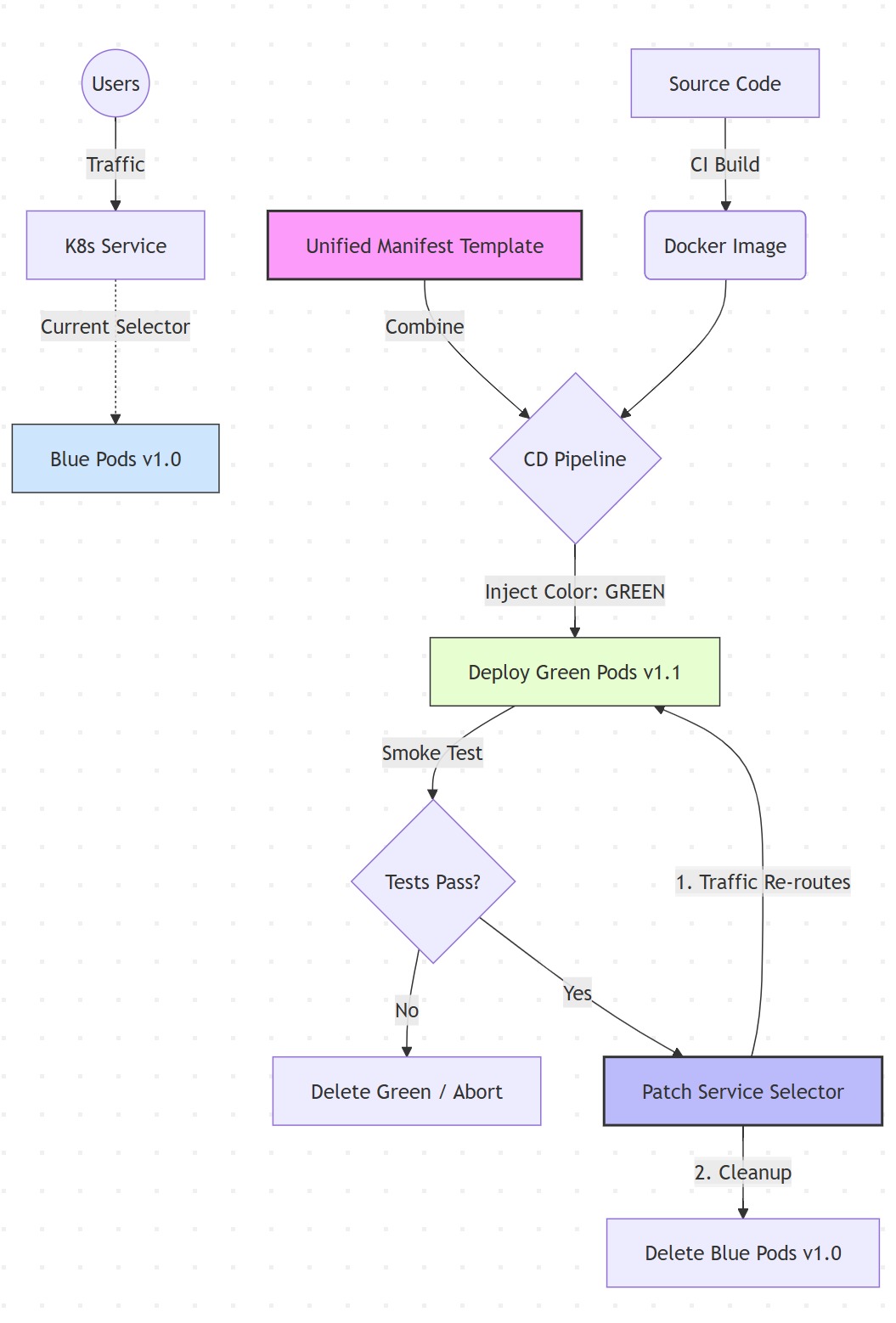
Implementation: The Pipeline Logic
Below is a conceptual example of how to implement the traffic switch using a simplified shell script within your CI/CD tool (e.g., Azure DevOps YAML task).#!/bin/bash
# 1. Detect Active Color
CURRENT_COLOR=$(kubectl get service myapp-service -o=jsonpath='{.spec.selector.color}')
if [ "$CURRENT_COLOR" == "blue" ]; then
NEW_COLOR="green"
else
NEW_COLOR="blue"
fi
echo "Current: $CURRENT_COLOR | Deploying: $NEW_COLOR"
# 2. Deploy New Color using the Unified Template
sed "s/%RELEASE%/$NEW_COLOR/g" unified-deployment.yaml | kubectl apply -f -
# 3. Wait for Rollout
kubectl rollout status deployment/myapp-$NEW_COLOR
# 4. Execute Smoke Tests (e.g., curl the specific pod IP)
./run_smoke_tests.sh $NEW_COLOR
if [ $? -ne 0 ]; then
echo "Tests Failed. Rolling back."
kubectl delete deployment myapp-$NEW_COLOR
exit 1
fi
# 5. Switch Traffic (Patch the Service)
kubectl patch service myapp-service -p "{\"spec\":{\"selector\":{\"color\":\"$NEW_COLOR\"}}}"
# 6. Cleanup Old Color
kubectl delete deployment myapp-$CURRENT_COLORResults and ROI
By moving from manual CLI operations to this automated, unified-manifest approach, the engineering team achieved significant efficiency gains:
- Operational efficiency: The number of manual steps required for a release dropped from 32 to 5.
- Risk reduction: The probability of "Manifest Drift" (where configuration differs between versions) dropped to 0%.
- Time savings: The "rework cost" caused by failed deployments was eliminated, saving estimated weeks of developer time per year.
Takeaways
Blue-green deployment is the gold standard for availability, but it incurs a "management tax." To pay that tax efficiently:
- Templatize: Never manually edit blue.yaml and green.yaml. Use a single deployment.yaml with variables.
- Decouple: Build your image once. Deploy it many times.
- Automate: The switch-over logic must be a script, not a human decision.
Opinions expressed by DZone contributors are their own.
Comments