

Argo Rollout and Deployment Strategies
Argo Rollouts is a Kubernetes controller and a part of the Argo project that provides advanced deployment capabilities for Kubernetes.
Join the DZone community and get the full member experience.
Join For FreeArgo Rollouts is a Kubernetes controller and a part of the Argo project that provides advanced deployment capabilities for Kubernetes. It enhances the deployment process by offering advanced strategies such as blue-green deployments, canary releases, and experimentation. Argo Rollouts allows you to manage the release process of your applications more effectively, ensuring minimal downtime and better control over how updates are rolled out.
Argo Rollouts (optionally) integrates with ingress controllers and service meshes, leveraging their traffic shaping abilities to gradually shift traffic to the new version during an update. Additionally, Rollouts can query and interpret metrics from various providers to verify key KPIs and drive automated promotion or rollback during an update.
Why Argo Rollouts?
The native Kubernetes Deployment Object supports the RollingUpdate strategy which provides a basic set of safety guarantees (readiness probes) during an update. However, the rolling update strategy faces many limitations:
- Few controls over the speed of the rollout
- Inability to control traffic flow to the new version
- Readiness probes are unsuitable for deeper, stress, or one-time checks
- No ability to query external metrics to verify an update
- Can halt the progression, but unable to automatically abort and rollback the update
For these reasons, in large-scale high-volume production environments, a rolling update is often considered too risky of an update procedure since it provides no control over the blast radius, may roll out too aggressively, and provides no automated rollback upon failures.
Controller Features
- Blue-Green update strategy
- Canary update strategy
- Fine-grained, weighted traffic shifting
- Automated rollbacks and promotions
- Manual judgement
- Customizable metric queries and analysis of business KPIs
- Ingress controller integration: NGINX, ALB
- Service Mesh integration: Istio, Linkerd, SMI
- Metric provider integration: Prometheus, Wavefront, Kayenta, Web, Kubernetes Jobs
Benefits of Argo Rollouts in Blue-Green and Canary Deployments
Blue-Green Deployments
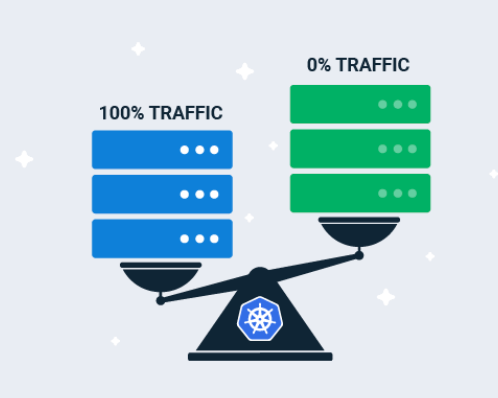
In a blue-green deployment, two identical environments (blue and green) are maintained. One environment (blue) serves the live production traffic while the other (green) is prepared with the new version of the application. Once the new version is tested and verified, traffic is switched from the blue environment to the green environment.
Benefits of Blue-Green Deployments With Argo Rollouts
- Minimized downtime: Traffic can be switched almost instantly between the blue and green environments, ensuring minimal downtime during deployment.
- Rollback capability: If any issues are detected with the new version, traffic can be switched back to the blue environment easily, enabling quick rollbacks.
- Easy testing and verification: The green environment allows for thorough testing and verification of the new release without affecting the live environment.
- Traffic management: Argo Rollouts integrates with service meshes like Istio and ingress controllers to manage traffic between blue and green environments seamlessly.
- Automation: Argo Rollouts automates the process of creating and managing blue-green deployments, reducing the manual effort required.
Canary Deployments
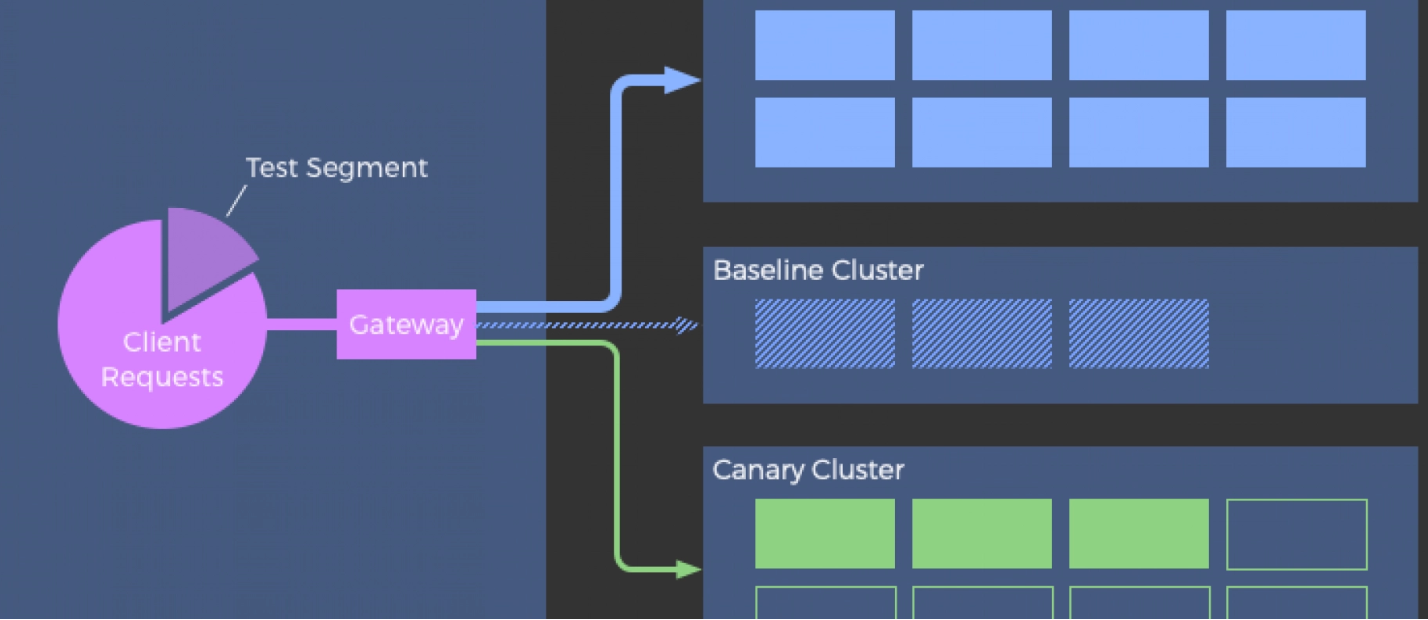
Canary deployments involve gradually rolling out a new version of an application to a subset of users before making it available to the entire user base. This allows for monitoring and testing of the new version in a controlled manner.
Benefits of Canary Deployments With Argo Rollouts
- Incremental rollouts: Argo Rollouts supports fine-grained control over the rollout process, allowing for incremental deployment to a small percentage of users initially.
- Monitoring and metrics: It integrates with monitoring tools (e.g., Prometheus) to gather metrics and monitor the health of the canary deployment, making it easier to detect issues early.
- Automated rollback: If the canary release causes problems, Argo Rollouts can automatically roll back to the previous version based on predefined metrics and thresholds.
- Traffic shaping: Argo Rollouts can leverage service meshes or ingress controllers to control the percentage of traffic routed to the canary version, providing precise traffic management.
- A/B testing and experiments: Enables A/B testing and experimentation by directing a portion of traffic to different versions and collecting performance data.
Automated Rollbacks
Automated rollbacks in Argo Rollouts refer to the capability of automatically reverting to a previous version of an application when issues are detected with a new deployment. This ensures that any deployment failures or performance issues can be quickly mitigated without manual intervention.
Key Features and Benefits
- Fault detection: Argo Rollouts continuously monitors the health and performance of deployments using metrics and thresholds defined in the rollout configuration.
- Automated reversion: Upon detecting issues (e.g., increased error rates, performance degradation), Argo Rollouts triggers an automated rollback to the last stable version of the application.
- Configurable policies: Administrators can define rollback policies based on various criteria, such as failure thresholds, response time degradation, or custom metrics from monitoring systems like Prometheus.
- Fast recovery: Automated rollbacks reduce downtime and mitigate the potential impact on users by swiftly reverting to a known good state of the application.
- Integration with Kubernetes ecosystem: Leveraging Kubernetes' native capabilities, Argo Rollouts integrates seamlessly with tools like Prometheus for monitoring and Istio for traffic management, enhancing visibility and control over deployments.
Automated Promotions
Automated promotions in Argo Rollouts involve automatically promoting a new version of an application through deployment stages based on predefined criteria, such as successful testing or performance thresholds.
Key Features and Benefits
- Continuous delivery pipeline: Argo Rollouts facilitates continuous delivery pipelines by automating the promotion of application versions across development, testing, and production environments.
- Stage gate criteria: Developers can define stage gate criteria (e.g., passing unit tests, successful integration tests) that must be met for a version to be automatically promoted to the next stage.
- Safety and control: Automated promotions ensure that only validated and tested versions progress through deployment stages, reducing the risk of introducing bugs or issues into production environments.
- Auditability: Each promotion event is logged and auditable, providing transparency into the deployment pipeline and ensuring compliance with organizational policies.
- Efficiency: By automating promotions, teams can accelerate the delivery of new features and updates to end-users while maintaining consistency and reliability across environments.
General Benefits of Argo Rollouts
- Advanced deployment strategies: Provides built-in support for sophisticated deployment strategies beyond blue-green and canary, including automated rollbacks and progressive delivery.
- Integration with Kubernetes ecosystem: Seamlessly integrates with Kubernetes and popular tools like Prometheus, Istio, and others, leveraging the existing Kubernetes ecosystem.
- Declarative configuration: Uses Kubernetes custom resources to define deployment strategies declaratively, ensuring consistency and repeatability.
- Visibility and control: Offers a user-friendly dashboard and CLI to monitor, control, and visualize the rollout process, providing better visibility into deployments.
- Scalability: Designed to handle large-scale deployments, making it suitable for organizations with complex microservices architectures.
Example Usage in a Kubernetes Environment
Blue-Green Deployment
apiVersion: argoproj.io/v1alpha1
kind: Rollout
metadata:
  name: example-rollout
spec:
  replicas: 5
  strategy:
    blueGreen:
      activeService: active-service
      previewService: preview-service
  template:
    metadata:
      labels:
        app: example
    spec:
      containers:
      - name: example
        image: example-image:stable
Canary Deployment
apiVersion: argoproj.io/v1alpha1

kind: Rollout

metadata:

  name: example-rollout

spec:

  replicas: 5

  strategy:

    canary:

      steps:

      - setWeight: 10

      - pause: {}

      - setWeight: 30

      - pause: {}

  template:

    metadata:

      labels:

        app: example

    spec:

      containers:

      - name: example

        image: example-image:stable
Automated Rollback Example
apiVersion: argoproj.io/v1alpha1

kind: Rollout

metadata:

  name: example-rollout

spec:

  replicas: 3

  template:

    metadata:

      labels:

        app: example

    spec:

      containers:

      - name: example

        image: example-app:v2

  strategy:

    canary:

      steps:

      - setWeight: 50

      - pause: {}
In this example, if issues are detected during the canary deployment (e.g., in the v2 version), Argo Rollouts will automatically roll back to the previous stable version (v1).
Automated Promotion Example
apiVersion: argoproj.io/v1alpha1

kind: Rollout

metadata:

  name: example-rollout

spec:

  replicas: 3

  template:

    metadata:

      labels:

        app: example

    spec:

      containers:

      - name: example

        image: example-app:v2

  strategy:

    blueGreen:

      activeService: production-service

      previewService: staging-service
Argo Rollouts enhances Kubernetes deployments by providing robust tools for blue-green and canary deployments, enabling safe and controlled releases with minimal downtime and automated rollbacks.
Opinions expressed by DZone contributors are their own.
Comments