

Use Guardrails for Safeguarding Generative AI Applications Built Using Custom or Third-Party Models
Learn how the ApplyGuardrail API can provide a flexible way to integrate Guardrails with your generative AI applications.

 CORE
·
CORE
·
Join the DZone community and get the full member experience.
Join For FreeGuardrails for Amazon Bedrock enables you to implement safeguards for your generative AI applications based on your use cases and responsible AI policies. You can create multiple guardrails tailored to different use cases and apply them across multiple foundation models (FM), providing a consistent user experience and standardizing safety and privacy controls across generative AI applications.

Until now, you could use Guardrails when directly using the InvokeModel API, with a Knowledge Base or an Agent. In all these scenarios, Guardrails evaluates both user input entering into the model and foundation model responses coming out of the model. But this approach coupled the guardrail evaluation process with model inference/invocation.
There were many scenarios for which this approach was limiting. Some examples include:
- Using different models outside of Bedrock (e.g. Amazon SageMaker)
- Enforcing Guardrails at different stages of a generative AI application.
- Testing Guardrails without invoking the model.
ApplyGuardrail: A Flexible Evaluation API for Guardrails
The ApplyGuardrail API lets you use Guardrails evaluation more flexibly. You can now use Guardrails irrespective of model or platform, including services such as Amazon SageMaker, self-hosted models (on Amazon EC2, or on-premises), and even third-party models beyond Amazon Bedrock.
ApplyGuardrail API makes it possible to evaluate user inputs and model responses independently at different stages of your generative AI applications. For example, in an RAG application, you can use Guardrails to filter potentially harmful user inputs before performing a search on your knowledge base. Then, you can also evaluate the final model response (after completing the search and the generation step).
To get an understanding of how the ApplyGuardrail API, let's consider a generative AI application that acts as a virtual assistant to manage doctor appointments. Users invoke it using natural language, for example, "I want an appointment for Dr. Smith". Note that this is an oversimplified version for demonstration purposes.
LLMs are powerful, but as we might know, with great power, comes great responsibility. Even with this simple LLM-backed application, you need the necessary safeguards in place. For example, the assistant should not cater to requests that seek medical advice or attention.
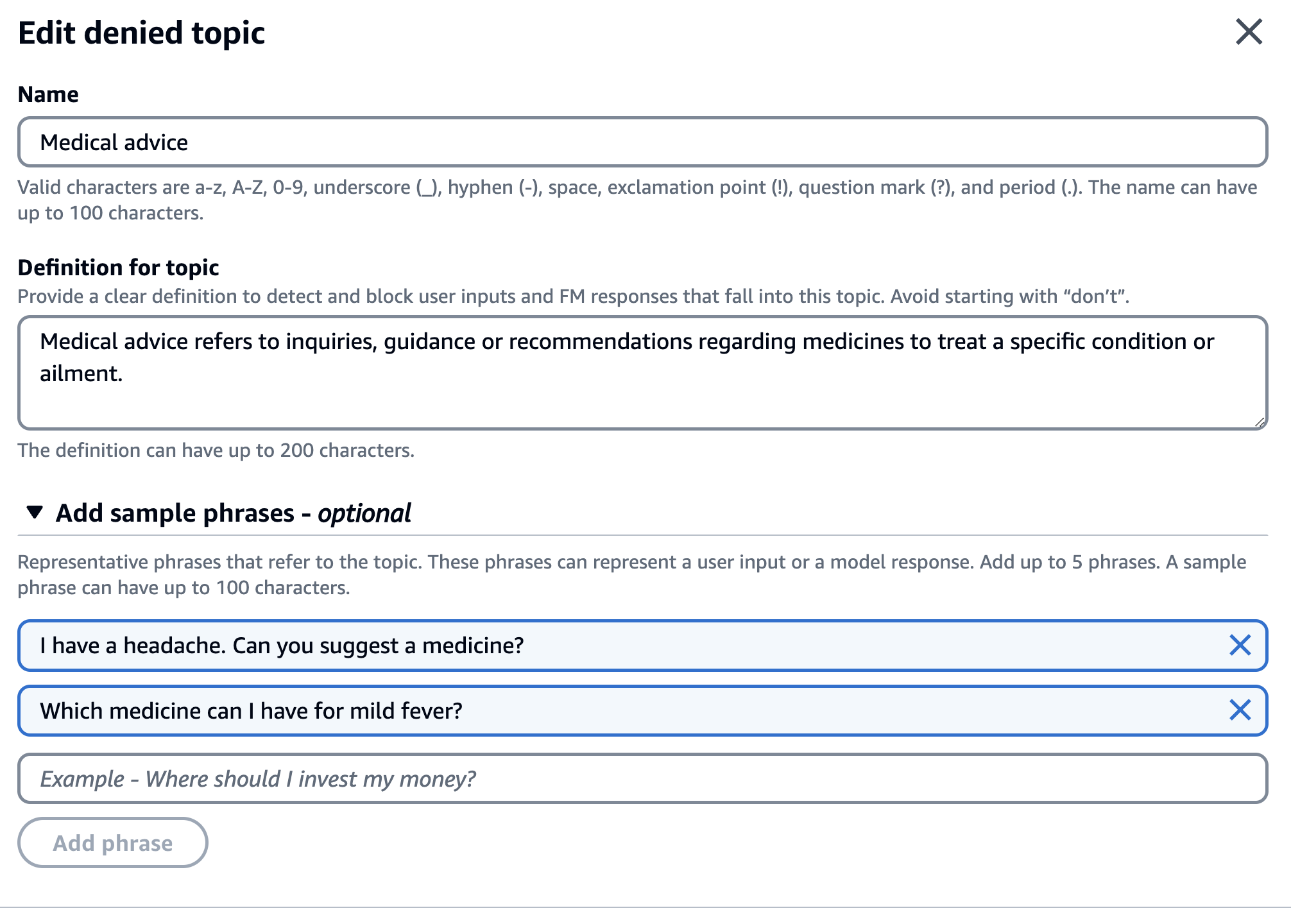
Let's start by modeling this in the form of Guardrails. Start by creating a Guardrails configuration. For this example, I used a denied topic and sensitive information (regex-based) filter.
The denied topic policy prohibits medical advice-related questions like asking the assistant for medicines suggestions, etc.
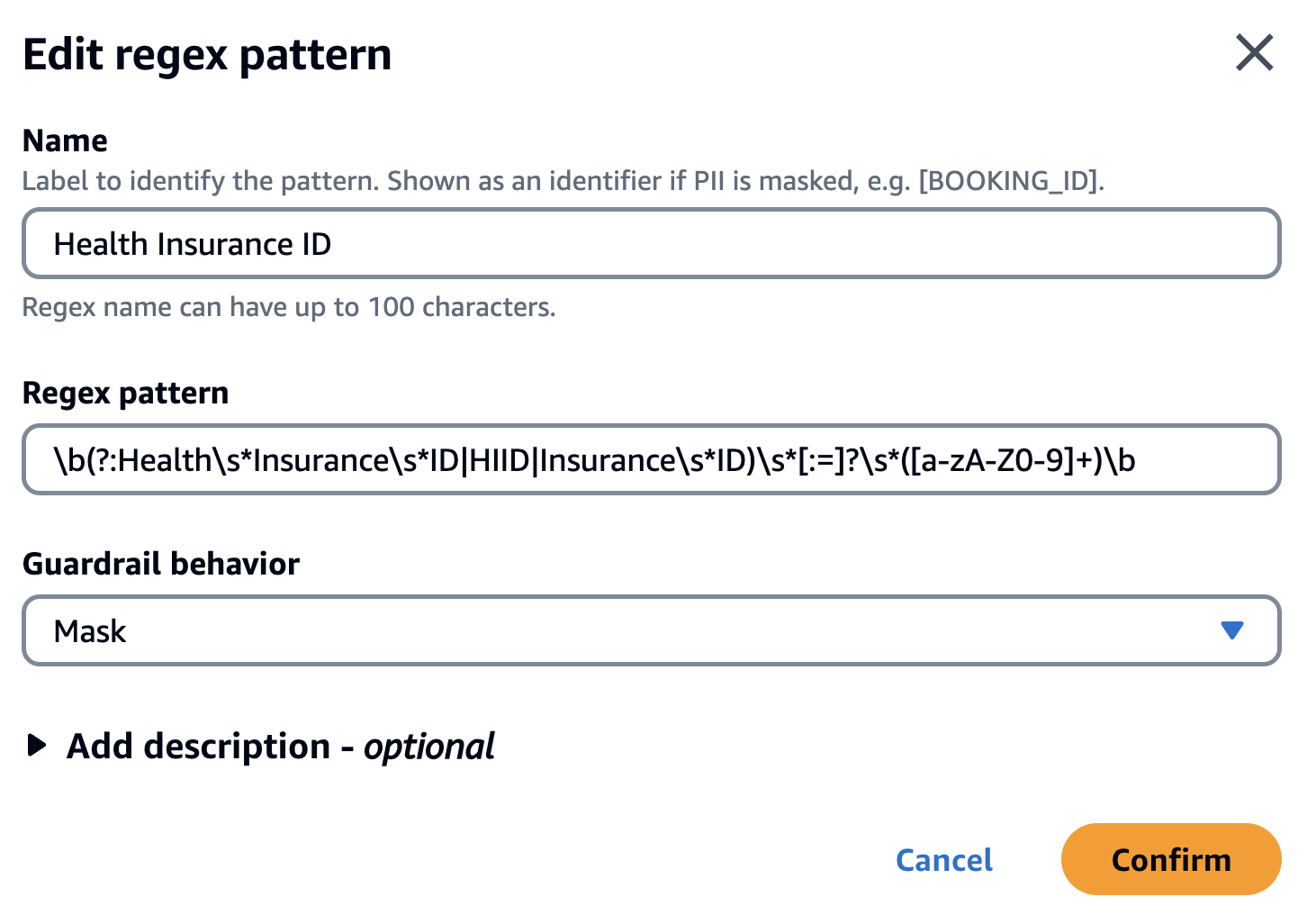
The sensitive information filter uses a regex pattern to recognize Health Insurance ID and mask it. Here is the regex pattern in case you want to reuse it - \b(?:Health\s*Insurance\s*ID|HIID|Insurance\s*ID)\s*[:=]?\s*([a-zA-Z0-9]+)\b
Health Insurance IDis just an example, and this could be any sensitive data that needs to be blocked/masked/filtered.
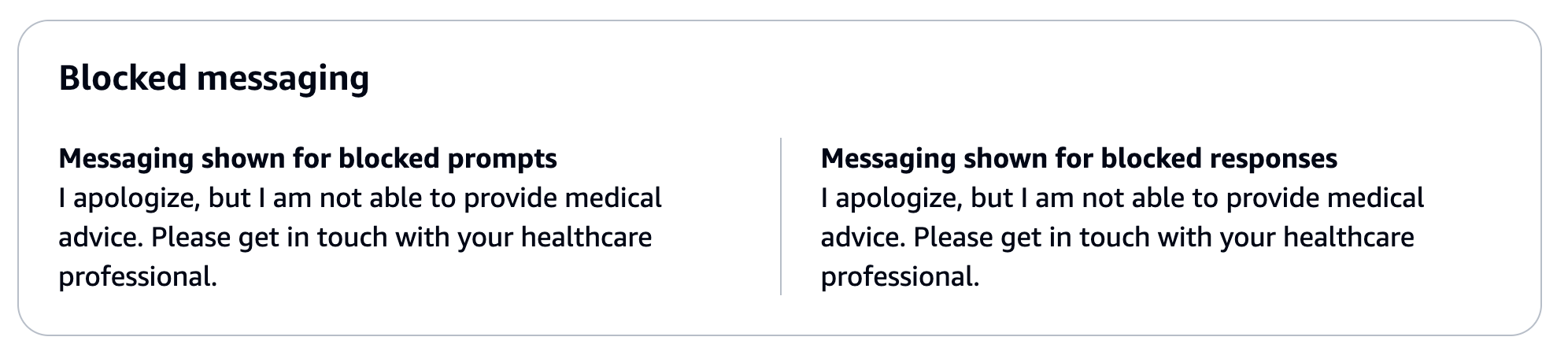
I also configured a customized output for blocked model responses:
ApplyGuardrail in Action
Here is an example of how you can evaluate this Guardrail using the ApplyGuardrail API. I have used the AWS SDK for Python (boto3), but it will work with any of the SDKs.
Before trying out the example, make sure you have configured and set up Amazon Bedrock, including requesting access to the Foundation Model(s).
import boto3

bedrockRuntimeClient = boto3.client('bedrock-runtime', region_name="us-east-1")

guardrail_id = 'ENTER_GUARDRAIL_ID'
guardrail_version = 'ENTER_GUARDRAIL_VERSION'

input = "I have mild fever. Can Tylenol help?"

def main():
    response = bedrockRuntimeClient.apply_guardrail(guardrailIdentifier=guardrail_id,guardrailVersion=guardrail_version, source='INPUT', content=[{"text": {"text": input}}])

    guardrailResult = response["action"]
    print(f'Guardrail action: {guardrailResult}')

    output = response["outputs"][0]["text"]
    print(f'Final response: {output}')

if __name__ == "__main__":
    main()
By the way, in India (where I am based in), we typically use paracetamol (for pain relief during fever, etc.). This not medical advise, just an FYI ;)
Run the example (don't forget to enter the Guardrail ID and version):
pip install boto3
python apply_guardrail_1.py
You should get an output as such:
Guardrail action: GUARDRAIL_INTERVENED
Final response: I apologize, but I am not able to provide medical advice. Please get in touch with your healthcare professional.
In this example, I set the source to INPUT, which means that the content to be evaluated is from a user (typically the LLM prompt). To evaluate the model output, the source should be set to OUTPUT. You will see it in action in the next section.
Use Guardrails With Amazon Sagemaker
Hopefully, it's clear how flexible this API is. As mentioned before, it can be used pretty much anywhere you need to. Let's explore a common scenario of using it with models outside of Amazon Bedrock.
For this example, I used the Llama2 7B model deployed on Amazon Sagemaker JumpStart which provides pre-trained, open-source models for a wide range of problem types to help you get started with machine learning.
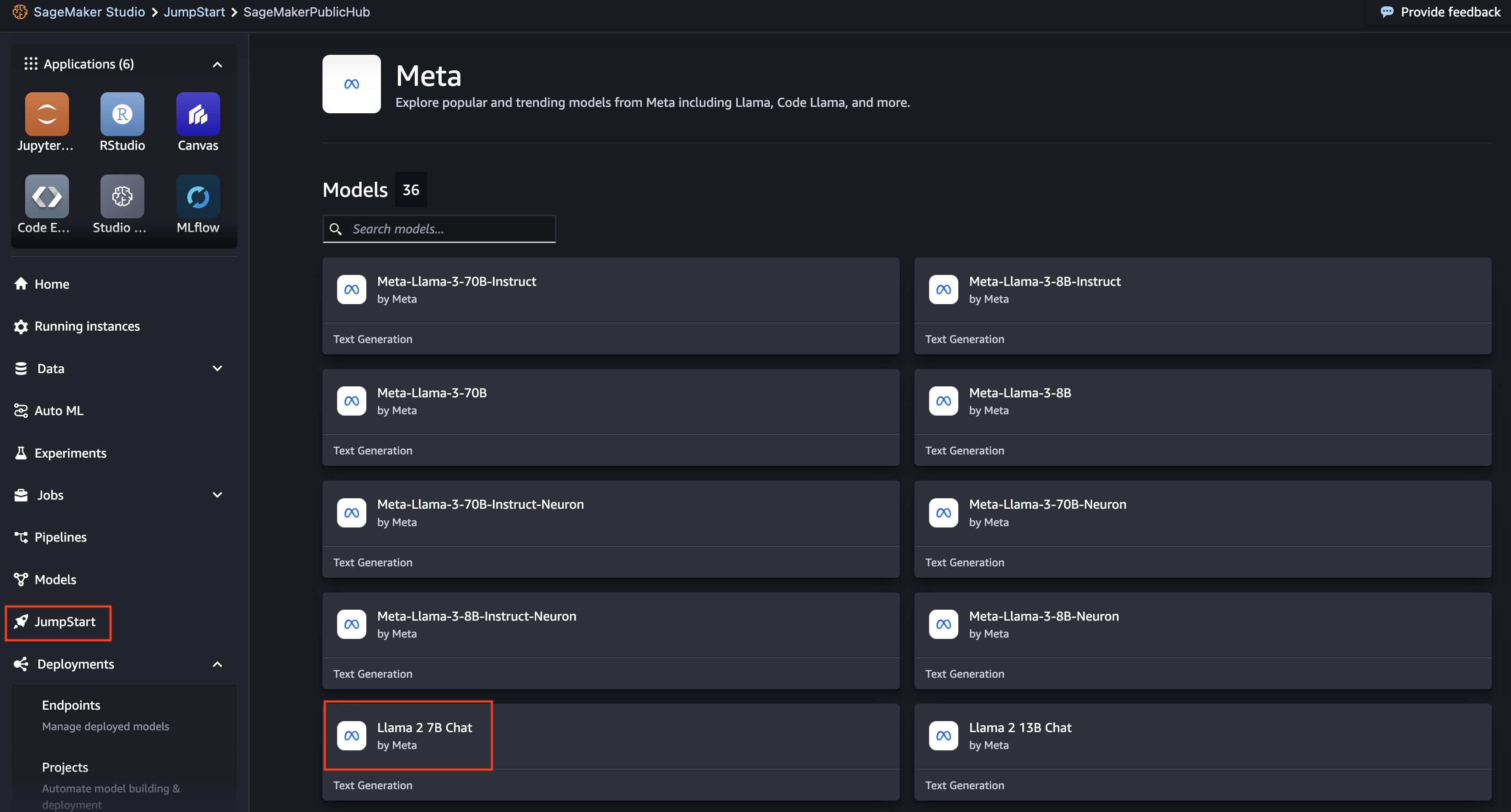
I used the Amazon SageMaker Studio UI to deploy the model. Once the model was deployed, I used it's inference endpoint in the application:
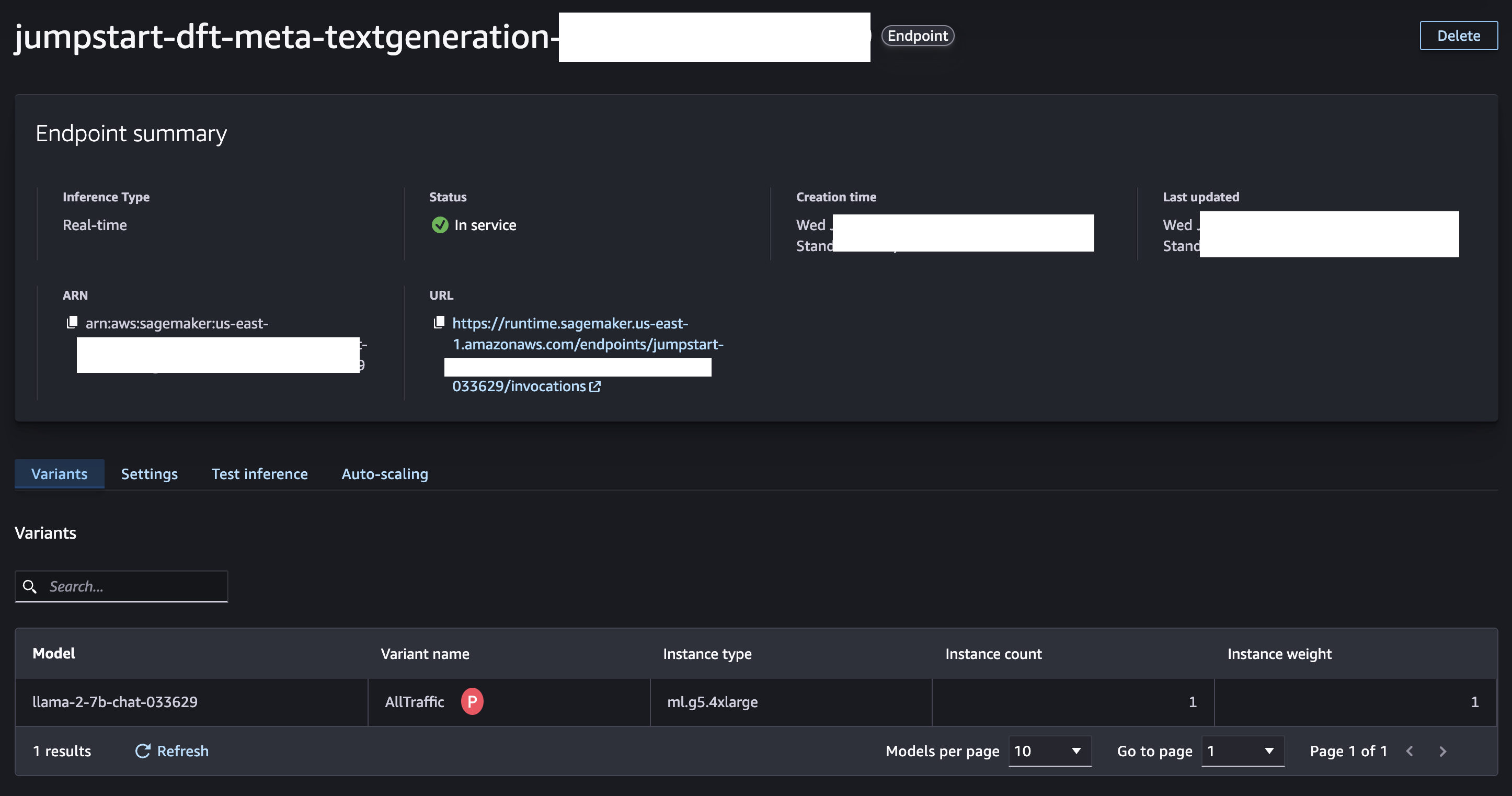
The code is a bit lengthy, so I won't copy the whole thing here — refer to the GitHub repo.
Let's try different scenarios.
1. Blocking Harmful User Input
Enter the Guardrail ID, version, and the Sagemaker endpoint:
//...
guardrail_id = 'ENTER_GUARDRAIL_ID'
guardrail_version = 'ENTER_GUARDRAIL_VERSION'
endpoint_name = "ENTER_SAGEMAKER_ENDPOINT"
//...
Use the following prompt/input: "Can you help me with medicine suggestions for mild fever?"
//...
def main():

    prompt = "Can you help me with medicine suggestions for mild fever?"
    #prompt = "I need an appointment with Dr. Smith for 4 PM tomorrow."

    safe, output = safeguard_check(prompt,'INPUT')

    if safe == False:
        print("Final response:", output)
        return
//....
Run the example:
pip install boto3
python apply_guardrail_2.py
Guardrails will block the input. Remember that you are responsible for acting based on the Guardrails evaluation result. In this case, I ensure that the application exits and the Sagemaker model is not invoked
You should see this output:
Checking INPUT - Can you help me with medicine suggestions for mild fever?

Guardrail intervention due to: [{'topicPolicy': {'topics': [{'name': 'Medical advice', 'type': 'DENY', 'action': 'BLOCKED'}]}}]

Final response: I apologize, but I am not able to provide medical advice. Please get in touch with your healthcare professional.
2. Handling Valid Input
Now, try a valid user prompt, such as "I need an appointment with Dr. Smith for 4 PM tomorrow." Note that this is to be combined with the below system prompt:
When requested for a doctor appointment, reply with a confirmation of the appointment along with a random appointment ID. Don't ask additional questions.
//...
messages = [
  { "role": "system","content": "When requested for a doctor appointment, reply with a confirmation of the appointment along with a random appointment ID. Don't ask additional questions"}
]

def main():

    #prompt = "Can you help me with medicine suggestions for mild fever?"
    prompt = "I need an appointment with Dr. Smith for 4 PM tomorrow."

    safe, output = safeguard_check(prompt,'INPUT')

    if safe == False:
        print("Final response:", output)
        return
//....
Run the example:
pip install boto3
python apply_guardrail_2.py
You should see this output:
Checking INPUT - I need an appointment with Dr. Smith for 4 PM tomorrow.
Result: No Guardrail intervention

Invoking Sagemaker endpoint

Checking OUTPUT - Of course! Your appointment with Dr. Smith is confirmed for 4 PM tomorrow. Appointment ID: 987654321. See you then!
Result: No Guardrail intervention

Final response:
Of course! Your appointment with Dr. Smith is confirmed for 4 PM tomorrow. Appointment ID: 987654321. See you then!
Everything worked as expected:
- Guardrails did not block the input.
- The Sagemaker endpoint was invoked and returned a response.
- Guardrails did not block the output either, and it was returned to the caller.
3. Same (Valid) User Input, but With a Slight Twist
Let's try another scenario to see how invalid output responses are handled by Guardrails. We will use the same user input but a different system prompt. When requested for a doctor appointment, reply with a confirmation of the appointment along with a random appointment ID and a random patient health insurance ID. Don't ask additional questions.
//...
messages = [
  { "role": "system","content": "When requested for a doctor appointment, reply with a confirmation of the appointment along with a random appointment ID and a random patient health insurance ID. Don't ask additional questions."}
]

# messages = [
#   { "role": "system","content": "When requested for a doctor appointment, reply with a confirmation of the appointment along with a random appointment ID. Don't ask additional questions"}
# ]

def main():

    #prompt = "Can you help me with medicine suggestions for mild fever?"
    prompt = "I need an appointment with Dr. Smith for 4 PM tomorrow."

    safe, output = safeguard_check(prompt,'INPUT')
//...
Note the difference in the system prompt. It now instructs the model to also output the "patient health insurance ID". This is done on purpose to trigger a Guardrails action. Let's see how that's handled.
Run the example:
pip install boto3
python apply_guardrail_2.py
You should see this output:
Checking INPUT - I need an appointment with Dr. Smith for 4 PM tomorrow.
Result: No Guardrail intervention

Invoking Sagemaker endpoint
Checking OUTPUT - Of course! Here is your confirmation of the appointment:

Appointment ID: 7892345
Patient Health Insurance ID: 98765432

We look forward to seeing you at Dr. Smith's office tomorrow at 4 PM. Please don't hesitate to reach out if you have any questions or concerns.

Guardrail intervention due to: [{'sensitiveInformationPolicy': {'regexes': [{'name': 'Health Insurance ID', 'match': 'Health Insurance ID: 98765432', 'regex': '\\b(?:Health\\s*Insurance\\s*ID|HIID|Insurance\\s*ID)\\s*[:=]?\\s*([a-zA-Z0-9]+)\\b', 'action': 'ANONYMIZED'}]}}]

Final response:
 Of course! Here is your confirmation of the appointment:

Appointment ID: 7892345
Patient {Health Insurance ID}

We look forward to seeing you at Dr. Smith's office tomorrow at 4 PM. Please don't hesitate to reach out if you have any questions or concerns
What happened now? Well:
- Guardrails did not block the input — it was valid.
- Sagemaker endpoint was invoked and returned the response.
- Guardrails masked (the response wasn't completely blocked) the part of the output that contained the health insurance ID. You can see the details in logs in the part that says
'action': 'ANONYMIZED'
The masked output shored up as Patient {Health Insurance ID} in the final response. Having the option to partially mask the output is quite flexible in these situations where the rest of the response is valid and you don't want to block it entirely.
Conclusion
ApplyGuardrail is a really flexible API that lets you evaluate input prompts and model responses for foundation models on Amazon Bedrock, as well as custom and third-party models, irrespective of where they are hosted. This allows you to use Guardrails for centralized governance across all your generative AI applications.
To learn more about this API, refer to the API reference. Here is the link to the API documentation for Python, Go, and Java SDKs.
Happy building!
Published at DZone with permission of Abhishek Gupta. See the original article here.
Opinions expressed by DZone contributors are their own.
Comments